door lock TOYOTA PRIUS PLUS 2017 Workshop Manual
[x] Cancel search | Manufacturer: TOYOTA, Model Year: 2017, Model line: PRIUS PLUS, Model: TOYOTA PRIUS PLUS 2017Pages: 509, PDF Size: 27.68 MB
Page 303 of 509
3035-4. Using the other interior features
PRIUS +_OM_OM47B24E_(EE)
5
Interior features
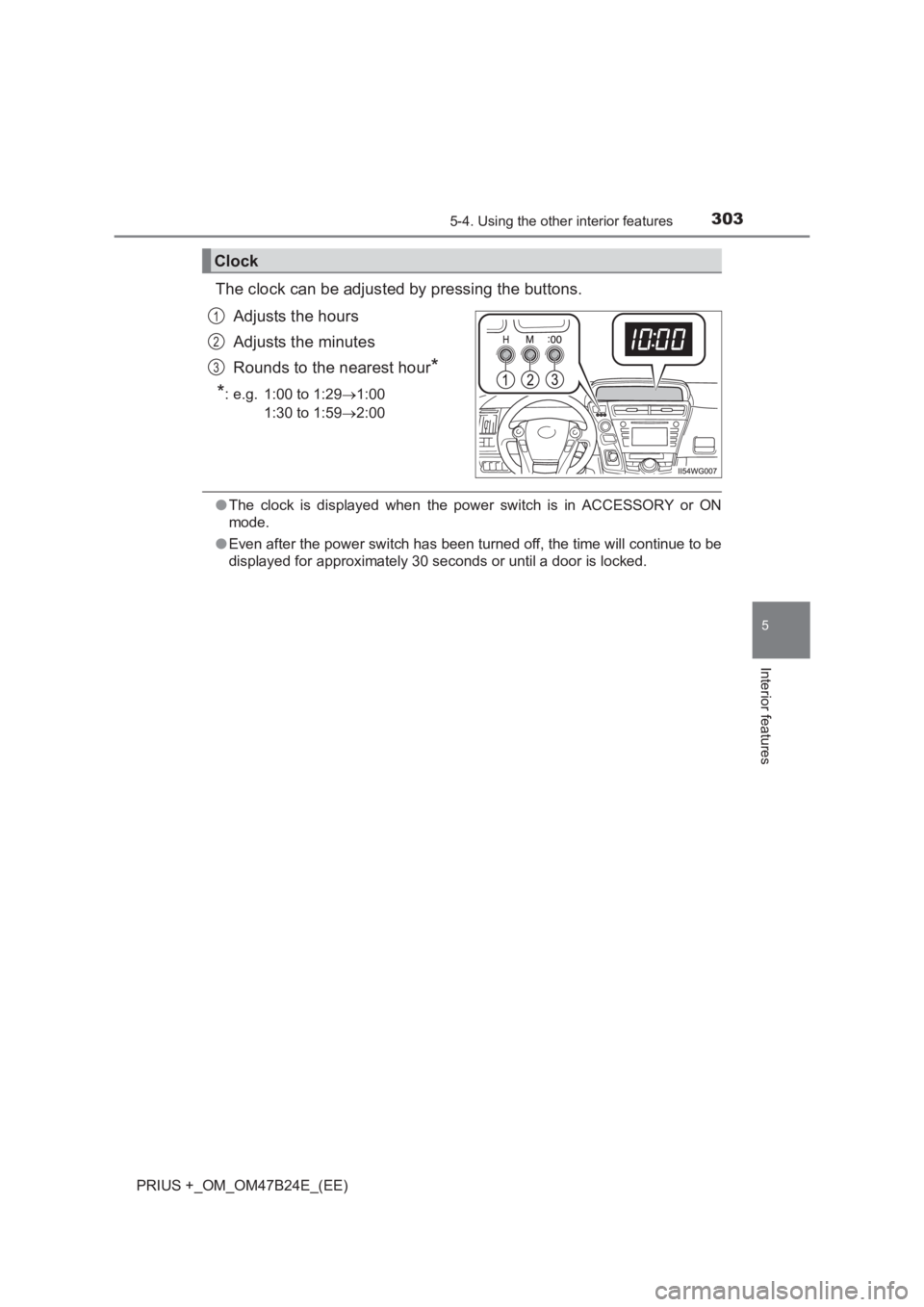
The clock can be adjusted by pressing the buttons.Adjusts the hours
Adjusts the minutes
Rounds to the nearest hour
*
*
: e.g. 1:00 to 1:29 →1:00
1:30 to 1:59 →2:00
●The clock is displayed when the power switch is in ACCESSORY or ON
mode.
● Even after the power switch has been turned off, the time will continue to be
displayed for approximately 30 seconds or until a door is locked.
Clock
1
2
3
Page 306 of 509
306
PRIUS +_OM_OM47B24E_(EE)
5-4. Using the other interior features
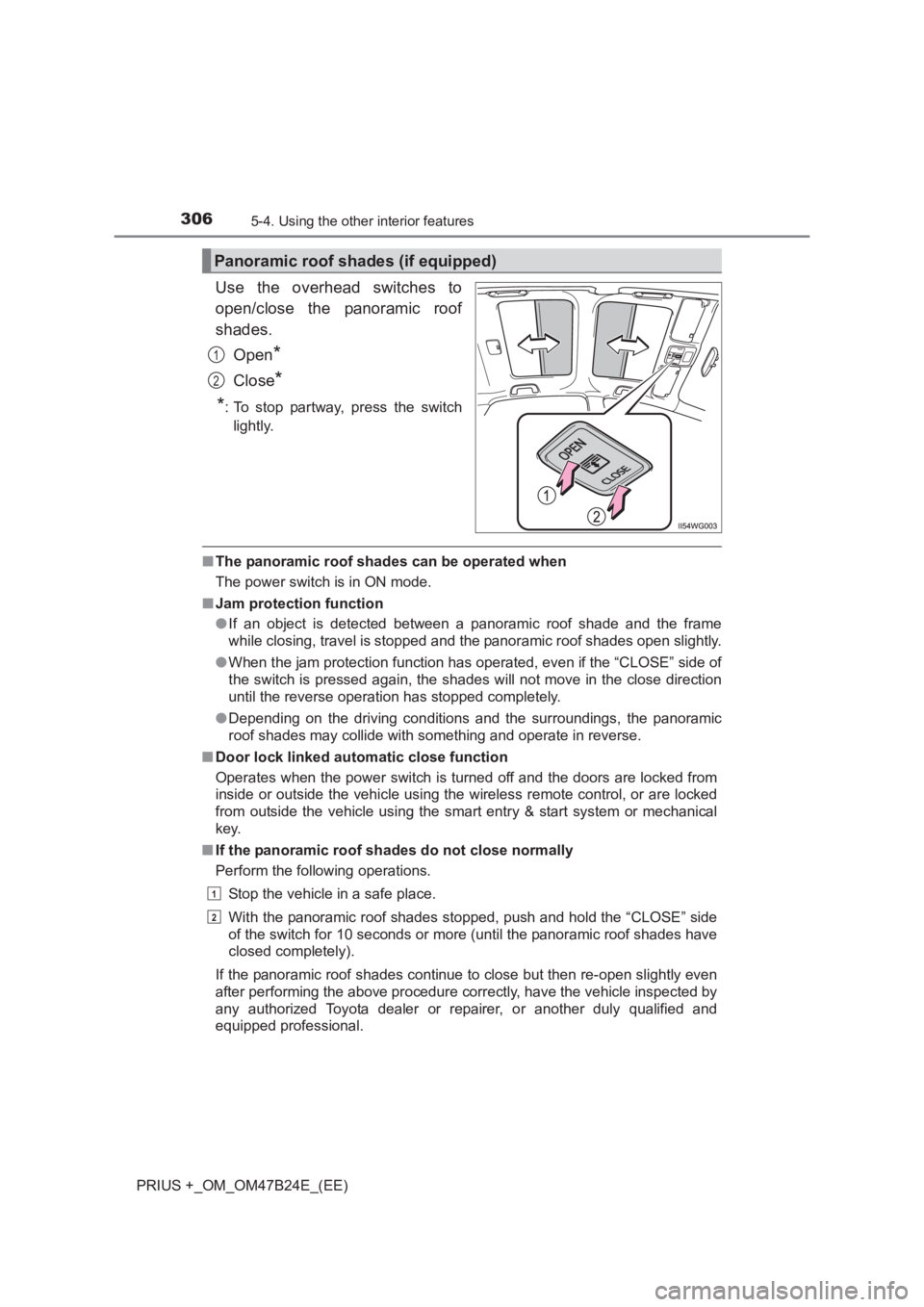
Use the overhead switches to
open/close the panoramic roof
shades.Open
*
Close*
*
: To stop partway, press the switch lightly.
■ The panoramic roof shades can be operated when
The power switch is in ON mode.
■ Jam protection function
●If an object is detected between a panoramic roof shade and the frame
while closing, travel is stopped and the panoramic roof shades open slightly.
● When the jam protection function has operated, even if the “CLOSE” side of
the switch is pressed again, the shades will not move in the close direction
until the reverse operation has stopped completely.
● Depending on the driving conditions and the surroundings, the panoramic
roof shades may collide with something and operate in reverse.
■ Door lock linked automatic close function
Operates when the power switch is turned off and the doors are locked from
inside or outside the vehicle using the wireless remote control, or are locked
from outside the vehicle using the smart entry & start system or mechanical
key.
■ If the panoramic roof shades do not close normally
Perform the following operations.
Stop the vehicle in a safe place.
With the panoramic roof shades stopped, push and hold the “CLOSE” side
of the switch for 10 seconds or more (until the panoramic roof shades have
closed completely).
If the panoramic roof shades continue to close but then re-open slightly even
after performing the above procedure correctly, have the vehicle inspected by
any authorized Toyota dealer or re pairer, or another duly qualified and
equipped professional.
Panoramic roof shades (if equipped)
1
2
1
2
Page 307 of 509
3075-4. Using the other interior features
PRIUS +_OM_OM47B24E_(EE)
5
Interior features
■Customization
The door lock linked automatic close function can be disabled.
(Customizable features: →P. 477)
WARNING
Observe the following precautions.
Failing to do so may result in death or serious injury.
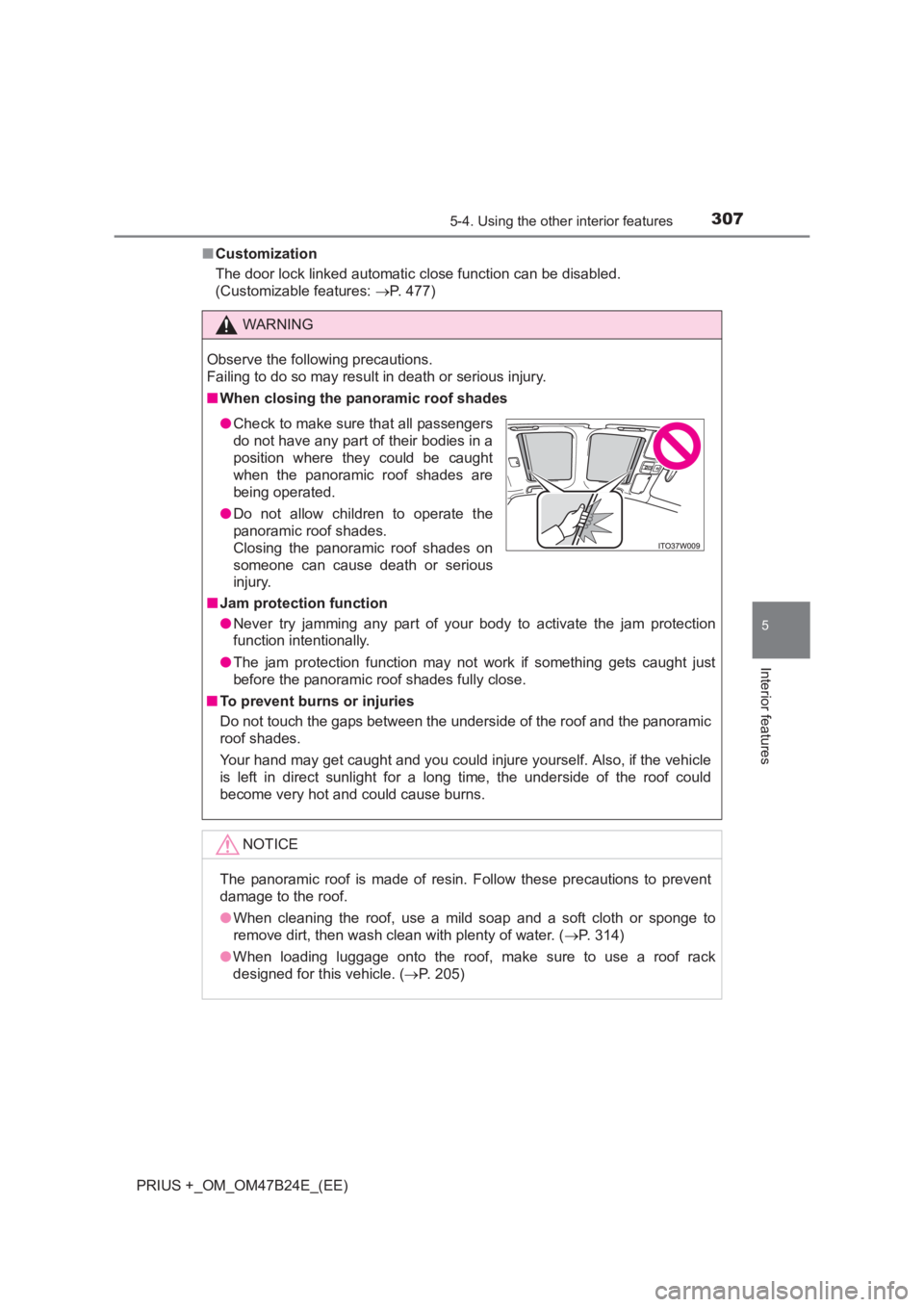
■ When closing the panoramic roof shades
■ Jam protection function
●Never try jamming any part of your body to activate the jam protection
function intentionally.
● The jam protection function may not work if something gets caught just
before the panoramic roof shades fully close.
■ To prevent burns or injuries
Do not touch the gaps between the underside of the roof and the panoramic
roof shades.
Your hand may get caught and you could injure yourself. Also, if the vehicle
is left in direct sunlight for a long time, the underside of the roof could
become very hot and could cause burns.
NOTICE
The panoramic roof is made of resin. Follow these precautions to prevent
damage to the roof.
●When cleaning the roof, use a mild soap and a soft cloth or sponge to
remove dirt, then wash clean with plenty of water. ( →P. 314)
● When loading luggage onto the roof, make sure to use a roof rack
designed for this vehicle. ( →P. 205)
●Check to make sure that all passengers
do not have any part of their bodies in a
position where they could be caught
when the panoramic roof shades are
being operated.
● Do not allow children to operate the
panoramic roof shades.
Closing the panoramic roof shades on
someone can cause death or serious
injury.
Page 311 of 509
3116-1. Maintenance and care
PRIUS +_OM_OM47B24E_(EE)
6
Maintenance and care
■Note for a smart entry & start system
If the door handle becomes wet while the electronic key is within the effective
range, the door may lock and unlock repeatedly. In that case, follow the fol-
lowing correction procedures to wash the vehicle:
●Place the key in a position 2 m (6 ft.) or more separate from the vehicle
while the vehicle is being washed. (Take care to ensure that the key is not
stolen.)
● Set the electronic key to battery-saving mode to disable the smart entry &
start system. ( →P. 155)
■ Aluminum wheels
●Remove any dirt immediately by using a neutral detergent. Do not use hard
brushes or abrasive cleaners. Do not use strong or harsh chemical clean-
ers.
Use the same mild detergent and wax as used on the paint.
● Do not use detergent on the wheels when they are hot, for example after
driving for long distance in the hot weather.
● Wash detergent from the wheels immediately after use.
■ Bumpers
Do not scrub with abrasive cleaners.
■ Front side windows water-repe llent coating (if equipped)
● The following precautions can extend the effectiveness of the water-repel-
lent coating.
• Remove any dirt, etc. from the front side windows regularly.
• Do not allow dirt and dust to accumulate on the windows for a long
period.
Clean the windows with a soft, damp cloth as soon as possible.
• Do not use wax or glass cleaners that contain abrasives when cleaning the windows.
• Do not use any metallic objects to remove condensation build up.
● When the water-repellent performance has become insufficient, the coating
can be repaired. Contact any authoriz ed Toyota dealer or repairer, or
another duly qualified and equipped professional.
Page 338 of 509
3386-3. Do-it-yourself maintenance
PRIUS +_OM_OM47B24E_(EE)
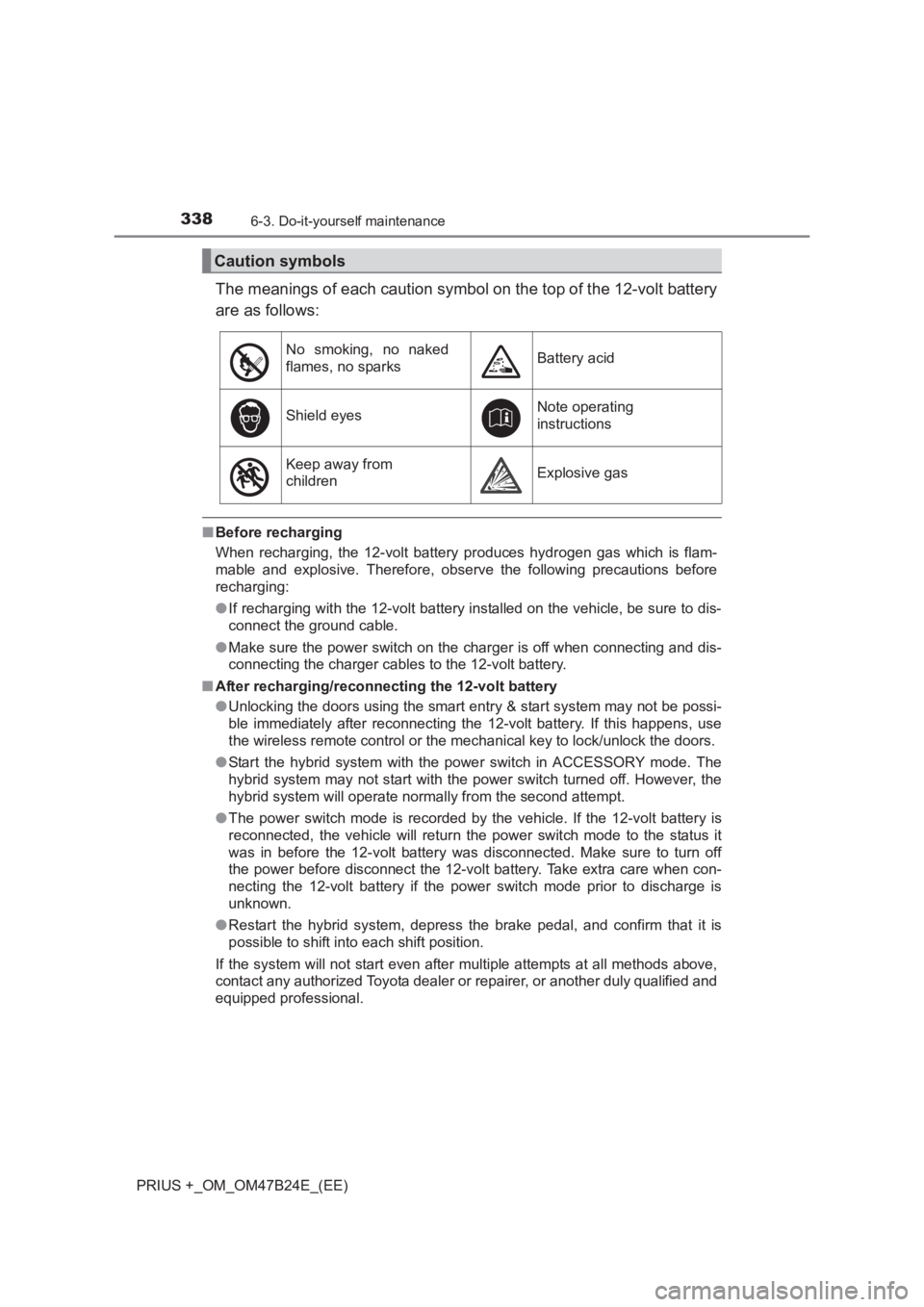
The meanings of each caution symbol on the top of the 12-volt battery
are as follows:
■Before recharging
When recharging, the 12-volt battery produces hydrogen gas which is flam-
mable and explosive. Therefore, obser ve the following precautions before
recharging:
● If recharging with the 12-volt battery installed on the vehicle, be sure to dis-
connect the ground cable.
● Make sure the power switch on the charger is off when connecting and dis-
connecting the charger cables to the 12-volt battery.
■ After recharging/reconnecting the 12-volt battery
●Unlocking the doors using the smart entry & start system may not be possi-
ble immediately after reconnecting the 12-volt battery. If this happens, use
the wireless remote control or the mechanical key to lock/unlock the doors.
● Start the hybrid system with the pow er switch in ACCESSORY mode. The
hybrid system may not start with the power switch turned off. However, the
hybrid system will operate normally from the second attempt.
● The power switch mode is recorded by the vehicle. If the 12-volt battery is
reconnected, the vehicle will return the power switch mode to the status it
was in before the 12-volt battery was disconnected. Make sure to turn off
the power before disconnect the 12-volt battery. Take extra care when con-
necting the 12-volt battery if the power switch mode prior to discharge is
unknown.
● Restart the hybrid system, depress the brake pedal, and confirm that it is
possible to shift into each shift position.
If the system will not start even after multiple attempts at all methods above,
contact any authorized Toyota dealer or repairer, or another duly qualified and
equipped professional.
Caution symbols
No smoking, no naked
flames, no sparksBattery acid
Shield eyesNote operating
instructions
Keep away from
childrenExplosive gas
Page 372 of 509
3726-3. Do-it-yourself maintenance
PRIUS +_OM_OM47B24E_(EE)■
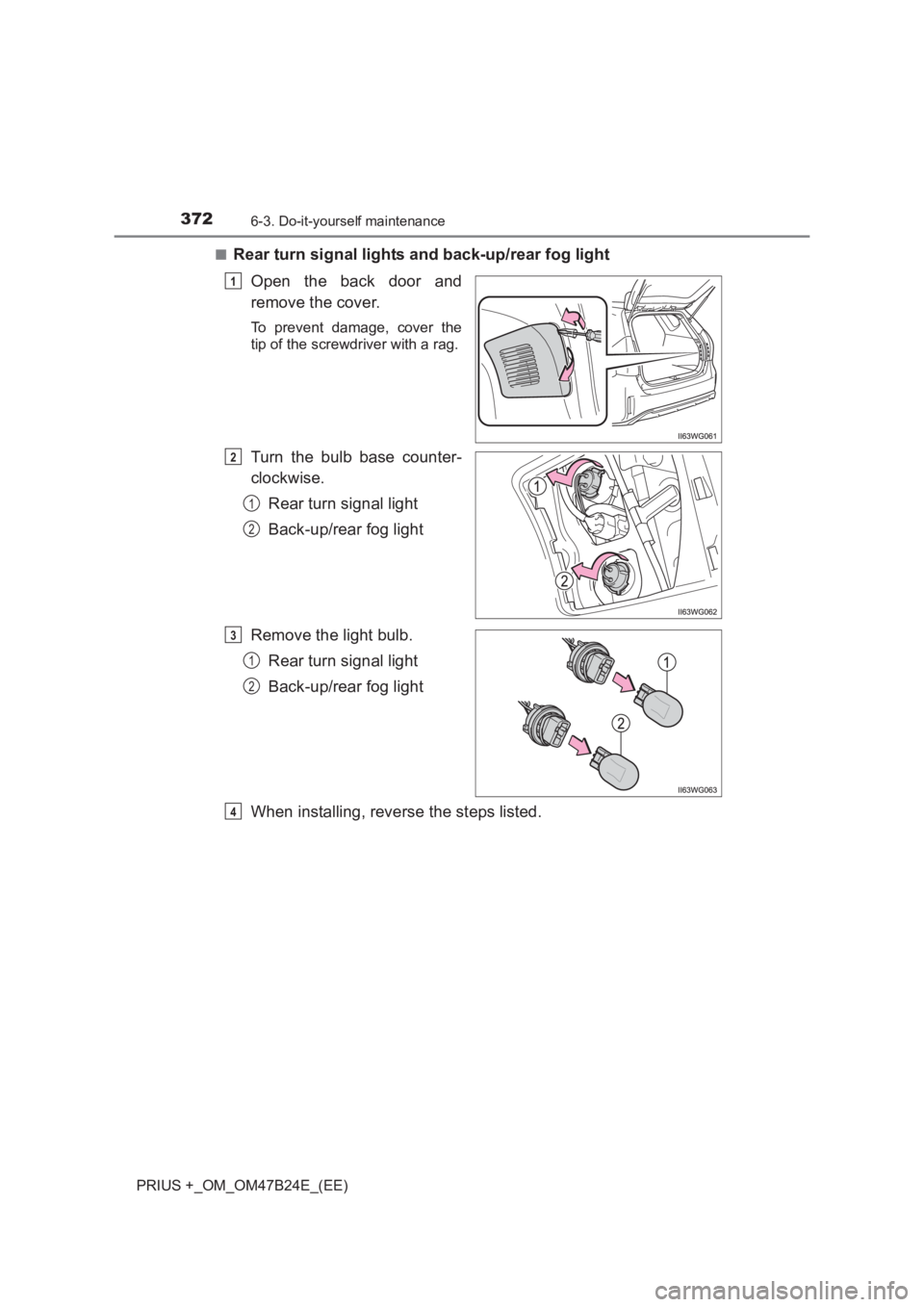
Rear turn signal lights and back-up/rear fog light
Open the back door and
remove the cover.
To prevent damage, cover the
tip of the screwdriver with a rag.
Turn the bulb base counter-
clockwise. Rear turn signal light
Back-up/rear fog light
Remove the light bulb. Rear turn signal light
Back-up/rear fog light
When installing, reverse the steps listed.
1
2
1
2
3
1
2
4
Page 373 of 509
3736-3. Do-it-yourself maintenance
PRIUS +_OM_OM47B24E_(EE)
6
Maintenance and care
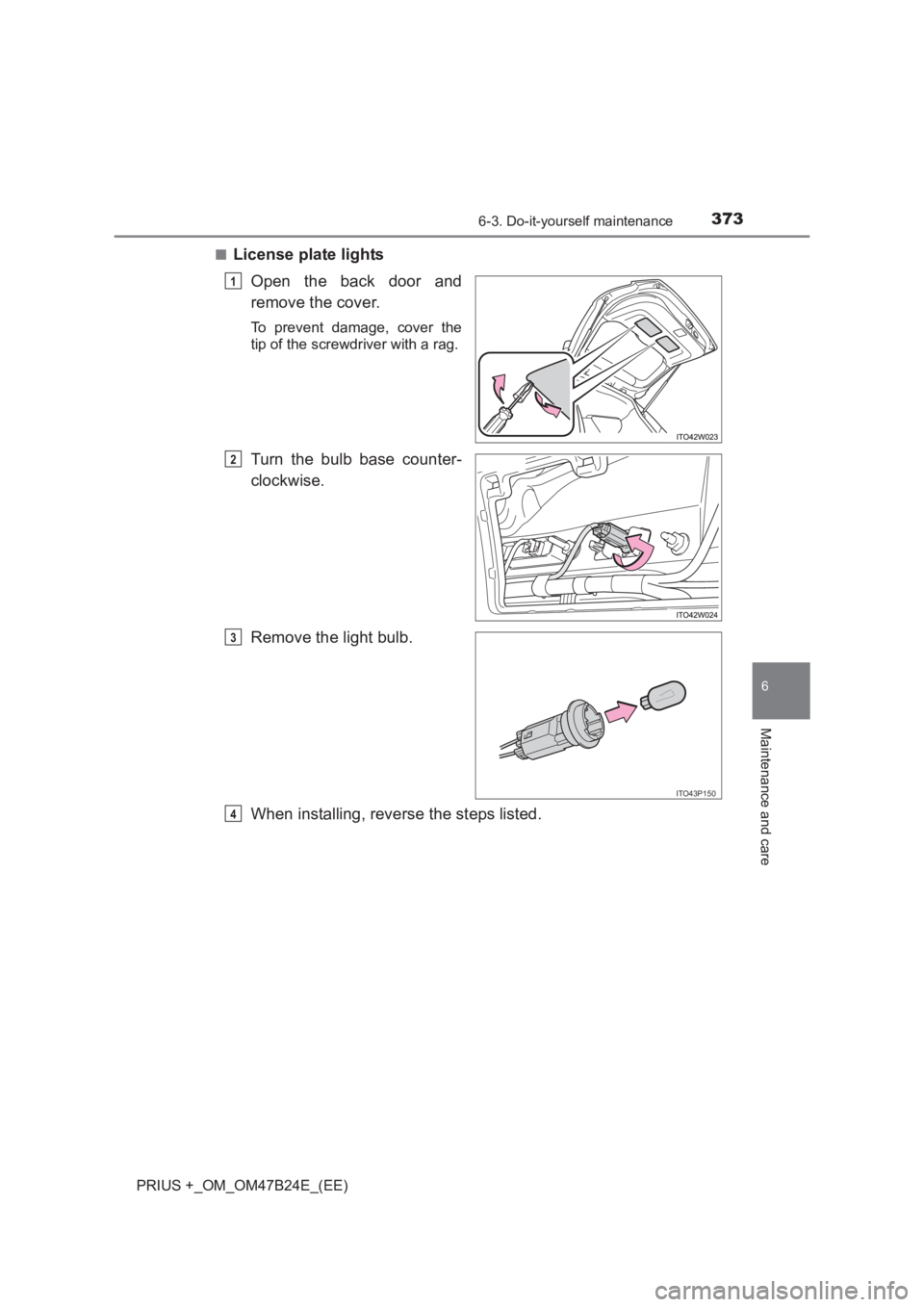
■License plate lightsOpen the back door and
remove the cover.
To prevent damage, cover the
tip of the screwdriver with a rag.
Turn the bulb base counter-
clockwise.
Remove the light bulb.
When installing, reverse the steps listed.
1
2
ITO43P150
3
4
Page 390 of 509
3907-2. Steps to take in an emergency
PRIUS +_OM_OM47B24E_(EE)
(If equipped)
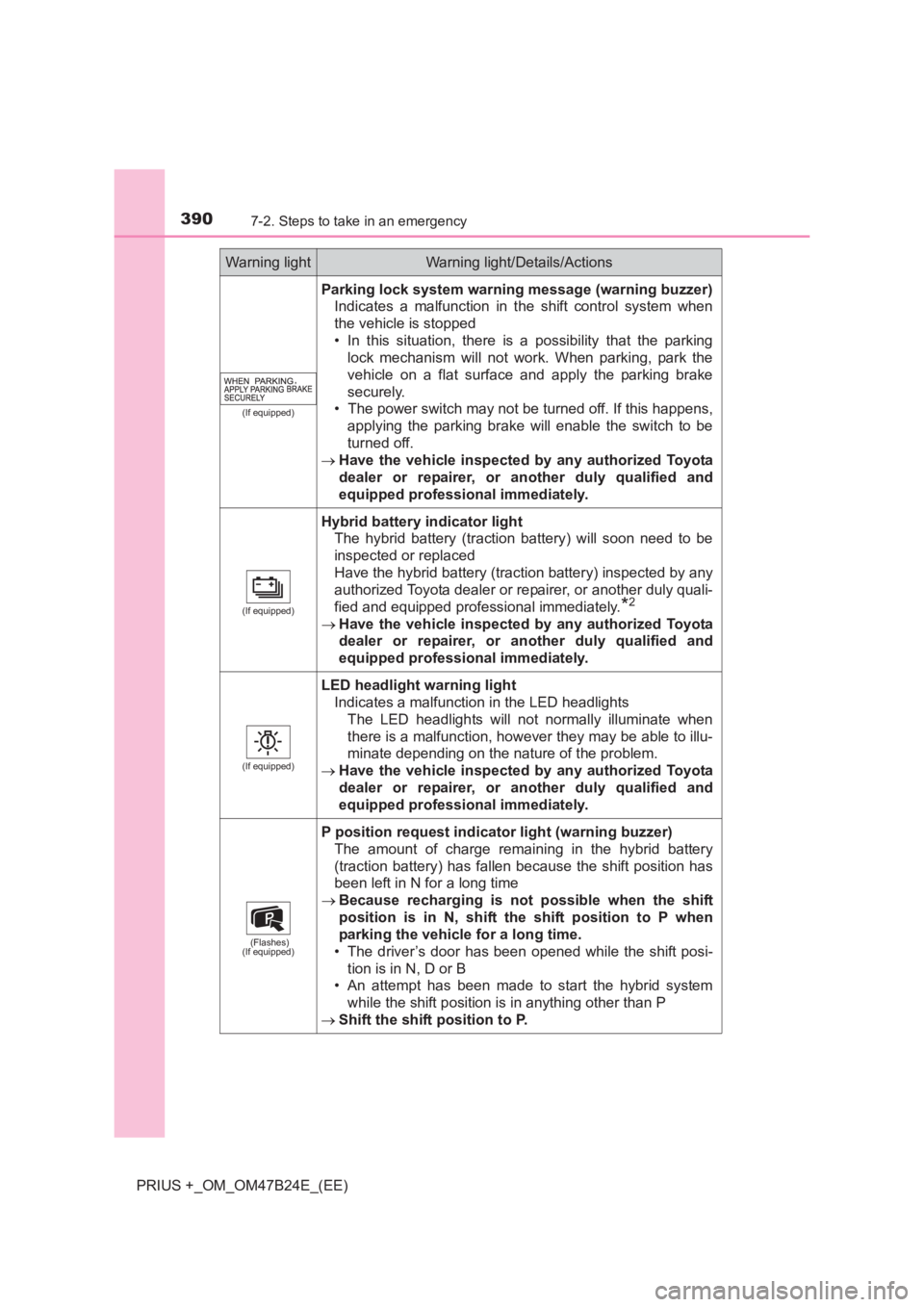
Parking lock system warning message (warning buzzer)Indicates a malfunction in the shift control system when
the vehicle is stopped
• In this situation, there is a possibility that the parkinglock mechanism will not work. When parking, park the
vehicle on a flat surface and apply the parking brake
securely.
• The power switch may not be turned off. If this happens,
applying the parking brake will enable the switch to be
turned off.
→ Have the vehicle inspected by any authorized Toyota
dealer or repairer, or another duly qualified and
equipped professional immediately.
(If equipped)
Hybrid battery indicator light The hybrid battery (traction battery) will soon need to be
inspected or replaced
Have the hybrid battery (traction battery) inspected by any
authorized Toyota dealer or re pairer, or another duly quali-
fied and equipped professional immediately.
*2
→ Have the vehicle inspected by any authorized Toyota
dealer or repairer, or another duly qualified and
equipped professional immediately.
(If equipped)
LED headlight warning light Indicates a malfunction in the LED headlights
The LED headlights will not normally illuminate when
there is a malfunction, however they may be able to illu-
minate depending on the nature of the problem.
→ Have the vehicle inspected by any authorized Toyota
dealer or repairer, or another duly qualified and
equipped professional immediately.
(Flashes)
(If equipped)
P position request indicator light (warning buzzer)
The amount of charge remaining in the hybrid battery
(traction battery) has fallen because the shift position has
been left in N for a long time
→ Because recharging is not possible when the shift
position is in N, shift the shift position to P when
parking the vehicle for a long time.
• The driver’s door has been opened while the shift posi- tion is in N, D or B
• An attempt has been made to start the hybrid system
while the shift position is in anything other than P
→ Shift the shift position to P.
Warning lightWarning light/Details/Actions
Page 393 of 509
3937-2. Steps to take in an emergency
PRIUS +_OM_OM47B24E_(EE)
7
When trouble arises
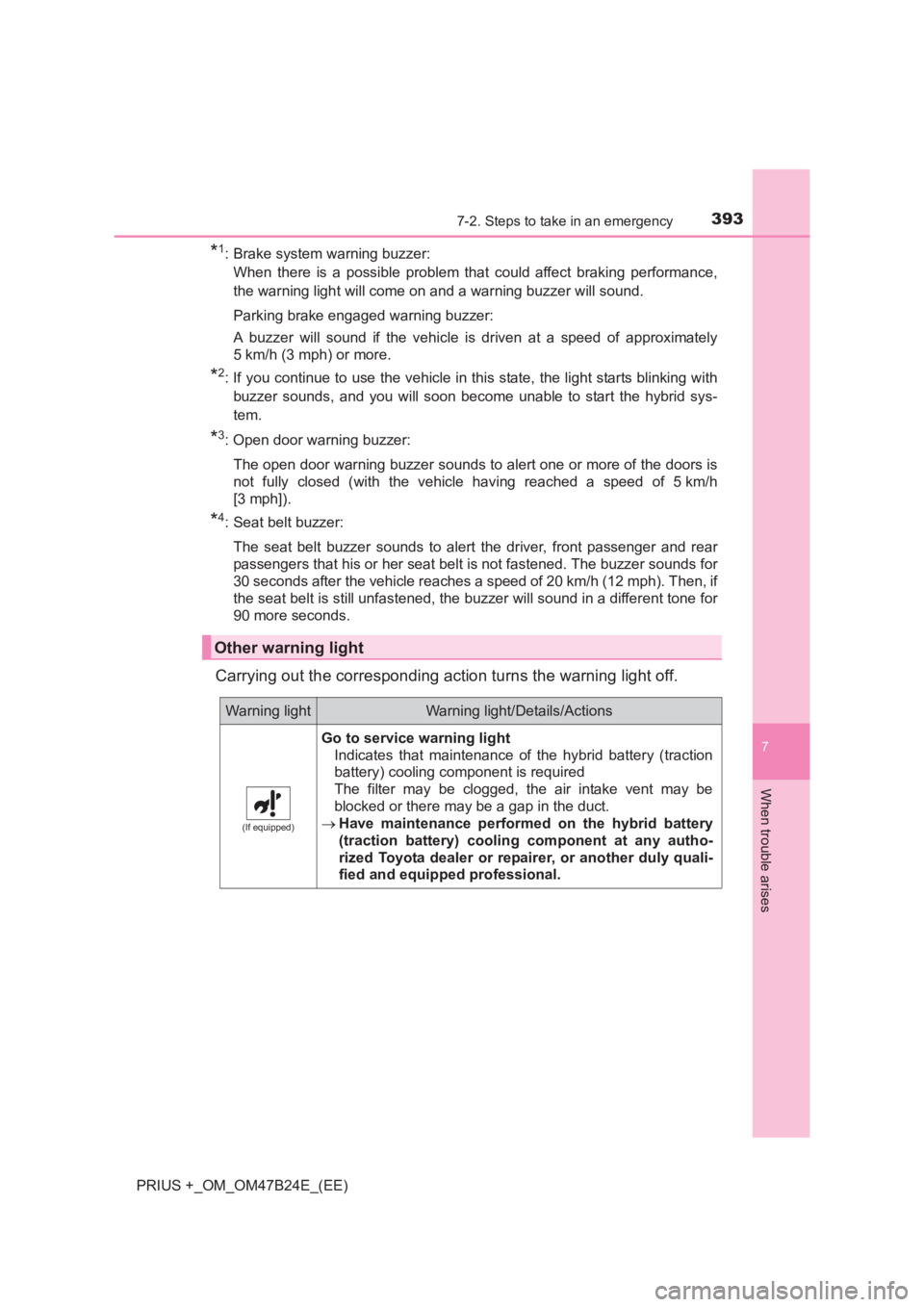
*1: Brake system warning buzzer:When there is a possible problem that could affect braking performance,
the warning light will come on and a warning buzzer will sound.
Parking brake engaged warning buzzer:
A buzzer will sound if the vehicle is driven at a speed of approximately
5 km/h (3 mph) or more.
*2: If you continue to use the vehicle in this state, the light starts blinking withbuzzer sounds, and you will soon become unable to start the hybrid sys-
tem.
*3: Open door warning buzzer:
The open door warning buzzer sounds to alert one or more of the doors is
not fully closed (with the vehicle having reached a speed of 5 km/h
[3 mph]).
*4: Seat belt buzzer:The seat belt buzzer sounds to alert the driver, front passenger and rear
passengers that his or her seat belt is not fastened. The buzzer sounds for
30 seconds after the vehicle reaches a speed of 20 km/h (12 mph). Then, if
the seat belt is still unfastened, the buzzer will sound in a different tone for
90 more seconds.
Carrying out the corresponding action turns the warning light off.
Other warning light
Warning lightWarning light/Details/Actions
(If equipped)
Go to service warning light Indicates that maintenance of the hybrid battery (traction
battery) cooling component is required
The filter may be clogged, the air intake vent may be
blocked or there may be a gap in the duct.
→ Have maintenance performed on the hybrid battery
(traction battery) cooling component at any autho-
rized Toyota dealer or repairer, or another duly quali-
fied and equipped professional.
Page 398 of 509
3987-2. Steps to take in an emergency
PRIUS +_OM_OM47B24E_(EE)
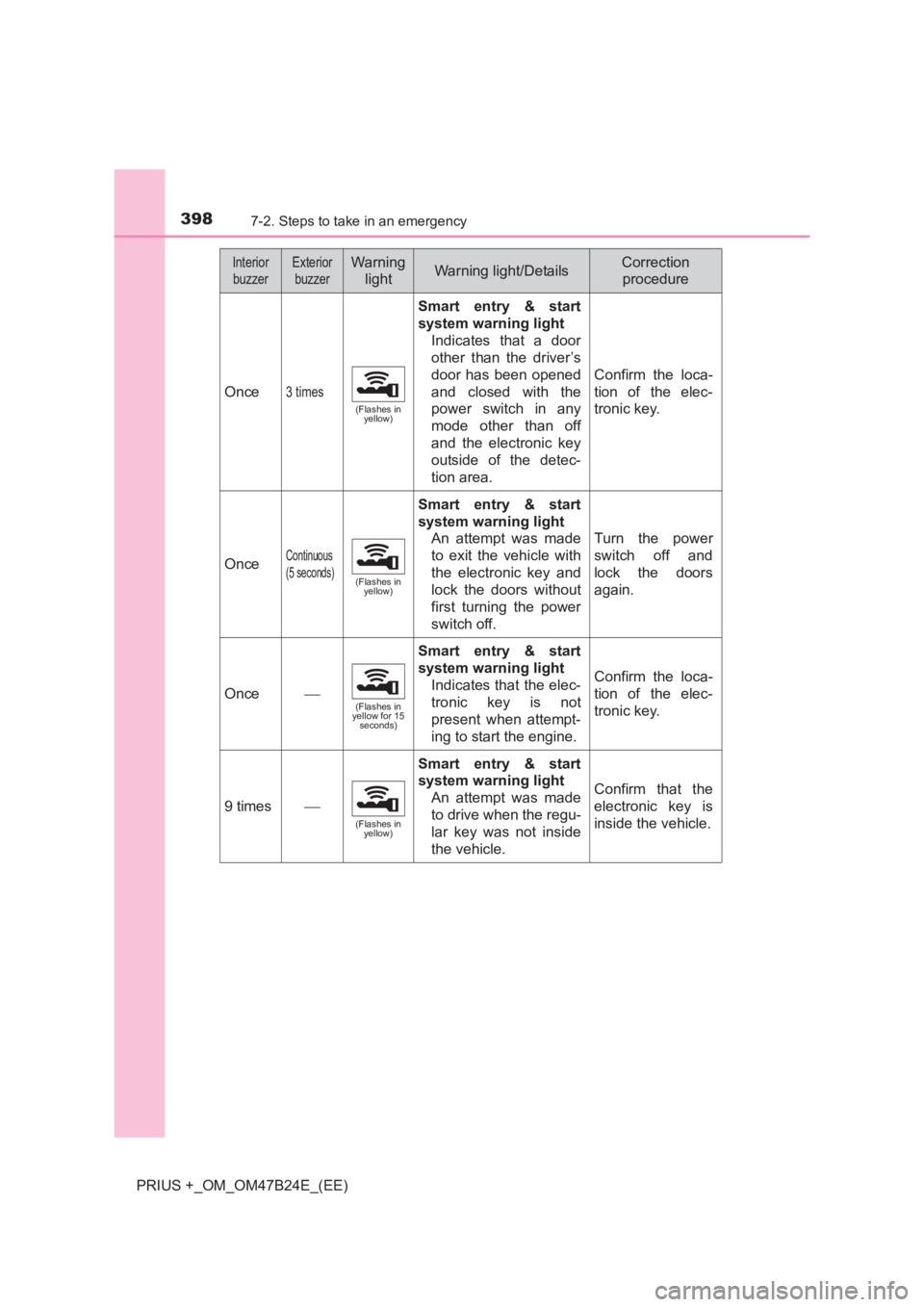
Once3 times
(Flashes in yellow)
Smart entry & start
system warning light
Indicates that a door
other than the driver’s
door has been opened
and closed with the
power switch in any
mode other than off
and the electronic key
outside of the detec-
tion area.
Confirm the loca-
tion of the elec-
tronic key.
OnceContinuous
(5 seconds)
(Flashes in yellow)
Smart entry & start
system warning light
An attempt was made
to exit the vehicle with
the electronic key and
lock the doors without
first turning the power
switch off.
Turn the power
switch off and
lock the doors
again.
Once(Flashes in
yellow for 15 seconds)
Smart entry & start
system warning light
Indicates that the elec-
tronic key is not
present when attempt-
ing to start the engine.
Confirm the loca-
tion of the elec-
tronic key.
9 times
(Flashes in yellow)
Smart entry & start
system warning light
An attempt was made
to drive when the regu-
lar key was not inside
the vehicle.
Confirm that the
electronic key is
inside the vehicle.
InteriorbuzzerExterior buzzerWarning lightWarning light/DetailsCorrection procedure