key battery TOYOTA PRIUS PLUS 2019 User Guide
[x] Cancel search | Manufacturer: TOYOTA, Model Year: 2019, Model line: PRIUS PLUS, Model: TOYOTA PRIUS PLUS 2019Pages: 568, PDF Size: 73.58 MB
Page 229 of 568
2294-2. Driving procedures
4
Driving
PRIUS +_OM_OM47D30E_(EE)■If the “READY” indicator does not come on
In the event that the “READY” indicator does not come on even after perform-
ing the proper procedures for starting the vehicle, contact any authorized
Toyota retailer or Toyota authorized repairer, or any reliable repairer immedi-
ately.
■If the hybrid system is malfunctioning
P. 460
■If the electronic key battery is depleted
P. 417
■Operation of the power switch
●If the switch is not pressed shortly and firmly, the power switch mode may
not change or the hybrid system may not start.
●If attempting to restart the hybrid system immediately after turning the power
switch off, the hybrid system may not start in some cases. After turning the
power switch off, please wait a few seconds before restarting the hybrid sys-
tem.
■Automatically P position selection function
P. 236
■When the shift control system malfunctions
The power switch will not be able to be turned off. In such a case, the switch
can be turned off after applying the parking brake.
Have the vehicle inspected by any authorized Toyota retailer or Toyota autho-
rized repairer, or any reliable repairer immediately.
■Meter display
When the power switch is turned off, each display will turn off as follows.
●The shift position indicator will turn off after approximately 2 seconds.
●EV driving ratio and average fuel consumption after hybrid system started,
turn off after approximately 6 seconds.
●The odometer, clock, etc. will turn off after approximately 30 seconds.
(Each display will also turn off immediately if a door is locked before 30 sec-
onds has elapsed.)
Page 344 of 568
3445-2. Using the interior lights
PRIUS +_OM_OM47D30E_(EE)
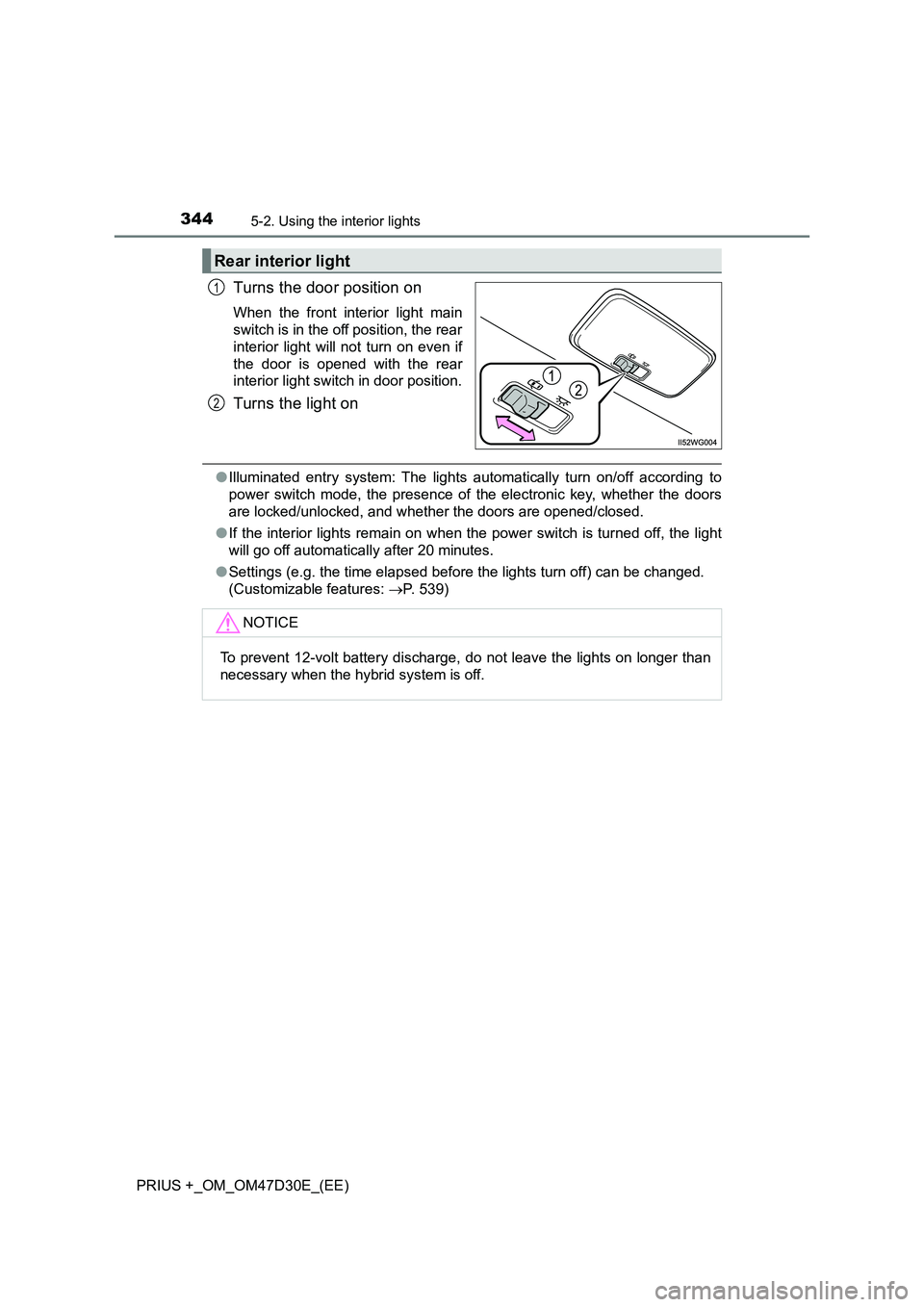
Turns the door position on
When the front interior light main
switch is in the off position, the rear
interior light will not turn on even if
the door is opened with the rear
interior light switch in door position.
Turns the light on
●Illuminated entry system: The lights automatically turn on/off according to
power switch mode, the presence of the electronic key, whether the doors
are locked/unlocked, and whether the doors are opened/closed.
●If the interior lights remain on when the power switch is turned off, the light
will go off automatically after 20 minutes.
●Settings (e.g. the time elapsed before the lights turn off) can be changed.
(Customizable features: P. 539)
Rear interior light
1
2
NOTICE
To prevent 12-volt battery discharge, do not leave the lights on longer than
necessary when the hybrid system is off.
Page 361 of 568
361
6Maintenance and care
PRIUS +_OM_OM47D30E_(EE)6-1. Maintenance and care
Cleaning and protecting
the vehicle exterior .......... 362
Cleaning and protecting
the vehicle interior ........... 367
6-2. Maintenance
Maintenance
requirements.................... 370
6-3. Do-it-yourself maintenance
Do-it-yourself service
precautions ...................... 373
Hood .................................. 375
Positioning a floor jack ....... 377
Engine compartment.......... 379
12-volt battery .................... 389
Tires ................................... 393
Tire inflation pressure ........ 409
Wheels ............................... 411
Air conditioning filter .......... 413
Wiper rubber
replacement ..................... 415
Electronic key battery ........ 417
Checking and replacing
fuses ................................ 419
Light bulbs ......................... 423
Page 363 of 568
3636-1. Maintenance and care
PRIUS +_OM_OM47D30E_(EE)
6
Maintenance and care
■Note for a smart entry & start system
If the door handle becomes wet while the electronic key is within the effective
range, the door may lock and unlock repeatedly. In that case, follow the fol-
lowing correction procedures to wash the vehicle:
●Place the key in a position 2 m (6 ft.) or more separate from the vehicle
while the vehicle is being washed. (Take care to ensure that the key is not
stolen.)
●Set the electronic key to battery-saving mode to disable the smart entry &
start system. (P. 155)
■Aluminum wheels
●Remove any dirt immediately by using a neutral detergent.
●Wash detergent off with water immediately after use.
●To protect the paint from damage, make sure to observe the following pre-
cautions.
• Do not use acidic, alkaline or abrasive detergent
• Do not use hard brushes
• Do not use detergent on the wheels when they are hot, such as after driv-
ing or parking in hot weather
■Bumpers
Do not scrub with abrasive cleaners.
■Front side windows water-repellent coating (if equipped)
The following precautions can extend the effectiveness of the water-repellent
coating.
●Remove any dirt, etc. from the front side windows regularly.
●Do not allow dirt and dust to accumulate on the windows for a long period.
Clean the windows with a soft, damp cloth as soon as possible.
●Do not use wax or glass cleaners that contain abrasives when cleaning the
windows.
●Do not use any metallic objects to remove condensation build up.
Page 390 of 568
3906-3. Do-it-yourself maintenance
PRIUS +_OM_OM47D30E_(EE)
■Before recharging
When recharging, the 12-volt battery produces hydrogen gas which is flam-
mable and explosive. Therefore, observe the following precautions before
recharging:
●If recharging with the 12-volt battery installed on the vehicle, be sure to dis-
connect the ground cable.
●Make sure the power switch on the charger is off when connecting and dis-
connecting the charger cables to the 12-volt battery.
■After recharging/reconnecting the 12-volt battery
●Unlocking the doors using the smart entry & start system may not be possi-
ble immediately after reconnecting the 12-volt battery. If this happens, use
the wireless remote control or the mechanical key to lock/unlock the doors.
●Start the hybrid system with the power switch in ACCESSORY mode. The
hybrid system may not start with the power switch turned off. However, the
hybrid system will operate normally from the second attempt.
●The power switch mode is recorded by the vehicle. If the 12-volt battery is
reconnected, the vehicle will return the power switch mode to the status it
was in before the 12-volt battery was disconnected. Make sure to turn off
the power before disconnect the 12-volt battery. Take extra care when con-
necting the 12-volt battery if the power switch mode prior to discharge is
unknown.
●Restart the hybrid system, depress the brake pedal, and confirm that it is
possible to shift into each shift position.
If the system will not start even after multiple attempts at all methods above,
contact any authorized Toyota retailer or Toyota authorized repairer, or any
reliable repairer.
Page 417 of 568
4176-3. Do-it-yourself maintenance
PRIUS +_OM_OM47D30E_(EE)
6
Maintenance and care
Electronic key batter y
●Flathead screwdriver
●Lithium battery CR2032
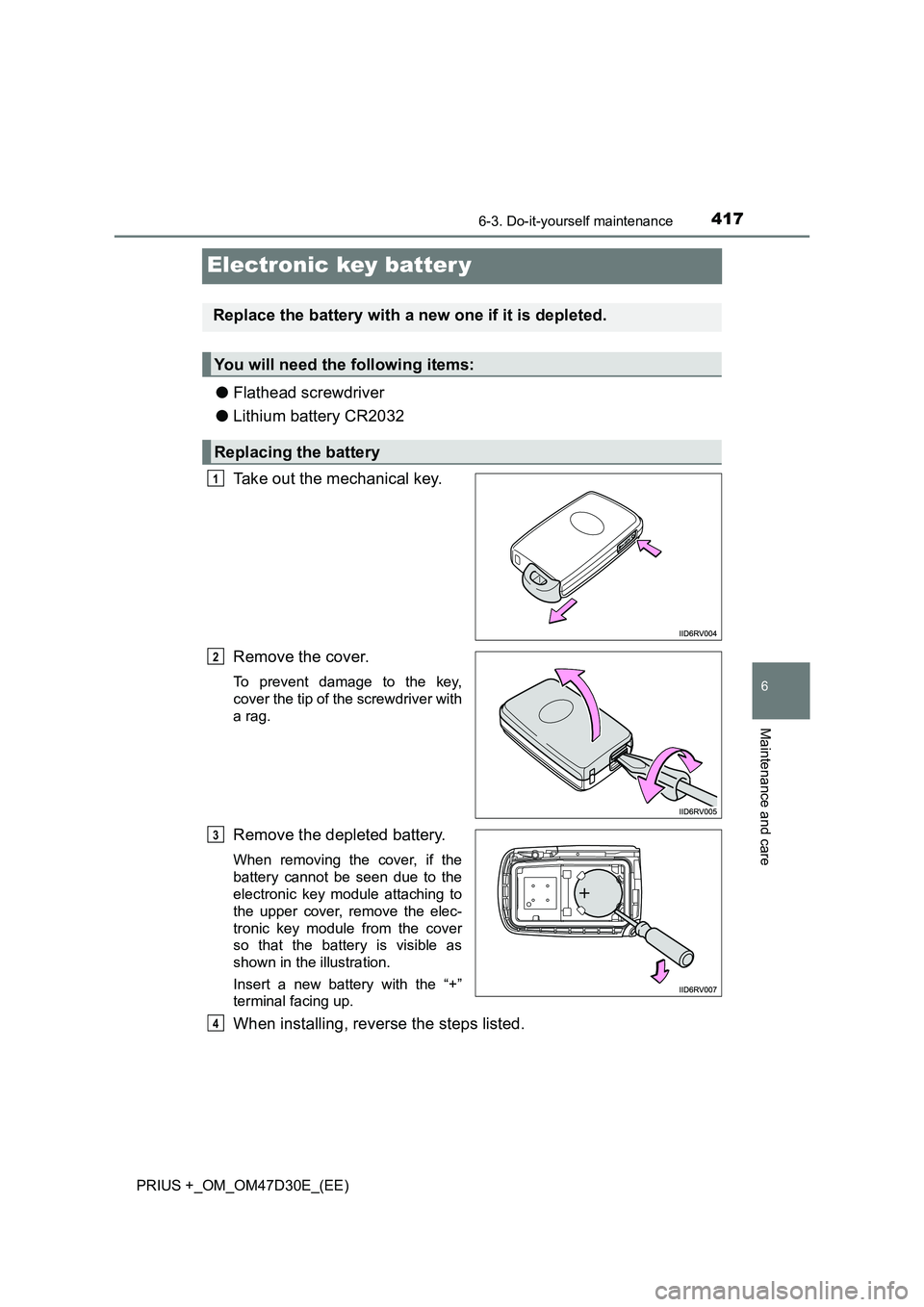
Take out the mechanical key.
Remove the cover.
To prevent damage to the key,
cover the tip of the screwdriver with
a rag.
Remove the depleted battery.
When removing the cover, if the
battery cannot be seen due to the
electronic key module attaching to
the upper cover, remove the elec-
tronic key module from the cover
so that the battery is visible as
shown in the illustration.
Insert a new battery with the “+”
terminal facing up.
When installing, reverse the steps listed.
Replace the battery with a new one if it is depleted.
You will need the following items:
Replacing the battery
1
2
3
4
Page 418 of 568
4186-3. Do-it-yourself maintenance
PRIUS +_OM_OM47D30E_(EE)
■Use a CR2032 lithium battery
● Batteries can be purchased at any authorized Toyota retailer or Toyota
authorized repairer, or any reliable repairer, local electrical appliance shops
or camera stores.
● Replace only with the same or equivalent type recommended by the manu-
facturer.
● Dispose of used batteries according to the local laws.
■ If the electronic key battery is depleted
The following symptoms may occur:
● The smart entry & start system and wireless remote control will not function
properly.
● The operational range will be reduced.
WARNING
■Removed battery and other parts
These parts are small and if swallowed by a child, they can cause choking.
Keep away from children. Failure to do so could result in death or serious
injury.
■ Certification for the smart entry & start system
CAUTION
RISK OF EXPLOSION IF BATTERY IS REPLACED BY AN INCORRECT
TYPE.
DISPOSE OF USED BATTERIES ACCORDING TO THE INSTRUCTIONS
NOTICE
■ For normal operation after replacing the battery
Observe the following precautions to prevent accidents:
● Always work with dry hands.
Moisture may cause the battery to rust.
● Do not touch or move any other component inside the remote control.
● Do not bend either of the battery terminals.
Page 433 of 568
433
7When trouble arises
PRIUS +_OM_OM47D30E_(EE)
7-1. Essential information
Emergency flashers ........... 434
If your vehicle has to
be stopped in an
emergency ....................... 435
If the vehicle is trapped in
rising water ...................... 436
7-2. Steps to take in an
emergency
If your vehicle needs
to be towed ...................... 437
If you think something is
wrong ............................... 443
If a warning light turns on
or a warning buzzer
sounds ............................. 444
If a warning message is
displayed ......................... 458
If you have a flat tire
(vehicles with spare
tire) .................................. 478
If you have a flat tire
(vehicles without spare
tire) .................................. 492
If the hybrid system will
not start............................ 509
If the electronic key does
not operate properly ........ 511
If the 12-volt battery is
discharged ....................... 513
If your vehicle
overheats ......................... 518
If the vehicle becomes
stuck ................................ 523
Page 457 of 568
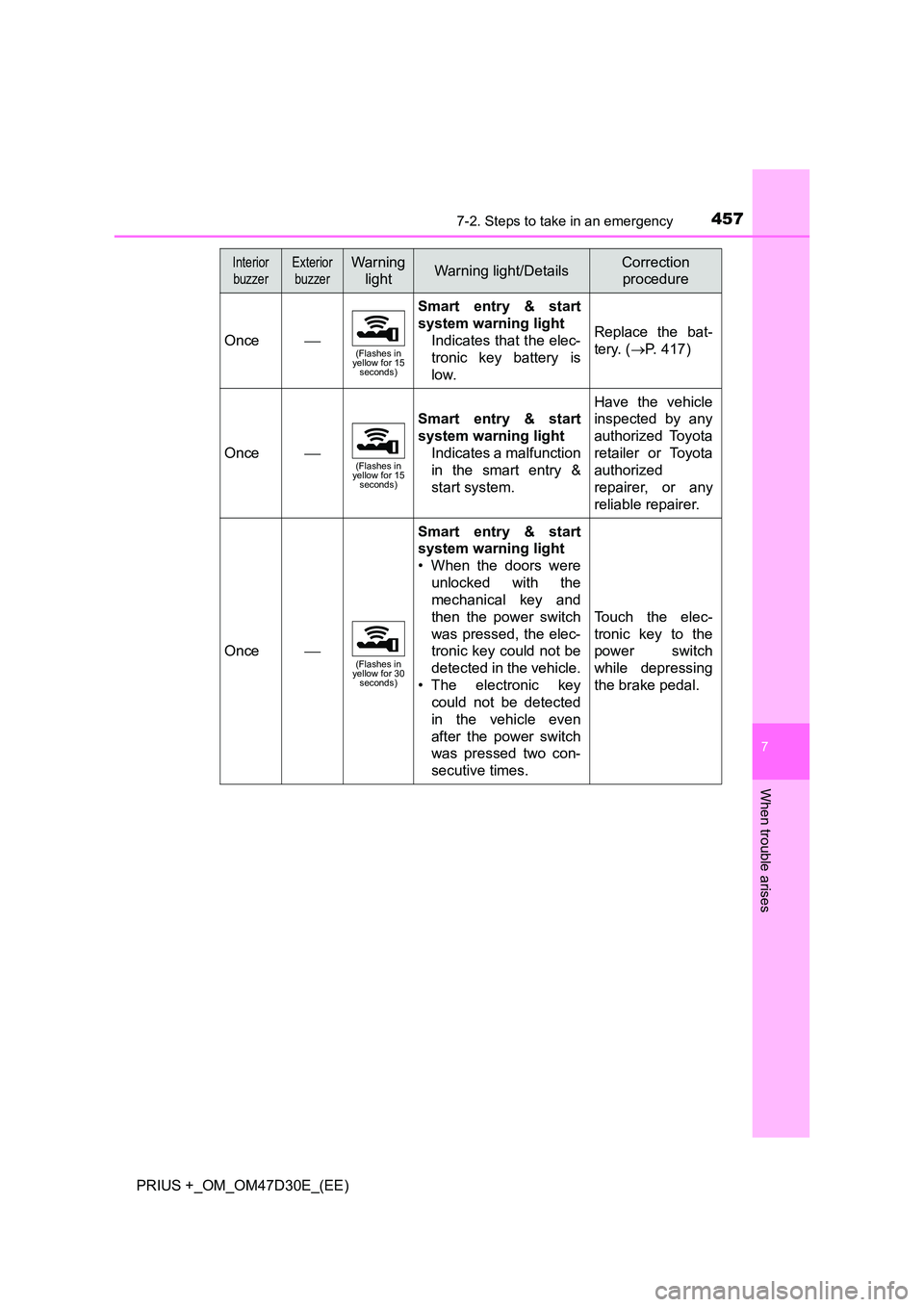
4577-2. Steps to take in an emergency
PRIUS +_OM_OM47D30E_(EE)
7
When trouble arises
Once(Flashes in yellow for 15 seconds)
Smart entry & start
system warning light
Indicates that the elec-
tronic key battery is
low.
Replace the bat-
tery. ( P. 417)
Once(Flashes in yellow for 15 seconds)
Smart entry & start
system warning light
Indicates a malfunction
in the smart entry &
start system.
Have the vehicle
inspected by any
authorized Toyota
retailer or Toyota
authorized
repairer, or any
reliable repairer.
Once(Flashes in yellow for 30 seconds)
Smart entry & start
system warning light
• When the doors were
unlocked with the
mechanical key and
then the power switch
was pressed, the elec-
tronic key could not be
detected in the vehicle.
• The electronic key
could not be detected
in the vehicle even
after the power switch
was pressed two con-
secutive times.
Touch the elec-
tronic key to the
power switch
while depressing
the brake pedal.
Interior
buzzer
Exterior
buzzer
Warning
lightWarning light/DetailsCorrection
procedure
Page 476 of 568
4767-2. Steps to take in an emergency
PRIUS +_OM_OM47D30E_(EE)
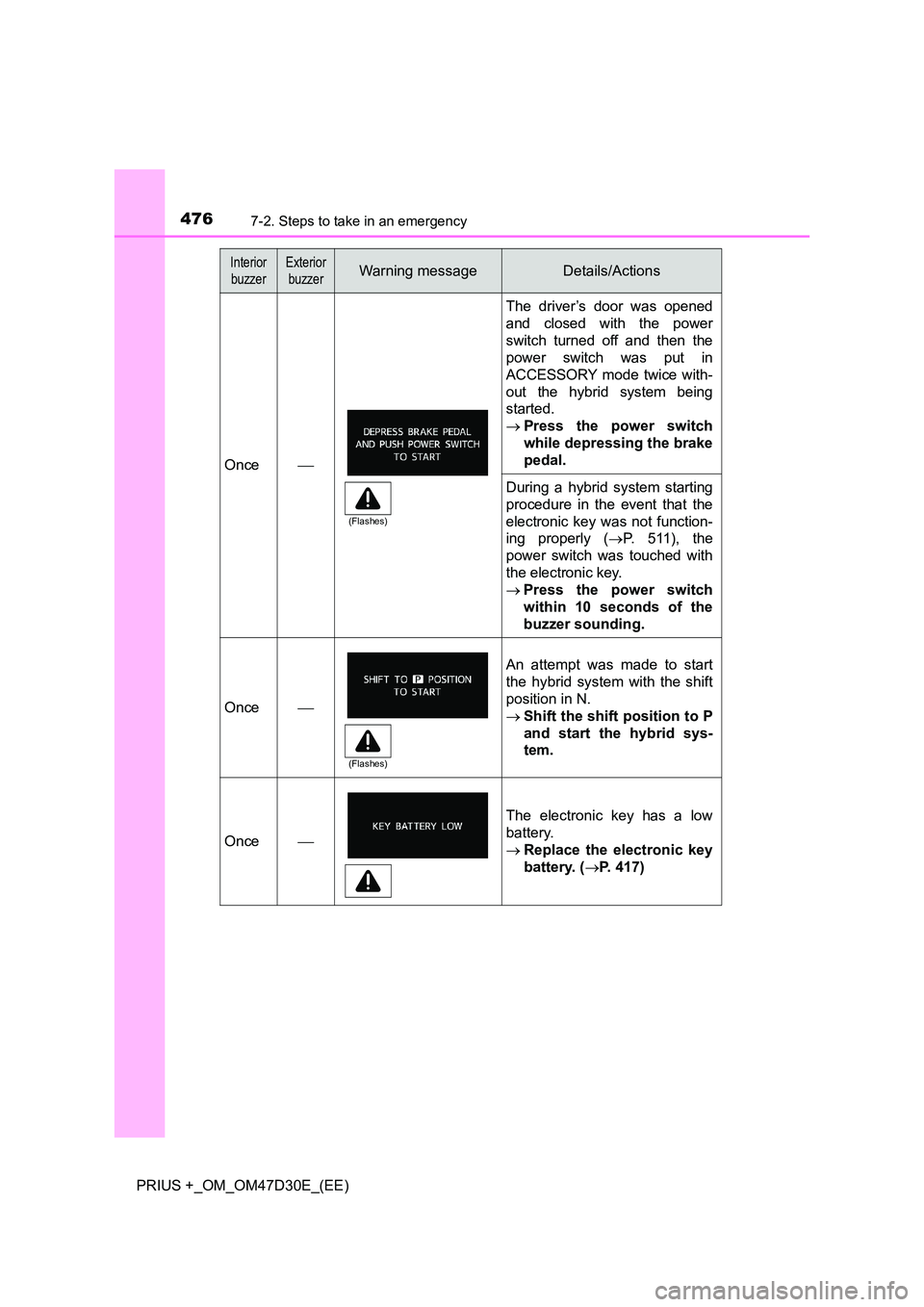
Once
The driver’s door was opened
and closed with the power
switch turned off and then the
power switch was put in
ACCESSORY mode twice with-
out the hybrid system being
started.
Press the power switch
while depressing the brake
pedal.
During a hybrid system starting
procedure in the event that the
electronic key was not function-
ing properly ( P. 5 1 1 ) , t h e
power switch was touched with
the electronic key.
Press the power switch
within 10 seconds of the
buzzer sounding.
Once
An attempt was made to start
the hybrid system with the shift
position in N.
Shift the shift position to P
and start the hybrid sys-
tem.
Once
The electronic key has a low
battery.
Replace the electronic key
battery. ( P. 417)
Interior
buzzer
Exterior
buzzerWarning messageDetails/Actions
(Flashes)
(Flashes)