spec TOYOTA PRIUS PLUS 2019 Owner's Manual
[x] Cancel search | Manufacturer: TOYOTA, Model Year: 2019, Model line: PRIUS PLUS, Model: TOYOTA PRIUS PLUS 2019Pages: 568, PDF Size: 73.58 MB
Page 209 of 568
2093-5. Opening and closing the windows
3
Operation of each component
PRIUS +_OM_OM47D30E_(EE)■Catch protection function
If an object becomes caught between the door and window while the window
is opening, window movement is stopped.
■When the window cannot be opened or closed
When the jam protection function or catch protection function operates
unusually and the door window cannot be opened or closed, perform the fol-
lowing operations with the power window switch of that door.
●Stop the vehicle. With the power switch in ON mode, within 4 seconds of the
jam protection function or catch protection function activating, continuously
operate the power window switch in the one-touch closing direction or one-
touch opening direction so that the door window can be opened and closed.
●If the door window cannot be opened and closed even when performing the
above operations, perform the following procedure for function initialization.
Turn the power switch to ON mode.
Pull and hold the power window switch in the one-touch closing direction
and completely close the door window.
Release the power window switch for a moment, resume pulling the
switch in the one-touch closing direction, and hold it there for approxi-
mately 6 seconds or more.
Press and hold the power window switch in the one-touch opening direc-
tion. After the door window is completely opened, continue holding the
switch for an additional 1 second or more.
Release the power window switch for a moment, resume pushing the
switch in the one-touch opening direction, and hold it there for approxi-
mately 4 seconds or more.
Pull and hold the power window switch in the one-touch closing direction
again. After the door window is completely closed, continue holding the
switch for a further 1 second or more.
If you release the switch while the window is moving, start again from the
beginning.
If the window reverses and cannot be fully closed or opened, have the vehicle
inspected by any authorized Toyota retailer or Toyota authorized repairer, or
any reliable repairer.
1
2
3
4
5
6
Page 210 of 568
2103-5. Opening and closing the windows
PRIUS +_OM_OM47D30E_(EE)
WARNING
Observe the following precautions.
Failing to do so may result in death or serious injury.
■ Closing the windows
● The driver is responsible for all the power window operations, including the
operation for the passengers. In order to prevent accidental operation,
especially by a child, do not let a child operate the power windows. It is
possible for children and other passengers to have body parts caught in
the power window. Also, when riding with a child, it is recommended to use
the window lock switch. ( P. 208)
● When exiting the vehicle, turn the power switch off, carry the key and exit
the vehicle along with the child. T here may be accidental operation, due to
mischief, etc., that may possibly lead to an accident.
■ Jam protection function
● Never use any part of your body to intentionally activate the up jam protec-
tion function.
● The up jam protection function may not work if something gets jammed
just before the window is fully closed. Be careful not to get any part of your
body jammed in the window.
■ Catch protection function
● Never use any part of your body or clothing to intentionally activate the
catch protection function.
● The catch protection function may not work if something gets caught just
before the window is fully opened. Be careful not to get any part of your
body or clothing caught in the window.
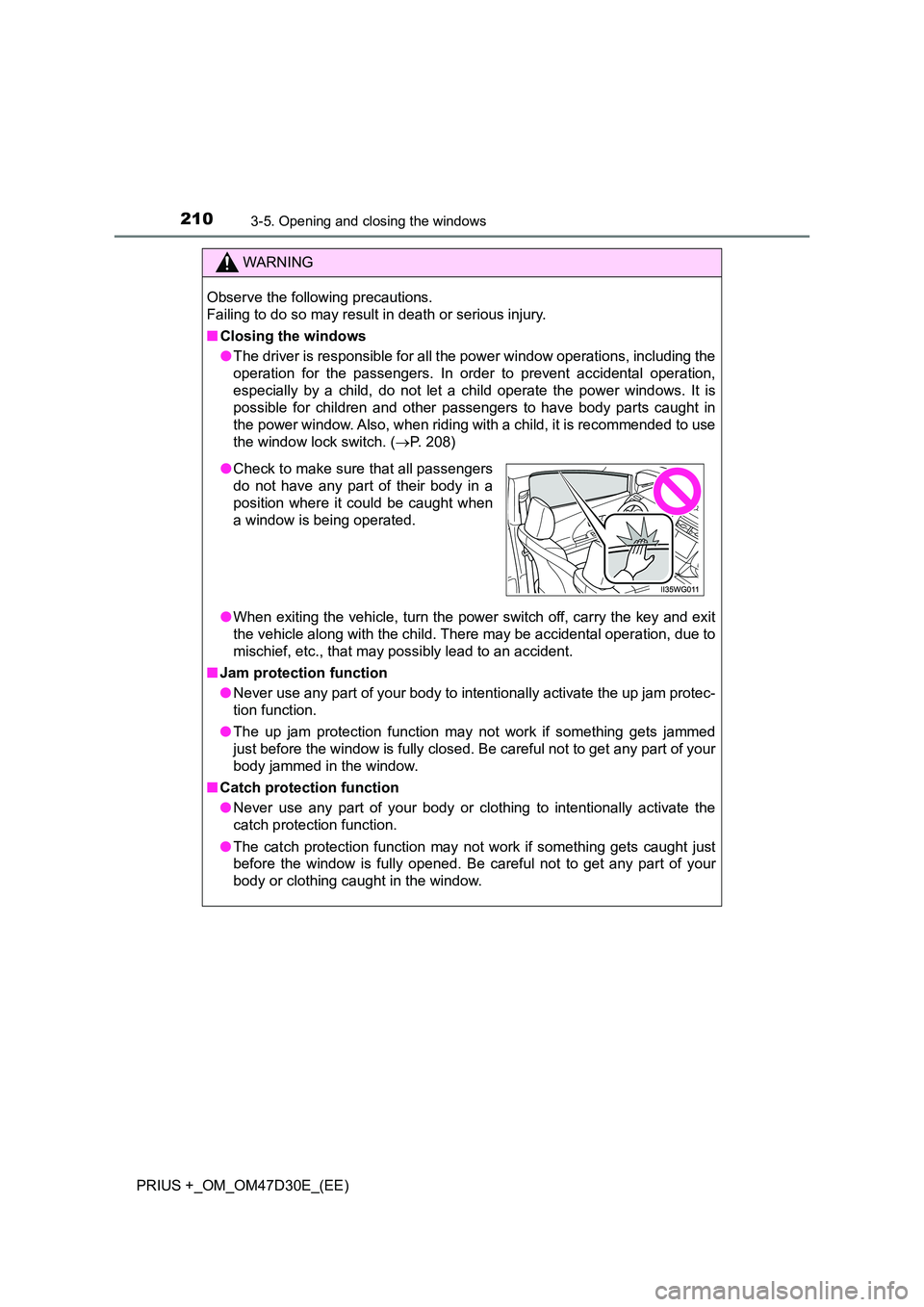
● Check to make sure that all passengers
do not have any part of their body in a
position where it could be caught when
a window is being operated.
Page 228 of 568
2284-2. Driving procedures
PRIUS +_OM_OM47D30E_(EE)
■Auto power off function
If the vehicle is left in ACCESSORY mode for more than 20 minutes or ON
mode (the hybrid system is not operating) for more than an hour with the shift
position in P, the power switch will automatically turn off. However, this func-
tion cannot entirely prevent the 12-volt battery discharge. Do not leave the
vehicle with the power switch in ACCESSORY or ON mode for long periods
of time when the hybrid system is not operating.
■Sounds and vibrations specific to a hybrid vehicle
P. 8 4
■Electronic key battery depletion
P. 142
■When the ambient temperature is low, such as during winter driving con-
ditions
When starting the hybrid system, the flashing time of the “READY” indicator
may be long. Leave the vehicle as it is until the “READY” indicator is steady
on, as steady means the vehicle is able to move.
■Conditions affecting operation
P. 156
■Note for the entry function
P. 157
■If the hybrid system does not start
The immobilizer system may not have been deactivated. (P. 91)
Contact any authorized Toyota retailer or Toyota authorized repairer, or any
reliable repairer.
■When “ENTRY & START SYSTEM CHECK HAVE YOUR VEHICLE
CHECKED BY A DEALER” is displayed on the multi-information display
(if equipped)
The system may be malfunctioning. Have the vehicle inspected by any autho-
rized Toyota retailer or Toyota authorized repairer, or any reliable repairer
immediately.
Page 229 of 568
2294-2. Driving procedures
4
Driving
PRIUS +_OM_OM47D30E_(EE)■If the “READY” indicator does not come on
In the event that the “READY” indicator does not come on even after perform-
ing the proper procedures for starting the vehicle, contact any authorized
Toyota retailer or Toyota authorized repairer, or any reliable repairer immedi-
ately.
■If the hybrid system is malfunctioning
P. 460
■If the electronic key battery is depleted
P. 417
■Operation of the power switch
●If the switch is not pressed shortly and firmly, the power switch mode may
not change or the hybrid system may not start.
●If attempting to restart the hybrid system immediately after turning the power
switch off, the hybrid system may not start in some cases. After turning the
power switch off, please wait a few seconds before restarting the hybrid sys-
tem.
■Automatically P position selection function
P. 236
■When the shift control system malfunctions
The power switch will not be able to be turned off. In such a case, the switch
can be turned off after applying the parking brake.
Have the vehicle inspected by any authorized Toyota retailer or Toyota autho-
rized repairer, or any reliable repairer immediately.
■Meter display
When the power switch is turned off, each display will turn off as follows.
●The shift position indicator will turn off after approximately 2 seconds.
●EV driving ratio and average fuel consumption after hybrid system started,
turn off after approximately 6 seconds.
●The odometer, clock, etc. will turn off after approximately 30 seconds.
(Each display will also turn off immediately if a door is locked before 30 sec-
onds has elapsed.)
Page 232 of 568
2324-2. Driving procedures
PRIUS +_OM_OM47D30E_(EE)
■ Switching to EV drive mode when the gasoline engine is cold
If the hybrid system is started while the gasoline engine is cold, the gasoline
engine will start automatically after a short period of time in order to warm up.
In this case, you will become unable to switch to EV drive mode.
After the hybrid system has started and the “READY” indicator has illumi-
nated, press the EV drive mode switch before the gasoline engine starts to
switch to EV drive mode.
■ Automatic cancelation of EV drive mode
When driving in EV drive mode, the gasoline engine may automatically restart
in the following situations. When EV drive mode is canceled, a buzzer will
sound and the EV drive mode indicator will flash and go off.
● The hybrid battery (traction battery) becomes low.
The remaining battery level indicated in the energy monitor display is low.
( P. 118, 134)
● Vehicle speed is high.
● The accelerator pedal is depressed firmly or the vehicle is on a hill etc.
When it is possible to inform the driver of automatic cancelation in advance, a
prior notice screen will appear on the multi-information display.
■ Possible driving distance when driving in EV drive mode
EV drive mode’s possible driving distance ranges from a few hundred meters
to approximately 1 km (0.6 mile). However, depending on vehicle conditions,
there are situations when EV drive mode cannot be used. (The distance that
is possible depends on the hybrid battery [traction battery] level and driving
conditions.)
■ Changing a driving mode when in EV drive mode
EV drive mode can be used in conjunction with Eco drive mode and power
mode.
However, EV drive mode may be automatically canceled when used in con-
junction with power mode.
■ Fuel economy
The hybrid system is designed to achieve the best possible fuel economy
during normal driving (using the gasol ine engine and electric motor [traction
motor]). Driving in EV drive mode more than necessary may lower fuel econ-
omy.
WARNING
■ Caution while driving
When driving in EV drive mode, pay special attention to the area around the
vehicle. Because there is no engine noise, pedestrians, people riding bicy-
cles or other people and vehicles in the area may not be aware of the vehi-
cle starting off or approaching them, so take extra care while driving.
Page 256 of 568
2564-4. Refueling
PRIUS +_OM_OM47D30E_(EE)
Opening the fuel tank cap
●Turn the power switch off and ensure that all the door and windows
are closed.
●Confirm the type of fuel. (P. 537)
■Fuel types
P. 537
■Fuel tank opening for unleaded gasoline
To help prevent incorrect fueling, your vehicle has a fuel tank opening that
only accommodates the special nozzle on unleaded fuel pumps.
Perform the following steps to open the fuel tank cap:
Before refueling the vehicle
Page 260 of 568
2604-5. Using the driving support systems
PRIUS +_OM_OM47D30E_(EE)
The pre-crash safety system is equipped with a sophisticated com-
puter that will record certain data, such as:
• Accelerator status
• Brake status
• Vehicle speed
• Operation status of the pre-crash safety system functions
• Information (such as the distance and relative speed between your
vehicle and the vehicle ahead or other objects)
The pre-crash safety system does not record conversations, sounds
or pictures.
●Data usage
Toyota may use the data recorded in this computer to diagnose
malfunctions, conduct research and development, and improve
quality.
Toyota will not disclose the recorded data to a third party except:
• With the consent of the vehicle owner or with the consent of the
lessee if the vehicle is leased
• In response to an official request by the police, a court of law or a
government agency
• For use by Toyota in a lawsuit
• For research purposes where the data is not tied to a specific
vehicle or vehicle owner
Vehicle data recording
Page 262 of 568
2624-5. Using the driving support systems
PRIUS +_OM_OM47D30E_(EE)
WARNING
■To avoid malfunction of the radar sensor
Observe the following precautions.
Otherwise, the radar sensor may not operate properly, possibly leading to
an accident resulting in death or serious injury.
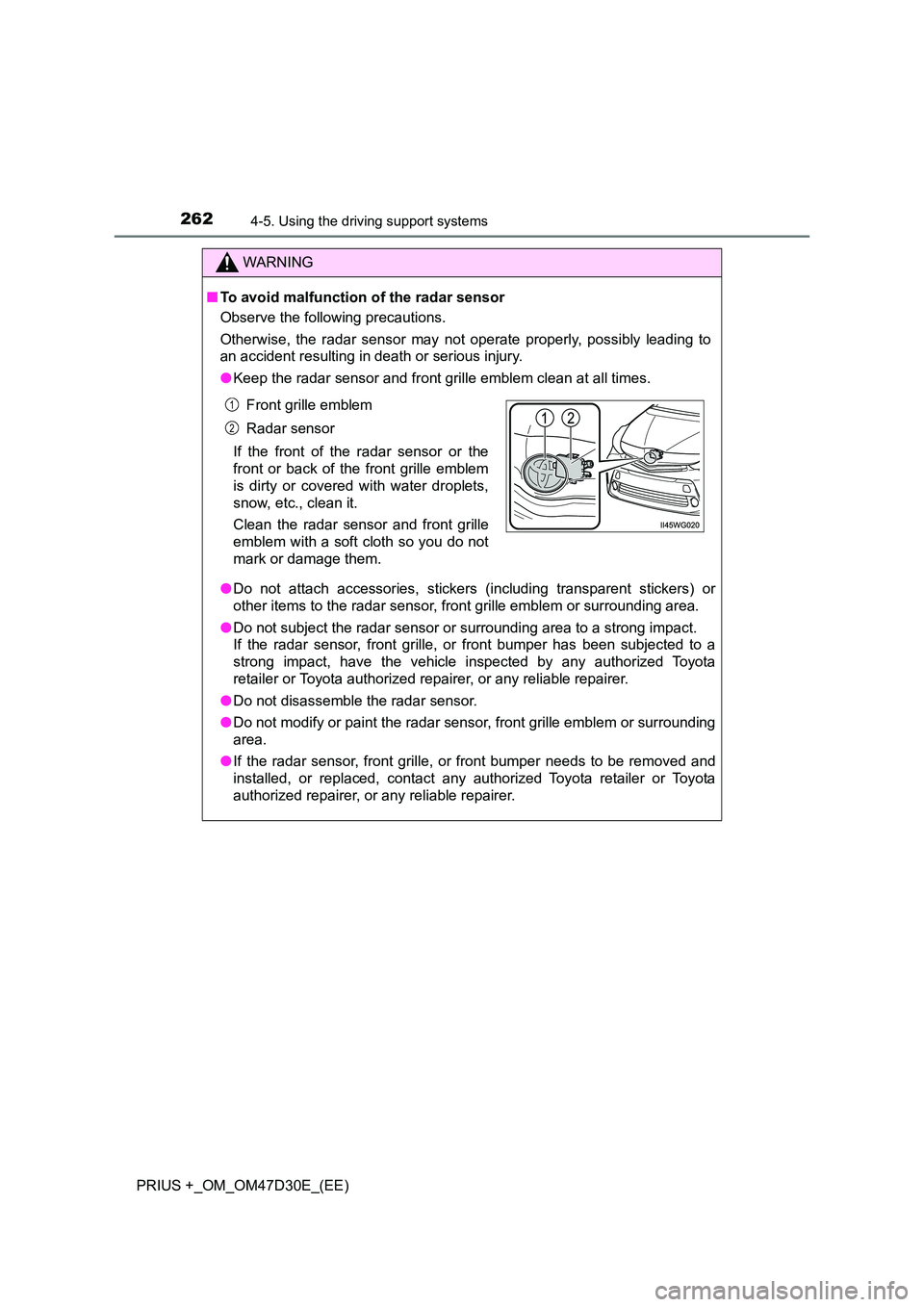
● Keep the radar sensor and front grille emblem clean at all times.
● Do not attach accessories, stickers (including transparent stickers) or
other items to the radar sensor, front grille emblem or surrounding area.
● Do not subject the radar sensor or surrounding area to a strong impact.
If the radar sensor, front grille, or front bumper has been subjected to a
strong impact, have the vehicle inspected by any authorized Toyota
retailer or Toyota authorized repairer, or any reliable repairer.
● Do not disassemble the radar sensor.
● Do not modify or paint the radar sensor, front grille emblem or surrounding
area.
● If the radar sensor, front grille, or front bumper needs to be removed and
installed, or replaced, contact any authorized Toyota retailer or Toyota
authorized repairer, or any reliable repairer.
Front grille emblem
Radar sensor
If the front of the radar sensor or the
front or back of the front grille emblem
is dirty or covered with water droplets,
snow, etc., clean it.
Clean the radar sensor and front grille
emblem with a soft cloth so you do not
mark or damage them.
1
2
Page 274 of 568
2744-5. Using the driving support systems
PRIUS +_OM_OM47D30E_(EE)
WARNING
■When to disable the pre-crash safety system
In the following situations, disable the system, as it may not operate prop-
erly, possibly leading to an accident resulting in death or serious injury:
● When the vehicle is being towed
● When your vehicle is towing another vehicle
● When transporting the vehicle via truck, boat, train or similar means of
transportation
● When the vehicle is raised on a lift with the hybrid system on and the tires
are allowed to rotate freely
● When inspecting the vehicle using a drum tester such as a chassis
dynamometer or speedometer tester , or when using an on vehicle wheel
balancer
● When a strong impact is applied to the front bumper or front grille, due to
an accident or other reasons
● If the vehicle cannot be driven in a stable manner, such as when the vehi-
cle has been in an accident or is malfunctioning
● When the vehicle is driven in a sporty manner or off-road
● When the tires are not properly inflated
● When the tires are very worn
● When tires of a size other than specified are installed
● When tire chains are installed
● When a compact spare tire or an emergency tire puncture repair kit is used
● If equipment (snow plow, etc.) that may obstruct the radar sensor or cam-
era sensor is temporarily installed to the vehicle
Page 283 of 568
2834-5. Using the driving support systems
4
Driving
PRIUS +_OM_OM47D30E_(EE)■If the PCS warning light flashes or illuminates and a warning message is
displayed on the multi-information display
The pre-crash safety system may be temporarily unavailable or there may be
a malfunction in the system.
●In the following situations, the warning light will turn off, the message will
disappear and the system will become operational when normal operating
conditions return:
• When the radar sensor or camera sensor or the area around either sen-
sor is hot, such as in the sun
• When the radar sensor or camera sensor or the area around either sen-
sor is cold, such as in an extremely cold environment
• When a front sensor is dirty or covered with snow, etc.
• When the part of the windshield in front of the camera sensor is fogged
up or covered with condensation or ice
(Defogging the windshield: P. 335)
• If the camera sensor is obstructed, such as when the hood is open or a
sticker is attached to the windshield near the camera sensor
●If the PCS warning light continues to flash or remains illuminated or the
warning message does not disappear even though the vehicle has returned
to normal, the system may be malfunctioning. Have the vehicle inspected by
any authorized Toyota retailer or Toyota authorized repairer, or any reliable
repairer immediately.