phone TOYOTA PRIUS PRIME 2017 2.G User Guide
[x] Cancel search | Manufacturer: TOYOTA, Model Year: 2017, Model line: PRIUS PRIME, Model: TOYOTA PRIUS PRIME 2017 2.GPages: 784, PDF Size: 14.98 MB
Page 532 of 784
532
PRIUS PRIME_OM_OM47A88U_(U)
6-4. Using the other interior features
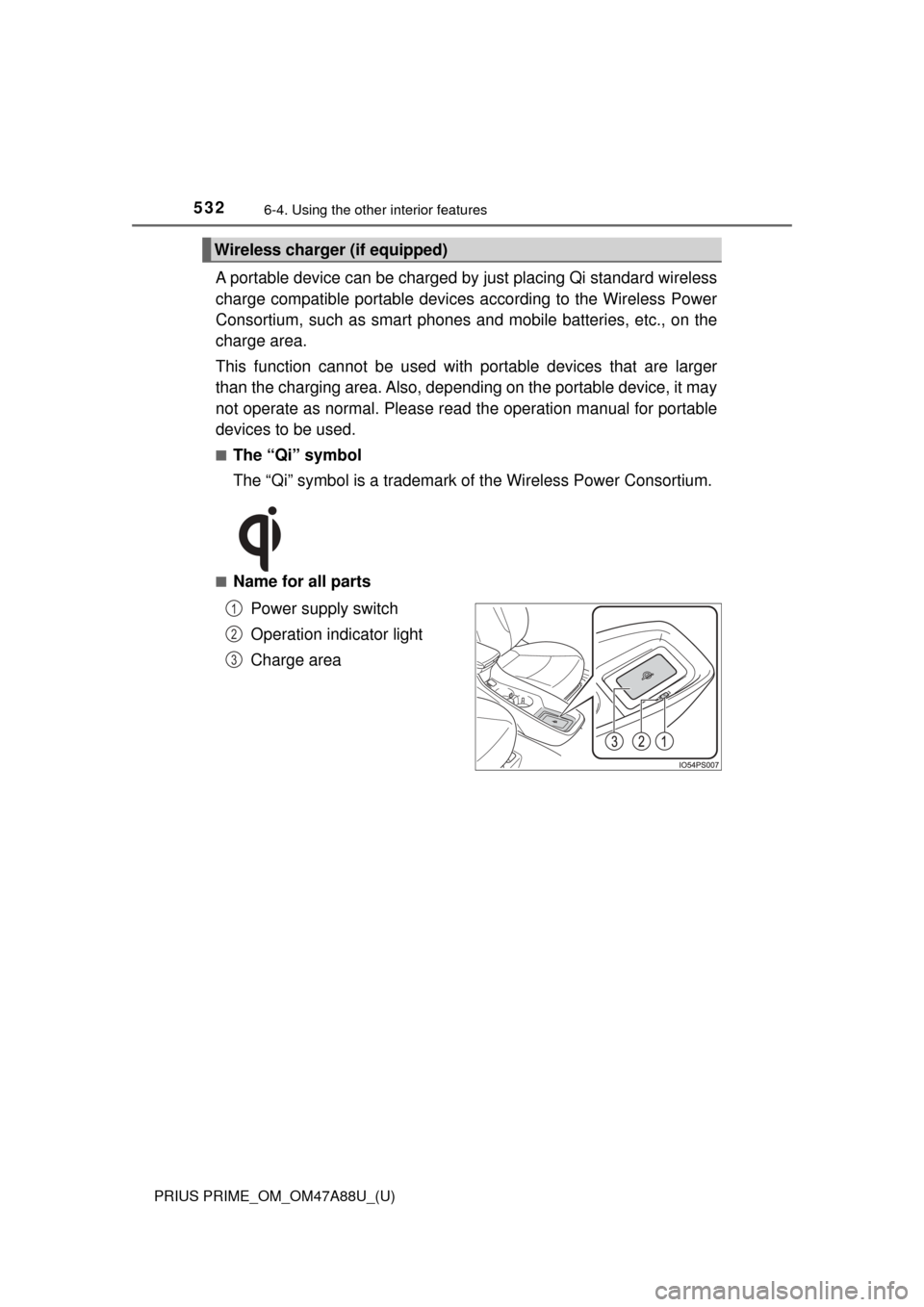
A portable device can be charged by just placing Qi standard wireless
charge compatible portable devices according to the Wireless Power
Consortium, such as smart phones an d mobile batteries, etc., on the
charge area.
This function cannot be used wi th portable devices that are larger
than the charging area. Also, depend ing on the portable device, it may
not operate as normal. Please read the operation manual for portable
devices to be used.
■The “Qi” symbol
The “Qi” symbol is a trademark of the Wireless Power Consortium.
■Name for all parts
Power supply switch
Operation indicator light
Charge area
Wireless charger (if equipped)
1
2
3
Page 535 of 784

PRIUS PRIME_OM_OM47A88U_(U)
5356-4. Using the other interior features
6
Interior features
■The wireless charger can be operated when
The power switch is in ACCESSORY or ON mode.
■ Usable portable devices
Qi standard wireless charge standard can be used on compatible devices.
However, not all Qi standard devices and compatibility are guaranteed.
Starting with mobile phones and smart phones , it is aimed for low power elec-
trically supplied portable devices of no more than 5W.
■ When covers and accessories are attached to portable devices
Do not charge in situations where cover and accessories not able to handle
Qi are attached to the portable device. Depending on the type of cover and
accessory, it may not be possible to charge. When charging is not performed
even with the portable device placed on the charge area, remove the cover
and accessories.
■ While charging, noise enters the AM radio
Turn off the wireless charger and confirm that the noise has decreased. If the
noise decreases, continuously pushing the power supply switch of the wire-
less charger for 2 seconds, the frequency of the charger can be changed and
the noise can be reduced.
Also, on that occasion, the operation indicator light will flash orange 2 times.
■ Important points of the wireless charger
●If the electronic key cannot be detected within the vehicle interior, charging
cannot be done. When the door is opened and closed, charging may be
temporarily suspended.
● When charging, the wireless charging device and portable device will get
warmer, however this is not a malfunction.
When a portable device gets warm while charging, charging may stop due
to the protection function on the portable device side. In this case, when the
temperature of the portable device drops significantly, charge again.
■ Operation sounds
When the power supply is turned on, while searching for the portable device a
sound will be produced, however this is not a malfunction.
Page 548 of 784
548
PRIUS PRIME_OM_OM47A88U_(U)
6-4. Using the other interior features
Safety Connect∗
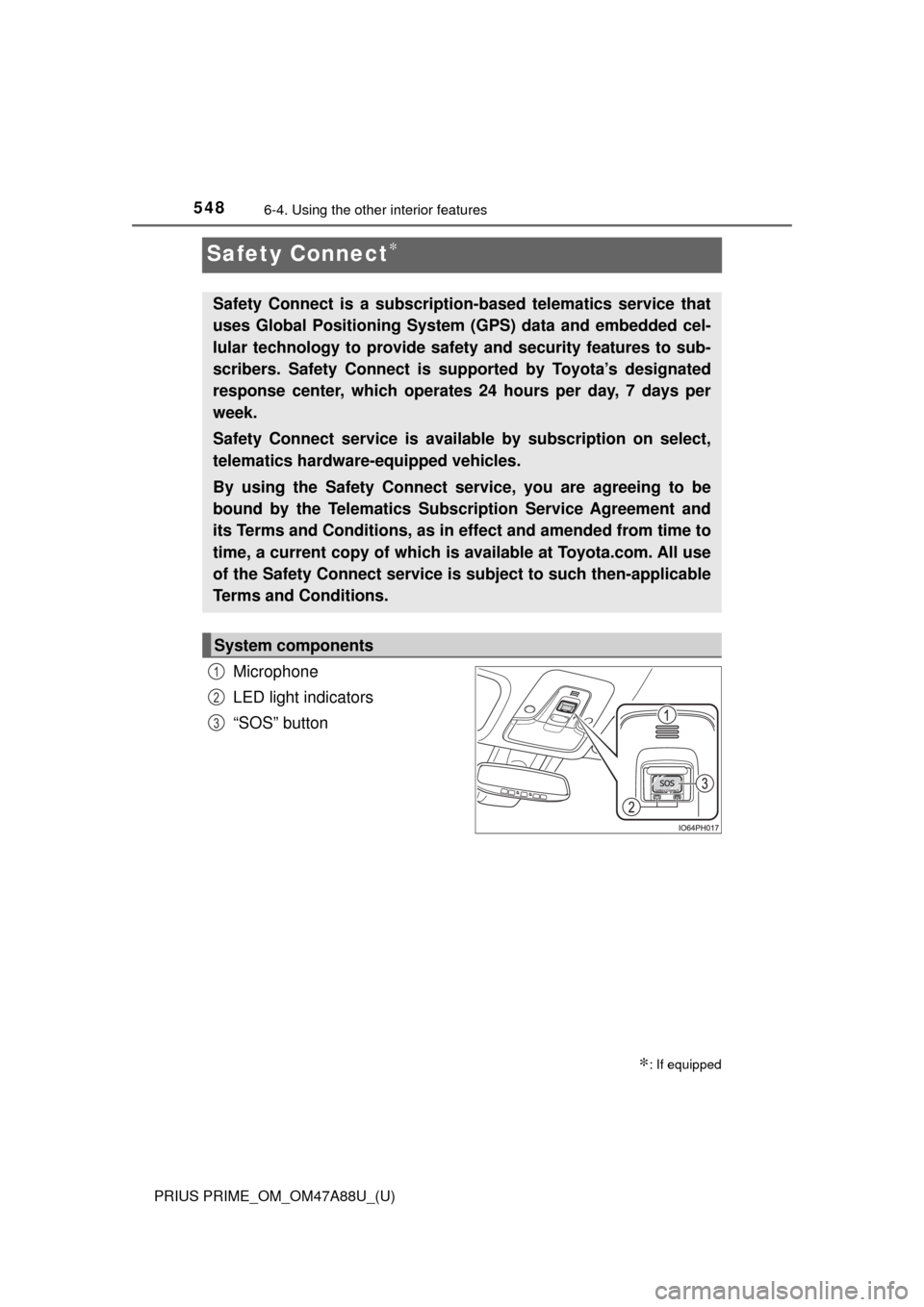
Microphone
LED light indicators
“SOS” button
∗: If equipped
Safety Connect is a subscripti on-based telematics service that
uses Global Positioning System (GPS) data and embedded cel-
lular technology to provide safety and security features to sub-
scribers. Safety Connect is s upported by Toyota’s designated
response center, which operates 24 hours per day, 7 days per
week.
Safety Connect service is avai lable by subscription on select,
telematics hardware-equipped vehicles.
By using the Safety Connect service, you are agreeing to be
bound by the Telematics Subscription Service Agreement and
its Terms and Conditions, as in ef fect and amended from time to
time, a current copy of which is available at Toyota.com. All use
of the Safety Connect service is subject to such then-applicable
Terms and Conditions.
System components
1
2
3
Page 550 of 784
550
PRIUS PRIME_OM_OM47A88U_(U)
6-4. Using the other interior features
■Safety Connect Services Information
●Phone calls using the vehicles Bluetooth® technology will not be possible
during Safety Connect.
● Safety Connect is available beginning Fall 2009 on select Toyota models.
Contact with the Safety Connect response center is dependent upon the
telematics device being in operative condition, cellular connection availabil-
ity, and GPS satellite signal reception, which can limit the ability to reach the
response center or receive emergency service support. Enrollment and
Telematics Subscription Service Agreement required. A variety of subscrip-
tion terms is available; charges vary by subscription term selected.
● Automatic Collision Notification, Emergency Assistance, Stolen Vehicle
Location, and Enhanced Roadside Assistance will function in the United
States, including Hawaii and Alaska, and in Canada. No Safety Connect
services will function outside of the United States in countries other than
Canada.
● Safety Connect services are not subject to section 255 of the Telecommuni-
cations Act and the device is not TTY compatible.
■ Languages
The Safety Connect response center will offer support in multiple languages.
The Safety Connect system will offer voice prompts in English and Spanish.
Please indicate your language of choice when enrolling.
■ When contacting th e response center
You may be unable to contact the response center if the network is busy.
When the power switch is turned to ON mode, the red indicator light
comes on for 2 seconds then turns off. Afterward, the green indicator
light comes on, indicating t hat the service is active.
The following indicator light pattern s indicate specific system usage
conditions:
● Green indicator light on = Active service
● Green indicator light flashing = Sa fety Connect call in process
● Red indicator light (except at vehicle start-up) = System malfunction
(contact your Toyota dealer)
● No indicator light (off) = Safety Connect service not active
Safety Connect LE D light Indicators
Page 552 of 784

552
PRIUS PRIME_OM_OM47A88U_(U)
6-4. Using the other interior features
■Enhanced Roadside Assistance
Enhanced Roadside Assi stance adds GPS data to the already
included warranty-based Toyota roadside service.
Subscribers can press the “SOS” bu tton to reach a Safety Connect
response-center agent, who can help with a wide range of needs,
such as: towing, flat tire, fuel deli very, etc. For a description of the
Roadside Assistance se rvices and their limitations, please see the
Safety Connect Terms and Conditions, which are available at
Toyota.com.
Important! Read this informatio n before using Safety Connect.
■Exposure to radio frequency signals
The Safety Connect system install ed in your vehicle is a low-power
radio transmitter and receiver. It receives and also sends out radio
frequency (RF) signals.
In August 1996, the Federal Communications Commission (FCC)
adopted RF exposure gui delines with safety levels for mobile wire-
less phones. Those guidelines are c onsistent with the safety stan-
dards previously set by the fo llowing U.S. and international
standards bodies.
● ANSI (American National Stand ards Institute) C95.1 [1992]
● NCRP (National Council on Radi ation Protection and Measure-
ment) Report 86 [1986]
● ICNIRP (International Commiss ion on Non-Ionizing Radiation
Protection) [1996]
Those standards were based on comprehensive and periodic eval-
uations of the relevant scientific literature. Over 120 scientists, engi-
neers, and physicians from uni versities, and government health
agencies and industries reviewed t he available body of research to
develop the ANSI Standard (C95.1).
The design of Safety Connect complies with the FCC guidelines in
addition to those standards.
Safety information for Safety Connect
Page 599 of 784

PRIUS PRIME_OM_OM47A88U_(U)
5997-3. Do-it-yourself maintenance
7
Maintenance and care
■Situations in which the tire pressure warning system may not oper-
ate properly
●In the following cases, the tire pressure warning system may not operate
properly.
• If non-genuine Toyota wheels are used.
• When a replacement tire is used , the system may not operate cor-
rectly due to the structure of the replacement tire.
• A tire has been replaced with a tire that is not of the specified size.
• Tire chains etc. are equipped.
• An auxiliary-supported run- flat tire is equipped.
• If a window tint that affects the radio wave signals is installed.
• If there is a lot of snow or ice on the vehicle, particularly around the wheels or wheel housings.
• If the tire inflation pressure is extremely higher than the specified level.
• If wheel without the tire pressure warning valve and transmitter is
used.
• If the ID code on the tire pressure warning valves and transmitters is not registered in the tire pressure warning computer.
●Performance may be affected in the following situations.
• Near a TV tower, electric power plant, gas station, radio station, largedisplay, airport or other facility that generates strong radio waves or
electrical noise
• When carrying a portable radio, cellular phone, cordless phone or other wireless communication device
●When the vehicle is parked, the time taken for the warning to start or go
off could be extended.
●When tire inflation pressure declines rapidly for example when a tire has
burst, the warning may not function.
■The initialization operation
●Make sure to carry out in itialization after adjusting the tire inflation pres-
sure.
Also, make sure the tires are cold be fore carrying out initialization or tire
inflation pressure adjustment.
●If you have accidentally turned the po wer switch off during initialization,
it is not necessary to press the reset switch again as initialization will
restart automatically when the powe r switch has been turned to ON
mode for the next time.
●If you accidentally press the reset s witch when initialization is not neces-
sary, adjust the tire inflation pressu re to the specified level when the
tires are cold, and conduct initialization again.
Page 761 of 784

761
PRIUS PRIME_OM_OM47A88U_(U)
Index
What to do if... (Troubleshooting) .................... 762
Alphabetical index ..................... 766
For information regarding the equipment listed below, refer to
the “NAVIGATION SYSTEM OWNER’S MANUAL”.
• Navigation system
• Audio/visual system
• Hands-free system (for cellular phone)
• Rear view monitor system
Page 772 of 784

772Alphabetical index
PRIUS PRIME_OM_OM47A88U_(U)
Hands-free system (for cellular phone)
*
Head restraints ........................ 291
Head-up display ....................... 238
Headlights ................................ 338
Automatic High Beam system ......... ....................... 343
Headlight aim ................ 633, 758
Light switch ........................... 338
Replacing light bulbs............. 640
Heated steering wheel............. 514
Heaters
Automatic air conditioning system .... 488, 498
Heated steering wheel .......... 514
Outside rear view mirrors ........................ 491, 502
Seat heaters ......................... 513
High coolant temperature
warning light .......................... 655
High mounted stoplight Replacing .............................. 640
High-voltage components ........ 90
Hill-start assist control............ 477
Hood ......................................... 577
Hooks Coat hooks............................ 540
Grocery bag hook ................. 524
Retaining hooks (floor mat)..... 26
Horn .......................................... 294
HV mode ..................................... 79 Hybrid battery
(traction battery) ..................... 90
Air intake vent ......................... 91
Charging ............................... 102
Location .................................. 90
Specification ......................... 711
Status indicator ..................... 104
Hybrid battery (traction battery)
air intake vent .......................... 91
Hybrid system............................ 78 Brake Override System ........ 308
Consumption
screen ................ 218, 250, 256
Drive-Start Control ................ 308
Emergency shut off system .... 91
Energy monitor ..... 208, 247, 253
High voltage components ....... 90
Hybrid System Indicator ....... 210
If the hybrid system will not start .............................. 688
Overheating .......................... 700
Plug-in hybrid system precautions........................... 90
Plug-in hybrid vehicle driving tips........................................ 97
Power switch ........................ 324
Regenerative braking ............. 86
Starting the hybrid system .... 324
Vehicle proximity notification system................ 85
Hybrid System Indicator ......... 210
Hybrid transmission................ 330
H
Page 774 of 784

774Alphabetical index
PRIUS PRIME_OM_OM47A88U_(U)
Language (multi-information display)................................... 233
LATCH system ........................... 60
LDA (Lane Departure Alert with steering control)............ 381
Lever Auxiliary catch lever .............. 577
Hood lock release lever ........ 577
Shift lever .............................. 330
Tilt and telescopic steering lock release lever ............... 294
Turn signal lever ................... 336
Wiper lever............................ 350
License plate lights ................. 338
Light switch ........................... 338
Replacing light bulbs............. 640
Light
Automatic High Beam system ......... ....................... 343
Door courtesy lights .............. 515
Emergency flasher switch ..... 644
Fog light switch ..................... 348
Headlight switch.................... 338
Illuminated entry system ....... 517
Interior lights ................. 516, 517
Interior light list...................... 515
Luggage compartment
light ..................................... 274
Personal lights ...................... 516
Replacing light bulbs............. 635
Shift lever light ...................... 515
Turn signal lever ................... 336
Vanity lights .......................... 530
Wattage ................................ 717
Light bulbs Replacing .............................. 635
Wattage ................................ 717
Load capacity........................... 321
Luggage cover ......................... 525 Main display ............................. 196
Maintenance
Do-it-yourself maintenance... 574
General maintenance ........... 570
Maintenance data ................. 708
Maintenance requirements ... 567
Malfunction indicator lamp..... 653
Master warning light ............... 663
Meter ......................................... 180 Clock adjustment .................. 185
Combination meter ............... 180
Head-up display.................... 238
Indicators .............................. 191
Instrument cluster light control ................................ 182
Main display.......................... 196
Multi-information display ....... 205
Warning lights ....................... 189
Warning messages ............... 663
Microphone
*............................ 548
Mirrors Inside rear view mirror .......... 296
Outside rear view mirror defoggers ................... 491, 502
Outside rear view mirrors ..... 298
Vanity mirrors ....................... 530
MP3 disc
*
Multi-information display........ 205
Air conditioning system settings screen ................... 226
Audio system-linked display ................................ 225
BSM (Blind Spot Monitor) ..... 408
Display contents ................... 205
Drive information .................. 207
Driving assist system
information ......................... 230
Dynamic radar cruise control with full-speed range .......... 391
LM
Page 778 of 784

778Alphabetical index
PRIUS PRIME_OM_OM47A88U_(U)
Smart key system .................... 278Antenna location ................... 278
Entry functions ...................... 267
Starting the hybrid system .... 324
Smart lid & connector
locking system ...................... 113
Snow tires ................................ 482
“SOS” button ........................... 548
Spark plug ................................ 714
Specifications .......................... 708
Speedometer ............................ 196
SRS airbags ............................... 36
Steering wheel ......................... 294 Adjustment ............................ 294
Audio switches
*
Heated steering wheel .......... 514
Meter control switches .......... 181
Talk switch
*
Telephone switches*
TRIP switch........................... 181
Stop lights Replacing light bulbs............. 640
Storage feature ........................ 518
Storage precautions ................ 518
Stuck
If the vehicle becomes stuck ................................... 705
Sun visors ................................ 530
Switch Audio remote control switches
*
Automatic High Beam
switch ................................. 343
Cruise control switch............. 391
Door lock switches ................ 269
Driving mode select switch ... 406
Emergency flashers switch ... 644
Engine switch........................ 324
EV auto mode switch .............. 82
EV/HV mode selection
switch ................................... 82
Fog light switch ..................... 348 Fuel filler door opener
switch ................................. 358
Garage door opener switches ............................. 541
Heated steering wheel
switch ................................. 514
“HUD” (Head-up display) switch ................................. 240
Ignition switch ....................... 324
LDA (Lane Departure Alert with steering control)
switch ................................. 384
Light switch ........................... 338
Meter control switches .......... 181
Outside rear view mirror switches ............................. 298
Power door lock switches ..... 269
Power switch ........................ 324
Power window switch ........... 300
Rear window and outside
rear view mirror
defoggers switch ........ 491, 502
S-APGS switch ..................... 445
Seat heater switches ............ 514
“SOS” button......................... 548
Talk switch
*
Telephone switches*
TRIP switch .......................... 181
Vehicle-to-vehicle distance switch ................................. 398
VSC OFF switch ................... 477
Window lock switch .............. 300
Windshield wipers and washer switch..................... 350
Wireless charger power supply switch ...................... 532