remote start TOYOTA PRIUS PRIME 2017 2.G User Guide
[x] Cancel search | Manufacturer: TOYOTA, Model Year: 2017, Model line: PRIUS PRIME, Model: TOYOTA PRIUS PRIME 2017 2.GPages: 784, PDF Size: 14.98 MB
Page 510 of 784

5106-1. Using the air conditioning system and defogger
PRIUS PRIME_OM_OM47A88U_(U)
■Operating conditions
The system will only operate if all of the following conditions are met:
●The shift position is in P.
● The power switch is off.
*
●All doors are closed.
● The hood is closed.
*: The Remote Air Conditioning System cannot be used for approximately 3
minutes and a half after the power switch is turned off.
■ Remote Air Conditioning System automatic shut-off
The system will automatically shut off under the following conditions:
● About 10 minutes have passed since operation began
● Any one of the operating conditions is not met
The system may also shut off if the charge level of the hybrid battery (traction
battery) drops to low.
■ Conditions affecting operation
The system may not start in the following situations:
●The charge level of the hybrid battery (traction battery) is low
● The outside temperature is extremely low
● When the hybrid system is cool (for example, after being left for a lon\
g time
in low temperatures)
■ Windshield defogger
When defogging the windshield using the Remote Air Conditioning System,
defogging may be insufficient due to the power being restricted more than
during normal air conditioning operation. Also, the outside of the windshield
may fog up due to the outside temperature, humidity or air conditioning set
temperature.
■ Using the heater via the Remote Air Conditioning System
When the outside heat exchanger becomes frosted over, heating perfor-
mance may decline due to automatically switching to the frost removal op\
era-
tion.
Page 511 of 784

PRIUS PRIME_OM_OM47A88U_(U)
5116-1. Using the air conditioning system and defogger
6
Interior features
■Security feature
Any unlocked doors will be automatically locked when the system is operat-
ing. The buzzer sounds and the emergency flashers flash to indicate that the
doors have been locked or the system has been turned off.
(The doors locked: Once; The system turned off: Twice)
■ Conditions affecting operation
→P. 281
■ When using the Remote Air Conditioning System
A charging message will be displayed on the multi-information display. Differ-
ent messages will be displayed depending on when the Remote Air Condi-
tioning System was started (after charging or during charging).
■ While the Remote Air Conditioning System is operating
●Depending on the operating condition of the Remote Air Conditioning Sys-
tem, the electric fan may spin and an operating noise may be heard. How-
ever, this does not indicate a malfunction.
● The Remote Air Conditioning System may stop operating temporarily if
other features that use electricity (for example, the seat heater, lights, wind-
shield wipers) are in operation or if the charge level of the 12-volt battery
becomes low.
● The headlights, windshield wiper, combination meter, etc. will not operate
while the Remote Air Conditioning System is operating.
■ Electronic key battery depletion
→P. 264
■ When the electronic key battery is fully depleted
→P. 627
■ Customization
Setting (e.g. Operation using “A/C” on the wireless remote control) can be
changed. (Customizable features →P. 732)
■ Smartphone-linked op eration (vehicles with 11.6-inch display)
After applying to Entune, it is possible to use the smartphone application to
operate the Remote Air Conditioning System.
For details about Entune, refer to http://www.toyota.com/entune/.
Page 545 of 784
PRIUS PRIME_OM_OM47A88U_(U)
5456-4. Using the other interior features
6
Interior features
■Programming an entry gate (for U.S.A. owners)/Programming a
devices in the Canadian marketPlace the remote control transmitter 1 to 3 in. (25 to 75 mm)
away from the HomeLink
® buttons.
Keep the HomeLink® indicator light in view while programming.
Press and hold the selected HomeLink® button.
Repeatedly press and release (cyc le) the remote control trans-
mitter for 2 seconds each until step 4 is completed.
When the HomeLink
® indicator light starts to flash rapidly,
release the buttons.
Test the HomeLink
® operation by pressing the newly pro-
grammed button. Check to see if the gate/device operates cor-
rectly.
Repeat the steps above to program another device for any of the
remaining HomeLink
® buttons.
■Programming other devices
To program other devices such as home security systems, home
door locks and lighting, contact your Toyota dealer for assistance.
■Reprogramming a button
The individual HomeLink
® buttons cannot be erased but can be
reprogrammed. To reprogram a button, follow the “Reprogramming
a HomeLink
® button” instructions.
Press the appropriate HomeLink
® button. The HomeLink® indicator
light should come on.
The HomeLink® compatible transceiver in your vehicle continues to send a
signal for up to 20 seconds as long as the button is pressed.
Operating HomeLink®
1
2
3
4
5
6
Page 546 of 784
546
PRIUS PRIME_OM_OM47A88U_(U)
6-4. Using the other interior features
Press and hold the desired HomeLink® button. After 20 seconds, the
HomeLink® indicator light will start flashing slowly. Keep pressing the
HomeLink® button and press and hold the transmitter button until the
HomeLink® indicator light changes from a slow to a rapid flash.
Release the buttons.
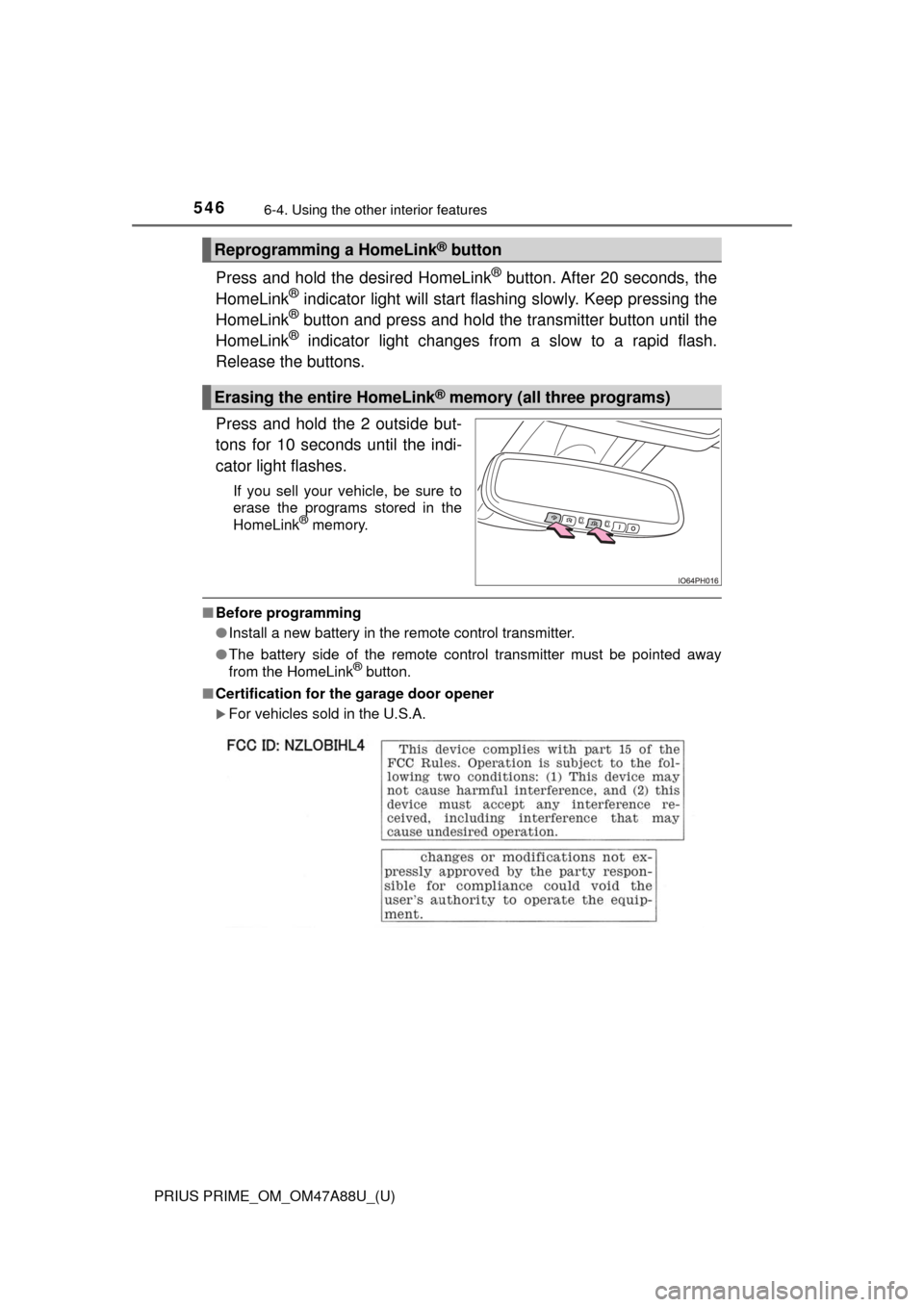
Press and hold the 2 outside but-
tons for 10 seconds until the indi-
cator light flashes.
If you sell your vehicle, be sure to
erase the programs stored in the
HomeLink
® memory.
■ Before programming
●Install a new battery in the remote control transmitter.
● The battery side of the remote control transmitter must be pointed away
from the HomeLink
® button.
■ Certification for the garage door opener
For vehicles sold in the U.S.A.
Reprogramming a HomeLink® button
Erasing the entire HomeLink® memory (all three programs)
Page 588 of 784
588
PRIUS PRIME_OM_OM47A88U_(U)
7-3. Do-it-yourself maintenance
■After recharging/reconnect ing the 12-volt battery
● Unlocking the doors using the smart key system may not be possible imme-
diately after reconnecting the 12-volt battery. If this happens, use the wire-
less remote control or the mechanical key to lock/unlock the doors.
● Start the hybrid system with the power switch in ACCESSORY mode. The
hybrid system may not start with the power switch turned off. However, the
hybrid system will operate normally from the second attempt.
● The power switch mode is recorded by the vehicle. If the 12-volt battery is
reconnected, the vehicle will return the power switch mode to the status it
was in before the 12-volt battery was disconnected. Make sure to turn off
the power before disconnect the 12-volt battery. Take extra care when con-
necting the 12-volt battery if the power switch mode prior to discharge is
unknown.
If the system will not start even after multiple attempts at all methods above,
contact your Toyota dealer.
WARNING
■ Chemicals in the 12-volt battery
The 12-volt battery contains poisonous and corrosive sulfuric acid and may
produce hydrogen gas which is flammable and explosive. To reduce the risk
of death or serious injury, take the following precautions while working on or
near the 12-volt battery:
● Do not cause sparks by touching the 12-volt battery terminals with tools.
● Do not smoke or light a match near the 12-volt battery.
● Avoid contact with eyes, skin and clothes.
● Never inhale or swallow electrolyte.
● Wear protective safety glasses when working near the 12-volt battery.
● Keep children away from the 12-volt battery.
■ Where to safely charge the 12-volt battery
Always charge the 12-volt battery in an open area. Do not charge the
12-volt battery in a garage or closed room where there is insufficient ventila-
tion.
■ How to recharge th e 12-volt battery
Only perform a slow charge (5 A or less). The 12-volt battery may explode if
charged at a quicker rate.
Page 690 of 784
690
PRIUS PRIME_OM_OM47A88U_(U)
8-2. Steps to take in an emergency
If the electronic key does not operate
properly
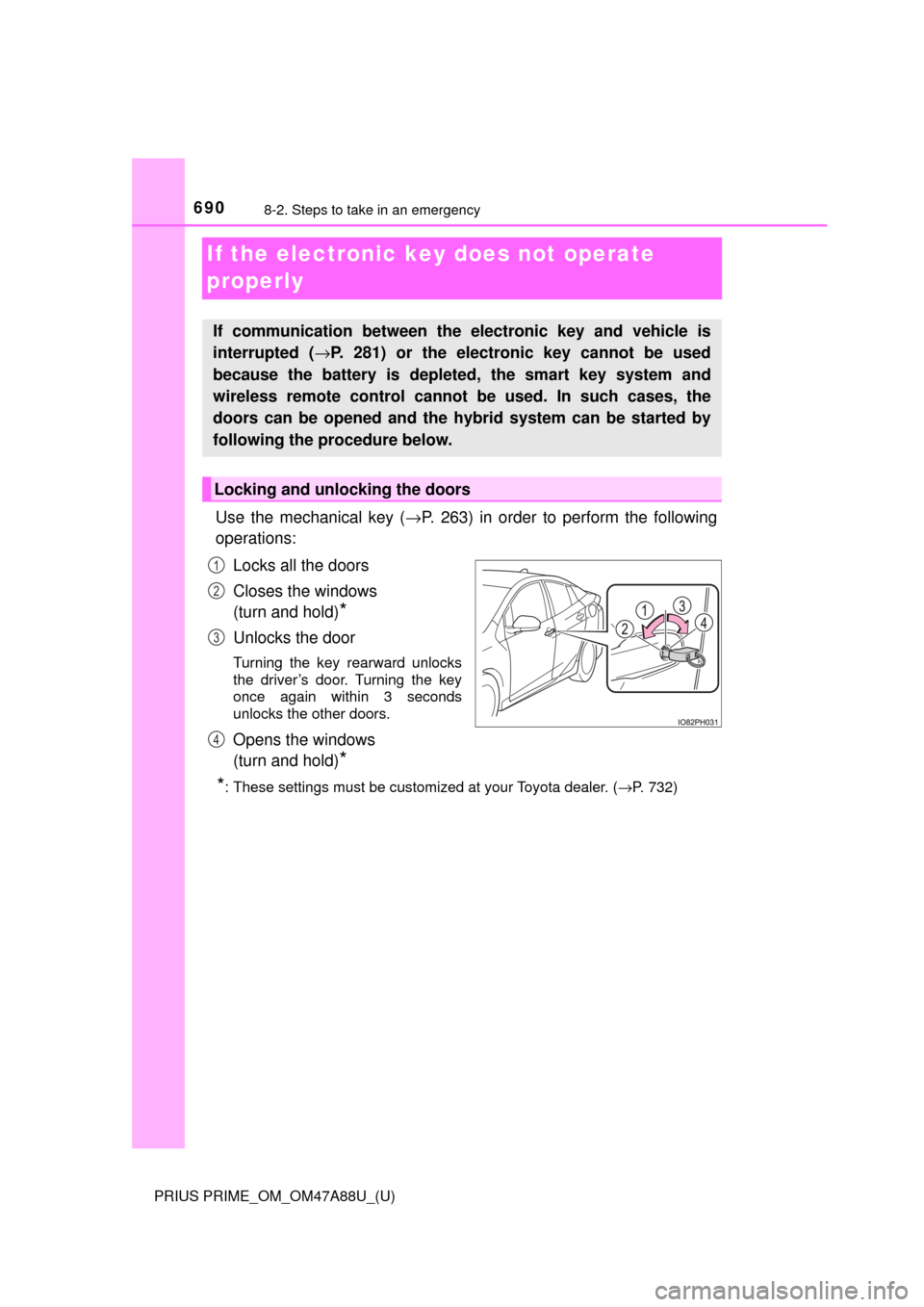
Use the mechanical key (→P. 263) in order to perform the following
operations:
Locks all the doors
Closes the windows
(turn and hold)
*
Unlocks the door
Turning the key rearward unlocks
the driver’s door. Turning the key
once again within 3 seconds
unlocks the other doors.
Opens the windows
(turn and hold)
*
*
: These settings must be customized at your Toyota dealer. ( →P. 732)
If communication between the electronic key and vehicle is
interrupted ( →P. 281) or the electronic key cannot be used
because the battery is depleted, the smart key system and
wireless remote control cannot be used. In such cases, the
doors can be opened and the hybrid system can be started by
following the procedure below.
Locking and unlocking the doors
1
2
3
4
Page 697 of 784

6978-2. Steps to take in an emergency
PRIUS PRIME_OM_OM47A88U_(U)
8
When trouble arises
■When recharging or repl acing the 12-volt battery
● In some cases, it may not be possible to unlock the doors using the smart
key system when the 12-volt battery is discharged. Use the wireless remote
control or the mechanical key to lock or unlock the doors.
● The hybrid system may not start on the first attempt after the 12-volt battery
has recharged but will start normally after the second attempt. This is not a
malfunction.
● Vehicles with smart lid & connector locking system:
It may be impossible to unlock the charging port lid or locking and unlocking
the charging connector immediately after the 12-volt battery is reconnected.
In this case, carry the electronic key on your person and operate the
charging port lid or charging connector lock switch again.
● The power switch mode is memorized by the vehicle. When the 12-volt bat-
tery is reconnected, the system will return to the mode it was in before the
12-volt battery was discharged. Before disconnecting the 12-volt battery,
turn the power switch off.
If you are unsure what mode the power switch was in before the 12-volt bat-
tery discharged, be especially careful when reconnecting the 12-volt battery.
● If the 12-volt battery discharges while the shift position is in P, it may not be
possible to shift the shift position to other positions. In this case, the vehicle
cannot be towed without lifting both front wheels because the front whee\
ls
will be locked. ( →P. 646)
■ When exchanging the 12-volt battery
●Use a 12-volt battery that conforms to European regulations.
● Use a 12-volt battery that the case size is same as the previous one (LN1),
20 hour rate capacity (20HR) is equivalent (45Ah) or greater, and perfor-
mance rating (CCA) is equivalent (295A) or greater.
• If the sizes differ, the 12-volt battery cannot be properly secured.
• If the 20 hour rate capacity is low, even if the time period where the vehi-
cle is not used is a short time, the 12-volt battery may discharge and the
hybrid system may not be able to start.
● For details, consult your Toyota dealer.
Page 773 of 784
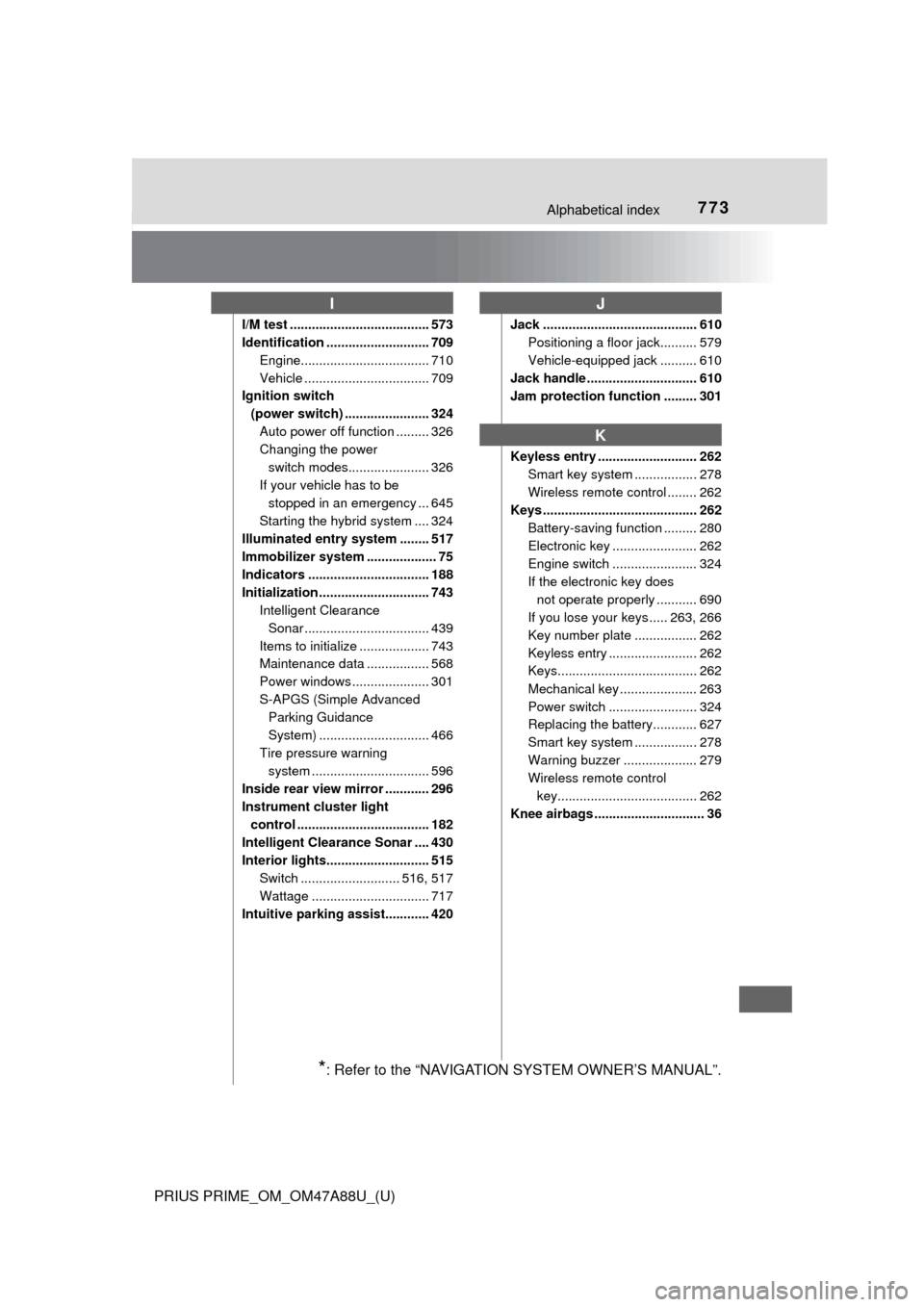
773Alphabetical index
PRIUS PRIME_OM_OM47A88U_(U)
I/M test ...................................... 573
Identification ............................ 709Engine................................... 710
Vehicle .................................. 709
Ignition switch
(power switch) ....................... 324 Auto power off function ......... 326
Changing the power switch modes...................... 326
If your vehicle has to be stopped in an emergency ... 645
Starting the hybrid system .... 324
Illuminated entry system ........ 517
Immobilizer system ................... 75
Indicators ................................. 188
Initialization .............................. 743 Intelligent Clearance
Sonar .................................. 439
Items to initialize ................... 743
Maintenance data ................. 568
Power windows ..................... 301
S-APGS (Simple Advanced Parking Guidance
System) .............................. 466
Tire pressure warning system ......... ....................... 596
Inside rear view mirror ............ 296
Instrument cluster light
control .................................... 182
Intelligent Clearance Sonar .... 430
Interior lights............................ 515
Switch ........................... 516, 517
Wattage ................................ 717
Intuitive parking assist............ 420 Jack .......................................... 610
Positioning a floor jack.......... 579
Vehicle-equipped jack .......... 610
Jack handle .............................. 610
Jam protection function ......... 301
Keyless entry ........................... 262 Smart key system ................. 278
Wireless remote control ........ 262
Keys .......................................... 262
Battery-saving function ......... 280
Electronic key ....................... 262
Engine switch ....................... 324
If the electronic key does not operate properly ........... 690
If you lose your keys ..... 263, 266
Key number plate ................. 262
Keyless entry ........................ 262
Keys...................................... 262
Mechanical key ..................... 263
Power switch ........................ 324
Replacing the battery............ 627
Smart key system ................. 278
Warning buzzer .................... 279
Wireless remote control key...................................... 262
Knee airbags .............................. 36
IJ
K
*: Refer to the “NAVIGATION SYSTEM OWNER’S MANUAL”.
Page 776 of 784

776Alphabetical index
PRIUS PRIME_OM_OM47A88U_(U)
Power control unit coolant ..... 584Capacity ................................ 714
Checking ............................... 584
Preparing and checking before winter....................... 482
Radiator ................................ 586
Power outlets ........................... 531
Power sources ......................... 122
Power steering (Electric Power Steering system) ....... 477 Function ................................ 477
Warning light ......................... 654
Power switch............................ 324 Auto power off function ......... 326
Changing the power
switch modes...................... 326
If your vehicle has to be
stopped in an emergency ... 645
Starting the hybrid system .... 324
Power windows........................ 300
Catch protection function ...... 301
Door lock linked window operation ............................ 302
Jam protection function......... 301
Operation .............................. 300
Window lock switch............... 300
Pre-Collision System (PCS) .... 369
Enabling/disabling the system ......... ....................... 373
Function ................................ 369
Warning light ......................... 654 Radar cruise control
(dynamic radar cruise
control with full-speed
range) ..................................... 391
Radiator .................................... 586
Radio
*
Rear passengers’ seat belt reminder light ........................ 656
Rear seat .................................. 289
Rear side marker lights........... 338 Light switch ........................... 338
Replacing light bulbs ............ 640
Rear turn signal lights ............ 336 Replacing light bulbs ............ 640
Turn signal lever ................... 336
Rear view mirror Inside rear view mirror .......... 296
Outside rear view mirrors ..... 298
Rear view monitor system
*
Rear window defogger .... 491, 502
Refueling .................................. 356 Capacity................................ 710
Fuel types ............................. 710
Opening the fuel tank cap..... 358
When the fuel filler door cannot be opened .............. 359
Regenerative braking ................ 86
Remote Air Conditioning
System ................................... 509
Replacing
Electronic key battery ........... 627
Fuses .................................... 630
Light bulbs ............................ 635
Tires...................................... 609
Wiper rubber ......................... 624
Reporting safety defects
for U.S. owners...................... 746
Resetting the message indicating maintenance is
required.................................. 568
Road accident cautions ............ 94
R
Page 778 of 784

778Alphabetical index
PRIUS PRIME_OM_OM47A88U_(U)
Smart key system .................... 278Antenna location ................... 278
Entry functions ...................... 267
Starting the hybrid system .... 324
Smart lid & connector
locking system ...................... 113
Snow tires ................................ 482
“SOS” button ........................... 548
Spark plug ................................ 714
Specifications .......................... 708
Speedometer ............................ 196
SRS airbags ............................... 36
Steering wheel ......................... 294 Adjustment ............................ 294
Audio switches
*
Heated steering wheel .......... 514
Meter control switches .......... 181
Talk switch
*
Telephone switches*
TRIP switch........................... 181
Stop lights Replacing light bulbs............. 640
Storage feature ........................ 518
Storage precautions ................ 518
Stuck
If the vehicle becomes stuck ................................... 705
Sun visors ................................ 530
Switch Audio remote control switches
*
Automatic High Beam
switch ................................. 343
Cruise control switch............. 391
Door lock switches ................ 269
Driving mode select switch ... 406
Emergency flashers switch ... 644
Engine switch........................ 324
EV auto mode switch .............. 82
EV/HV mode selection
switch ................................... 82
Fog light switch ..................... 348 Fuel filler door opener
switch ................................. 358
Garage door opener switches ............................. 541
Heated steering wheel
switch ................................. 514
“HUD” (Head-up display) switch ................................. 240
Ignition switch ....................... 324
LDA (Lane Departure Alert with steering control)
switch ................................. 384
Light switch ........................... 338
Meter control switches .......... 181
Outside rear view mirror switches ............................. 298
Power door lock switches ..... 269
Power switch ........................ 324
Power window switch ........... 300
Rear window and outside
rear view mirror
defoggers switch ........ 491, 502
S-APGS switch ..................... 445
Seat heater switches ............ 514
“SOS” button......................... 548
Talk switch
*
Telephone switches*
TRIP switch .......................... 181
Vehicle-to-vehicle distance switch ................................. 398
VSC OFF switch ................... 477
Window lock switch .............. 300
Windshield wipers and washer switch..................... 350
Wireless charger power supply switch ...................... 532