ECO mode TOYOTA PRIUS PRIME 2017 2.G Owner's Manual
[x] Cancel search | Manufacturer: TOYOTA, Model Year: 2017, Model line: PRIUS PRIME, Model: TOYOTA PRIUS PRIME 2017 2.GPages: 784, PDF Size: 14.98 MB
Page 173 of 784
PRIUS PRIME_OM_OM47A88U_(U)
1732-2. Charging
2
Plug-in hybrid system
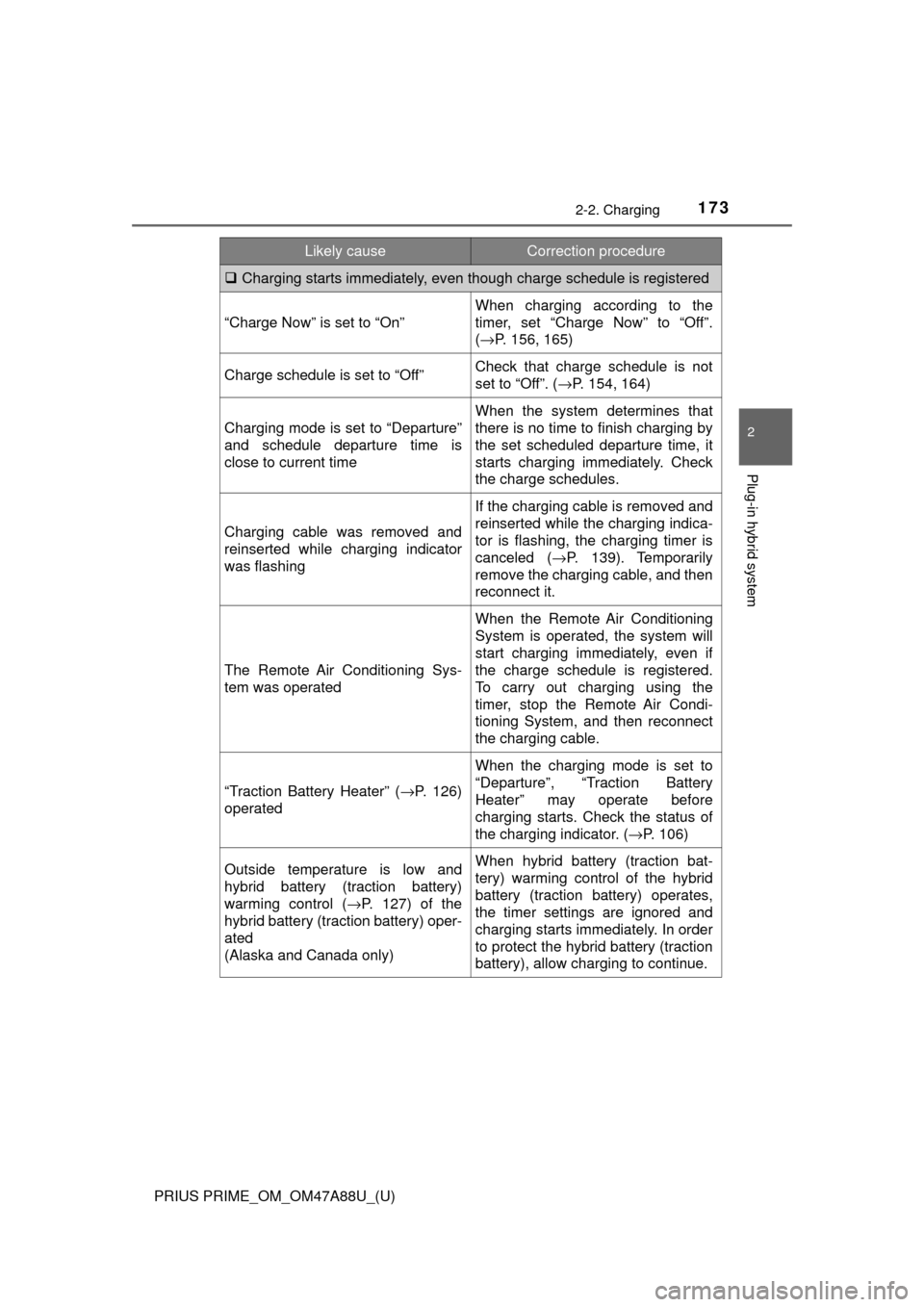
Charging starts immediately, even though charge schedule is registered
“Charge Now” is set to “On”
When charging according to the
timer, set “Charge Now” to “Off”.
(→ P. 156, 165)
Charge schedule is set to “Off”Check that charge schedule is not
set to “Off”. (→P. 154, 164)
Charging mode is set to “Departure”
and schedule departure time is
close to current time
When the system determines that
there is no time to finish charging by
the set scheduled departure time, it
starts charging immediately. Check
the charge schedules.
Charging cable was removed and
reinserted while charging indicator
was flashing
If the charging cable is removed and
reinserted while the charging indica-
tor is flashing, the charging timer is
canceled ( →P. 139). Temporarily
remove the charging cable, and then
reconnect it.
The Remote Air Conditioning Sys-
tem was operated
When the Remote Air Conditioning
System is operated, the system will
start charging immediately, even if
the charge schedule is registered.
To carry out charging using the
timer, stop the Remote Air Condi-
tioning System, and then reconnect
the charging cable.
“Traction Battery Heater” ( →P. 126)
operated
When the charging mode is set to
“Departure”, “Traction Battery
Heater” may operate before
charging starts. Check the status of
the charging indicator. ( →P. 106)
Outside temperature is low and
hybrid battery (traction battery)
warming control (→P. 127) of the
hybrid battery (traction battery) oper-
ated
(Alaska and Canada only)When hybrid battery (traction bat-
tery) warming control of the hybrid
battery (traction battery) operates,
the timer settings are ignored and
charging starts immediately. In order
to protect the hybrid battery (traction
battery), allow charging to continue.
Likely causeCorrection procedure
Page 186 of 784
186
PRIUS PRIME_OM_OM47A88U_(U)
3. Instrument cluster
■The meters and display illuminate when
The power switch is in ON mode.
■ Adjusting the instrument cluster brightness (→P. 182)
● The brightness levels that can be selected differ depending on whether the
tail lights are on and surrounding brightness levels, as shown in the table
below.
*: 22 levels of the brightness are displayed on the setting screen. However,
the brightness setting will be the brightest when other than 1st level (the
darkest) is selected. If other than 1st or 22nd level is selected, when the
tail lights are turned on in a dark place, the instrument cluster brightness
setting will be the selected level.
● If the taillights are illuminated in a dark environment, the instrument cluster
light dims. However, when the brightness of the instrument cluster is set to
minimum or maximum (1st or 22nd level of the instrument cluster bright-
ness), even if the taillights are illuminated, the instrument cluster light will
not dim.
■ When disconnecting and reconnect ing 12-volt battery terminals
The settings of the clock will be reset.
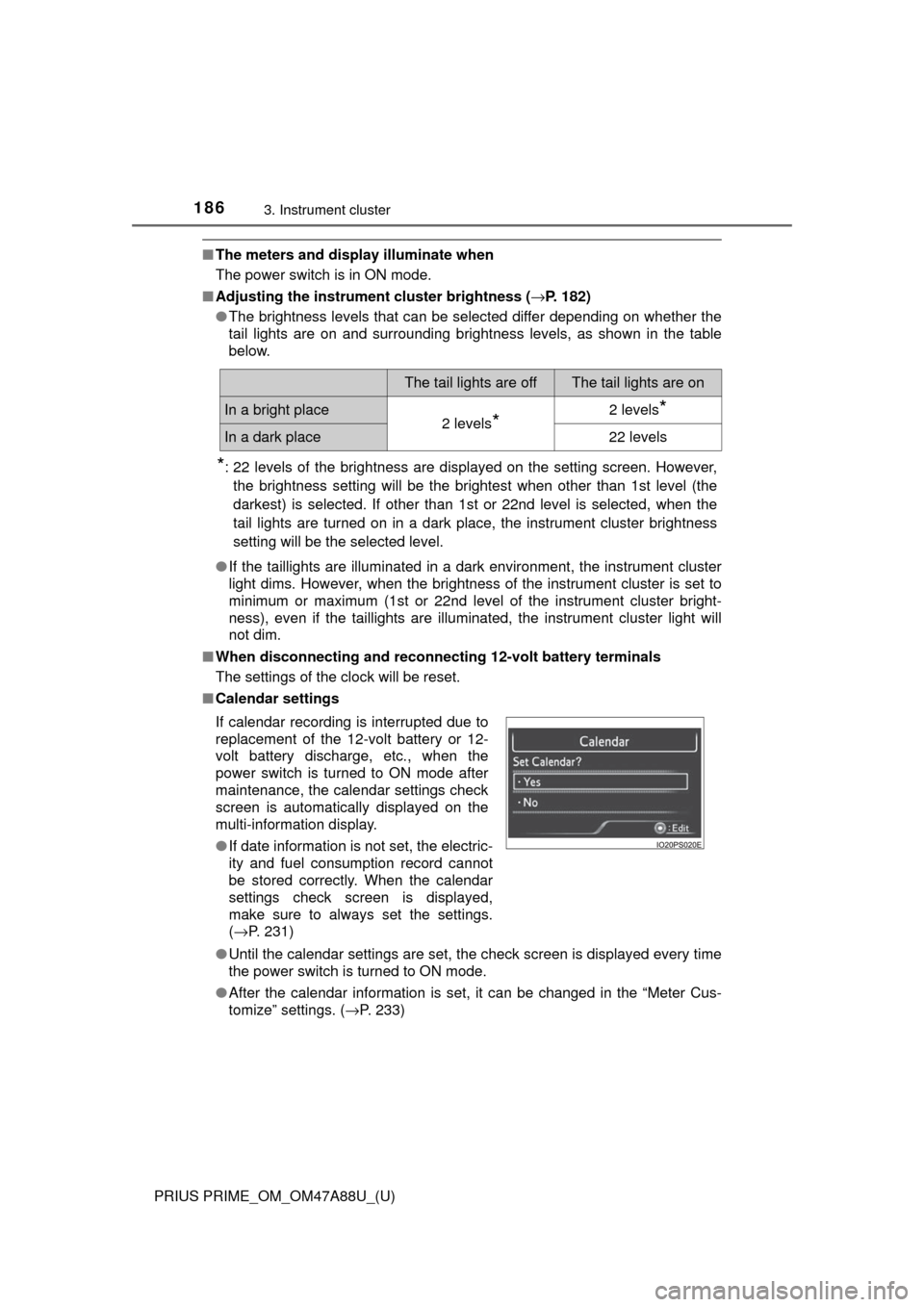
■ Calendar settings
●Until the calendar settings are set, the check screen is displayed every time
the power switch is turned to ON mode.
● After the calendar information is set, it can be changed in the “Meter Cus-
tomize” settings. ( →P. 233)
The tail lights are offThe tail lights are on
In a bright place2 levels*2 levels*
In a dark place22 levels
If calendar recording is interrupted due to
replacement of the 12-volt battery or 12-
volt battery discharge, etc., when the
power switch is turned to ON mode after
maintenance, the calendar settings check
screen is automatically displayed on the
multi-information display.
● If date information is not set, the electric-
ity and fuel consumption record cannot
be stored correctly. When the calendar
settings check screen is displayed,
make sure to always set the settings.
(→P. 231)
Page 190 of 784
190
PRIUS PRIME_OM_OM47A88U_(U)
3. Instrument cluster
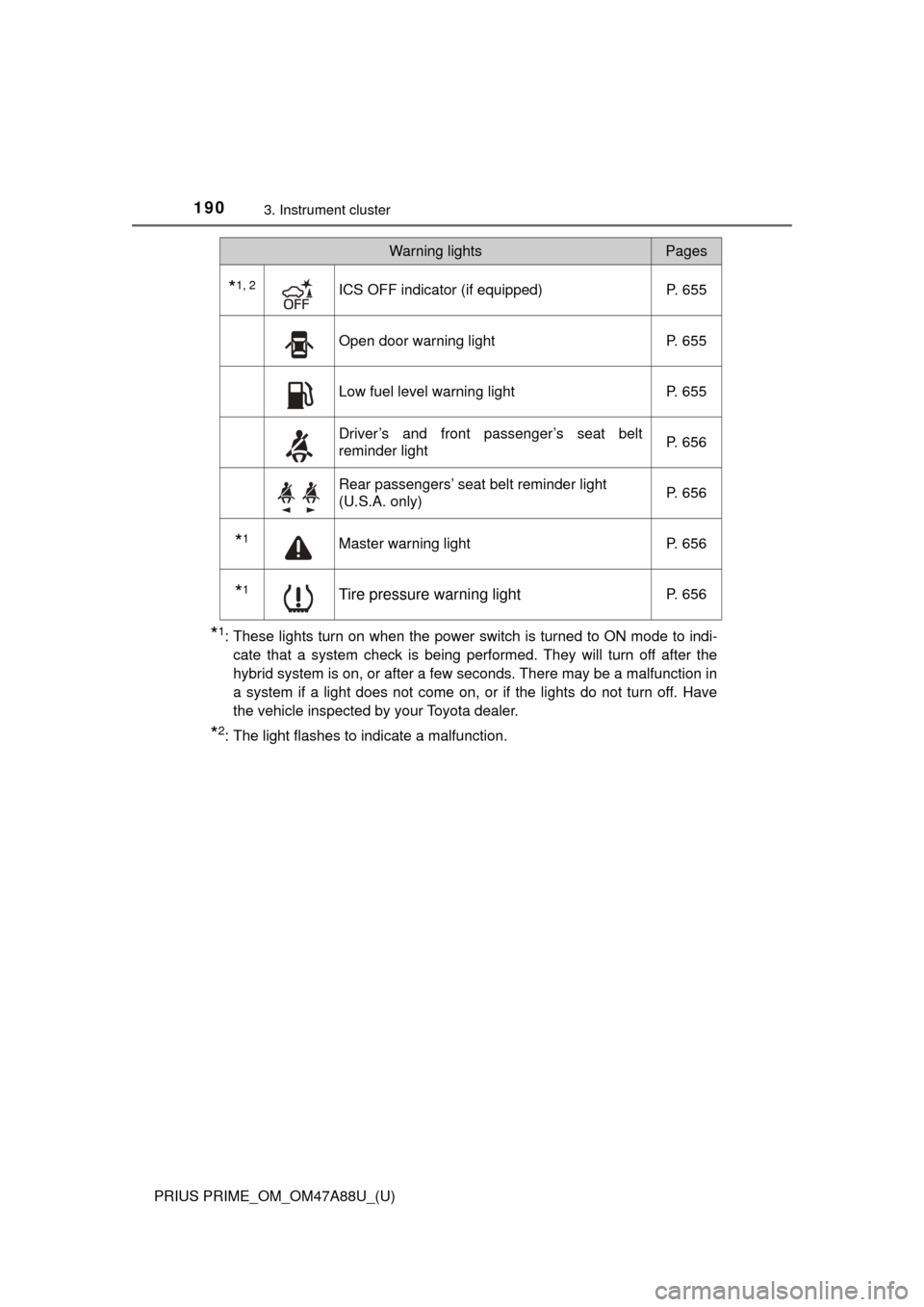
*1: These lights turn on when the power switch is turned to ON mode to indi-cate that a system check is being performed. They will turn off after the
hybrid system is on, or after a few seconds. There may be a malfunction in
a system if a light does not come on, or if the lights do not turn off. Have
the vehicle inspected by your Toyota dealer.
*2: The light flashes to indicate a malfunction.
*1, 2ICS OFF indicator (if equipped) P. 655
Open door warning lightP. 655
Low fuel level warning lightP. 655
Driver’s and front passenger’s seat belt
reminder lightP. 656
Rear passengers’ seat belt reminder light
(U.S.A. only)
P. 656
*1Master warning light
P. 656
*1Tire pressure warning lightP. 656
Warning lightsPages
Page 192 of 784
192
PRIUS PRIME_OM_OM47A88U_(U)
3. Instrument cluster
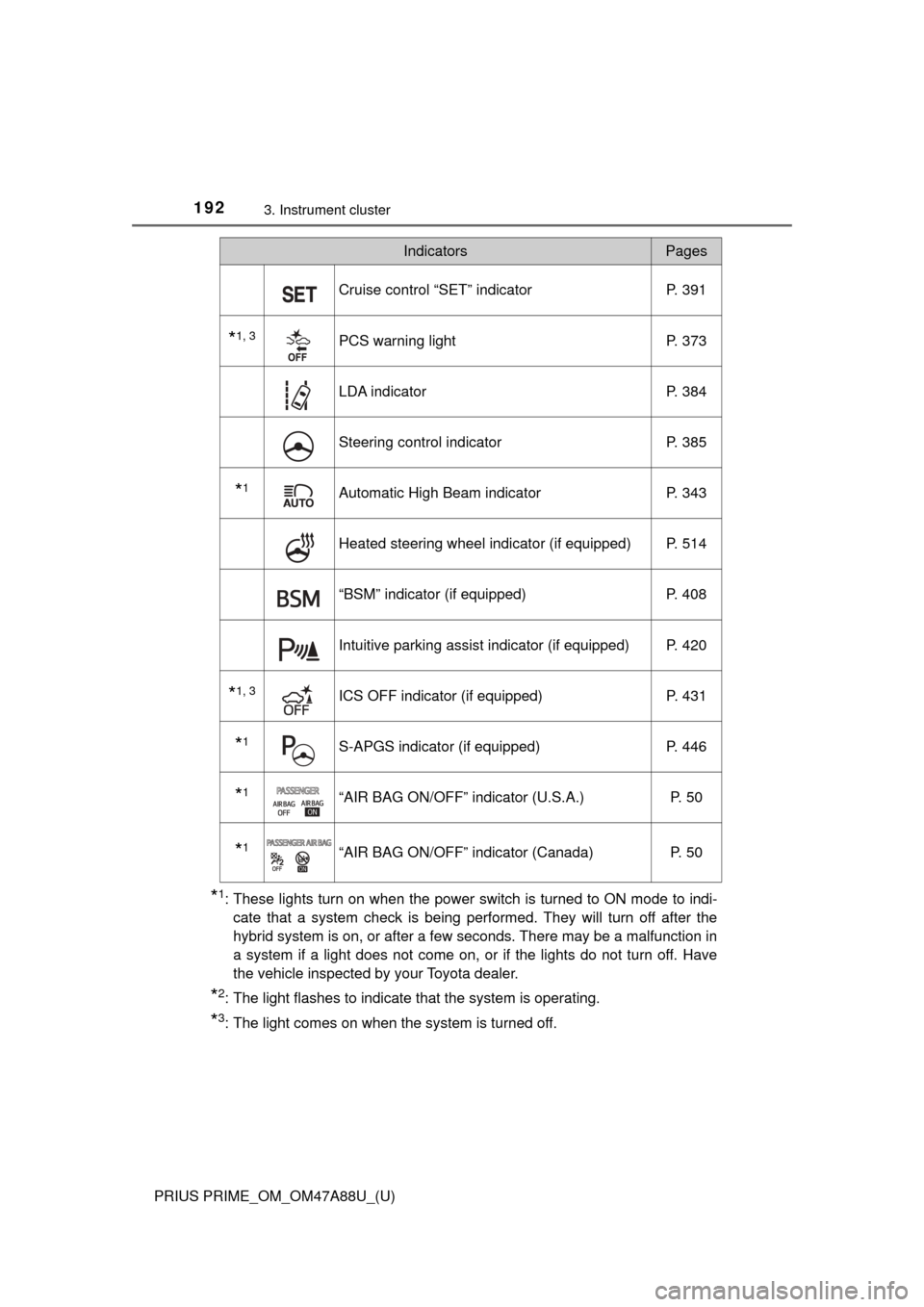
*1: These lights turn on when the power switch is turned to ON mode to indi-cate that a system check is being performed. They will turn off after the
hybrid system is on, or after a few seconds. There may be a malfunction in
a system if a light does not come on, or if the lights do not turn off. Have
the vehicle inspected by your Toyota dealer.
*2: The light flashes to indicate that the system is operating.
*3: The light comes on when the system is turned off.
Cruise control “SET” indicator P. 391
*1, 3PCS warning lightP. 373
LDA indicator P. 384
Steering control indicatorP. 385
*1Automatic High Beam indicatorP. 343
Heated steering wheel indicator (if equipped) P. 514
“BSM” indicator (if equipped)P. 408
Intuitive parking assist indicator (if equipped) P. 420
*1, 3ICS OFF indicator (if equipped) P. 431
*1S-APGS indicator (if equipped)P. 446
*1“AIR BAG ON/OFF” indicator (U.S.A.) P. 50
*1“AIR BAG ON/OFF” indicator (Canada)P. 50
IndicatorsPages
Page 193 of 784
PRIUS PRIME_OM_OM47A88U_(U)
1933. Instrument cluster
3
Instrument cluster
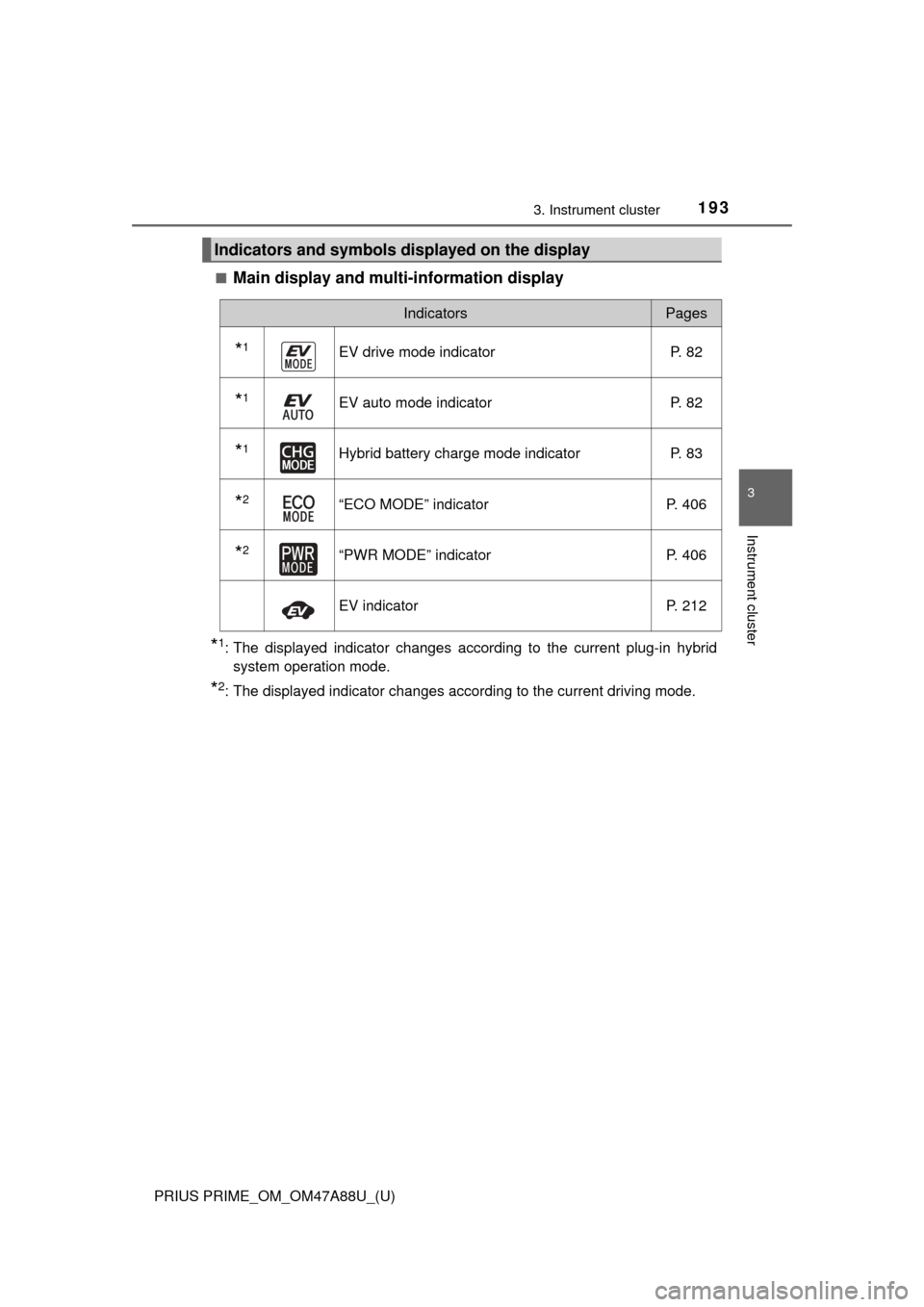
■Main display and multi-information display
*1: The displayed indicator changes according to the current plug-in hybridsystem operation mode.
*2: The displayed indicator changes according to the current driving mode.
Indicators and symbols displayed on the display
IndicatorsPages
*1EV drive mode indicator P. 82
*1EV auto mode indicator P. 82
*1Hybrid battery charge mode indicator P. 83
*2“ECO MODE” indicatorP. 406
*2“PWR MODE” indicatorP. 406
EV indicatorP. 212
Page 195 of 784
PRIUS PRIME_OM_OM47A88U_(U)
1953. Instrument cluster
3
Instrument cluster
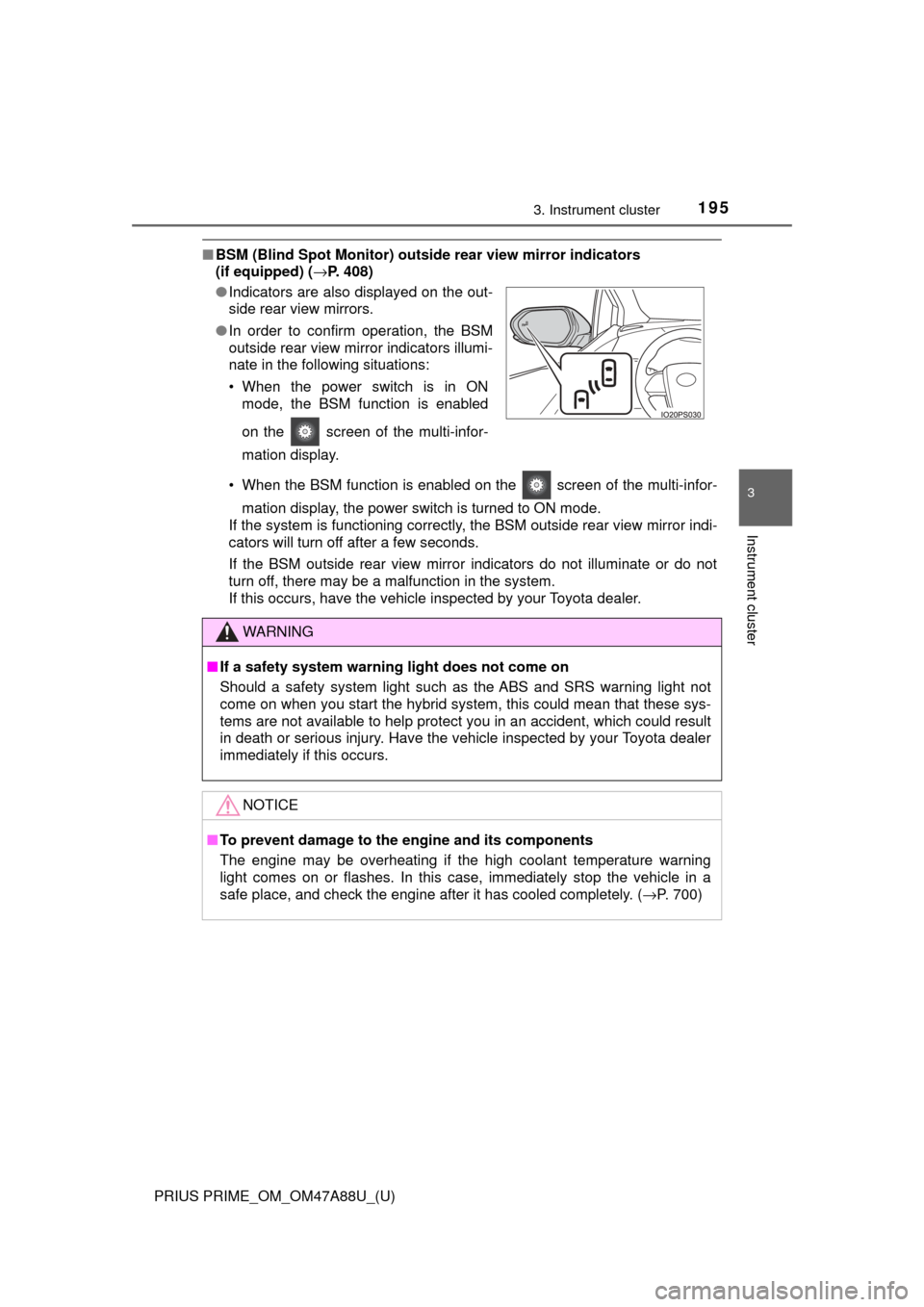
■BSM (Blind Spot Monitor) outsid e rear view mirror indicators
(if equipped) ( →P. 408)
• When the BSM function is enabled on the screen of the multi-infor- mation display, the power switch is turned to ON mode.
If the system is functioning correctly, the BSM outside rear view mirror indi-
cators will turn off after a few seconds.
If the BSM outside rear view mirror indicators do not illuminate or do not
turn off, there may be a malfunction in the system.
If this occurs, have the vehicle inspected by your Toyota dealer.
●
Indicators are also displayed on the out-
side rear view mirrors.
● In order to confirm operation, the BSM
outside rear view mirror indicators illumi-
nate in the following situations:
• When the power switch is in ON
mode, the BSM function is enabled
on the screen of the multi-infor-
mation display.
WARNING
■If a safety system warning light does not come on
Should a safety system light such as the ABS and SRS warning light not
come on when you start the hybrid system, this could mean that these sys-
tems are not available to help protect you in an accident, which could r\
esult
in death or serious injury. Have the vehicle inspected by your Toyota dealer
immediately if this occurs.
NOTICE
■To prevent damage to the engine and its components
The engine may be overheating if the high coolant temperature warning
light comes on or flashes. In this case, immediately stop the vehicle in a
safe place, and check the engine after it has cooled completely. ( →P. 700)
Page 204 of 784
204
PRIUS PRIME_OM_OM47A88U_(U)
3. Instrument cluster
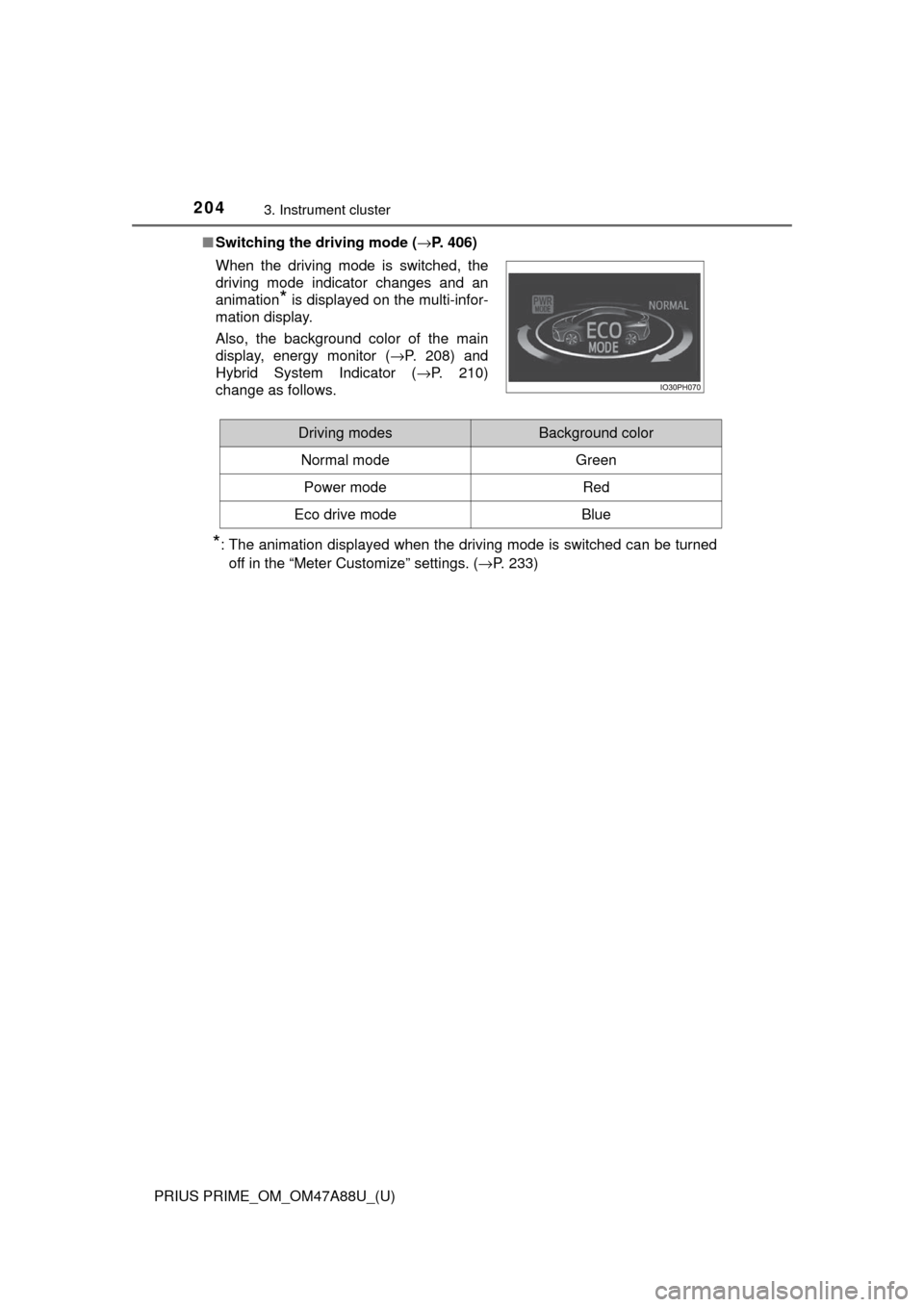
■Switching the driving mode ( →P. 406)
*: The animation displayed when the driving mode is switched can be turned
off in the “Meter Customize” settings. ( →P. 233)
When the driving mode is switched, the
driving mode indicator changes and an
animation
* is displayed on the multi-infor-
mation display.
Also, the background color of the main
display, energy monitor ( →P. 208) and
Hybrid System Indicator ( →P. 210)
change as follows.
Driving modesBackground color
Normal mode Green
Power modeRed
Eco drive modeBlue
Page 210 of 784
210
PRIUS PRIME_OM_OM47A88U_(U)
3. Instrument cluster
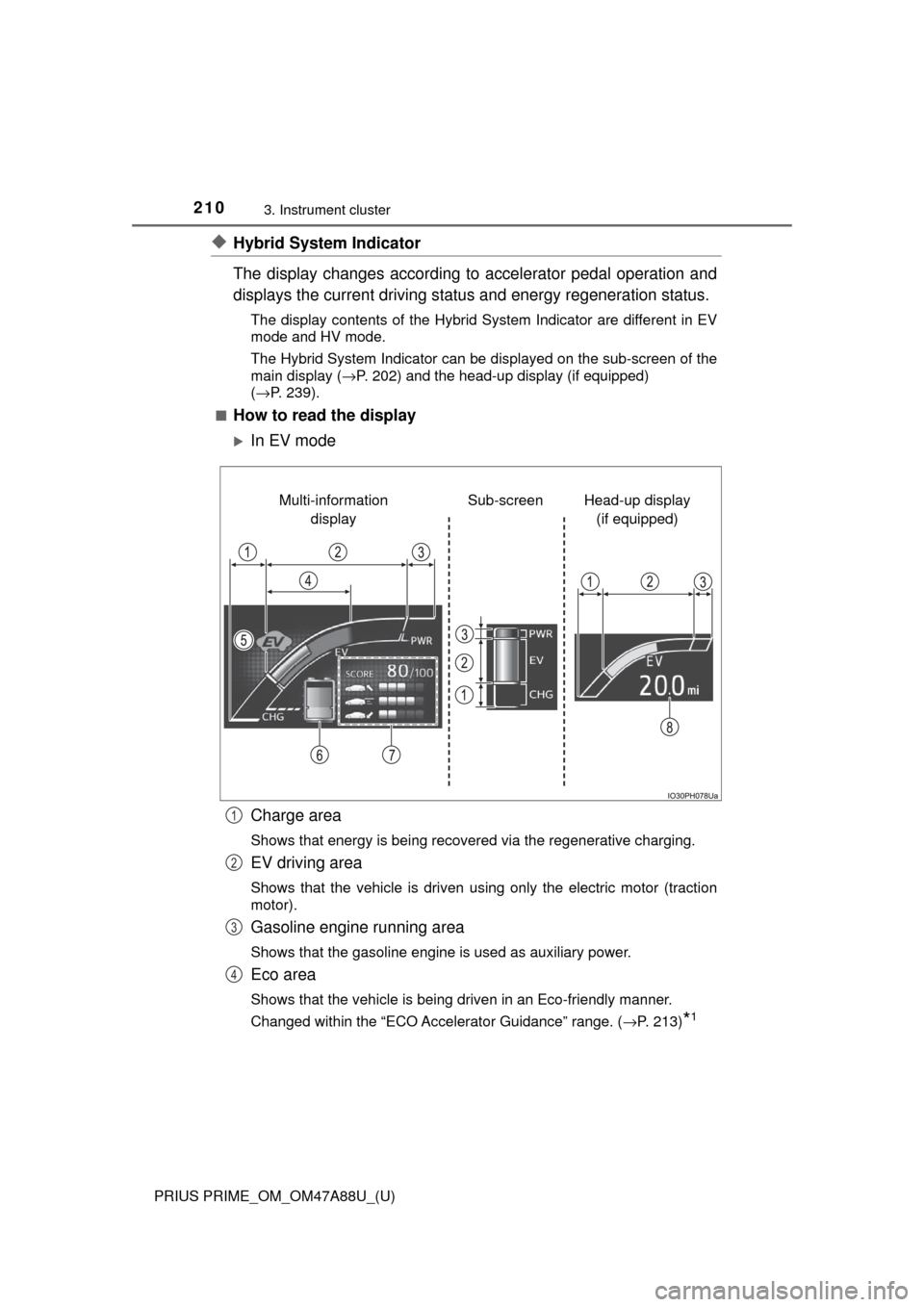
◆Hybrid System Indicator
The display changes according to accelerator pedal operation and
displays the current driving status and energy regeneration status.
The display contents of the Hybrid System Indicator are different in EV
mode and HV mode.
The Hybrid System Indicator can be displayed on the sub-screen of the
main display (→P. 202) and the head-up display (if equipped)
( →P. 239).
■
How to read the display
In EV mode
Charge area
Shows that energy is being recovered via the regenerative charging.
EV driving area
Shows that the vehicle is driven using only the electric motor (traction
motor).
Gasoline engine running area
Shows that the gasoline engine is used as auxiliary power.
Eco area
Shows that the vehicle is being driven in an Eco-friendly manner.
Changed within the “ECO Accelerator Guidance” range. ( →P. 213)
*1
Head-up display
(if equipped)
Sub-screen
Multi-information
display
1
2
3
4
Page 212 of 784
212
PRIUS PRIME_OM_OM47A88U_(U)
3. Instrument cluster
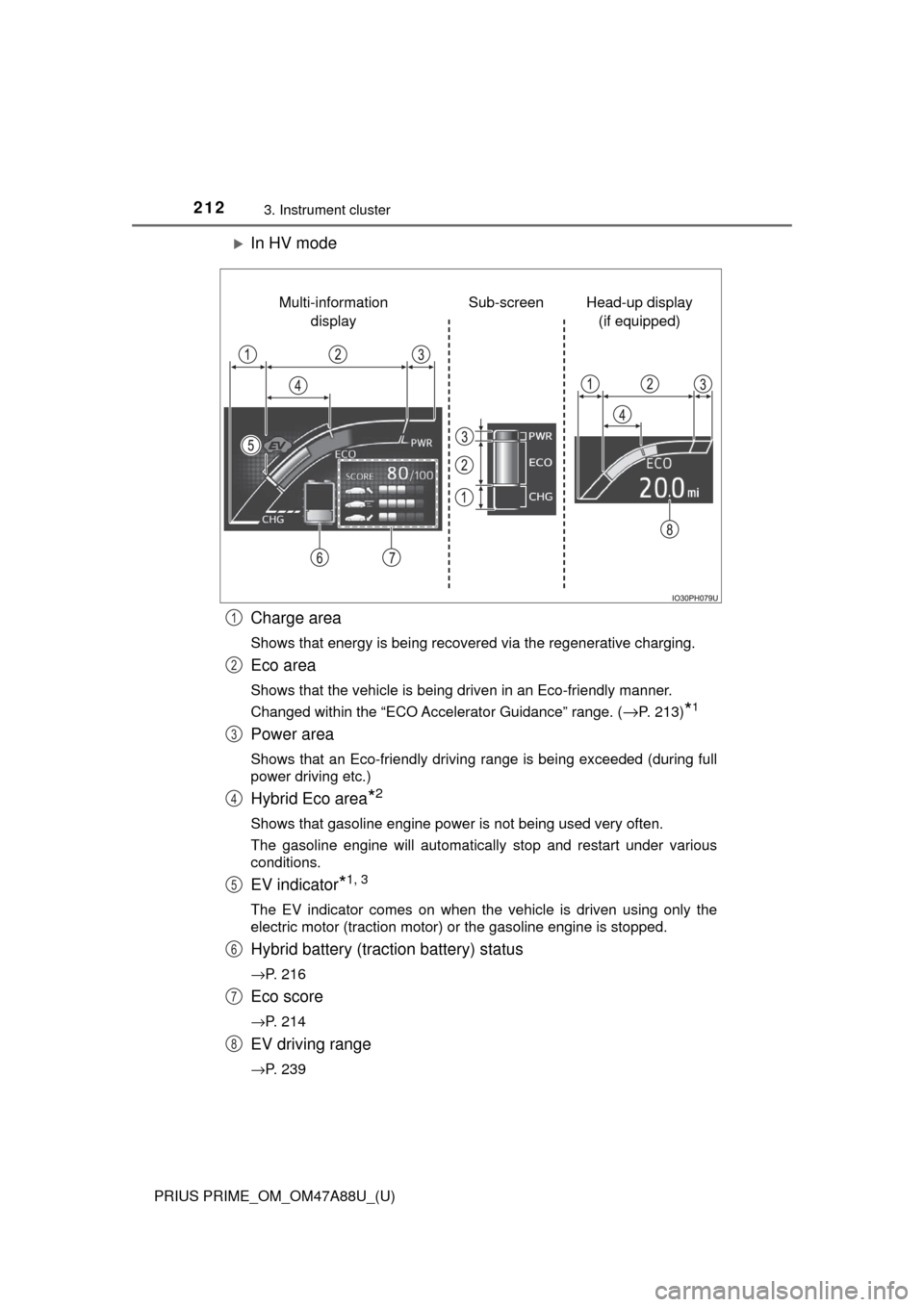
In HV mode
Charge area
Shows that energy is being recovered via the regenerative charging.
Eco area
Shows that the vehicle is being driven in an Eco-friendly manner.
Changed within the “ECO Accelerator Guidance” range. (
→P. 213)*1
Power area
Shows that an Eco-friendly driving range is being exceeded (during full
power driving etc.)
Hybrid Eco area*2
Shows that gasoline engine power is not being used very often.
The gasoline engine will automatically stop and restart under various
conditions.
EV indicator*1, 3
The EV indicator comes on when the vehicle is driven using only the
electric motor (traction motor) or the gasoline engine is stopped.
Hybrid battery (traction battery) status
→P. 216
Eco score
→P. 214
EV driving range
→P. 239
Head-up display (if equipped)
Sub-screen
Multi-information
display
1
2
3
4
5
6
7
8
Page 213 of 784
PRIUS PRIME_OM_OM47A88U_(U)
2133. Instrument cluster
3
Instrument cluster
●By keeping the indicator within Ec o area, more Eco-friendly driv-
ing can be achieved.
● Charge area indicates regeneration
*4 status. Regenerated
energy will be used to charge the hybrid battery (traction battery).
*1: Not displayed on the sub-screen or head-up display.
*2: Not displayed on the sub-screen.
*3: The EV indicator function can be turned off in the “Meter Customize”
settings. ( →P. 233)
*4: When used in this manual, “regeneration” refers to the conversion of
energy created by the movement of the vehicle into electrical energy.
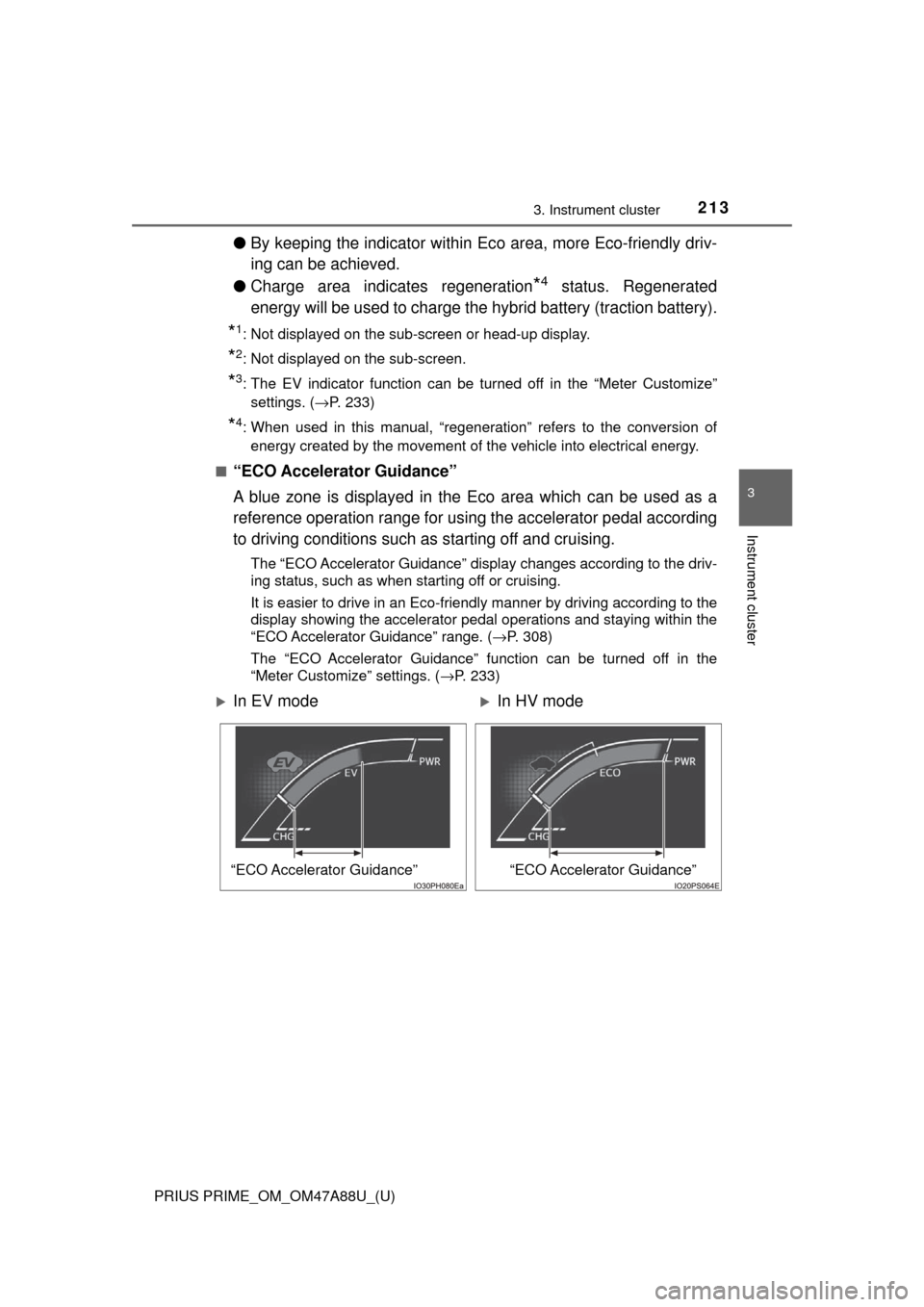
■
“ECO Accelerator Guidance”
A blue zone is displayed in the Eco area which can be used as a
reference operation range for using the accelerator pedal according
to driving conditions such as starting off and cruising.
The “ECO Accelerator Guidance” display changes according to the driv-
ing status, such as when starting off or cruising.
It is easier to drive in an Eco-friendly manner by driving according to the
display showing the accelerator pedal operations and staying within the
“ECO Accelerator Guidance” range. ( →P. 308)
The “ECO Accelerator Guidance” function can be turned off in the
“Meter Customize” settings. ( →P. 233)
In EV modeIn HV mode
“ECO Accelerator Guidance”“ECO Accelerator Guidance”