ESP TOYOTA PRIUS PRIME 2017 2.G Owner's Manual
[x] Cancel search | Manufacturer: TOYOTA, Model Year: 2017, Model line: PRIUS PRIME, Model: TOYOTA PRIUS PRIME 2017 2.GPages: 784, PDF Size: 14.98 MB
Page 302 of 784
302
PRIUS PRIME_OM_OM47A88U_(U)
4-5. Opening and closing the windows
■Door lock linked window operation
●The power windows can be opened and closed using the mechanical key.
*
(→P. 690)
● The power windows can be opened using the wireless remote control.
*
(→P. 268)
*: These settings must be customized at your Toyota dealer.
■ Power window open reminder function
The buzzer sounds and a message is shown on the multi-information display
in the instrument cluster when the power switch is turned off and the driver’s
door is opened with the power windows open.
■ Customization
Settings (e.g. linked door lock operation) can be changed.
(Customizable features: →P. 732)
WARNING
Observe the following precautions.
Failing to do so may result in death or serious injury.
■Closing the windows
● The driver is responsible for all the power window operations, including the
operation for the passengers. In order to prevent accidental operation,
especially by a child, do not let a child operate the power windows. It is
possible for children and other passengers to have body parts caught in
the power window. Also, when riding with a child, it is recommended to use
the window lock switch. ( →P. 300)
● When using the wireless remote control or mechanical key and operating
the power windows, operate the power window after checking to make
sure that there is no possibility of any passenger having any of their body
parts caught in the side window. Also do not let a child operate side win-
dow by the wireless remote control or mechanical key. It is possible for
children and other passengers to get caught in the power window.
● When exiting the vehicle, turn the power switch off, carry the key and exit
the vehicle along with the child. There may be accidental operation, due to
mischief, etc., that may possibly lead to an accident.
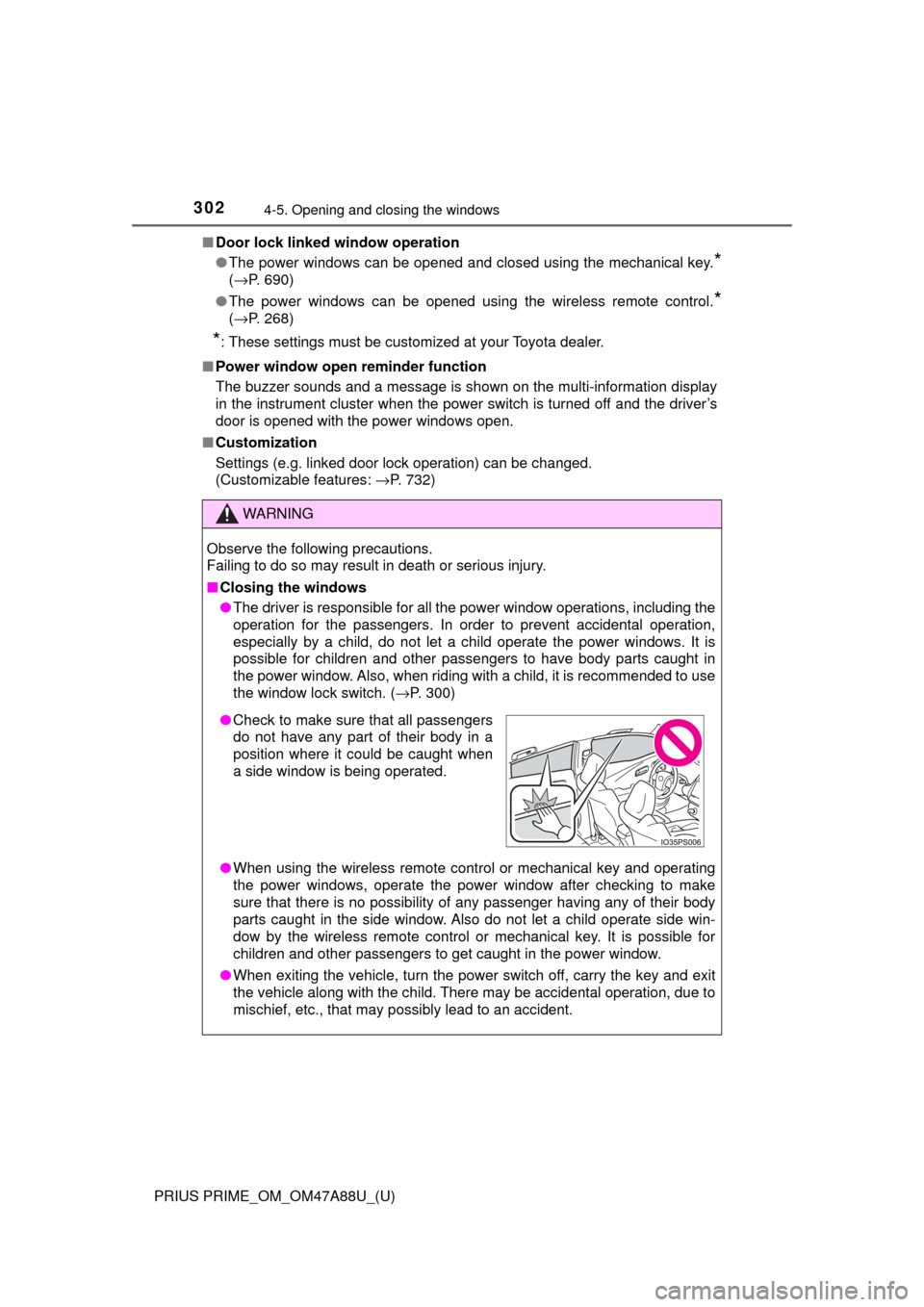
●Check to make sure that all passengers
do not have any part of their body in a
position where it could be caught when
a side window is being operated.
Page 307 of 784

PRIUS PRIME_OM_OM47A88U_(U)
3075-1. Before driving
5
Driving
Stop the vehicle completely.
Set the parking brake. (→P. 337)
Shift the shift position to P. ( →P. 331)
Check that the shift position indicator shows P.
Press the power switch to stop the hybrid system.
Slowly release the brake pedal.
Lock the door, making sure that you have the electronic key on your
person.
If parking on a hill, block the wheels as needed.
Firmly set the parking brake with the brake pedal depressed, and
then shift the shift position to D.
Release the brake pedal and gentl y depress the accelerator pedal.
Release the parking brake.
■ When starting off on an uphill
The hill-start assist control will activate. ( →P. 477)
■ For electricity-saving and fuel-efficient driving
Understand the system characteristics of the vehicle to use the functions of
the hybrid system. Also, keep in mind that hybrid vehicles are similar to con-
ventional vehicles, and it is necessary to refrain from activities such as sud-
den acceleration. Refer to “Plug-in hybrid vehicle driving tips” ( →P. 97).
■ Driving in the rain
●Drive carefully when it is raining, because visibility will be reduced, the win-
dows may become fogged-up, and the road will be slippery.
● Drive carefully when it starts to rain, because the road surface will be espe-
cially slippery.
● Refrain from high speeds when driving on an expressway in the rain,
because there may be a layer of water between the tires and the road sur-
face, preventing the steering and brakes from operating properly.
Parking the vehicle
Starting off on a steep uphill
1
2
3
4
5
6
1
2
3
Page 310 of 784

310
PRIUS PRIME_OM_OM47A88U_(U)
5-1. Before driving
WARNING
Observe the following precautions.
Failure to do so may result in death or serious injury.
■When starting the vehicle
Always keep your foot on the brake pedal while stopped with the “READY”
indicator is illuminated. This prevents the vehicle from creeping.
■ When driving the vehicle
● Do not drive if you are unfamiliar with the location of the brake and ac\
cel-
erator pedals to avoid depressing the wrong pedal.
• Accidentally depressing the accelerator pedal instead of the brake
pedal will result in sudden acceleration that may lead to an accident.
• When backing up, you may twist your body around, leading to a diffi- culty in operating the pedals. Make sure to operate the pedals properly.
• Make sure to keep a correct driving posture even when moving the vehicle only slightly. This allows you to depress the brake and accelera-
tor pedals properly.
• Depress the brake pedal using your right foot. Depressing the brake pedal using your left foot may delay response in an emergency, result-
ing in an accident.
● The driver should pay extra attention to pedestrians when the vehicle is
powered only by the electric motor (traction motor). As there is no engine
noise, the pedestrians may misjudge the vehicle’s movement. Even
though the vehicle is equipped with the vehicle proximity notification sys-
tem, drive with care as pedestrians in the vicinity may still not notice the
vehicle if the surrounding area is noisy.
● Do not drive the vehicle over or stop the vehicle near flammable materials.
The exhaust system and exhaust gases can be extremely hot. These hot
parts may cause a fire if there is any flammable material nearby.
● During normal driving, do not turn off the hybrid system. Turning the hybrid
system off while driving will not cause loss of steering or braking control,
however, power assist to the steering will be lost. This will make it more
difficult to steer smoothly, so you should pull over and stop the vehicle as
soon as it is safe to do so.
In the event of an emergency, such as if it becomes impossible to stop the
vehicle in the normal way: →P. 645
Page 361 of 784
361
PRIUS PRIME_OM_OM47A88U_(U)
5-5. Using the driving support systems
5
Driving
Toyota Safety Sense P
◆PCS (Pre-Collision System)
→P. 3 6 9
◆LDA (Lane Departure Alert with steering control)
→P. 3 8 1
◆Automatic High Beam
→P. 3 4 3
◆Dynamic radar cruise cont rol with full-speed range
→ P. 3 9 1
The Toyota Safety Sense P consists of the following drive assist
systems and contributes to a safe and comfortable driving expe-
rience:
WARNING
■Toyota Safety Sense P
The Toyota Safety Sense P is designed to operate under the assumption
that the driver will drive safely, and is designed to help reduce the impact to
the occupants and the vehicle in the case of a collision or assist the driver in
normal driving conditions.
As there is a limit to the degree of recognition accuracy and control perfor-
mance that this system can provide, do not overly rely on this system. The
driver is always responsible for paying attention to the vehicle’s surround-
ings and driving safely.
Page 362 of 784

362
PRIUS PRIME_OM_OM47A88U_(U)
5-5. Using the driving support systems
The pre-collision system is equipp ed with a sophisticated computer
that will record cert ain data, such as:
• Accelerator status
• Brake status
• Vehicle speed
• Operation status of the pre-collision system functions
• Information (such as the distanc e and relative speed between your
vehicle and the vehicle ahead or other objects)
• Images from the camera sensor (available only when the pre-colli-
sion braking function or the pre-collision brake assist function was
operating)
The pre-collision system does not record conversations, sounds or
images of the inside of the vehicle.
● Data usage
Toyota may use the data recorded in this computer to diagnose
malfunctions, conduct research and development, and improve
quality.
Toyota will not disclose the recor ded data to a third party except:
• With the consent of the vehicle owner or with the consent of the lessee if the vehicle is leased
• In response to an official request by the police, a court of law or a
government agency
• For use by Toyota in a lawsuit
• For research purposes where the data is not tied to a specific vehicle or vehicle owner
● Recorded images can be erased using a specialized device.
The image recording function can be disabled. However, if the func-
tion is disabled, data from when the pre-collision system operates
will not be available.
Vehicle data recording
Page 371 of 784
PRIUS PRIME_OM_OM47A88U_(U)
3715-5. Using the driving support systems
5
Driving
WARNING
■Limitations of the pre-collision system
● The driver is solely responsible for safe driving. Always drive safely, taking
care to observe your surroundings.
Do not use the pre-collision system instead of normal braking operations
under any circumstances. This system will not prevent collisions or lessen
collision damage or injury in every situation. Do not overly rely on this sys-
tem. Failure to do so may lead to an accident, resulting in death or serious
injury.
● Although this system is designed to help avoid a collision or help reduce
the impact of the collision, its effectiveness may change according to vari-
ous conditions, therefore the system may not always be able to achieve
the same level of performance.
Read the following conditions carefully. Do not overly rely on this system
and always drive carefully.
• Conditions under which the system may operate even if there is no pos-
sibility of a collision: →P. 375
• Conditions under which the system may not operate properly: →P. 377
● Do not attempt to test the operation of the pre-collision system yourself, as
the system may not operate properly, possibly leading to an accident.
■ Pre-collision braking
● When the pre-collision braking function is operating, a large amount of
braking force will be applied.
● If the vehicle is stopped by the operation of the pre-collision braking func-
tion, the pre-collision braking func tion operation will be canceled after
approximately 2 seconds. Depress the brake pedal as necessary.
● The pre-collision braking function may not operate if certain operations are
performed by the driver. If the accelerator pedal is being depressed
strongly or the steering wheel is being turned, the system may determine
that the driver is taking evasive action and possibly prevent the pre-colli-
sion braking function from operating.
● In some situations, while the pre-collision braking function is operating,
operation of the function may be canceled if the accelerator pedal is
depressed strongly or the steering wheel is turned and the system deter-
mines that the driver is taking evasive action.
● If the brake pedal is being depressed, the system may determine that the
driver is taking evasive action and possibly delay the operation timing of
the pre-collision braking function.
Page 383 of 784
PRIUS PRIME_OM_OM47A88U_(U)
3835-5. Using the driving support systems
5
Driving
WARNING
■Before using LDA system
Do not rely solely upon the LDA system. The LDA system does not auto-
matically drive the vehicle or reduce the amount of attention that must be
paid to the area in front of the vehicle. The driver must always assume full
responsibility for driving safely by paying careful attention to the surround-
ing conditions and operating the steering wheel to correct the path of the
vehicle. Also, the driver must take adequate breaks when fatigued, such as
from driving for a long period of time.
Failure to perform appropriate driving operations and pay careful attention
may lead to an accident, resulting in death or serious injury.
■ To avoid operating LDA system by mistake
When not using the LDA system, use the LDA switch to turn the system off.
■ Situations unsuitable for LDA system
Do not use the LDA system in the following situations.
The system may not operate properly and lead to an accident, resulting in
death or serious injury.
● Tire chains are equipped.
● When the tires have been excessively worn, or when the tire inflation pres-
sure is low.
● Tires which differ by structure, manufacturer, brand or tread pattern are
used.
● Objects or patterns that could be mistaken for white (yellow) lines are
present on the side of the road (guardrails, curbs, reflective poles etc.).
● Vehicle is driven on a snow-covered road.
● White (yellow) lines are difficult to see due to rain, snow, fog, dust, etc.
● Asphalt repair marks, white (yellow) line marks, etc., are present due to
road repair.
● Vehicle is driven in a temporary lane or restricted lane due to construction
work.
● Vehicle is driven on a road surface which is slippery due to rainy weather,
fallen snow, freezing, etc.
● Vehicle is driven in traffic lanes other than on highways and freeways.
● Vehicle is driven in a construction zone.
Page 392 of 784

392
PRIUS PRIME_OM_OM47A88U_(U)
5-5. Using the driving support systems
WARNING
■Before using dynamic radar cruise control with full-speed range
Driving safely is the sole responsibility of the driver. Do not rely solely on the
system, and drive safely by always paying careful attention to your sur-
roundings.
The dynamic radar cruise control wi th full-speed range provides driving
assistance to reduce the driver’s burden. However, there are limitations to
the assistance provided.
Even when the system is functioning normally, the condition of the preced-
ing vehicle as detected by the system may differ from the condition
observed by the driver. Therefore, th e driver must always remain alert,
assess the danger of each situation and drive safely. Relying on this system
or assuming the system ensures safety while driving can lead to an acci-
dent, resulting in death or serious injury.
■ Cautions regarding the driving assist systems
Observe the following precautions, as there are limitations to the assistance
provided by the system.
Failure to do so may cause an accident resulting in death or serious injury.
● Assisting the driver to measure following distance
The dynamic radar cruise control with full-speed range is only intended to
help the driver in determining the following distance between the driver’s
own vehicle and a designated vehicle traveling ahead. It is not a mecha-
nism that allows careless or inattentive driving, and it is not a system that
can assist the driver in low-visibility conditions. It is still necessary for
driver to pay close attention to the vehicle’s surroundings.
● Assisting the driver to judge proper following distance
The dynamic radar cruise control with full-speed range determines
whether the following distance between the driver’s own vehicle and a
designated vehicle traveling ahead is with in a set range. It is not capable
of making any other type of judgement. Therefore, it is absolutely neces-
sary for the driver to remain vigilant and to determine whether or not there
is a possibility of danger in any given situation.
● Assisting the driver to operate the vehicle
The dynamic radar cruise control with full-speed range has limited capabil-
ity to prevent or avoid a collision with a vehicle traveling ahead. Therefore,
if there is ever any danger, the driver must take immediate and direct con-
trol of the vehicle and act appropriately in order to ensure the safety of all
involved.
Page 395 of 784

PRIUS PRIME_OM_OM47A88U_(U)
3955-5. Using the driving support systems
5
Driving
Example of constant speed cruising
When there are no vehicles ahead
The vehicle travels at the speed set by the driver. The desired vehicle-to-
vehicle distance can also be set by operating the vehicle-to-vehicle dis-
tance button.
Example of deceleration cruising and follow-up cruising
When a preceding vehicle driving slower than the set speed
appears
When a vehicle is detected running ahead of you, the system automatically
decelerates your vehicle. When a greater reduction in vehicle speed is
necessary, the system applies the brakes (the stop lights will come on at
this time). The system will respond to changes in the speed of the vehicle
ahead in order to maintain the vehicle-to-vehicle distance set by the driver.
Approach warning warns you when the system cannot decelerate suffi-
ciently to prevent your vehicle from closing in on the vehicle ahead.
When the vehicle ahead of you stops, your vehicle will also stop (vehicle is
stopped by system control). After the vehicle ahead starts off, pushing the
cruise control lever up or depressing the accelerator pedal will resume fol-
low-up cruising.
Example of acceleration
When there are no longer any preceding vehicles driving slower
than the set speed
The system accelerates until the set speed is reached. The system then
returns to constant speed cruising.
1
2
3
Page 398 of 784
398
PRIUS PRIME_OM_OM47A88U_(U)
5-5. Using the driving support systems
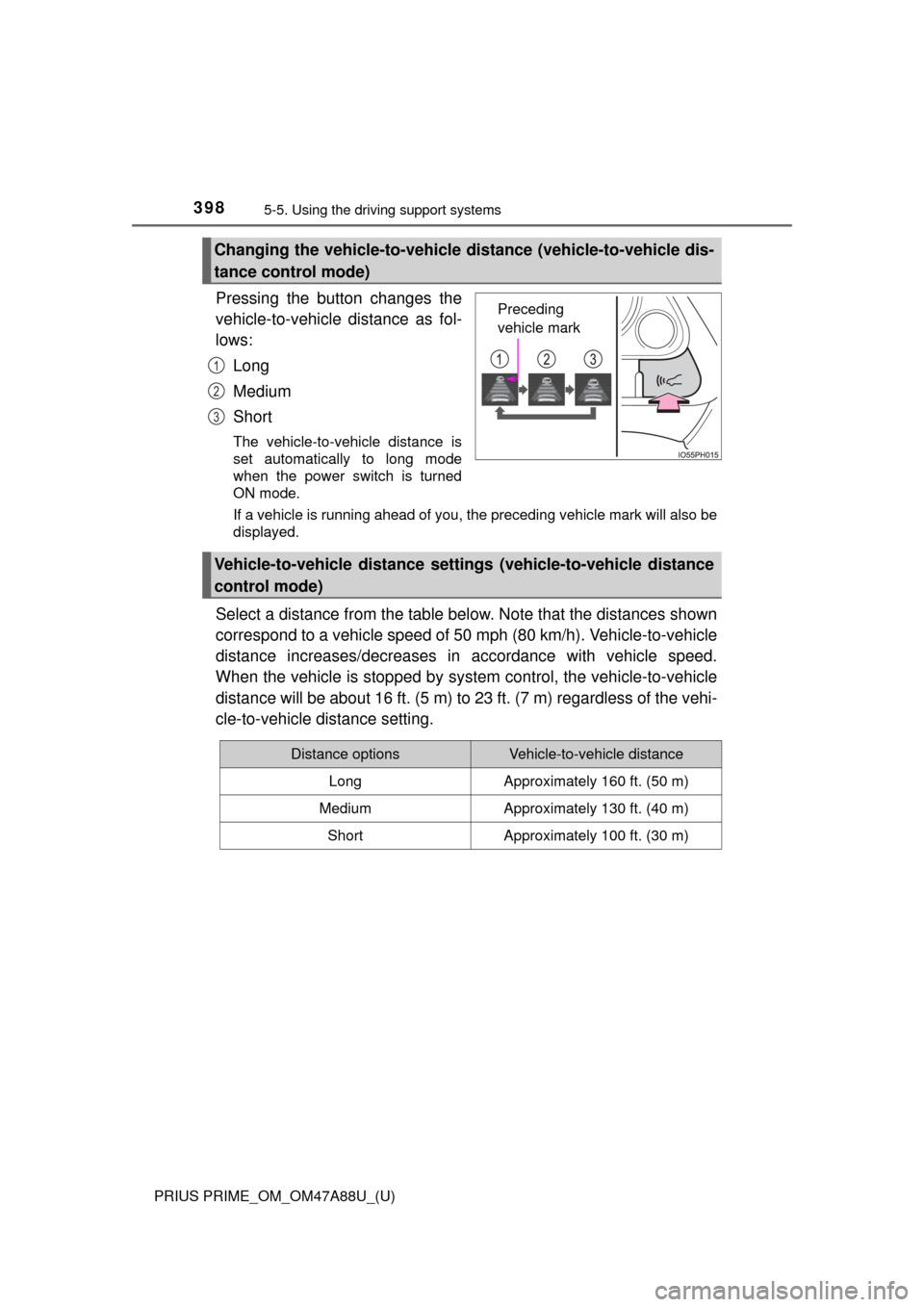
Pressing the button changes the
vehicle-to-vehicle distance as fol-
lows:
Long
Medium
Short
The vehicle-to-vehicle distance is
set automatically to long mode
when the power switch is turned
ON mode.
If a vehicle is running ahead of you, the preceding vehicle mark will also be
displayed.
Select a distance from the table bel ow. Note that the distances shown
correspond to a vehicle speed of 50 mph (80 km/h). Vehicle-to-vehicle
distance increases/decreases in accordance with vehicle speed.
When the vehicle is stop ped by system control, the vehicle-to-vehicle
distance will be about 16 ft. (5 m) to 23 ft. (7 m) regardless of the vehi-
cle-to-vehicle distance setting.
Changing the vehicle-to-vehicle di stance (vehicle-to-vehicle dis-
tance control mode)
Preceding
vehicle mark
1
2
3
Vehicle-to-vehicle distance settings (vehicle-to-vehicle distance
control mode)
Distance optionsVehicle-to-vehicle distance
LongApproximately 160 ft. (50 m)
MediumApproximately 130 ft. (40 m)
ShortApproximately 100 ft. (30 m)