indicator light TOYOTA PRIUS PRIME 2017 2.G Owner's Manual
[x] Cancel search | Manufacturer: TOYOTA, Model Year: 2017, Model line: PRIUS PRIME, Model: TOYOTA PRIUS PRIME 2017 2.GPages: 784, PDF Size: 14.98 MB
Page 180 of 784
180
PRIUS PRIME_OM_OM47A88U_(U)
3. Instrument cluster
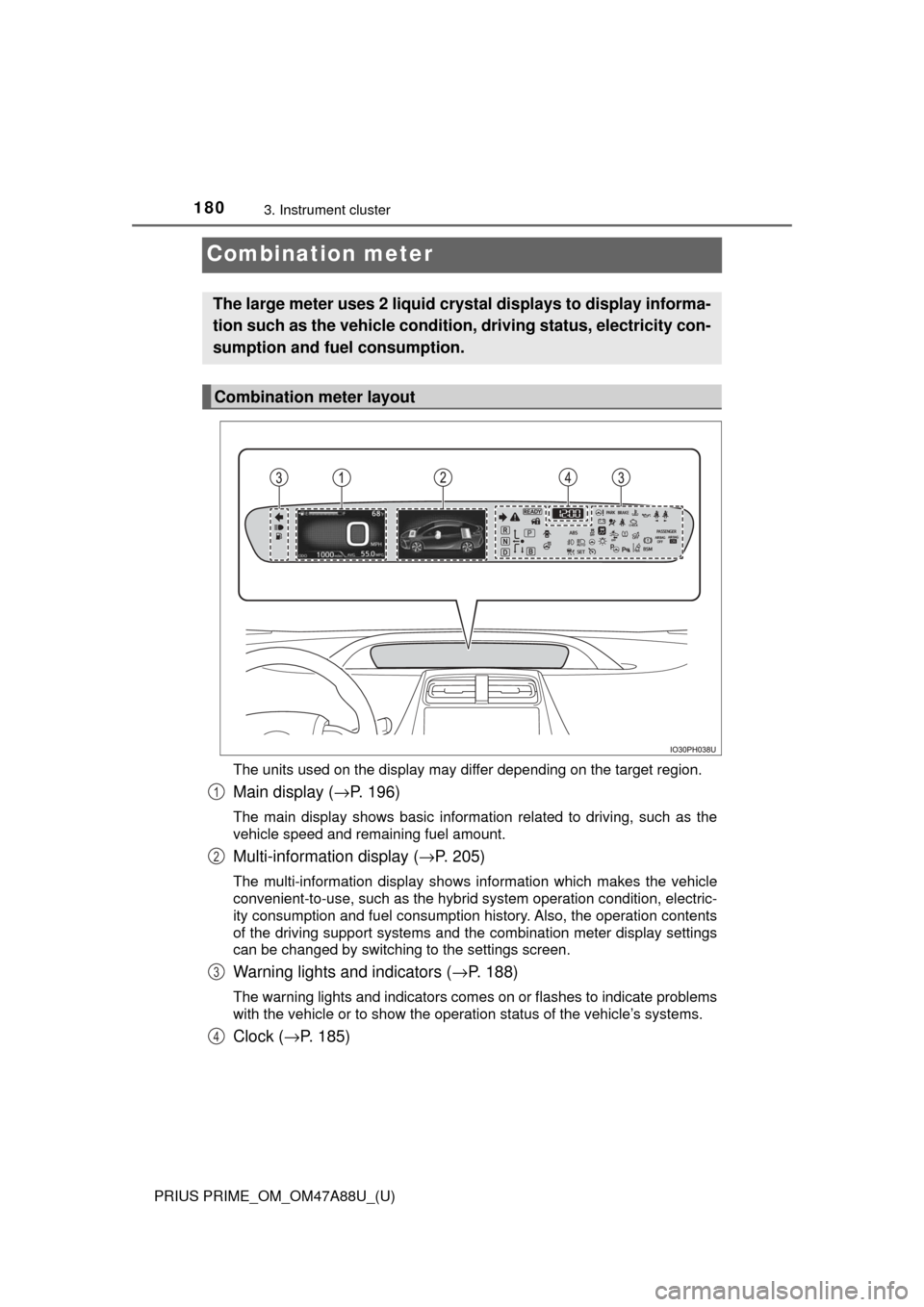
Combination meter
The units used on the display may differ depending on the target region.
Main display (→P. 196)
The main display shows basic information related to driving, such as the
vehicle speed and remaining fuel amount.
Multi-information display ( →P. 205)
The multi-information display shows information which makes the vehicle
convenient-to-use, such as the hybrid system operation condition, electric-
ity consumption and fuel consumption history. Also, the operation contents
of the driving support systems and the combination meter display settings
can be changed by switching to the settings screen.
Warning lights and indicators (→ P. 188)
The warning lights and indicators comes on or flashes to indicate problems
with the vehicle or to show the operation status of the vehicle’s systems.
Clock (→P. 185)
The large meter uses 2 liquid crys tal displays to display informa-
tion such as the vehicle condition , driving status, electricity con-
sumption and fuel consumption.
Combination meter layout
1
2
3
4
Page 188 of 784
188
PRIUS PRIME_OM_OM47A88U_(U)
3. Instrument cluster
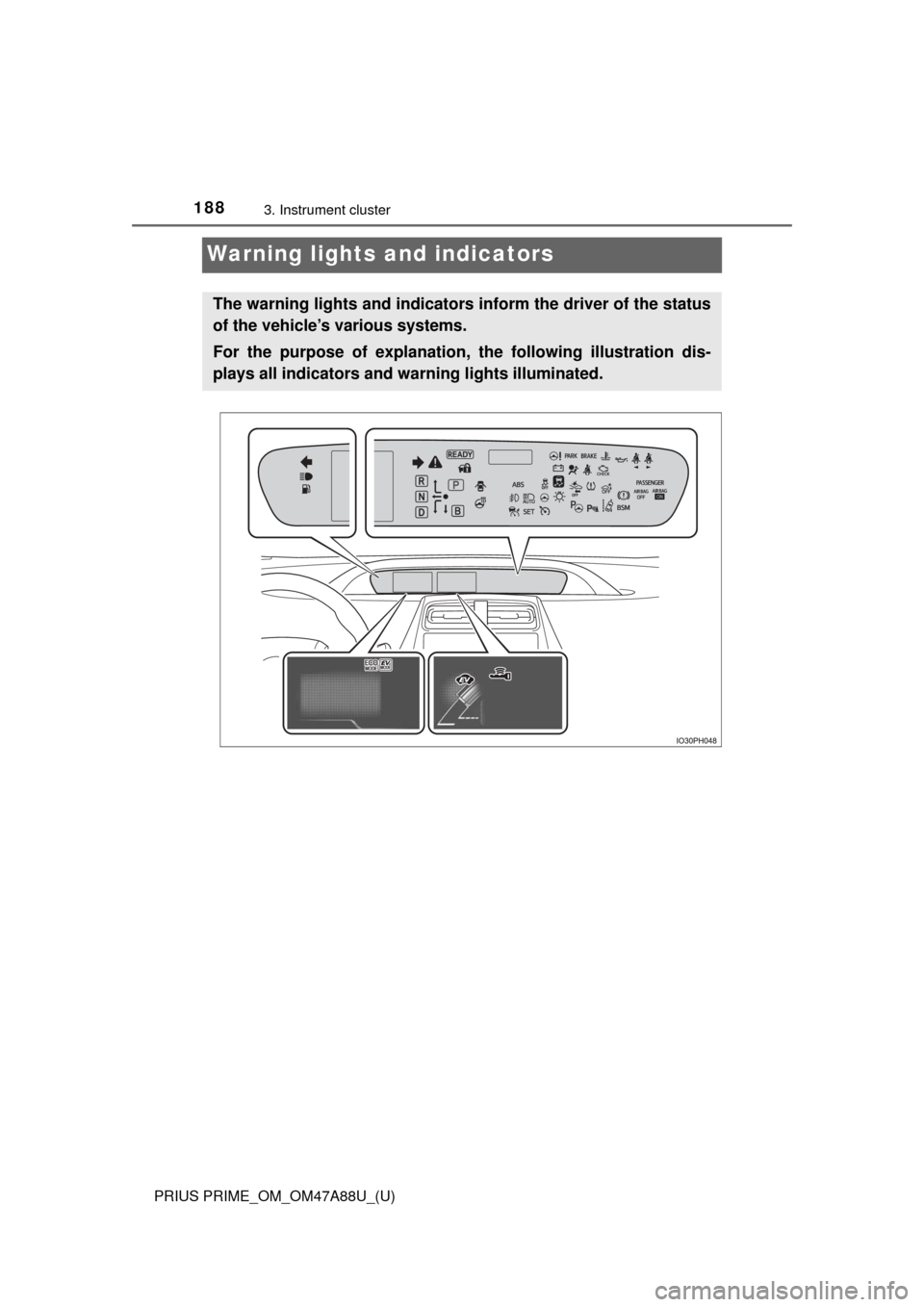
Warning lights and indicators
The warning lights and indicators inform the driver of the status
of the vehicle’s various systems.
For the purpose of explanation, the following illustration dis-
plays all indicators and wa rning lights illuminated.
Page 189 of 784
PRIUS PRIME_OM_OM47A88U_(U)
1893. Instrument cluster
3
Instrument cluster
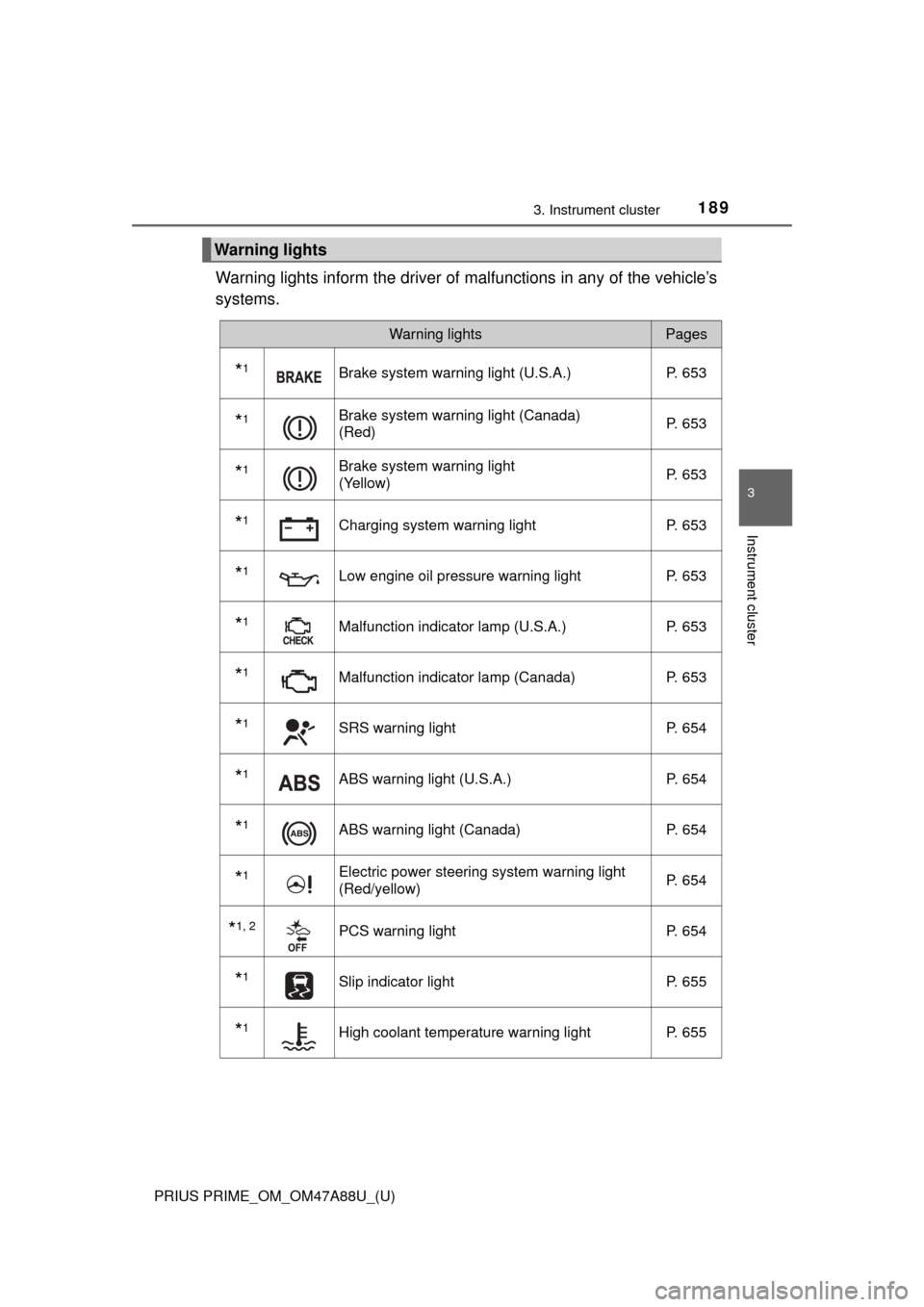
Warning lights inform the driver of malfunctions in any of the vehicle’s
systems.
Warning lights
Warning lightsPages
*1Brake system warning light (U.S.A.) P. 653
*1Brake system warning light (Canada)
(Red)P. 653
*1Brake system warning light
(Yellow)P. 653
*1Charging system warning light
P. 653
*1Low engine oil pressure warning lightP. 653
*1Malfunction indicator lamp (U.S.A.) P. 653
*1Malfunction indicator lamp (Canada) P. 653
*1SRS warning lightP. 654
*1ABS warning light (U.S.A.) P. 654
*1ABS warning light (Canada)P. 654
*1Electric power steering system warning light
(Red/yellow)P. 654
*1, 2PCS warning light
P. 654
*1Slip indicator light P. 655
*1High coolant temperature warning lightP. 655
Page 190 of 784
190
PRIUS PRIME_OM_OM47A88U_(U)
3. Instrument cluster
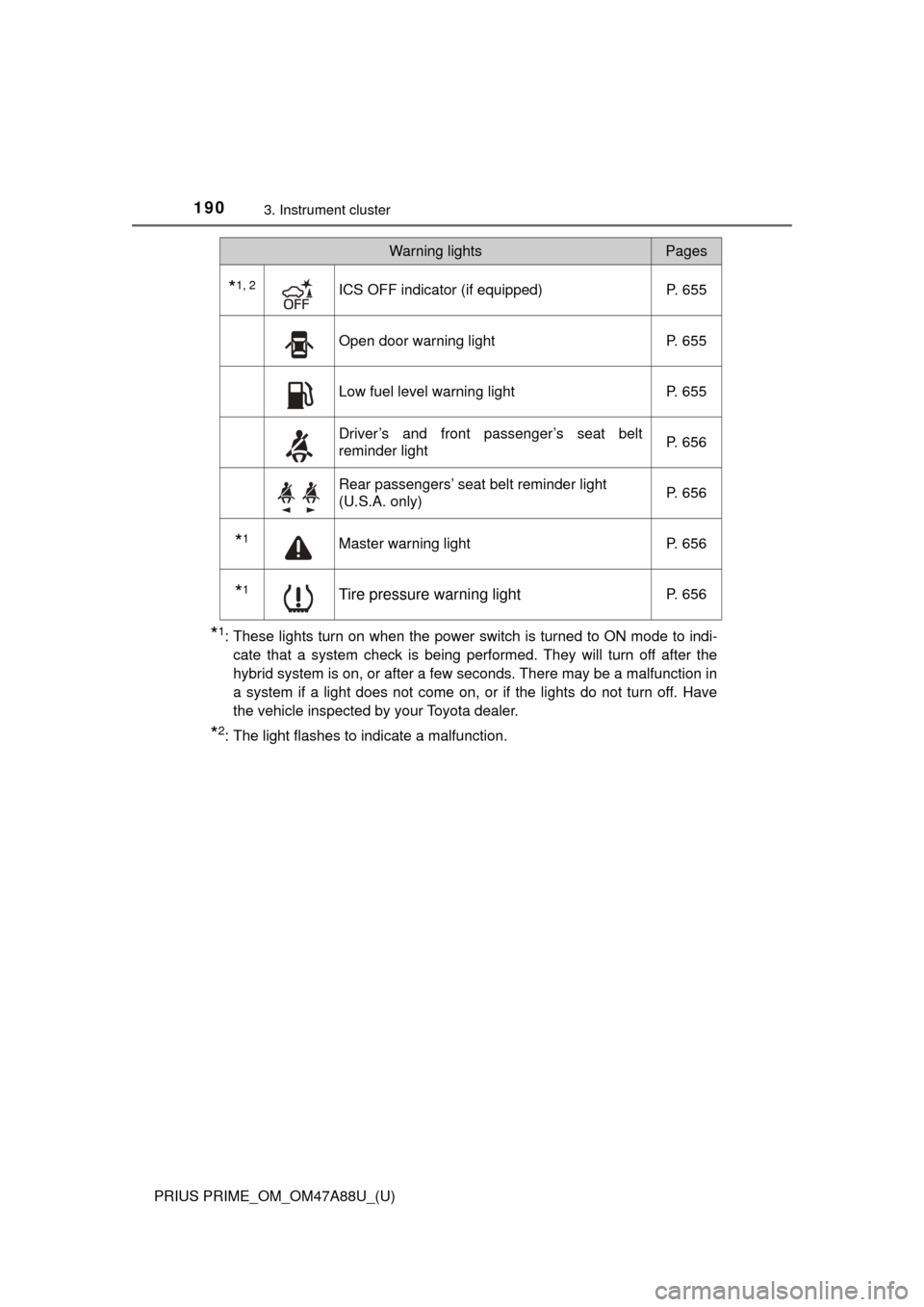
*1: These lights turn on when the power switch is turned to ON mode to indi-cate that a system check is being performed. They will turn off after the
hybrid system is on, or after a few seconds. There may be a malfunction in
a system if a light does not come on, or if the lights do not turn off. Have
the vehicle inspected by your Toyota dealer.
*2: The light flashes to indicate a malfunction.
*1, 2ICS OFF indicator (if equipped) P. 655
Open door warning lightP. 655
Low fuel level warning lightP. 655
Driver’s and front passenger’s seat belt
reminder lightP. 656
Rear passengers’ seat belt reminder light
(U.S.A. only)
P. 656
*1Master warning light
P. 656
*1Tire pressure warning lightP. 656
Warning lightsPages
Page 191 of 784
PRIUS PRIME_OM_OM47A88U_(U)
1913. Instrument cluster
3
Instrument cluster
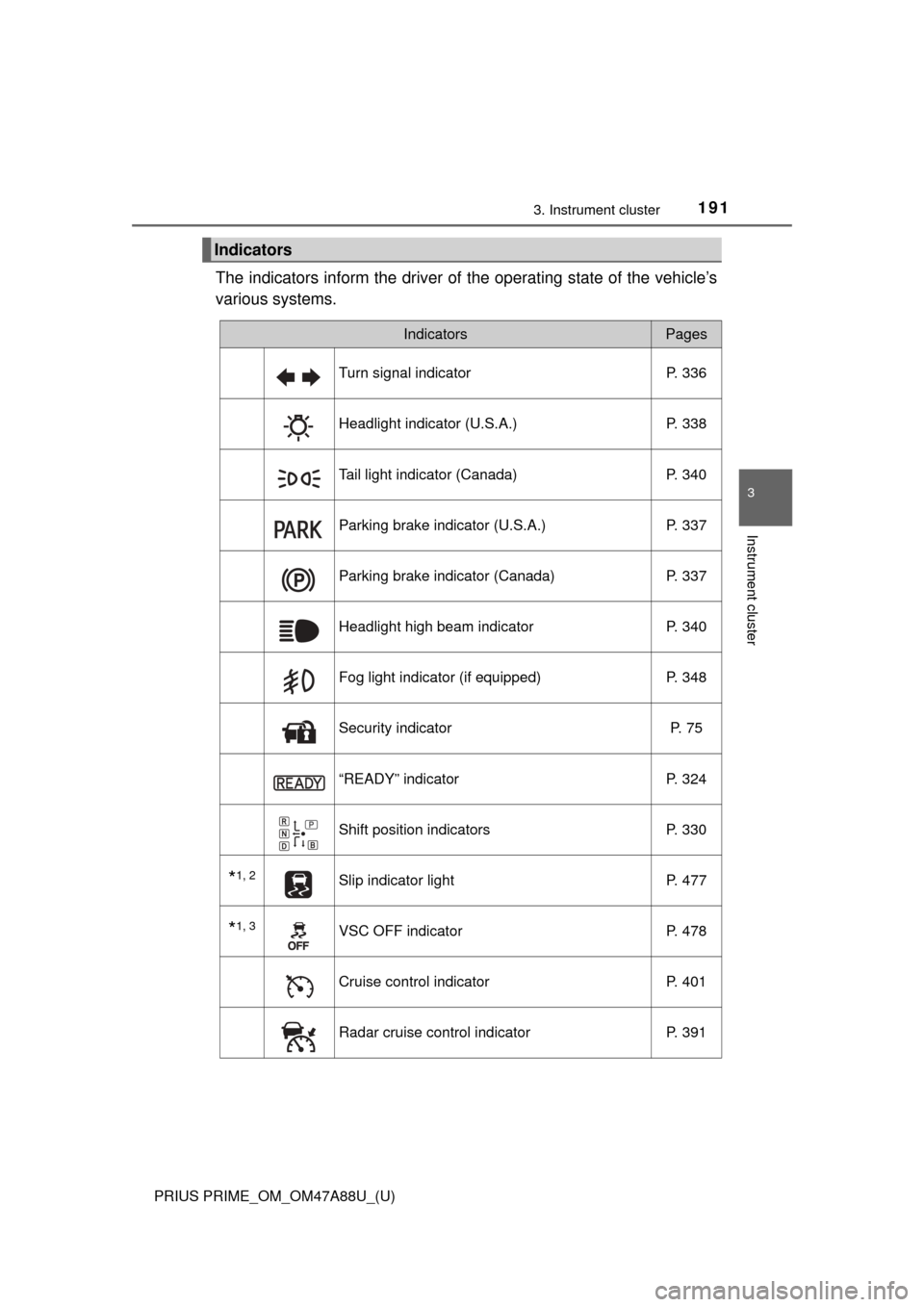
The indicators inform the driver of the operating state of the vehicle’s
various systems.
Indicators
IndicatorsPages
Turn signal indicator P. 336
Headlight indicator (U.S.A.) P. 338
Tail light indicator (Canada) P. 340
Parking brake indicator (U.S.A.) P. 337
Parking brake indicator (Canada)P. 337
Headlight high beam indicatorP. 340
Fog light indicator (if equipped) P. 348
Security indicator P. 75
“READY” indicatorP. 324
Shift position indicators P. 330
*1, 2Slip indicator light P. 477
*1, 3VSC OFF indicatorP. 478
Cruise control indicatorP. 401
Radar cruise control indicatorP. 391
Page 192 of 784
192
PRIUS PRIME_OM_OM47A88U_(U)
3. Instrument cluster
*1: These lights turn on when the power switch is turned to ON mode to indi-cate that a system check is being performed. They will turn off after the
hybrid system is on, or after a few seconds. There may be a malfunction in
a system if a light does not come on, or if the lights do not turn off. Have
the vehicle inspected by your Toyota dealer.
*2: The light flashes to indicate that the system is operating.
*3: The light comes on when the system is turned off.
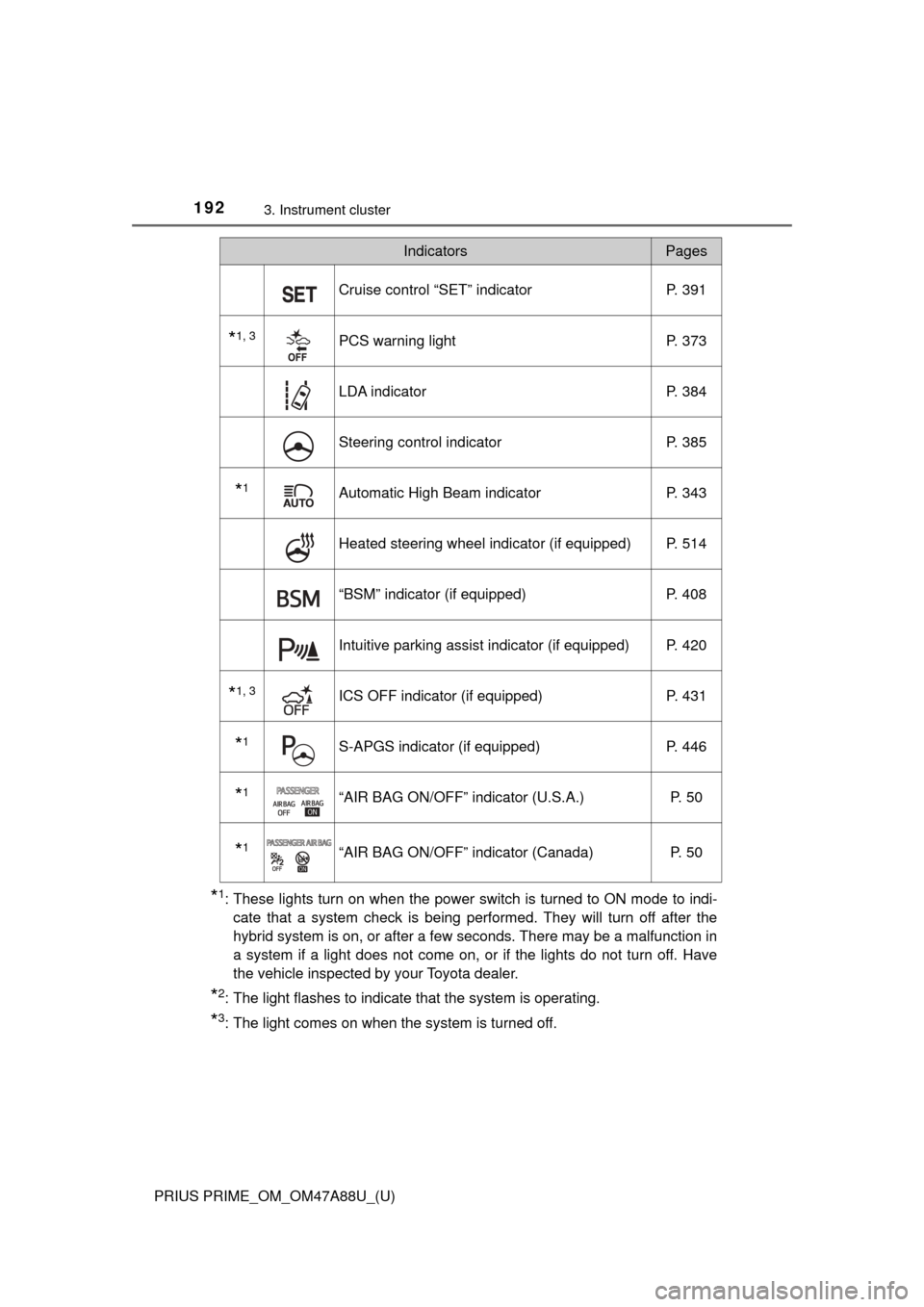
Cruise control “SET” indicator P. 391
*1, 3PCS warning lightP. 373
LDA indicator P. 384
Steering control indicatorP. 385
*1Automatic High Beam indicatorP. 343
Heated steering wheel indicator (if equipped) P. 514
“BSM” indicator (if equipped)P. 408
Intuitive parking assist indicator (if equipped) P. 420
*1, 3ICS OFF indicator (if equipped) P. 431
*1S-APGS indicator (if equipped)P. 446
*1“AIR BAG ON/OFF” indicator (U.S.A.) P. 50
*1“AIR BAG ON/OFF” indicator (Canada)P. 50
IndicatorsPages
Page 195 of 784
PRIUS PRIME_OM_OM47A88U_(U)
1953. Instrument cluster
3
Instrument cluster
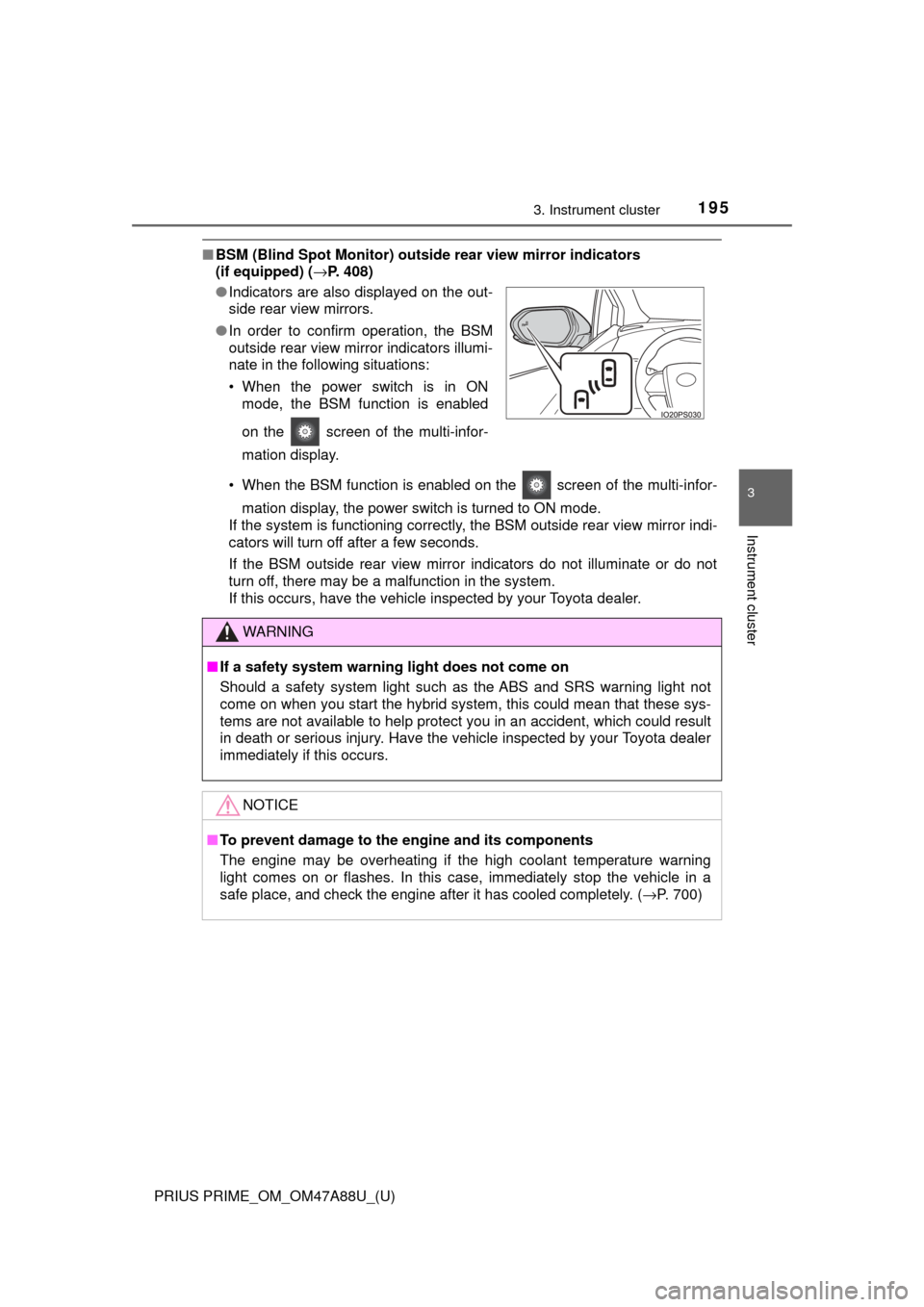
■BSM (Blind Spot Monitor) outsid e rear view mirror indicators
(if equipped) ( →P. 408)
• When the BSM function is enabled on the screen of the multi-infor- mation display, the power switch is turned to ON mode.
If the system is functioning correctly, the BSM outside rear view mirror indi-
cators will turn off after a few seconds.
If the BSM outside rear view mirror indicators do not illuminate or do not
turn off, there may be a malfunction in the system.
If this occurs, have the vehicle inspected by your Toyota dealer.
●
Indicators are also displayed on the out-
side rear view mirrors.
● In order to confirm operation, the BSM
outside rear view mirror indicators illumi-
nate in the following situations:
• When the power switch is in ON
mode, the BSM function is enabled
on the screen of the multi-infor-
mation display.
WARNING
■If a safety system warning light does not come on
Should a safety system light such as the ABS and SRS warning light not
come on when you start the hybrid system, this could mean that these sys-
tems are not available to help protect you in an accident, which could r\
esult
in death or serious injury. Have the vehicle inspected by your Toyota dealer
immediately if this occurs.
NOTICE
■To prevent damage to the engine and its components
The engine may be overheating if the high coolant temperature warning
light comes on or flashes. In this case, immediately stop the vehicle in a
safe place, and check the engine after it has cooled completely. ( →P. 700)
Page 207 of 784
PRIUS PRIME_OM_OM47A88U_(U)
2073. Instrument cluster
3
Instrument cluster
Press or of the meter control switches and select the icon
of the desired item.
The selected icon is highlighted and the display switches to the information
screen.
When split screen display is selected for the main display, the sub-screen
of the main display can also be selected. ( →P. 201)
Press or of the meter control switches to switch the con-
tents of the display.
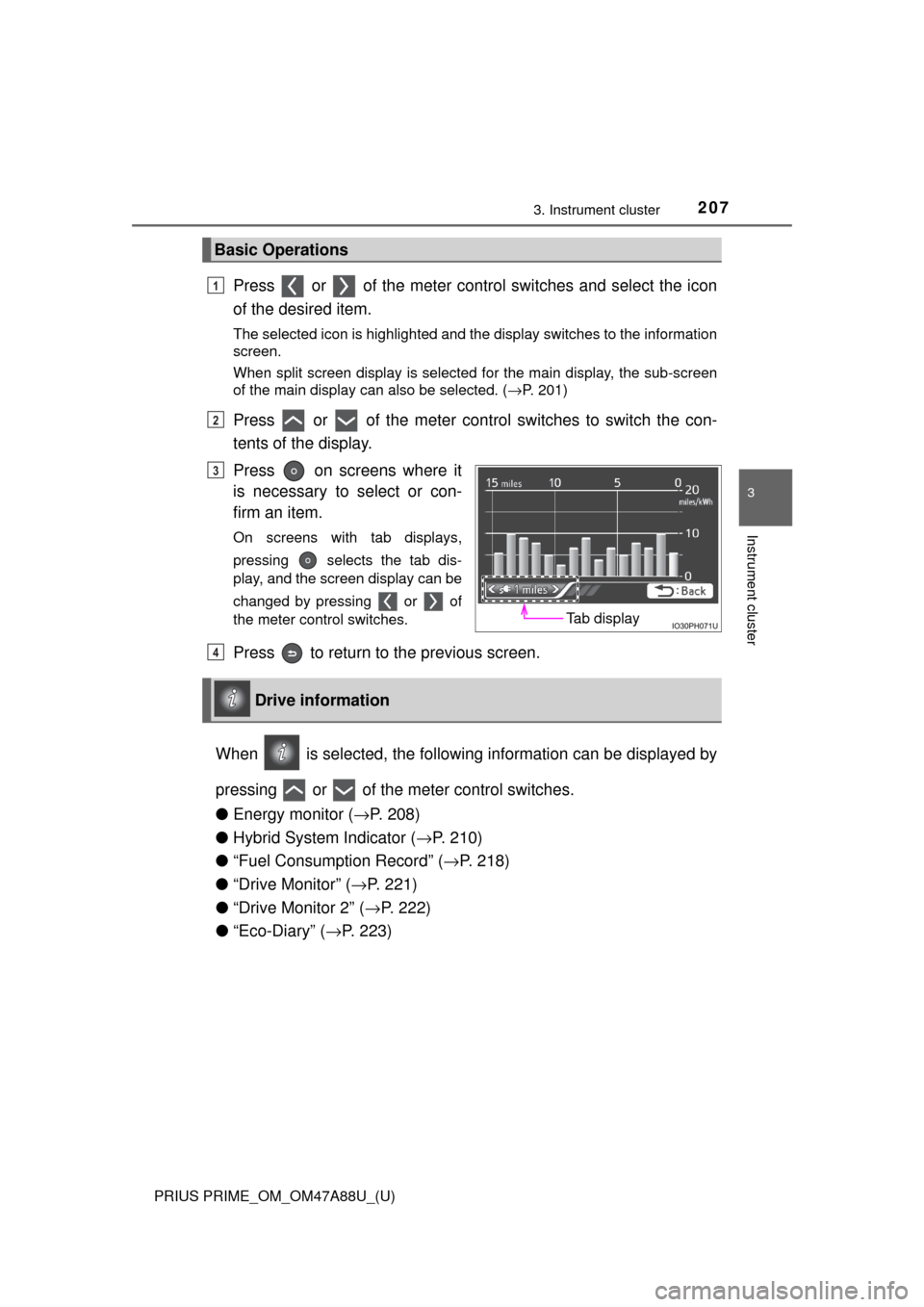
Press on screens where it
is necessary to select or con-
firm an item.
On screens with tab displays,
pressing selects the tab dis-
play, and the screen display can be
changed by pressing or of
the meter control switches.
Press to return to the previous screen.
When is selected, the followi ng information can be displayed by
pressing or of the meter control switches.
● Energy monitor ( →P. 208)
● Hybrid System Indicator ( →P. 210)
● “Fuel Consumption Record” ( →P. 218)
● “Drive Monitor” ( →P. 221)
● “Drive Monitor 2” ( →P. 222)
● “Eco-Diary” ( →P. 223)
Basic Operations
1
2
Tab display
3
Drive information
4
Page 233 of 784
PRIUS PRIME_OM_OM47A88U_(U)
2333. Instrument cluster
3
Instrument cluster
*: If equipped
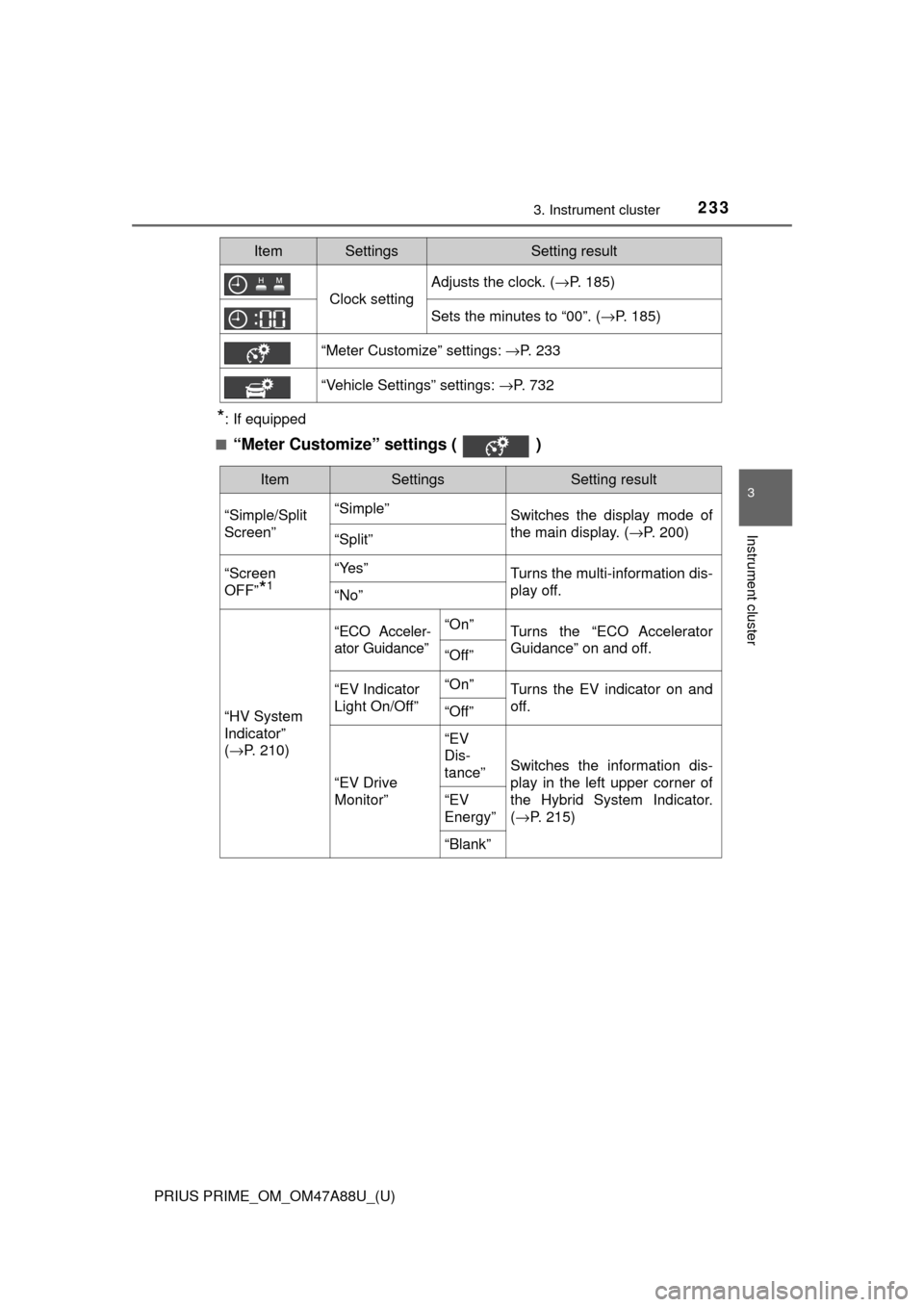
■
“Meter Customize” settings ( )
Clock setting
Adjusts the clock. ( →P. 185)
Sets the minutes to “00”. (→P. 185)
“Meter Customize” settings: →P. 233
“Vehicle Settings” settings: →P. 732
ItemSettingsSetting result
ItemSettingsSetting result
“Simple/Split
Screen” “Simple”
Switches the display mode of
the main display. (→P. 200)
“Split”
“Screen
OFF”
*1
“Yes”Turns the multi-information dis-
play off.
“No”
“HV System
Indicator”
( → P. 210)
“ECO Acceler-
ator Guidance”“On”Turns the “ECO Accelerator
Guidance” on and off.
“Off”
“EV Indicator
Light On/Off” “On”Turns the EV indicator on and
off.
“Off”
“EV Drive
Monitor”“EV
Dis-
tance”
Switches the information dis-
play in the left upper corner of
the Hybrid System Indicator.
(
→ P. 215)
“EV
Energy”
“Blank”
Page 240 of 784
240
PRIUS PRIME_OM_OM47A88U_(U)
3. Instrument cluster
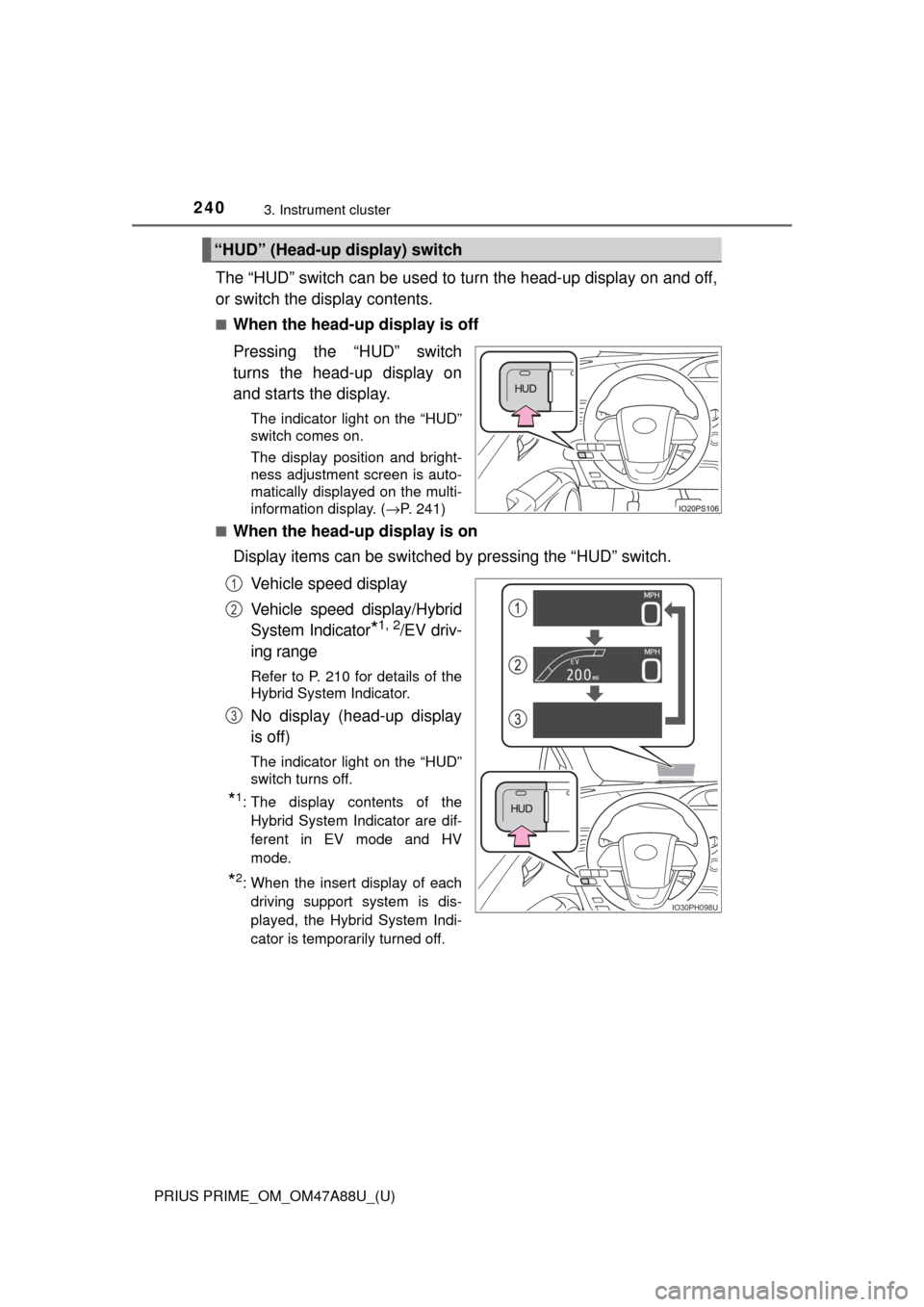
The “HUD” switch can be used to turn the head-up display on and off,
or switch the display contents.
■When the head-up display is off
Pressing the “HUD” switch
turns the head-up display on
and starts the display.
The indicator light on the “HUD”
switch comes on.
The display position and bright-
ness adjustment screen is auto-
matically displayed on the multi-
information display. (→P. 241)
■
When the head-up display is on
Display items can be switched by pressing the “HUD” switch.
Vehicle speed display
Vehicle speed display/Hybrid
System Indicator
*1, 2/EV driv-
ing range
Refer to P. 210 for details of the
Hybrid System Indicator.
No display (head-up display
is off)
The indicator light on the “HUD”
switch turns off.
*1: The display contents of the Hybrid System Indicator are dif-
ferent in EV mode and HV
mode.
*2: When the insert display of eachdriving support system is dis-
played, the Hybrid System Indi-
cator is temporarily turned off.
“HUD” (Head-up display) switch
IO30PH098U
1
2
3