windshield TOYOTA PRIUS PRIME 2017 2.G Owner's Manual
[x] Cancel search | Manufacturer: TOYOTA, Model Year: 2017, Model line: PRIUS PRIME, Model: TOYOTA PRIUS PRIME 2017 2.GPages: 784, PDF Size: 14.98 MB
Page 381 of 784
381
PRIUS PRIME_OM_OM47A88U_(U)
5-5. Using the driving support systems
5
Driving
LDA (Lane Departure Al ert with steering
control)
When driving on highways and freeways with white (yellow) lines, this
function alerts the driver when th e vehicle might depart from its lane
and provides assistance by operatin g the steering wheel to keep the
vehicle in its lane.
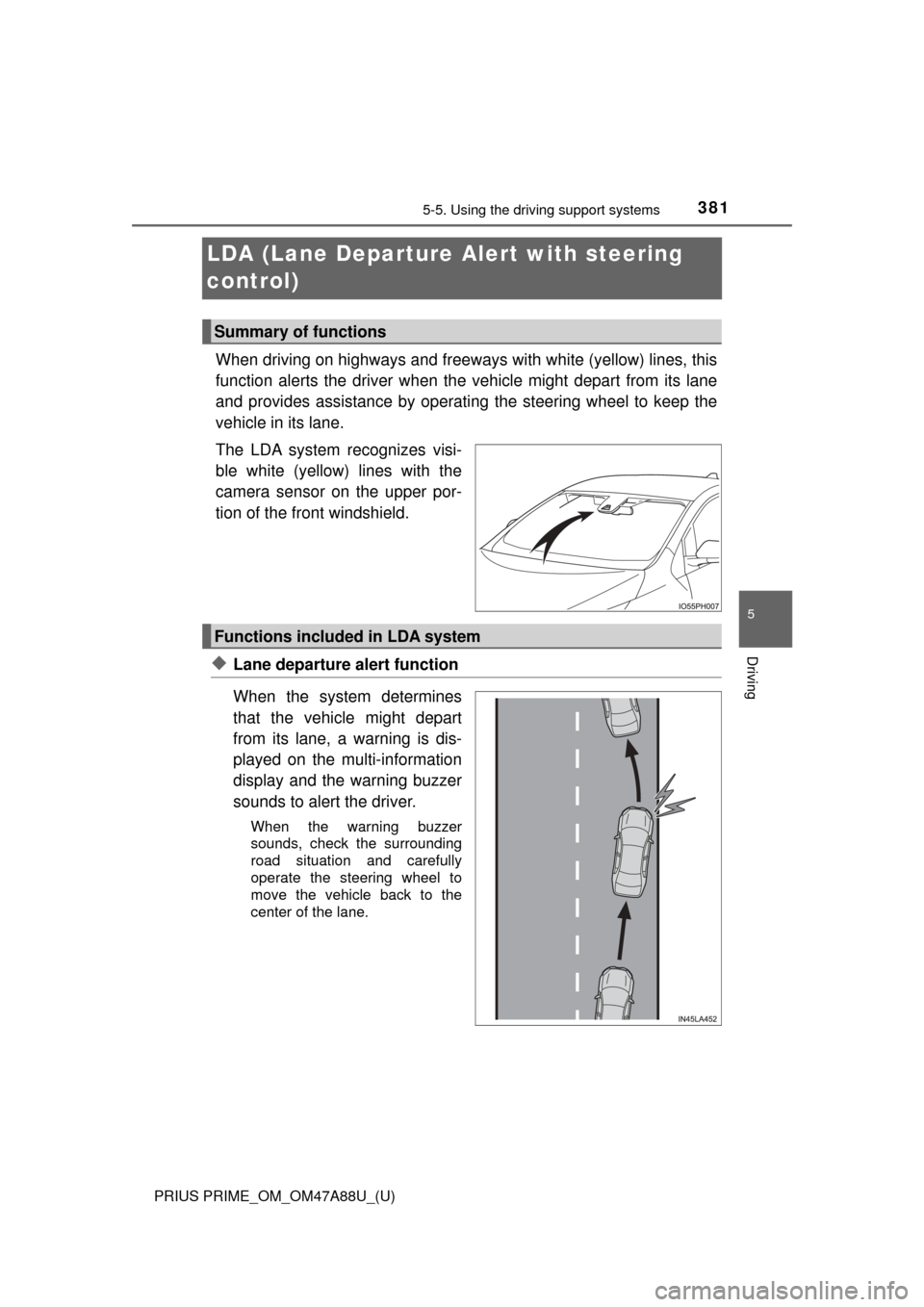
The LDA system recognizes visi-
ble white (yellow) lines with the
camera sensor on the upper por-
tion of the front windshield.
◆Lane departure alert function
When the system determines
that the vehicle might depart
from its lane, a warning is dis-
played on the multi-information
display and the warning buzzer
sounds to alert the driver.
When the warning buzzer
sounds, check the surrounding
road situation and carefully
operate the steering wheel to
move the vehicle back to the
center of the lane.
Summary of functions
Functions included in LDA system
Page 384 of 784
384
PRIUS PRIME_OM_OM47A88U_(U)
5-5. Using the driving support systems
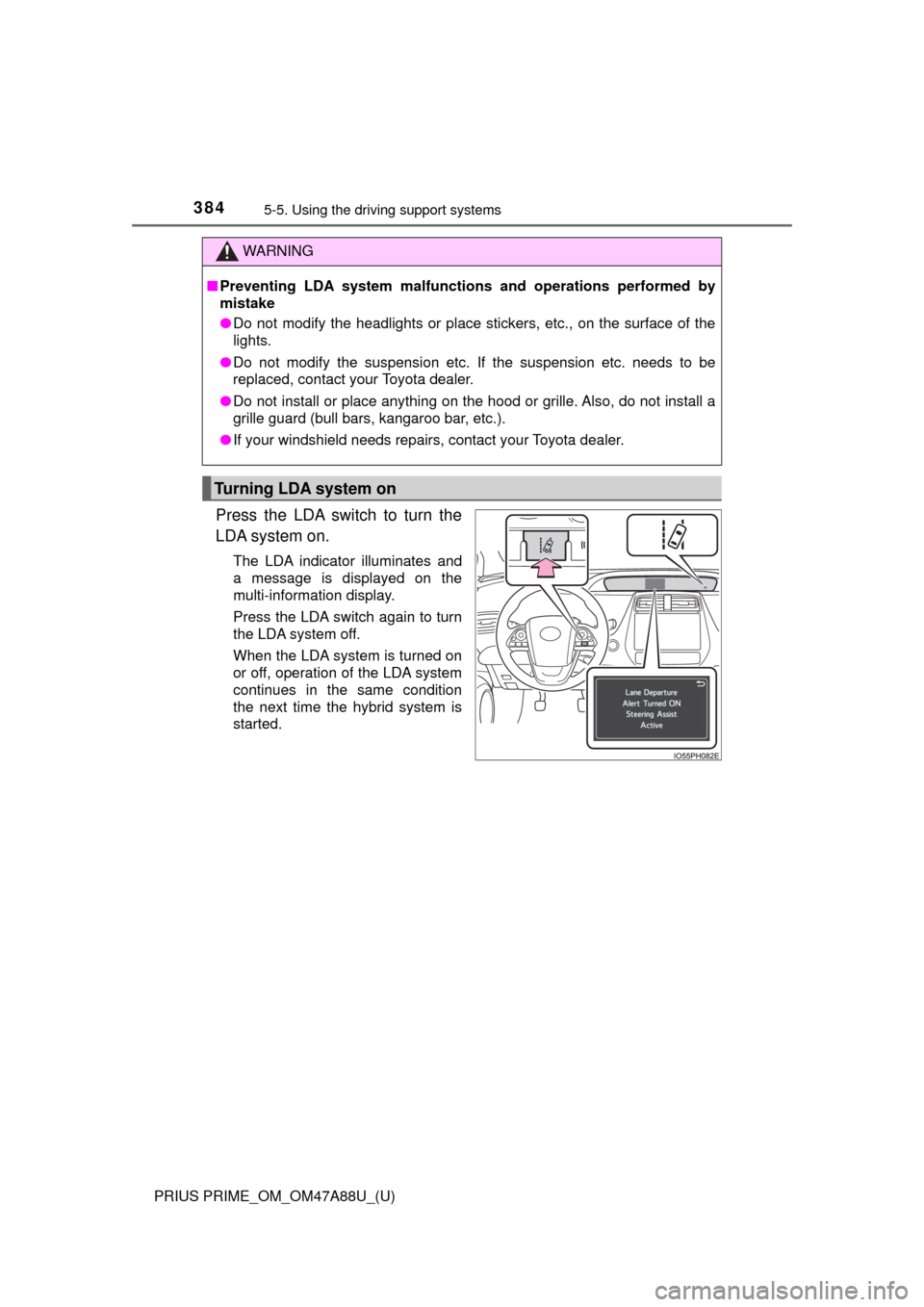
Press the LDA switch to turn the
LDA system on.
The LDA indicator illuminates and
a message is displayed on the
multi-information display.
Press the LDA switch again to turn
the LDA system off.
When the LDA system is turned on
or off, operation of the LDA system
continues in the same condition
the next time the hybrid system is
started.
WARNING
■Preventing LDA system malfunctio ns and operations performed by
mistake
● Do not modify the headlights or place stickers, etc., on the surface of the
lights.
● Do not modify the suspension etc. If the suspension etc. needs to be
replaced, contact your Toyota dealer.
● Do not install or place anything on the hood or grille. Also, do not install a
grille guard (bull bars, kangaroo bar, etc.).
● If your windshield needs repairs, contact your Toyota dealer.
Turning LDA system on
Page 389 of 784
PRIUS PRIME_OM_OM47A88U_(U)
3895-5. Using the driving support systems
5
Driving
■Warning message
If the following warning message is displayed on the multi-information dis-
play, follow the appropriate troubleshooting procedure.
If a different warning message is displayed, follow the instructions displayed
on the screen.
Warning messageDetails/Actions
“Lane Departure Alert
Malfunction
Visit Your Dealer”The system may not be operating
properly.
→ Have the vehicle inspected at your
Toyota dealer.
“Forward Camera
System
Unavailable
Clean Windshield”
Dirt, rain, condensation, ice, snow,
etc. are present on the windshield in
front of the camera sensor.
→ Turn the LDA system off, remove
any dirt, rain, condensation, ice,
snow, etc. from the windshield, and
then turn the LDA system back on.
“Forward Camera
System
Unavailable”
The operation conditions of the cam-
era sensor (temperature, etc.) are not
met.
→ When the operation conditions of
the camera sensor (temperature,
etc.) are met, the LDA system will
become available. Turn the LDA
system off, wait for a little while,
and then turn the LDA system back
on.
“Lane Departure Alert
Unavailable”
The LDA system is temporarily can-
celed due to a malfunction in a sensor
other than the camera sensor.
→Turn the LDA system off and follow
the appropriate troubleshooting
procedures for the warning mes-
sage. Afterward, drive the vehicle
for a short time, and then turn the
LDA system back on.
“Lane Departure Alert
System is Unavailable
Below Approx. 32 MPH.”The LDA system cannot be used as
the vehicle speed is less than approxi-
mately 32 mph (50 km/h).
→ Drive the vehicle at approximately
32 mph (50 km/h) or more.
Page 482 of 784
482
PRIUS PRIME_OM_OM47A88U_(U)
5-6. Driving tips
Winter driving tips
●Use fluids that are appropriate to the prevailing outside tempera-
tures. • Engine oil
• Engine/power control unit coolant
• Washer fluid
● Have a service technician inspec t the condition of the 12-volt bat-
tery.
● Have the vehicle fitted with four snow tires or purchase a set of tire
chains for the front tires.
Ensure that all tires are the same size and brand, and that chains match
the size of the tires.
Perform the following accordin g to the driving conditions:
● Do not try to forcibly open a window or move a wiper that is frozen.
Pour warm water over the frozen area to melt the ice. Wipe away
the water immediately to prevent it from freezing.
● To ensure proper operation of the climate control system fan,
remove any snow that has accumulated on the air inlet vents in
front of the windshield.
● Check for and remove any excess ice or snow that may have accu-
mulated on the exterior lights, vehicle’s roof, chassis, around the
tires or on the brakes.
● Remove any snow or mud from the bottom of your shoes before
getting in the vehicle.
Carry out the necessary preparations and inspections before
driving the vehicle in winter. Al ways drive the vehicle in a man-
ner appropriate to the prevailing weather conditions.
Preparation for winter
Before driving the vehicle
Page 489 of 784
PRIUS PRIME_OM_OM47A88U_(U)
4896-1. Using the air conditioning system and defogger
6
Interior features
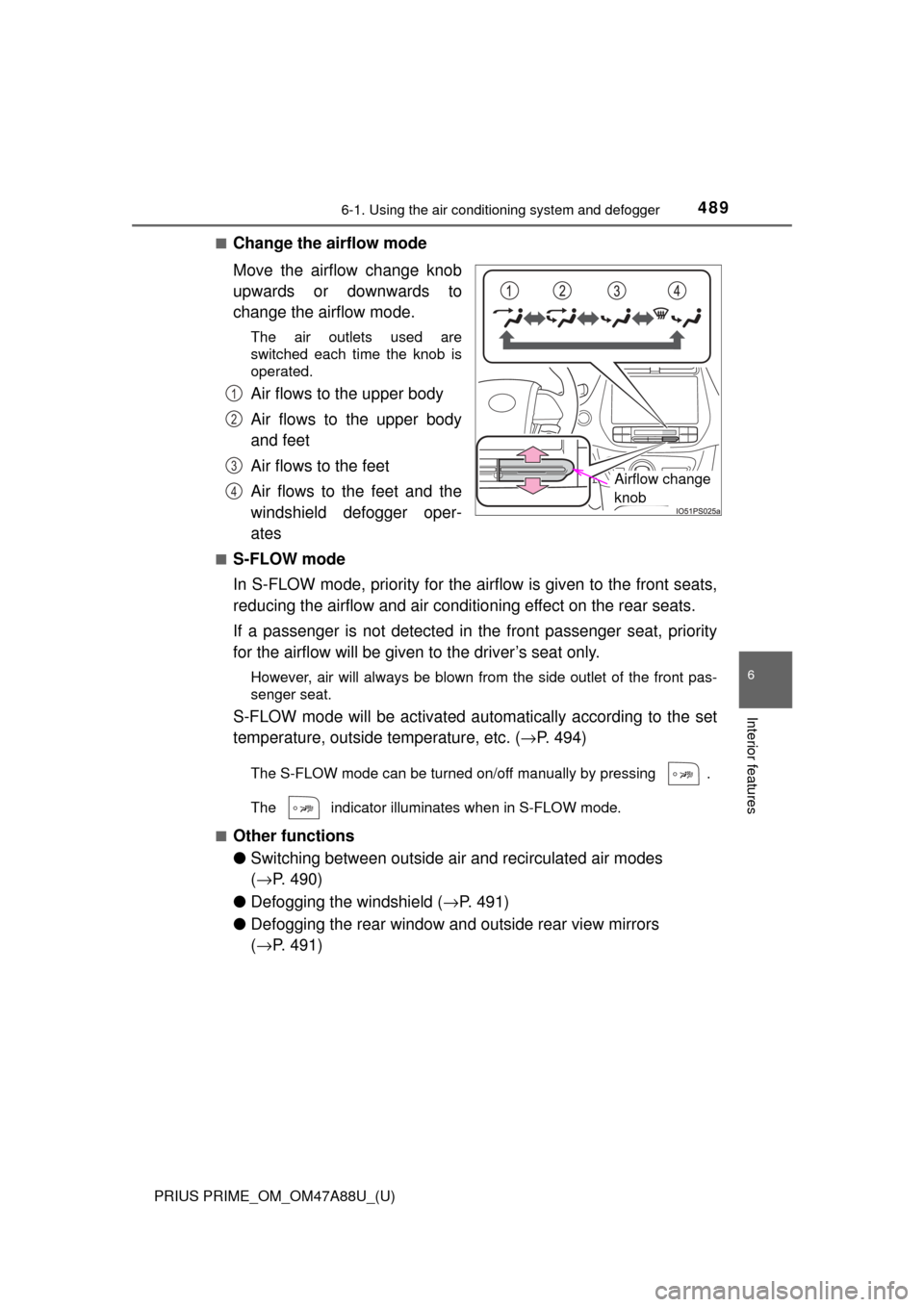
■Change the airflow mode
Move the airflow change knob
upwards or downwards to
change the airflow mode.
The air outlets used are
switched each time the knob is
operated.
Air flows to the upper body
Air flows to the upper body
and feet
Air flows to the feet
Air flows to the feet and the
windshield defogger oper-
ates
■S-FLOW mode
In S-FLOW mode, priority for the ai rflow is given to the front seats,
reducing the airflow and air conditio ning effect on the rear seats.
If a passenger is not detected in the front passenger seat, priority
for the airflow will be given to the driver’s seat only.
However, air will always be blown from the side outlet of the front pas-
senger seat.
S-FLOW mode will be activated autom atically according to the set
temperature, outside temperature, etc. ( →P. 494)
The S-FLOW mode can be turned on/off manually by pressing .
The indicator illuminates when in S-FLOW mode.
■
Other functions
● Switching between outside ai r and recirculated air modes
( → P. 490)
● Defogging the windshield ( →P. 491)
● Defogging the rear window and outside rear view mirrors
(→ P. 491)
Airflow change
knob
1
2
3
4
Page 491 of 784
PRIUS PRIME_OM_OM47A88U_(U)
4916-1. Using the air conditioning system and defogger
6
Interior features
■Defogging the windshield
Defoggers are used to defog the windshield and front side win-
dows.
Press .
Set to outside air mode if the recirculated air mode is used. (It
may switch automatically.)
To defog the windshield and the side windows early, turn the air flow and
temperature up.
The indicator illuminates when the defoggers are on.
To return to the previous mode, press again when the wind-
shield is defogged. Also, turning the power switch off during operation
can return to the previous mode.
■
Defogging the rear window and outside rear view mirrors
Defoggers are used to defog the rear window and to remove rain-
drops, dew and frost from the outside rear view mirrors.
Press .
Defoggers switch between on and off each time is pressed.
The indicator illuminates when defoggers are on.
The defoggers will automatically turn off after a period of time.
■
Eco score (A/C score)
→ P. 2 1 4
Page 494 of 784

4946-1. Using the air conditioning system and defogger
PRIUS PRIME_OM_OM47A88U_(U)■
Setting confirmation screen
■ S-FLOW mode operation
●In automatic mode, S-FLOW mode will be turned off if a rear door has been
opened and closed. To activate S-FLOW mode again, press .
■ Changing settings using the multi-information display
The air conditioning system settings can be changed on the screen of
the multi-information display. ( →P. 226)
■ Fogging up of the windows
●The windows will easily fog up when the humidity in the vehicle is high.
Turning on will dehumidify the air from the outlets and defog the
windshield effectively.
● If you turn off, the windows may fog up more easily.
● The windows may fog up if the recirculated air mode is used.
■ Windshield fog detection function
When automatic mode is set, the humidity sensor ( →P. 497) detects fog on
the windshield and controls the air conditioning system to prevent fog. When changing the settings of the air
conditioning system, the setting confirma-
tion screen is shown as a pop-up on the
multi-information display.
Press of the meter control switches to
go back to the previous screen.
● When is pressed, the S-FLOW
mode status is displayed on the multi-
information display.
Page 496 of 784
4966-1. Using the air conditioning system and defogger
PRIUS PRIME_OM_OM47A88U_(U)■
Ventilation and air conditioning odors
●To let the fresh air in, set the air conditioning system to the outside air mode.
● During use, various odors from inside and outside the vehicle may enter into
and accumulate in the air conditioning system. This may then cause odor to
be emitted from the vents.
● In order to suppress odors that occur when the air conditioning system
starts, fresh air is automatically taken in when parked.
● To reduce potential odors from occurring, the start timing of the blower may
be delayed for a short period of time i mmediately after the air conditioning
system is started in automatic mode.
■ Air conditioning filter
→P. 620
■ Customization
Settings (e.g. A/C auto switching operation) can be changed. (Customizable
features: →P. 732)
WARNING
■To prevent the windshield from fogging up
● Do not use
during cool air operation in extremely humid weather.
The difference between the temperature of the outside air and that of the
windshield can cause the outer surface of the windshield to fog up, block-
ing your vision.
■ To prevent burns
Do not touch the rear view mirror surf aces when the outside rear view mirror
defoggers are on.
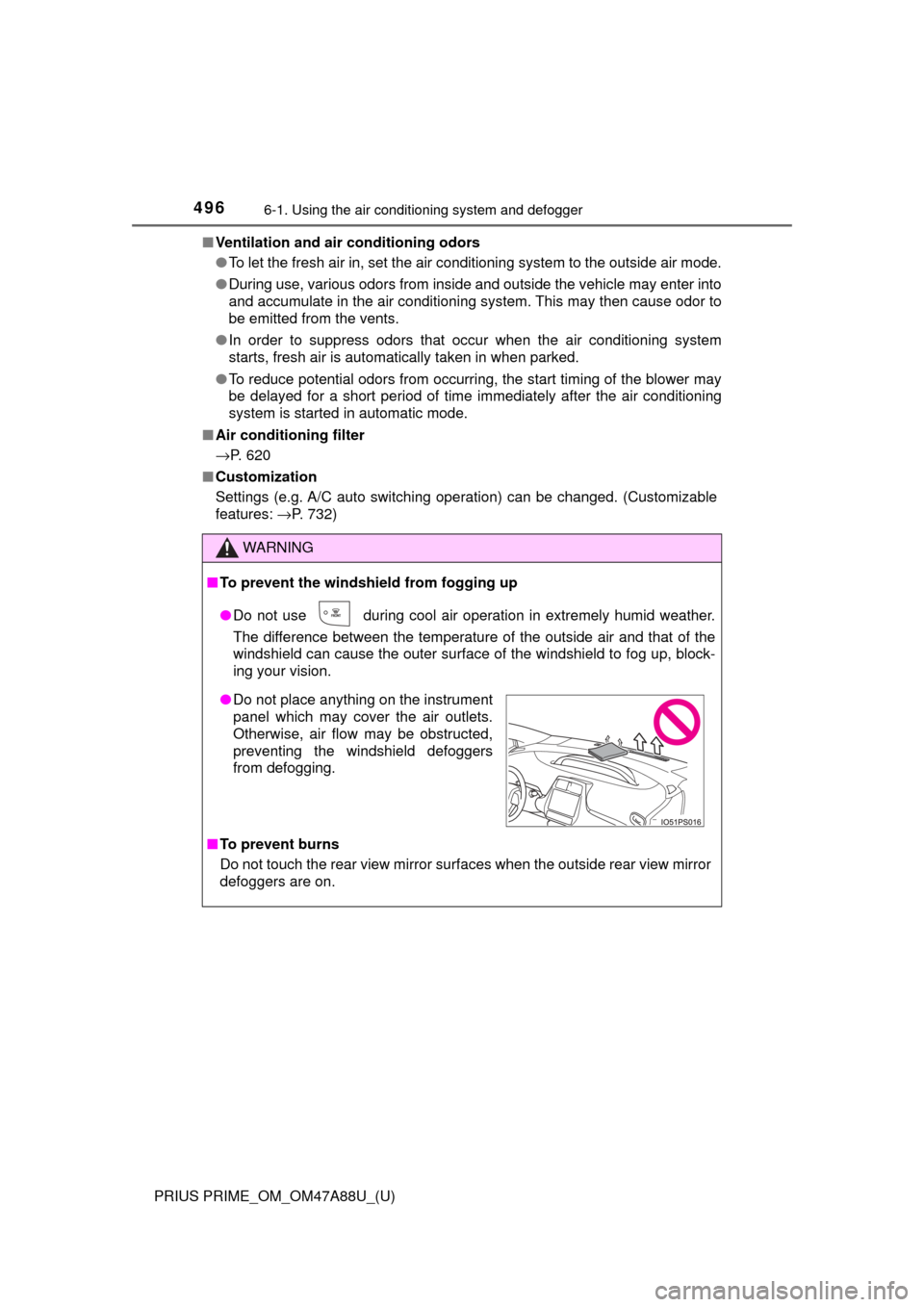
● Do not place anything on the instrument
panel which may cover the air outlets.
Otherwise, air flow may be obstructed,
preventing the windshield defoggers
from defogging.
Page 497 of 784
PRIUS PRIME_OM_OM47A88U_(U)
4976-1. Using the air conditioning system and defogger
6
Interior features
NOTICE
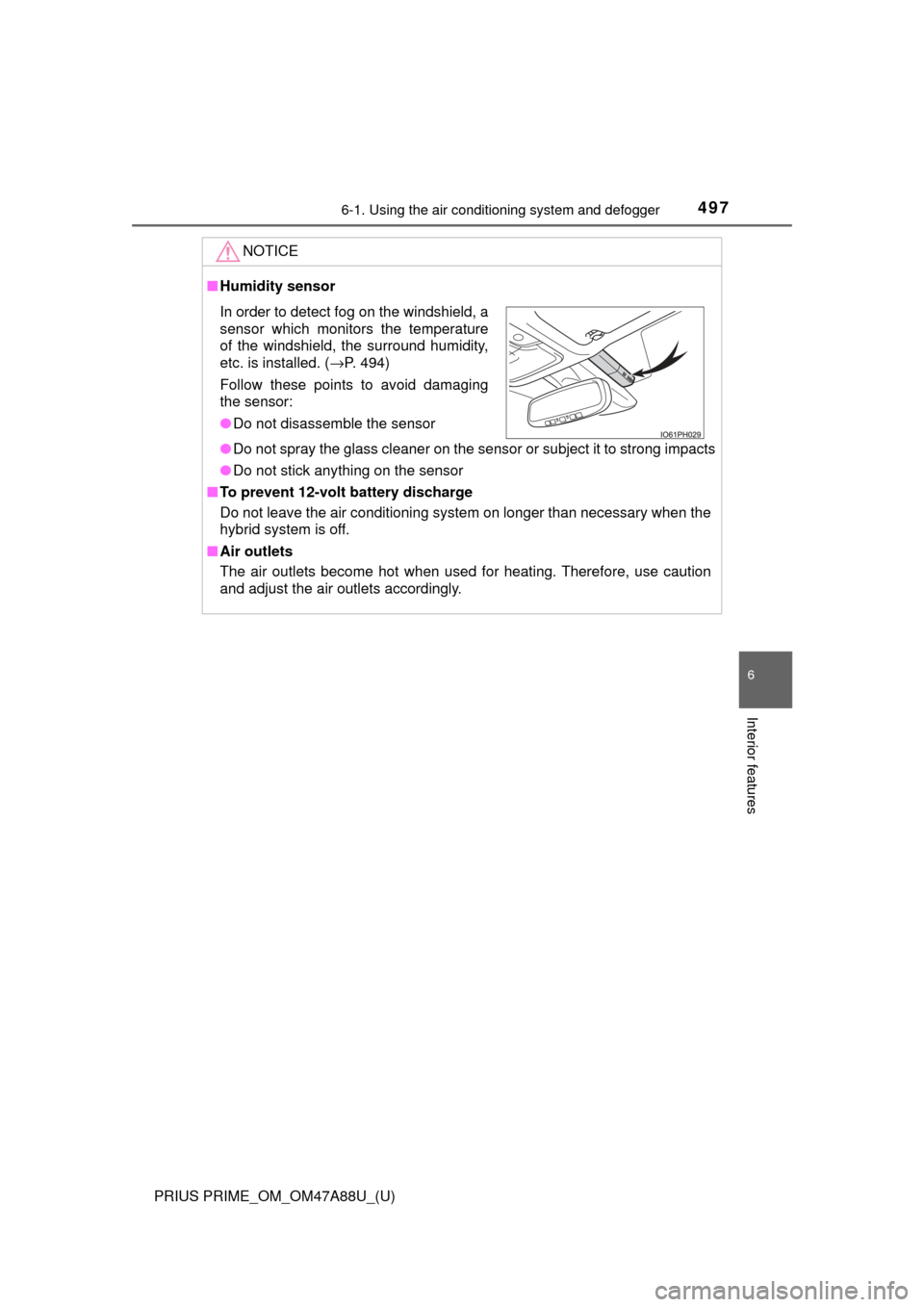
■Humidity sensor
● Do not spray the glass cleaner on the sensor or subject it to strong impacts
● Do not stick anything on the sensor
■ To prevent 12-volt battery discharge
Do not leave the air conditioning system on longer than necessary when the
hybrid system is off.
■ Air outlets
The air outlets become hot when used for heating. Therefore, use caution
and adjust the air outlets accordingly.
In order to detect fog on the windshield, a
sensor which monitors the temperature
of the windshield, the surround humidity,
etc. is installed. ( →P. 494)
Follow these points to avoid damaging
the sensor:
● Do not disassemble the sensor
Page 499 of 784
PRIUS PRIME_OM_OM47A88U_(U)
4996-1. Using the air conditioning system and defogger
6
Interior features
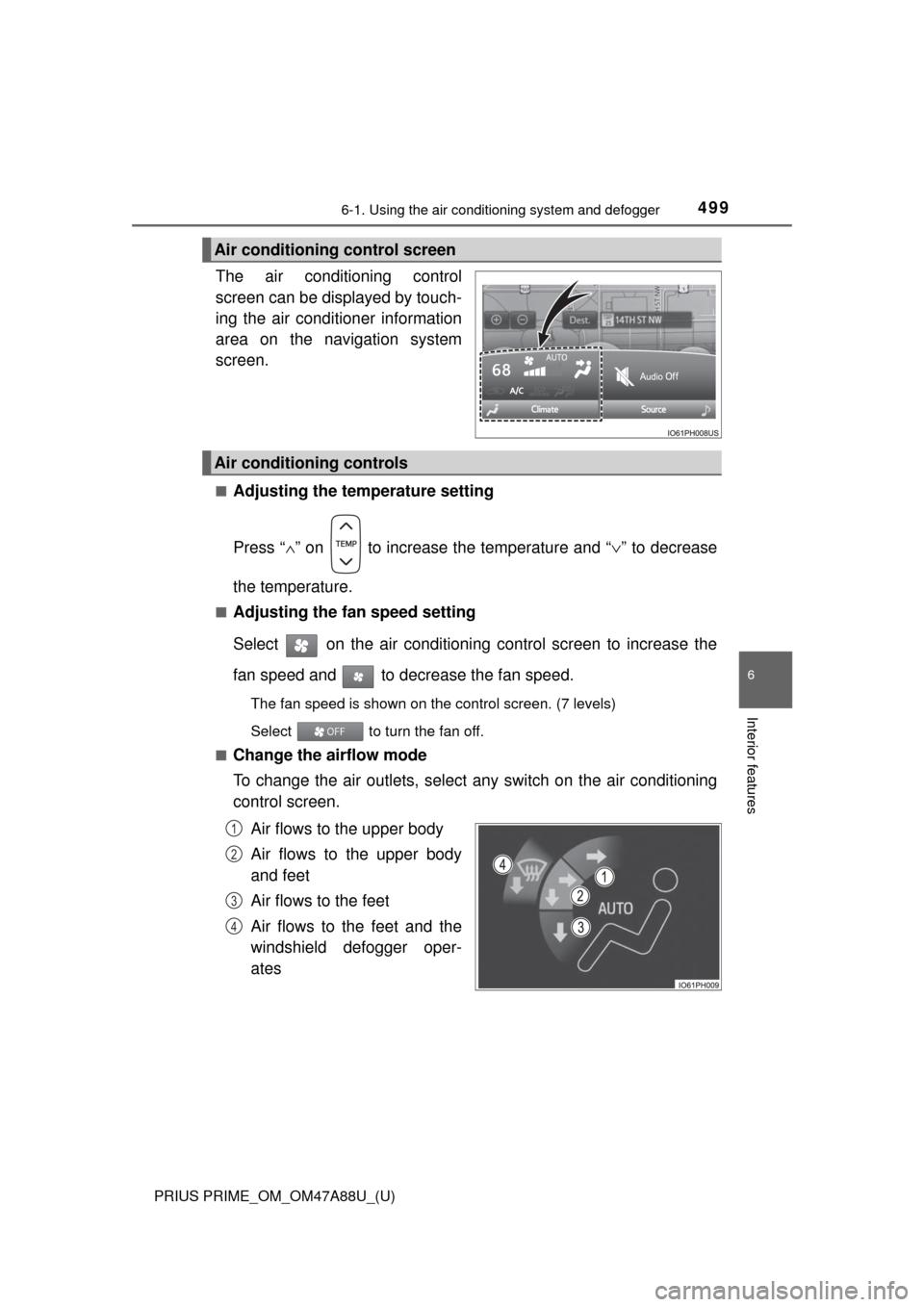
The air conditioning control
screen can be displayed by touch-
ing the air conditioner information
area on the navi gation system
screen.
■Adjusting the temperature setting
Press “ ∧” on to increase the temperature and “ ∨” to decrease
the temperature.
■Adjusting the fan speed setting
Select on the air conditioning control screen to increase the
fan speed and to decrease the fan speed.
The fan speed is shown on the control screen. (7 levels)
Select to turn the fan off.
■
Change the airflow mode
To change the air outlets, select any switch on the air conditioning
control screen.
Air flows to the upper body
Air flows to the upper body
and feet
Air flows to the feet
Air flows to the feet and the
windshield defogger oper-
ates
Air conditioning control screen
Air conditioning controls
1
2
3
4