wireless TOYOTA PRIUS PRIME 2017 2.G Owner's Manual
[x] Cancel search | Manufacturer: TOYOTA, Model Year: 2017, Model line: PRIUS PRIME, Model: TOYOTA PRIUS PRIME 2017 2.GPages: 784, PDF Size: 14.98 MB
Page 439 of 784

PRIUS PRIME_OM_OM47A88U_(U)
4395-5. Using the driving support systems
5
Driving
●Influence from other sonic waves
• An ultrasonic wave source is nearby, such as the horn or parking assist
system of another vehicle, a vehicle detector, a motorcycle engine or the
air brake of a large vehicle
• Electronic components (such as a backlit license plate (especially fluo- rescent types), fog lights, a fender pole or a wireless antenna) are
installed near the sensors
● Changes in the vehicle
• The vehicle is tilted a large amount
• The height of the vehicle has drastically changed due to the carried load
(the nose tilts up or down)
• The direction of the sensor has deviated due to a collision or other impact
■ Intelligent Clearance Sonar function while the Simple Advanced Parking
Guidance System is operating
→P. 444
■ When removing and installi ng the 12-volt battery
The system needs to be initialized.
The system can be initialized by driving the vehicle straight ahead for 5 sec-
onds or more at a speed of approximately 22 mph (35 km/h) or higher.
■ When “ICS Unavailable” is displayed on the multi-information display
and the ICS OFF indicator flashes
● Ice, snow, dirt, etc., may have adhered to the sensor. If this occurs, remove
the ice, snow, dirt, etc., from the sensor to return the system to normal.
Also, a warning message may be displayed at low temperatures due to ice
forming on the sensor, and the sensor may not detect obstacles. Once the
ice melts, the system will return to normal.
● If this message is shown even after removing dirt from the sensor, or shown
when the sensor was not dirty to begin with, have the vehicle inspected at
your Toyota dealer.
● System initialization may not have been performed after removal and instal-
lation of the 12-volt battery. Perform system initialization.
■ When “ICS Malfunction Visit Your Deal er” is displayed on the multi-infor-
mation display, the ICS OFF indi cator flashes and the buzzer sounds
The system may not be operating properly. Have the vehicle inspected at
your Toyota dealer.
Page 487 of 784

487
PRIUS PRIME_OM_OM47A88U_(U)
6Interior features
6-1. Using the air conditioning system and defogger
Automatic air conditioning system (vehicles with
7-inch display) ................. 488
Automatic air conditioning system (vehicles with
11.6-inch display) ............ 498
Remote Air Conditioning System ............................ 509
Heated steering wheel/ seat heaters .................... 513 6-2. Using the interior lights
Interior lights list ................ 515• Front interior light .......... 516
• Front personal lights ..... 516
• Rear interior light .......... 517
6-3. Using the storage features List of storage features ..... 518• Glove box...................... 519
• Console box .................. 519
• Cup holders .................. 520
• Bottle holders/door pockets ................. 521
• Auxiliary boxes.............. 522
Luggage compartment features ........................... 523
6-4. Using the other interior features
Other interior features ....... 530 • Sun visors ..................... 530
• Vanity mirrors................ 530
• Power outlets ................ 531
• Wireless charger ........... 532
• Coat hooks.................... 540
• Assist grips ................... 540
Garage door opener.......... 541
Safety Connect ................. 548
Page 511 of 784

PRIUS PRIME_OM_OM47A88U_(U)
5116-1. Using the air conditioning system and defogger
6
Interior features
■Security feature
Any unlocked doors will be automatically locked when the system is operat-
ing. The buzzer sounds and the emergency flashers flash to indicate that the
doors have been locked or the system has been turned off.
(The doors locked: Once; The system turned off: Twice)
■ Conditions affecting operation
→P. 281
■ When using the Remote Air Conditioning System
A charging message will be displayed on the multi-information display. Differ-
ent messages will be displayed depending on when the Remote Air Condi-
tioning System was started (after charging or during charging).
■ While the Remote Air Conditioning System is operating
●Depending on the operating condition of the Remote Air Conditioning Sys-
tem, the electric fan may spin and an operating noise may be heard. How-
ever, this does not indicate a malfunction.
● The Remote Air Conditioning System may stop operating temporarily if
other features that use electricity (for example, the seat heater, lights, wind-
shield wipers) are in operation or if the charge level of the 12-volt battery
becomes low.
● The headlights, windshield wiper, combination meter, etc. will not operate
while the Remote Air Conditioning System is operating.
■ Electronic key battery depletion
→P. 264
■ When the electronic key battery is fully depleted
→P. 627
■ Customization
Setting (e.g. Operation using “A/C” on the wireless remote control) can be
changed. (Customizable features →P. 732)
■ Smartphone-linked op eration (vehicles with 11.6-inch display)
After applying to Entune, it is possible to use the smartphone application to
operate the Remote Air Conditioning System.
For details about Entune, refer to http://www.toyota.com/entune/.
Page 512 of 784

5126-1. Using the air conditioning system and defogger
PRIUS PRIME_OM_OM47A88U_(U)
WARNING
■Precautions for the Remote Air Conditioning System
● Do not use the system if people are in the vehicle.
Even when the system is in use, the internal temperature may still reach a
high or low level due to features such as the automatic shut-off. Children
and pets left inside the vehicle may suffer heatstroke dehydration or hypo-
thermia or could result in death or serious injury.
● Depending on the surrounding environment, signals from the wireless
switch may transmit further than expected. Pay appropriate attention to
the vehicle’s surroundings and use the switch only when necessary.
● Do not operate “A/C” if the hood is open. The air conditioning may operate
unintentionally and objects may be drawn into the electrical cooling fan.
NOTICE
■To prevent the hybrid battery (traction battery) from being discharged
through incorrect operation
Use “A/C” only when necessary.
Page 522 of 784
522
PRIUS PRIME_OM_OM47A88U_(U)
6-3. Using the storage features
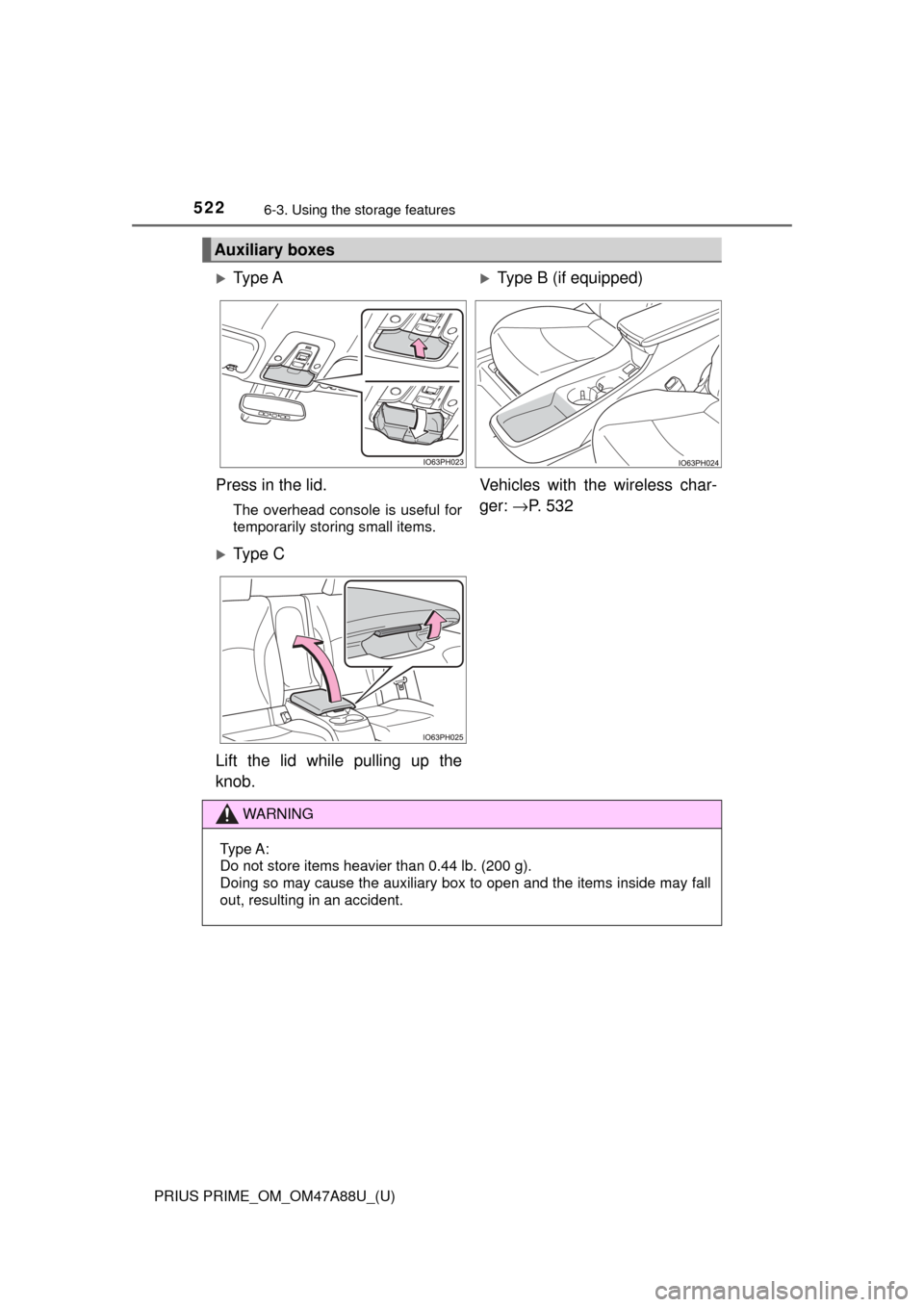
Auxiliary boxes
Ty p e AType B (if equipped)
Press in the lid.
The overhead console is useful for
temporarily storing small items.
Vehicles with the wireless char-
ger: →P. 5 3 2
Ty p e C
Lift the lid while pulling up the
knob.
WARNING
Type A:
Do not store items heavier than 0.44 lb. (200 g).
Doing so may cause the auxiliary box to open and the items inside may fall
out, resulting in an accident.
Page 532 of 784
532
PRIUS PRIME_OM_OM47A88U_(U)
6-4. Using the other interior features
A portable device can be charged by just placing Qi standard wireless
charge compatible portable devices according to the Wireless Power
Consortium, such as smart phones an d mobile batteries, etc., on the
charge area.
This function cannot be used wi th portable devices that are larger
than the charging area. Also, depend ing on the portable device, it may
not operate as normal. Please read the operation manual for portable
devices to be used.
■The “Qi” symbol
The “Qi” symbol is a trademark of the Wireless Power Consortium.
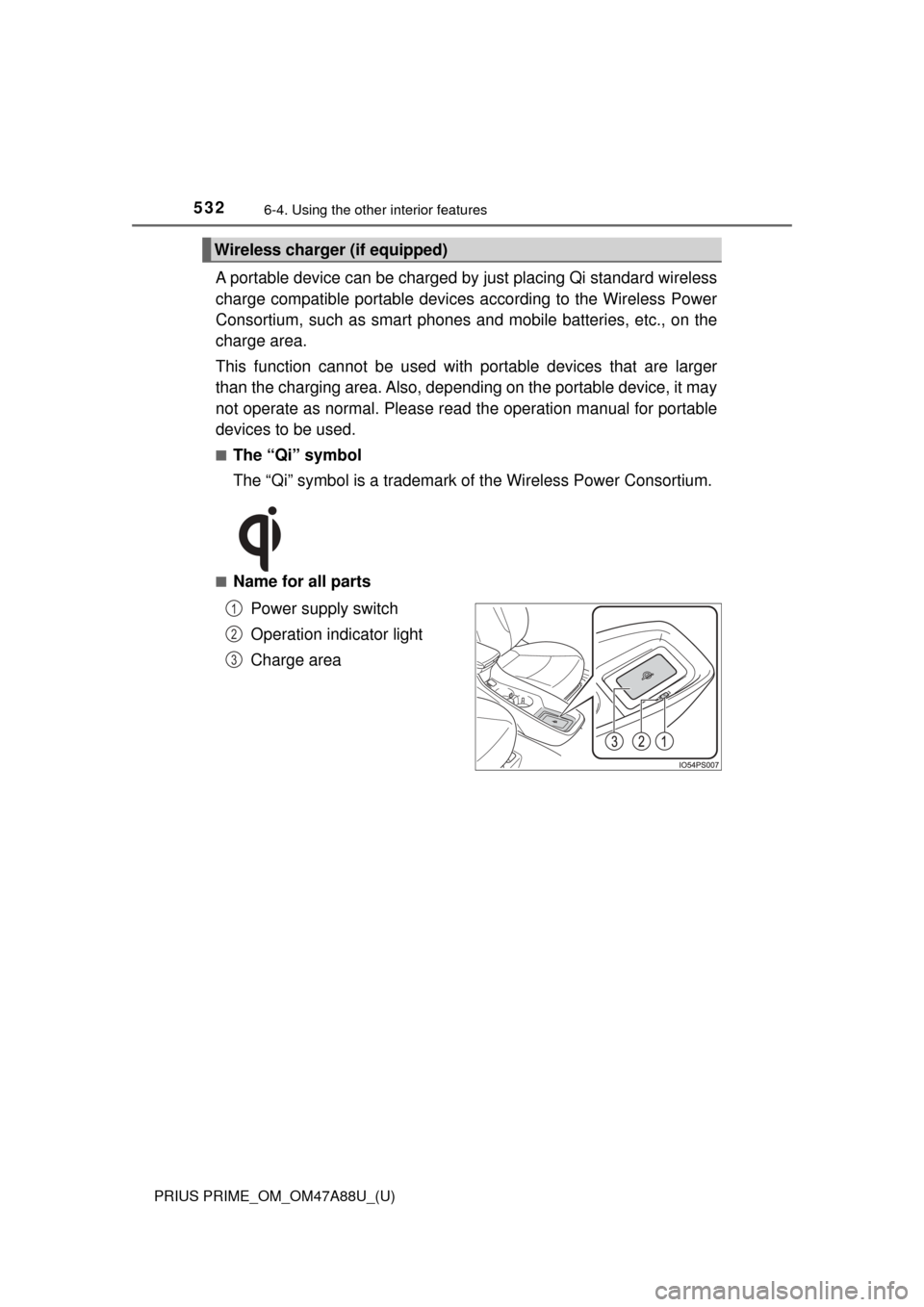
■Name for all parts
Power supply switch
Operation indicator light
Charge area
Wireless charger (if equipped)
1
2
3
Page 533 of 784
PRIUS PRIME_OM_OM47A88U_(U)
5336-4. Using the other interior features
6
Interior features
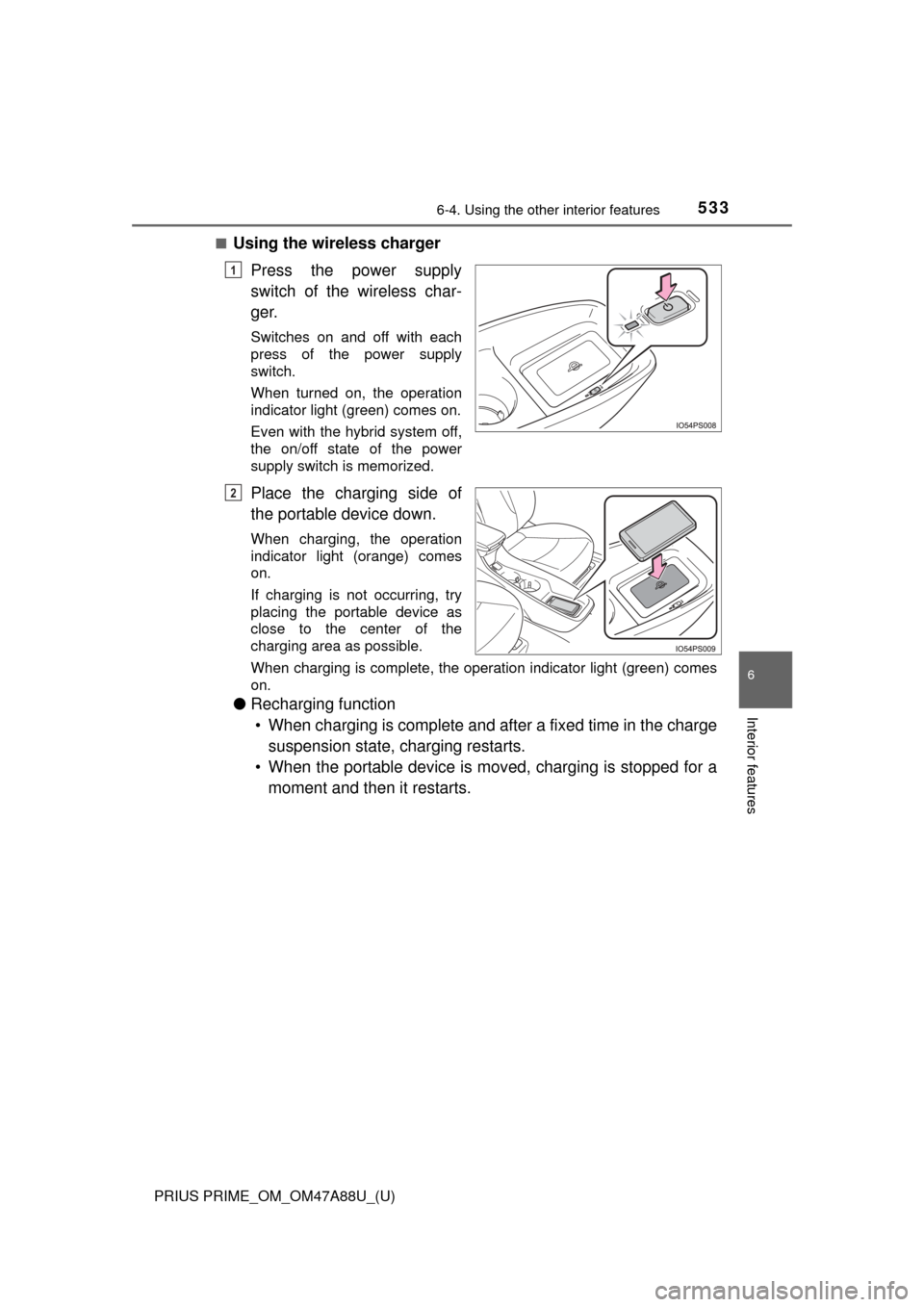
■Using the wireless chargerPress the power supply
switch of the wireless char-
ger.
Switches on and off with each
press of the power supply
switch.
When turned on, the operation
indicator light (green) comes on.
Even with the hybrid system off,
the on/off state of the power
supply switch is memorized.
Place the charging side of
the portable device down.
When charging, the operation
indicator light (orange) comes
on.
If charging is not occurring, try
placing the portable device as
close to the center of the
charging area as possible.
When charging is complete, the operation indicator light (green) comes
on.
●Recharging function
• When charging is complete and after a fixed time in the charge suspension state, charging restarts.
• When the portable device is mov ed, charging is stopped for a
moment and then it restarts.
1
2
Page 534 of 784
534
PRIUS PRIME_OM_OM47A88U_(U)
6-4. Using the other interior features
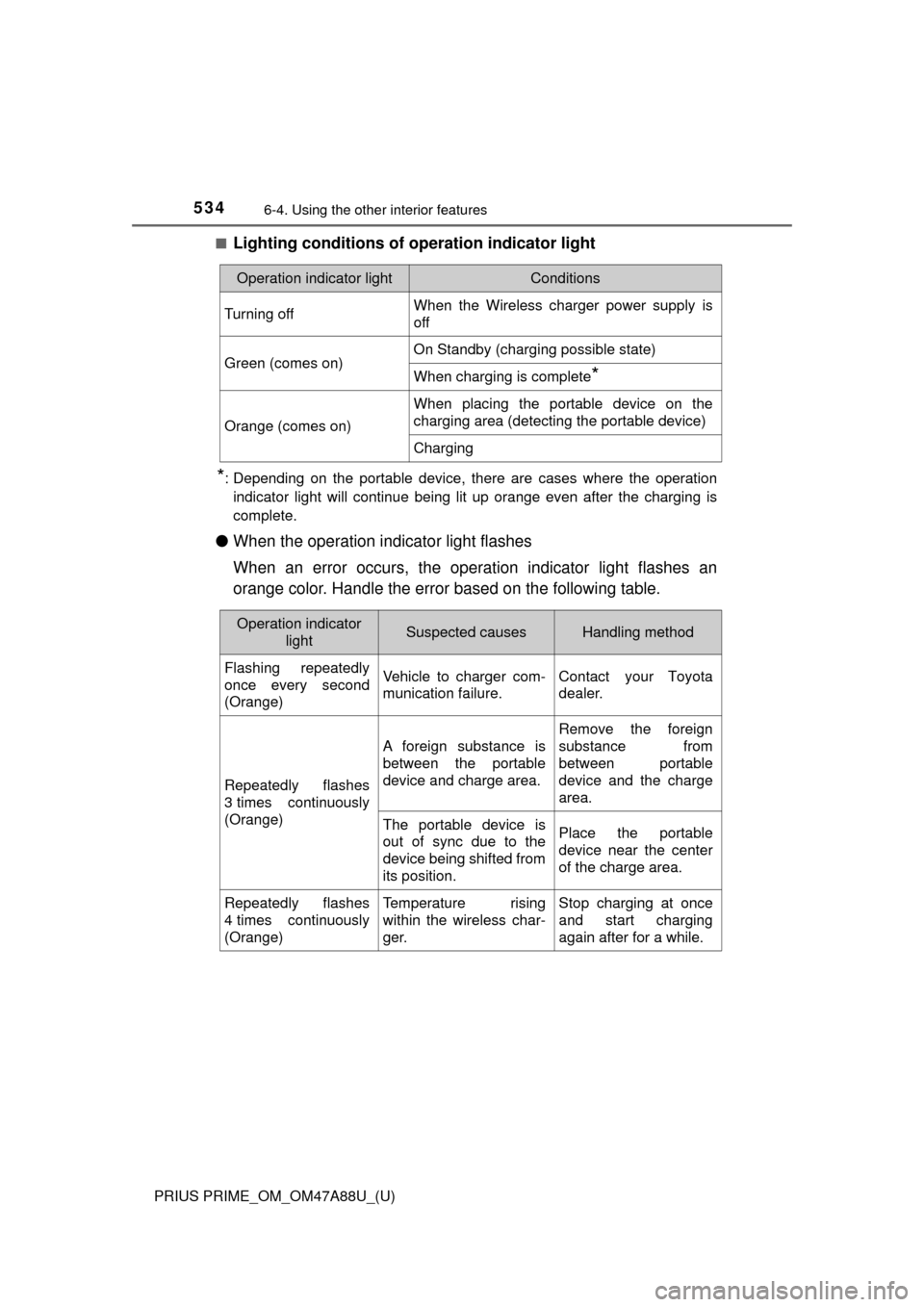
■Lighting conditions of operation indicator light
*: Depending on the portable device, there are cases where the operation
indicator light will continue being lit up orange even after the chargin\
g is
complete.
● When the operation indicator light flashes
When an error occurs, the operat ion indicator light flashes an
orange color. Handle the error based on the following table.
Operation indicator lightConditions
Turning offWhen the Wireless charger power supply is
off
Green (comes on)On Standby (charging possible state)
When charging is complete*
Orange (comes on)
When placing the portable device on the
charging area (detecting the portable device)
Charging
Operation indicator lightSuspected causesHandling method
Flashing repeatedly
once every second
(Orange)Vehicle to charger com-
munication failure.Contact your Toyota
dealer.
Repeatedly flashes
3 times continuously
(Orange)
A foreign substance is
between the portable
device and charge area.
Remove the foreign
substance from
between portable
device and the charge
area.
The portable device is
out of sync due to the
device being shifted from
its position.Place the portable
device near the center
of the charge area.
Repeatedly flashes
4 times continuously
(Orange)Temperature rising
within the wireless char-
ger.Stop charging at once
and start charging
again after for a while.
Page 535 of 784

PRIUS PRIME_OM_OM47A88U_(U)
5356-4. Using the other interior features
6
Interior features
■The wireless charger can be operated when
The power switch is in ACCESSORY or ON mode.
■ Usable portable devices
Qi standard wireless charge standard can be used on compatible devices.
However, not all Qi standard devices and compatibility are guaranteed.
Starting with mobile phones and smart phones , it is aimed for low power elec-
trically supplied portable devices of no more than 5W.
■ When covers and accessories are attached to portable devices
Do not charge in situations where cover and accessories not able to handle
Qi are attached to the portable device. Depending on the type of cover and
accessory, it may not be possible to charge. When charging is not performed
even with the portable device placed on the charge area, remove the cover
and accessories.
■ While charging, noise enters the AM radio
Turn off the wireless charger and confirm that the noise has decreased. If the
noise decreases, continuously pushing the power supply switch of the wire-
less charger for 2 seconds, the frequency of the charger can be changed and
the noise can be reduced.
Also, on that occasion, the operation indicator light will flash orange 2 times.
■ Important points of the wireless charger
●If the electronic key cannot be detected within the vehicle interior, charging
cannot be done. When the door is opened and closed, charging may be
temporarily suspended.
● When charging, the wireless charging device and portable device will get
warmer, however this is not a malfunction.
When a portable device gets warm while charging, charging may stop due
to the protection function on the portable device side. In this case, when the
temperature of the portable device drops significantly, charge again.
■ Operation sounds
When the power supply is turned on, while searching for the portable device a
sound will be produced, however this is not a malfunction.
Page 536 of 784
536
PRIUS PRIME_OM_OM47A88U_(U)
6-4. Using the other interior features
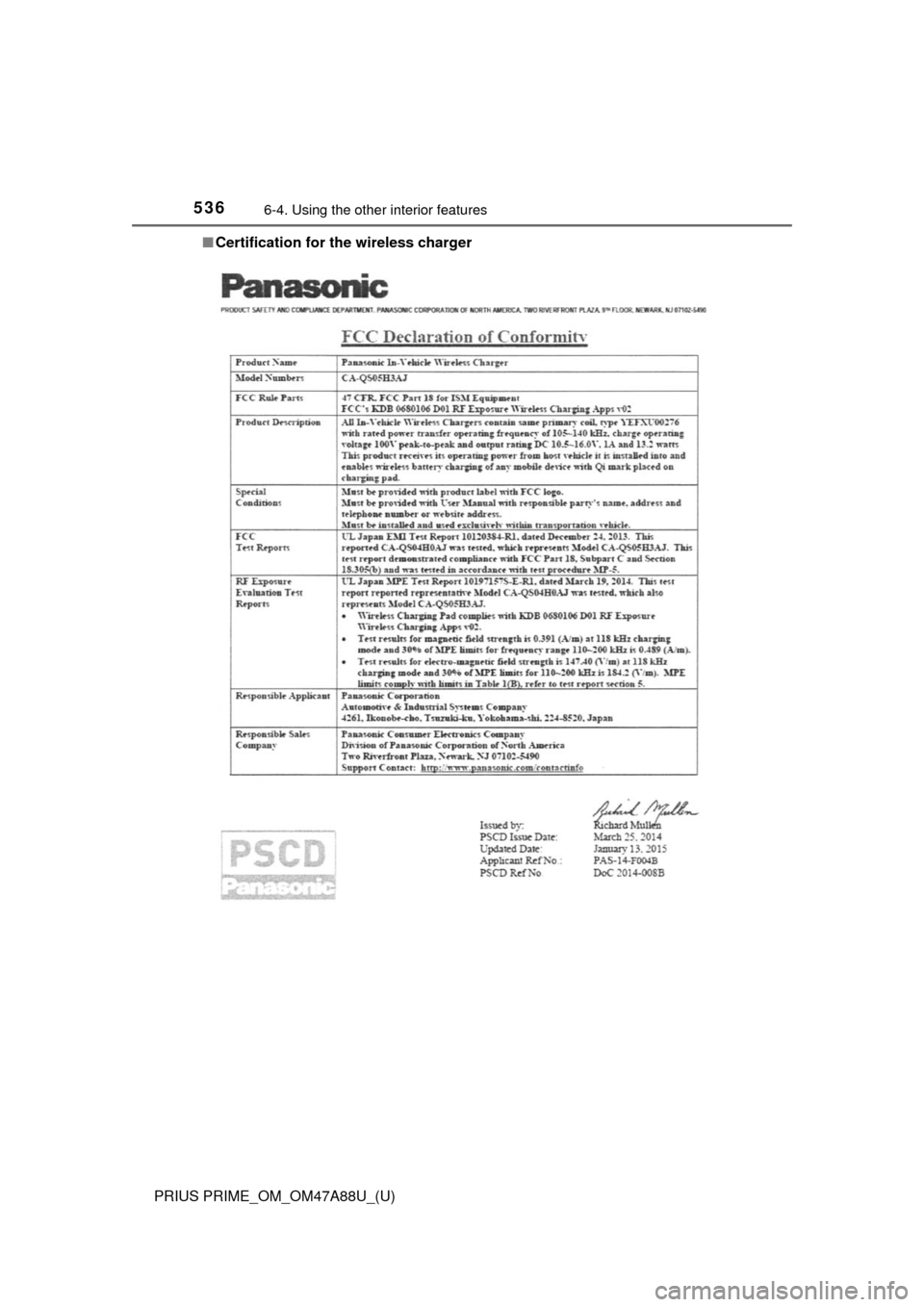
■Certification for the wireless charger