battery TOYOTA PRIUS PRIME 2017 2.G Workshop Manual
[x] Cancel search | Manufacturer: TOYOTA, Model Year: 2017, Model line: PRIUS PRIME, Model: TOYOTA PRIUS PRIME 2017 2.GPages: 784, PDF Size: 14.98 MB
Page 184 of 784
184
PRIUS PRIME_OM_OM47A88U_(U)
3. Instrument cluster
■When stopping the hybrid system
●When the hybrid system is stopped, the “Ending” screen is dis-
played on the multi-information display (for approximately 30
seconds
*1).
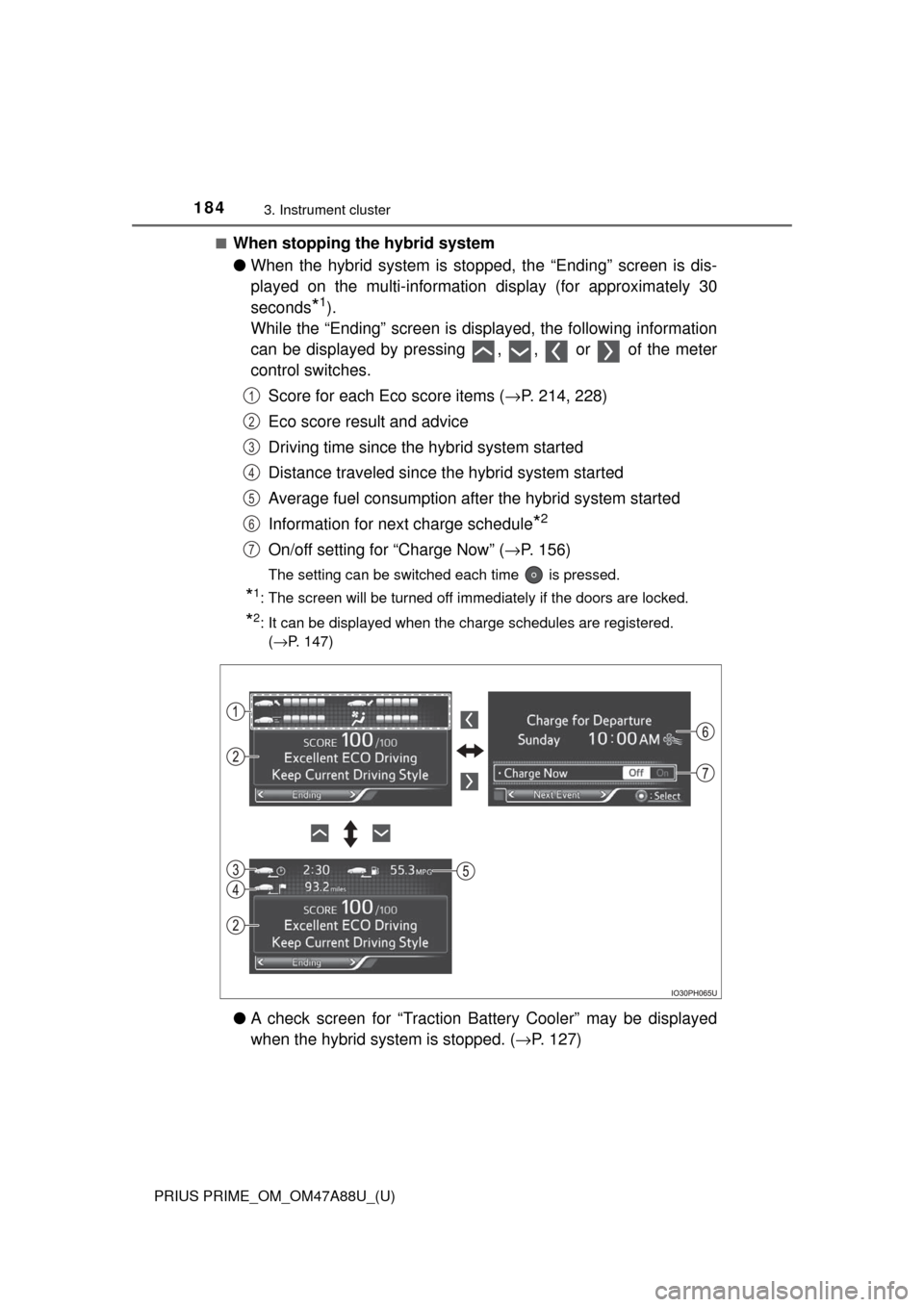
While the “Ending” screen is displayed, the following information
can be displayed by pressing , , or of the meter
control switches.
Score for each Eco score items ( →P. 214, 228)
Eco score result and advice
Driving time since the hybrid system started
Distance traveled since th e hybrid system started
Average fuel consumption after the hybrid system started
Information for next charge schedule
*2
On/off setting for “Charge Now” ( →P. 156)
The setting can be switched each time is pressed.
*1: The screen will be turned off immediately if the doors are locked.
*2: It can be displayed when the charge schedules are registered.
(→P. 147)
● A check screen for “Traction Battery Cooler” may be displayed
when the hybrid syst em is stopped. (→P. 127)
1
2
3
4
5
6
7
Page 186 of 784
186
PRIUS PRIME_OM_OM47A88U_(U)
3. Instrument cluster
■The meters and display illuminate when
The power switch is in ON mode.
■ Adjusting the instrument cluster brightness (→P. 182)
● The brightness levels that can be selected differ depending on whether the
tail lights are on and surrounding brightness levels, as shown in the table
below.
*: 22 levels of the brightness are displayed on the setting screen. However,
the brightness setting will be the brightest when other than 1st level (the
darkest) is selected. If other than 1st or 22nd level is selected, when the
tail lights are turned on in a dark place, the instrument cluster brightness
setting will be the selected level.
● If the taillights are illuminated in a dark environment, the instrument cluster
light dims. However, when the brightness of the instrument cluster is set to
minimum or maximum (1st or 22nd level of the instrument cluster bright-
ness), even if the taillights are illuminated, the instrument cluster light will
not dim.
■ When disconnecting and reconnect ing 12-volt battery terminals
The settings of the clock will be reset.
■ Calendar settings
●Until the calendar settings are set, the check screen is displayed every time
the power switch is turned to ON mode.
● After the calendar information is set, it can be changed in the “Meter Cus-
tomize” settings. ( →P. 233)
The tail lights are offThe tail lights are on
In a bright place2 levels*2 levels*
In a dark place22 levels
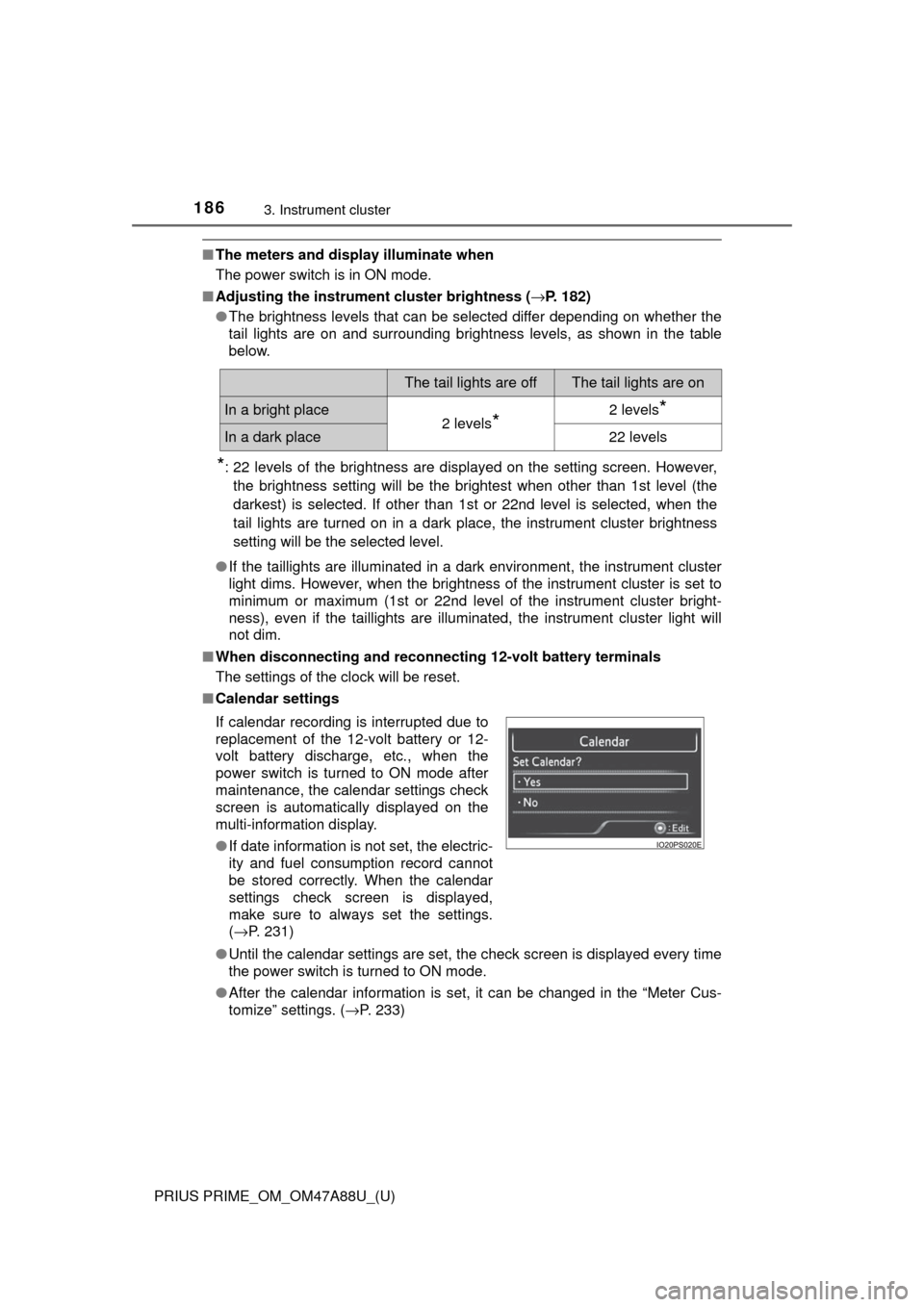
If calendar recording is interrupted due to
replacement of the 12-volt battery or 12-
volt battery discharge, etc., when the
power switch is turned to ON mode after
maintenance, the calendar settings check
screen is automatically displayed on the
multi-information display.
● If date information is not set, the electric-
ity and fuel consumption record cannot
be stored correctly. When the calendar
settings check screen is displayed,
make sure to always set the settings.
(→P. 231)
Page 193 of 784
PRIUS PRIME_OM_OM47A88U_(U)
1933. Instrument cluster
3
Instrument cluster
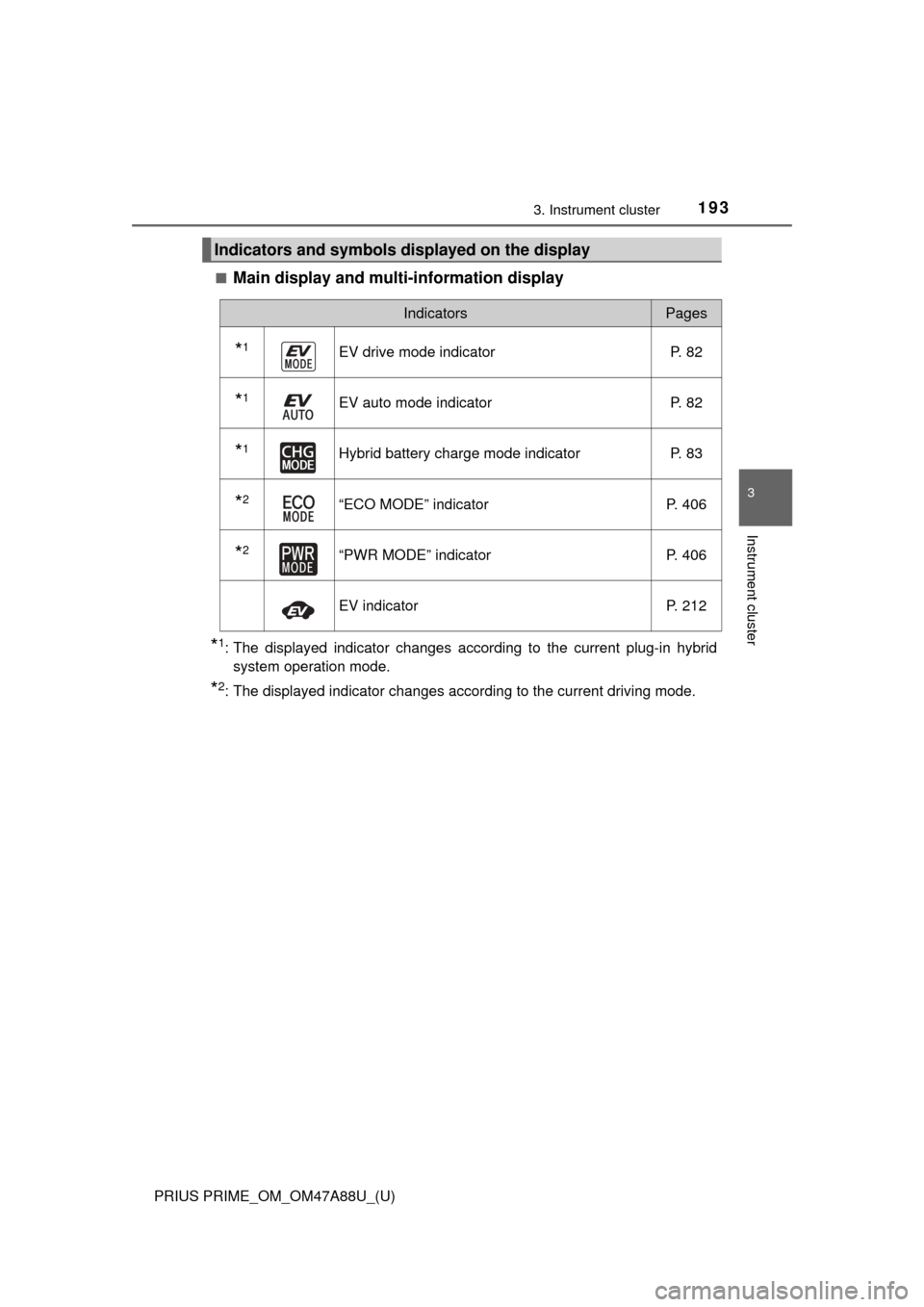
■Main display and multi-information display
*1: The displayed indicator changes according to the current plug-in hybridsystem operation mode.
*2: The displayed indicator changes according to the current driving mode.
Indicators and symbols displayed on the display
IndicatorsPages
*1EV drive mode indicator P. 82
*1EV auto mode indicator P. 82
*1Hybrid battery charge mode indicator P. 83
*2“ECO MODE” indicatorP. 406
*2“PWR MODE” indicatorP. 406
EV indicatorP. 212
Page 202 of 784
202
PRIUS PRIME_OM_OM47A88U_(U)
3. Instrument cluster
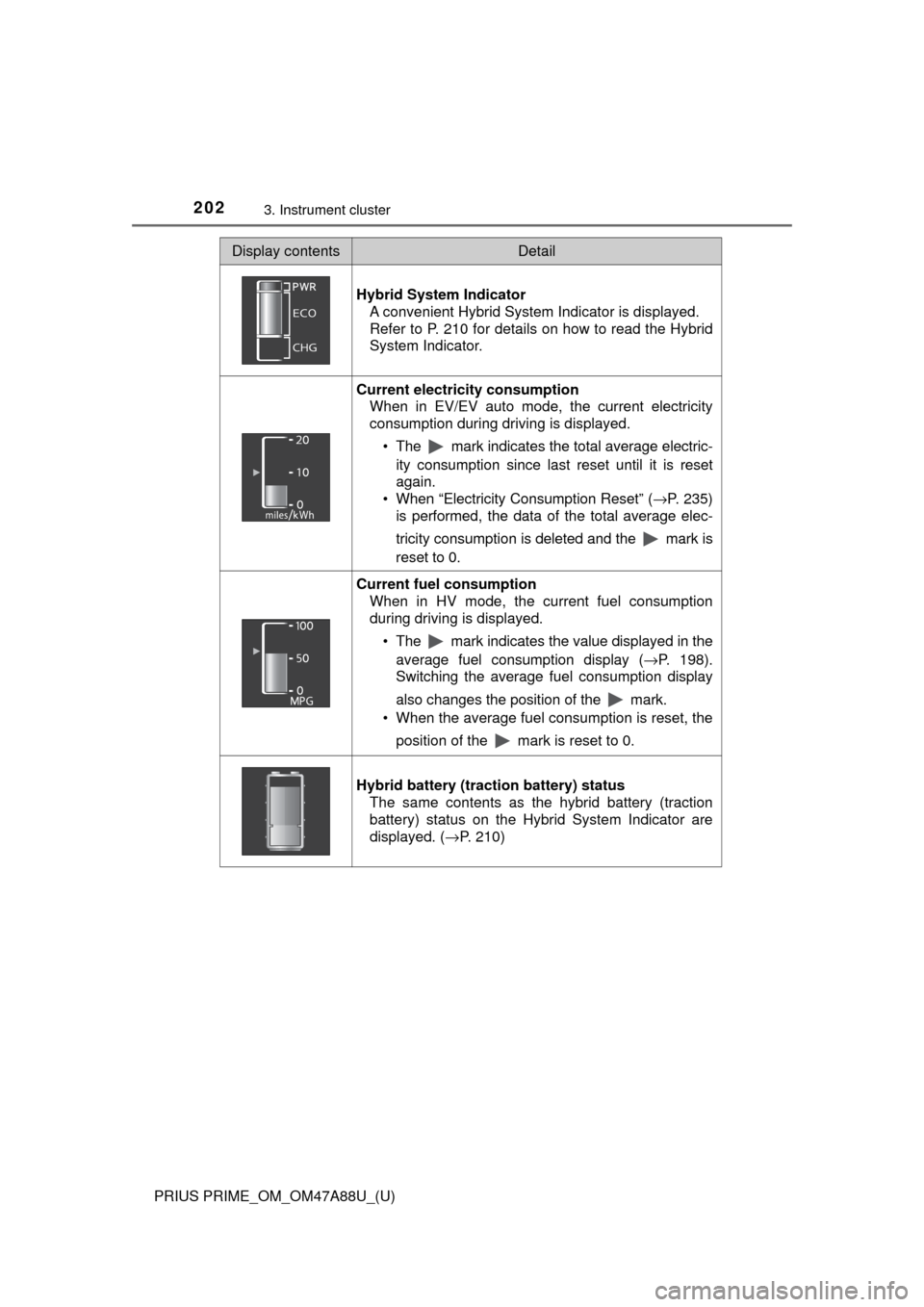
Display contentsDetail
Hybrid System Indicator A convenient Hybrid System Indicator is displayed.
Refer to P. 210 for details on how to read the Hybrid
System Indicator.
Current electricity consumption When in EV/EV auto mode, the current electricity
consumption during driving is displayed.
• The mark indicates the total average electric-ity consumption since last reset until it is reset
again.
• When “Electricity Consumption Reset” ( →P. 235)
is performed, the data of the total average elec-
tricity consumption is deleted and the mark is
reset to 0.
Current fuel consumption
When in HV mode, the current fuel consumption
during driving is displayed.
• The mark indicates the value displayed in theaverage fuel consumption display ( →P. 198).
Switching the average fuel consumption display
also changes the position of the mark.
• When the average fuel consumption is reset, the
position of the mark is reset to 0.
Hybrid battery (traction battery) status The same contents as the hybrid battery (traction
battery) status on the Hybrid System Indicator are
displayed. ( →P. 210)
Page 208 of 784
208
PRIUS PRIME_OM_OM47A88U_(U)
3. Instrument cluster
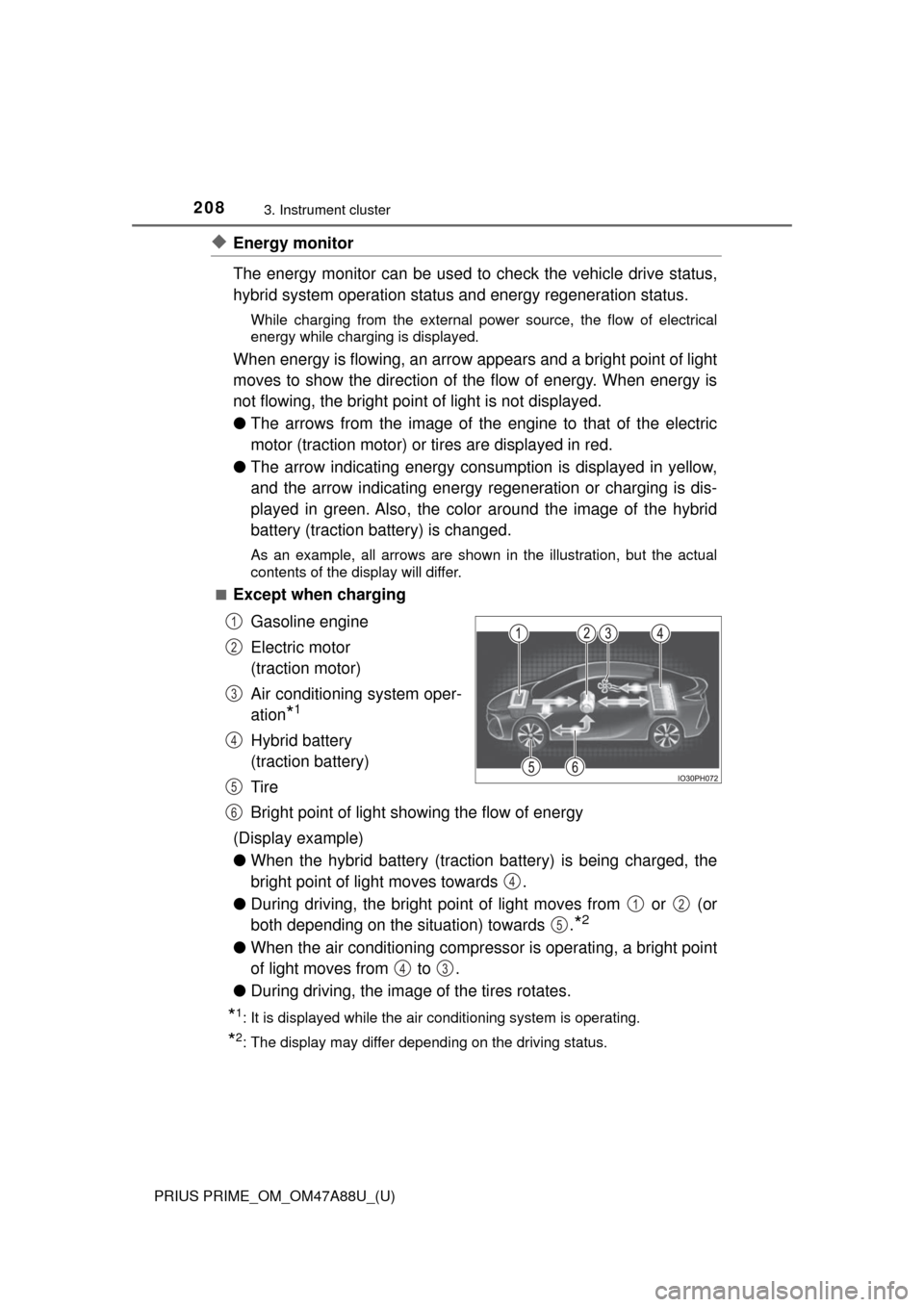
◆Energy monitor
The energy monitor can be used to check the vehicle drive status,
hybrid system operation status and energy regeneration status.
While charging from the external pow er source, the flow of electrical
energy while charging is displayed.
When energy is flowing, an arrow appears and a bright point of light
moves to show the direction of the flow of energy. When energy is
not flowing, the bright point of light is not displayed.
● The arrows from the image of the engine to that of the electric
motor (traction motor) or tires are displayed in red.
● The arrow indicating energy consumption is displayed in yellow,
and the arrow indicating energy regeneration or charging is dis-
played in green. Also, the colo r around the image of the hybrid
battery (traction battery) is changed.
As an example, all arrows are shown in the illustration, but the actual
contents of the display will differ.
■
Except when charging
Gasoline engine
Electric motor
(traction motor)
Air conditioning system oper-
ation
*1
Hybrid battery
(traction battery)
Tire
Bright point of light showing the flow of energy
(Display example)
● When the hybrid battery (traction battery) is being charged, the
bright point of light moves towards .
● During driving, the bright point of light moves from or (or
both depending on the situation) towards .
*2
●When the air conditioning compressor is operating, a bright point
of light moves from to .
● During driving, the image of the tires rotates.
*1: It is displayed while the air conditioning system is operating.
*2: The display may differ depending on the driving status.
1
2
3
4
5
6
4
12
5
43
Page 209 of 784
PRIUS PRIME_OM_OM47A88U_(U)
2093. Instrument cluster
3
Instrument cluster
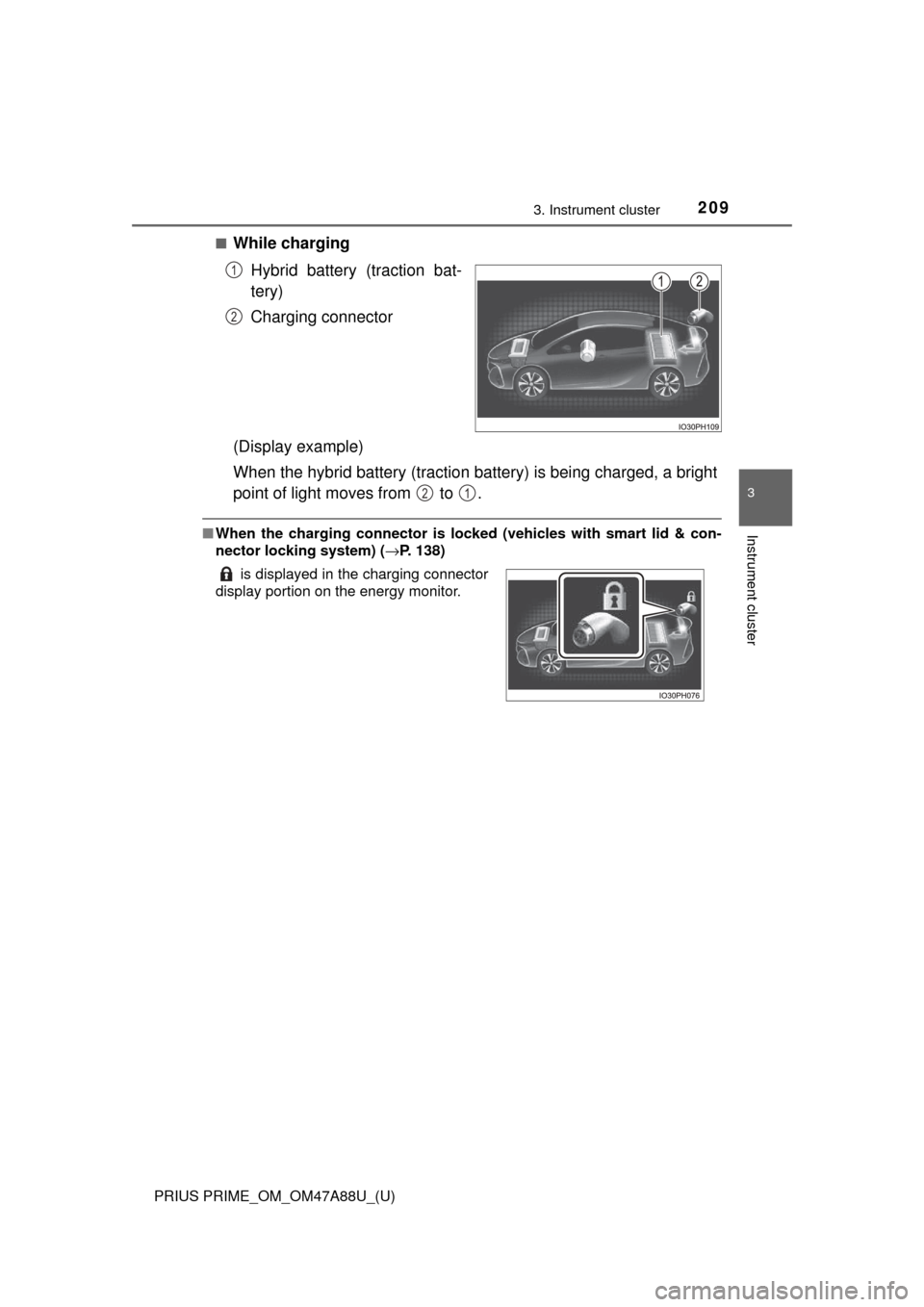
■While chargingHybrid battery (traction bat-
tery)
Charging connector
(Display example)
When the hybrid battery (traction battery) is being charged, a bright
point of light moves from to .
■ When the charging connector is lo cked (vehicles with smart lid & con-
nector locking system) ( →P. 138)
1
2
is displayed in the charging connector
display portion on the energy monitor.
21
Page 211 of 784

PRIUS PRIME_OM_OM47A88U_(U)
2113. Instrument cluster
3
Instrument cluster
EV indicator*1, 2
The EV indicator comes on when the vehicle is driven using only the
electric motor (traction motor) or the gasoline engine is stopped.
Hybrid battery (traction battery) status
→P. 216
Eco score
→P. 214
EV driving range
→P. 239
●By keeping the indicator within Ec o area, more Eco-friendly driv-
ing can be achieved.
● Charge area indicates regeneration
*3 status. Regenerated
energy will be used to charge the hybrid battery (traction battery).
*1: Not displayed on the sub-screen or head-up display.
*2: The EV indicator function can be turned off in the “Meter Customize”
settings. ( →P. 233)
*3: When used in this manual, “regeneration” refers to the conversion of
energy created by the movement of the vehicle into electrical energy.
5
6
7
8
Page 212 of 784
212
PRIUS PRIME_OM_OM47A88U_(U)
3. Instrument cluster
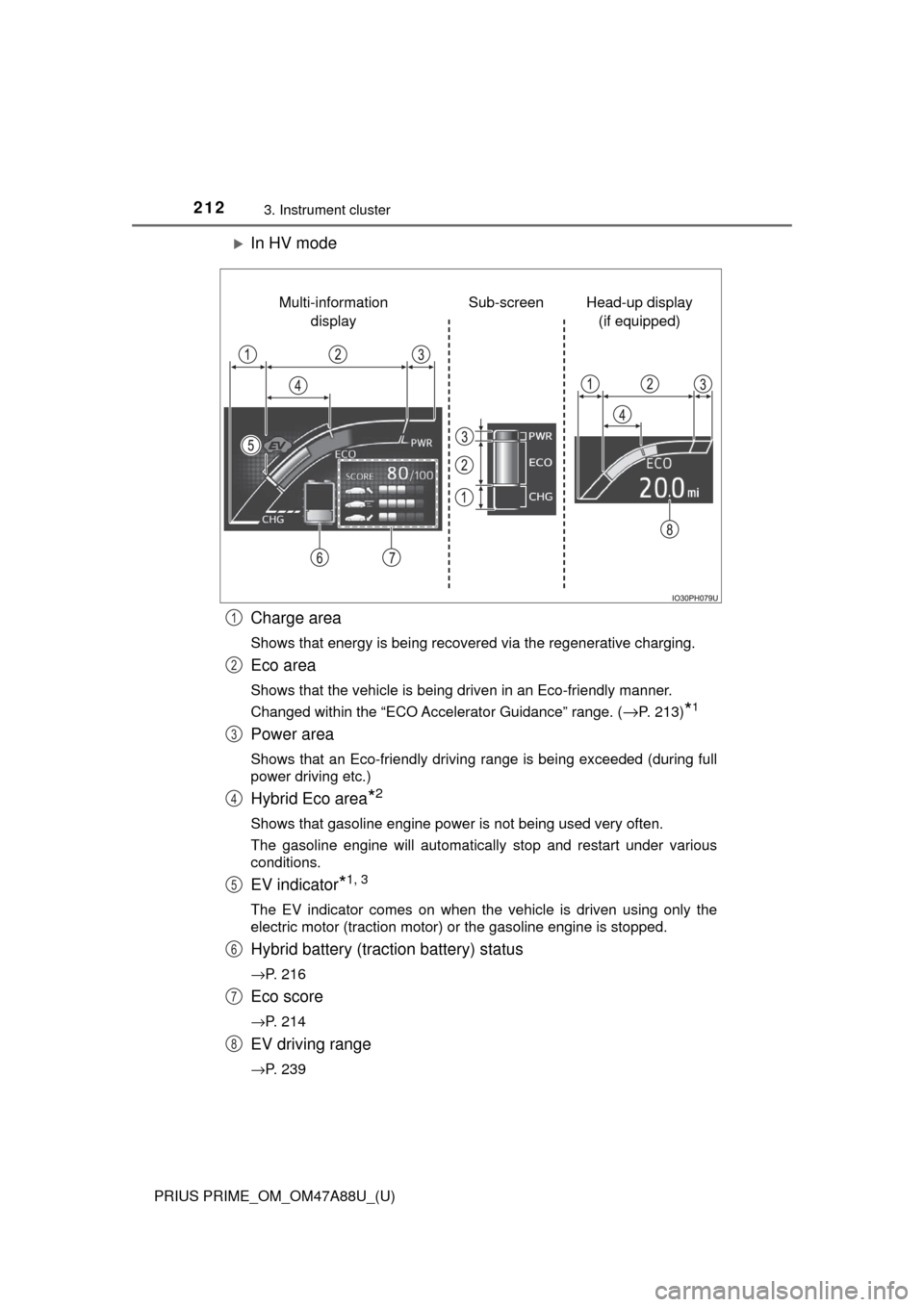
In HV mode
Charge area
Shows that energy is being recovered via the regenerative charging.
Eco area
Shows that the vehicle is being driven in an Eco-friendly manner.
Changed within the “ECO Accelerator Guidance” range. (
→P. 213)*1
Power area
Shows that an Eco-friendly driving range is being exceeded (during full
power driving etc.)
Hybrid Eco area*2
Shows that gasoline engine power is not being used very often.
The gasoline engine will automatically stop and restart under various
conditions.
EV indicator*1, 3
The EV indicator comes on when the vehicle is driven using only the
electric motor (traction motor) or the gasoline engine is stopped.
Hybrid battery (traction battery) status
→P. 216
Eco score
→P. 214
EV driving range
→P. 239
Head-up display (if equipped)
Sub-screen
Multi-information
display
1
2
3
4
5
6
7
8
Page 213 of 784
PRIUS PRIME_OM_OM47A88U_(U)
2133. Instrument cluster
3
Instrument cluster
●By keeping the indicator within Ec o area, more Eco-friendly driv-
ing can be achieved.
● Charge area indicates regeneration
*4 status. Regenerated
energy will be used to charge the hybrid battery (traction battery).
*1: Not displayed on the sub-screen or head-up display.
*2: Not displayed on the sub-screen.
*3: The EV indicator function can be turned off in the “Meter Customize”
settings. ( →P. 233)
*4: When used in this manual, “regeneration” refers to the conversion of
energy created by the movement of the vehicle into electrical energy.
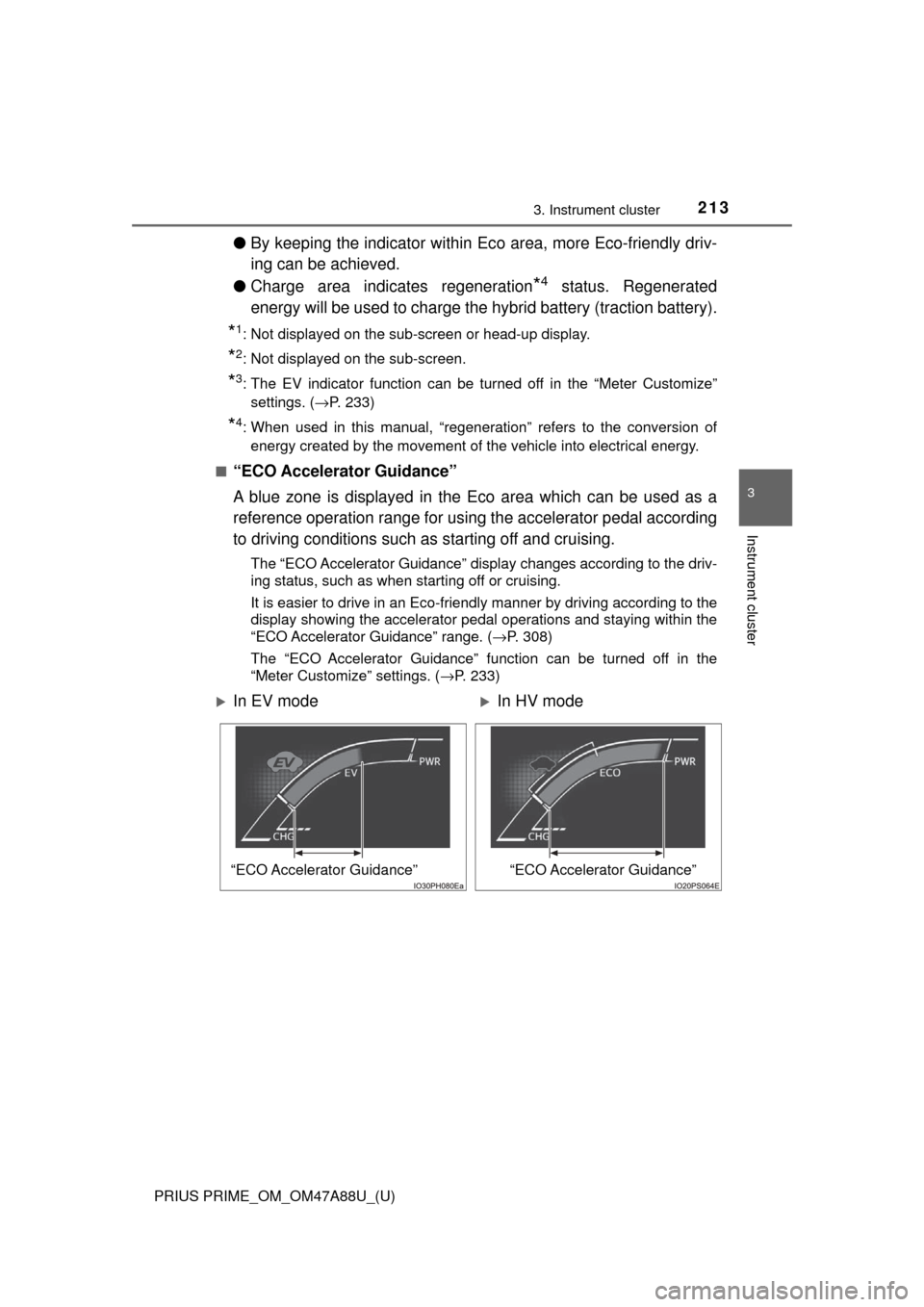
■
“ECO Accelerator Guidance”
A blue zone is displayed in the Eco area which can be used as a
reference operation range for using the accelerator pedal according
to driving conditions such as starting off and cruising.
The “ECO Accelerator Guidance” display changes according to the driv-
ing status, such as when starting off or cruising.
It is easier to drive in an Eco-friendly manner by driving according to the
display showing the accelerator pedal operations and staying within the
“ECO Accelerator Guidance” range. ( →P. 308)
The “ECO Accelerator Guidance” function can be turned off in the
“Meter Customize” settings. ( →P. 233)
In EV modeIn HV mode
“ECO Accelerator Guidance”“ECO Accelerator Guidance”
Page 215 of 784
PRIUS PRIME_OM_OM47A88U_(U)
2153. Instrument cluster
3
Instrument cluster
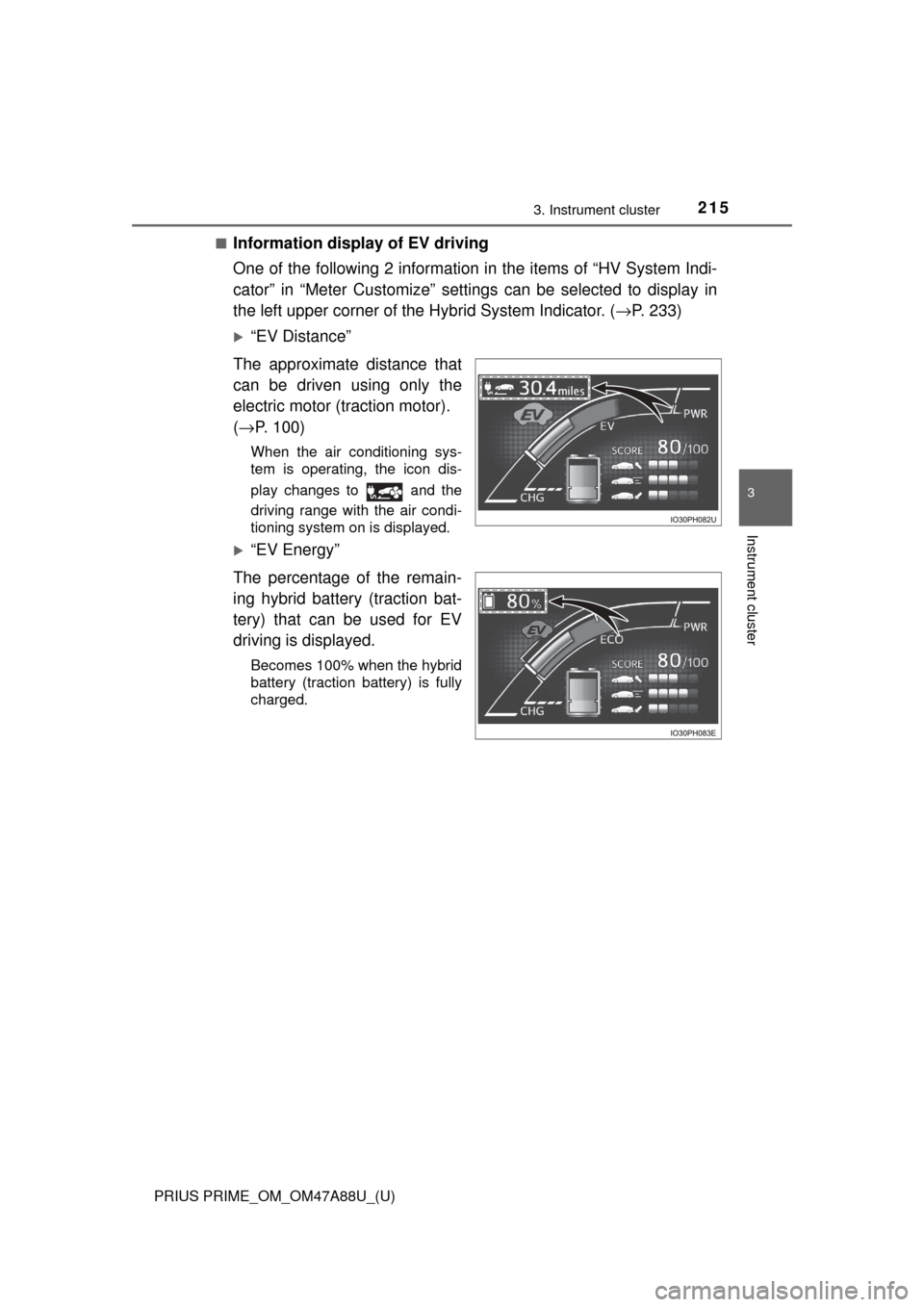
■Information display of EV driving
One of the following 2 information in the items of “HV System Indi-
cator” in “Meter Customize” settings can be selected to display in
the left upper corner of the Hybrid System Indicator. ( →P. 233)
“EV Distance”
The approximate distance that
can be driven using only the
electric motor (traction motor).
( → P. 100)
When the air conditioning sys-
tem is operating, the icon dis-
play changes to and the
driving range with the air condi-
tioning system on is displayed.
“EV Energy”
The percentage of the remain-
ing hybrid battery (traction bat-
tery) that can be used for EV
driving is displayed.
Becomes 100% when the hybrid
battery (traction battery) is fully
charged.