ECU TOYOTA PRIUS PRIME 2017 2.G Repair Manual
[x] Cancel search | Manufacturer: TOYOTA, Model Year: 2017, Model line: PRIUS PRIME, Model: TOYOTA PRIUS PRIME 2017 2.GPages: 784, PDF Size: 14.98 MB
Page 414 of 784

414
PRIUS PRIME_OM_OM47A88U_(U)
5-5. Using the driving support systems
■Conditions under which the Blind Spot Monitor function may not func-
tion correctly
●The Blind Spot Monitor function may not detect vehicles correctly in the fol-
lowing situations:
• When the sensor is misaligned due to a strong impact to the sensor or its
surrounding area
• When mud, snow, ice, a sticker, etc. is covering the sensor or surround- ing area on the rear bumper
• When driving on a road surface that is wet with standing water during bad
weather, such as heavy rain, snow, or fog
• When multiple vehicles are approaching with only a small gap between each vehicle
• When the distance between your vehicle and a following vehicle is short
• When there is a significant difference in speed between your vehicle and the vehicle that enters the detection area
• When the difference in speed between your vehicle and another vehicle is changing
• When a vehicle enters a detection area traveling at about the same
speed as your vehicle
• As your vehicle starts from a stop, a vehicle remains in the detection area
• When driving up and down consecutive steep inclines, such as hills, dips
in the road, etc.
• When driving on roads with sharp bends, consecutive curves, or uneven surfaces
• When vehicle lanes are wide, or when driving on the edge of a lane, and the vehicle in an adjacent lane is far away from your vehicle
• When a bicycle carrier or other accessory is installed to the rear of the vehicle
• When there is a significant difference in height between your vehicle and
the vehicle that enters the detection area
• Immediately after the Blind Spot Monitor main switch is turned on
● Instances of the Blind Spot Monitor function unnecessarily detecting a vehi-
cle and/or object may increase in the following situations:
• When the sensor is misaligned due to a strong impact to the sensor or its
surrounding area
• When the distance between your vehicle and a guardrail, wall, etc. that
enters the detection area is short
• When driving up and down consecutive steep inclines, such as hills, dips in the road, etc.
• When vehicle lanes are narrow, or when driving on the edge of a lane, and a vehicle traveling in a lane other than the adjacent lanes enters the
detection area
• When driving on roads with sharp bends, consecutive curves, or uneven surfaces
• When the tires are slipping or spinning
• When the distance between your vehicle and a following vehicle is short
• When a bicycle carrier or other accessory is installed to the rear of the vehicle
Page 511 of 784
PRIUS PRIME_OM_OM47A88U_(U)
5116-1. Using the air conditioning system and defogger
6
Interior features
■Security feature
Any unlocked doors will be automatically locked when the system is operat-
ing. The buzzer sounds and the emergency flashers flash to indicate that the
doors have been locked or the system has been turned off.
(The doors locked: Once; The system turned off: Twice)
■ Conditions affecting operation
→P. 281
■ When using the Remote Air Conditioning System
A charging message will be displayed on the multi-information display. Differ-
ent messages will be displayed depending on when the Remote Air Condi-
tioning System was started (after charging or during charging).
■ While the Remote Air Conditioning System is operating
●Depending on the operating condition of the Remote Air Conditioning Sys-
tem, the electric fan may spin and an operating noise may be heard. How-
ever, this does not indicate a malfunction.
● The Remote Air Conditioning System may stop operating temporarily if
other features that use electricity (for example, the seat heater, lights, wind-
shield wipers) are in operation or if the charge level of the 12-volt battery
becomes low.
● The headlights, windshield wiper, combination meter, etc. will not operate
while the Remote Air Conditioning System is operating.
■ Electronic key battery depletion
→P. 264
■ When the electronic key battery is fully depleted
→P. 627
■ Customization
Setting (e.g. Operation using “A/C” on the wireless remote control) can be
changed. (Customizable features →P. 732)
■ Smartphone-linked op eration (vehicles with 11.6-inch display)
After applying to Entune, it is possible to use the smartphone application to
operate the Remote Air Conditioning System.
For details about Entune, refer to http://www.toyota.com/entune/.
Page 527 of 784
PRIUS PRIME_OM_OM47A88U_(U)
5276-3. Using the storage features
6
Interior features
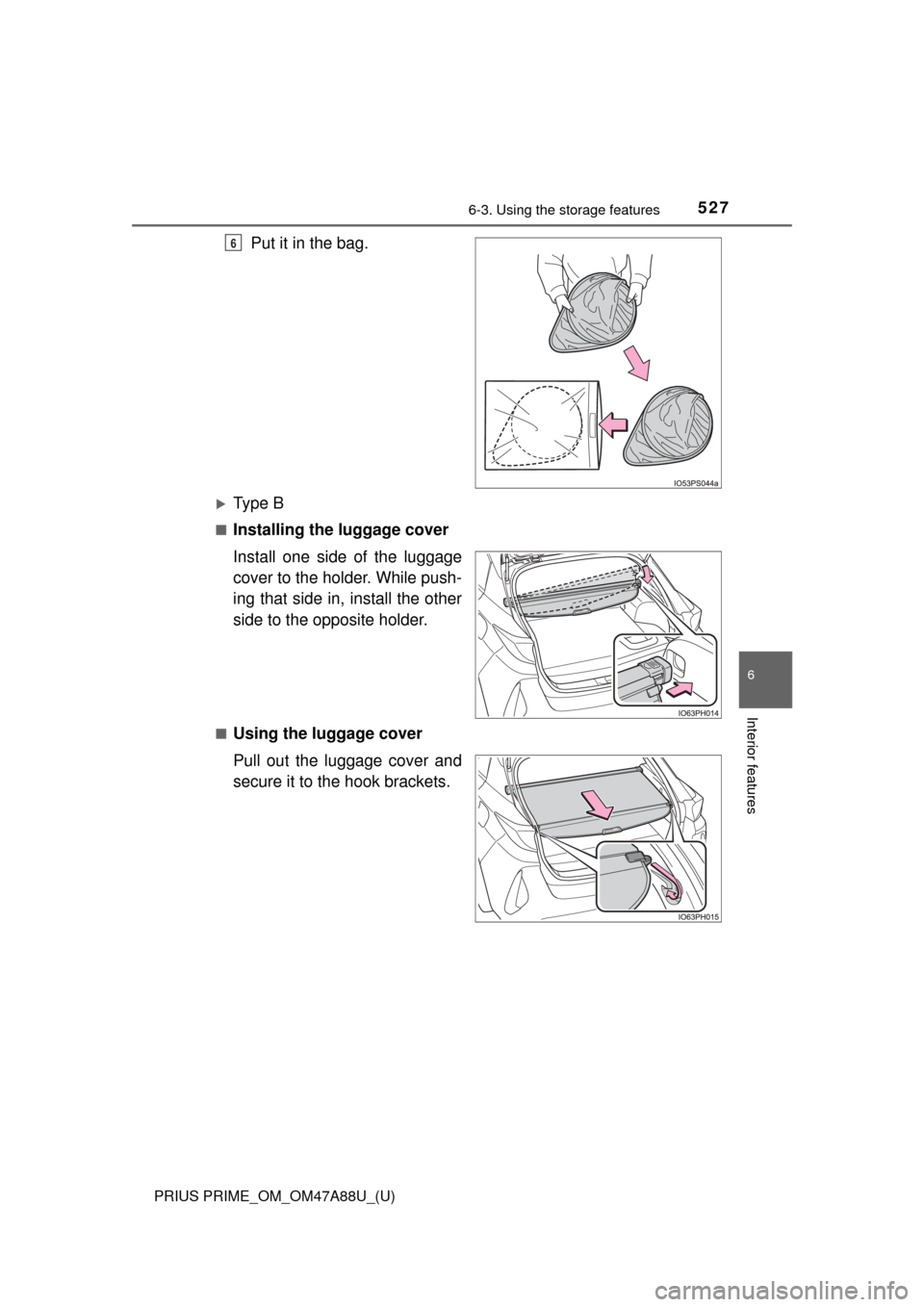
Put it in the bag.
Ty p e B
■Installing the luggage cover
Install one side of the luggage
cover to the holder. While push-
ing that side in, install the other
side to the opposite holder.
■Using the luggage cover
Pull out the luggage cover and
secure it to the hook brackets.
6
Page 541 of 784
541
PRIUS PRIME_OM_OM47A88U_(U)
6-4. Using the other interior features
6
Interior features
Garage door opener∗
The garage door opener (HomeLink® Universal Transceiver) is manu-
factured under license from HomeLink®.
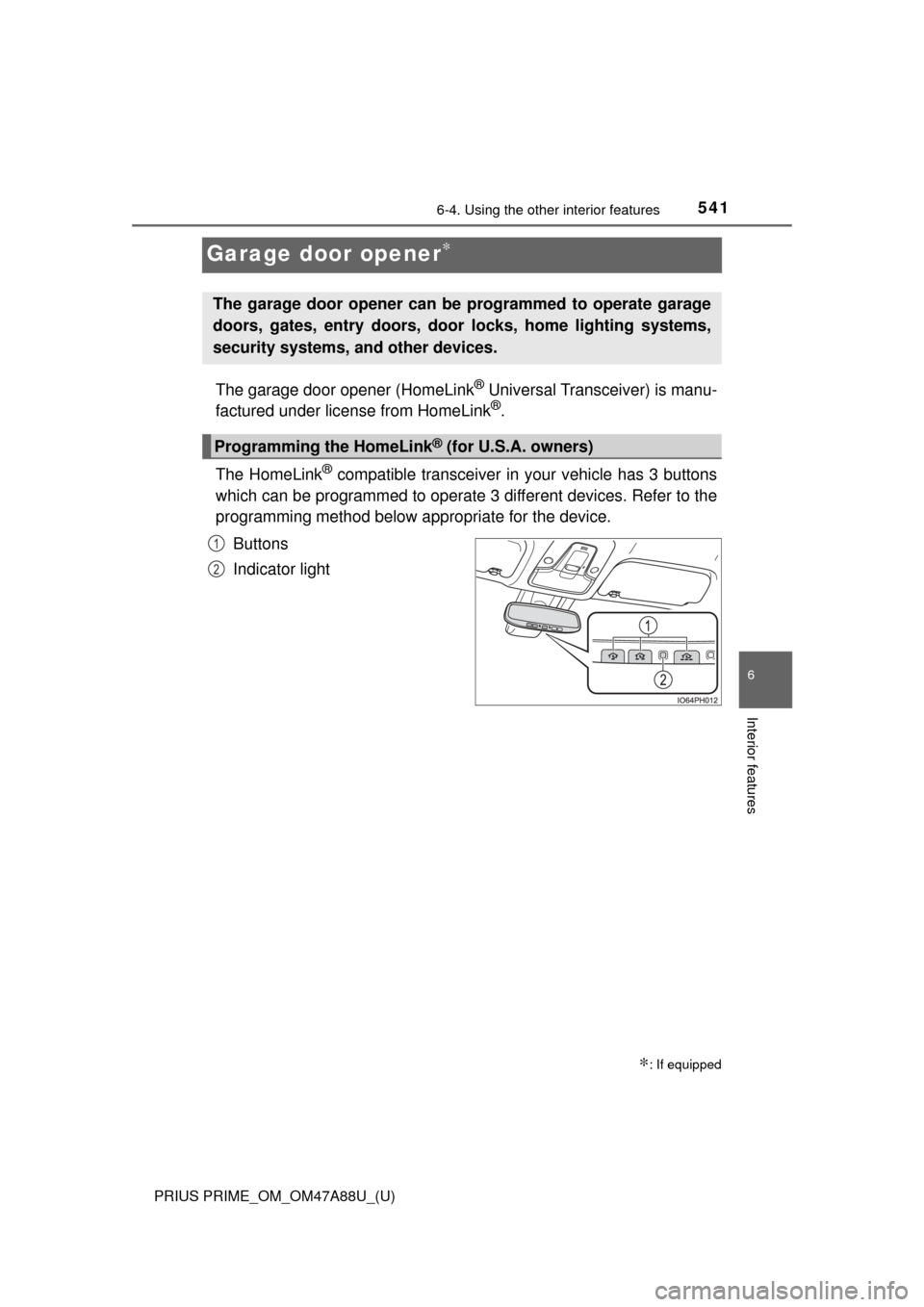
The HomeLink
® compatible transceiver in your vehicle has 3 buttons
which can be programmed to operate 3 different devices. Refer to the
programming method below appropriate for the device.
Buttons
Indicator light
∗: If equipped
The garage door opener can be programmed to operate garage
doors, gates, entry doors, door locks, home lighting systems,
security systems, and other devices.
Programming the HomeLink® (for U.S.A. owners)
1
2
Page 545 of 784
PRIUS PRIME_OM_OM47A88U_(U)
5456-4. Using the other interior features
6
Interior features
■Programming an entry gate (for U.S.A. owners)/Programming a
devices in the Canadian marketPlace the remote control transmitter 1 to 3 in. (25 to 75 mm)
away from the HomeLink
® buttons.
Keep the HomeLink® indicator light in view while programming.
Press and hold the selected HomeLink® button.
Repeatedly press and release (cyc le) the remote control trans-
mitter for 2 seconds each until step 4 is completed.
When the HomeLink
® indicator light starts to flash rapidly,
release the buttons.
Test the HomeLink
® operation by pressing the newly pro-
grammed button. Check to see if the gate/device operates cor-
rectly.
Repeat the steps above to program another device for any of the
remaining HomeLink
® buttons.
■Programming other devices
To program other devices such as home security systems, home
door locks and lighting, contact your Toyota dealer for assistance.
■Reprogramming a button
The individual HomeLink
® buttons cannot be erased but can be
reprogrammed. To reprogram a button, follow the “Reprogramming
a HomeLink
® button” instructions.
Press the appropriate HomeLink
® button. The HomeLink® indicator
light should come on.
The HomeLink® compatible transceiver in your vehicle continues to send a
signal for up to 20 seconds as long as the button is pressed.
Operating HomeLink®
1
2
3
4
5
6
Page 548 of 784
548
PRIUS PRIME_OM_OM47A88U_(U)
6-4. Using the other interior features
Safety Connect∗
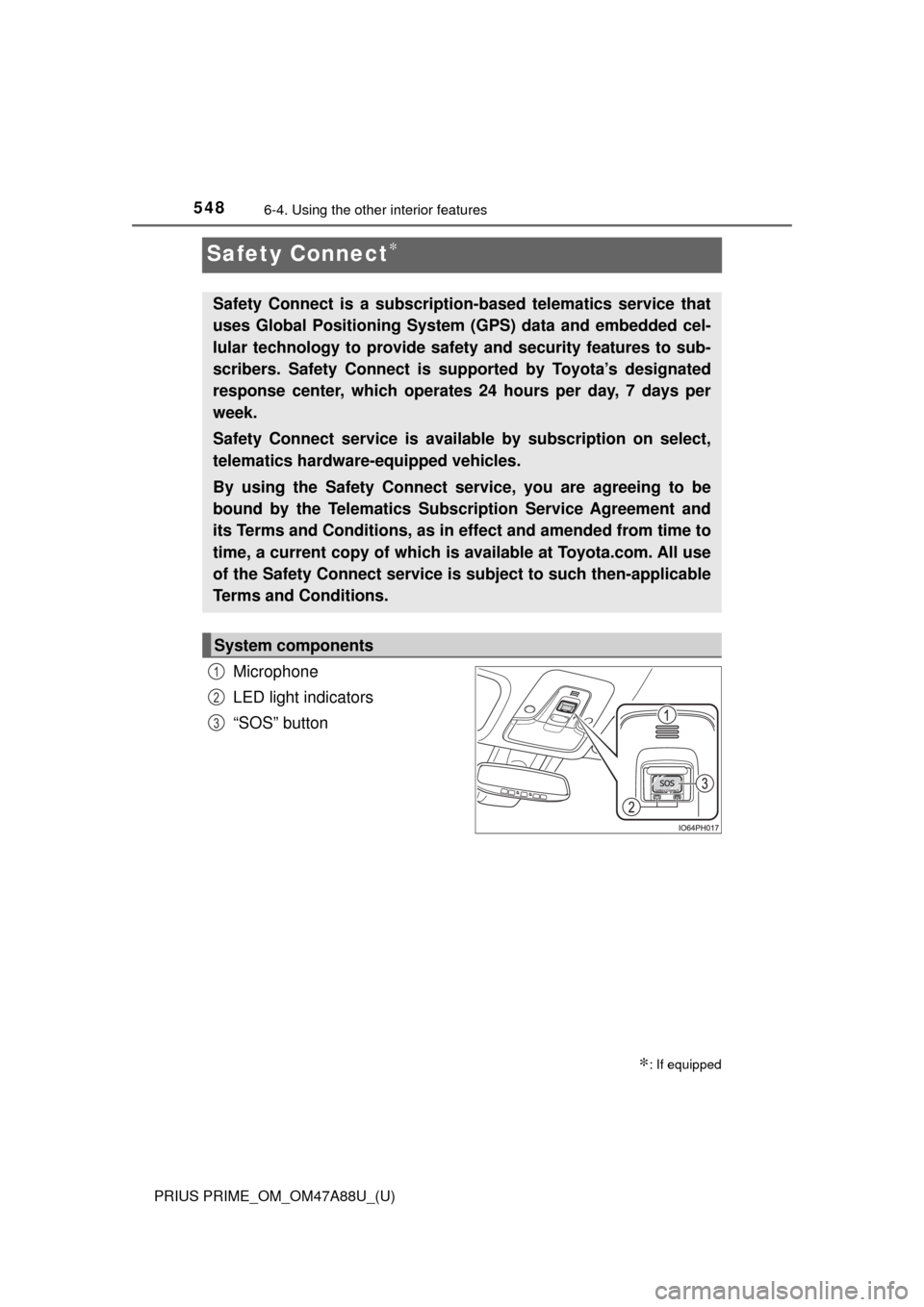
Microphone
LED light indicators
“SOS” button
∗: If equipped
Safety Connect is a subscripti on-based telematics service that
uses Global Positioning System (GPS) data and embedded cel-
lular technology to provide safety and security features to sub-
scribers. Safety Connect is s upported by Toyota’s designated
response center, which operates 24 hours per day, 7 days per
week.
Safety Connect service is avai lable by subscription on select,
telematics hardware-equipped vehicles.
By using the Safety Connect service, you are agreeing to be
bound by the Telematics Subscription Service Agreement and
its Terms and Conditions, as in ef fect and amended from time to
time, a current copy of which is available at Toyota.com. All use
of the Safety Connect service is subject to such then-applicable
Terms and Conditions.
System components
1
2
3
Page 563 of 784
PRIUS PRIME_OM_OM47A88U_(U)
5637-1. Maintenance and care
7
Maintenance and care
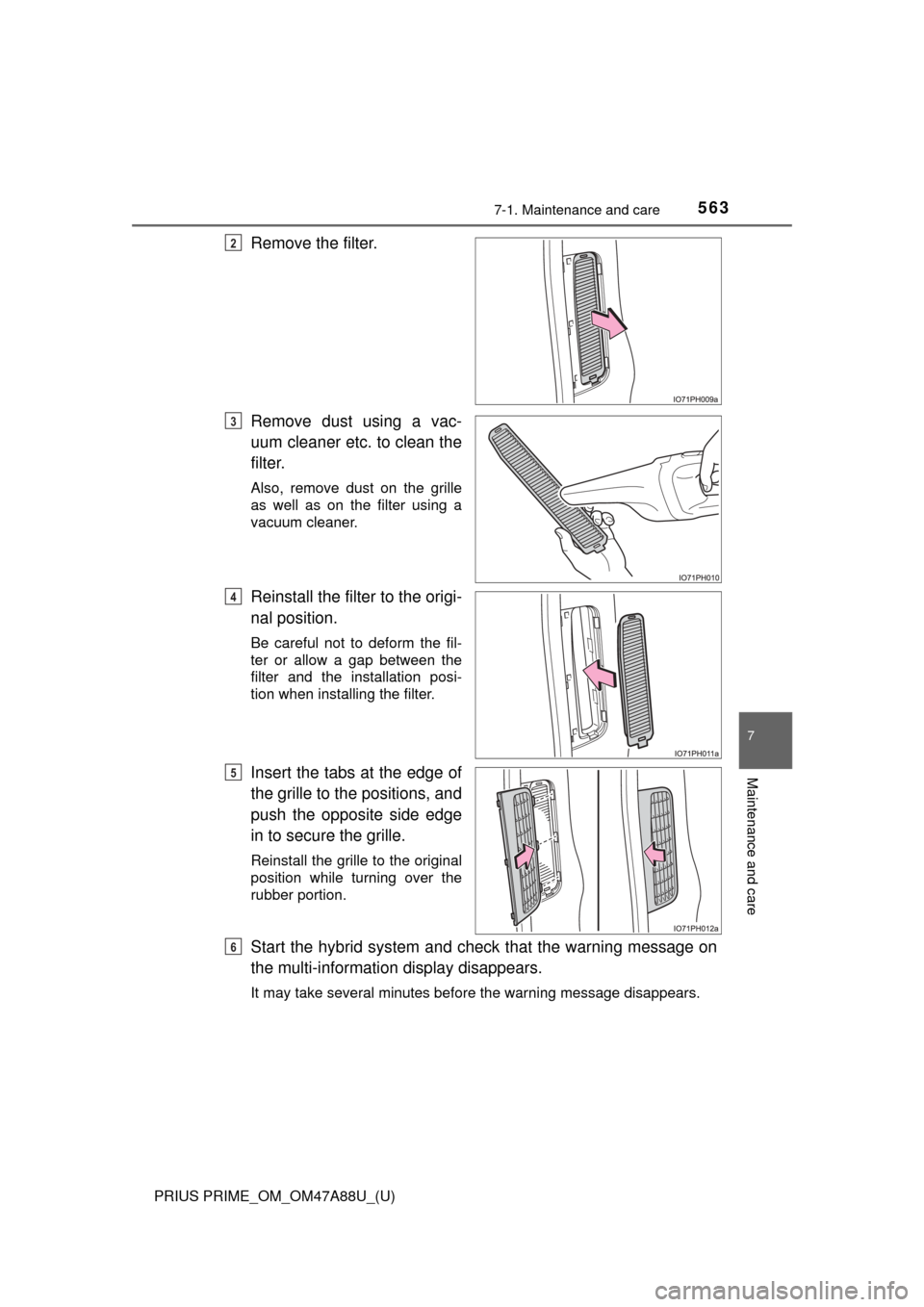
Remove the filter.
Remove dust using a vac-
uum cleaner etc. to clean the
filter.
Also, remove dust on the grille
as well as on the filter using a
vacuum cleaner.
Reinstall the filter to the origi-
nal position.
Be careful not to deform the fil-
ter or allow a gap between the
filter and the installation posi-
tion when installing the filter.
Insert the tabs at the edge of
the grille to the positions, and
push the opposite side edge
in to secure the grille.
Reinstall the grille to the original
position while turning over the
rubber portion.
Start the hybrid system and check that the warning message on
the multi-informati on display disappears.
It may take several minutes before the warning message disappears.
2
3
4
5
6
Page 571 of 784
PRIUS PRIME_OM_OM47A88U_(U)
5717-2. Maintenance
7
Maintenance and care
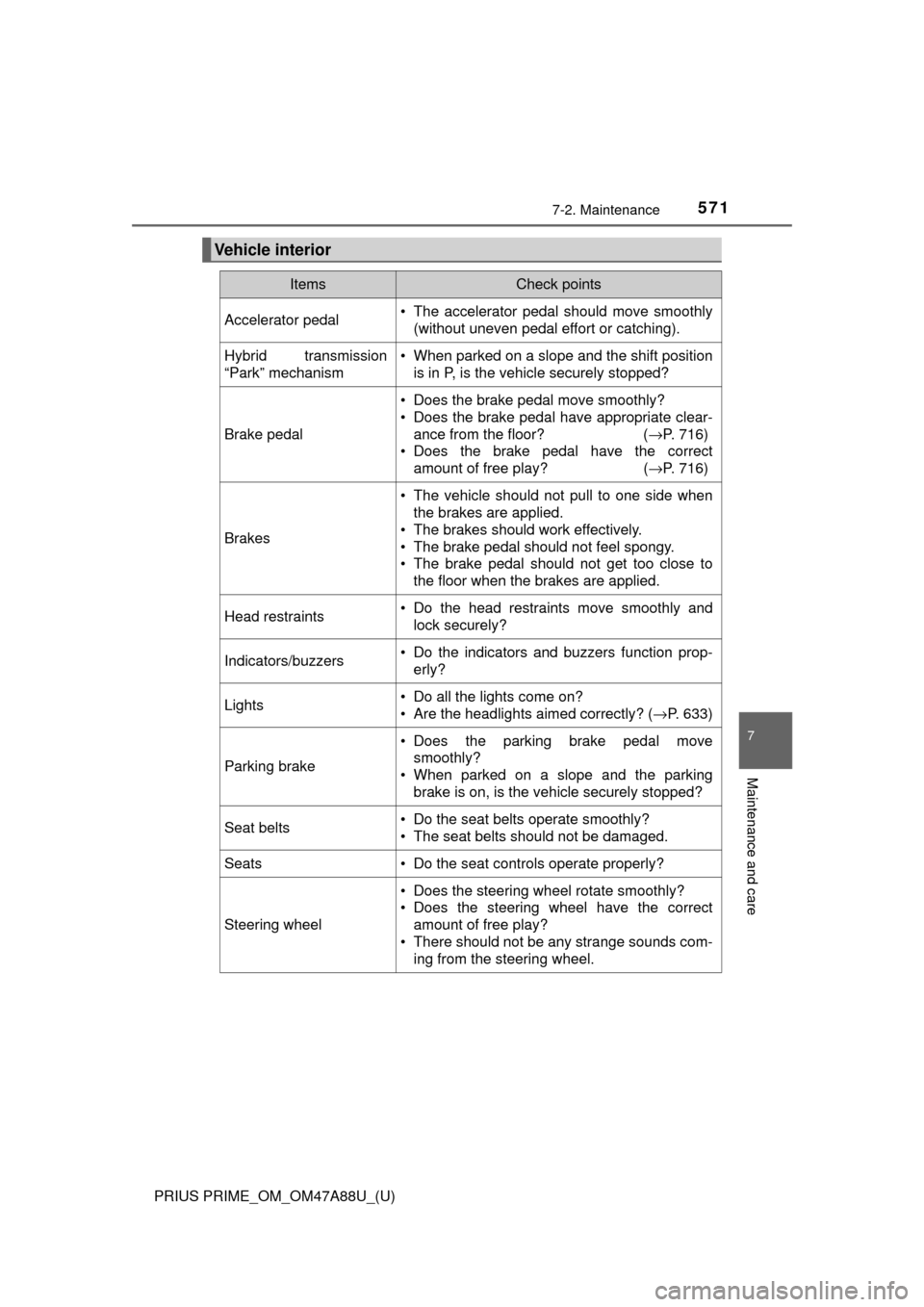
Vehicle interior
ItemsCheck points
Accelerator pedal• The accelerator pedal should move smoothly(without uneven pedal effort or catching).
Hybrid transmission
“Park” mechanism• When parked on a slope and the shift positionis in P, is the vehicle securely stopped?
Brake pedal
• Does the brake pedal move smoothly?
• Does the brake pedal have appropriate clear-
ance from the floor? ( →P. 716)
• Does the brake pedal have the correct amount of free play? ( →P. 716)
Brakes
• The vehicle should not pull to one side when
the brakes are applied.
• The brakes should work effectively.
• The brake pedal should not feel spongy.
• The brake pedal should not get too close to the floor when the brakes are applied.
Head restraints• Do the head restraints move smoothly andlock securely?
Indicators/buzzers• Do the indicators and buzzers function prop-erly?
Lights• Do all the lights come on?
• Are the headlights aimed correctly? ( →P. 633)
Parking brake
• Does the parking brake pedal move
smoothly?
• When parked on a slope and the parking
brake is on, is the vehicle securely stopped?
Seat belts• Do the seat belts operate smoothly?
• The seat belts should not be damaged.
Seats• Do the seat controls operate properly?
Steering wheel
• Does the steering wheel rotate smoothly?
• Does the steering wheel have the correctamount of free play?
• There should not be any strange sounds com- ing from the steering wheel.
Page 578 of 784
578
PRIUS PRIME_OM_OM47A88U_(U)
7-3. Do-it-yourself maintenance
WARNING
■Pre-driving check
Check that the hood is fully closed and locked.
If the hood is not locked properly, it may open while the vehicle is in motion
and cause an accident, which may result in death or serious injury.
■ To prevent burns
■ After installing the su pport rod into the slot
Make sure the rod supports the hood securely from falling down on to your
head or body.
■ When closing the hood
NOTICE
■When closing the hood
Be sure to return the supporting rod to its clip before closing the hood. Clos-
ing the hood without returning the support rod properly could cause the
hood to bend.
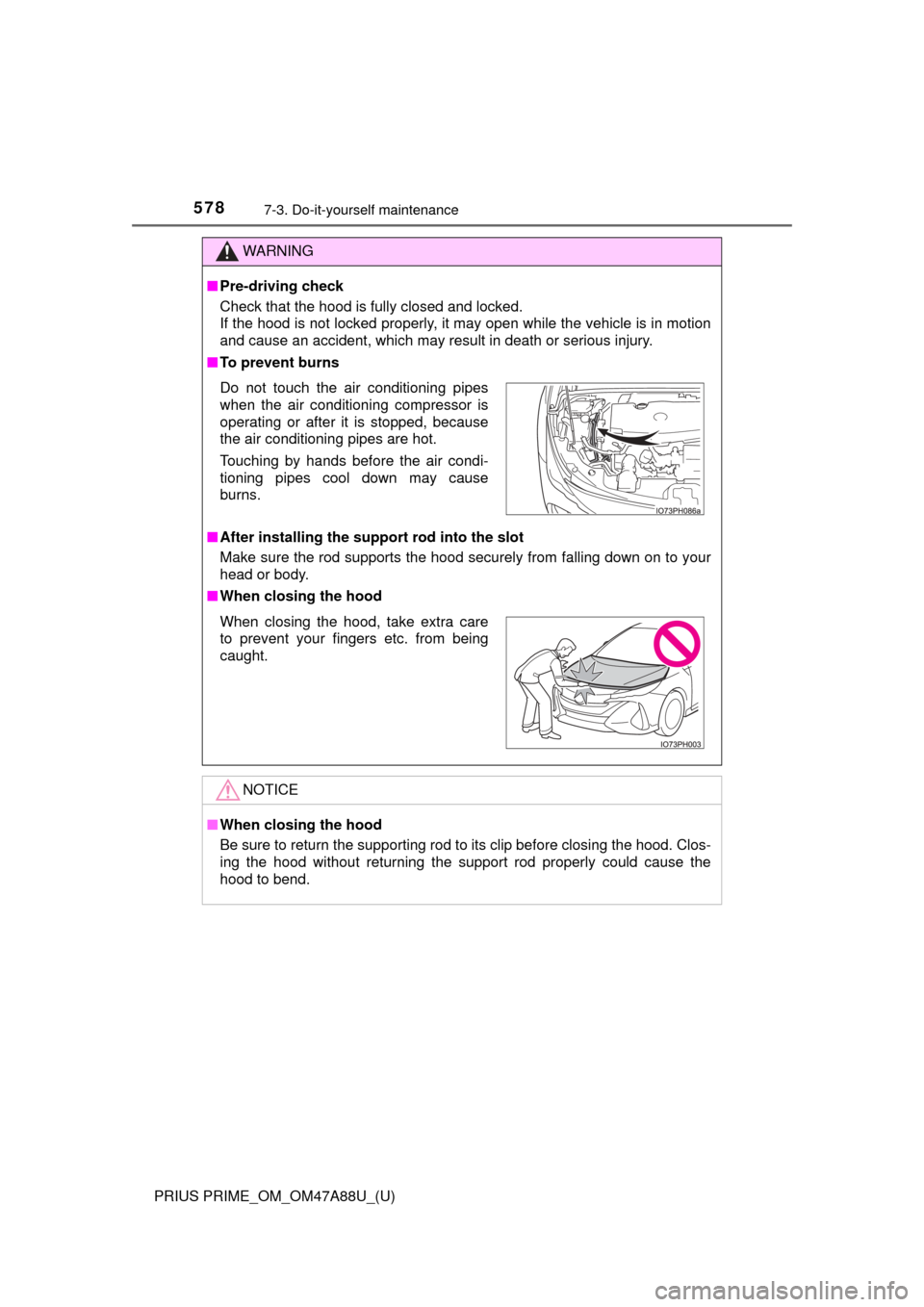
Do not touch the air conditioning pipes
when the air conditioning compressor is
operating or after it is stopped, because
the air conditioning pipes are hot.
Touching by hands before the air condi-
tioning pipes cool down may cause
burns.
When closing the hood, take extra care
to prevent your fingers etc. from being
caught.
Page 618 of 784
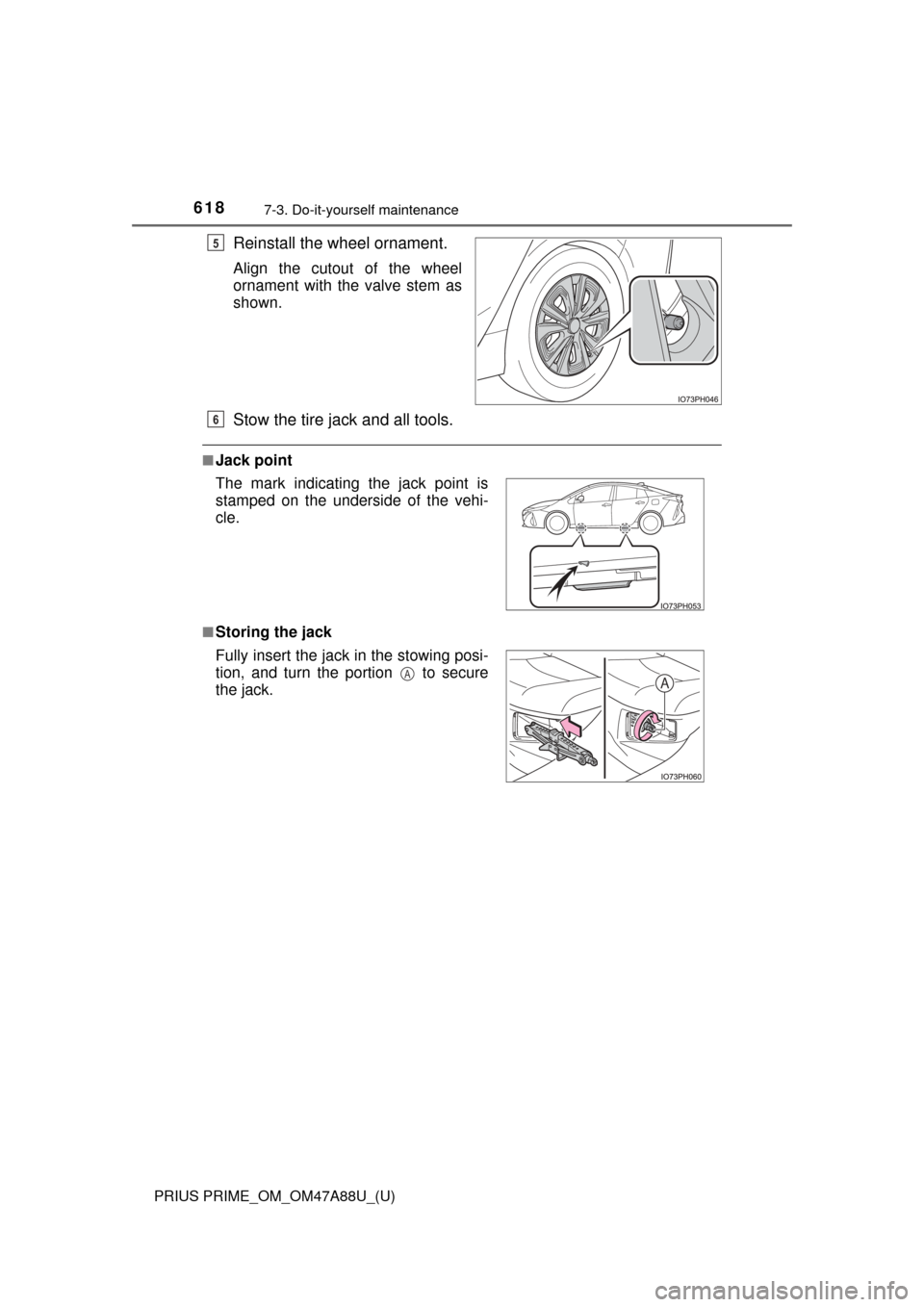
618
PRIUS PRIME_OM_OM47A88U_(U)
7-3. Do-it-yourself maintenance
Reinstall the wheel ornament.
Align the cutout of the wheel
ornament with the valve stem as
shown.
Stow the tire jack and all tools.
■Jack point
■Storing the jack
5
The mark indicating the jack point is
stamped on the underside of the vehi-
cle.
Fully insert the jack in the stowing posi-
tion, and turn the portion to secure
the jack.
6
A