cruise control TOYOTA PRIUS PRIME 2020 (in English) User Guide
[x] Cancel search | Manufacturer: TOYOTA, Model Year: 2020, Model line: PRIUS PRIME, Model: TOYOTA PRIUS PRIME 2020Pages: 792, PDF Size: 16.56 MB
Page 253 of 792
PRIUS PRIME_OM_OM47C77U_(U)
2533. Instrument cluster
3
Instrument cluster
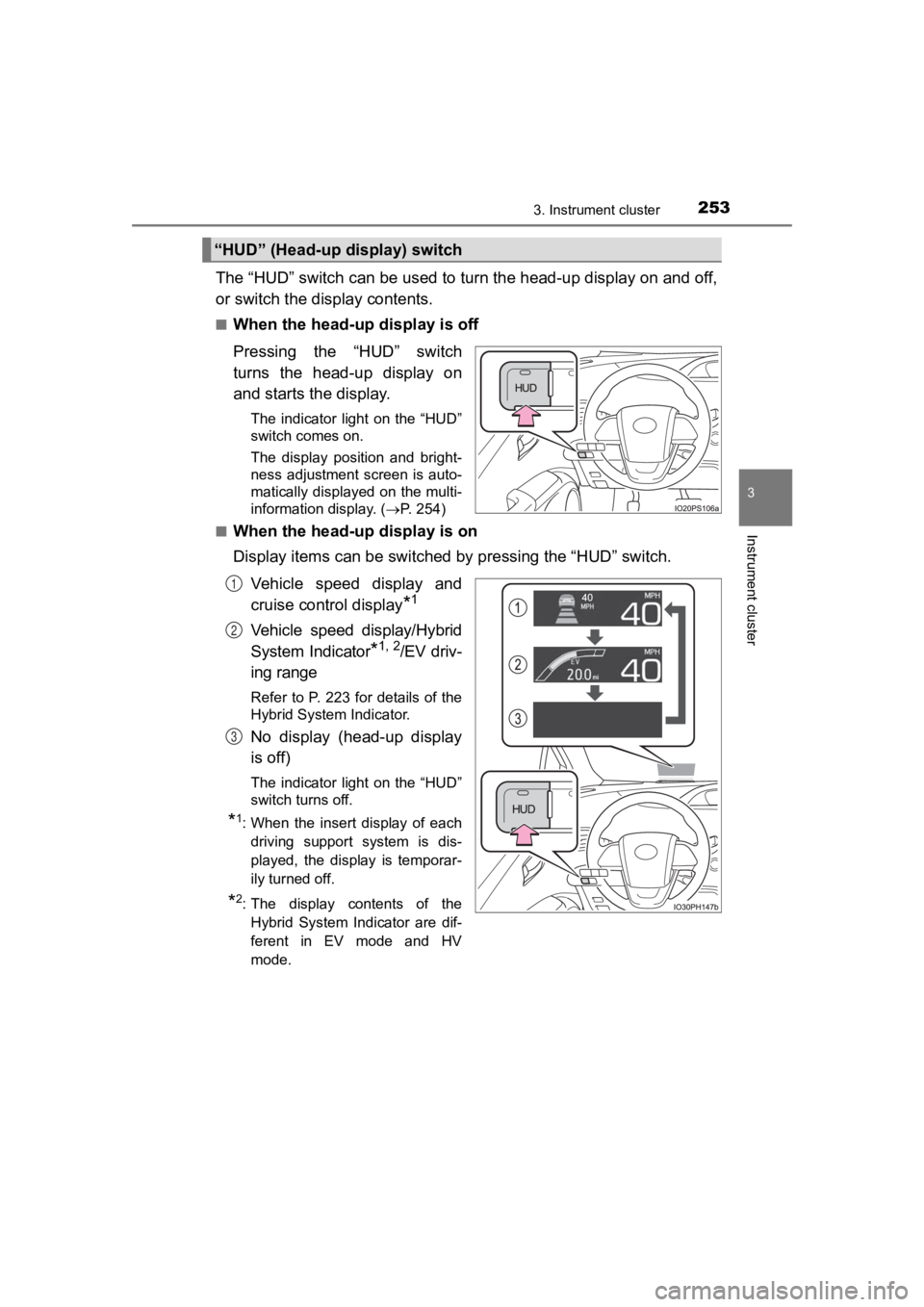
The “HUD” switch can be used to turn the head-up display on and off,
or switch the display contents.
■When the head-up display is off
Pressing the “HUD” switch
turns the head-up display on
and starts the display.
The indicator light on the “HUD”
switch comes on.
The display position and bright-
ness adjustment screen is auto-
matically displayed on the multi-
information display. ( P. 254)
■
When the head-up display is on
Display items can be switched by pressing the “HUD” switch.
Vehicle speed display and
cruise control display
*1
Vehicle speed display/Hybrid
System Indicator
*1, 2/EV driv-
ing range
Refer to P. 223 for details of the
Hybrid System Indicator.
No display (head-up display
is off)
The indicator light on the “HUD”
switch turns off.
*1: When the insert display of each driving support system is dis-
played, the display is temporar-
ily turned off.
*2: The display contents of theHybrid System Indicator are dif-
ferent in EV mode and HV
mode.
“HUD” (Head-up display) switch
1
2
3
Page 255 of 792
PRIUS PRIME_OM_OM47C77U_(U)
2553. Instrument cluster
3
Instrument cluster
■Insert displays of the driving support systems
Insert displays are linked wit h the operation of the following sys-
tems and used to show some of the information shown on the mult i-
information display on the head-up display.
*: If equipped
■
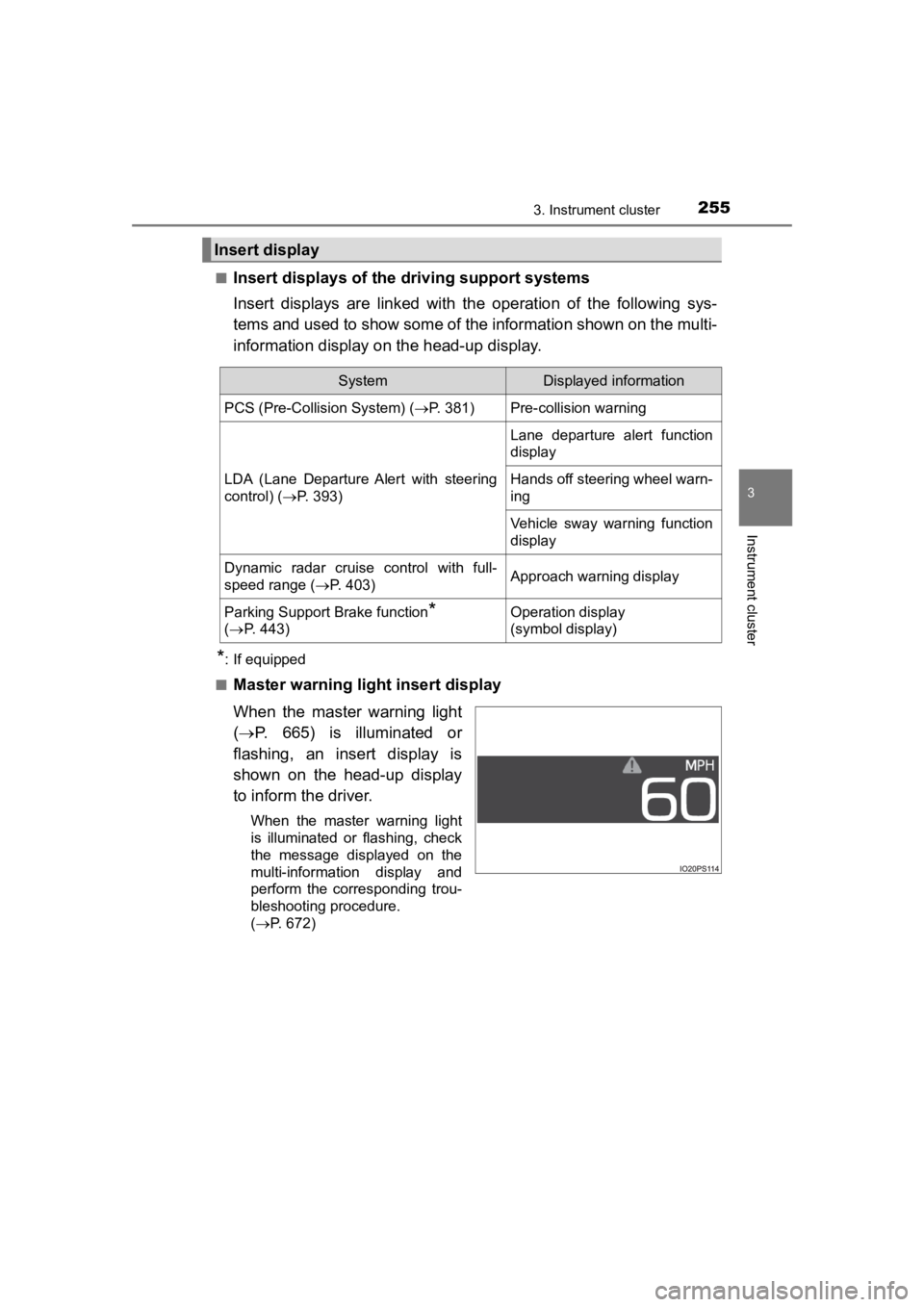
Master warning light insert display
When the master warning light
( P. 665) is illuminated or
flashing, an insert display is
shown on the head-up display
to inform the driver.
When the master warning light
is illuminated or flashing, check
the message displayed on the
multi-information display and
perform the corresponding trou-
bleshooting procedure.
( P. 672)
Insert display
SystemDisplayed information
PCS (Pre-Collision System) ( P. 381)Pre-collision warning
LDA (Lane Departure Alert with steering
control) (P. 393)
Lane departure alert function
display
Hands off steering wheel warn-
ing
Vehicle sway warning function
display
Dynamic radar cruise control with full-
speed range ( P. 403)Approach warning display
Parking Support Brake function*
( P. 4 4 3 )Operation display
(symbol display)
Page 317 of 792
317
PRIUS PRIME_OM_OM47C77U_(U)
5Driving
5-1. Before drivingDriving the vehicle ............. 318
Cargo and luggage ........... 330
Vehicle load limits ............. 333
Trailer towing..................... 334
Dinghy towing ................... 335
5-2. Driving procedures Power (ignition) switch ...... 336
Hybrid transmission........... 342
Turn signal lever................ 348
Parking brake .................... 349
5-3. Operating the lights and wipers
Headlight switch ................ 350
Automatic High Beam ....... 355
Fog light switch ................. 360
Windshield wipers and washer ............................ 362
5-4. Refueling Opening the fuel tank cap .................................. 368 5-5. Using the driving support
systems
Toyota Safety Sense P ..... 373
PCS (Pre-Collision System)........................... 381
LDA (Lane Departure Alert with steering
control) ............................ 393
Dynamic radar cruise control with full-speed
range............................... 403
Driving mode select switch .............................. 419
BSM (Blind Spot Monitor) ........ 421
• The Blind Spot Monitor function ......................... 425
• The Rear Cross Traffic Alert function ................. 428
Intuitive parking assist....... 433
Parking Support Brake function ........................... 443
S-APGS (Simple Advanced Parking
Guidance System) .......... 455
Driving assist systems ...... 489
5-6. Driving tips Winter driving tips ............. 495
Page 320 of 792

320
PRIUS PRIME_OM_OM47C77U_(U)
5-1. Before driving
■Restraining the hybrid system o utput (Brake Override System)
● When the accelerator and brake pedals are depressed at the same time, the
hybrid system output may be restrained.
● A warning message is displayed on the multi-information display while the
system is operating. ( P. 677)
■ “ECO Accelerator Guidance” (P. 226)
It is easier to drive in an Eco-friendly manner by driving whil e referring to the
“ECO Accelerator Guidance” display. Also, by using the “ECO Accelerator
Guidance”, it is easier to increase the Eco score evaluation.
● When starting off:
While staying within the “ECO Accelerator Guidance” range, gradually
depress the accelerator pedal and accelerate to the desired spe ed. If exces-
sive acceleration is avoided, the “Eco-Start” score will increa se.
● When driving:
After accelerating to the desired speed, release the accelerato r pedal and
drive at a stable speed within the “ECO Accelerator Guidance” range. By
keeping the vehicle within the “ECO Accelerator Guidance” range, the “Eco-
Cruise” score will increase.
● When stopping:
When stopping the vehicle, early releasing the accelerator peda l will cause
the “Eco-Stop” score to increase.
■ Restraining sudden start (Drive-Start Control)
● When the following unusual operation is performed, the hybrid s ystem out-
put may be restrained.
• When the shift position is shifted from R to D/B, D/B to R, N to R, P to D/
B
*, P to R* with the accelerator pedal depressed, a warning message
appears on the multi-information display. If a warning message is shown
on the multi-information display, read the message and follow t he instruc-
tions.
• When the accelerator pedal is depressed too much while the veh icle is in
reverse.
● While Drive-Start Control is being activated, your vehicle may have trou-
ble escaping from the mud or fresh snow. In such case, deactivate TRAC
( P. 490) to cancel Drive Start Control so that the vehicle may b ecome
able to escape from the mud or fresh snow.
*: Depending on the situation, the shift position may not be chan ged.
Page 345 of 792

PRIUS PRIME_OM_OM47C77U_(U)
3455-2. Driving procedures
5
Driving
■Reverse warning buzzer
When shifting into R, a buzzer will sound to inform the driver that the shift
position is in R.
■ Restraining sudden start (Drive-Start Control)
P. 320
■ Automatic P position selection function
●If the power switch is on and the shift position is not already P, completely
stopping the vehicle and pressing the power switch causes the s hift position
to automatically switch to P and the power switch to turn off.
*
● The shift position may also automatically switch to P if one of the following
conditions is detected while the vehicle is stopped by dynamic radar cruise
control with full-speed range.
• Driver’s seat belt is not fastened
• Driver’s door is opened
• Approximately 3 minutes elapse after the vehicle stopped
*: If the power switch is pressed when driving at very low speeds (for exam-
ple, just before the vehicle stops), the shift position may automatically
switch to P. Press the power switch after completely stopping t he vehicle to
prevent unexpected sudden stopping of the vehicle.
■ If the shift position cannot be shifted from P
There is a possibility that the 12-volt battery is discharged. Check the 12-volt
battery in this situation. ( P. 703)
■ About engine braking
When shift position B is selected, releasing the accelerator pe dal will apply
engine braking.
● When the vehicle is driven at high speeds, compared to ordinary gasoline-
fueled vehicles, the engine braking deceleration is felt less t han that of other
vehicles.
● The vehicle can be accelerated even when shift position B is se lected.
If the vehicle is driven continuously in the B position, fuel e fficiency will
become low. Usually, select the D position.
■ After recharging/reconnecting the 12-volt battery
P. 596
Page 373 of 792
373
PRIUS PRIME_OM_OM47C77U_(U)
5-5. Using the driving support systems
5
Driving
Toyota Safety Sense P
◆PCS (Pre-Collision System)
P. 3 8 1
◆LDA (Lane Departure Alert with steering control)
P. 3 9 3
◆Automatic High Beam
P. 3 5 5
◆Dynamic radar cruise control with full-speed range
P. 4 0 3
The Toyota Safety Sense P consists of the following drive assis t
systems and contributes to a safe and comfortable driving expe-
rience:
WARNING
■ Toyota Safety Sense P
The Toyota Safety Sense P is designed to operate under the assumption
that the driver will drive safely, and is designed to help reduce the impact to
the occupants and the vehicle in the case of a collision or assist the driver in
normal driving conditions.
As there is a limit to the degree of recognition accuracy and control perfor-
mance that this system can provide, do not overly rely on this system. The
driver is always responsible for paying attention to the vehicl e’s surround-
ings and driving safely.
Page 403 of 792
403
PRIUS PRIME_OM_OM47C77U_(U)
5-5. Using the driving support systems
5
Driving
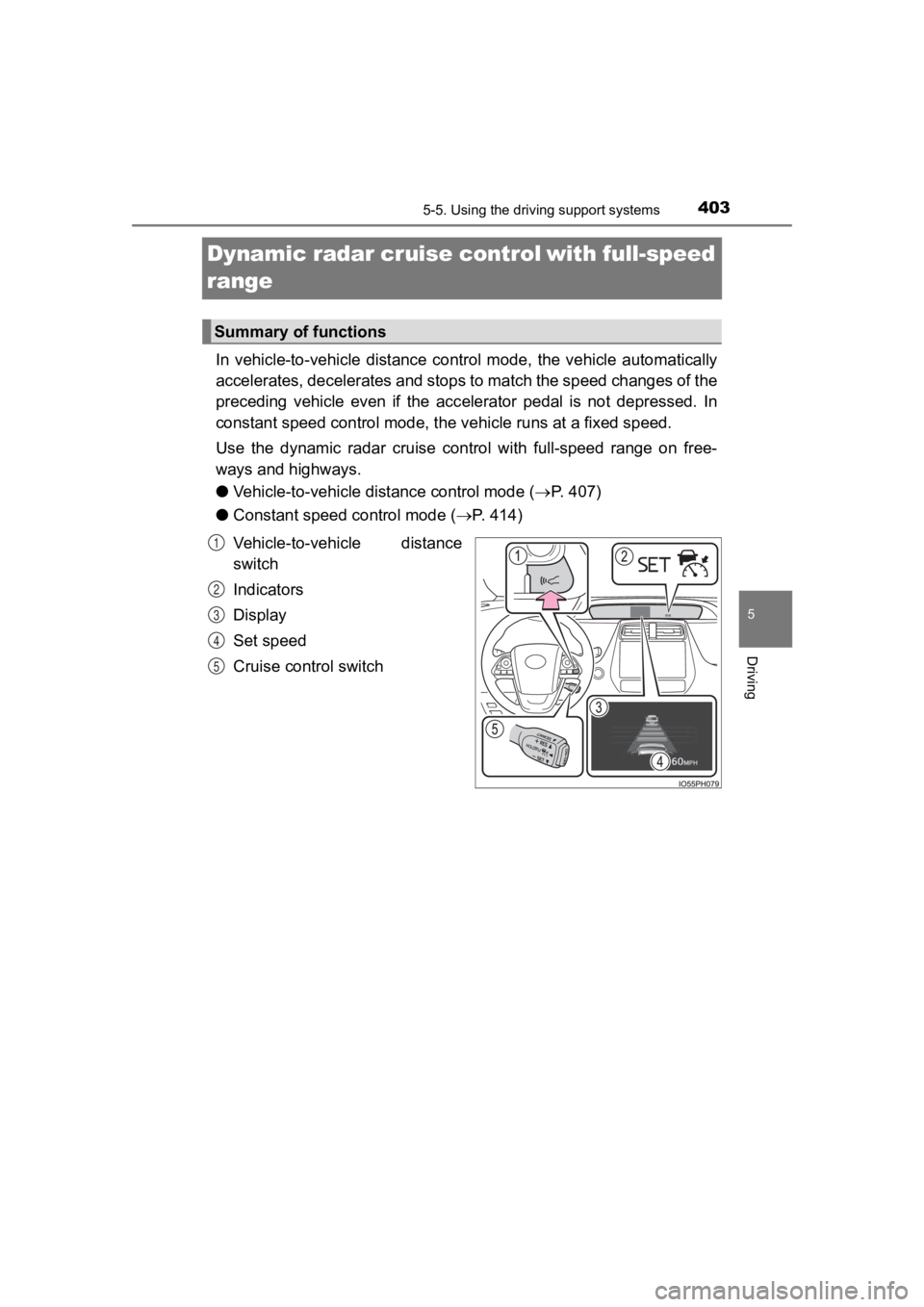
Dynamic radar cruise controlwith full-speed
range
In vehicle-to-vehicle distance control mode, the vehicle automa tically
accelerates, decelerates and st ops to match the speed changes o f the
preceding vehicle even if the acc elerator pedal is not depressed. In
constant speed control mode, t he vehicle runs at a fixed speed.
Use the dynamic radar cruise control with full-speed range on f ree-
ways and highways.
● Vehicle-to-vehicle distance control mode ( P. 407)
● Constant speed c ontrol mode (P. 414)
Vehicle-to-vehicle distance
switch
Indicators
Display
Set speed
Cruise control switch
Summary of functions
1
2
3
4
5
Page 404 of 792

404
PRIUS PRIME_OM_OM47C77U_(U)
5-5. Using the driving support systems
WARNING
■Before using dynamic radar cruise control with full-speed range
● Driving safely is the sole responsibility of the driver. Do not rely solely on
the system, and drive safely by always paying careful attention to your sur-
roundings.
● The dynamic radar cruise control with full-speed range provides driving
assistance to reduce the driver’s burden. However, there are li mitations to
the assistance provided.
Read the following conditions carefully. Do not overly rely on this system
and always drive carefully.
• When the sensor may not be correctly detecting the vehicle ahead:
P. 417
• Conditions under which the vehicle-to-vehicle distance control mode may not function correctly: P. 418
● Set the speed appropriately depending on the speed limit, traffic flow, road
conditions, weather conditions, etc. The driver is responsible for checking
the set speed.
● Even when the system is functioning normally, the condition of the preced-
ing vehicle as detected by the system may differ from the condition
observed by the driver. Therefore, the driver must always remain alert,
assess the danger of each situation and drive safely. Relying s olely on this
system or assuming the system ensures safety while driving can lead to
an accident, resulting in death or serious injury.
● Switch the dynamic radar cruise control with full-speed range o ff using the
“ON-OFF” button when not in use.
Page 405 of 792

PRIUS PRIME_OM_OM47C77U_(U)
4055-5. Using the driving support systems
5
Driving
WARNING
■Cautions regarding the driving assist systems
Observe the following precautions, as there are limitations to the assistance
provided by the system.
Failure to do so may cause an accident resulting in death or se rious injury.
● Assisting the driver to measure following distance
The dynamic radar cruise control with full-speed range is only intended to
help the driver in determining the following distance between the driver’s
own vehicle and a designated vehicle traveling ahead. It is not a mecha-
nism that allows careless or inattentive driving, and it is not a system that
can assist the driver in low-visibility conditions. It is still necessary for
driver to pay close attention to the vehicle’s surroundings.
● Assisting the driver to judge proper following distance
The dynamic radar cruise control with full-speed range determines
whether the following distance between the driver’s own vehicle and a
designated vehicle traveling ahead is within a set range. It is not capable
of making any other type of judgement. Therefore, it is absolutely neces-
sary for the driver to remain vigilant and to determine whether or not there
is a possibility of danger in any given situation.
● Assisting the driver to operate the vehicle
The dynamic radar cruise control with full-speed range does not include
functions which will prevent or avoid collisions with vehicles ahead of your
vehicle. Therefore, if there is ever any possibility of danger, the driver must
take immediate and direct control of the vehicle and act appropriately in
order to ensure the safety of all involved.
Page 406 of 792

406
PRIUS PRIME_OM_OM47C77U_(U)
5-5. Using the driving support systems
WARNING
■Situations unsuitable for dynamic radar cruise control with ful l-speed
range
Do not use dynamic radar cruise control with full-speed range in any of the
following situations.
Doing so may result in inappropriate speed control and could cause an acci-
dent resulting in death or serious injury.
● Roads where there are pedestrians, cyclists, etc.
● In heavy traffic
● On roads with sharp bends
● On winding roads
● On slippery roads, such as those covered with rain, ice or snow
● On steep downhills, or where there are sudden changes between s harp up
and down gradients
Vehicle speed may exceed the set speed when driving down a stee p hill.
● At entrances to freeways and highways
● When weather conditions are bad enough that they may prevent the sen-
sors from detecting correctly (fog, snow, sandstorm, heavy rain, etc.)
● When there is rain, snow, etc. on the front surface of the rada r sensor or
camera sensor
● In traffic conditions that require frequent repeated acceleration and decel-
eration
● During emergency towing
● When an approach warning buzzer is heard often