time change TOYOTA PRIUS PRIME 2020 (in English) Workshop Manual
[x] Cancel search | Manufacturer: TOYOTA, Model Year: 2020, Model line: PRIUS PRIME, Model: TOYOTA PRIUS PRIME 2020Pages: 792, PDF Size: 16.56 MB
Page 457 of 792

PRIUS PRIME_OM_OM47C77U_(U)
4575-5. Using the driving support systems
5
Driving
■Parking Support Brake function while the Simple Advanced Parkin g
Guidance System is operating
While the Simple Advanced Parking Guidance System is operating, if the sys-
tem detects an obstacle that could result in a collision, hybri d system output
restriction control and brake control of the Parking Support Br ake function are
operated, regardless of whether the Parking Support Brake funct ion is on or
off. ( P. 444)
● After the Parking Support Brake function operates, operation of the Simple
Advanced Parking Guidance System is temporarily stopped, and operation
of the Parking Support Brake function is indicated on the multi -information
display. ( P. 448)
● When operation of the Simple Advanced Parking Guidance System i s
stopped 3 times by operation of the Parking Support Brake funct ion, the
Simple Advanced Parking Guidance System is canceled.
● Once the Simple Advanced Parking Guidance System becomes availa ble
after the Parking Support Brake function is operated, a message prompting
you to shift is displayed on the multi-information display. Ope ration of the
Simple Advanced Parking Guidance System can be resumed by shift ing
according to the prompt on the multi-information display and pr essing the
S-APGS switch ( P. 458) again.
■ Shifting while the Simple Advanced Parking Guidance System is operat-
ing
If the system determines that the drivers intends to move forward or in
reverse, assistance continues even if the drivers shifted before being
prompted to do so by the system. However, because driver operat ion differs
from the guidance provided by the system, the number of turning maneuvers
may increase.
■ Customization
Settings (e.g. obstacle detection range) can be changed. (Custo mizable fea-
tures: P. 741)
Page 459 of 792
PRIUS PRIME_OM_OM47C77U_(U)
4595-5. Using the driving support systems
5
Driving
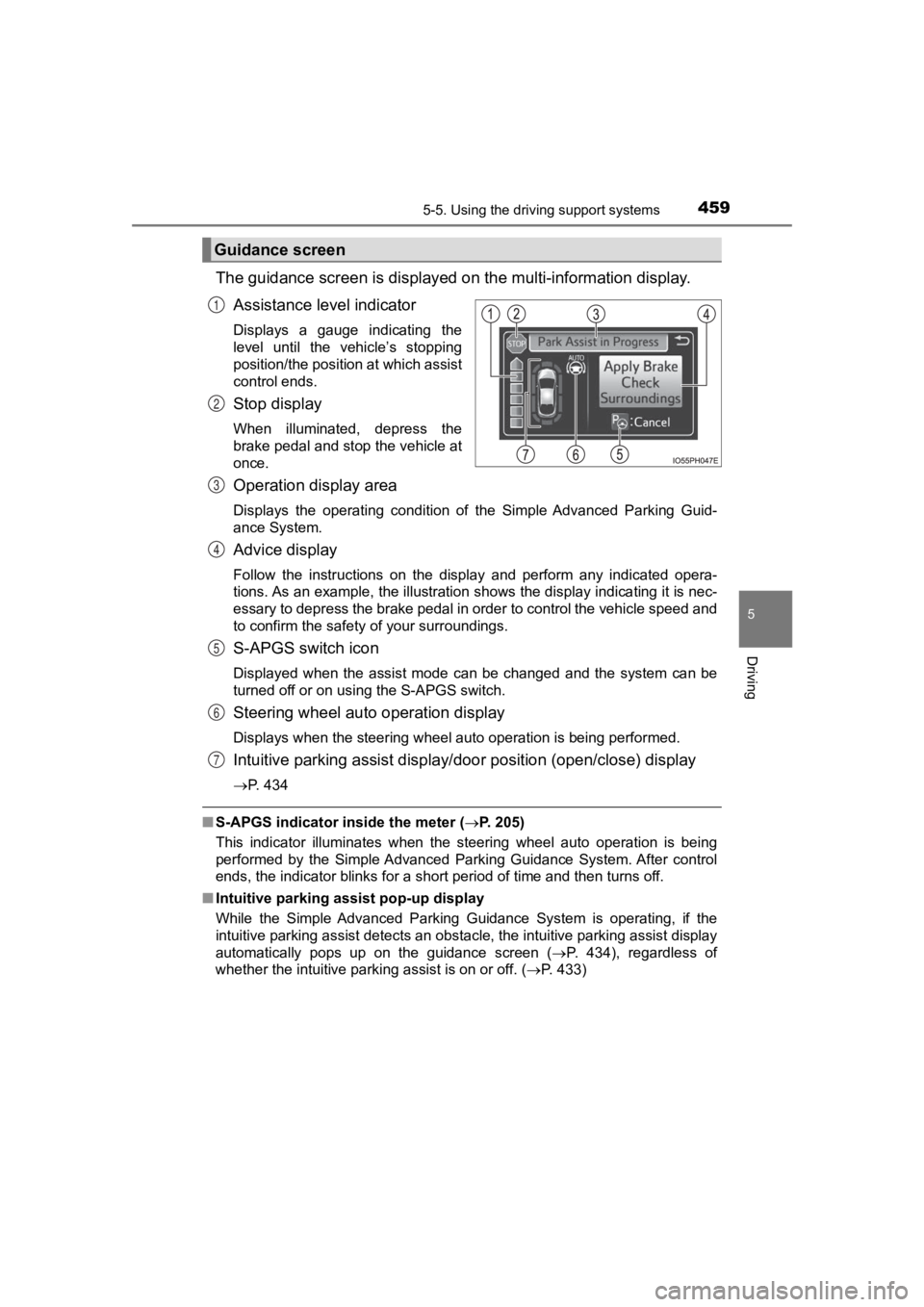
The guidance screen is displayed on the multi-information display.
Assistance level indicator
Displays a gauge indicating the
level until the vehicle’s stopping
position/the position at which assist
control ends.
Stop display
When illuminated, depress the
brake pedal and stop the vehicle at
once.
Operation display area
Displays the operating condition of the Simple Advanced Parking Guid-
ance System.
Advice display
Follow the instructions on the display and perform any indicate d opera-
tions. As an example, the illustration shows the display indica ting it is nec-
essary to depress the brake pedal in order to control the vehicle speed and
to confirm the safety of your surroundings.
S-APGS switch icon
Displayed when the assist mode can be changed and the system ca n be
turned off or on using the S-APGS switch.
Steering wheel auto operation display
Displays when the steering wheel auto operation is being perfor med.
Intuitive parking assist display/door position (open/close) display
P. 434
■S-APGS indicator inside the meter (P. 205)
This indicator illuminates when the steering wheel auto operation is being
performed by the Simple Advanced Parking Guidance System. After control
ends, the indicator blinks for a short period of time and then turns off.
■ Intuitive parking assist pop-up display
While the Simple Advanced Parking Guidance System is operating, if the
intuitive parking assist detects an obstacle, the intuitive parking assist display
automatically pops up on the guidance screen ( P. 434), regardless of
whether the intuitive parking assist is on or off. (P. 433)
Guidance screen
1
2
3
4
5
6
7
Page 461 of 792
PRIUS PRIME_OM_OM47C77U_(U)
4615-5. Using the driving support systems
5
Driving
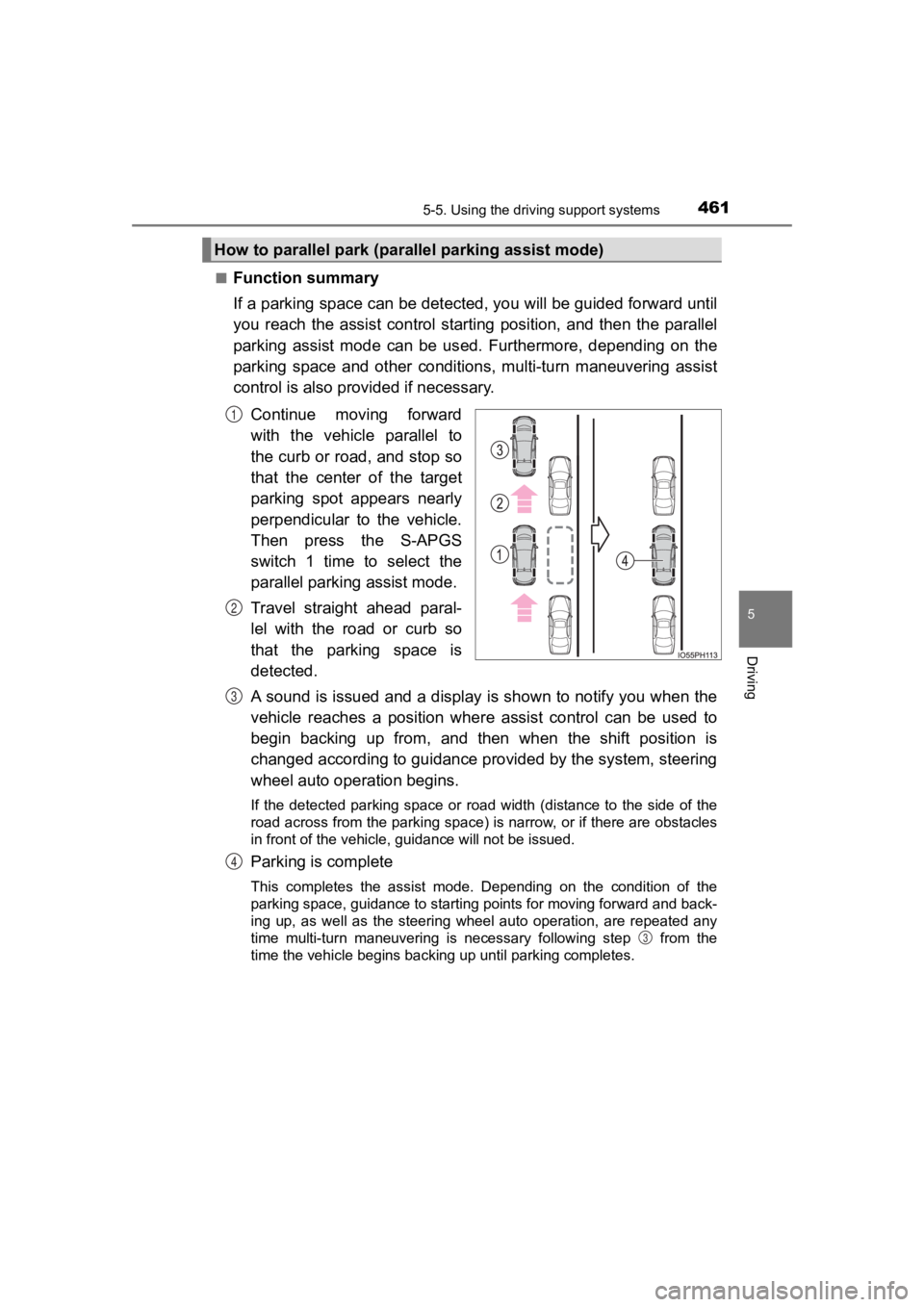
■Function summary
If a parking space can be detected, you will be guided forward until
you reach the assist control star ting position, and then the parallel
parking assist mode can be us ed. Furthermore, depending on the
parking space and other conditions, multi-turn maneuvering assi st
control is also prov ided if necessary.
Continue moving forward
with the vehicle parallel to
the curb or road, and stop so
that the center of the target
parking spot appears nearly
perpendicular to the vehicle.
Then press the S-APGS
switch 1 time to select the
parallel parking assist mode.
Travel straight ahead paral-
lel with the road or curb so
that the parking space is
detected.
A sound is issued and a display is shown to notify you when the
vehicle reaches a position wher e assist control can be used to
begin backing up from, and then when the shift position is
changed according to guidance provided by the system, steering
wheel auto oper ation begins.
If the detected parking space or road width (distance to the si de of the
road across from the parking space) is narrow, or if there are obstacles
in front of the vehicle, guidance will not be issued.
Parking is complete
This completes the assist mode. Depending on the condition of t he
parking space, guidance to starting points for moving forward and back-
ing up, as well as the steering wheel auto operation, are repea ted any
time multi-turn maneuvering is necessary following step from the
time the vehicle begins backing up until parking completes.
How to parallel park (paral lel parking assist mode)
1
2
3
4
3
Page 466 of 792

466
PRIUS PRIME_OM_OM47C77U_(U)
5-5. Using the driving support systems
When the vehicle is almost entire ly within the target parking spot,
a high-pitched beep is emitted and the stop display is shown on
the display, stop the vehicle.
This completes the para llel parking assist mode.
● After stopping, feel free to maneuver the vehicle to reach the
desired parking spot.
● Be sure to back up while checking the area to the front and
rear of the vehicle direct ly and by using the mirrors.
■Parallel parking assist mode operating conditions
●In order to operate the parallel parking assist mode correctly, drive slowly (at
a speed at which the vehicle can be quickly stopped) parallel t o the road (or
shoulder) while maintaining a distance of approximately 3.3 ft. (1 m) to any
parked vehicles.
● The function cannot be used when the vehicle speed is approxima tely
19 mph (30 km/h) or higher.
● The front side sensors and rear side sensors are used to detect parked
vehicles and determine the parking spot. Therefore, when detection is not
possible ( P. 488), guidance is not issued.
● If there are no parked vehicles, the parking spot cannot be det ermined.
Therefore, the parallel parking assist mode cannot be operated.
● If unable to detect the environment surrounding the parking spa ce, the par-
allel parking assist mode may not be able to operate.
● Guidance will continue until the vehicle speed meets or exceeds approxi-
mately 19 mph (30 km/h) or the function is turned off using the S -APGS
switch.
■ Timing for pressing the S-APGS switch
In the following cases, the assist mode may also operate during the steps
taken to park using the parallel parking assist mode. However, in these
cases, conduct parking procedures according to the information on the multi-
information display.
● In step the S-APGS switch is pressed after already passing ove r the tar-
get parking spot.
If the vehicle is not stopped in step , pressing the S-APGS swi tch 1 time
while the vehicle is in motion allows you to select “Parallel P arking” and
proceed directly to step .
● The vehicle is moved up to the position in step without the S- APGS
switch being pressed. Then the S-APGS switch is pressed after having
changed the shift position to R.
12
1
1
2
3
Page 468 of 792
468
PRIUS PRIME_OM_OM47C77U_(U)
5-5. Using the driving support systems
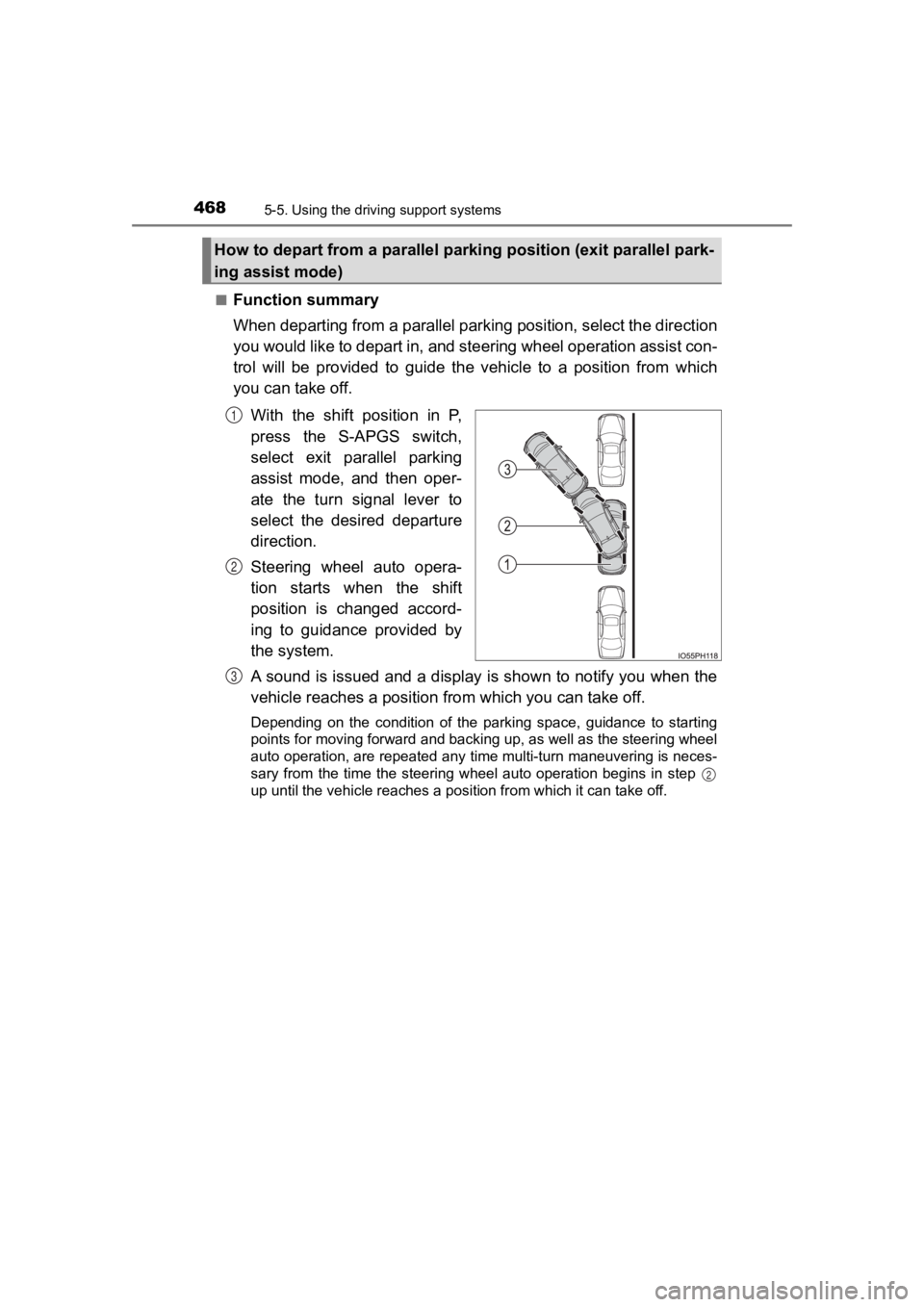
■Function summary
When departing from a parallel parking position, select the dir ection
you would like to depart in, and steering wheel operation assis t con-
trol will be provided to guide the vehicle to a position from w hich
you can take off.
With the shift position in P,
press the S-APGS switch,
select exit parallel parking
assist mode, and then oper-
ate the turn signal lever to
select the desired departure
direction.
Steering wheel auto opera-
tion starts when the shift
position is changed accord-
ing to guidance provided by
the system.
A sound is issued and a display is shown to notify you when the
vehicle reaches a position fr om which you can take off.
Depending on the condition of the parking space, guidance to st arting
points for moving forward and backing up, as well as the steeri ng wheel
auto operation, are repeated any time multi-turn maneuvering is neces-
sary from the time the steering wheel auto operation begins in step
up until the vehicle reaches a position from which it can take off.
How to depart from a parallel parking position (exit parallel park-
ing assist mode)
1
2
3
2
Page 475 of 792
PRIUS PRIME_OM_OM47C77U_(U)
4755-5. Using the driving support systems
5
Driving
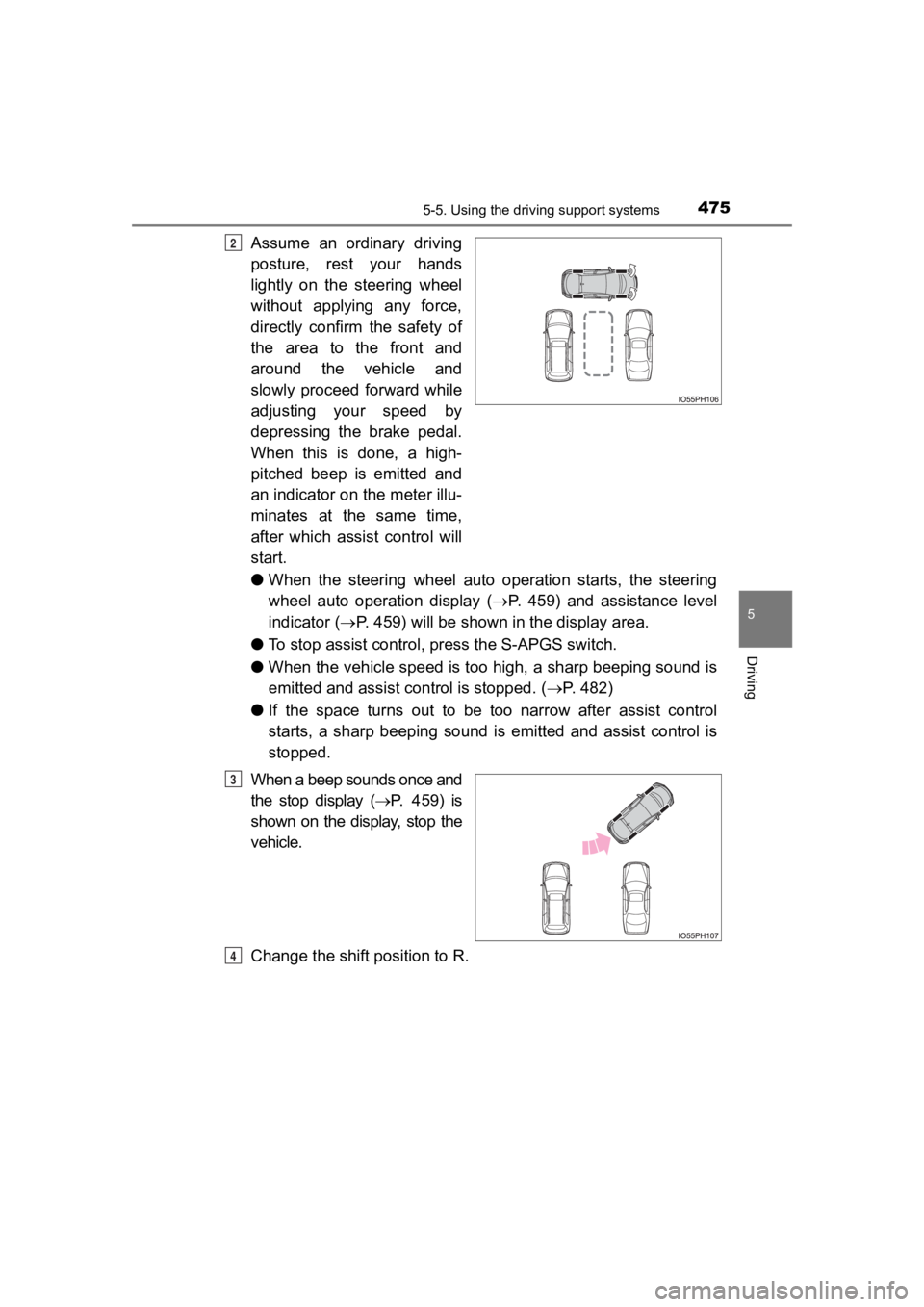
Assume an ordinary driving
posture, rest your hands
lightly on the steering wheel
without applying any force,
directly confirm the safety of
the area to the front and
around the vehicle and
slowly proceed forward while
adjusting your speed by
depressing the brake pedal.
When this is done, a high-
pitched beep is emitted and
an indicator on the meter illu-
minates at the same time,
after which assist control will
start.
●When the steering wheel auto operation starts, the steering
wheel auto operation display ( P. 459) and assistance level
indicator ( P. 459) will be shown in the display area.
● To stop assist control, press the S-APGS switch.
● When the vehicle speed is too high, a sharp beeping sound is
emitted and assist c ontrol is stopped. (P. 482)
● If the space turns out to be too narrow after assist control
starts, a sharp beeping sound is emitted and assist control is
stopped.
When a beep sounds once and
the stop display ( P. 459) is
shown on the display, stop the
vehicle.
Change the shift position to R.2
3
4
Page 501 of 792
PRIUS PRIME_OM_OM47C77U_(U)
5016-1. Using the air conditioning system and defogger
6
Interior features
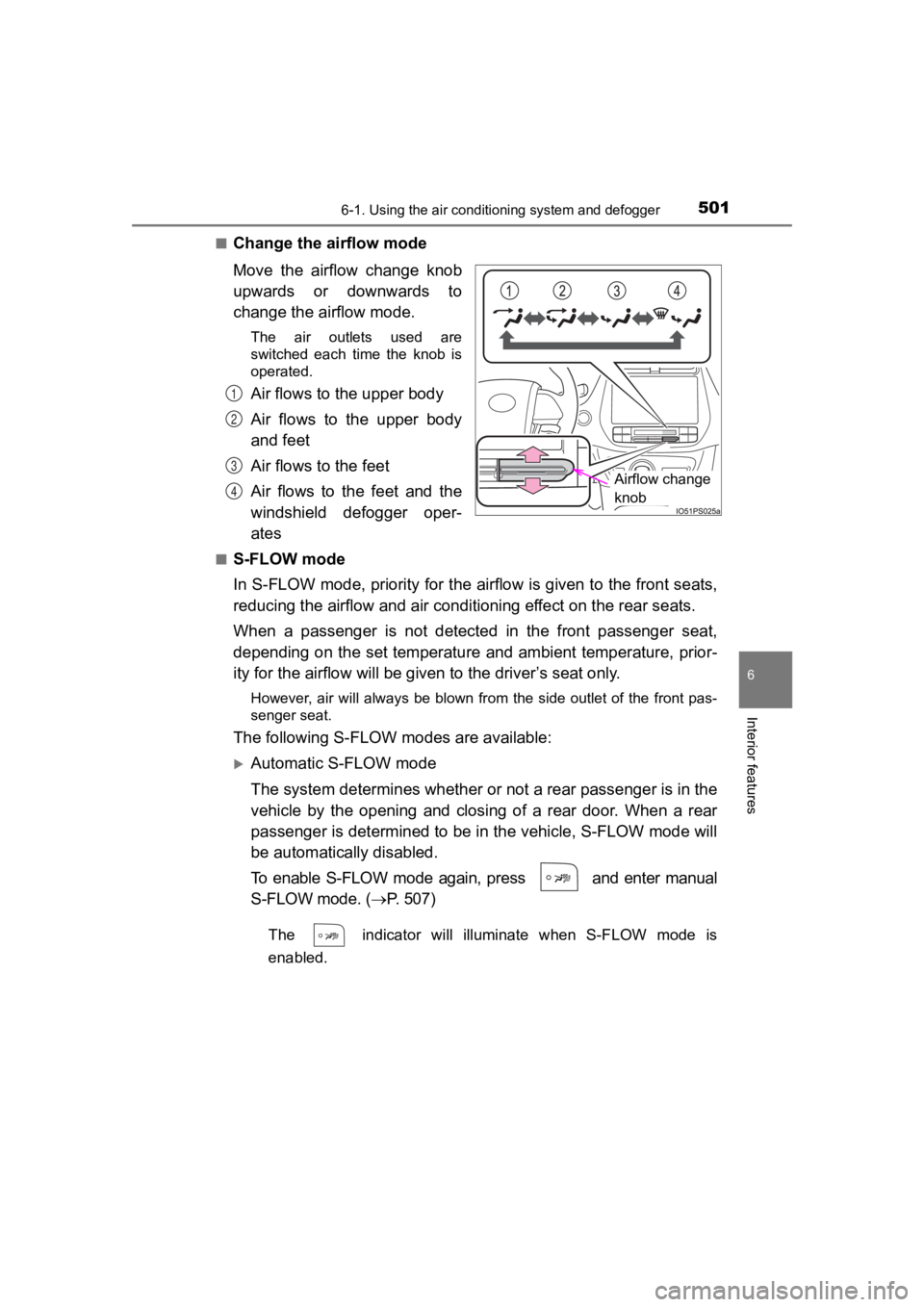
■Change the airflow mode
Move the airflow change knob
upwards or downwards to
change the airflow mode.
The air outlets used are
switched each time the knob is
operated.
Air flows to the upper body
Air flows to the upper body
and feet
Air flows to the feet
Air flows to the feet and the
windshield defogger oper-
ates
■S-FLOW mode
In S-FLOW mode, priority for the airflow is given to the front seats,
reducing the airflow and air conditioning effect on the rear se ats.
When a passenger is not detected in the front passenger seat,
depending on the set temperature and ambient temperature, prior -
ity for the airflow will be given to the driver’s seat only.
However, air will always be blown from the side outlet of the front pas-
senger seat.
The following S-FLOW modes are available:
Automatic S-FLOW mode
The system determines whether o r not a rear passenger is in the
vehicle by the opening and closing of a rear door. When a rear
passenger is determined to be in the vehicle, S-FLOW mode will
be automatically disabled.
To enable S-FLOW mode again, press and enter manual
S-FLOW mode. ( P. 507)
The indicator will illuminate when S-FLOW mode is
enabled.
Airflow change
knob
1
2
3
4
Page 509 of 792
PRIUS PRIME_OM_OM47C77U_(U)
5096-1. Using the air conditioning system and defogger
6
Interior features
■Ventilation and air conditioning odors
●To let the fresh air in, set the air conditioning system to the outside air mode.
● During use, various odors from inside and outside the vehicle may enter into
and accumulate in the air conditioning system. This may then ca use odor to
be emitted from the vents.
● In order to suppress odors that occur when the air conditioning system
starts, fresh air is automatically taken in when parked.
● To reduce potential odors from occurring, the start timing of the blower may
be delayed for a short period of time immediately after the air conditioning
system is started in automatic mode.
■ Air conditioning filter
P. 628
■ Customization
Settings (e.g. A/C auto switching operation) can be changed. (C ustomizable
features: P. 741)
WARNING
■ To prevent the windshield from fogging up
● Do not use
during cool air operation in extremely humid weather.
The difference between the temperature of the outside air and that of the
windshield can cause the outer surface of the windshield to fog up, block-
ing your vision.
■ To prevent burns
Do not touch the rear view mirror surfaces when the outside rea r view mirror
defoggers are on.
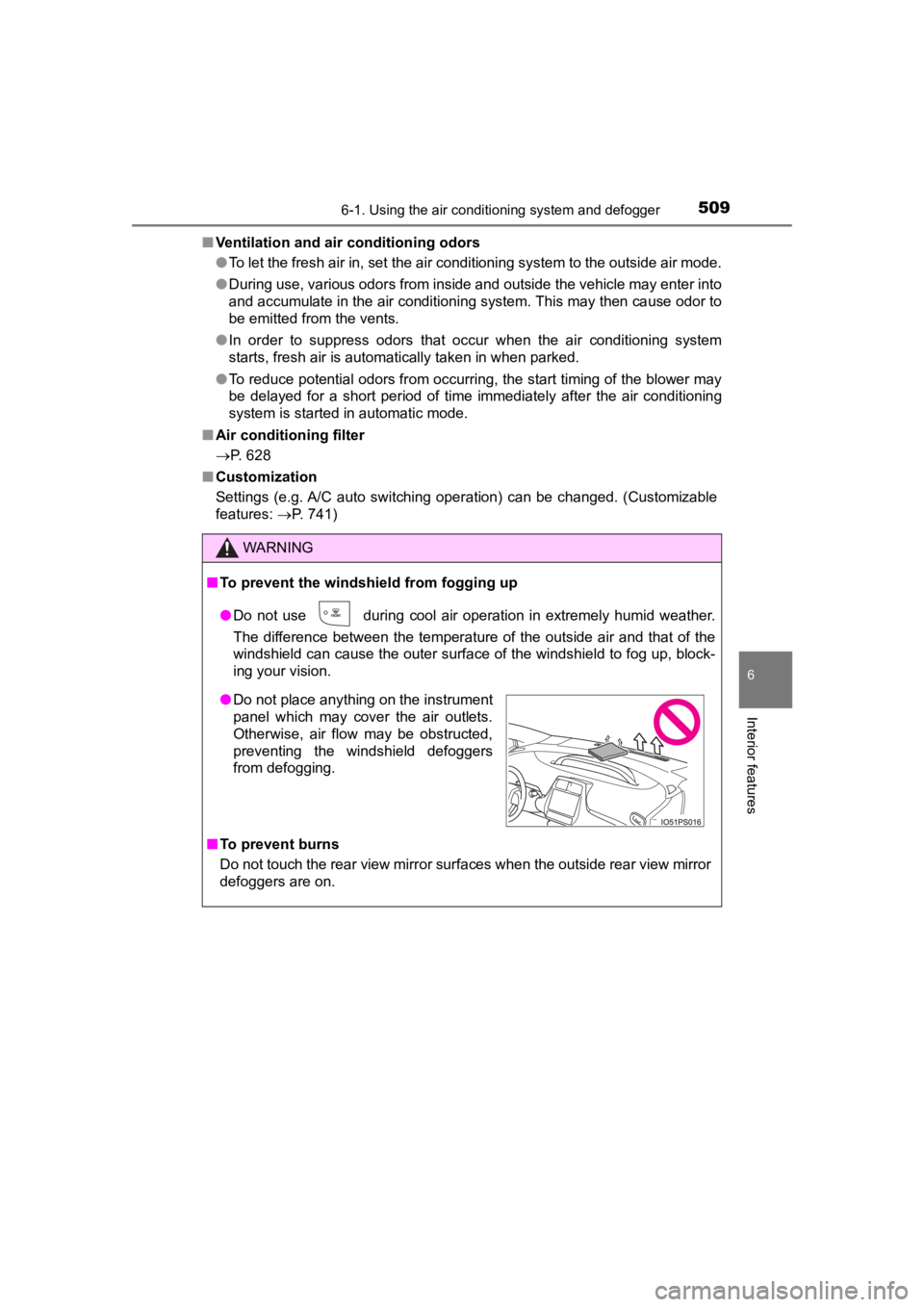
● Do not place anything on the instrument
panel which may cover the air outlets.
Otherwise, air flow may be obstructed,
preventing the windshield defoggers
from defogging.
Page 515 of 792
PRIUS PRIME_OM_OM47C77U_(U)
5156-1. Using the air conditioning system and defogger
6
Interior features
■Defogging the rear window and outside rear view mirrors
Defoggers are used to defog the rear window and to remove rain-
drops, dew and frost from the outside rear view mirrors.
Press .
Defoggers switch between on and off each time is pressed.
The switch indicator illuminates when defoggers are on.
The defoggers will automatically turn off after a period of tim e.
■
Eco score (A/C score)
P. 2 2 7
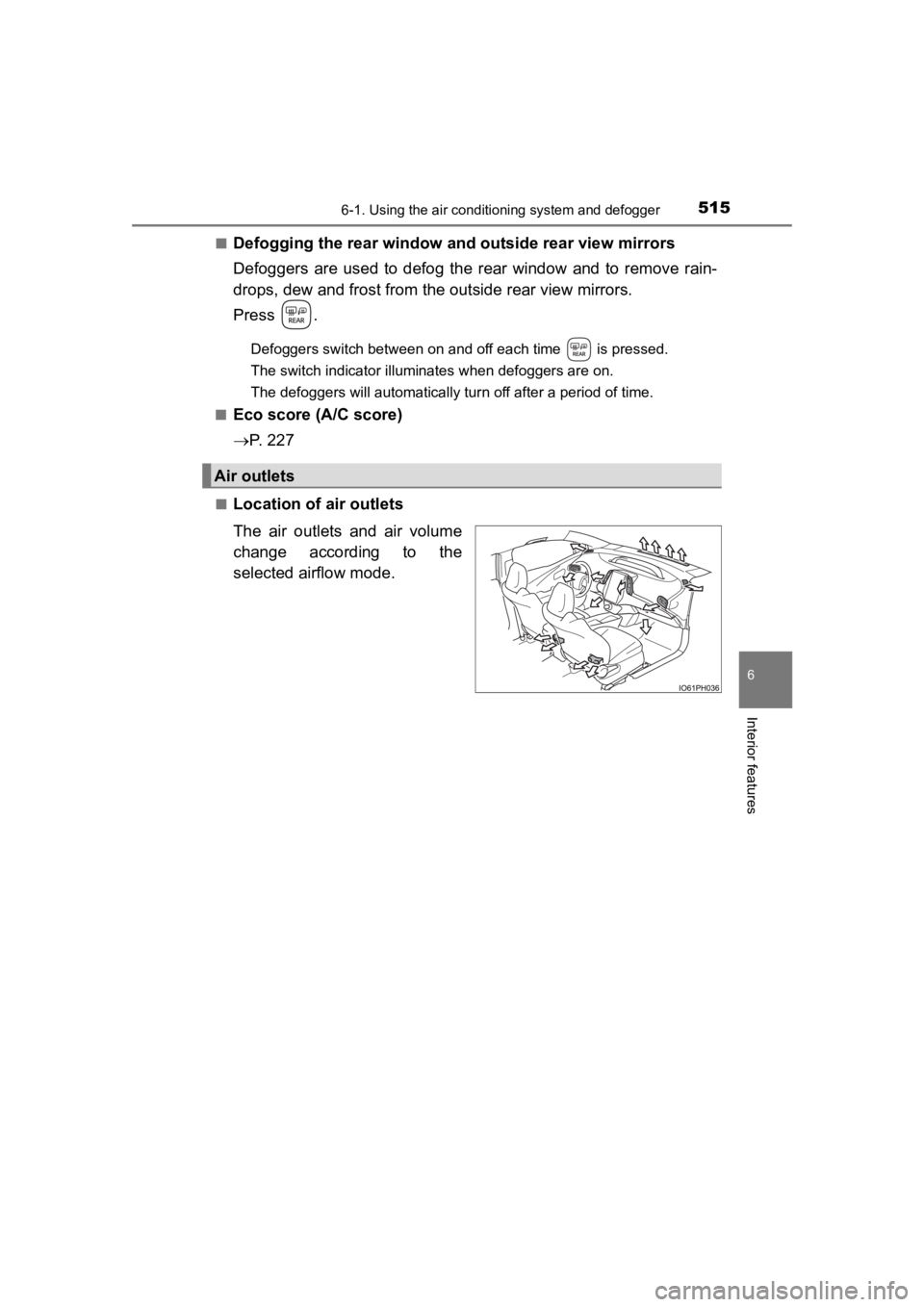
■Location of a ir outlets
The air outlets and air volume
change according to the
selected airflow mode.
Air outlets
Page 523 of 792

PRIUS PRIME_OM_OM47C77U_(U)
5236-1. Using the air conditioning system and defogger
6
Interior features
■Operating conditions
The system will only operate if all of the following conditions are met:
●The shift position is in P.
● The power switch is off.
*
●All doors are closed.
● The hood is closed.
*: The Remote Air Conditioning System cannot be used for approxim ately 3
minutes and a half after the power switch is turned off.
■ Remote Air Conditioning S ystem automatic shut-off
The system will automatically shut off under the following cond itions:
● About 10 minutes have passed since operation began
● Any one of the operating conditions is not met
The system may also shut off if the charge level of the hybrid battery (traction
battery) drops to low.
■ Conditions affecting operation
The system may not start in the following situations:
●The charge level of the hybrid battery (traction battery) is lo w
● The outside temperature is extremely low
● When the hybrid system is cool (for example, after being left f or a long time
in low temperatures)
■ Windshield defogger
When defogging the windshield using the Remote Air Conditioning System,
defogging may be insufficient due to the power being restricted more than
during normal air conditioning operation. Also, the outside of the windshield
may fog up due to the outside temperature, humidity or air conditioning set
temperature.
■ Using the heater via the Remote Air Conditioning System
When the outside heat exchanger becomes frosted over, heating p erfor-
mance may decline due to automatically switching to the frost r emoval opera-
tion.