ad blue TOYOTA PRIUS PRIME 2021 Owners Manual (in English)
[x] Cancel search | Manufacturer: TOYOTA, Model Year: 2021, Model line: PRIUS PRIME, Model: TOYOTA PRIUS PRIME 2021Pages: 808, PDF Size: 74.05 MB
Page 78 of 808
781-3. Emergency assistance
PRIUS PRIME_OM_OM47D71U_(U)
■Safety Connect Services Information
●Phone calls using the vehicle’s Bluetooth® technology will not be possible
when Safety Connect is active and in use.
●Safety Connect is available beginning Fall 2009 on select Toyota models (in
the contiguous United States only). Contact with the Safety Connect
response center is dependent upon the telematics device being in operative
condition, cellular connection availability, and GPS satellite signal reception,
which can limit the ability to reach the response center or receive emer-
gency service support. Enrollment and Telematics Subscription Service
Agreement required. A variety of subscription terms is available; charges
vary by subscription term selected and location.
●Automatic Collision Notification, Emergency Assistance and Stolen Vehicle
Location are available in the United States, including Hawaii and Alaska,
Puerto Rico and Canada, and Enhanced Roadside Assistance are available
in the United States, Puerto Rico and Canada.
●Automatic Collision Notification, Emergency Assistance, Stolen Vehicle and
Enhanced Road Assistance are not available in the U.S. Virgin Islands.
For vehicles first sold in the U.S. Virgin Islands, no Safety Connect services
will function in or outside the U.S. Virgin Islands.
●Safety Connect services are not subject to section 255 of the Telecommuni-
cations Act and the device is not TTY compatible.
■Languages
The Safety Connect response center will offer support in multiple languages.
The Safety Connect system will offer voice prompts in English, Spanish, and
French. Please indicate your language of choice when enrolling.
■When contacting the response center
You may be unable to contact the response center if the network is busy.
When the power switch is turned to ON mode, the red indicator light
comes on for 2 seconds then turns off. Afterward, the green indicator
light comes on, indicating that the service is active.
The following indicator light patterns indicate specific system usage
conditions:
●Green indicator light on = Active service
●Green indicator light flashing = Safety Connect call in process
●Red indicator light (except at vehicle start-up) = System malfunction
(contact your Toyota dealer)
●No indicator light (off) = Safety Connect service not active
Safety Connect LED light Indicators
Page 172 of 808
172
PRIUS PRIME_OM_OM47D71U_(U)
2-2. Charging
“ON”/“OFF” button
The charge schedule switches between “ON” and “OFF” each time this
button is pressed. (P. 174)
Scroll bar
When the number of registered charge schedules exceeds 3, the dis-
<0053004f0044005c00480047000300460052005100570048005100570056000300460044005100030045004800030046004b00440051004a0048004700030045005c0003005200530048005500440057004c0051004a00030057004b004800030045005800
570057005200510011[
Main content displayed on the calendar:
*1: A row with a red line indicates the current time.
*2: While a registered setting is being changed, the icon of the related setting
is highlighted (except when the icon overlaps with another icon).
*3: When “Charge Now” (P. 175) is set to on, the orange icon moves to the
position of the red line and changes to display “Charge Now”.
*4: The content of the charge schedule that corresponds to the “Next Charging
Event” is not displayed in the list.
■
Registering the charge schedule
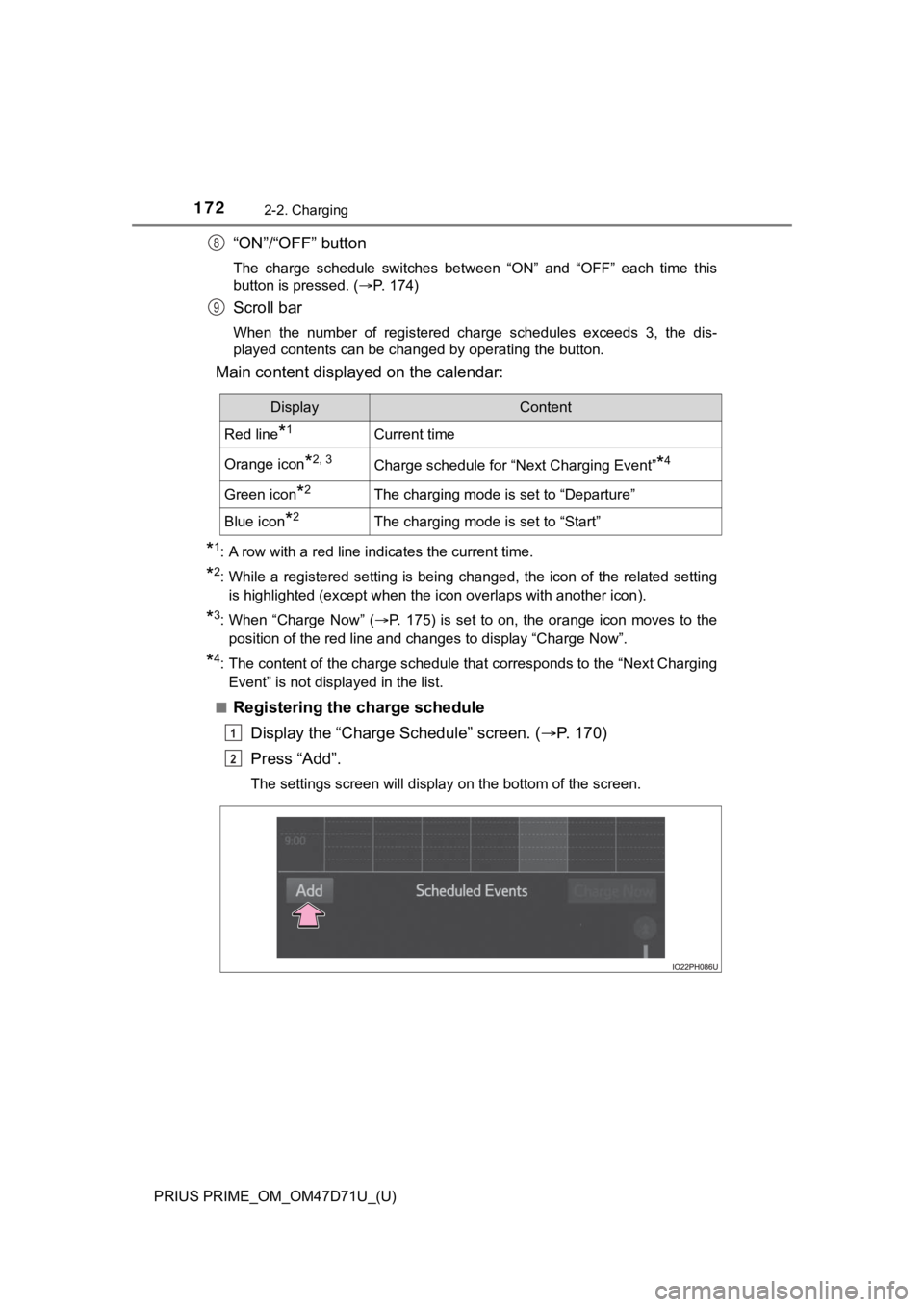
Display the “Charge Schedule” screen. (P. 1 7 0 )
Press “Add”.
The settings screen will display on the bottom of the screen.
8
9
DisplayContent
Red line*1Current time
Orange icon*2, 3Charge schedule for “Next Charging Event”*4
Green icon*2The charging mode is set to “Departure”
Blue icon*2The charging mode is set to “Start”
1
2
Page 219 of 808
PRIUS PRIME_OM_OM47D71U_(U)
2193. Instrument cluster
3
Instrument cluster
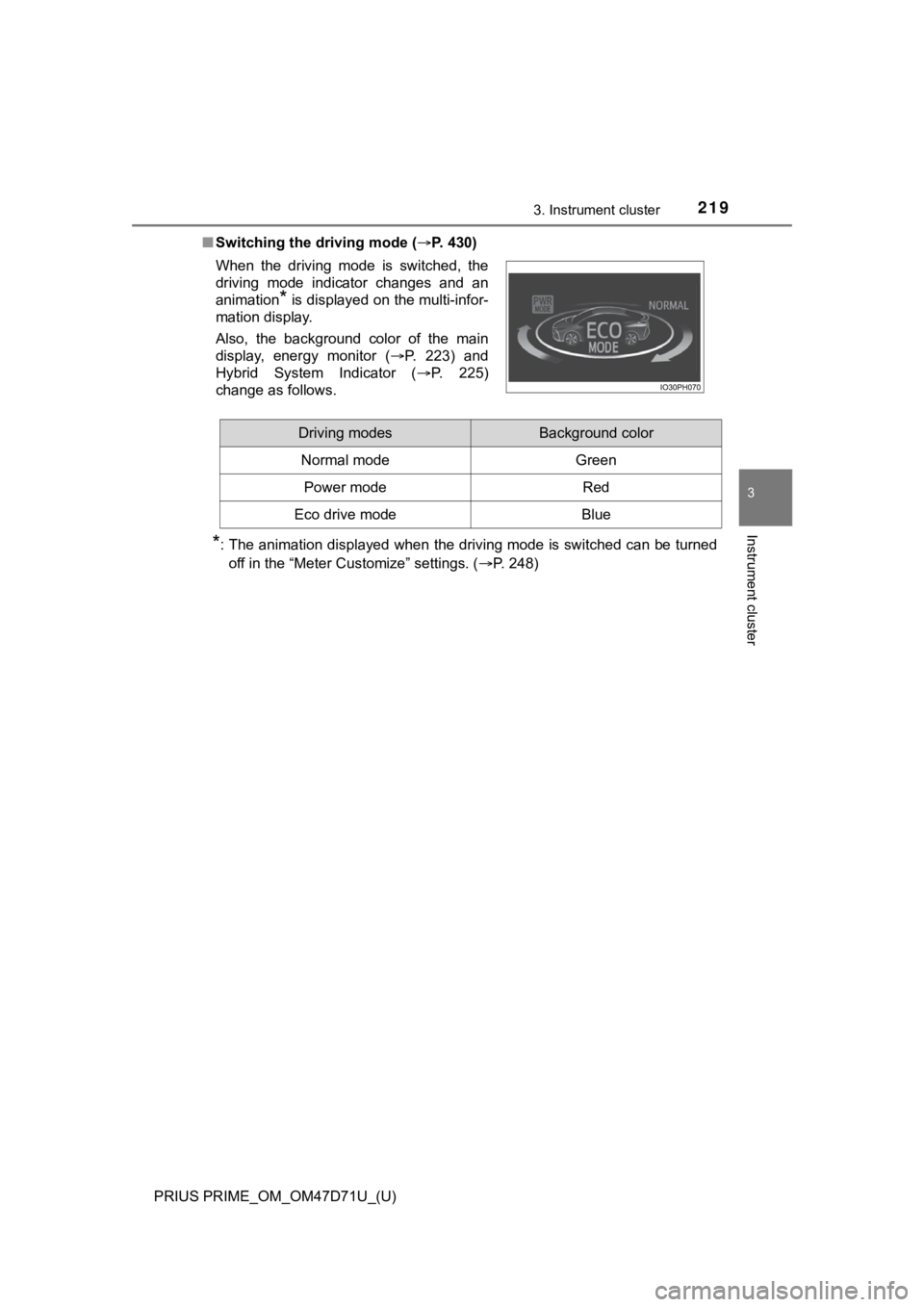
■Switching the driving mode (P. 430)
*: The animation displayed when the driving mode is switched can be turned
off in the “Meter Customize” settings. (P. 248) When the driving mode is switched, the
driving mode indicator changes and an
animation
* is displayed on the multi-infor-
mation display.
Also, the background color of the main
display, energy monitor (P. 223) and
Hybrid System Indicator (P. 225)
change as follows.
Driving modesBackground color
Normal mode Green
Power modeRed
Eco drive modeBlue
Page 228 of 808
228
PRIUS PRIME_OM_OM47D71U_(U)
3. Instrument cluster
●By keeping the indicator within Eco area, more Eco-friendly driv-
ing can be achieved.
●Charge area indicates regeneration
*4 status. Regenerated
energy will be used to charge the hybrid battery (traction battery).
*1: Not displayed on the sub-screen or head-up display.
*2: Not displayed on the sub-screen.
*3: The EV indicator function can be turned off in the “Meter Customize”
settings. (P. 248)
*4: When used in this manual, “regeneration” refers to the conversion of
energy created by the movement of the vehicle into electrical energy.
■
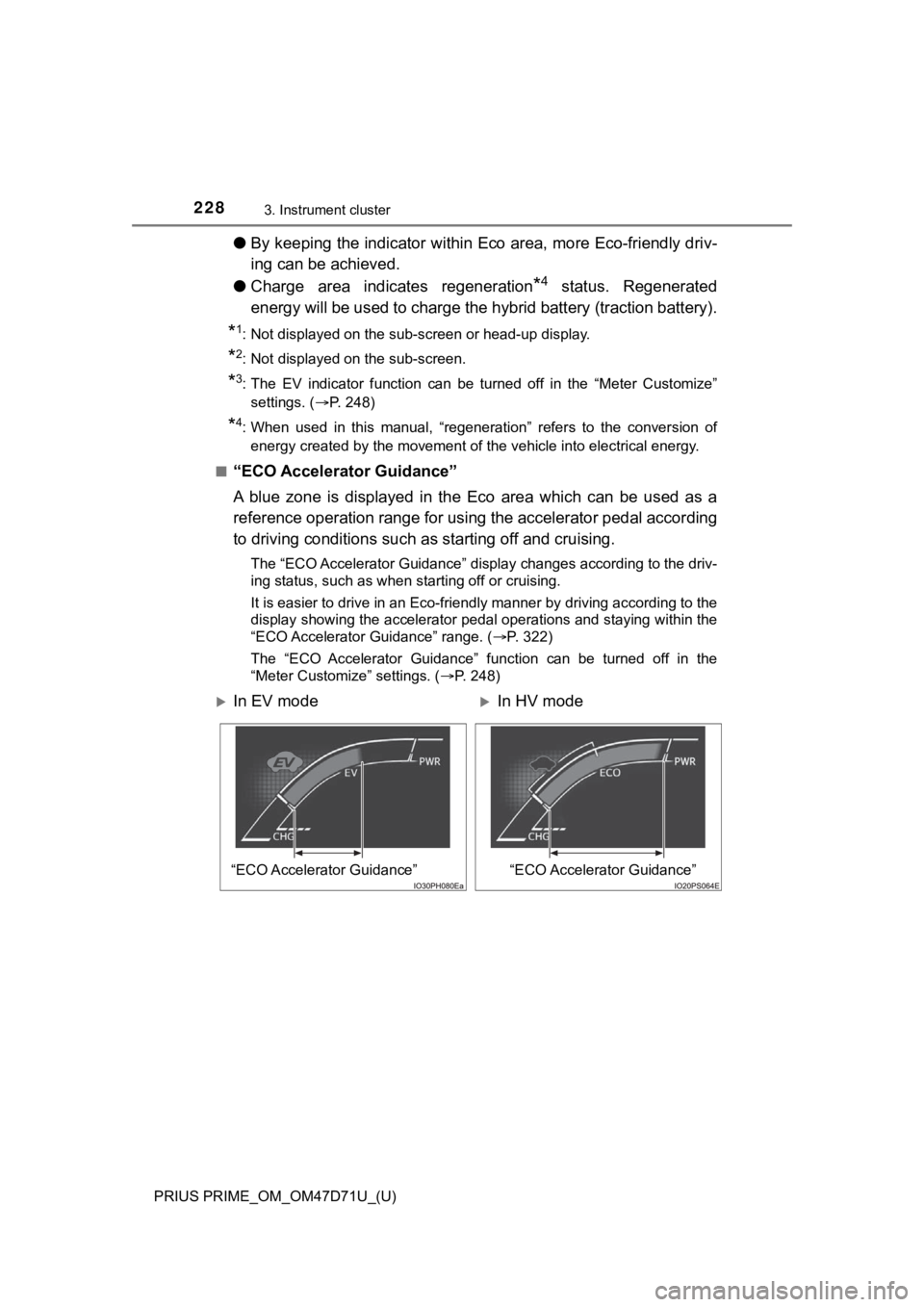
“ECO Accelerator Guidance”
A blue zone is displayed in the Eco area which can be used as a
reference operation range for using the accelerator pedal according
to driving conditions such as starting off and cruising.
The “ECO Accelerator Guidance” display changes according to the driv-
ing status, such as when starting off or cruising.
It is easier to drive in an Eco-friendly manner by driving according to the
display showing the accelerator pedal operations and staying within the
“ECO Accelerator Guidance” range. (P. 322)
The “ECO Accelerator Guidance” function can be turned off in the
“Meter Customize” settings. (P. 248)
In EV modeIn HV mode
“ECO Accelerator Guidance”“ECO Accelerator Guidance”
Page 231 of 808
PRIUS PRIME_OM_OM47D71U_(U)
2313. Instrument cluster
3
Instrument cluster
■When operation of each function stops
●The Hybrid System Indicator stops operating in the following situations.
• The “READY” indicator is not illuminated.
• The shift position is not D or B.
●The Eco score and “ECO Accelerator Guidance” stop operating in the fol-
lowing situations.
• The Hybrid System Indicator is not operating.
• Dynamic radar cruise control with full-speed range is being used.
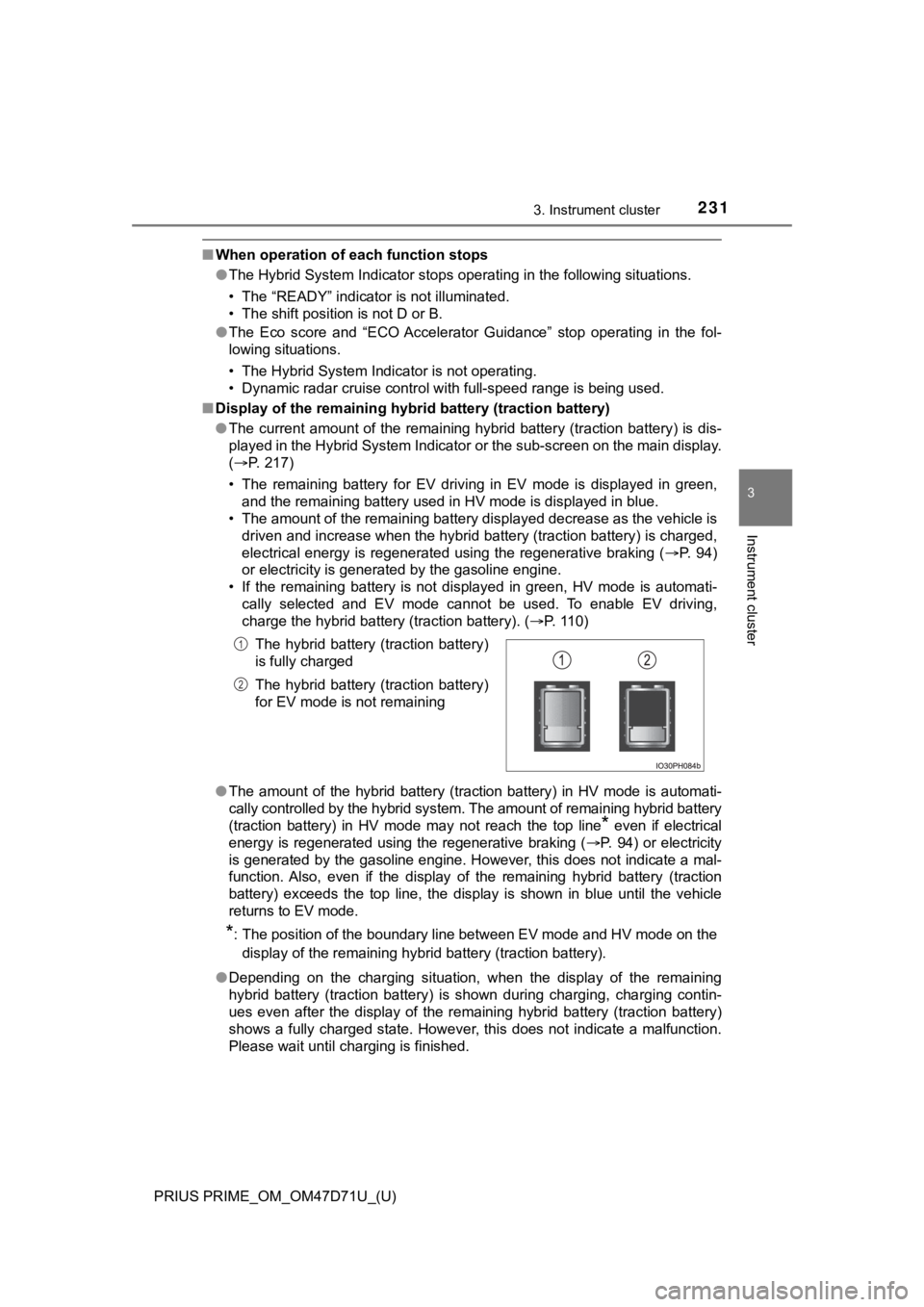
■Display of the remaining hybrid battery (traction battery)
●The current amount of the remaining hybrid battery (traction battery) is dis-
played in the Hybrid System Indicator or the sub-screen on the main display.
(P. 217)
• The remaining battery for EV driving in EV mode is displayed in green,
and the remaining battery used in HV mode is displayed in blue.
• The amount of the remaining battery displayed decrease as the vehicle is
driven and increase when the hybrid battery (traction battery) is charged,
electrical energy is regenerated using the regenerative braking (P. 94)
or electricity is generated by the gasoline engine.
• If the remaining battery is not displayed in green, HV mode is automati-
cally selected and EV mode cannot be used. To enable EV driving,
charge the hybrid battery (traction battery). (P. 110)
●The amount of the hybrid battery (traction battery) in HV mode is automati-
cally controlled by the hybrid system. The amount of remaining hybrid battery
(traction battery) in HV mode may not reach the top line
* even if electrical
energy is regenerated using the regenerative braking (P. 94) or electricity
is generated by the gasoline engine. However, this does not indicate a mal-
function. Also, even if the display of the remaining hybrid battery (traction
battery) exceeds the top line, the display is shown in blue until the vehicle
returns to EV mode.
*: The position of the boundary line between EV mode and HV mode on the
<0047004c00560053004f0044005c00030052004900030057004b004800030055004800500044004c0051004c0051004a0003004b005c00450055004c00470003004500440057005700480055005c0003000b00570055004400460057004c00520051000300
4500440057005700480055005c000c0011[
●Depending on the charging situation, when the display of the remaining
hybrid battery (traction battery) is shown during charging, charging contin-
ues even after the display of the remaining hybrid battery (traction battery)
shows a fully charged state. However, this does not indicate a malfunction.
Please wait until charging is finished.The hybrid battery (traction battery)
is fully charged
The hybrid battery (traction battery)
for EV mode is not remaining
1
2
Page 268 of 808
268
PRIUS PRIME_OM_OM47D71U_(U)
3. Instrument cluster
■Display the detail screen (P. 2 7 3 )
Display “Energy Monitor” screen.
Select on the upper right screen.
■Function summary
The energy monitor can be used to check the vehicle drive status,
hybrid system operation status and energy regeneration status.
The flow of electric energy during charging is displayed when
charging from an external power source.
For vehicles equipped with a solar charging system, a guide for the
state of the solar charging system is displayed.
■Flow of energy and display details
When energy is flowing, an arrow appears and a bright point of light
moves to show the direction of the flow of energy. When energy is
not flowing, the bright point of light are not displayed.
●The display when the engine is operating is in blue while the
engine is being warmed up and yellow afterwards.
●The arrow from the engine to the motor and tires is displayed in
red.
●The arrow indicating energy consumption is displayed in yellow
and the arrow indicating energy regeneration or charging is dis-
played in green. Also, the hybrid battery (traction battery)
changes color accordingly.
●There are icons , , on the lower side of the
screen. The screen switches to each point of view when you
select it.
●When you select , this screen is displayed in the lower half of
the screen, it will be displayed together with the navigation
screen.
●These images are examples only, and may vary slightly from
actual conditions.
How to read the energy monitor
1
2
Page 789 of 808
789Alphabetical index
PRIUS PRIME_OM_OM47D71U_(U)
Approach warning ................... 424
Armrest ..................................... 566
Assist grips .............................. 567
Audio input
*
Audio system*
Automatic air
conditioning system ..... 512, 524
Air conditioning eco
mode .......................... 515, 527
Air conditioning filter ............. 640
Automatic air
conditioning system .... 512, 524
Eco score (A/C score)........... 243
Front seat concentrated
airflow mode
(S-FLOW) ................... 514, 526
Humidity sensor ............ 523, 534
Remote Air Conditioning
System ............................... 535
Automatic door locking
and unlocking systems ........ 284
Automatic High Beam
(AHB) ...................................... 358
Automatic light control
system .................................... 356
AUX port
*
Auxiliary boxes ........................ 548
Back door ................................. 287
Back-up light ............................ 655
Replacing light bulbs............. 656
Wattage ................................ 738Battery (12-volt battery) .......... 607
Battery checking ................... 607
Exchanging ........................... 718
If the 12-volt battery is
discharged.......................... 715
Preparing and checking
before winter ...................... 507
Replacing.............................. 718
Warning light......................... 674
Battery (traction battery) .......... 98
Air intake vent ......................... 99
Charging ............................... 110
Location .................................. 98
Specification ......................... 733
Status indicator ..................... 112
Blind Spot Monitor (BSM) ....... 432
Blind Spot Monitor
function............................... 437
Rear Cross Traffic Alert
function............................... 440
Bluetooth
®*
Bottle holders .......................... 547
Brake
Fluid ...................................... 737
Parking brake ....................... 352
Regenerative braking ............. 94
Warning light......................... 674
Brake assist ............................. 501
Brake Override System ........... 322
Break-in tips............................. 323
Brightness control
Instrument cluster light
control ................................ 194
BSM (Blind Spot Monitor) ....... 432
Blind Spot Monitor
function............................... 437
Rear Cross Traffic Alert
function............................... 440
B
*: Refer to “NAVIGATION SYSTEM OWNER’S MANUAL” or
“MULTIMEDIA OWNER’S MANUAL”.