height TOYOTA PRIUS PRIME 2021 Owners Manual (in English)
[x] Cancel search | Manufacturer: TOYOTA, Model Year: 2021, Model line: PRIUS PRIME, Model: TOYOTA PRIUS PRIME 2021Pages: 808, PDF Size: 74.05 MB
Page 31 of 808
311-1. For safe use
PRIUS PRIME_OM_OM47D71U_(U)
1
For safety and security
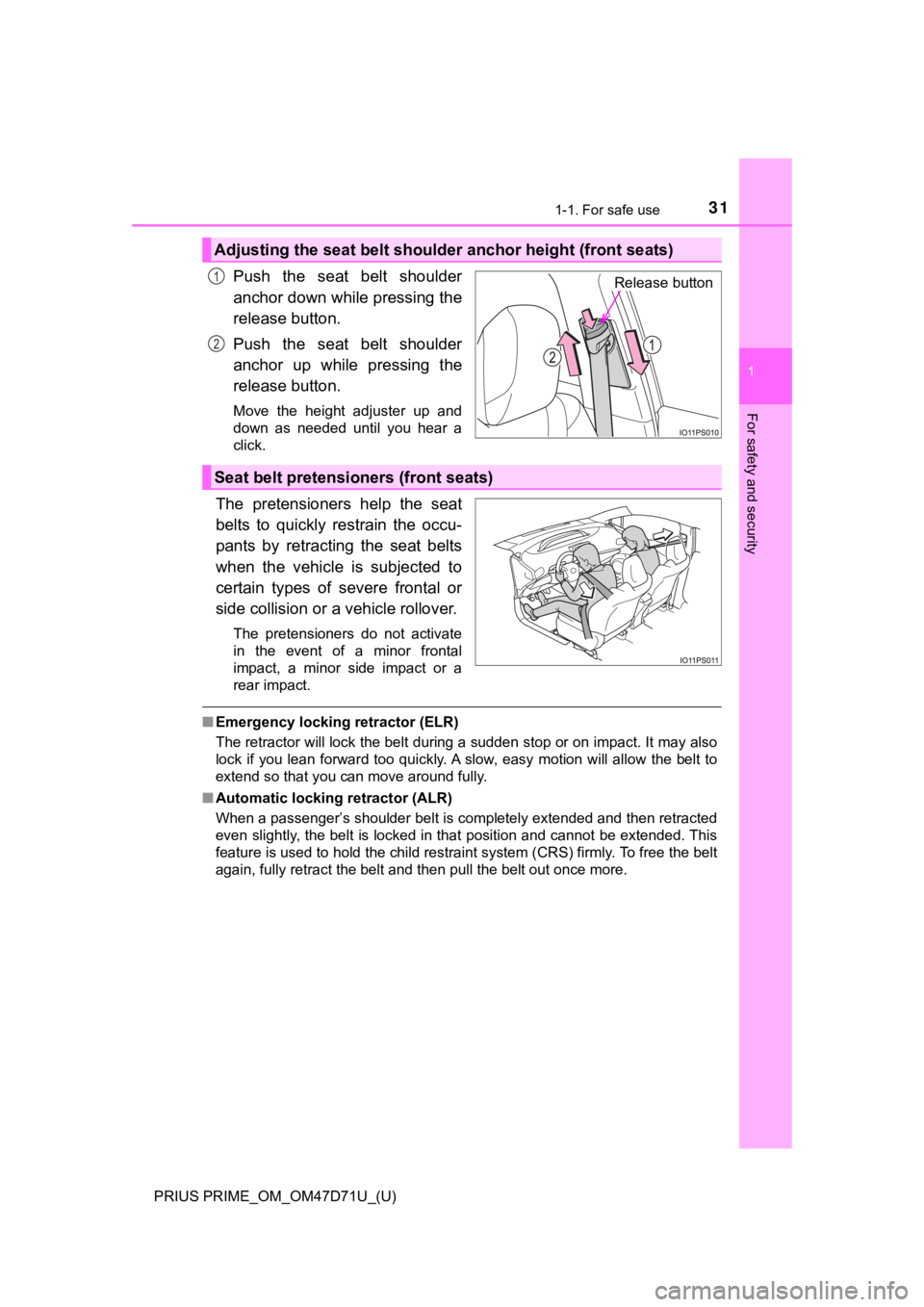
Push the seat belt shoulder
anchor down while pressing the
release button.
Push the seat belt shoulder
anchor up while pressing the
release button.
Move the height adjuster up and
down as needed until you hear a
click.
The pretensioners help the seat
belts to quickly restrain the occu-
pants by retracting the seat belts
when the vehicle is subjected to
certain types of severe frontal or
side collision or a vehicle rollover.
The pretensioners do not activate
in the event of a minor frontal
impact, a minor side impact or a
rear impact.
■Emergency locking retractor (ELR)
The retractor will lock the belt during a sudden stop or on impact. It may also
lock if you lean forward too quickly. A slow, easy motion will allow the belt to
extend so that you can move around fully.
■Automatic locking retractor (ALR)
When a passenger’s shoulder belt is completely extended and then retracted
even slightly, the belt is locked in that position and cannot be extended. This
feature is used to hold the child restraint system (CRS) firmly. To free the belt
again, fully retract the belt and then pull the belt out once more.
Adjusting the seat belt shoulder anchor height (front seats)
Release button1
2
Seat belt pretensioners (front seats)
Page 248 of 808
248
PRIUS PRIME_OM_OM47D71U_(U)
3. Instrument cluster
*: If equipped
■
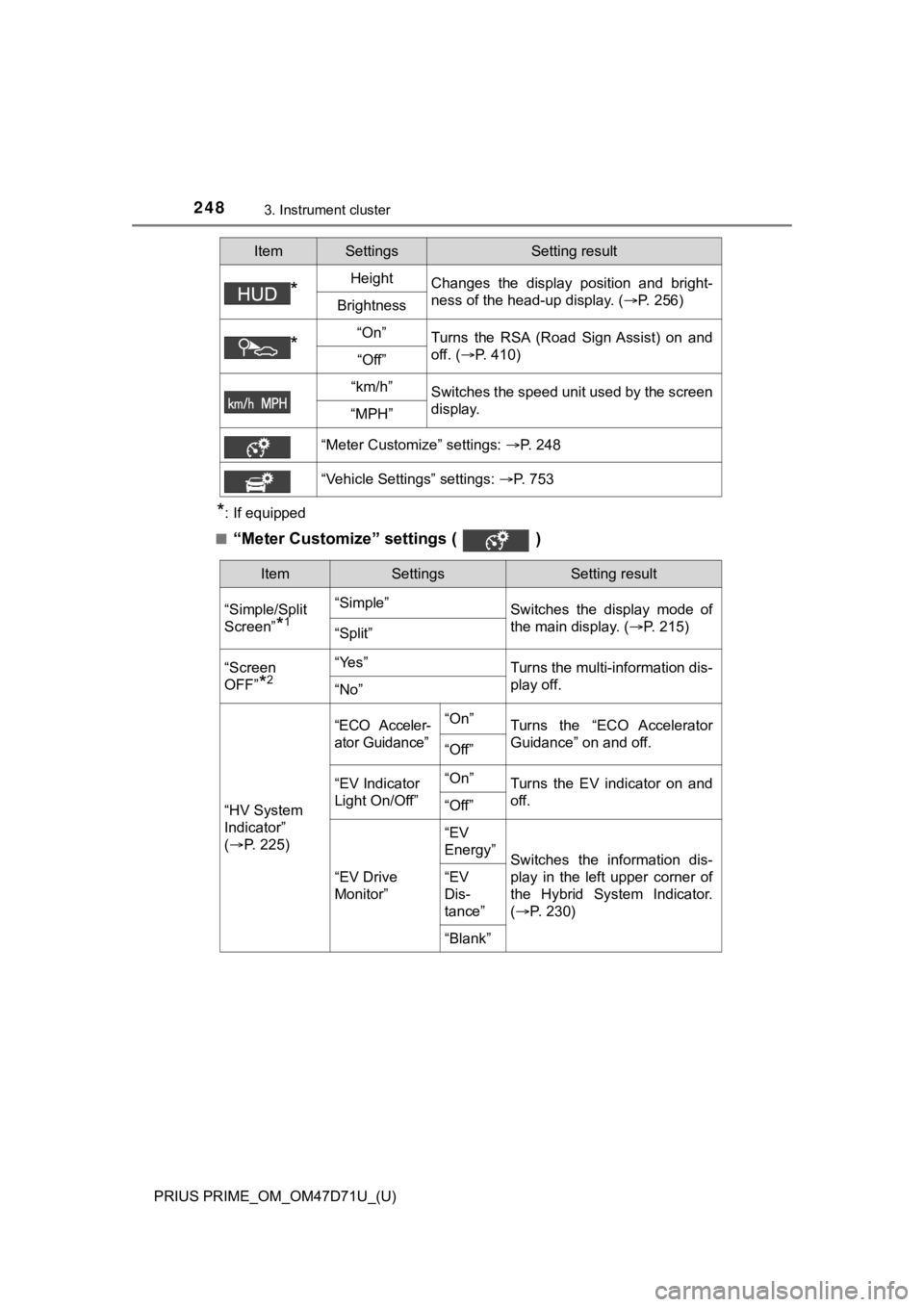
“Meter Customize” settings ( )
*HeightChanges the display position and bright-
ness of the head-up display. (P. 256)
Brightness
*“On”Turns the RSA (Road Sign Assist) on and
off. (P. 410)
“Off”
“km/h”Switches the speed unit used by the screen
display.
“MPH”
“Meter Customize” settings: P. 248
“Vehicle Settings” settings: P. 753
ItemSettingsSetting result
ItemSettingsSetting result
“Simple/Split
Screen”
*1
“Simple”
Switches the display mode of
the main display. (P. 215)
“Split”
“Screen
OFF”
*2
“Yes”Turns the multi-information dis-
play off.
“No”
“HV System
Indicator”
(P. 2 2 5 )
“ECO Acceler-
ator Guidance”“On”Turns the “ECO Accelerator
Guidance” on and off.
“Off”
“EV Indicator
Light On/Off”“On”Turns the EV indicator on and
off.
“Off”
“EV Drive
Monitor”“EV
Energy”
Switches the information dis-
play in the left upper corner of
the Hybrid System Indicator.
(P. 2 3 0 )
“EV
Dis-
tance”
“Blank”
Page 301 of 808
301
PRIUS PRIME_OM_OM47D71U_(U)
4-3. Adjusting the seats
4
Operation of each component
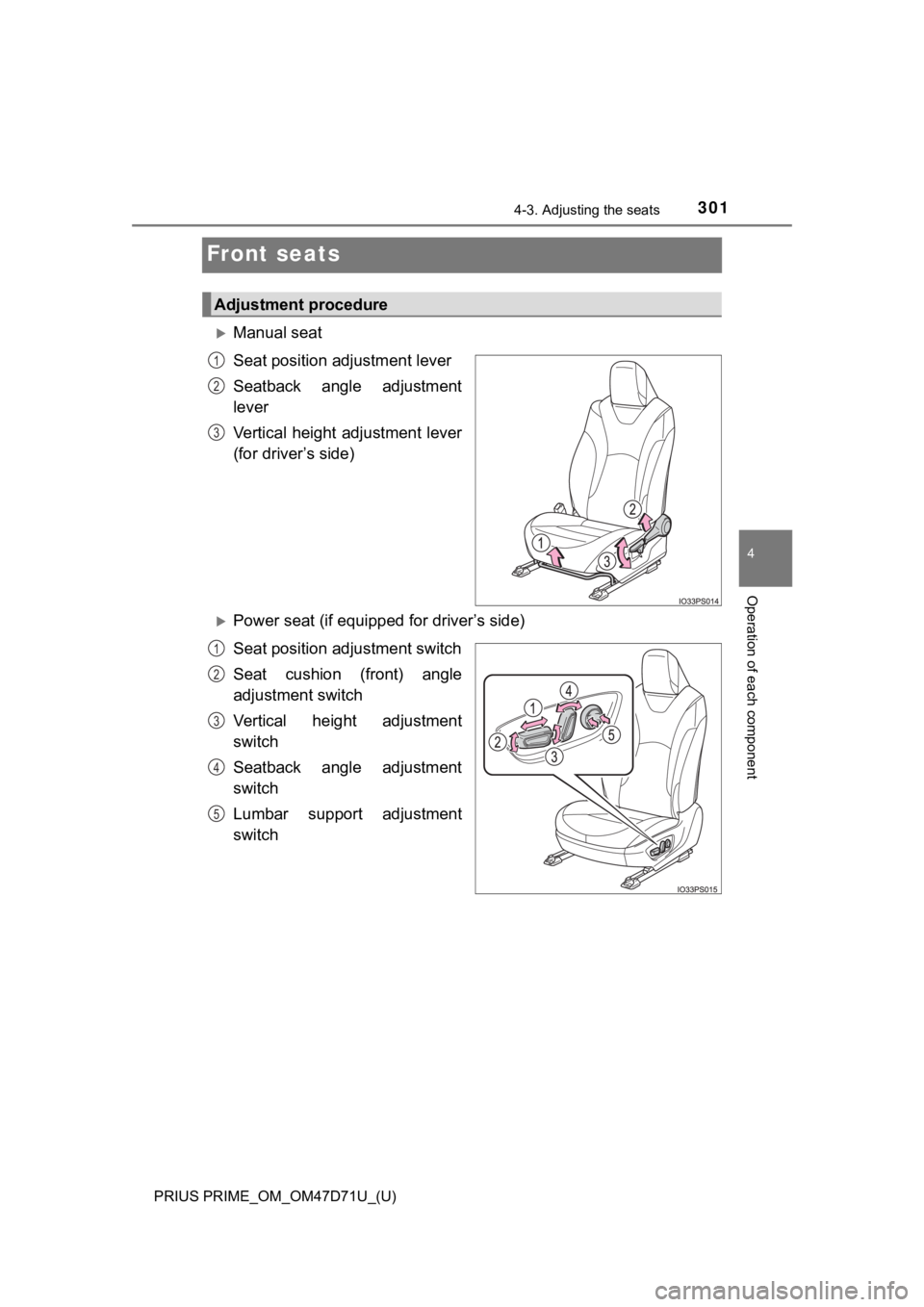
Front seats
Manual seat
Seat position adjustment lever
Seatback angle adjustment
lever
Vertical height adjustment lever
(for driver’s side)
Power seat (if equipped for driver’s side)
Seat position adjustment switch
Seat cushion (front) angle
adjustment switch
Vertical height adjustment
switch
Seatback angle adjustment
switch
Lumbar support adjustment
switch
Adjustment procedure
1
2
3
1
2
3
4
5
Page 307 of 808
PRIUS PRIME_OM_OM47D71U_(U)
3074-3. Adjusting the seats
4
Operation of each component
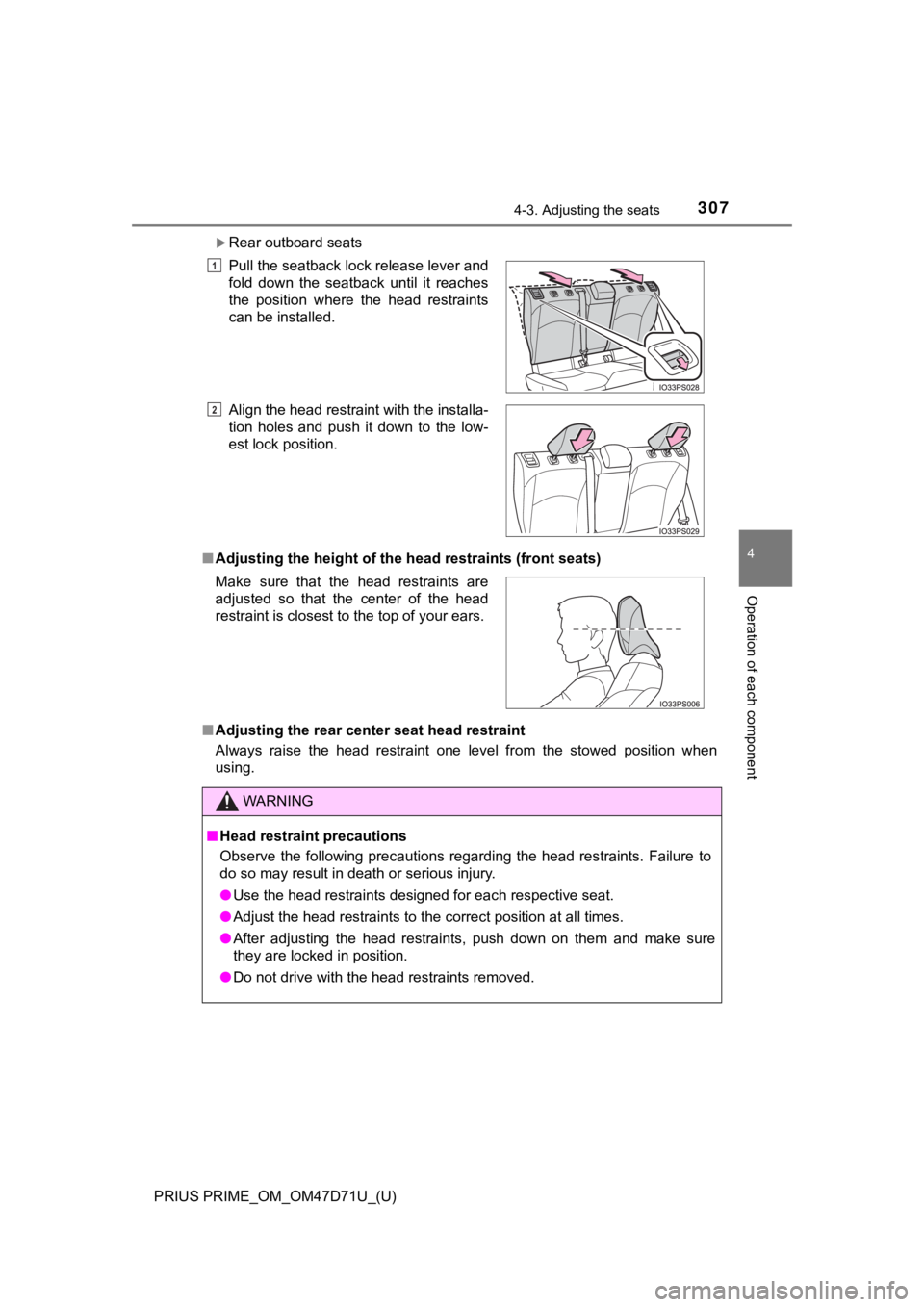
Rear outboard seats
■Adjusting the height of the head restraints (front seats)
■Adjusting the rear center seat head restraint
Always raise the head restraint one level from the stowed position when
using.Pull the seatback lock release lever and
fold down the seatback until it reaches
the position where the head restraints
can be installed.
Align the head restraint with the installa-
tion holes and push it down to the low-
est lock position.
Make sure that the head restraints are
adjusted so that the center of the head
restraint is closest to the top of your ears.
WARNING
■Head restraint precautions
Observe the following precautions regarding the head restraints. Failure to
do so may result in death or serious injury.
●Use the head restraints designed for each respective seat.
●Adjust the head restraints to the correct position at all times.
●After adjusting the head restraints, push down on them and make sure
they are locked in position.
●Do not drive with the head restraints removed.
1
2
Page 310 of 808
3104-4. Adjusting the steering wheel and mirrors
PRIUS PRIME_OM_OM47D71U_(U)
Inside rear view mirror
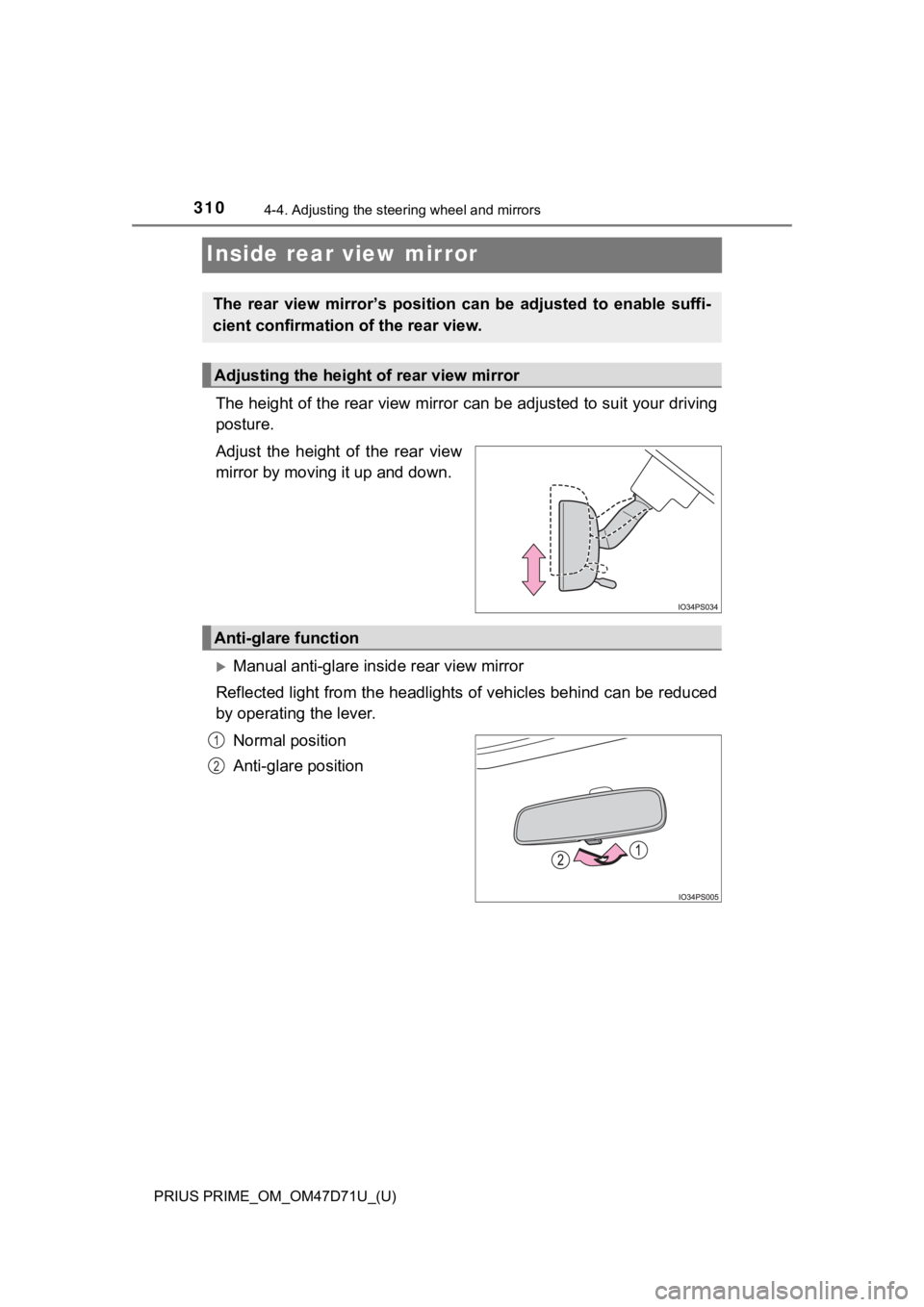
The height of the rear view mirror can be adjusted to suit your driving
posture.
Adjust the height of the rear view
mirror by moving it up and down.
Manual anti-glare inside rear view mirror
Reflected light from the headlights of vehicles behind can be reduced
by operating the lever.
Normal position
Anti-glare position
The rear view mirror’s position can be adjusted to enable suffi-
cient confirmation of the rear view.
Adjusting the height of rear view mirror
Anti-glare function
1
2
Page 393 of 808
PRIUS PRIME_OM_OM47D71U_(U)
3935-5. Using the driving support systems
5
Driving
• If a vehicle ahead is narrow, such as a personal mobility vehicle
• If a preceding vehicle has a small rear end, such as an unloaded truck
• If a vehicle ahead is carrying a load which protrudes past its rear bumper
• If a vehicle ahead is irregularly shaped, such as a tractor or side car
• If a vehicle ahead is a child sized bicycle, a bicycle that is carrying a large
load, a bicycle ridden by more than one person, or a uniquely shaped
bicycle (bicycle with a child seat, tandem bicycle, etc.)
• If a pedestrian/or the riding height of a bicyclist ahead is shorter than
<00440053005300550052005b004c0050004400570048004f005c000300160011001500030049005700110003000b001400030050000c000300520055000300570044004f004f0048005500030057004b00440051000300440053005300550052005b004c00
50004400570048004f005c0003001900110018000300490057[. (2 m)
• If a pedestrian/bicyclist is wearing oversized clothing (a rain coat, long
skirt, etc.), making their silhouette obscure
• If a pedestrian is bending forward or squatting or bicyclist is bending for-
ward
• If a pedestrian/bicyclist is moving fast
• If a pedestrian is pushing a stroller, wheelchair, bicycle or other vehicle
• When driving in inclement weather such as heavy rain, fog, snow or a
sandstorm
• When driving through steam or smoke
• When the surrounding area is dim, such as at dawn or dusk, or while at
night or in a tunnel, making a detectable object appear to be nearly the
same color as its surroundings
• When driving in a place where the surrounding brightness changes sud-
denly, such as at the entrance or exit of a tunnel
• After the hybrid system has started the vehicle has not been driven for a
certain amount of time
• While making a left/right turn and for a few seconds after making a left/
right turn
• While driving on a curve and for a few seconds after driving on a curve
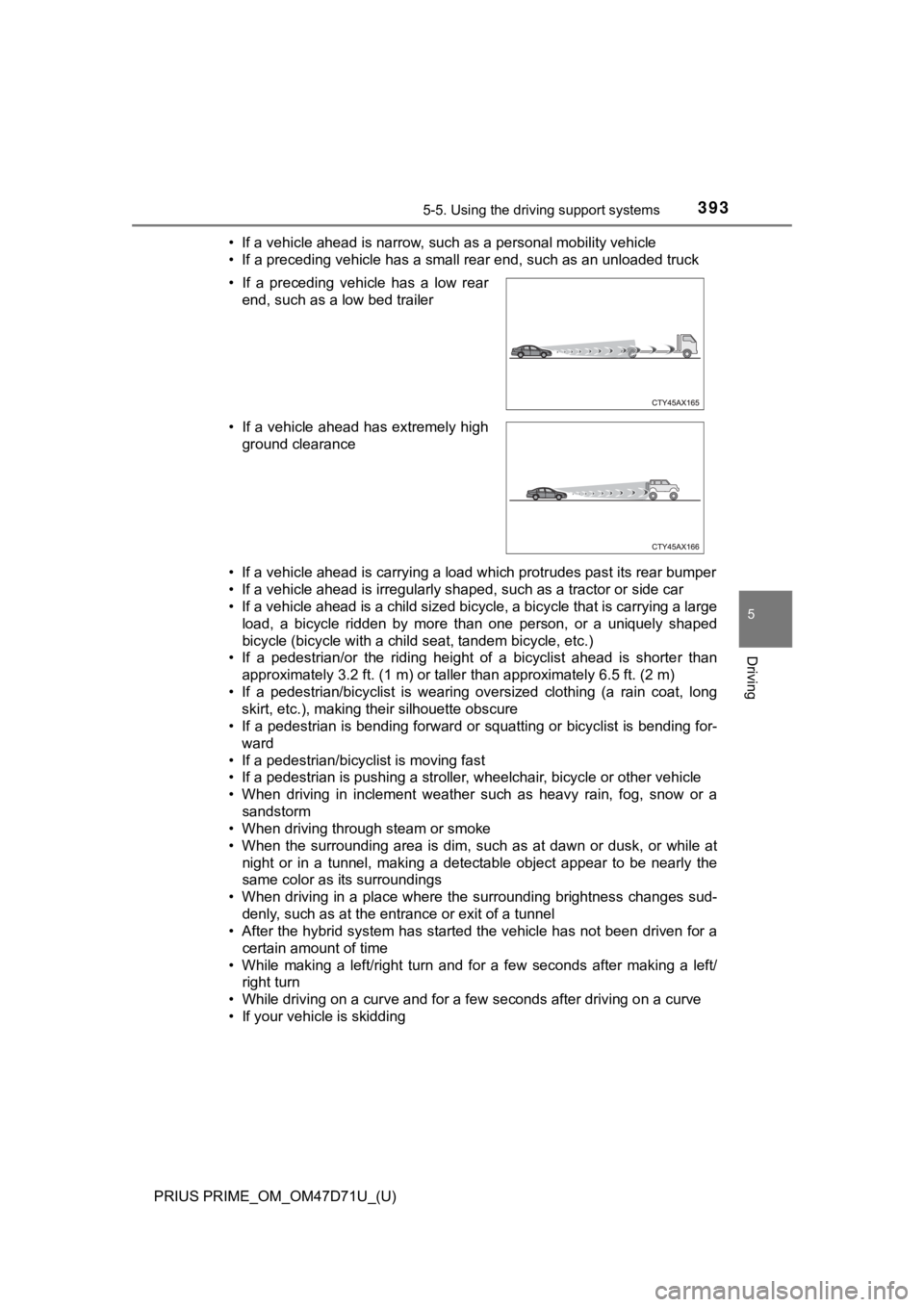
• If your vehicle is skidding • If a preceding vehicle has a low rear
end, such as a low bed trailer
• If a vehicle ahead has extremely high
ground clearance
Page 439 of 808

PRIUS PRIME_OM_OM47D71U_(U)
4395-5. Using the driving support systems
5
Driving
■Conditions under which the Blind Spot Monitor function may not func-
tion correctly
●The Blind Spot Monitor function may not detect vehicles correctly in the fol-
lowing situations:
• When the sensor is misaligned due to a strong impact to the sensor or its
surrounding area
• When mud, snow, ice, a sticker, etc. is covering the sensor or surround-
ing area on the rear bumper
• When driving on a road surface that is wet with standing water during bad
weather, such as heavy rain, snow, or fog
• When multiple vehicles are approaching with only a small gap between
each vehicle
• When the distance between your vehicle and a following vehicle is short
• When there is a significant difference in speed between your vehicle and
the vehicle that enters the detection area
• When the difference in speed between your vehicle and another vehicle
is changing
• When a vehicle enters a detection area traveling at about the same
speed as your vehicle
• As your vehicle starts from a stop, a vehicle remains in the detection area
• When driving up and down consecutive steep inclines, such as hills, dips
in the road, etc.
• When driving on roads with sharp bends, consecutive curves, or uneven
surfaces
• When vehicle lanes are wide, or when driving on the edge of a lane, and
the vehicle in an adjacent lane is far away from your vehicle
• When a bicycle carrier or other accessory is installed to the rear of the
vehicle
• When there is a significant difference in height between your vehicle and
the vehicle that enters the detection area
• Immediately after the Blind Spot Monitor function is turned on
●Instances of the Blind Spot Monitor function unnecessarily detecting a vehi-
cle and/or object may increase in the following situations:
• When the sensor is misaligned due to a strong impact to the sensor or its
surrounding area
• When the distance between your vehicle and a guardrail, wall, etc. that
enters the detection area is short
• When driving up and down consecutive steep inclines, such as hills, dips
in the road, etc.
• When vehicle lanes are narrow, or when driving on the edge of a lane,
and a vehicle traveling in a lane other than the adjacent lanes enters the
detection area
• When driving on roads with sharp bends, consecutive curves, or uneven
surfaces
• When the tires are slipping or spinning
• When the distance between your vehicle and a following vehicle is short
• When a bicycle carrier or other accessory is installed to the rear of the
vehicle
Page 463 of 808
PRIUS PRIME_OM_OM47D71U_(U)
4635-5. Using the driving support systems
5
Driving
●Changes in the vehicle
• The vehicle is tilted a large amount
• The height of the vehicle has drastically changed due to the carried load
(the nose tilts up or down)
• The direction of the sensor has deviated due to a collision or other impact
■In the unlikely event that the Parking Support Brake function mistakenly
operates at a crossing or elsewhere
Even in the unlikely event that the Parking Support Brake function mistakenly
operates at a crossing or elsewhere, brake control is canceled after approxi-
mately 2 seconds, allowing you to proceed forward and leave the area. Fur-
thermore, brake control is also canceled when the brake pedal is depressed.
Depressing the accelerator pedal again allows you to proceed forward and
leave the area.
■Situations in which the system may not operate normally
In the following situations, the system may not operate normally.
●Environmental influence
• There is an obstacle that cannot be detected between the vehicle and
another obstacle that can be detected
• An obstacle such as another vehicle, a motorcycle, a bicycle or a pedes-
trian cuts in front of the vehicle or jumps out from the side.
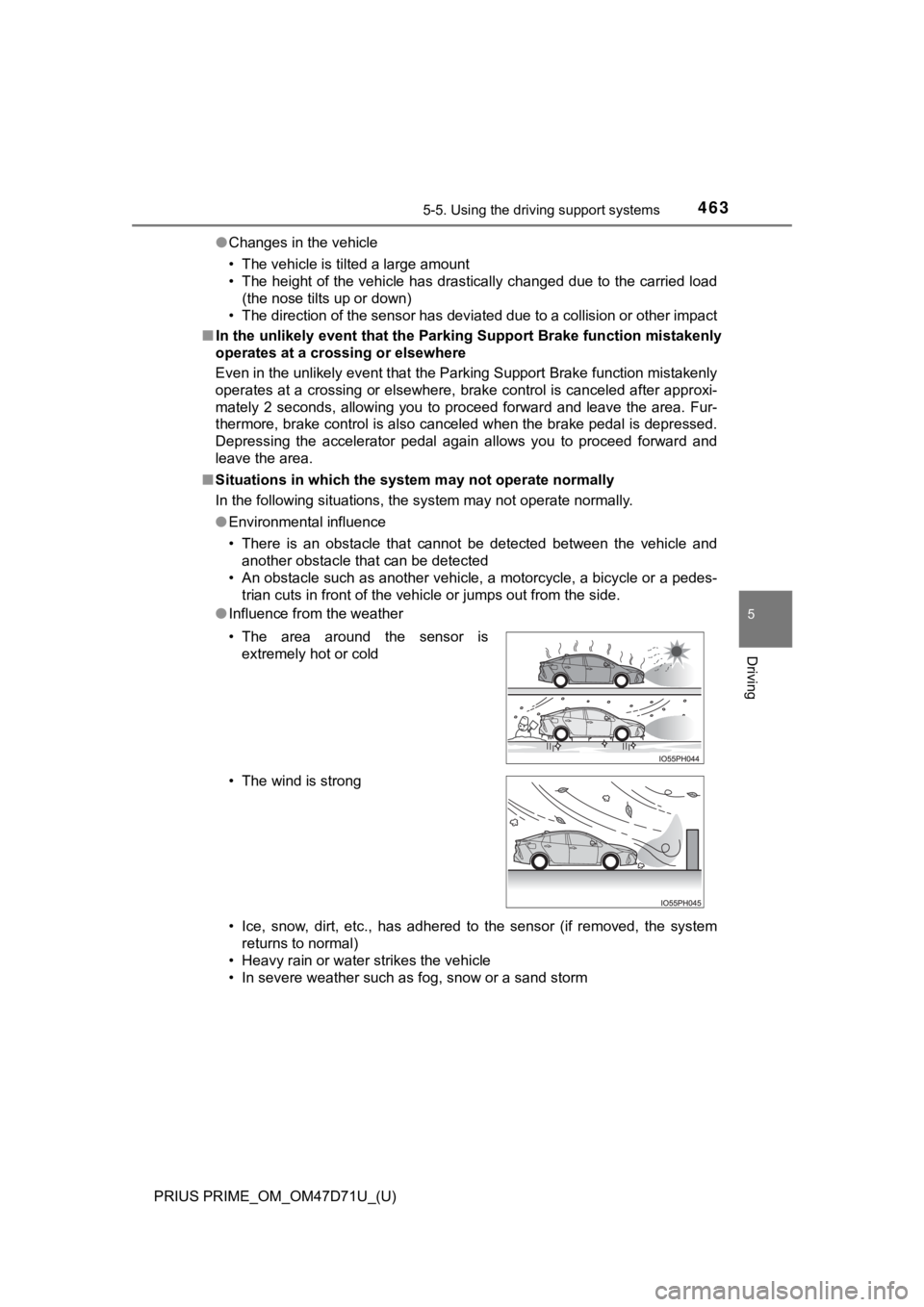
●Influence from the weather
• Ice, snow, dirt, etc., has adhered to the sensor (if removed, the system
returns to normal)
• Heavy rain or water strikes the vehicle
• In severe weather such as fog, snow or a sand storm • The area around the sensor is
extremely hot or cold
• The wind is strong
Page 464 of 808

464
PRIUS PRIME_OM_OM47D71U_(U)
5-5. Using the driving support systems
●Influence from other sonic waves
• An ultrasonic wave source is nearby, such as the horn or parking assist
sensors of another vehicle, a vehicle detector, a motorcycle engine or the
air brake of a large vehicle
• Electronic components (such as a backlit license plate (especially fluo-
rescent types), fog lights, a fender pole or a wireless antenna) are
installed near the sensors
●Changes in the vehicle
• When driving with the shift position in N
• The vehicle is tilted a large amount
• The height of the vehicle has drastically changed due to the carried load
(the nose tilts up or down)
• The direction of the sensor has deviated due to a collision or other impact
■Parking Support Brake function while the Simple Advanced Parking
Guidance System is operating
P. 469
■When removing and installing the 12-volt battery
The system needs to be initialized.
The system can be initialized by driving the vehicle straight ahead for 5 sec-
onds or more at a speed of approximately 22 mph (35 km/h) or higher.
■When “PKSB Unavailable” is displayed on the multi-information display
and the PKSB OFF indicator flashes
●Ice, snow, dirt, etc., may have adhered to the sensor. If this occurs, remove
the ice, snow, dirt, etc., from the sensor to return the system to normal.
Also, a warning message may be displayed at low temperatures due to ice
forming on the sensor, and the sensor may not detect obstacles. Once the
ice melts, the system will return to normal.
●If this message is shown even after removing dirt from the sensor, or shown
when the sensor was not dirty to begin with, have the vehicle inspected at
your Toyota dealer.
●System initialization may not have been performed after removal and instal-
lation of the 12-volt battery. Perform system initialization.
■When “PKSB Malfunction Visit Your Dealer” is displayed on the multi-
information display, the PKSB OFF indicator flashes and the buzzer
sounds
The system may not be operating properly. Have the vehicle inspected at
your Toyota dealer.
Page 465 of 808
PRIUS PRIME_OM_OM47D71U_(U)
4655-5. Using the driving support systems
5
Driving
WARNING
■For safe use
Do not rely solely upon the system. Relying solely upon the system may
lead to an unexpected accident.
●Driving safely is the sole responsibility of the driver. Pay careful attention
to the surrounding conditions in order to ensure safe driving. The Parking
Support Brake function can provide support to lessen the severity of colli-
sions. However, it may not operate depending on the situation.
●The Parking Support Brake function is not a system designed to com-
pletely stop the vehicle. Furthermore, even if the Parking Support Brake
function is able to stop the vehicle, brake control is canceled after approxi-
mately 2 seconds, so depress the brake pedal immediately.
■In order for the system to operate properly
Make sure to observe the following precautions regarding the sensors
(P. 456). Failure to observe these precautions may cause the sensors
not to operate properly, and may result in an unexpected accident.
●<002700520003005100520057000300530048005500490052005500500003005a00520055004e0003005600580046004b0003004400560003005000520047004c0049004c004600440057004c00520051000f00030047004c00560044005600560048005000
45004f005c000300520055000300530044004c00510057004c[ng
●Only perform replacements using genuine parts
●Do not subject the area around the sensors to any impacts
●Do not damage the sensors, and always keep them clean
■Handling the suspension
Do not modify the suspension, as changes to the height or incline of the
vehicle may prevent the sensors from correctly detecting obstacles, may
cause the system not operate, or may cause the system to operate unnec-
essarily.