width TOYOTA PRIUS PRIME 2021 Owners Manual (in English)
[x] Cancel search | Manufacturer: TOYOTA, Model Year: 2021, Model line: PRIUS PRIME, Model: TOYOTA PRIUS PRIME 2021Pages: 808, PDF Size: 74.05 MB
Page 405 of 808

PRIUS PRIME_OM_OM47D71U_(U)
4055-5. Using the driving support systems
5
Driving
Follow-up cruising display
Displayed when the multi-information display is switched to the driving
assist system information screen.
Indicates that steering assist of the lane centering function is operating by
monitoring the position of a preceding vehicle.
When the follow-up cruising display is displayed, if the preceding vehicle
moves, your vehicle may move in the same way. Always pay careful atten-
tion to your surroundings and operate the steering wheel as necessary to
correct the path of the vehicle and ensure safety.
■Operation conditions of each function
●Lane departure alert function
This function operates when all of the following conditions are met.
• LTA is turned on.
• Vehicle speed is approximately 32 mph (50 km/h) or more.
*1
• System recognizes white (yellow) lane lines or a course*2. (When a white
[yellow] line or course
*2 is recognized on only one side, the system will
operate only for the recognized side.)
• Width of traffic lane is approximately 9.8 ft. (3 m) or more.
• Turn signal lever is not operated.
• Vehicle is not being driven around a sharp curve.
• No system malfunctions are detected. (P. 409)
*1: The function operates even if the vehicle speed is less than approxi-
mately 32 mph (50 km/h) when the lane centering function is operating.
*2: Boundary between asphalt and the side of the road, such as grass, soil,
or a curb
●Steering assist function
This function operates when all of the following conditions are met in addi-
tion to the operation conditions for the lane departure alert function.
• Setting for (“LTA Steering Assist Mode”) in of the multi-
information display is set to “On”. (P. 220)
• Vehicle is not accelerated or decelerated by a fixed amount or more.
• Steering wheel is not operated with a steering force level suitable for
changing lanes.
• ABS, VSC, TRAC and PCS are not operating.
• TRAC or VSC is not turned off.
• Hands off steering wheel warning is not displayed. (P. 408)
4
Page 406 of 808
406
PRIUS PRIME_OM_OM47D71U_(U)
5-5. Using the driving support systems
●Vehicle sway warning function
This function operates when all of the following conditions are met.
• Setting for (“Lane Sway Warning Status”) in of the multi-
information display is set to “On”. (P. 220)
• Vehicle speed is approximately 32 mph (50 km/h) or more.
• Width of traffic lane is approximately 9.8 ft. (3 m) or more.
• No system malfunctions are detected. (P. 409)
●Lane centering function
This function operates when all of the following conditions are met.
• LTA is turned on.
• Setting for (“LTA Steering Assist Mode”) and (“Center
Trace”) in of the multi-information display are set to “On”. (P. 220)
• This function recognizes white (yellow) lane lines or the position of a pre-
ceding vehicle (except when the preceding vehicle is small, such as a
motorcycle).
• The dynamic radar cruise control with full-speed range is operating in
vehicle-to-vehicle distance control mode.
• Width of traffic lane is approximately 10 to 13 ft. (3 to 4 m).
• Turn signal lever is not operated.
• Vehicle is not being driven around a sharp curve.
• No system malfunctions are detected. (P. 409)
• Vehicle does not accelerate or decelerate by a fixed amount or more.
• Steering wheel is not operated with a steering force level suitable for
changing lanes.
• ABS, VSC, TRAC and PCS are not operating.
• TRAC or VSC is not turned off.
• Hands off steering wheel warning is not displayed. (P. 408)
• The vehicle is being driven in the center of a lane.
• Steering assist function is not operating.
Page 473 of 808
PRIUS PRIME_OM_OM47D71U_(U)
4735-5. Using the driving support systems
5
Driving
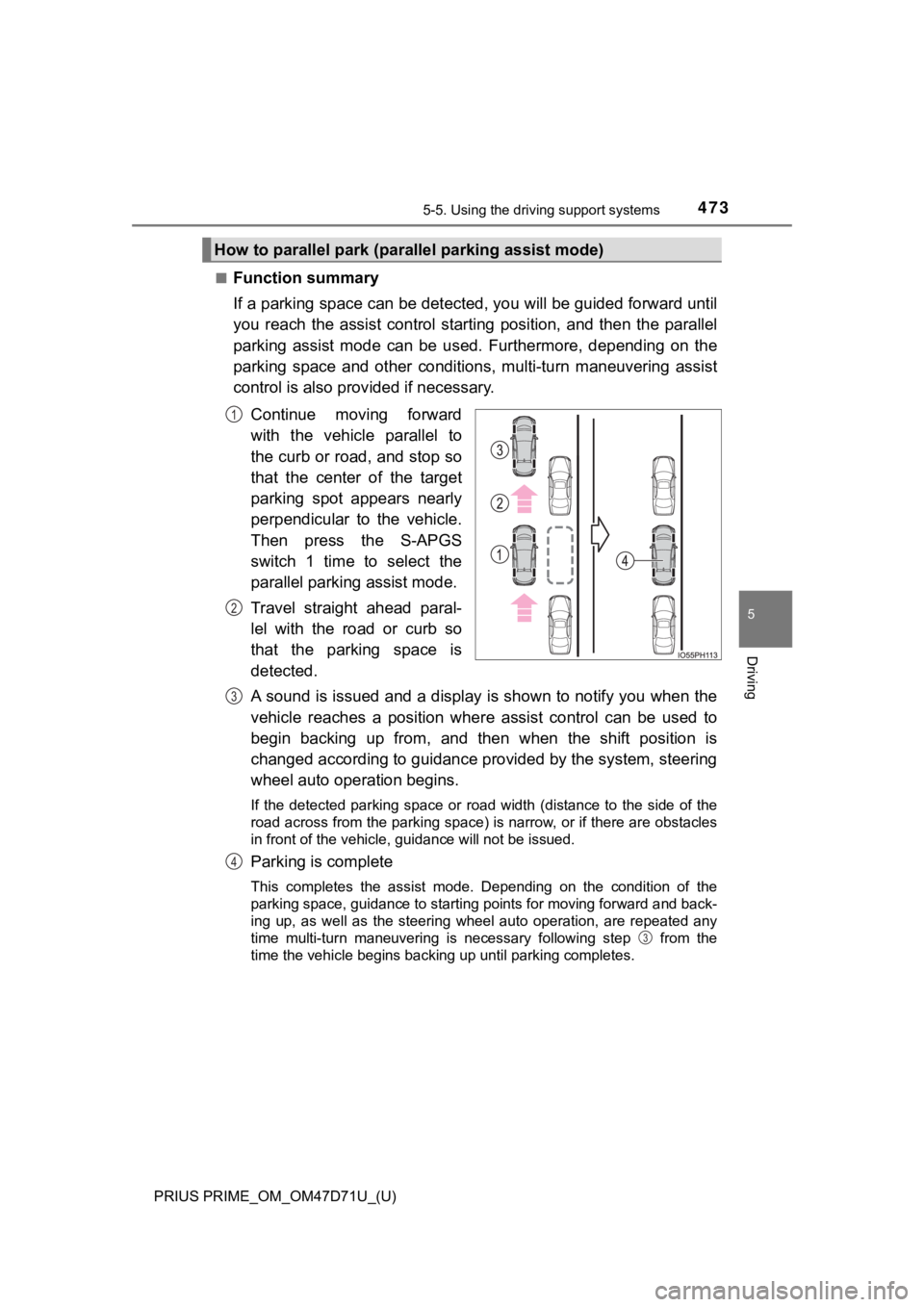
■Function summary
If a parking space can be detected, you will be guided forward until
you reach the assist control starting position, and then the parallel
parking assist mode can be used. Furthermore, depending on the
parking space and other conditions, multi-turn maneuvering assist
control is also provided if necessary.
Continue moving forward
with the vehicle parallel to
the curb or road, and stop so
that the center of the target
parking spot appears nearly
perpendicular to the vehicle.
Then press the S-APGS
switch 1 time to select the
parallel parking assist mode.
Travel straight ahead paral-
lel with the road or curb so
that the parking space is
detected.
A sound is issued and a display is shown to notify you when the
vehicle reaches a position where assist control can be used to
begin backing up from, and then when the shift position is
changed according to guidance provided by the system, steering
wheel auto operation begins.
If the detected parking space or road width (distance to the side of the
road across from the parking space) is narrow, or if there are obstacles
in front of the vehicle, guidance will not be issued.
Parking is complete
This completes the assist mode. Depending on the condition of the
parking space, guidance to starting points for moving forward and back-
ing up, as well as the steering wheel auto operation, are repeated any
time multi-turn maneuvering is necessary following step from the
<0057004c0050004800030057004b0048000300590048004b004c0046004f0048000300450048004a004c005100560003004500440046004e004c0051004a0003005800530003005800510057004c004f0003005300440055004e004c0051004a0003004600
5200500053004f00480057004800560011[
How to parallel park (parallel parking assist mode)
1
2
3
4
3
Page 485 of 808
PRIUS PRIME_OM_OM47D71U_(U)
4855-5. Using the driving support systems
5
Driving
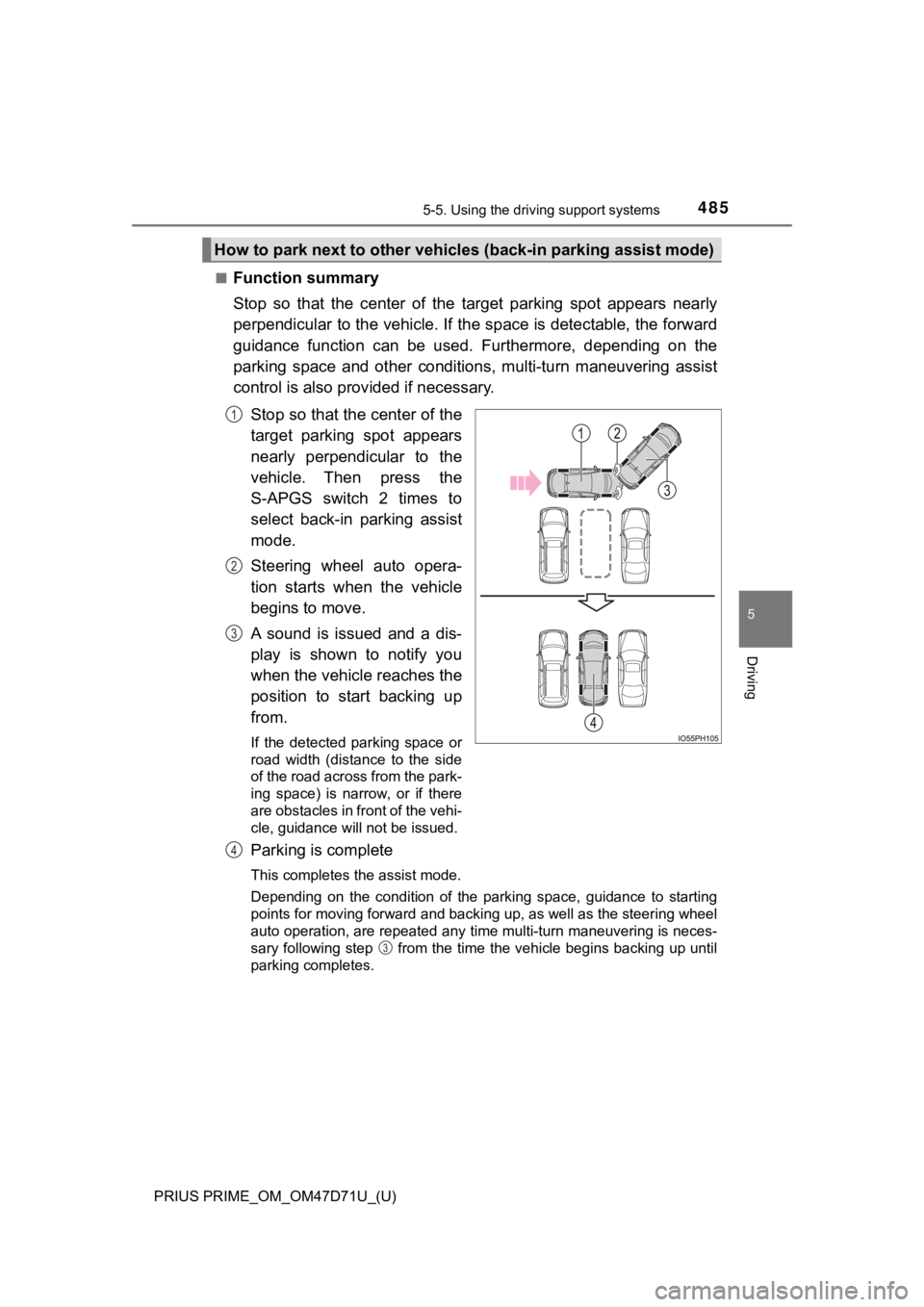
■Function summary
Stop so that the center of the target parking spot appears nearly
perpendicular to the vehicle. If the space is detectable, the forward
guidance function can be used. Furthermore, depending on the
parking space and other conditions, multi-turn maneuvering assist
control is also provided if necessary.
Stop so that the center of the
target parking spot appears
nearly perpendicular to the
vehicle. Then press the
S-APGS switch 2 times to
select back-in parking assist
mode.
Steering wheel auto opera-
tion starts when the vehicle
begins to move.
A sound is issued and a dis-
play is shown to notify you
when the vehicle reaches the
position to start backing up
from.
If the detected parking space or
road width (distance to the side
of the road across from the park-
ing space) is narrow, or if there
are obstacles in front of the vehi-
cle, guidance will not be issued.
Parking is complete
This completes the assist mode.
Depending on the condition of the parking space, guidance to starting
points for moving forward and backing up, as well as the steering wheel
auto operation, are repeated any time multi-turn maneuvering is neces-
sary following step from the time the vehicle begins backing up until
parking completes.
How to park next to other vehicles (back-in parking assist mode)
1
2
3
4
3
Page 492 of 808
492
PRIUS PRIME_OM_OM47D71U_(U)
5-5. Using the driving support systems
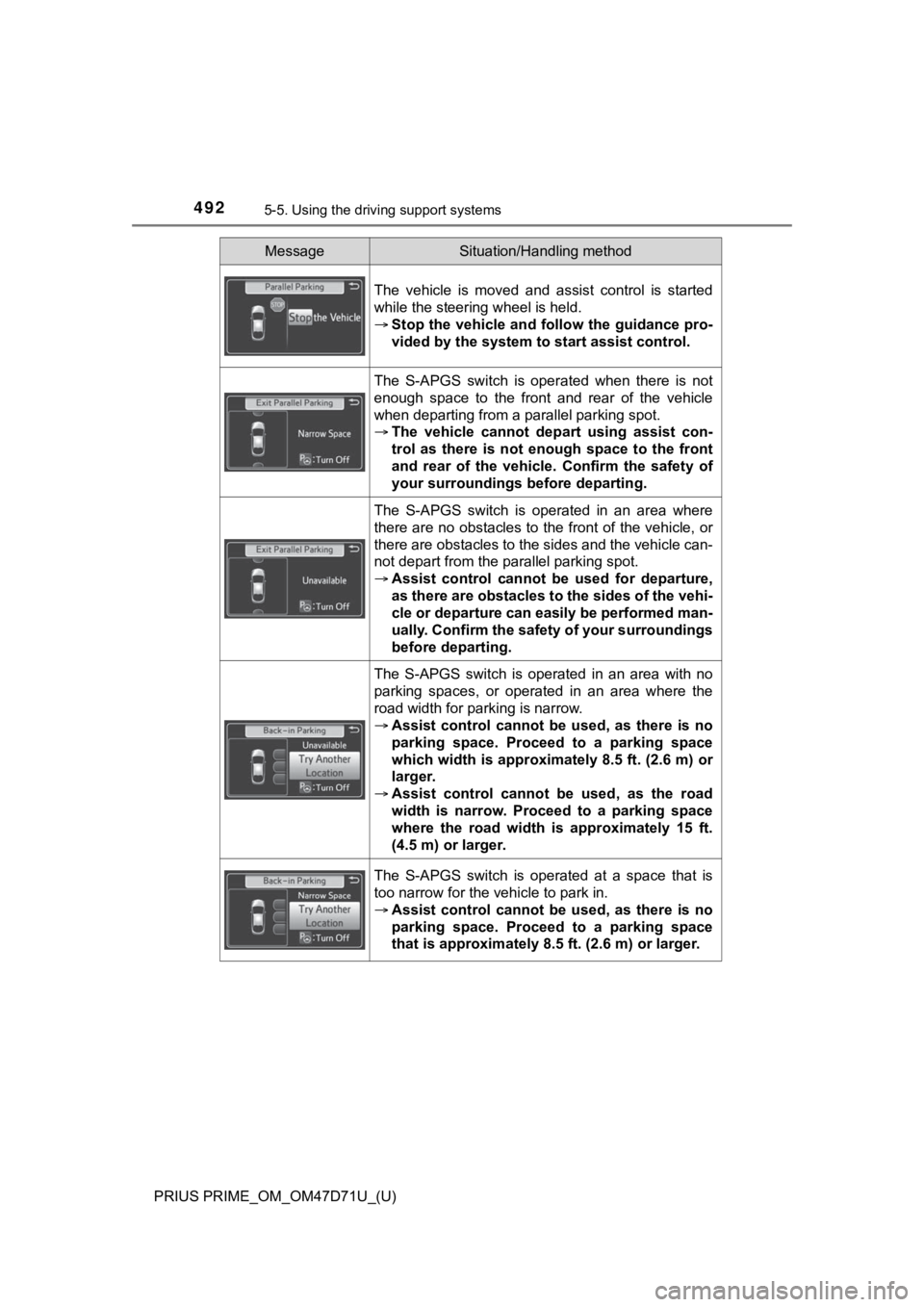
The vehicle is moved and assist control is started
while the steering wheel is held.
Stop the vehicle and follow the guidance pro-
vided by the system to start assist control.
The S-APGS switch is operated when there is not
enough space to the front and rear of the vehicle
when departing from a parallel parking spot.
The vehicle cannot depart using assist con-
trol as there is not enough space to the front
and rear of the vehicle. Confirm the safety of
your surroundings before departing.
The S-APGS switch is operated in an area where
there are no obstacles to the front of the vehicle, or
there are obstacles to the sides and the vehicle can-
not depart from the parallel parking spot.
Assist control cannot be used for departure,
as there are obstacles to the sides of the vehi-
cle or departure can easily be performed man-
ually. Confirm the safety of your surroundings
before departing.
The S-APGS switch is operated in an area with no
parking spaces, or operated in an area where the
road width for parking is narrow.
Assist control cannot be used, as there is no
parking space. Proceed to a parking space
which width is approximately 8.5 ft. (2.6 m) or
larger.
Assist control cannot be used, as the road
width is narrow. Proceed to a parking space
where the road width is approximately 15 ft.
(4.5 m) or larger.
The S-APGS switch is operated at a space that is
too narrow for the vehicle to park in.
Assist control cannot be used, as there is no
parking space. Proceed to a parking space
that is approximately 8.5 ft. (2.6 m) or larger.
MessageSituation/Handling method
Page 626 of 808
626
PRIUS PRIME_OM_OM47D71U_(U)
7-3. Do-it-yourself maintenance
Wheels
When replacing wheels, care should be taken to ensure that they are
equivalent to those removed in load capacity, diameter, rim width and
inset
*.
Replacement wheels are available at your Toyota dealer.
*: Conventionally referred to as “offset”.
Toyota does not recommend using the following:
●Wheels of different sizes or types
●Used wheels
●Bent wheels that have been straightened
●Use only Toyota wheel nuts and wrenches designed for use with
your aluminum wheels.
●When rotating, repairing or changing your tires, check that the
wheel nuts are still tight after driving 1000 miles (1600 km).
●Be careful not to damage the aluminum wheels when using tire
chains.
●Use only Toyota genuine balance weights or equivalent and a plas-
tic or rubber hammer when balancing your wheels.
If a wheel is bent, cracked or heavily corroded, it should be
replaced. Otherwise, the tire may separate from the wheel or
cause a loss of handling control.
Wheel selection
Aluminum wheel precautions
Page 730 of 808
730
PRIUS PRIME_OM_OM47D71U_(U)
9-1. Specifications
Maintenance data (fuel, oil level, etc.)
*: Unladen vehicle
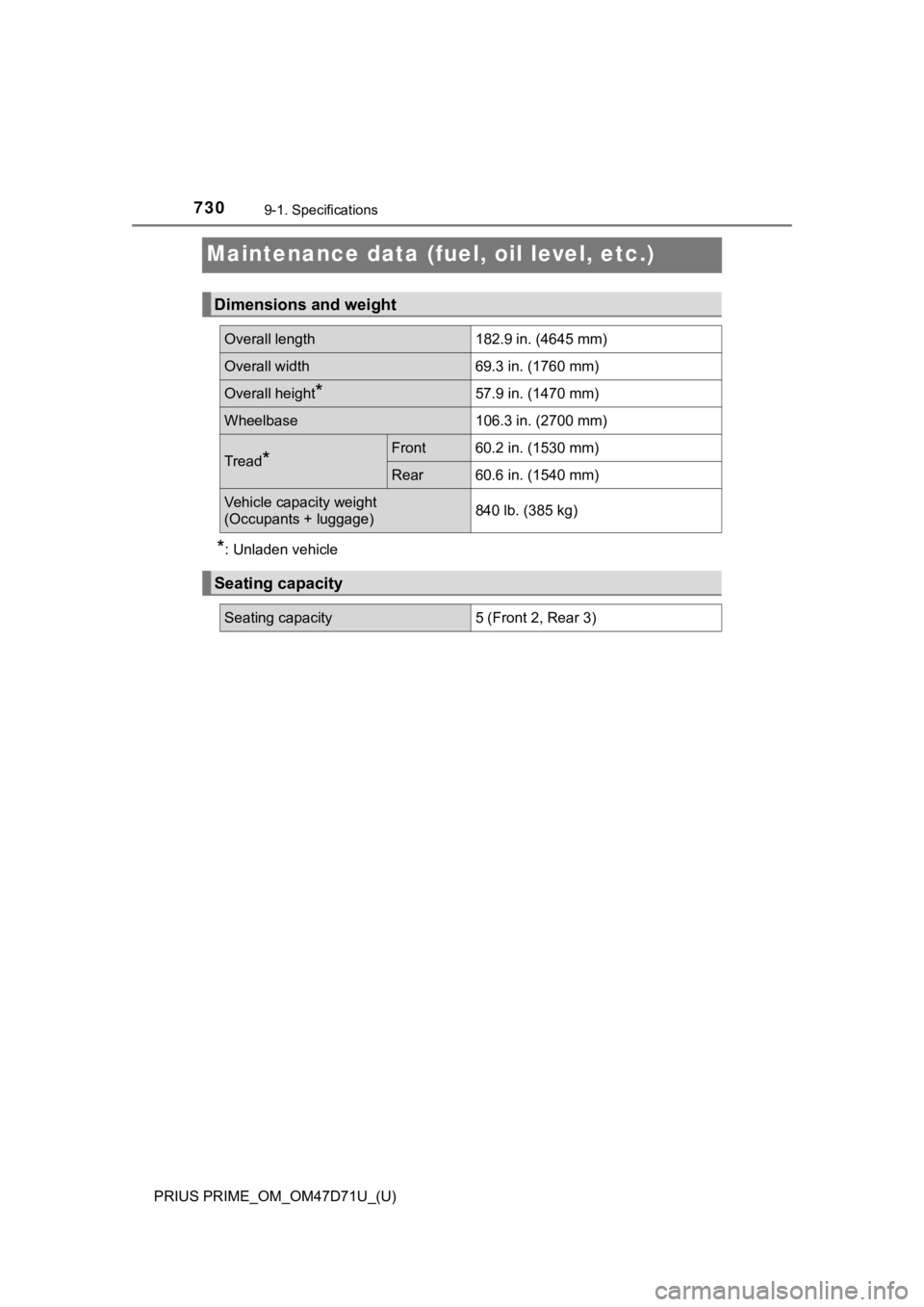
Dimensions and weight
Overall length182.9 in. (4645 mm)
Overall width69.3 in. (1760 mm)
Overall height*57.9 in. (1470 mm)
Wheelbase106.3 in. (2700 mm)
Tread*Front60.2 in. (1530 mm)
Rear60.6 in. (1540 mm)
Vehicle capacity weight
(Occupants + luggage)840 lb. (385 kg)
Seating capacity
Seating capacity5 (Front 2, Rear 3)
Page 743 of 808
PRIUS PRIME_OM_OM47D71U_(U)
7439-1. Specifications
9
Vehicle specifications
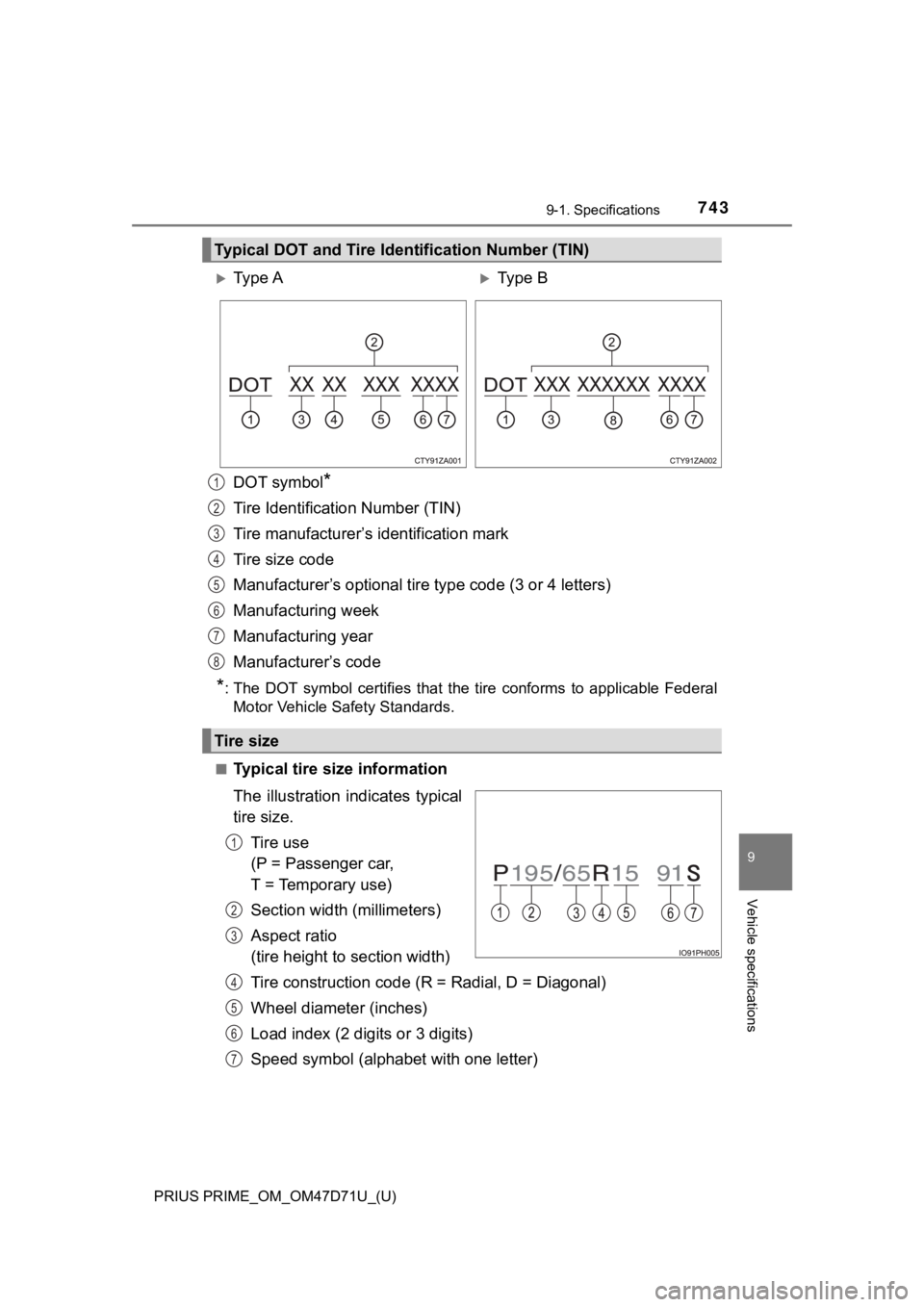
DOT symbol*
Tire Identification Number (TIN)
Tire manufacturer’s identification mark
Tire size code
Manufacturer’s optional tire type code (3 or 4 letters)
Manufacturing week
Manufacturing year
Manufacturer’s code
*: The DOT symbol certifies that the tire conforms to applicable Federal
Motor Vehicle Safety Standards.
■Typical tire size information
The illustration indicates typical
tire size.
Tire use
(P = Passenger car,
T = Temporary use)
Section width (millimeters)
Aspect ratio
(tire height to section width)
Tire construction code (R = Radial, D = Diagonal)
Wheel diameter (inches)
Load index (2 digits or 3 digits)
Speed symbol (alphabet with one letter)
Typical DOT and Tire Identification Number (TIN)
Ty p e AType B
Tire size
1
2
3
4
5
6
7
8
1
2
3
4
5
6
7
Page 744 of 808
744
PRIUS PRIME_OM_OM47D71U_(U)
9-1. Specifications
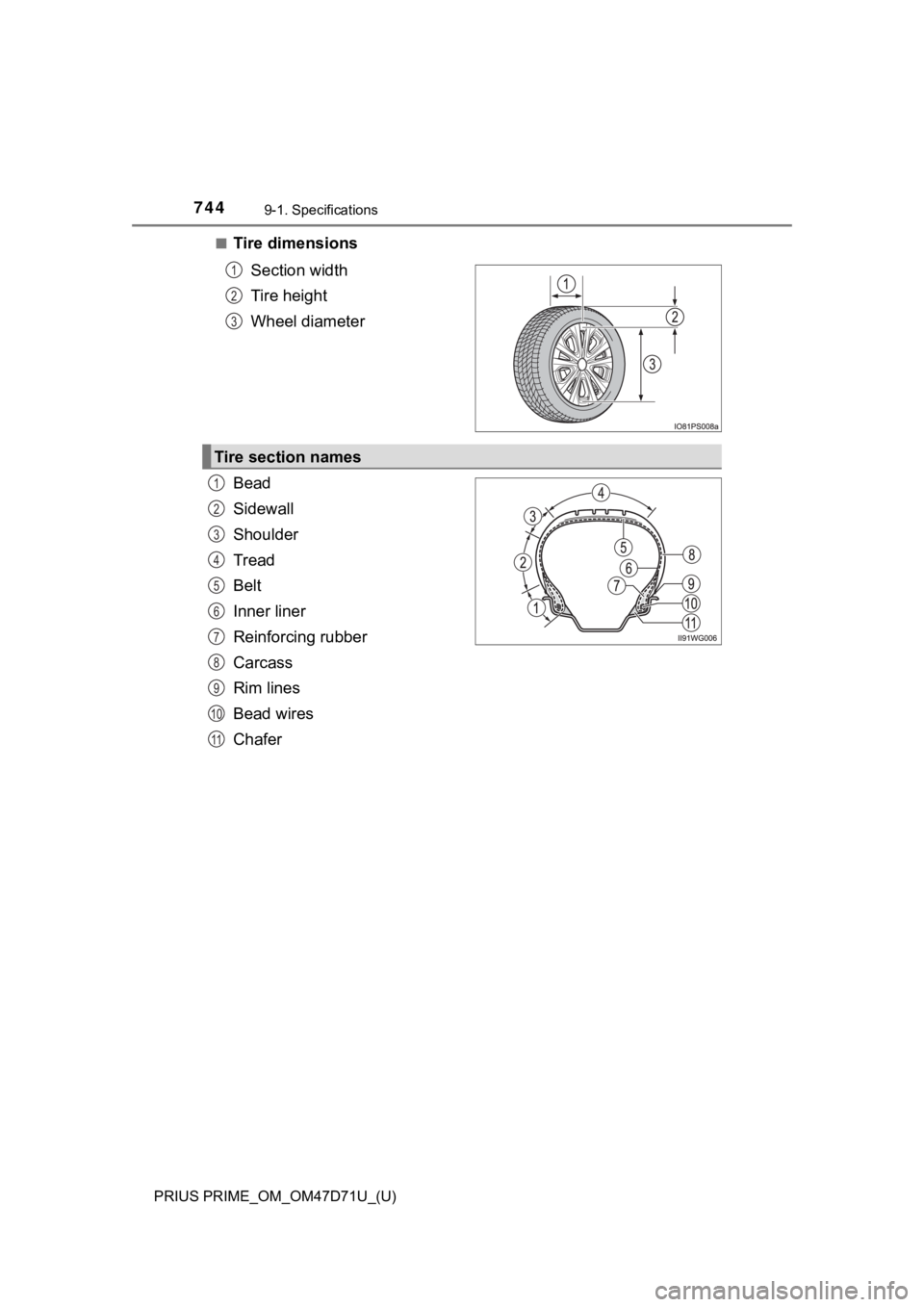
■Tire dimensions
Section width
Tire height
Wheel diameter
Bead
Sidewall
Shoulder
Tread
Belt
Inner liner
Reinforcing rubber
Carcass
Rim lines
Bead wires
Chafer
1
2
3
Tire section names
1
2
3
4
5
6
7
8
9
10
11
Page 745 of 808

PRIUS PRIME_OM_OM47D71U_(U)
7459-1. Specifications
9
Vehicle specifications
This information has been prepared in accordance with regulations
issued by the National Highway Traffic Safety Administration of the
U.S. Department of Transportation.
It provides the purchasers and/or prospective purchasers of Toyota
vehicles with information on uniform tire quality grading.
Your Toyota dealer will help answer any questions you may have as
you read this information.
■DOT quality grades
All passenger vehicle tires must conform to Federal Safety Require-
ments in addition to these grades. Quality grades can be found
where applicable on the tire sidewall between tread shoulder and
maximum section width.
For example: Treadwear 200 Traction AA Temperature A
■Treadwear
The treadwear grade is a comparative rating based on the wear
rate of the tire when tested under controlled conditions on a speci-
fied government test course.
For example, a tire graded 150 would wear one and a half (1 - 1/2)
times as well on the government course as a tire graded 100.
The relative performance of tires depends upon the actual condi-
tions of their use. Performance may differ significantly from the norm
due to variations in driving habits, service practices and differences
in road characteristics and climate.
■Traction AA, A, B, C
The traction grades, from highest to lowest, are AA, A, B and C,
and they represent the tire’s ability to stop on wet pavement as
measured under controlled conditions on specified government test
surfaces of asphalt and concrete.
A tire marked C may have poor traction performance.
Warning: The traction grade assigned to this tire is based on braking
(straight ahead) traction tests and does not include cornering (turn-
ing) traction.
Uniform Tire Quality Grading