display TOYOTA PRIUS PRIME 2022 Owners Manual
[x] Cancel search | Manufacturer: TOYOTA, Model Year: 2022, Model line: PRIUS PRIME, Model: TOYOTA PRIUS PRIME 2022Pages: 808, PDF Size: 14.72 MB
Page 283 of 808
PRIUS PRIME_OM_OM47E74U_(U)
2834-2. Opening, closing and locking the doors
4
Operation of each component
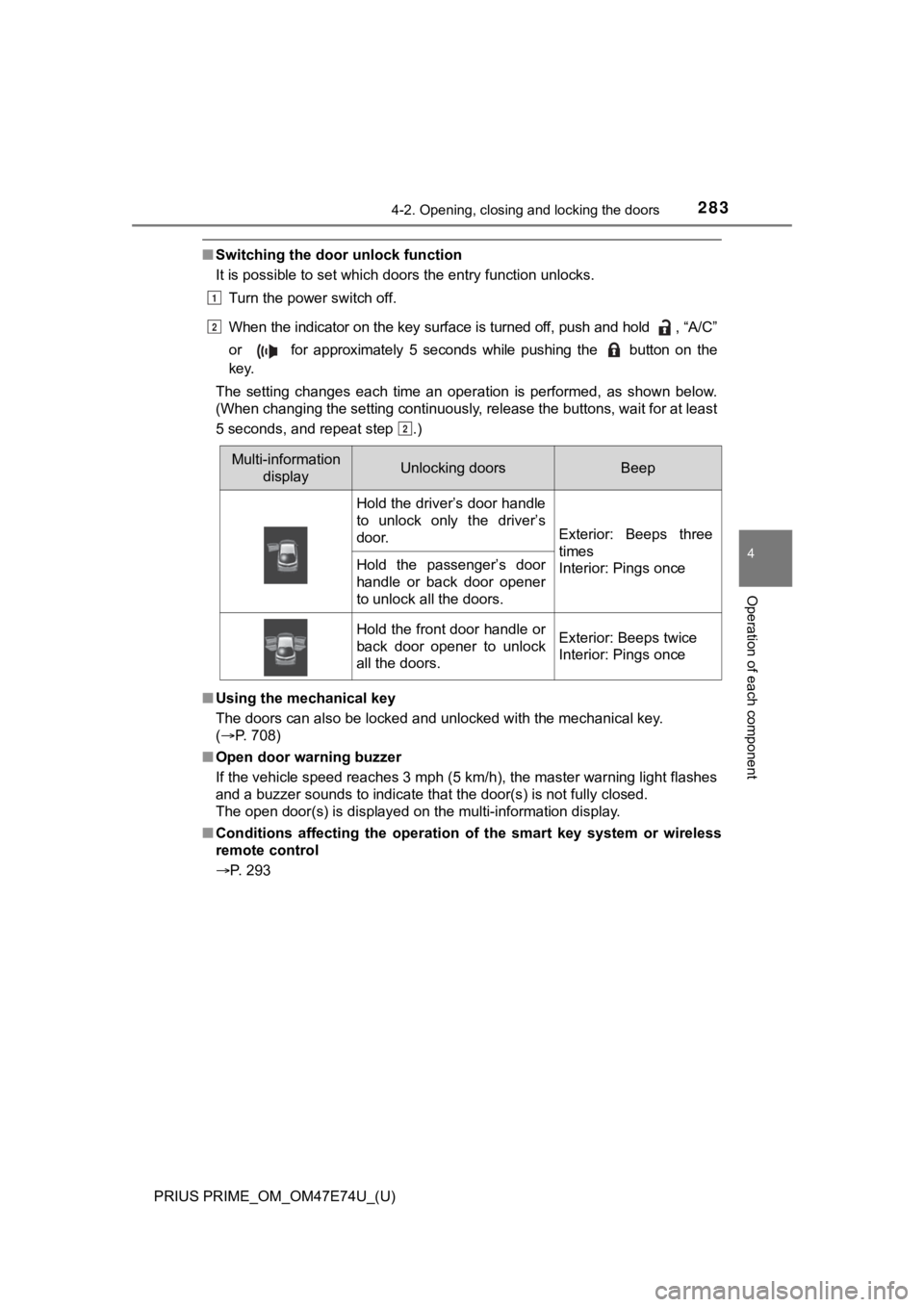
■Switching the door unlock function
It is possible to set which doors the entry function unlocks.
Turn the power switch off.
When the indicator on the key surface is turned off, push and h old , “A/C”
or for approximately 5 seconds while pushing the button on th e
key.
The setting changes each time an operation is performed, as sho wn below.
(When changing the setting continuously, release the buttons, w ait for at least
5 seconds, and repeat step .)
■ Using the mechanical key
The doors can also be locked and unlocked with the mechanical k ey.
( P. 708)
■ Open door warning buzzer
If the vehicle speed reaches 3 mph (5 km/h), the master warning light flashes
and a buzzer sounds to indicate that the door(s) is not fully c losed.
The open door(s) is displayed on the multi-information display.
■ Conditions affecting the operation of the smart key system or w ireless
remote control
P. 293
Multi-information
displayUnlocking doorsBeep
Hold the driver’s door handle
to unlock only the driver’s
door.
Exterior: Beeps three
times
Interior: Pings once
Hold the passenger’s door
handle or back door opener
to unlock all the doors.
Hold the front door handle or
back door opener to unlock
all the doors.Exterior: Beeps twice
Interior: Pings once
1
2
2
Page 284 of 808

284
PRIUS PRIME_OM_OM47E74U_(U)
4-2. Opening, closing and locking the doors
■Rear seat reminder function
●In order to remind you not to forget luggage, etc. in the rear seat, when the
power switch is turned off after any of the following condition s are met, a
buzzer will sound and a message will be displayed on the multi- information
display for approximately 6 seconds.
• The hybrid system is started within 10 minutes after opening and closing
a rear door.
• A rear door has been opened and closed after the hybrid system was
started.
However, if a rear door is opened and then closed within approximately 2
seconds, the rear seat reminder function may not operate.
● The rear seat reminder function determines that luggage, etc. has been
placed in a rear seat based on opening and closing of a rear door. There-
fore, depending on the situation, the rear seat reminder function may not
operate and you may still forget luggage, etc. in the rear seat, or it may
operate unnecessarily.
● The rear seat reminder function can be enabled/disabled. ( P. 749)
■ Customization
Settings (e.g. unlocking function using a key) can be changed.
(Customizable features: P. 749)
WARNING
■To prevent an accident
Observe the following precautions while driving the vehicle.
Failure to do so may result in a door opening and an occupant could be
thrown out of the vehicle, resulting in death or serious injury.
● Ensure that all doors are properly closed and locked.
● Do not pull the inside handle of the doors while driving.
Be especially careful for the front doors, as the doors may be opened even
if the inside lock buttons are in locked position.
● Set the rear door child-protector locks when children are seated in the rear
seats.
■ When opening or closing a door
Check the surroundings of the vehicle such as whether the vehicle is on an
incline, whether there is enough space for a door to open and w hether a
strong wind is blowing. When opening or closing the door, hold the door
handle tightly to prepare for any unpredictable movement.
■ When using the wireless remote control and operating the power win-
dows
Operate the power window after checking to make sure that there is no pos-
sibility of any passenger having any of their body parts caught in the side
window. Also, do not allow children to operate the wireless rem ote control. It
is possible for children and other passengers to get caught in the power
window.
Page 291 of 808
PRIUS PRIME_OM_OM47E74U_(U)
2914-2. Opening, closing and locking the doors
4
Operation of each component
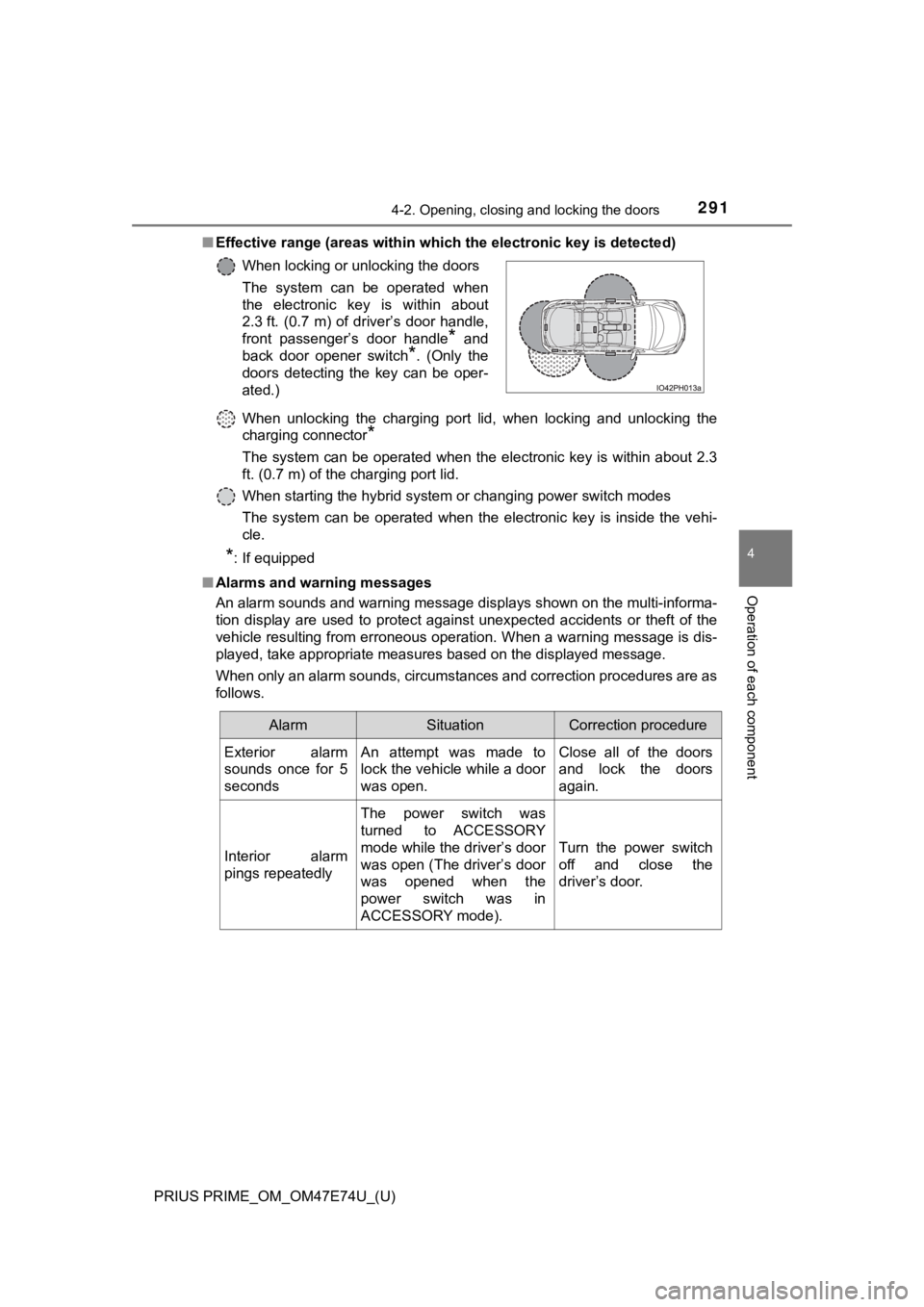
■Effective range (areas within wh ich the electronic key is detected)
When unlocking the charging port lid, when locking and unlockin g the
charging connector
*
The system can be operated when the electronic key is within ab out 2.3
ft. (0.7 m) of the charging port lid.
When starting the hybrid system or changing power switch modes
The system can be operated when the electronic key is inside th e vehi-
cle.
*: If equipped
■ Alarms and warning messages
An alarm sounds and warning message displays shown on the multi -informa-
tion display are used to protect against unexpected accidents o r theft of the
vehicle resulting from erroneous operation. When a warning mess age is dis-
played, take appropriate measures based on the displayed message.
When only an alarm sounds, circumstances and correction procedu res are as
follows. When locking or unlocking the doors
The system can be operated when
the electronic key is within about
2.3 ft. (0.7 m) of driver’s door handle,
front passenger’s door handle
* and
back door opener switch
*. (Only the
doors detecting the key can be oper-
ated.)
AlarmSituationCorrection procedure
Exterior alarm
sounds once for 5
secondsAn attempt was made to
lock the vehicle while a door
was open.Close all of the doors
and lock the doors
again.
Interior alarm
pings repeatedly
The power switch was
turned to ACCESSORY
mode while the driver’s door
was open (The driver’s door
was opened when the
power switch was in
ACCESSORY mode).
Turn the power switch
off and close the
driver’s door.
Page 292 of 808
292
PRIUS PRIME_OM_OM47E74U_(U)
4-2. Opening, closing and locking the doors
■When “Smart Key System malfuncti on See owner’s manual” is dis-
played on the multi-information display
The system may be malfunctioning. Have the vehicle inspected by your
Toyota dealer immediately.
■ Battery-saving function
The battery-saving function will be activated in order to preve nt the electronic
key battery and the 12-volt battery from being discharged while the vehicle is
not in operation for a long time.
● In the following situations, the smart key system may take some time to
unlock the doors.
• The electronic key has been left in an area of approximately 6 ft. (2 m) of
the outside of the vehicle for 10 minutes or longer.
• The smart key system has not been used for 5 days or longer.
● If the smart key system has not been used for 14 days or longer , the doors
cannot be unlocked at any doors except the driver’s door. In th is case, take
hold of the driver’s door handle, or use the wireless remote co ntrol or the
mechanical key, to unlock the doors.
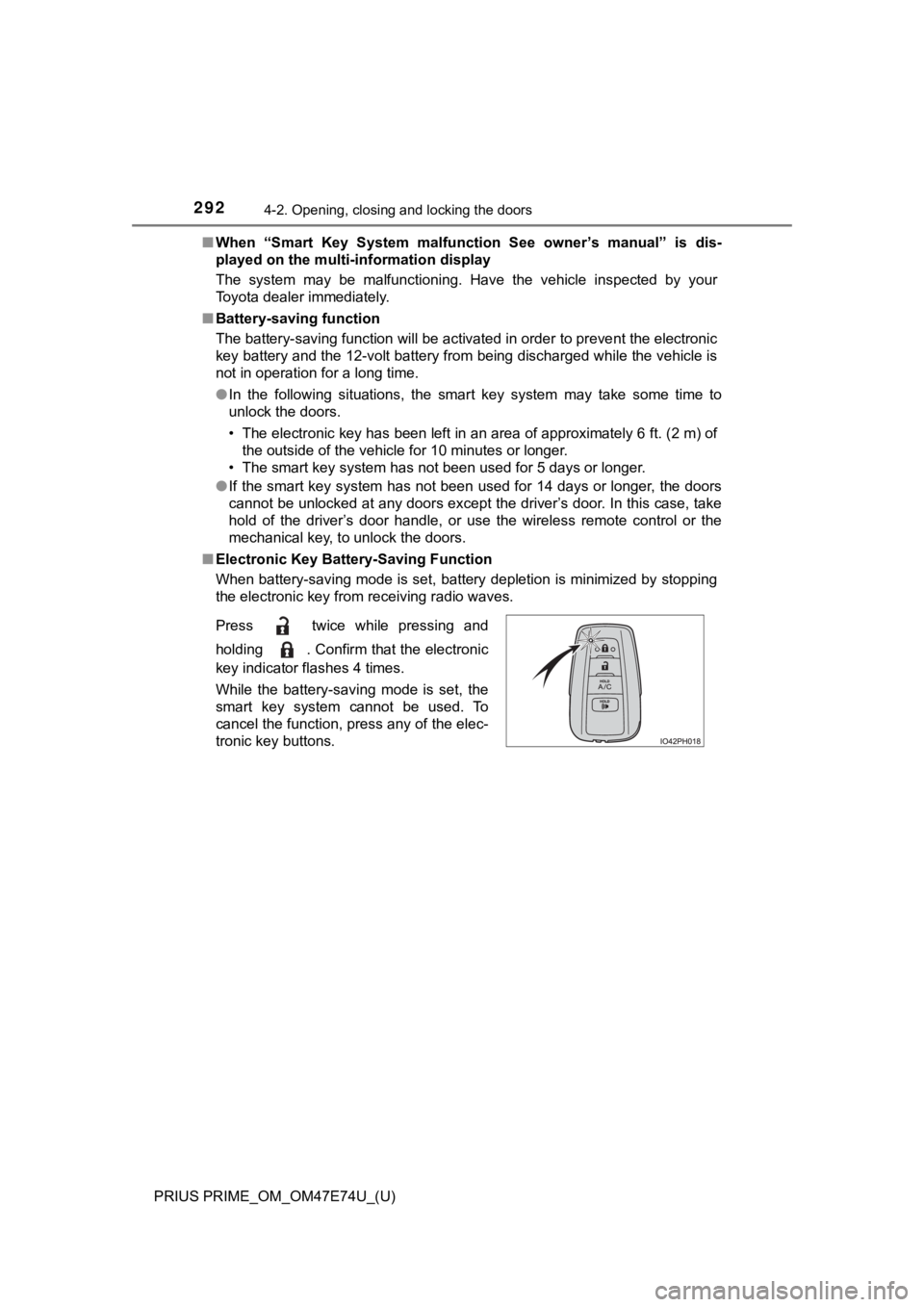
■ Electronic Key Battery-Saving Function
When battery-saving mode is set, battery depletion is minimized by stopping
the electronic key from receiving radio waves.
Press twice while pressing and
holding . Confirm that the electronic
key indicator flashes 4 times.
While the battery-saving mode is set, the
smart key system cannot be used. To
cancel the function, press any of the elec-
tronic key buttons.
Page 311 of 808
PRIUS PRIME_OM_OM47E74U_(U)
3114-5. Opening and closing the windows
4
Operation of each component
■When the 12-volt battery is disconnected
The window lock switch is disabled. If necessary, press the win dow lock
switch after reconnecting the 12-volt battery.
■ Power window open reminder function
The buzzer sounds and a message is shown on the multi-informati on display
in the instrument cluster when the power switch is turned off and the driver’s
door is opened with the power windows open.
■ Customization
Settings (e.g. linked door lock operation) can be changed.
(Customizable features: P. 749)
WARNING
Observe the following precautions.
Failing to do so may result in death or serious injury.
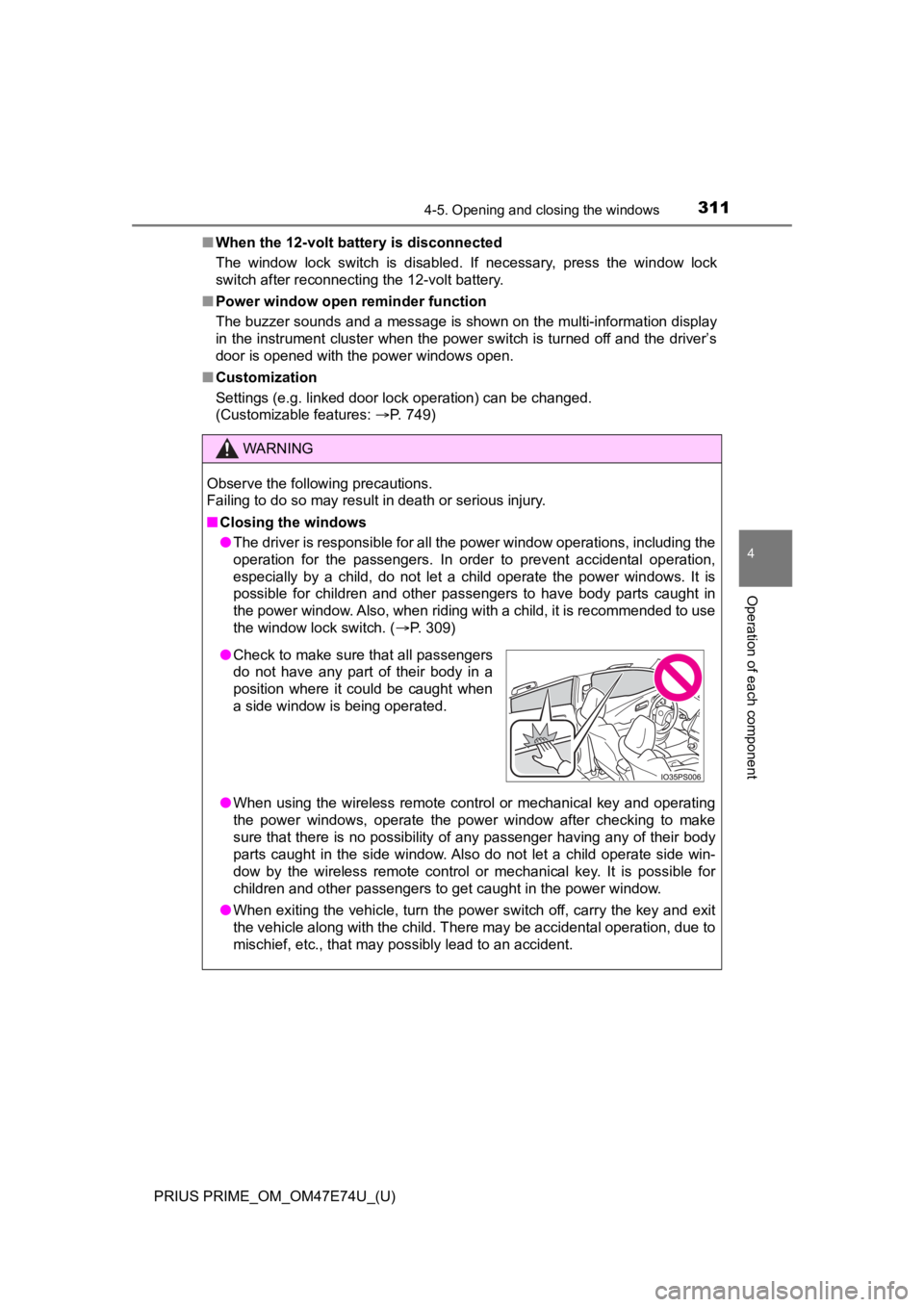
■Closing the windows
● The driver is responsible for all the power window operations, including the
operation for the passengers. In order to prevent accidental op eration,
especially by a child, do not let a child operate the power windows. It is
possible for children and other passengers to have body parts c aught in
the power window. Also, when riding with a child, it is recommended to use
the window lock switch. ( P. 309)
● When using the wireless remote control or mechanical key and op erating
the power windows, operate the power window after checking to m ake
sure that there is no possibility of any passenger having any o f their body
parts caught in the side window. Also do not let a child operat e side win-
dow by the wireless remote control or mechanical key. It is pos sible for
children and other passengers to get caught in the power window .
● When exiting the vehicle, turn the power switch off, carry the key and exit
the vehicle along with the child. There may be accidental operation, due to
mischief, etc., that may possibly lead to an accident.
● Check to make sure that all passengers
do not have any part of their body in a
position where it could be caught when
a side window is being operated.
Page 315 of 808
PRIUS PRIME_OM_OM47E74U_(U)
3155-1. Before driving
5
Driving
Stop the vehicle completely.
Set the parking brake. ( P. 3 4 6 )
Shift the shift position to P. ( P. 340)
Check that the shift position indicator shows P.
Press the power switch to stop the hybrid system.
Slowly release th e brake pedal.
Lock the door, making sure that you have the electronic key on your
person.
If parking on a hill, block the wheels as needed.
Firmly set the parking brake with the brake pedal depressed, an d
then shift the shift position to D.
Release the brake pedal and gen tly depress the accelerator pedal.
Release the parking brake.
When the following unusual operation is performed with the acce lera-
tor pedal depressed, the hybrid system output may be restrained .
● When the shift position is shifted to R
*.
● When the shift position is shifted from P or R to forward drive shift
position such as D
*.
When the system operates, a me ssage appears on the multi-inform a-
tion display. Read the message and follow the instruction.
*: Depending on the situation, the shift position may not be cha nged.
■When starting off on an uphill
The hill-start assist control will activate. ( P. 497)
■ For electricity-saving and fuel-efficient driving
Understand the system characteristics of the vehicle to use the functions of
the hybrid system. Also, keep in mind that hybrid vehicles are similar to con-
ventional vehicles, and it is necessary to refrain from activit ies such as sud-
den acceleration. Refer to “Plug-in hybrid vehicle driving tips ” (P. 106).
Parking the vehicle
Starting off on a steep uphill
Sudden start restraint control (Drive-Start Control [DSC])
1
2
3
4
5
6
1
2
3
Page 316 of 808

316
PRIUS PRIME_OM_OM47E74U_(U)
5-1. Before driving
■Driving in the rain
●Drive carefully when it is raining, because visibility will be reduced, the win-
dows may become fogged-up, and the road will be slippery.
● Drive carefully when it starts to rain, because the road surface will be espe-
cially slippery.
● Refrain from high speeds when driving on an expressway in the r ain,
because there may be a layer of water between the tires and the road sur-
face, preventing the steering and brakes from operating properl y.
■ Restraining the hybrid system o utput (Brake Override System)
● When the accelerator and brake pedals are depressed at the same time, the
hybrid system output may be restrained.
● A warning message is displayed on the multi-information display while the
system is operating. ( P. 686)
■ “ECO Accelerator Guidance” (P. 228)
It is easier to drive in an Eco-friendly manner by driving whil e referring to the
“ECO Accelerator Guidance” display. Also, by using the “ECO Accelerator
Guidance”, it is easier to increase the Eco score evaluation.
● When starting off:
While staying within the “ECO Accelerator Guidance” range, gradually
depress the accelerator pedal and accelerate to the desired spe ed. If exces-
sive acceleration is avoided, the “Eco-Start” score will increa se.
● When driving:
After accelerating to the desired speed, release the accelerato r pedal and
drive at a stable speed within the “ECO Accelerator Guidance” range. By
keeping the vehicle within the “ECO Accelerator Guidance” range, the “Eco-
Cruise” score will increase.
● When stopping:
When stopping the vehicle, early releasing the accelerator peda l will cause
the “Eco-Stop” score to increase.
■ Drive-Start Control (DSC)
When the TRAC is turned off ( P. 497), sudden start restraint control also
does not operate. If your vehicle have trouble escaping from th e mud or fresh
snow due to sudden start restraint control operation, deactivat e TRAC (P.
497) so that the vehicle may become able to escape from the mud or fresh
snow.
Page 320 of 808

320
PRIUS PRIME_OM_OM47E74U_(U)
5-1. Before driving
WARNING
Observe the following precautions.
Failure to do so may result in death or serious injury.
■When shifting the shift position
● Do not let the vehicle roll backward while a forward driving position is
selected, or roll forward while the shift position is in R.
Doing so may result in an accident or damage to the vehicle.
● Do not shift the shift position to P while the vehicle is movin g.
Doing so can damage the transmission and may result in a loss o f vehicle
control.
● Do not shift the shift position to R while the vehicle is moving forward.
Doing so can damage the transmission and may result in a loss o f vehicle
control.
● Do not shift the shift position to a driving position while the vehicle is mov-
ing backward.
Doing so can damage the transmission and may result in a loss of vehicle
control.
● Changing the shift position to N while the vehicle is moving will disengage
the hybrid system. Engine braking is not available with the hyb rid system
disengaged.
● Be careful not to change the shift position with the accelerato r pedal
depressed.
Changing the shift position to any position other than P or N may lead to
unexpected rapid acceleration of the vehicle that may cause an accident
and result in death or serious injury.
Also, when the shift position is in N, the shift position may not be able to be
changed to the intended shift position.
After changing the shift position, make sure to confirm the current shift
position displayed on the shift position indicator inside the meter.
Page 333 of 808
PRIUS PRIME_OM_OM47E74U_(U)
3335-2. Driving procedures
5
Driving
Stop the vehicle completely.
Set the parking brake. ( P. 3 4 6 )
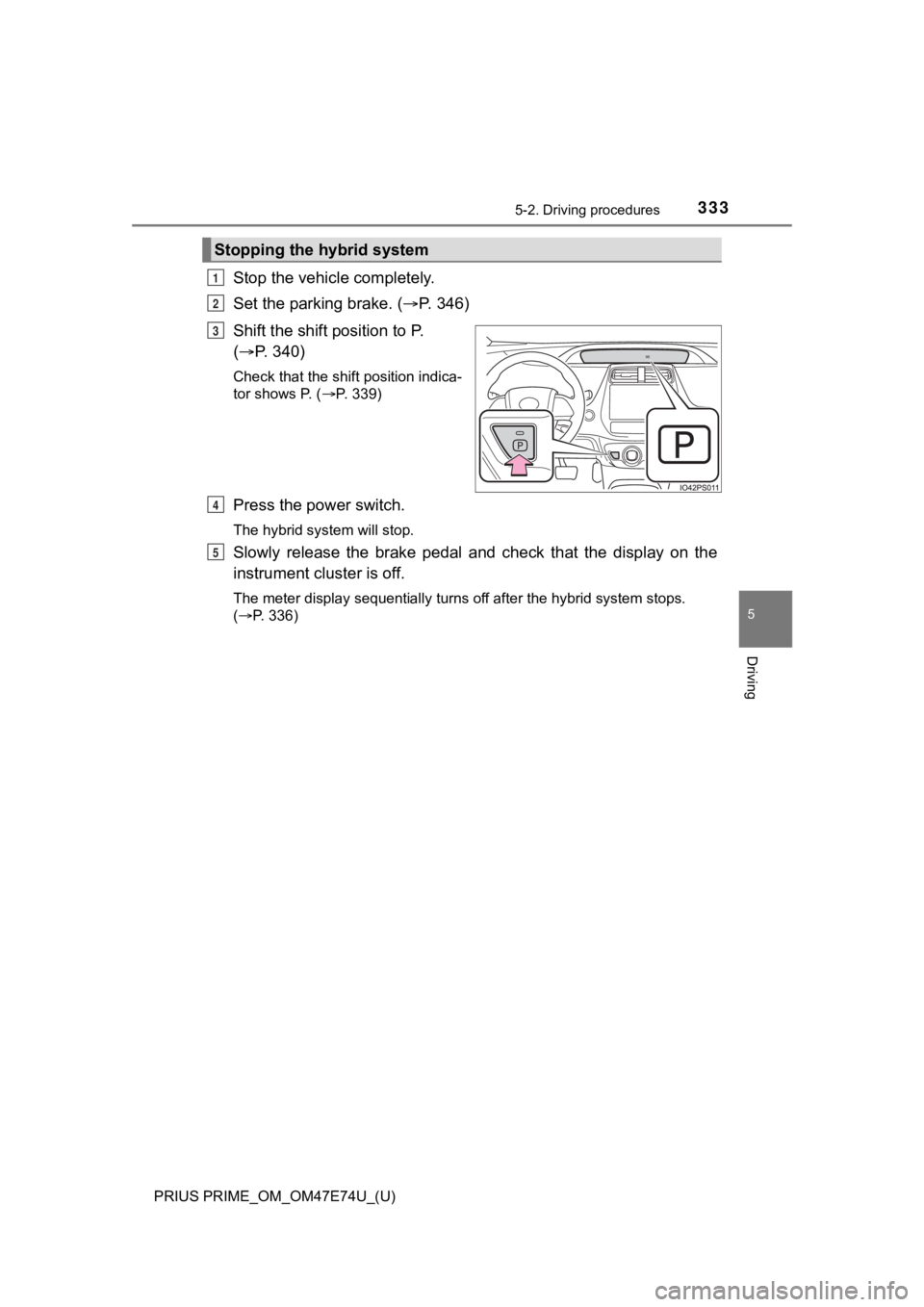
Shift the shift position to P.
( P. 340)
Check that the shift position indica-
tor shows P. ( P. 339)
Press the power switch.
The hybrid system will stop.
Slowly release the brake pedal and check that the display on th e
instrument cluster is off.
The meter display sequentially turns off after the hybrid syste m stops.
( P. 336)
Stopping the hybrid system
1
2
3
4
5
Page 334 of 808
334
PRIUS PRIME_OM_OM47E74U_(U)
5-2. Driving procedures
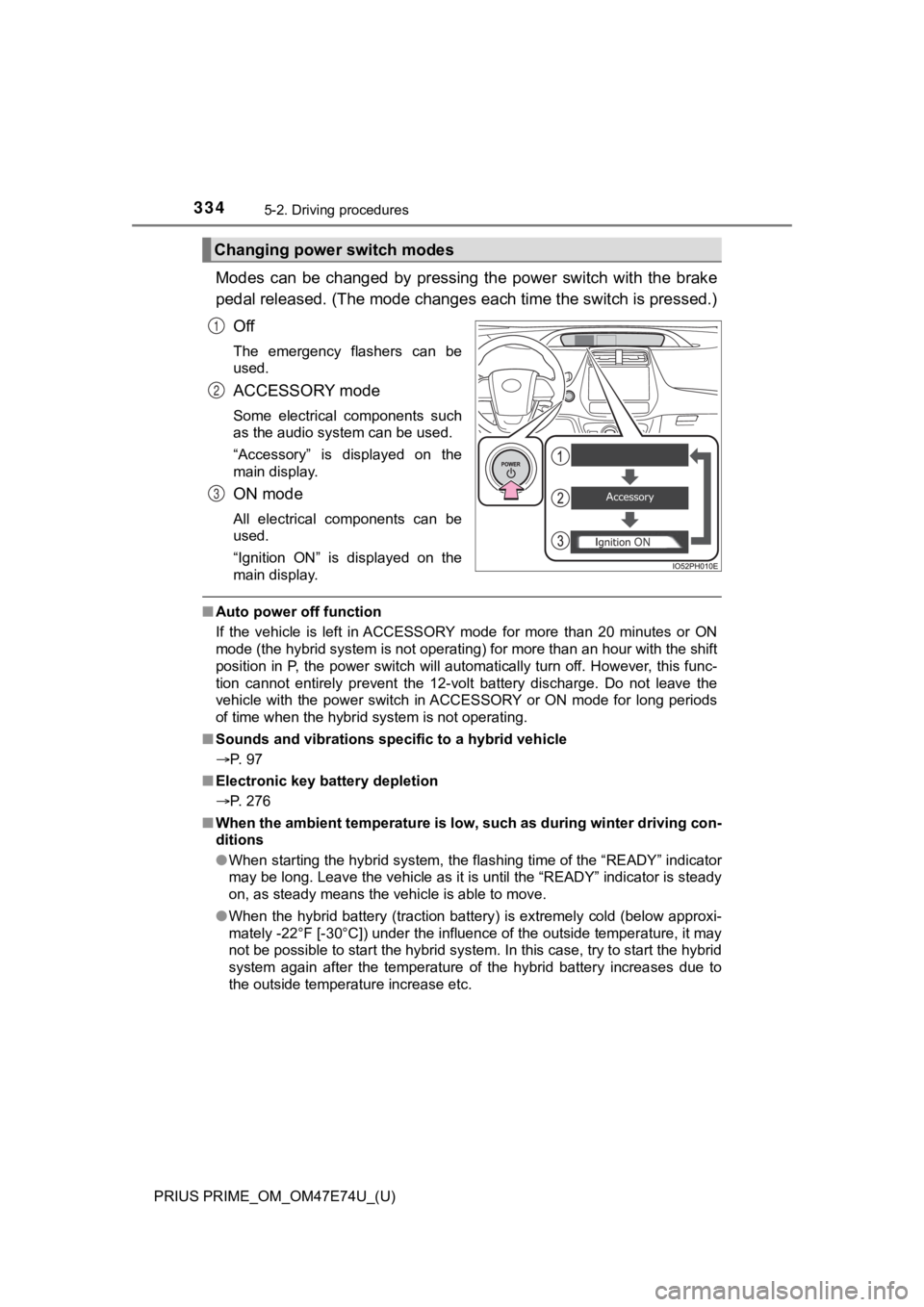
Modes can be changed by pressing the power switch with the brake
pedal released. (The mode changes each time the switch is pressed.)
Off
The emergency flashers can be
used.
ACCESSORY mode
Some electrical components such
as the audio system can be used.
“Accessory” is displayed on the
main display.
ON mode
All electrical components can be
used.
“Ignition ON” is displayed on the
main display.
■ Auto power off function
If the vehicle is left in ACCESSORY mode for more than 20 minut es or ON
mode (the hybrid system is not operating) for more than an hour with the shift
position in P, the power switch will automatically turn off. Ho wever, this func-
tion cannot entirely prevent the 12-volt battery discharge. Do not leave the
vehicle with the power switch in ACCESSORY or ON mode for long periods
of time when the hybrid system is not operating.
■ Sounds and vibrations sp ecific to a hybrid vehicle
P. 97
■ Electronic key battery depletion
P. 276
■ When the ambient temperature is low, such as during winter driv ing con-
ditions
● When starting the hybrid system, the flashing time of the “READY” indicator
may be long. Leave the vehicle as it is until the “READY” indic ator is steady
on, as steady means the vehicle is able to move.
● When the hybrid battery (traction battery) is extremely cold (b elow approxi-
mately -22°F [-30°C]) under the influence of the outside temper ature, it may
not be possible to start the hybrid system. In this case, try t o start the hybrid
system again after the temperature of the hybrid battery increa ses due to
the outside temperature increase etc.
Changing power switch modes
1
2
3