change time TOYOTA PRIUS PRIME 2022 Service Manual
[x] Cancel search | Manufacturer: TOYOTA, Model Year: 2022, Model line: PRIUS PRIME, Model: TOYOTA PRIUS PRIME 2022Pages: 808, PDF Size: 14.72 MB
Page 337 of 808
PRIUS PRIME_OM_OM47E74U_(U)
3375-2. Driving procedures
5
Driving
WARNING
■When starting the hybrid system
Always start the hybrid system while sitting in the driver’s seat. Do not
depress the accelerator pedal while starting the hybrid system under any
circumstances.
Doing so may cause an accident resulting in death or serious in jury.
■ Stopping the hybrid system in an emergency
● If you want to stop the hybrid system in an emergency while driving the
vehicle, press and hold the power switch for more than 2 second s, or
press it briefly 3 times or more in succession. ( P. 661)
However, do not touch the power switch while driving except in an emer-
gency. Turning the hybrid system off while driving will not cause loss of
steering or braking control, however, power assist to the steer ing will be
lost. This will make it more difficult to steer smoothly, so you should pull
over and stop the vehicle as soon as it is safe to do so.
● If the power switch is operated while the vehicle is running, a warning
message will be shown on the multi-information display and a buzzer
sounds.
● When restarting the hybrid system after an emergency shutdown w hile
driving, press the power switch. When restarting the hybrid sys tem after
stopping the vehicle, change the shift position to P and then press the
power switch.
■ When parking
Exhaust gases include harmful carbon monoxide (CO), which is co lorless
and odorless. Observe the following precautions.
Failure to do so may cause exhaust gases to enter the vehicle a nd may
lead to an accident caused by light-headedness, or may lead to death or a
serious health hazard.
● If the vehicle is in a poorly ventilated area or a closed area, such as a
garage, stop the hybrid system.
● Do not leave the vehicle with the hybrid system operating for a long time. If
such a situation cannot be avoided, park the vehicle in an open space and
ensure that exhaust fumes do not enter the vehicle interior.
● Do not leave the hybrid system operating in an area with snow build-up, or
where it is snowing. If snowbanks build up around the vehicle w hile the
hybrid system is operating, exhaust gases may collect and enter the vehi-
cle.
Page 344 of 808
344
PRIUS PRIME_OM_OM47E74U_(U)
5-2. Driving procedures
NOTICE
■Hybrid battery (traction battery) charge
If the shift position is in N, the hybrid battery (traction battery) will not be
charged. To help prevent the battery from discharging, avoid leaving the N
position selected for an extended period of time.
■ Situations where shift control system malfunctions are possible
If any of the following situations occurs, shift control system malfunctions
are possible.
Immediately stop the vehicle in a safe place on level ground, a pply the park-
ing brake, and then contact your Toyota dealer.
● When the warning message indicating the shift control system ap pears on
the multi-information display.
● The display indicates that no shift position is selected for mo re than a few
seconds.
■ Notes regarding shift lever and P position switch operation
Avoid repeatedly operating the shift lever and P position switch in quick suc-
cession.
The system protection function may activate and it will not be temporarily
possible to shift the shift position other than P. If this happens, please wait
for approximately 20 seconds before attempting to change the sh ift position
again.
■ When exiting the vehicle (driver’s seat only)
Check that the shift position indicator shows P and that the parking brake is
set before opening the door and exiting the vehicle.
Page 345 of 808
345
PRIUS PRIME_OM_OM47E74U_(U)
5-2. Driving procedures
5
Driving
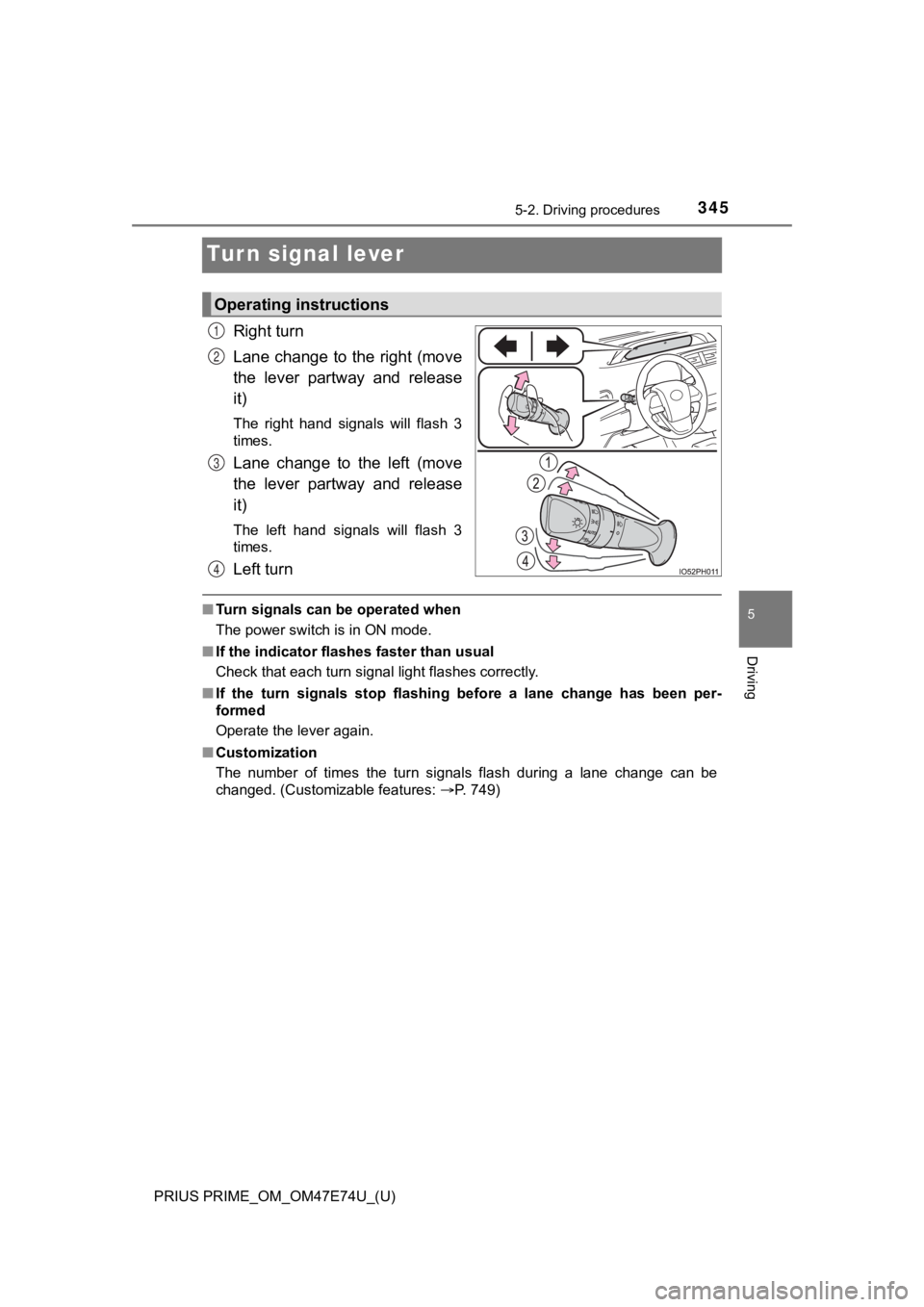
Turn signal lever
Right turn
Lane change to the right (move
the lever partway and release
it)
The right hand signals will flash 3
times.
Lane change to the left (move
the lever partway and release
it)
The left hand signals will flash 3
times.
Left turn
■Turn signals can be operated when
The power switch is in ON mode.
■ If the indicator flashes faster than usual
Check that each turn signal light flashes correctly.
■ If the turn signals stop flashing before a lane change has been per-
formed
Operate the lever again.
■ Customization
The number of times the turn signals flash during a lane change can be
changed. (Customizable features: P. 749)
Operating instructions
1
2
3
4
Page 356 of 808

356
PRIUS PRIME_OM_OM47E74U_(U)
5-3. Operating the lights and wipers
■Temporarily lowering sensor sensitivity
The sensitivity of the sensor can be temporarily lowered.
Turn the power switch off while the following conditions are me t.
• The headlight switch is in the or position.
• The headlight switch lever is in high beam position.
• Automatic High Beam switch is on.
Turn the power switch to ON mode.
Within 60 seconds after step , repeat pulling the headlight swi tch lever to
the original position then pushing it to the high beam position quickly 10
times, then leave the lever in high beam position.
If the sensitivity is changed, the Automatic High Beam indicato r is turn on
and off 3 times.
Automatic High Beam (headlights) may turn on even the vehicle i s stopped.
■ If “Headlight System Malfunction Visit Your Dealer” is displaye d on the
multi-information display
The system may be malfunctioning. Have the vehicle inspected by your Toy-
ota dealer.
1
2
32
4
Page 363 of 808
PRIUS PRIME_OM_OM47E74U_(U)
3635-3. Operating the lights and wipers
5
Driving
■The windshield wipers and washer can be operated when
The power switch is in ON mode.
■ Dripping prevention wiper sweep (vehicles with rain-sensing win dshield
wipers)
After washing and wiping operation several times, the wipers op erate one
more time after a short delay to prevent dripping. However, thi s function will
not operate while driving.
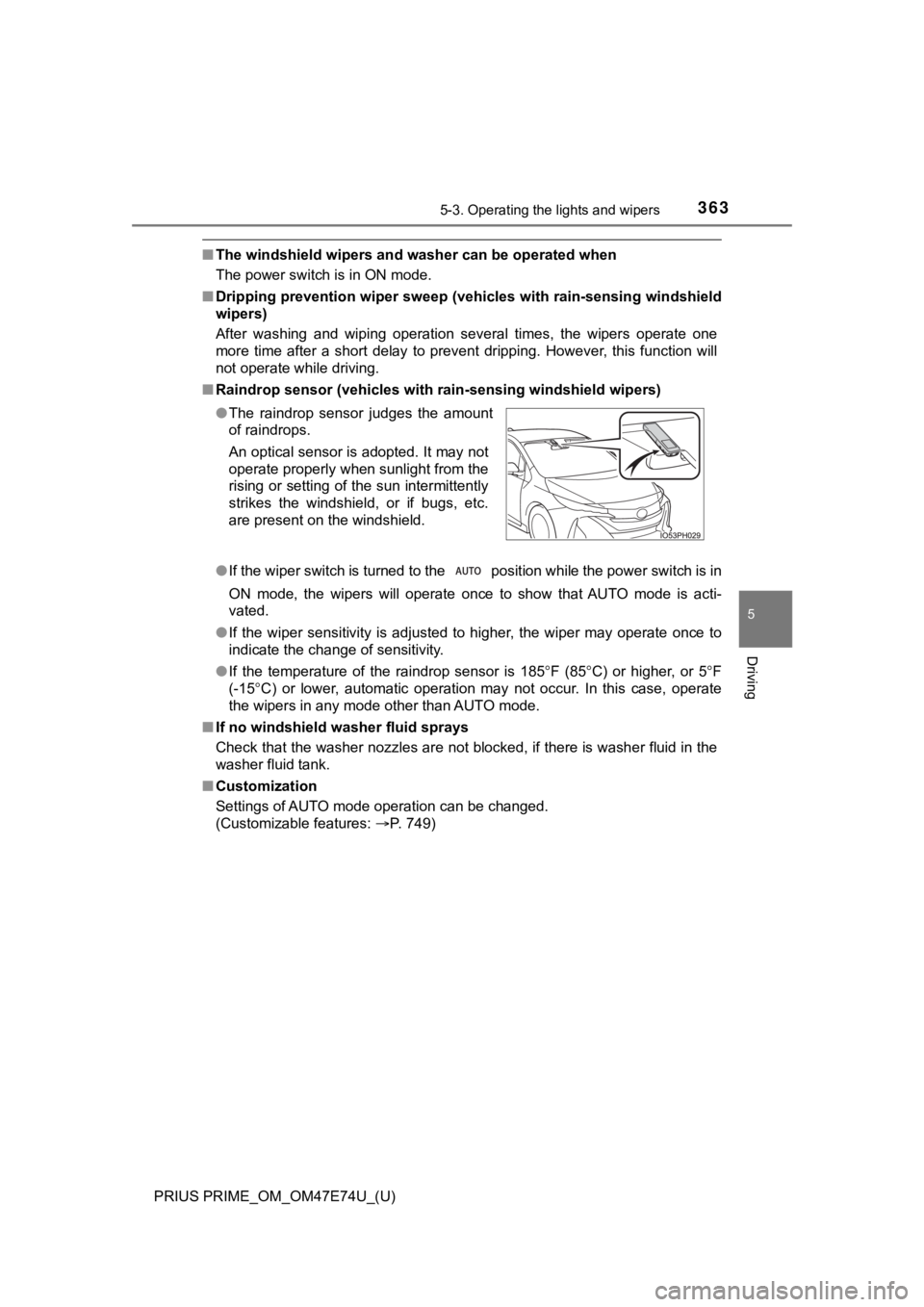
■ Raindrop sensor (vehicles with rain-sensing windshield wipers)
●If the wiper switch is turned to the position while the power switch is in
ON mode, the wipers will operate once to show that AUTO mode is acti-
vated.
● If the wiper sensitivity is adjusted to higher, the wiper may o perate once to
indicate the change of sensitivity.
● If the temperature of the raindrop sensor is 185 F (85 C) or higher, or 5 F
(-15 C) or lower, automatic operation may not occur. In this case, o perate
the wipers in any mode other than AUTO mode.
■ If no windshield washer fluid sprays
Check that the washer nozzles are not blocked, if there is wash er fluid in the
washer fluid tank.
■ Customization
Settings of AUTO mode operation can be changed.
(Customizable features: P. 749)
●
The raindrop sensor judges the amount
of raindrops.
An optical sensor is adopted. It may not
operate properly when sunlight from the
rising or setting of the sun intermittently
strikes the windshield, or if bugs, etc.
are present on the windshield.
Page 378 of 808

378
PRIUS PRIME_OM_OM47E74U_(U)
5-5. Using the driving support systems
●In the following situations, if the situation has changed (or the vehicle has
been driven for some time) and the normal operating conditions are
detected, the message will disappear and the system will become opera-
tional.
If the message does not disappear, contact your Toyota dealer. • When the temperature around the radar sensor is outside of the opera-
tional range, such as when the vehicle is in the sun or in an e xtremely
cold environment
• When the front camera cannot detect objects in front of the ve hicle, such
as when driving in the dark, snow, or fog, or when bright lights are shining
into the front camera
• Depending on the conditions in the vicinity of the vehicle, th e radar may
judge the surrounding environment can not be properly recognize d. In
that case, “Pre-Collision Syst em Unavailable” is displayed.
Page 383 of 808
PRIUS PRIME_OM_OM47E74U_(U)
3835-5. Using the driving support systems
5
Driving
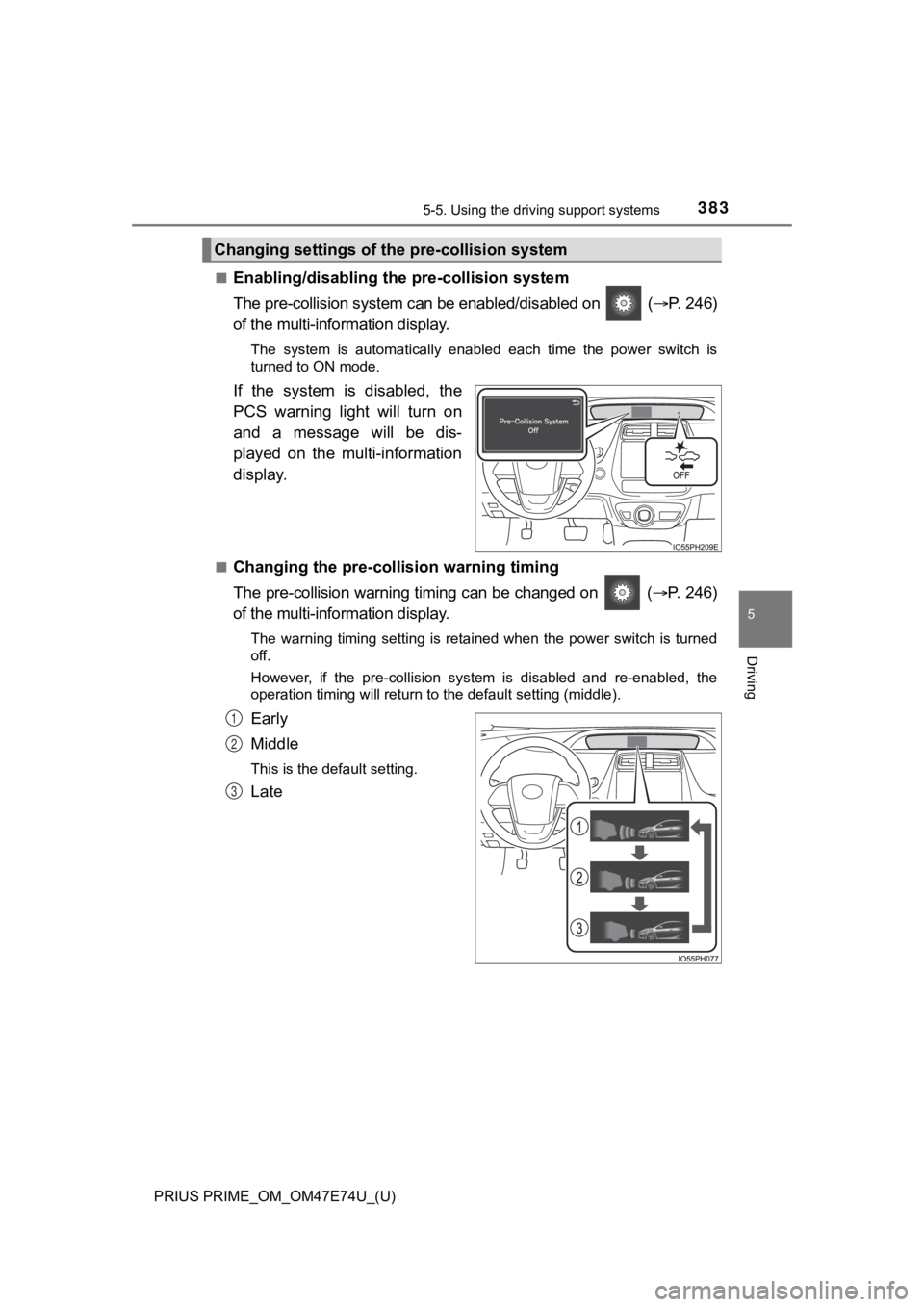
■Enabling/disabling th e pre-collision system
The pre-collision system can be enabled/disabled on ( P. 246)
of the multi-information display.
The system is automatically enabled each time the power switch is
turned to ON mode.
If the system is disabled, the
PCS warning light will turn on
and a message will be dis-
played on the multi-information
display.
■Changing the pre-colli sion warning timing
The pre-collision warning timing can be changed on ( P. 246)
of the multi-information display.
The warning timing setting is retained when the power switch is turned
off.
However, if the pre-collision system is disabled and re-enabled , the
operation timing will return to the default setting (middle).
Early
Middle
This is the default setting.
Late
Changing settings of the pre-collision system
1
2
3
Page 388 of 808
388
PRIUS PRIME_OM_OM47E74U_(U)
5-5. Using the driving support systems
• If a vehicle ahead is narrow, such as a personal mobility vehi cle
• If a preceding vehicle has a small rear end, such as an unload ed truck
• If a vehicle ahead is carrying a load which protrudes past its rear bumper
• If a vehicle ahead is irregularly shaped, such as a tractor or side car
• If a vehicle ahead is a child sized bicycle, a bicycle that is carrying a large
load, a bicycle ridden by more than one person, or a uniquely shaped
bicycle (bicycle with a child seat, tandem bicycle, etc.)
• If a pedestrian/or the riding height of a bicyclist ahead is s horter than
approximately 3.2 ft. (1 m) or taller than approximately 6.5 ft. (2 m)
• If a pedestrian/bicyclist is wearing oversized clothing (a rai n coat, long
skirt, etc.), making their silhouette obscure
• If a pedestrian is bending forward or squatting or bicyclist i s bending for-
ward
• If a pedestrian/bicyclist is moving fast
• If a pedestrian is pushing a stroller, wheelchair, bicycle or other vehicle
• When driving in inclement weather such as heavy rain, fog, snow or a
sandstorm
• When driving through steam or smoke
• When the surrounding area is dim, such as at dawn or dusk, or while at
night or in a tunnel, making a detectable object appear to be n early the
same color as its surroundings
• When driving in a place where the surrounding brightness changes sud-
denly, such as at the entrance or exit of a tunnel
• After the hybrid system has started the vehicle has not been d riven for a
certain amount of time
• While making a left/right turn and for a few seconds after mak ing a left/
right turn
• While driving on a curve and for a few seconds after driving o n a curve
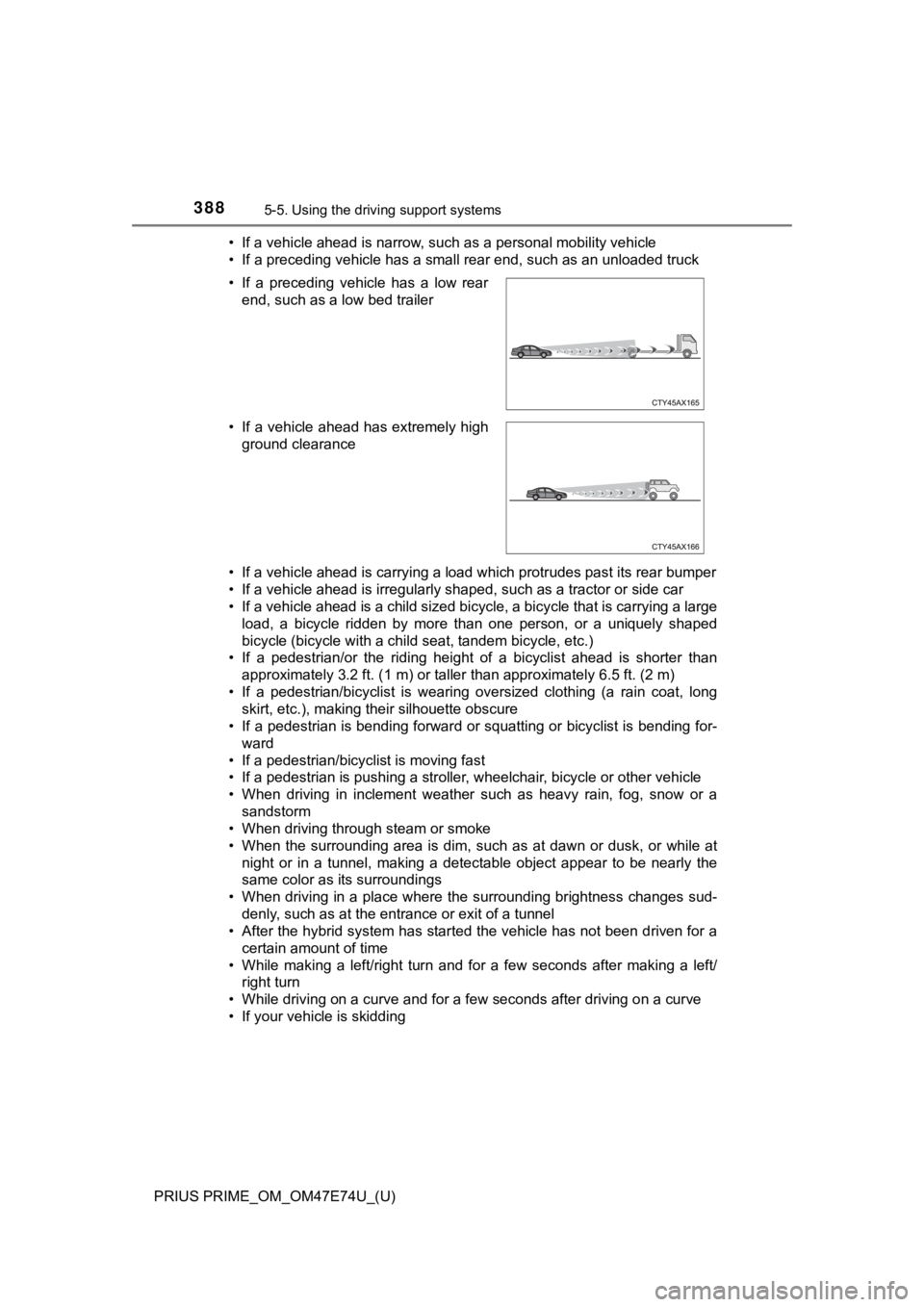
• If your vehicle is skidding • If a preceding vehicle has a low rear end, such as a low bed trailer
• If a vehicle ahead has extremely high ground clearance
Page 407 of 808
PRIUS PRIME_OM_OM47E74U_(U)
4075-5. Using the driving support systems
5
Driving
In the following situations, the RSA syst em will notify the driver.
● When the vehicle speed exceeds the speed notification threshold of
the speed limit sign displayed, the sign display will be emphas ized
and a buzzer will sound.
● When the RSA system recognizes a do not enter sign and deter-
mines that your vehicle has ent ered a no-entry area, the displayed
sign will flash and a buzzer will sound.
Depending on the situation, a not ification function may not operate
properly.
■ Setting procedure
P. 246
■ Automatic turn-off of RSA sign display
In the following situations, a displayed speed limit sign and/o r do not enter
sign will stop being displayed automatically:
● No sign has been recognized for a certain distance.
● The road changes due to a left or right turn, etc.
In the following situations, stop and yield signs will stop bei ng displayed auto-
matically:
● The system determines that your vehicle has passed the sign.
● The road changes due to a left or right turn, etc.
■ Conditions in which the function may not operate or detect correctly
In the following situations, RSA does not operate normally and may not rec-
ognize signs, display the incorrect sign, etc. However, this do es not indicate a
malfunction.
● The front camera is misaligned due to a strong impact being applied to the
sensor, etc.
● Dirt, snow, stickers, etc. are on the windshield near the front camera.
● In inclement weather such as heavy rain, fog, snow or sand storms
● Light from an oncoming vehicle, the sun, etc. enters the front camera.
● The sign is dirty, faded, tilted or bent.
● The contrast of electronic sign is low.
● All or part of the sign is hidden by the leaves of a tree, a pole, etc.
● The sign is only visible to the front camera for a short amount of time.
● The driving scene (turning, lane change, etc.) is judged incorr ectly.
● If a sign not appropriate for the currently traveled lane, but the sign exists
directly after a freeway branches, or in an adjacent lane just before merging.
● Stickers are attached to the rear of the preceding vehicle.
Notification function
Page 414 of 808

414
PRIUS PRIME_OM_OM47E74U_(U)
5-5. Using the driving support systems
Example of constant speed cruising
When there are no vehicles ahead
The vehicle travels at the speed set by the driver.
Example of deceleration crui sing and follow-up cruising
When a preceding vehicle driving slower than the set speed
appears
When a vehicle is detected running ahead of you, the system automatically
decelerates your vehicle. When a greater reduction in vehicle s peed is
necessary, the system applies the brakes (the stop lights will come on at
this time). The system will respond to changes in the speed of the vehicle
ahead in order to maintain the vehicle-to-vehicle distance set by the driver.
Approach warning warns you when the system cannot decelerate su ffi-
ciently to prevent your vehicle fr om closing in on the vehicle ahead.
When the vehicle ahead of you stops, your vehicle will also stop (vehicle is
stopped by system control). After the vehicle ahead starts off, pushing the
cruise control lever up or depressing the accelerator pedal (st art-off opera-
tion) will resume follow-up cruising. If the start-off operatio n is not per-
formed, system control continues to keep your vehicle stopped.
When the turn signal lever is operated and your vehicle moves to an over-
taking lane while driving at 50 mph (80 km/h) or more, the vehi cle will
accelerate to help to overtake a passing vehicle.
The system’s identification of what is an overtaking lane may b e deter-
mined solely based on the location of the steering wheel in the vehicle (left
side driver position versus right side driver position.) If the vehicle is driven
to a region where the overtaking lane is on a different side fr om where the
vehicle is normally driven, the vehicle may accelerate when the turn signal
lever is operated in the opposite direction to the overtaking l ane (e.g., if the
driver normally operates the vehicle in a region where the overtaking lane
is to the right but then drives to a region where the overtaking lane is to the
left, the vehicle may accelerate when the right turn signal is activated).
Example of acceleration
When there are no longer any preceding vehicles driving slower
than the set speed
The system accelerates until the set speed is reached. The syst em then
returns to constant speed cruising.
1
2
3