change time TOYOTA PRIUS PRIME 2022 Owner's Guide
[x] Cancel search | Manufacturer: TOYOTA, Model Year: 2022, Model line: PRIUS PRIME, Model: TOYOTA PRIUS PRIME 2022Pages: 808, PDF Size: 14.72 MB
Page 199 of 808
PRIUS PRIME_OM_OM47E74U_(U)
1993. Instrument cluster
3
Instrument cluster
■The meters and display illuminate when
The power switch is in ON mode.
■ Adjusting the instrume nt cluster brightness (P. 194)
● The brightness levels that can be selected differ depending on whether the
tail lights are on and surrounding brightness levels, as shown in the table
below.
*: 22 levels of the brightness are displayed on the setting scree n. However,
the brightness setting will be the brightest when other than 1st level (the
darkest) is selected. If other than 1st or 22nd level is select ed, when the
tail lights are turned on in a dark place, the instrument clust er brightness
setting will be the selected level.
● If the taillights are illuminated in a dark environment, the in strument cluster
light dims. However, when the brightness of the instrument clus ter is set to
minimum or maximum (1st or 22nd level of the instrument cluster bright-
ness), even if the taillights are illuminated, the instrument c luster light will
not dim.
■ When disconnecting and reconnecting 12-volt battery terminals
The settings of the clock will be reset.
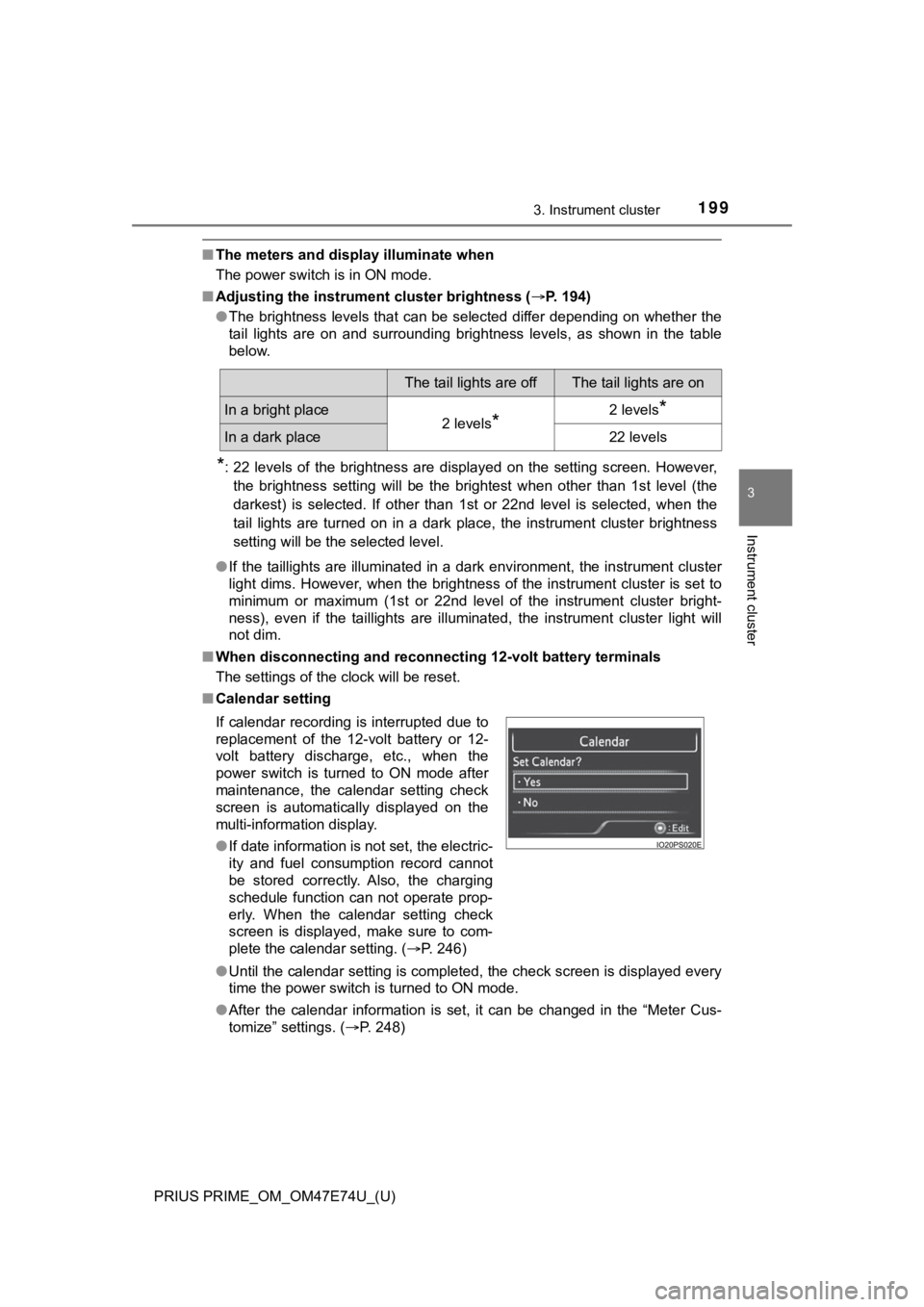
■ Calendar setting
●Until the calendar setting is completed, the check screen is di splayed every
time the power switch is turned to ON mode.
● After the calendar information is set, it can be changed in the “Meter Cus-
tomize” settings. ( P. 248)
The tail lights are offThe tail lights are on
In a bright place2 levels*2 levels*
In a dark place22 levels
If calendar recording is interrupted due to
replacement of the 12-volt battery or 12-
volt battery discharge, etc., when the
power switch is turned to ON mode after
maintenance, the calendar setting check
screen is automatically displayed on the
multi-information display.
● If date information is not set, the electric-
ity and fuel consumption record cannot
be stored correctly. Also, the charging
schedule function can not operate prop-
erly. When the calendar setting check
screen is displayed, make sure to com-
plete the calendar setting. ( P. 246)
Page 213 of 808
PRIUS PRIME_OM_OM47E74U_(U)
2133. Instrument cluster
3
Instrument cluster
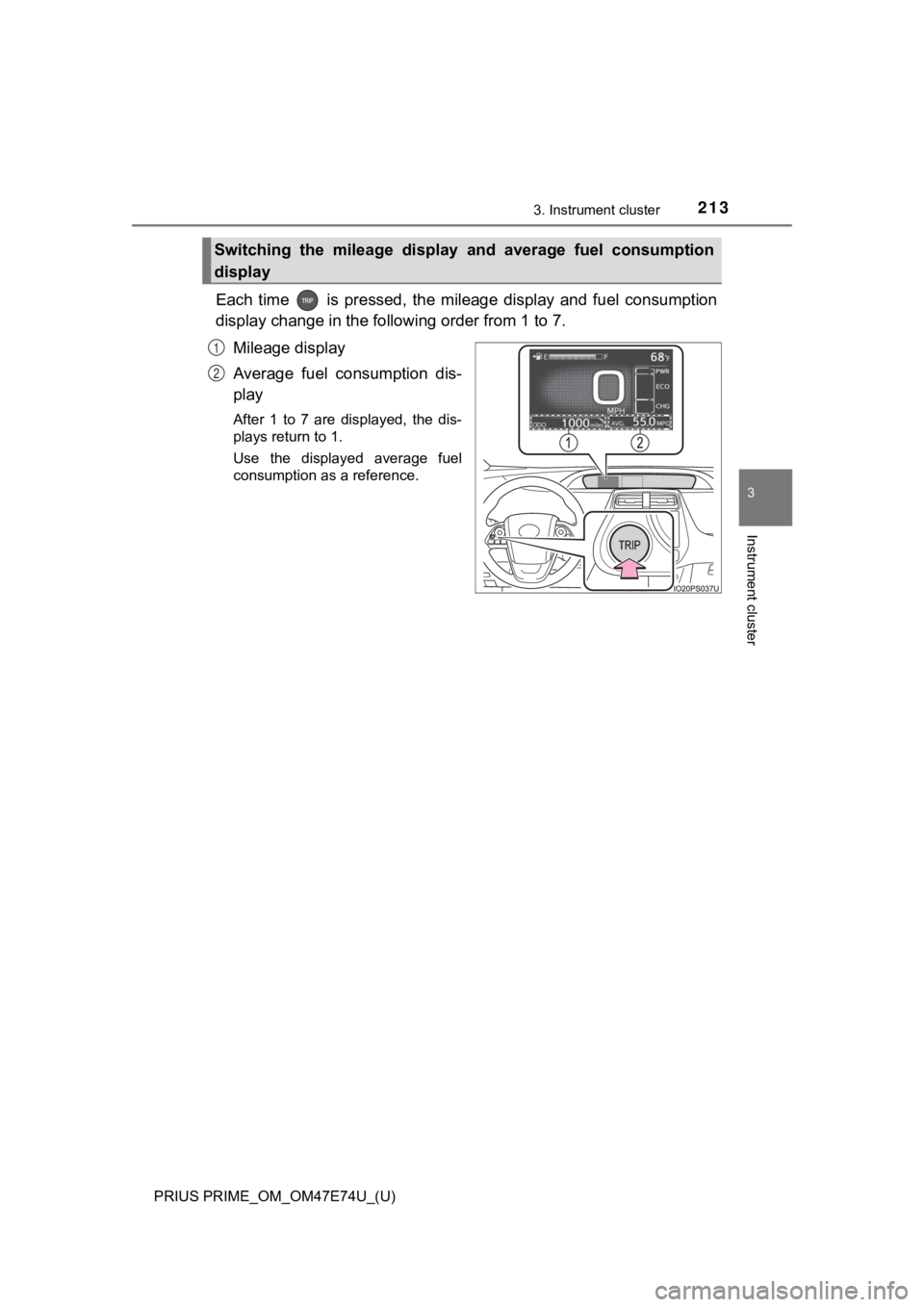
Each time is pressed, the mileage display and fuel consumption
display change in the following order from 1 to 7.
Mileage display
Average fuel consumption dis-
play
After 1 to 7 are displayed, the dis-
plays return to 1.
Use the displayed average fuel
consumption as a reference.
Switching the mileage display and average fuel consumption
display
1
2
Page 214 of 808
214
PRIUS PRIME_OM_OM47E74U_(U)
3. Instrument cluster
*1: If is pressed and held while this item is displayed, the information is
reset.
*2: This item is reset each time the hybrid system starts.
*3: This value is not displayed if electricity needed for EV driving is not remain- ing.
*4: When the air conditioning system is operating, the icon displa y changes to
and the driving range with the air conditioning system on is d is-
played.
*5: The EV driving range may shorten even when not driving due to power
consumption by the system.
Mileage display Average fuel consumption display
1ODO (Odometer) Total mileage
Average fuel consumption since
last resetAverage fuel consumption since
last reset
*1
2TRIP A (Trip meter A)Mileage since last reset
*1
TRIP A average fuel consumption
Average fuel consumption since
TRIP A was reset
*1
3TRIP B (Trip meter B)Mileage since last reset
*1
TRIP B average fuel consumptionAverage fuel consumption since
TRIP B was reset
*1
4
(Mileage since hybrid sys-
tem was started) Mileage since hybrid system
started
*2
Average fuel con sumption after
hybrid system started Average fuel consumption since
hybrid system was started
*2
5
(Distance to empty)
Approximate distance vehicle
can travel based on current
remaining fuel amount
Blank screen
6
(EV driving range)
Approximate driving range using
only the electric motor (traction
motor) ( P. 109)
*3, 4, 5
Blank screen
7Blank screenBlank screen
12
Page 236 of 808
236
PRIUS PRIME_OM_OM47E74U_(U)
3. Instrument cluster
◆“Drive Monitor”
Displays information such as the driving time and average vehicle
speed, which are linked with the current mileage display. ( P. 213)
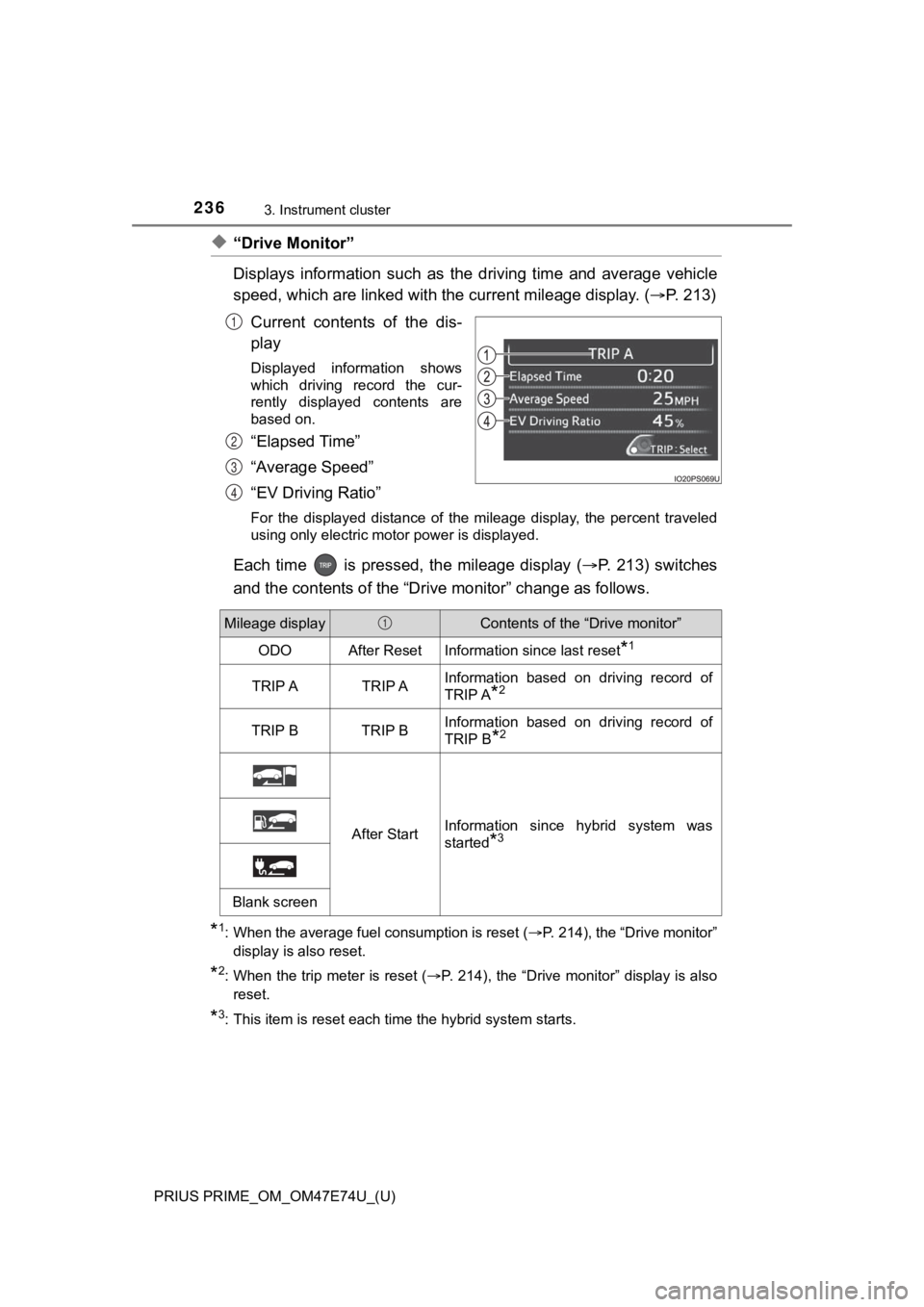
Current contents of the dis-
play
Displayed information shows
which driving record the cur-
rently displayed contents are
based on.
“Elapsed Time”
“Average Speed”
“EV Driving Ratio”
For the displayed distance of the mileage display, the percent traveled
using only electric motor power is displayed.
Each time is pressed, the mileage display ( P. 213) switches
and the contents of the “Dri ve monitor” change as follows.
*1: When the average fuel consumption is reset ( P. 214), the “Drive monitor”
display is also reset.
*2: When the trip meter is reset ( P. 214), the “Drive monitor” display is also
reset.
*3: This item is reset each time the hybrid system starts.
1
2
3
4
Mileage displayContents of the “Drive monitor”
ODOAfter ResetInformation since last reset*1
TRIP ATRIP AInformation based on driving record of
TRIP A
*2
TRIP BTRIP BInformation based on driving record of
TRIP B
*2
After StartInformation since hybrid system was
started
*3
Blank screen
1
Page 246 of 808
246
PRIUS PRIME_OM_OM47E74U_(U)
3. Instrument cluster
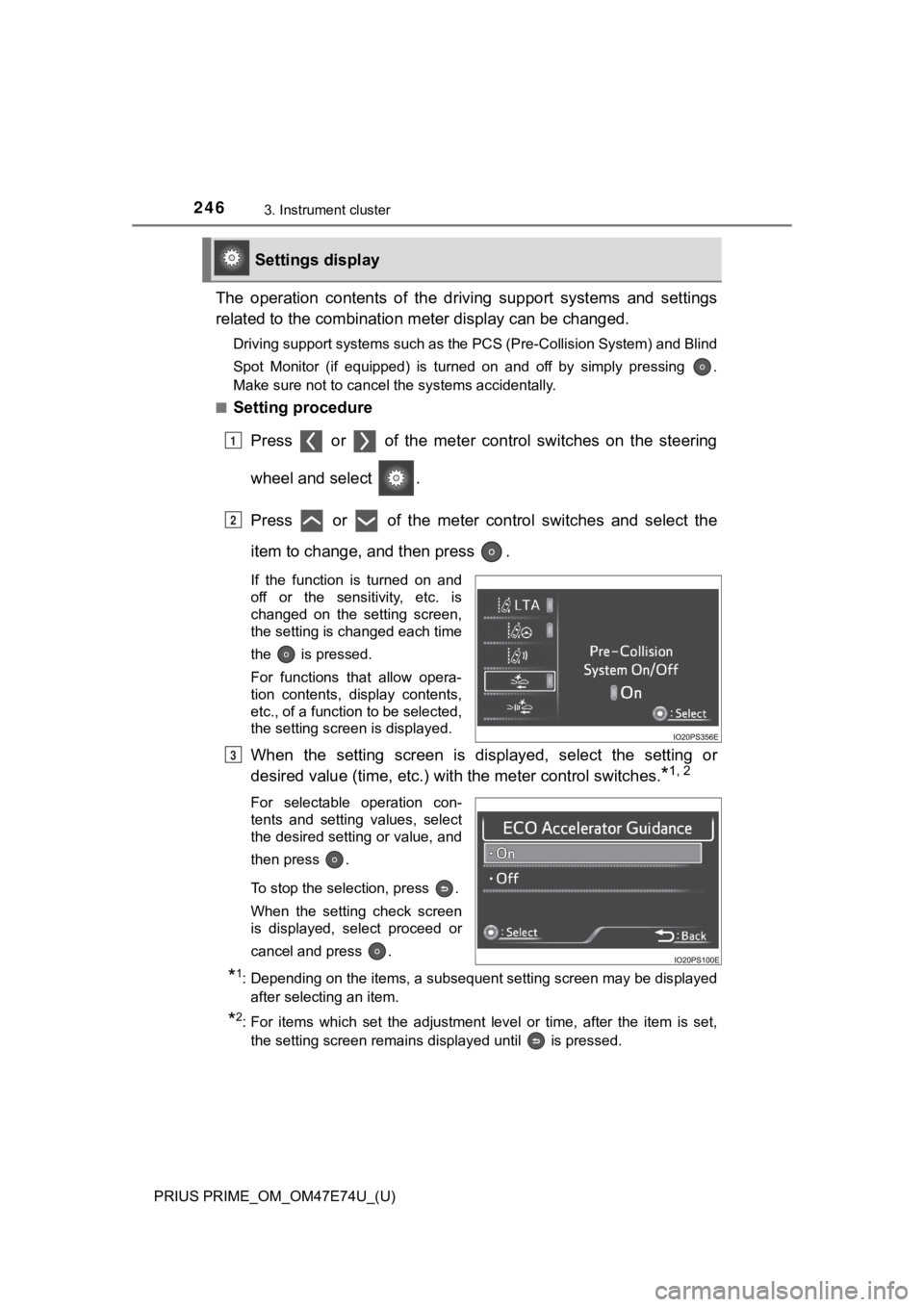
The operation contents of the driving support systems and settings
related to the com bination meter disp lay can be changed.
Driving support systems such as the PCS (Pre-Collision System) and Blind
Spot Monitor (if equipped) is turned on and off by simply pressing .
Make sure not to cancel the systems accidentally.
■
Setting procedure
Press or of the meter cont rol switches on the steering
wheel and select .
Press or of the meter control switches and select the
item to change, and then press .
If the function is turned on and
off or the sensitivity, etc. is
changed on the setting screen,
the setting is changed each time
the is pressed.
For functions that allow opera-
tion contents, display contents,
etc., of a function to be selected,
the setting screen is displayed.
When the setting screen is displayed, select the setting or
desired value (time, etc.) wit h the meter control switches.
*1, 2
For selectable operation con-
tents and setting values, select
the desired setting or value, and
then press .
To stop the selection, press .
When the setting check screen
is displayed, select proceed or
cancel and press .
*1: Depending on the items, a subsequent setting screen may be dis played
after selecting an item.
*2: For items which set the adjustment level or time, after the it em is set,
the setting screen remains displayed until is pressed.
Settings display
1
2
3
Page 249 of 808
PRIUS PRIME_OM_OM47E74U_(U)
2493. Instrument cluster
3
Instrument cluster
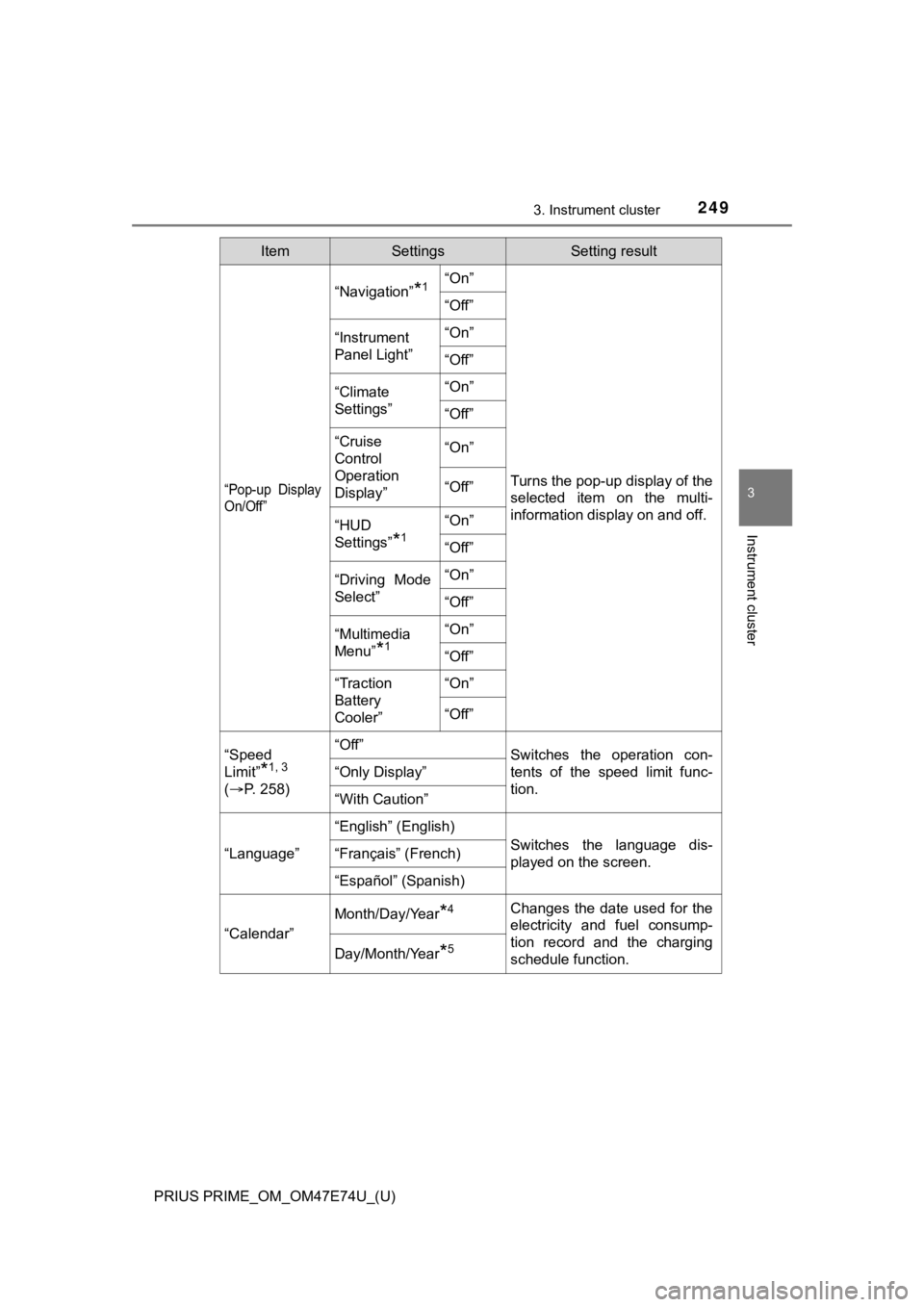
“Pop-up Display
On/Off”
“Navigation”*1“On”
Turns the pop-up display of the
selected item on the multi-
information display on and off.
“Off”
“Instrument
Panel Light”“On”
“Off”
“Climate
Settings”“On”
“Off”
“Cruise
Control
Operation
Display”“On”
“Off”
“HUD
Settings”
*1
“On”
“Off”
“Driving Mode
Select”
“On”
“Off”
“Multimedia
Menu”
*1
“On”
“Off”
“Traction
Battery
Cooler”“On”
“Off”
“Speed
Limit”
*1, 3
(
P. 2 5 8 )
“Off”Switches the operation con-
tents of the speed limit func-
tion.
“Only Display”
“With Caution”
“Language”
“English” (English)
Switches the language dis-
played on the screen.“Français” (French)
“Español” (Spanish)
“Calendar”
Month/Day/Year*4Changes the date used for the
electricity and fuel consump-
tion record and the charging
schedule function.
Day/Month/Year*5
ItemSettingsSetting result
Page 262 of 808
262
PRIUS PRIME_OM_OM47E74U_(U)
3. Instrument cluster
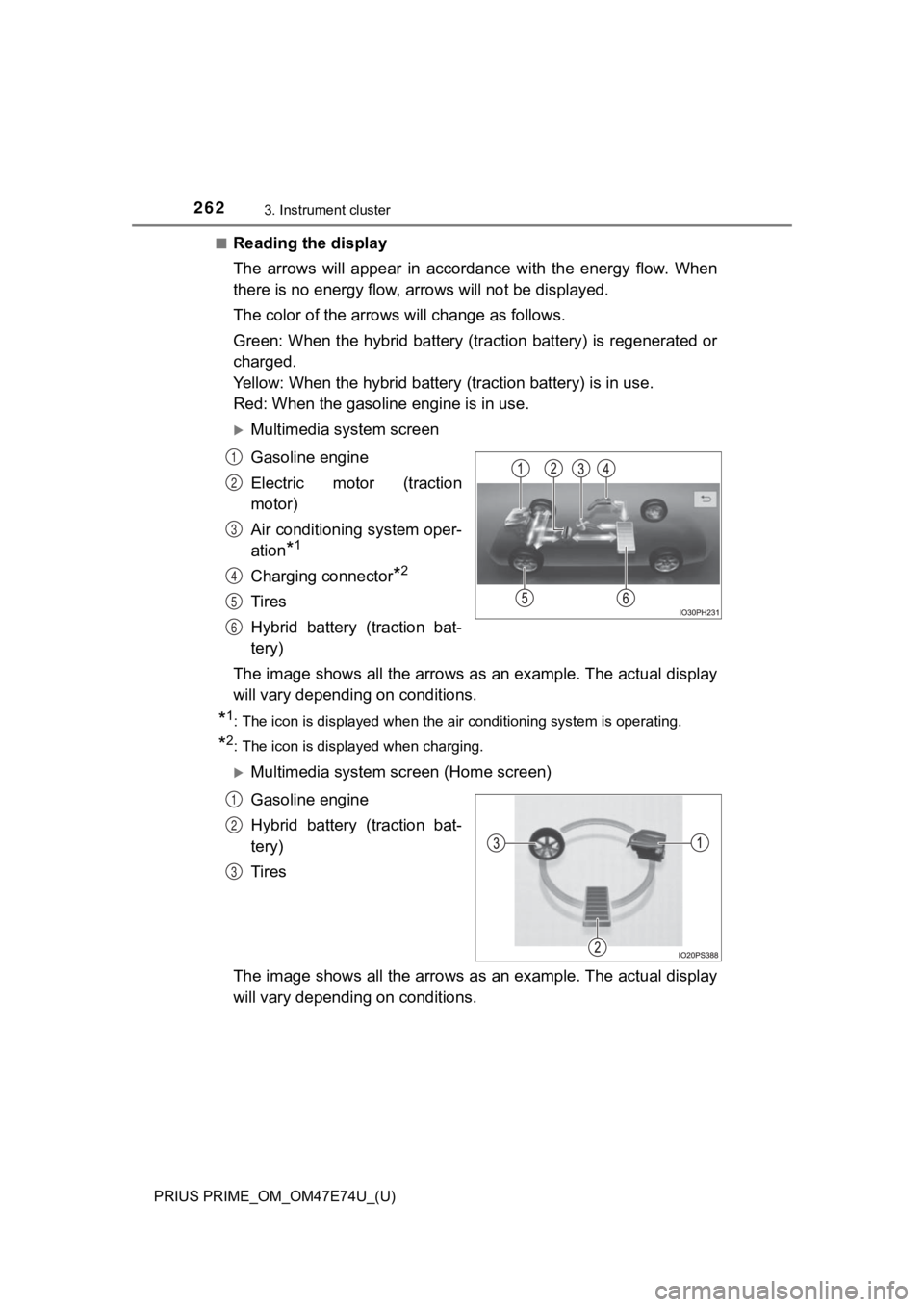
■Reading the display
The arrows will appear in accordance with the energy flow. When
there is no energy flow, arrows will not be displayed.
The color of the arrows will change as follows.
Green: When the hybrid battery (tr action battery) is regenerated or
charged.
Yellow: When the hybrid battery (traction battery) is in use.
Red: When the gasolin e engine is in use.
Multimedia system screen
Gasoline engine
Electric motor (traction
motor)
Air conditioning system oper-
ation
*1
Charging connector*2
Tires
Hybrid battery (traction bat-
tery)
The image shows all the arrows as an example. The actual displa y
will vary dependin g on conditions.
*1: The icon is displayed when the air conditioning system is oper ating.
*2: The icon is displayed when charging.
Multimedia system screen (Home screen)
Gasoline engine
Hybrid battery (traction bat-
tery)
Tires
The image shows all the arrows as an example. The actual displa y
will vary dependin g on conditions.
1
2
3
4
5
6
1
2
3
Page 283 of 808
PRIUS PRIME_OM_OM47E74U_(U)
2834-2. Opening, closing and locking the doors
4
Operation of each component
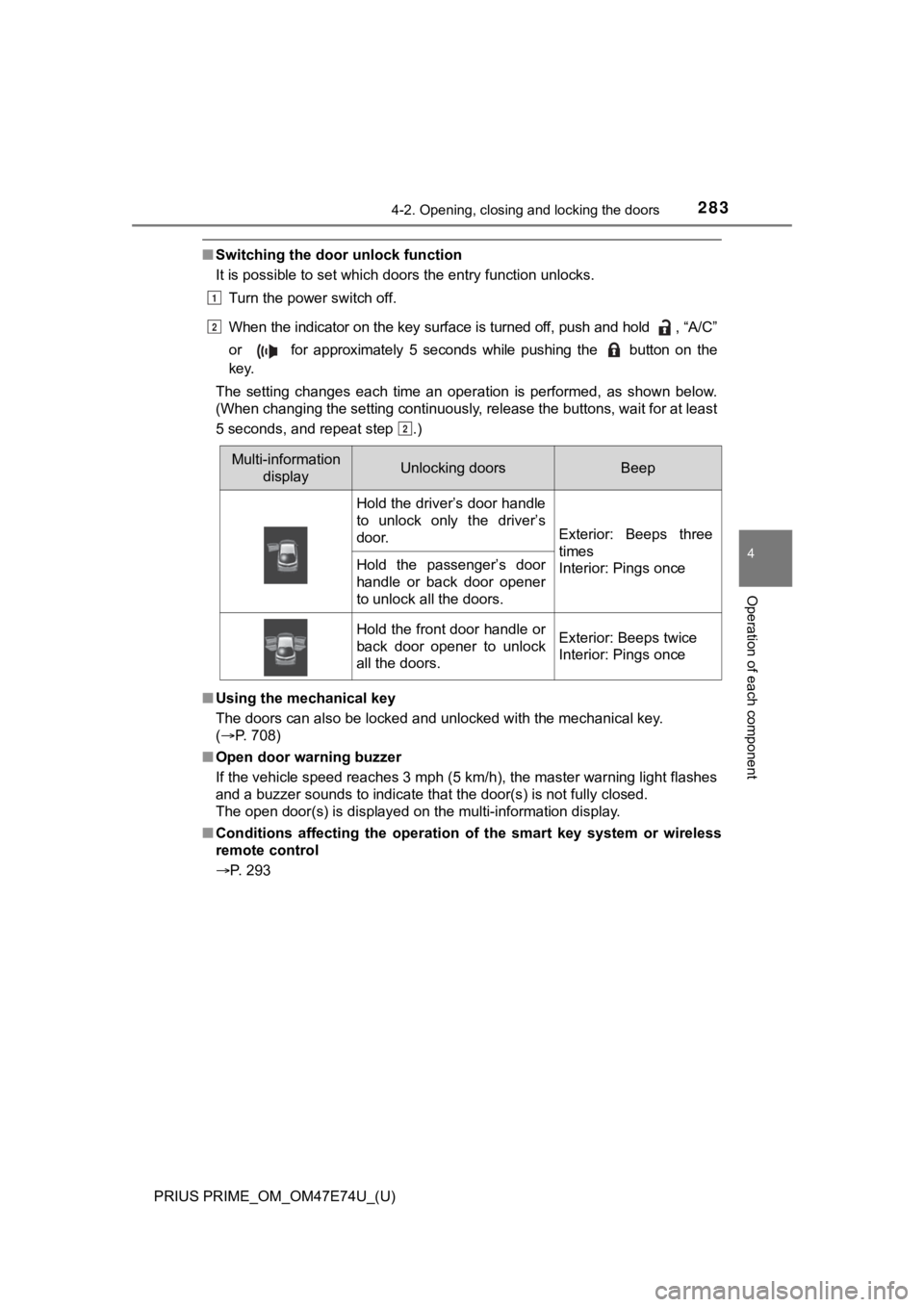
■Switching the door unlock function
It is possible to set which doors the entry function unlocks.
Turn the power switch off.
When the indicator on the key surface is turned off, push and h old , “A/C”
or for approximately 5 seconds while pushing the button on th e
key.
The setting changes each time an operation is performed, as sho wn below.
(When changing the setting continuously, release the buttons, w ait for at least
5 seconds, and repeat step .)
■ Using the mechanical key
The doors can also be locked and unlocked with the mechanical k ey.
( P. 708)
■ Open door warning buzzer
If the vehicle speed reaches 3 mph (5 km/h), the master warning light flashes
and a buzzer sounds to indicate that the door(s) is not fully c losed.
The open door(s) is displayed on the multi-information display.
■ Conditions affecting the operation of the smart key system or w ireless
remote control
P. 293
Multi-information
displayUnlocking doorsBeep
Hold the driver’s door handle
to unlock only the driver’s
door.
Exterior: Beeps three
times
Interior: Pings once
Hold the passenger’s door
handle or back door opener
to unlock all the doors.
Hold the front door handle or
back door opener to unlock
all the doors.Exterior: Beeps twice
Interior: Pings once
1
2
2
Page 334 of 808
334
PRIUS PRIME_OM_OM47E74U_(U)
5-2. Driving procedures
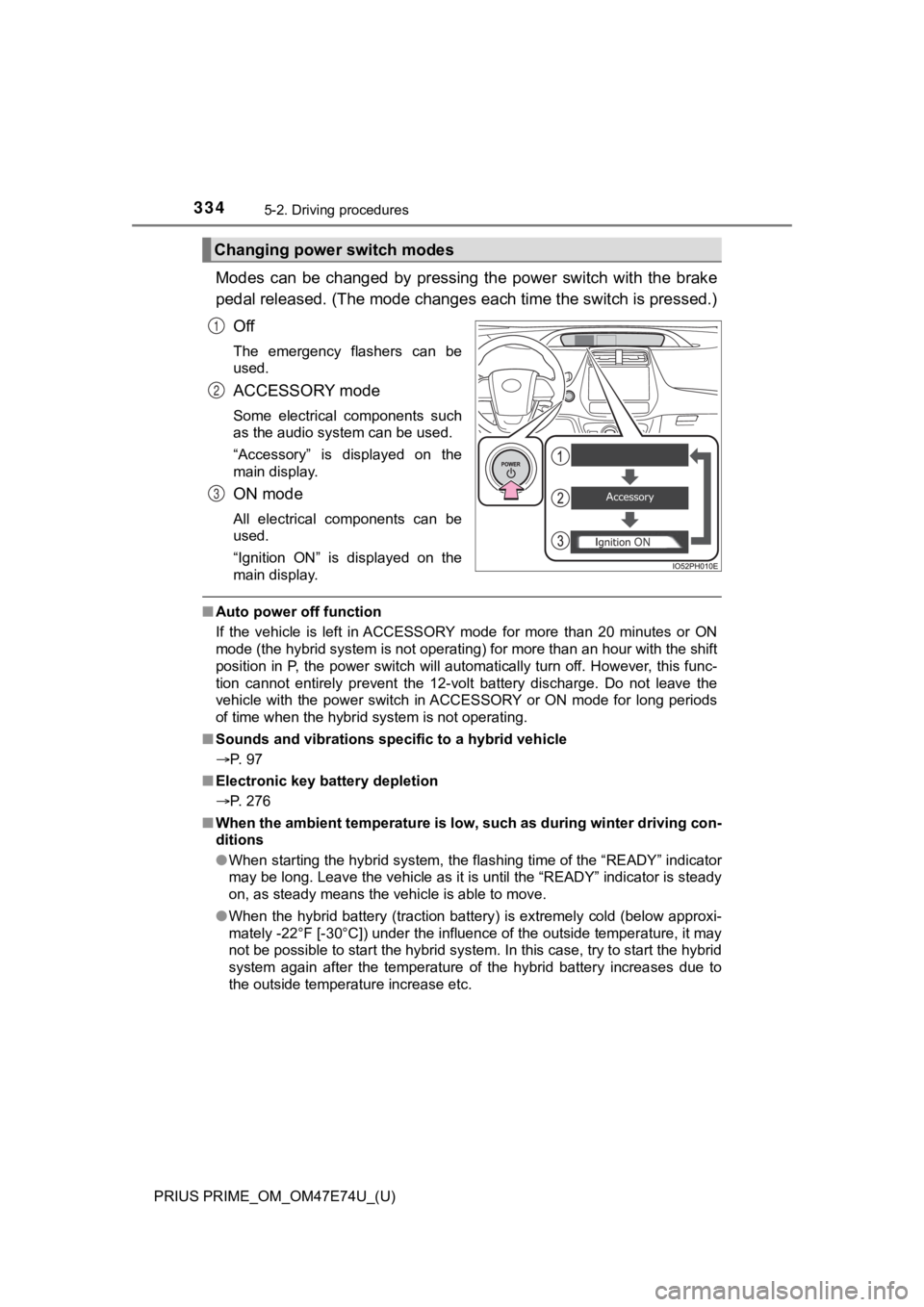
Modes can be changed by pressing the power switch with the brake
pedal released. (The mode changes each time the switch is pressed.)
Off
The emergency flashers can be
used.
ACCESSORY mode
Some electrical components such
as the audio system can be used.
“Accessory” is displayed on the
main display.
ON mode
All electrical components can be
used.
“Ignition ON” is displayed on the
main display.
■ Auto power off function
If the vehicle is left in ACCESSORY mode for more than 20 minut es or ON
mode (the hybrid system is not operating) for more than an hour with the shift
position in P, the power switch will automatically turn off. Ho wever, this func-
tion cannot entirely prevent the 12-volt battery discharge. Do not leave the
vehicle with the power switch in ACCESSORY or ON mode for long periods
of time when the hybrid system is not operating.
■ Sounds and vibrations sp ecific to a hybrid vehicle
P. 97
■ Electronic key battery depletion
P. 276
■ When the ambient temperature is low, such as during winter driv ing con-
ditions
● When starting the hybrid system, the flashing time of the “READY” indicator
may be long. Leave the vehicle as it is until the “READY” indic ator is steady
on, as steady means the vehicle is able to move.
● When the hybrid battery (traction battery) is extremely cold (b elow approxi-
mately -22°F [-30°C]) under the influence of the outside temper ature, it may
not be possible to start the hybrid system. In this case, try t o start the hybrid
system again after the temperature of the hybrid battery increa ses due to
the outside temperature increase etc.
Changing power switch modes
1
2
3
Page 335 of 808
PRIUS PRIME_OM_OM47E74U_(U)
3355-2. Driving procedures
5
Driving
■Conditions affecting operation
P. 293
■ Note for the entry function
P. 294
■ If the hybrid system does not start
●The immobilizer system may not have been deactivated. ( P. 83)
Contact your Toyota dealer.
● The charging cable may be connected to the vehicle. ( P. 1 4 3 )
● If a message related to start-up is shown on the multi-informat ion display,
read the message and follow the instructions.
■ If the “READY” indicator does not come on
In the event that the “READY” indicator does not come on even a fter perform-
ing the proper procedures for starting the vehicle, contact you r Toyota dealer
immediately.
■ If the hybrid system is malfunctioning
P. 100
■ If the electronic key battery is depleted
P. 644
■ Operation of the power switch
●If the switch is not pressed shortly and firmly, the power switch mode may
not change or the hybrid system may not start.
● If attempting to restart the hybrid system immediately after tu rning the power
switch off, the hybrid system may not start in some cases. After turning the
power switch off, please wait a few seconds before restarting t he hybrid sys-
tem.
■ Automatic hybrid system shut off feature
●The vehicle is equipped with a feature that automatically shuts off the hybrid
system when the shift position is in P with the hybrid system operating for an
extended period.
● The hybrid system will automatically shut off after approximately 1 hour if it
has been left running while the shift position is in P.
● The timer for the automatic hybrid system shut off feature will reset if the
brake pedal is depressed or if the shift position is in a posit ion other than P.
● After the vehicle is parked, if the door is locked with the door lock switch
(P. 281) from the inside or the mechanical key ( P. 708) from the outside,
the automatic hybrid system shut off feature will be disabled. The timer for
the automatic hybrid system shut off feature will be re-enabled if the driver’s
door is opened.