interior lights TOYOTA PRIUS PRIME 2023 User Guide
[x] Cancel search | Manufacturer: TOYOTA, Model Year: 2023, Model line: PRIUS PRIME, Model: TOYOTA PRIUS PRIME 2023Pages: 680, PDF Size: 14.97 MB
Page 456 of 680
4566-4. Using the other interior features
6-4.Using the other interior features
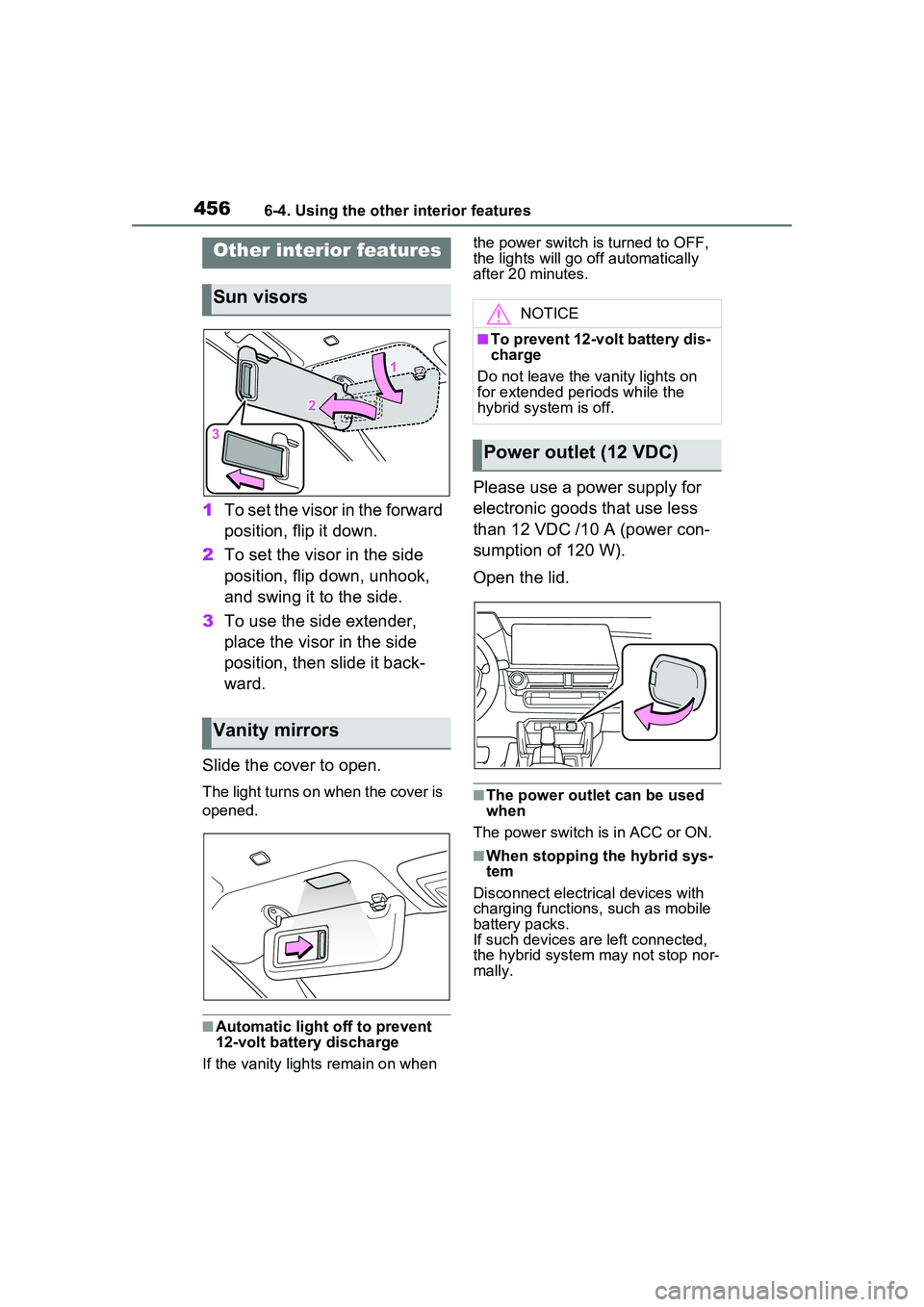
1To set the visor in the forward
position, flip it down.
2 To set the visor in the side
position, flip down, unhook,
and swing it to the side.
3 To use the side extender,
place the visor in the side
position, then slide it back-
ward.
Slide the cover to open.
The light turns on when the cover is
opened.
■Automatic light off to prevent
12-volt battery discharge
If the vanity lights remain on when the power switch is turned to OFF,
the lights will go off automatically
after 20 minutes.
Please use a power supply for
electronic goods that use less
than 12 VDC /10 A (power con-
sumption of 120 W).
Open the lid.
■The power outlet can be used
when
The power switch is in ACC or ON.
■When stopping the hybrid sys-
tem
Disconnect electrical devices with
charging functions, such as mobile
battery packs.
If such devices ar e left connected,
the hybrid system may not stop nor-
mally.
Other interior features
Sun visors
Vanity mirrors
NOTICE
■To prevent 12-volt battery dis-
charge
Do not leave the vanity lights on
for extended periods while the
hybrid system is off.
Power outlet (12 VDC)
Page 461 of 680
4616-4. Using the other interior features
6
Interior features
Operation indicator lightSuspected causes/Handling method
Orange (Flashing repeatedly once every second)
Vehicle to wireless charger com-
munication failure
If the hybrid system is operating,
stop and then restart the hybrid
system.
If the power switch is in ACC, start the
hybrid system. ( P.251)
Green (comes on)
The smart key system is detecting
the electronic key.
Wait until electronic key detec-
tion has completed.
Page 462 of 680
4626-4. Using the other interior features
■The wireless charger can be
operated when
The power switch is in ACC or ON.
■Usable smartphones
●Qi standard wireless charge stan-
dard can be used on compatible
devices. However, not all Qi stan- dard devices and compatibility are
guaranteed.
●This product is designed for use
with smartphones with a power
supply of 5 W or less.
●However, charging exceeding 5 W
is supported by the following
smartphones.
• Charging at 7.5 W or less is sup-
Orange (Repeatedly flashes 3 times
continuously)
Foreign substance detection:
The abnormal heating prevention
function for foreign substances
operated due to the presence of a
metallic foreign substance in the
charge area
Remove the foreign substance
from the charge area.
Smartphone misaligned:
The abnormal heating prevention
function for foreign substances
operated due to the charging coil
in the smartphone moving outside
of the charge area
Remove the smartphone from
the wireless charger, check that
the operation indicator light
changes back to green, and then
place the smartphone so that it
is near the center of the wireless
charger. Also, if a case or cover
is installed to the smartphone,
remove it. Also refer to “Situa-
tions in which the function may
not operate normally”. ( P.463)
Orange (Repeatedly flashes 4 times
continuously)
Safety shutdown resulting when
the temperature within the wireless
charger exceeded the set value
Remove the smartphone from
the charging area and start
charging after waiting for the
operation indicator light to
changes back to green.
Operation indicator lightSuspected causes/Handling method
Page 469 of 680
4696-4. Using the other interior features
6
Interior features
after checking the regulations of the
applicable local government.
■When the power outlets are
used while the vehicle is parked
or stopped
●The doors cannot be
locked/unlocked using the smart
key system.
●The doors cannot be
locked/unlocked using an elec-
tronic key. The doors can only be
locked/unlocked using a mechani-
cal key.
●When a door is opened/closed, a
buzzer may sound or “Key Not
Detected Check Key Location”
may be displayed on the multi-
information display. Check that an
electronic key is carried with you.
●When the vehicle’s surroundings
become dark while supplying
power, the headlights etc. turn on
automatically. For the U.S.A.,
refer to P.269 for information
about turning off the lights.
WARNING
■For safe use
Observe the following precau-
tions. Failure to do so may lead to
an accident, resulting in death or
serious injury.
●Do not allow children or other
people not used to the opera-
tion to perform the power supply
by themselves.
●Do not disconnect the plug of a
device while your hands are wet
or insert a pin or other object
into the power outlet. Also, if a
liquid or snow is on the power
outlet, dry the outlet before
using it.
●Do not attempt to modify, disas-
semble or repair a power outlet.
For information on repairs, con-
tact your Toyota dealer.
●Keep the power outlets free of
dust and foreign matter. Also,
make sure to clean the power
outlets periodically.
●Hold the plug body to plug in/out
of a power outlet. Do not touch
the plug blades. Do not pull on a
cord for unplugging, as other-
wise the plug or cord may be
damaged.
●Stop the use immediately if
abnormal heat is observed on a
cord or power outlet. To prevent
the cord or power outlet from
becoming hot, observe the fol-
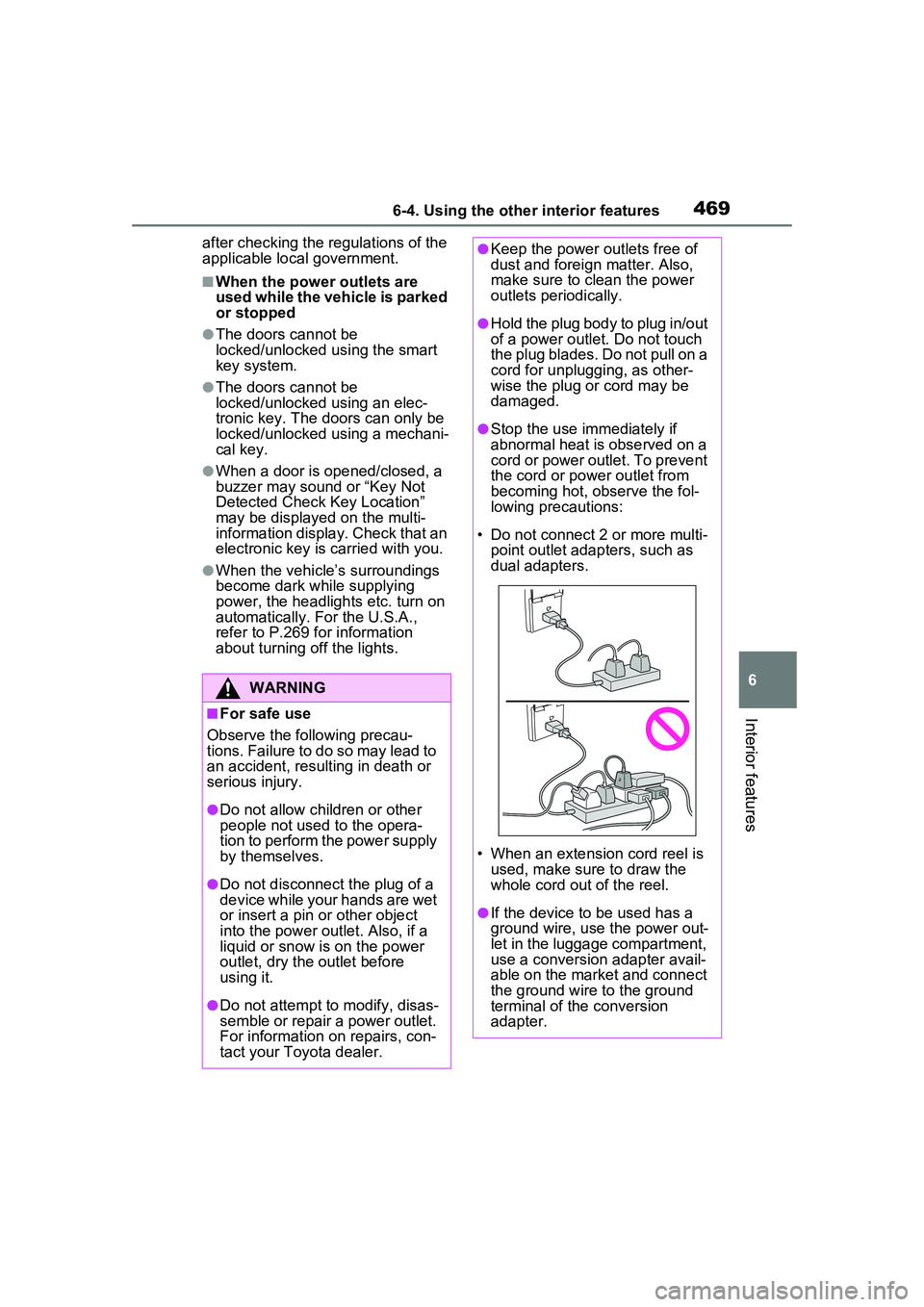
lowing precautions:
• Do not connect 2 or more multi- point outlet adapters, such as
dual adapters.
• When an extension cord reel is used, make sure to draw the
whole cord out of the reel.
●If the device to be used has a
ground wire, use the power out-
let in the luggage compartment,
use a conversion adapter avail-
able on the market and connect
the ground wire to the ground
terminal of the conversion
adapter.
Page 485 of 680
485
7
7
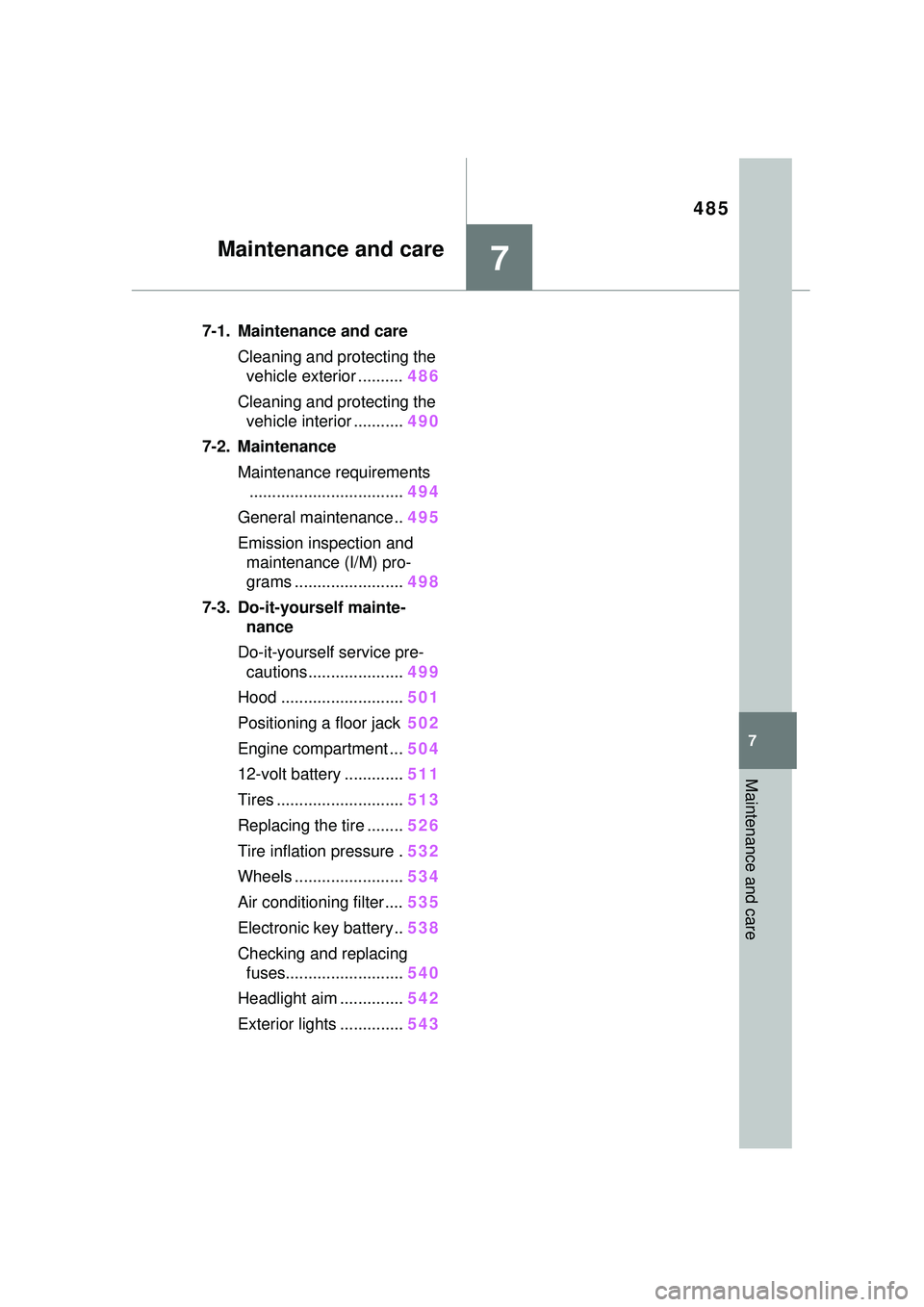
Maintenance and care
Maintenance and care
7-1. Maintenance and careCleaning and protecting the vehicle exterior .......... 486
Cleaning and protecting the vehicle interior ........... 490
7-2. Maintenance Maintenance requirements.................................. 494
General maintenance.. 495
Emission inspection and maintenance (I/M) pro-
grams ........................ 498
7-3. Do-it-yourself mainte- nance
Do-it-yourself service pre- cautions ..................... 499
Hood ........................... 501
Positioning a floor jack 502
Engine compartment ... 504
12-volt battery ............. 511
Tires ............................ 513
Replacing the tire ........ 526
Tire inflation pressure . 532
Wheels ......... ...............534
Air conditioning filter .... 535
Electronic key battery.. 538
Checking and replacing fuses.......................... 540
Headlight aim .............. 542
Exterior lights .............. 543
Page 585 of 680
5858-2. Steps to take in an emergency
8
When trouble arises
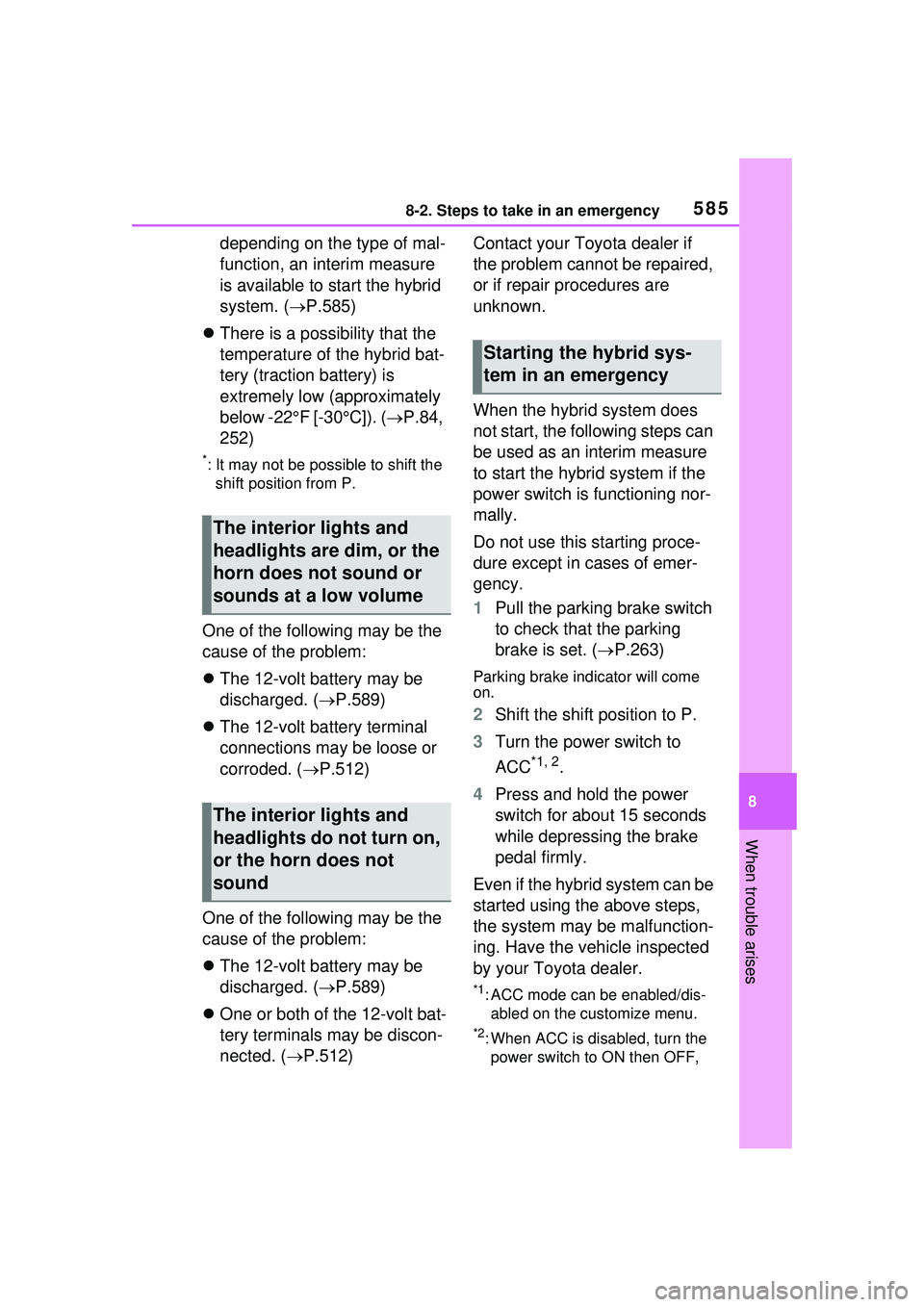
depending on the type of mal-
function, an interim measure
is available to start the hybrid
system. (P.585)
There is a possibility that the
temperature of the hybrid bat-
tery (traction battery) is
extremely low (approximately
below -22°F [-30°C]). ( P.84,
252)
*: It may not be possible to shift the shift position from P.
One of the following may be the
cause of the problem:
The 12-volt battery may be
discharged. ( P.589)
The 12-volt battery terminal
connections may be loose or
corroded. ( P.512)
One of the following may be the
cause of the problem:
The 12-volt battery may be
discharged. ( P.589)
One or both of the 12-volt bat-
tery terminals may be discon-
nected. ( P.512) Contact your Toyota dealer if
the problem cannot be repaired,
or if repair procedures are
unknown.
When the hybrid system does
not start, the following steps can
be used as an interim measure
to start the hybrid system if the
power switch is functioning nor-
mally.
Do not use this starting proce-
dure except in cases of emer-
gency.
1
Pull the parking brake switch
to check that the parking
brake is set. ( P.263)
Parking brake indicator will come
on.
2 Shift the shift position to P.
3 Turn the power switch to
ACC
*1, 2.
4 Press and hold the power
switch for about 15 seconds
while depressing the brake
pedal firmly.
Even if the hybrid system can be
started using the above steps,
the system may be malfunction-
ing. Have the vehicle inspected
by your Toyota dealer.
*1: ACC mode can be enabled/dis- abled on the customize menu.
*2: When ACC is disabled, turn the power switch to ON then OFF,
The interior lights and
headlights are dim, or the
horn does not sound or
sounds at a low volume
The interior lights and
headlights do not turn on,
or the horn does not
sound
Starting the hybrid sys-
tem in an emergency
Page 632 of 680
6329-2. Customization
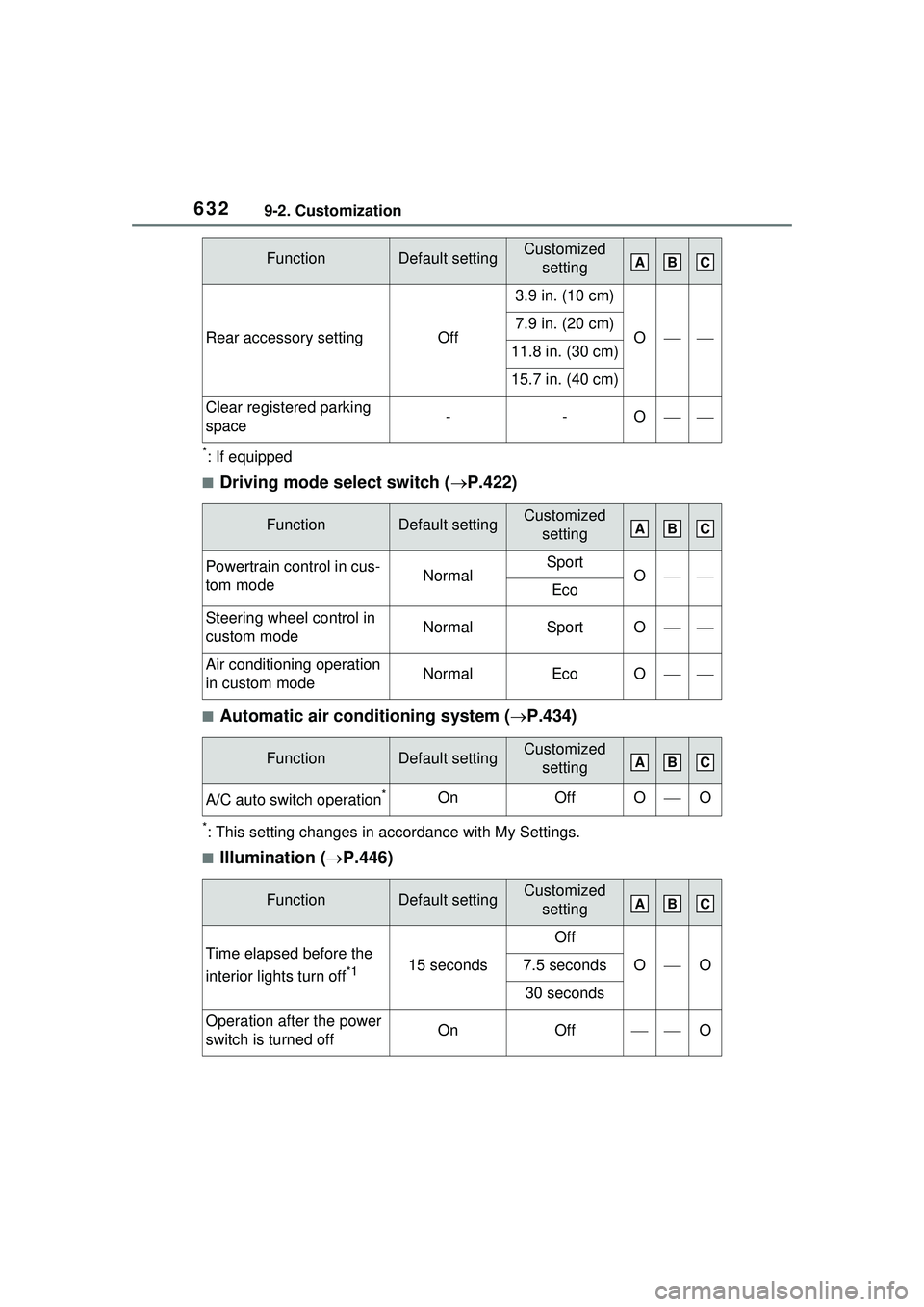
*: If equipped
■Driving mode select switch (P.422)
■Automatic air conditioning system ( P.434)
*: This setting changes in accordance with My Settings.
■Illumination ( P.446)
Rear accessory settingOff
3.9 in. (10 cm)
O7.9 in. (20 cm)
11.8 in. (30 cm)
15.7 in. (40 cm)
Clear registered parking
space--O
FunctionDefault settingCustomized
setting
Powertrain control in cus-
tom modeNormalSportOEco
Steering wheel control in
custom modeNormalSportO
Air conditioning operation
in custom modeNormalEcoO
FunctionDefault settingCustomized setting
A/C auto switch operation*OnOffOO
FunctionDefault settingCustomized setting
Time elapsed before the
interior lights turn off
*115 seconds
Off
OO7.5 seconds
30 seconds
Operation after the power
switch is turned offOnOffO
FunctionDefault settingCustomized settingABC
ABC
ABC
ABC
Page 651 of 680
Alphabetical Index651
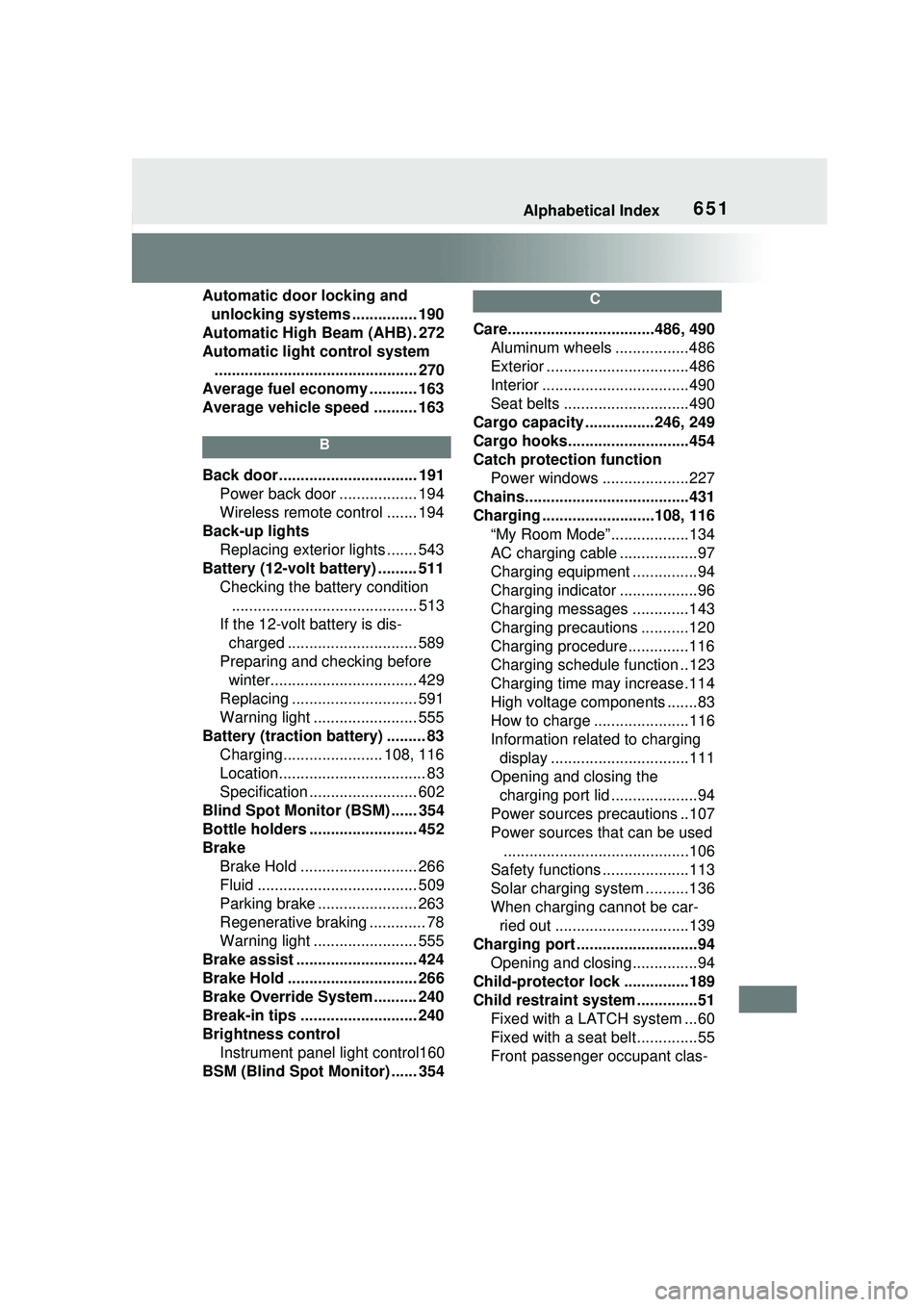
Automatic door locking and unlocking systems ............... 190
Automatic High Beam (AHB) . 272
Automatic light control system ............................................... 270
Average fuel economy ........... 163
Average vehicle speed .......... 163
B
Back door ................................ 191 Power back door .................. 194
Wireless remote control ....... 194
Back-up lights Replacing exterior lights ....... 543
Battery (12-volt battery) ......... 511 Checking the battery condition........................................... 513
If the 12-volt battery is dis- charged .............................. 589
Preparing and checking before winter.................................. 429
Replacing ............................. 591
Warning light ........................ 555
Battery (traction battery) ......... 83 Charging....................... 108, 116
Location.................................. 83
Specification ......................... 602
Blind Spot Monitor (BSM) ...... 354
Bottle holders ......................... 452
Brake Brake Hold ........................... 266
Fluid ..................................... 509
Parking brake ....................... 263
Regenerative braking ............. 78
Warning light ........................ 555
Brake assist ............................ 424
Brake Hold .............................. 266
Brake Override System .......... 240
Break-in tips ........................... 240
Brightness control Instrument panel light control160
BSM (Blind Spot Monitor) ...... 354
C
Care..................................486, 490 Aluminum wheels .................486
Exterior .................................486
Interior ..................................490
Seat belts .............................490
Cargo capacity ................246, 249
Cargo hooks............................454
Catch protection function Power windows ....................227
Chains......................................431
Charging ..........................108, 116 “My Room Mode” ..................134
AC charging cable ..................97
Charging equipment ...............94
Charging indicator ..................96
Charging messages .............143
Charging precautions ...........120
Charging procedure..............116
Charging schedule function ..123
Charging time may increase.114
High voltage components .......83
How to charge ......................116
Information related to charging display ................................111
Opening and closing the charging port lid ....................94
Power sources precautions ..107
Power sources that can be used ...........................................106
Safety functions ....................113
Solar charging system ..........136
When charging cannot be car- ried out ...............................139
Charging port ............................94 Opening and closing...............94
Child-protector lock ...............189
Child restraint system ..............51 Fixed with a LATCH system ...60
Fixed with a seat belt..............55
Front passenger occupant clas-
Page 652 of 680
652Alphabetical Index
sification system ................... 44
Points to remember ................ 51
Riding with children ................ 50
Types of child restraint system installation method ............... 53
Using an anchor bracket ........ 62
Child safety ............................... 50 12-volt battery precautions . 511, 592
Airbag precautions ................. 40
Back door precautions ......... 191
Charging precautions ........... 115
Child restraint system............. 53
Heated steering wheel precau- tions.................................... 443
How your child should wear the seat belt................................ 32
Power window lock switch.... 229
Power window precautions .. 228
Rear door child-protector lock ........................................... 189
Removed key battery precau- tions.................................... 539
Seat belt extender precautions ............................................. 32
Seat belt precautions ............. 31
Seat heater precautions ....... 443
Window lock switch .............. 229
Cleaning .......................... 486, 490 Aluminum wheels ................. 486
Exterior ................................. 486
Interior .................................. 490
Radar sensor........................ 355
Seat belts ............................. 490
Condenser .............................. 508
Console box ............................ 451
Coolant Checking .............................. 507
Preparing and checking before winter.................................. 429
Warning light ........................ 556
Cooling system ...................... 507 Hybrid system overheating ...594
Coussins gonflables Emplacement des coussins gonflables SRS...................639
Modification et mise au rebut des coussins gonflables ............645
Précautions générales relatives aux coussins gonflables .....641
Précautions relatives aux couss- ins gonflables en rideau .....641
Précautions relatives aux couss- ins gonflables latéraux et en
rideau .................................641
Précautions relatives aux couss- ins gonflables latéraux........641
Précautions relatives aux couss- ins gonflables pour vos enfants...........................................641
Cruise control Cruise control .......................342
Dynamic radar cruise control 331
Cup holders.............................451
Current fuel economy ............163
Curtain shield airbags ..............35
Customizable features ...........618
Custom mode..........................422
D
Daytime running light system270 Replacing exterior lights .......543
Deck board ..............................454
Deck under tray ......................455
Defogger Outside rear view mirrors .....436
Rear window.........................436
Windshield ............................435
Digital Rear-view Mirror .........217
Dimensions .............................600
Dinghy towing .........................250
Display Cruise control .......................342
Driving information ...............163
Page 656 of 680
656Alphabetical Index
IdentificationEngine .................................. 601
Vehicle ................................. 600
Ignition switch (power switch) ............................................... 251Auto power off function ........ 255
Changing the power switch modes ................................ 254
If your vehicle has to be stopped in an emergency................. 547
Starting the hybrid system.... 251
Illuminated entry system ....... 446
Illumination notification ......... 448
Immobilizer system .................. 70
Indicators ................................ 150
Initialization ............................ 634 Items to initialize................... 634
Maintenance......................... 495
Power back door .................. 199
Power windows .................... 227
Inside rear view mirror........... 216
Instrument panel light control ............................................... 160
Instrument panel ornament lights...................................... 446
Interior lights .......................... 446
Intuitive parking assist Function ............................... 363
Warning message ................ 365
J
JackPositioning a floor jack ......... 502
Vehicle-equipped jack .. 527, 575
Jack handle ..................... 527, 575
Jam protection function Memory recall function ......... 234
Power back door .................. 197
Power easy access system .. 231
Power windows .................... 227
Seat position memory .......... 231
K
Keyless entrySmart key system .................203
Wireless remote control........182
Keys .........................................180 Battery-saving function .........204
Electronic key .......................180
If the electronic key does not operate properly .................587
If you lose your keys.............586
Key number plate .................180
Keyless entry ................182, 203
Mechanical key.....................182
Power switch ........................251
Replacing the battery ...........538
Warning buzzer .. ..................204
Wireless remote control key .182
Knee airbags .............................35
L
Lane Tracing Assist (LTA) .....305 Operation..............................305
LATCH anchors ........................60
Lever Auxiliary catch le ver .............501
Hood lock releas e lever ........501
Shift lever .............................256
Tilt and telescopic steering lock release lever .......................215
Turn signal lever ...................262
Wiper lever ...........................275
License plate lights Replacing exterior lights .......543
Switch ...................................269
Lights AHB (Automatic High Beam) 272
Footwell lights.......................446
Front personal lights .............447
Headlight switch ...................269
Illuminated entry system .......446
Illumination notification .........448