wheel TOYOTA PRIUS PRIME 2023 Owner's Manual
[x] Cancel search | Manufacturer: TOYOTA, Model Year: 2023, Model line: PRIUS PRIME, Model: TOYOTA PRIUS PRIME 2023Pages: 680, PDF Size: 14.97 MB
Page 219 of 680
2194-4. Adjusting the steering wheel and mirrors
4
Before driving
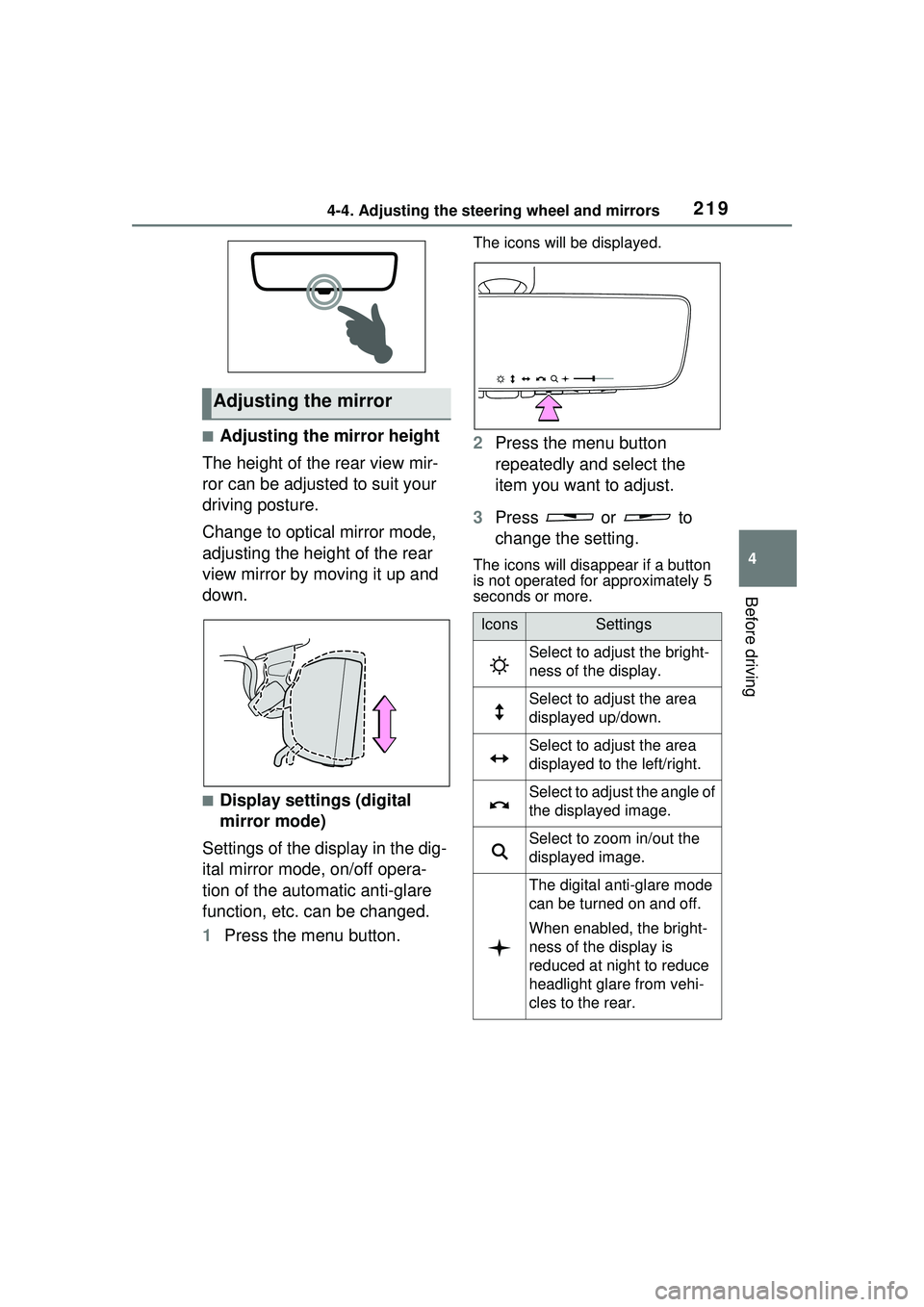
■Adjusting the mirror height
The height of the rear view mir-
ror can be adjusted to suit your
driving posture.
Change to optical mirror mode,
adjusting the height of the rear
view mirror by moving it up and
down.
■Display settings (digital
mirror mode)
Settings of the display in the dig-
ital mirror mode, on/off opera-
tion of the automatic anti-glare
function, etc. can be changed.
1 Press the menu button.
The icons will be displayed.
2Press the menu button
repeatedly and select the
item you want to adjust.
3 Press or to
change the setting.
The icons will disappear if a button
is not operated for approximately 5
seconds or more.
Adjusting the mirror
IconsSettings
Select to adjust the bright-
ness of the display.
Select to adjust the area
displayed up/down.
Select to adjust the area
displayed to the left/right.
Select to adjust the angle of
the displayed image.
Select to zoom in/out the
displayed image.
The digital anti-glare mode
can be turned on and off.
When enabled, the bright-
ness of the display is
reduced at night to reduce
headlight glare from vehi-
cles to the rear.
Page 220 of 680
2204-4. Adjusting the steering wheel and mirrors
■Adjusting the display (digital
mirror mode)
●The icons will disappear if a button
is not operated for approximately
5 seconds or more.
●If the displayed image is adjusted,
it may appear distorted. This is not
a malfunction.
●If the brightness of the Digital
Rear-view Mirror is set too high, it
may cause eye strain. Adjust the
Digital Rear-view Mirror to an
appropriate brightness. If your
eyes become tired, change to
optical mirror mode.
●The brightness of the Digital Rear-
view Mirror will change automati-
cally according to the brightness
of the area in front of your vehicle.
●The digital anti-glare mode oper-
ates only in locations where the
surroundings are dark. Depending
on the surrounding illumination
environment, the image may not
darken and it may not be possible
to reduce headlight glare from
vehicles to the rear.
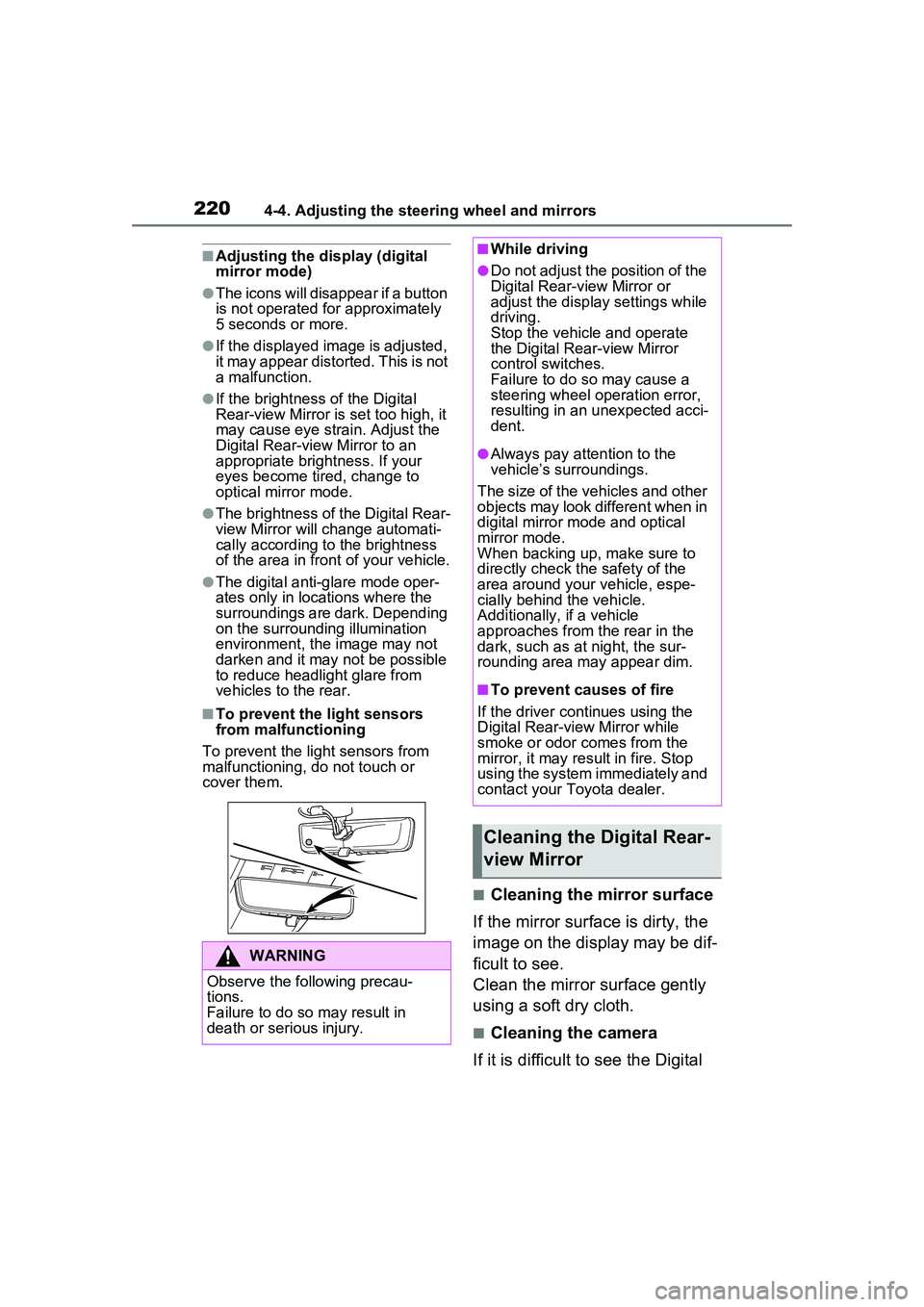
■To prevent the light sensors
from malfunctioning
To prevent the light sensors from
malfunctioning, do not touch or
cover them.
■Cleaning the mirror surface
If the mirror surface is dirty, the
image on the display may be dif-
ficult to see.
Clean the mirror surface gently
using a soft dry cloth.
■Cleaning the camera
If it is difficult to see the Digital
WARNING
Observe the following precau-
tions.
Failure to do so may result in
death or serious injury.
■While driving
●Do not adjust the position of the
Digital Rear-view Mirror or
adjust the displa y settings while
driving.
Stop the vehicle and operate
the Digital Rear-view Mirror
control switches.
Failure to do so may cause a
steering wheel operation error,
resulting in an unexpected acci-
dent.
●Always pay attention to the
vehicle’s surroundings.
The size of the vehicles and other
objects may look different when in
digital mirror mode and optical
mirror mode.
When backing up, make sure to
directly check the safety of the
area around your vehicle, espe-
cially behind the vehicle.
Additionally, if a vehicle
approaches from the rear in the
dark, such as at night, the sur-
rounding area may appear dim.
■To prevent causes of fire
If the driver continues using the
Digital Rear-view Mirror while
smoke or odor comes from the
mirror, it may result in fire. Stop
using the system immediately and
contact your Toyota dealer.
Cleaning the Digital Rear-
view Mirror
Page 221 of 680
2214-4. Adjusting the steering wheel and mirrors
4
Before driving
Rear-view Mirror image
because water, snow, mud, etc.
is stuck to the camera lens,
operate the camera cleaning
washer or change to optical mir-
ror mode. (P.275)
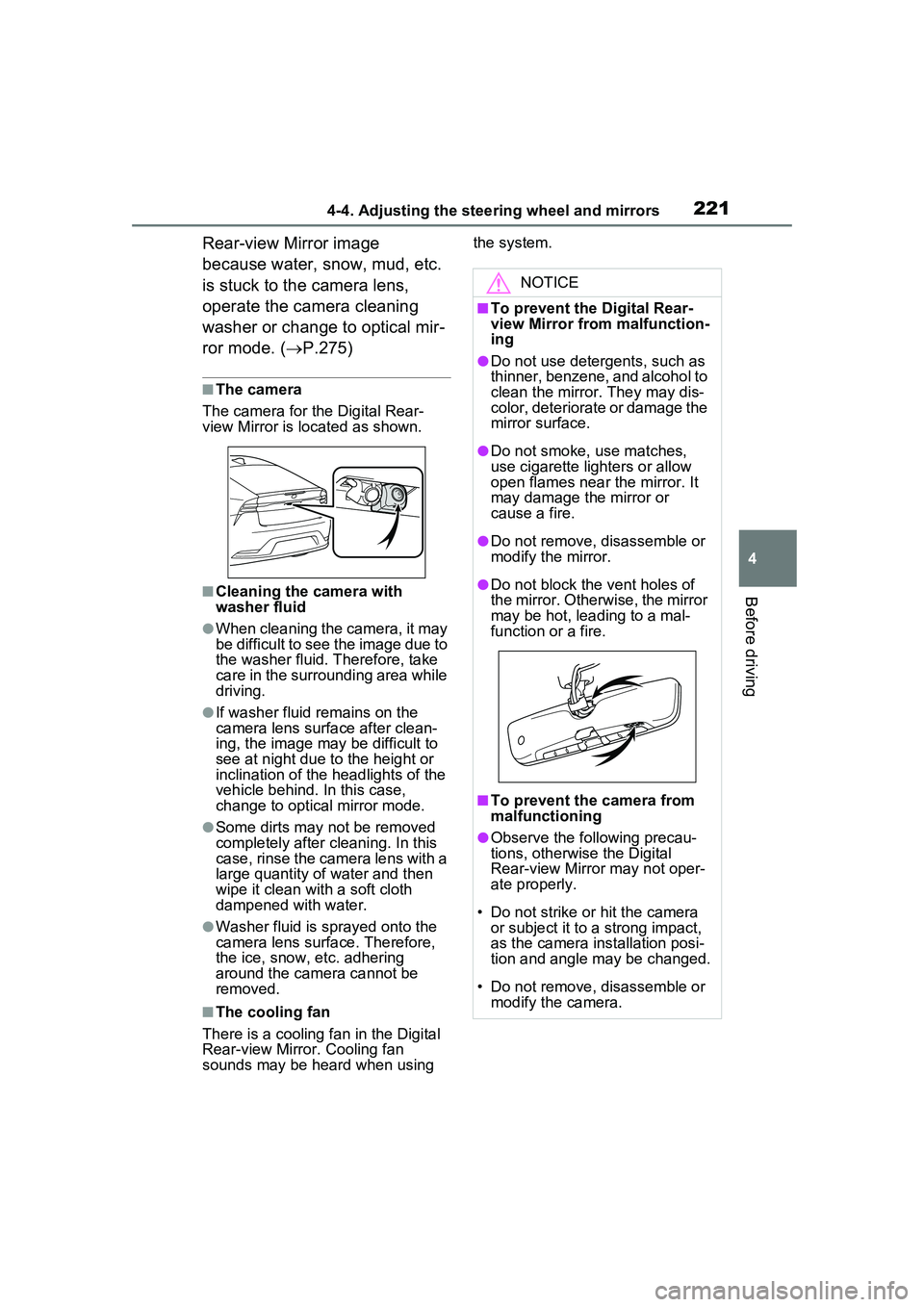
■The camera
The camera for the Digital Rear-
view Mirror is located as shown.
■Cleaning the camera with
washer fluid
●When cleaning the camera, it may
be difficult to see the image due to
the washer fluid. Therefore, take
care in the surrounding area while
driving.
●If washer fluid remains on the
camera lens surface after clean-
ing, the image may be difficult to
see at night due to the height or
inclination of the headlights of the
vehicle behind. In this case,
change to optical mirror mode.
●Some dirts may not be removed
completely after cleaning. In this
case, rinse the camera lens with a
large quantity of water and then
wipe it clean with a soft cloth
dampened with water.
●Washer fluid is sprayed onto the
camera lens surface. Therefore,
the ice, snow, etc. adhering
around the camera cannot be
removed.
■The cooling fan
There is a cooling fan in the Digital
Rear-view Mirror. Cooling fan
sounds may be heard when using the system.
NOTICE
■To prevent the Digital Rear-
view Mirror from malfunction-
ing
●Do not use detergents, such as
thinner, benzene, and alcohol to
clean the mirror. They may dis-
color, deteriorate or damage the
mirror surface.
●Do not smoke, use matches,
use cigarette lighters or allow
open flames near the mirror. It
may damage the mirror or
cause a fire.
●Do not remove, disassemble or
modify the mirror.
●Do not block the vent holes of
the mirror. Other
wise, the mirror
may be hot, leading to a mal-
function or a fire.
■To prevent the camera from
malfunctioning
●Observe the following precau-
tions, otherwise the Digital
Rear-view Mirror may not oper-
ate properly.
• Do not strike or hit the camera or subject it to a strong impact,
as the camera installation posi-
tion and angle may be changed.
• Do not remove, disassemble or modify the camera.
Page 222 of 680
2224-4. Adjusting the steering wheel and mirrors
If you notice any of the following symptoms, refer to the following
table for the likely cause and the solution.
If the symptom is not resolved by the solution, have the vehicle
inspected by your Toyota dealer.
NOTICE
• When washing the camera, rinse it with a large quantity of
water and then wipe it clean
with a soft cloth dampened with
water. Do not strongly rub the
camera lens, as it may be
scratched and will not be able to
transmit a clear image.
• Do not allow organic solvent, car wax, window cleaner or
glass coat to adhere to the cam-
era cover. If this happens, wipe
it off as soon as possible.
• Do not apply hot water to the camera in cold weather, as the
sudden change of temperature
may cause the camera to not
operate properly.
• When using a high pressure washer to wash the vehicle, do
not directly spray the camera
and its surrounding area, as
doing so may cause the camera
to not operate properly.
●Do not subject the camera to a
strong impact as this could
cause a malfunction.
If this happens, have the vehicle
inspected by your Toyota dealer
as soon as possible.
If you notice any symptoms
Page 223 of 680
2234-4. Adjusting the steering wheel and mirrors
4
Before driving
SymptomLikely causeSolution
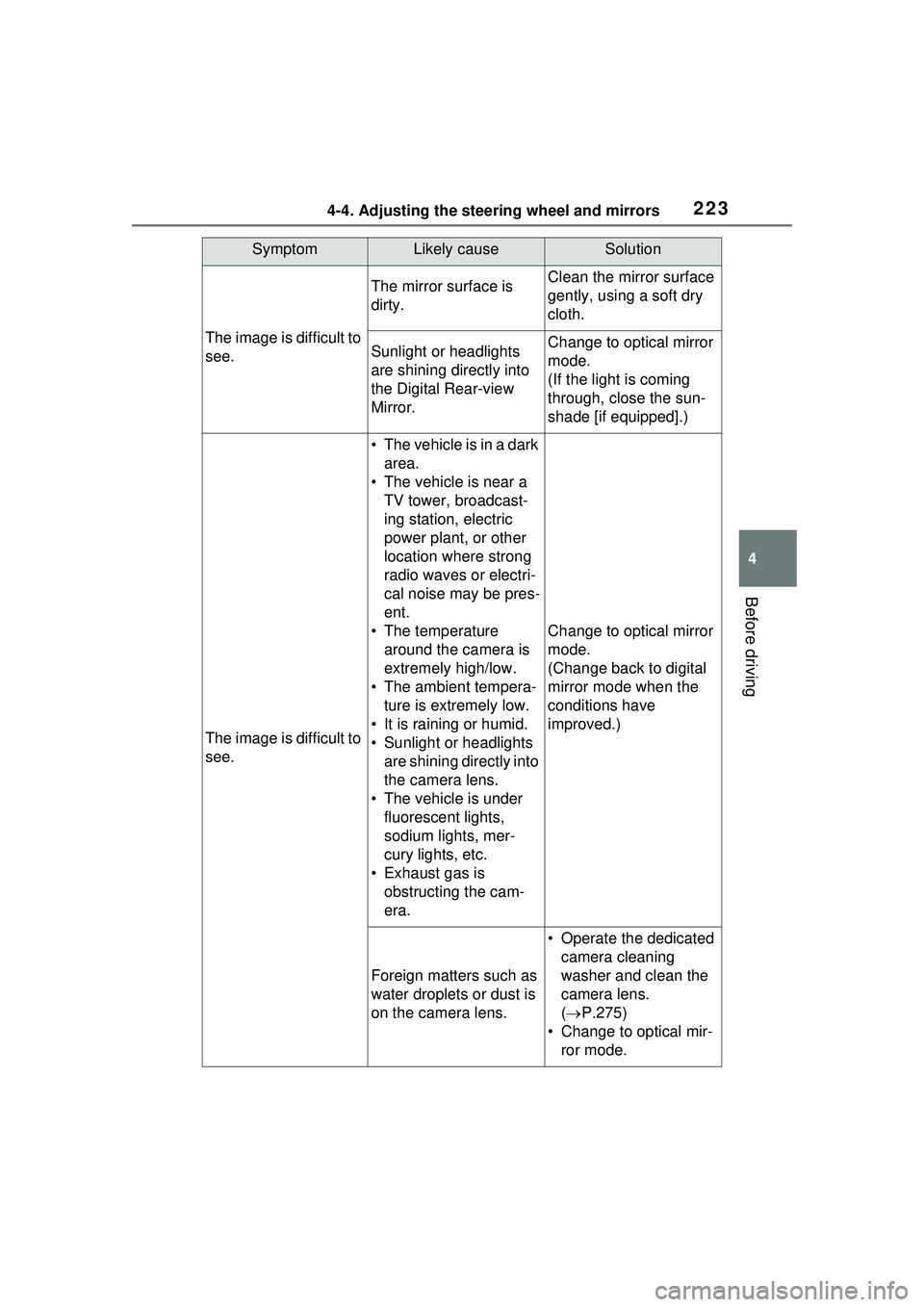
The image is difficult to
see.
The mirror surface is
dirty.Clean the mirror surface
gently, using a soft dry
cloth.
Sunlight or headlights
are shining directly into
the Digital Rear-view
Mirror.Change to optical mirror
mode.
(If the light is coming
through, close the sun-
shade [if equipped].)
The image is difficult to
see.
• The vehicle is in a dark area.
• The vehicle is near a TV tower, broadcast-
ing station, electric
power plant, or other
location where strong
radio waves or electri-
cal noise may be pres-
ent.
• The temperature around the camera is
extremely high/low.
• The ambient tempera- ture is extremely low.
• It is raining or humid.
• Sunlight or headlights are shining directly into
the camera lens.
• The vehicle is under fluorescent lights,
sodium lights, mer-
cury lights, etc.
• Exhaust gas is obstructing the cam-
era.
Change to optical mirror
mode.
(Change back to digital
mirror mode when the
conditions have
improved.)
Foreign matters such as
water droplets or dust is
on the camera lens.
• Operate the dedicated camera cleaning
washer and clean the
camera lens.
( P.275)
• Change to optical mir- ror mode.
Page 224 of 680
2244-4. Adjusting the steering wheel and mirrors
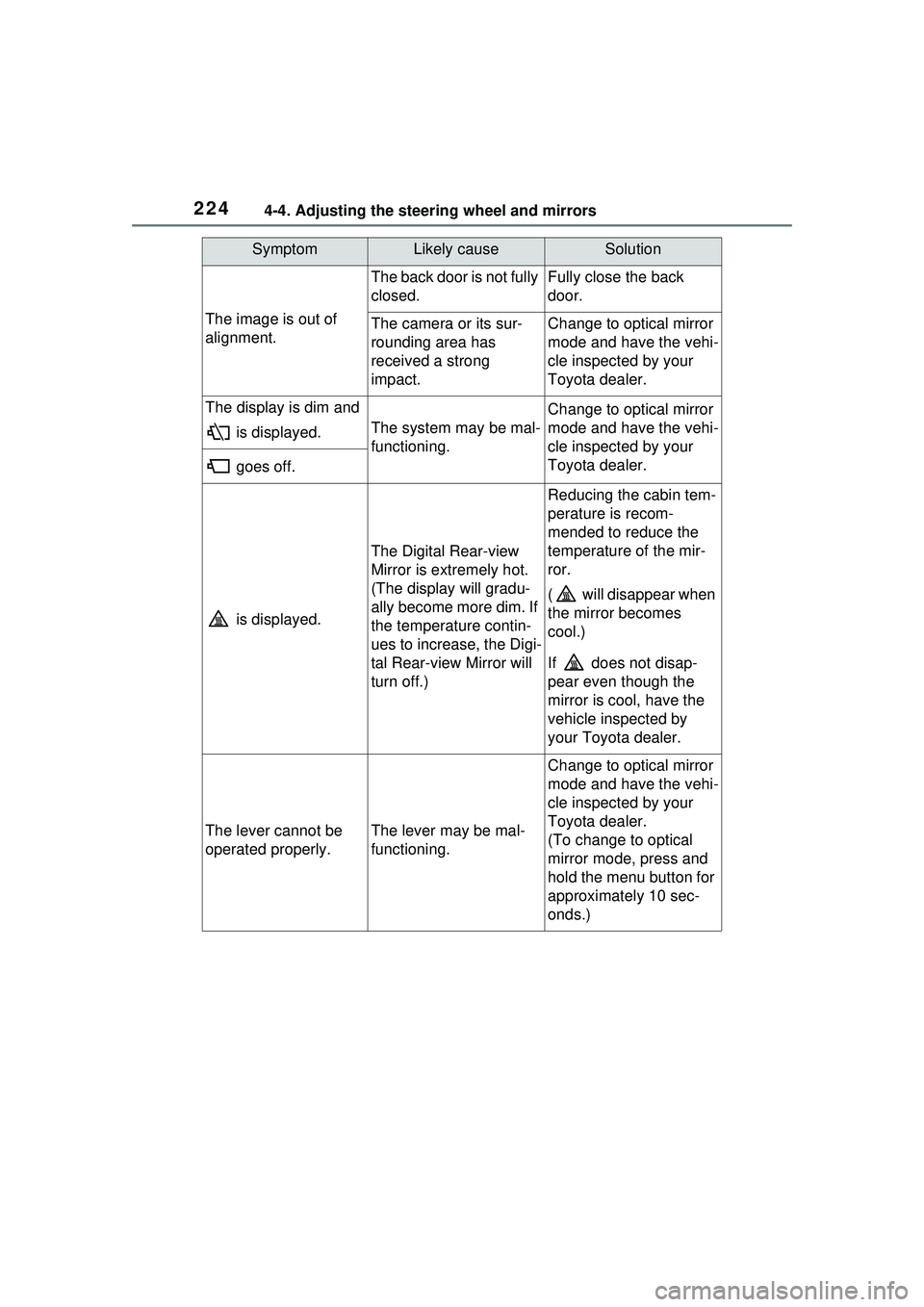
The image is out of
alignment.
The back door is not fully
closed.Fully close the back
door.
The camera or its sur-
rounding area has
received a strong
impact.Change to optical mirror
mode and have the vehi-
cle inspected by your
Toyota dealer.
The display is dim and is displayed.
The system may be mal-
functioning.
Change to optical mirror
mode and have the vehi-
cle inspected by your
Toyota dealer.
goes off.
is displayed.
The Digital Rear-view
Mirror is extremely hot.
(The display will gradu-
ally become more dim. If
the temperature contin-
ues to increase, the Digi-
tal Rear-view Mirror will
turn off.)
Reducing the cabin tem-
perature is recom-
mended to reduce the
temperature of the mir-
ror.
( will disappear when
the mirror becomes
cool.)
If does not disap-
pear even though the
mirror is cool, have the
vehicle inspected by
your Toyota dealer.
The lever cannot be
operated properly.The lever may be mal-
functioning.
Change to optical mirror
mode and have the vehi-
cle inspected by your
Toyota dealer.
(To change to optical
mirror mode, press and
hold the menu button for
approximately 10 sec-
onds.)
SymptomLikely causeSolution
Page 225 of 680
2254-4. Adjusting the steering wheel and mirrors
4
Before driving
■When using the outside rear
view mirrors in a cold weather
When it is cold and the outside rear
view mirrors are frozen, it may not
be possible to fold /extend them or
adjust the mirror surface. Remove
the ice, snow, etc. covering the out-
side rear view mirrors.
■Defogging the mirrors (if
equipped)
The outside rear view mirrors can
be cleared using the mirror defog-
gers. Turn on the rear window
defogger to turn on the outside rear
view mirror defoggers.
( P.436)
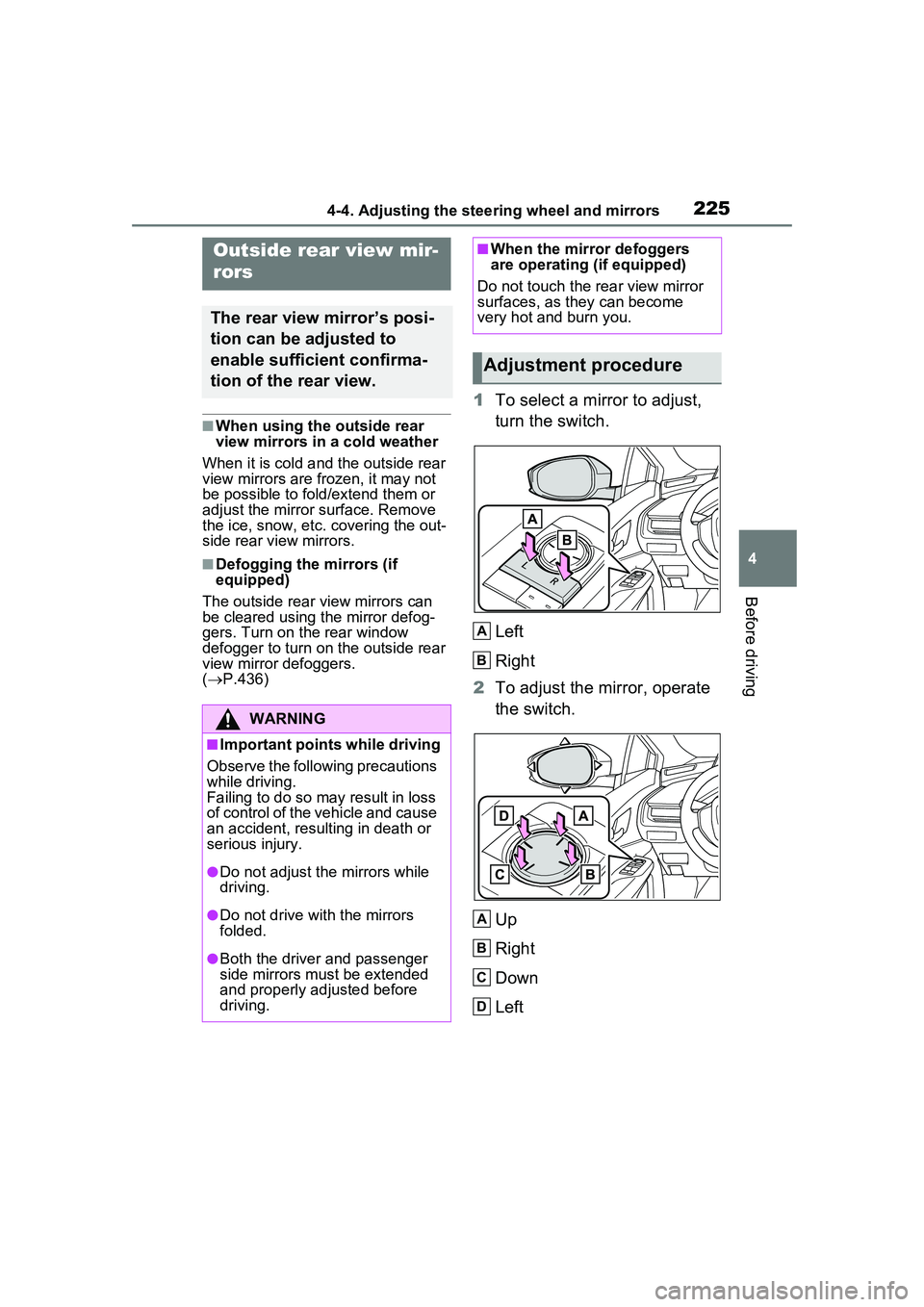
1 To select a mirror to adjust,
turn the switch.
Left
Right
2 To adjust the mirror, operate
the switch.
Up
Right
Down
Left
Outside rear view mir-
rors
The rear view mirror’s posi-
tion can be adjusted to
enable sufficient confirma-
tion of the rear view.
WARNING
■Important points while driving
Observe the following precautions
while driving.
Failing to do so may result in loss
of control of the vehicle and cause
an accident, resulting in death or
serious injury.
●Do not adjust the mirrors while
driving.
●Do not drive with the mirrors
folded.
●Both the driver and passenger
side mirrors must be extended
and properly adjusted before
driving.
■When the mirror defoggers
are operating (if equipped)
Do not touch the rear view mirror
surfaces, as they can become
very hot and burn you.
Adjustment procedure
A
B
A
B
C
D
Page 226 of 680
2264-4. Adjusting the steering wheel and mirrors
■Mirror angle can be adjusted
when
The power switch is in ACC or ON.
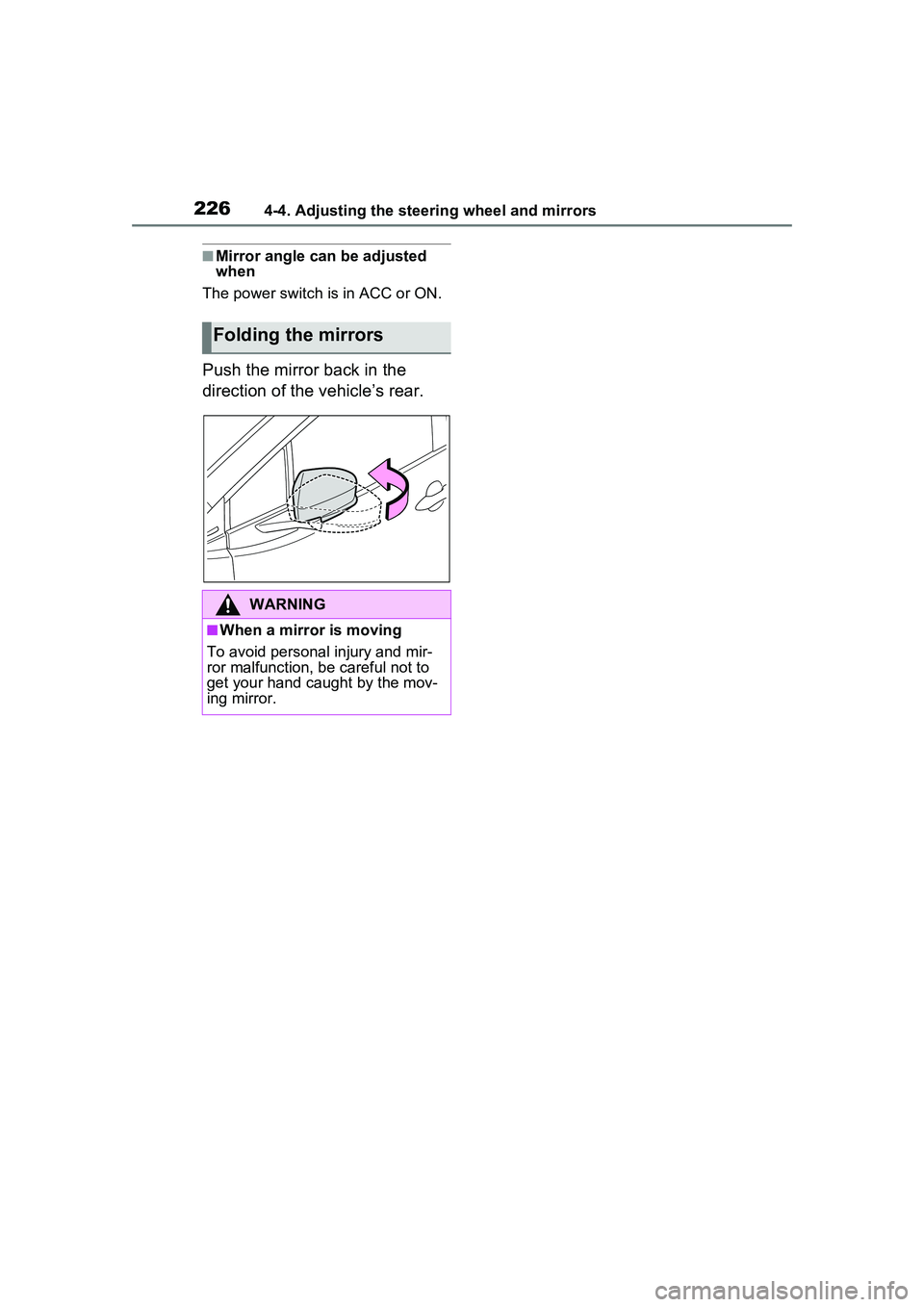
Push the mirror back in the
direction of the vehicle’s rear.
Folding the mirrors
WARNING
■When a mirror is moving
To avoid personal injury and mir-
ror malfunction, be careful not to
get your hand caught by the mov-
ing mirror.
Page 232 of 680
2324-6. Favorite settings
■Using the voice control system
(if equipped)
The following operations can be
performed using the voice control
system:
●Driving position registration
●Recalling the drivin g position (can
be operated only when the shift
position is in P)
For details regarding the voice con-
trol system, refer to the “MULTIME-
DIA OWNER’S MANUAL”.
■Seat positions that can be
memorized ( P.209)
The adjusted positions other than
the position adjusted by lumbar sup-
port switch can be recorded.
■Operating the driving position
memory after turning the power
switch to OFF
Recorded seat positions can be
activated up to 180 seconds after
the driver’s door is opened and
another 60 seconds after it is closed
again.
■In order to correctly use the
driving position memory func-
tion
If a seat position is already in the
furthest possible position and the
seat is operated in the same direc-
tion, the recorded position may be
slightly different when it is recalled.
■When recalling the driving posi-
tion
Take care when recalling the driving
position so that the head restraint
does not touch the ceiling.
■When the recorded seat posi-
tion cannot be recalled
The seat position may not be
recalled in some situations when the
seat position is recorded in a certain
range. For details, contact your
Toyota dealer.
■When My Settings is turned
off
Registering procedure
Record your driving position to
button “1” or “2” before perform-
ing the following:
Carry only the electronic key
you want to register, and then
close the driver’s door.
If 2 or more electronic keys are
in the vehicle, the driving posi-
tion cannot be recorded prop-
erly.
1 Check that the shift position
is in P.
2 Turn the power switch to ON.
3 Recall the driving position
that you want to record.
4 While pressing the recalled
button, press and hold the
door lock switch (either lock
or unlock) until the buzzer
sounds.
If the button could not be regis-
tered, the buzzer sounds continu-
WARNING
■Seat adjustment caution
Take care during seat adjustment
so that the seat does not strike
the rear passenger or squeeze
your body against the steering
wheel.
Registering/recalling/can-
celing a driving position
to an electronic key
(memory recall function)
Page 239 of 680
2395-1. Before driving
5
Driving
5-1.Before driving
■Starting the hybrid system
P.251
■Driving
1 With the brake pedal
depressed, shift the shift
position to D.
Check that the shift position indica-
tor shows D.
2If the parking brake is set,
release the parking brake.
( P.263)
If the parking brake is in automatic
mode, the parking brake will be
released automatically. ( P.264)
3 Gradually release the brake
pedal and gently depress the
accelerator pedal to acceler-
ate the vehicle.
■Stopping
1 Depress the brake pedal.
2 If necessary, set the parking
brake.
If the vehicle is to be stopped for an
extended period of time, shift the
shift position to P. ( P.257)
■Parking the vehicle
1 Depress the brake pedal to
stop the vehicle completely. 2
If the parking brake is
released, set the parking
brake. ( P.263)
3 Shift the shift position to P.
( P.257)
Check that the shift position indica-
tor shows P and the parking brake
indicator is illuminated.
4Press the power switch to
stop the hybrid system.
5 Slowly release the brake
pedal.
6 Lock the door, making sure
that you have the electronic
key on your person.
If parking on a hill, block the wheels
as needed.
■Starting off on a steep
uphill
1 Firmly depress the brake
pedal and shift the shift posi-
tion to D.
The hill-start assi st control will be
activated.
2 Set the parking brake.
( P.263)
3 Release the brake pedal and
gently depress the accelera-
tor pedal to accelerate the
vehicle.
4 Release the parking brake.
( P.263)
■For electricity-saving and fuel-
efficient driving
Understand the system characteris-
tics of the vehicl e to use the func-
tions of the hybrid system. Also,
keep in mind that Plug-in Hybrid
Electric Vehicles are similar to con-
Driving the vehicle
The following procedures
should be observed to
ensure safe driving:
Driving procedure