wheel TOYOTA PRIUS PRIME 2023 User Guide
[x] Cancel search | Manufacturer: TOYOTA, Model Year: 2023, Model line: PRIUS PRIME, Model: TOYOTA PRIUS PRIME 2023Pages: 680, PDF Size: 14.97 MB
Page 89 of 680
892-1. Plug-in hybrid system
2
Plug-in hybrid system
gently and a timely manner.
A greater amount of electrical
energy can be regenerated
when slowing down.
Repeated acceleration and
deceleration, as well as long
waits at traffic lights, will lead to
high fuel and electricity con-
sumption. Check traffic reports
before leaving and avoid delays
as much as possible. When driv-
ing in a traffic jam, gently
release the brake pedal to allow
the vehicle to move forward
slightly while avoiding overuse
of the accelerator pedal. Doing
so can help control excessive
electricity and fuel consumption.
Control and maintain the vehi-
cle at a constant speed.
Before stopping at a toll booth
or similar, allow plenty of time
to release the accelerator and
gently apply the brakes. A
greater amount of electrical
energy can be regenerated
when slowing down.
Electricity consumption will
increase significantly when
driving at high speeds in EV
mode or AUTO EV/HV mode.
If there will be a long distance
to the next external charging
point after leaving a freeway, it is recommended to drive in
HV mode while on the free-
way and change to EV mode
or AUTO EV/HV mode after
leaving the freeway. (
P.74)
Turn the “A/C” switch off
when it is not needed. Doing
so can help reduce excessive
electricity and fuel consump-
tion.
In summer: When the ambient tem-
perature is high, use the recircu-
lated air mode. Doin g so will help to
reduce the burden on the air condi-
tioning system and reduce electric-
ity and fuel consumption as well.
In winter: Avoid excessive and
unnecessary use of the heater.
Usage of the heated steering wheel
(if equipped) and seat heaters (if
equipped) are effective. ( P.443)
Make sure to check the tire infla-
tion pressure frequently. If there
is improper tire inflation pres-
sure in the tires, the EV driving
range will become shorter, and
fuel consumption when in HV
mode will increase.
Also, as snow tires can cause
large amounts of friction, their
use on dry roads can lead to
increased fuel and electricity
consumption.
Delays
Highway driving
Air conditioning
Checking tire inflation
pressure
Page 92 of 680
922-1. Plug-in hybrid system
■Release the accelerator
pedal early before stopping
the vehicle, such as at a
traffic light
The regenerative brake will
operate to convert the kinetic
energy of the vehicle into electri-
cal energy, which will charge the
hybrid battery (traction battery).
The regeneration status can be
checked from the Hybrid Sys-
tem Indicator. ( P.158)
When the brake pedal is
depressed lightly during decel-
eration, the regeneration
amount increases, enabling
more electrical energy to be
recovered.
If the brake pedal is depressed too
strongly, the recovered amount
indicator will reach the maximum
level and the upper limit of the
recoverable en ergy will be
exceeded. Therefore, be sure to
operate the brake pedal early.
■Use the air conditioning
system appropriately, and
also utilize the heated steer-
ing wheel (if equipped) and
seat heaters (if equipped)
In EV mode, the vehicle is
cooled and heated by electrical
energy. (Except in extremely
cold temperatures of approxi-
mately 14°F [-10°C] or less.)
Preventing excessive cooling or
heating of the vehicle will reduce
power consumption and
improve electrical efficiency. When eco air conditioning mode
is used, the air conditioning con-
trol is switched automatically to
a lower setting. (
P.437)
The heated steering wheel and
seat heaters are efficient heat-
ing device that directly warm the
body using less electric power.
When used together with the air
conditioning system, a low tem-
perature setting can be used to
improve electrical and fuel effi-
ciency.
■Check the tire pressure
If the tire pressure is lower than
the specified value, it will
worsen the electrical and fuel
efficiency.
A pressure level 7 psi (50 kPa, 0.5
kgf/cm
2 or bar) lower than the spec-
ified value will cause a worsening of
several percentage points.
■When driving on highways,
use the EV/HV mode selec-
tion switch to drive in HV
mode
The power consumption will
increase significantly if the vehi-
cle is driven in EV mode on
highways.
■Do not load unnecessary
objects in the vehicle
Driving with objects weighing
220 lb. (100 kg) in the vehicle
will worsen the electrical and
fuel efficiency by approximately
3%.
Air resistance also greatly
Page 120 of 680
1202-2. Charging
2Touch “Vehicle customize” on
the sub menu.
3 Touch “Charging”.
4 Touch “Charging current”.
5 Touch “8A”, and touch “OK”.
WARNING
■When charging
Observe the following precau-
tions.
Failure to do so may cause an
unexpected accident, resulting in
death or serious injury.
●Connect to a power source suit-
able for charging. ( P.106)
●Check that the AC charging
cable, plug and outlet are free of
foreign matter.
●Before charging, check that the
AC charging inlet is not
deformed, damaged or cor-
roded, and check that the inlet
is free of foreign matter such as
dirt, snow and ice.
If there is dirt or dust in these
areas, remove completely
before inserting the charging
connector.
●Only use outlets where the plug
can be securely inserted.
●Do not bundle or wind the AC
charging cable while charging,
as doing so may result in over-
heating.
●Do not touch the terminals of
the charging connector and AC
charging inlet with a sharp metal
objects (needles etc.) or hands,
or short them with foreign
objects.
●When charging outdoors, make
sure to connect to a weather-
proof outlet for outdoor use.
Ensure the weatherproof outlet
cover closes co mpletely. If the
weatherproof outlet cover can-
not be closed, install a weather-
proof outlet cover that will close.
●In order to stop charging at the
charging station, follow the
instructions of the charger.
●If any heat, smoke, odors, noise
or other abnormalities are
noticed during charging, stop
charging immediately.
●Do not insert the plug if the out-
let is submerged in water or
snow.
●When charging while it is raining
or snowing, do not connect or
disconnect the plug if your
hands are wet. Also, do not get
the plug or outlet wet.
●Do not charge the vehicle
during a lightning storm.
●Prevent the AC charging cable
from being caught in the door or
back door.
●Do not let the wheels on the AC
charging cable, plug, charging
connector and CCID (Charging
Circuit Interrupting Device).
●Firmly insert the plug into the
outlet.
●Do not use an extension cord
and converting adaptor.
●Close the hood before using the
charging system. The cooling
fan may start operating sud-
denly. Touching or getting close
to rotating parts such as the fan
may cause your hands or
clothes (especially a necktie or
scarf) to become caught and
result in a serious injury.
Page 162 of 680
1623-1. Instrument cluster
Driving support system infor-
mation (P.165)
■The multi-information display is
displayed when
The power switch is in ON.
■Liquid crystal display
( P.159)
The multi-information display is
operated using the meter control
switches.
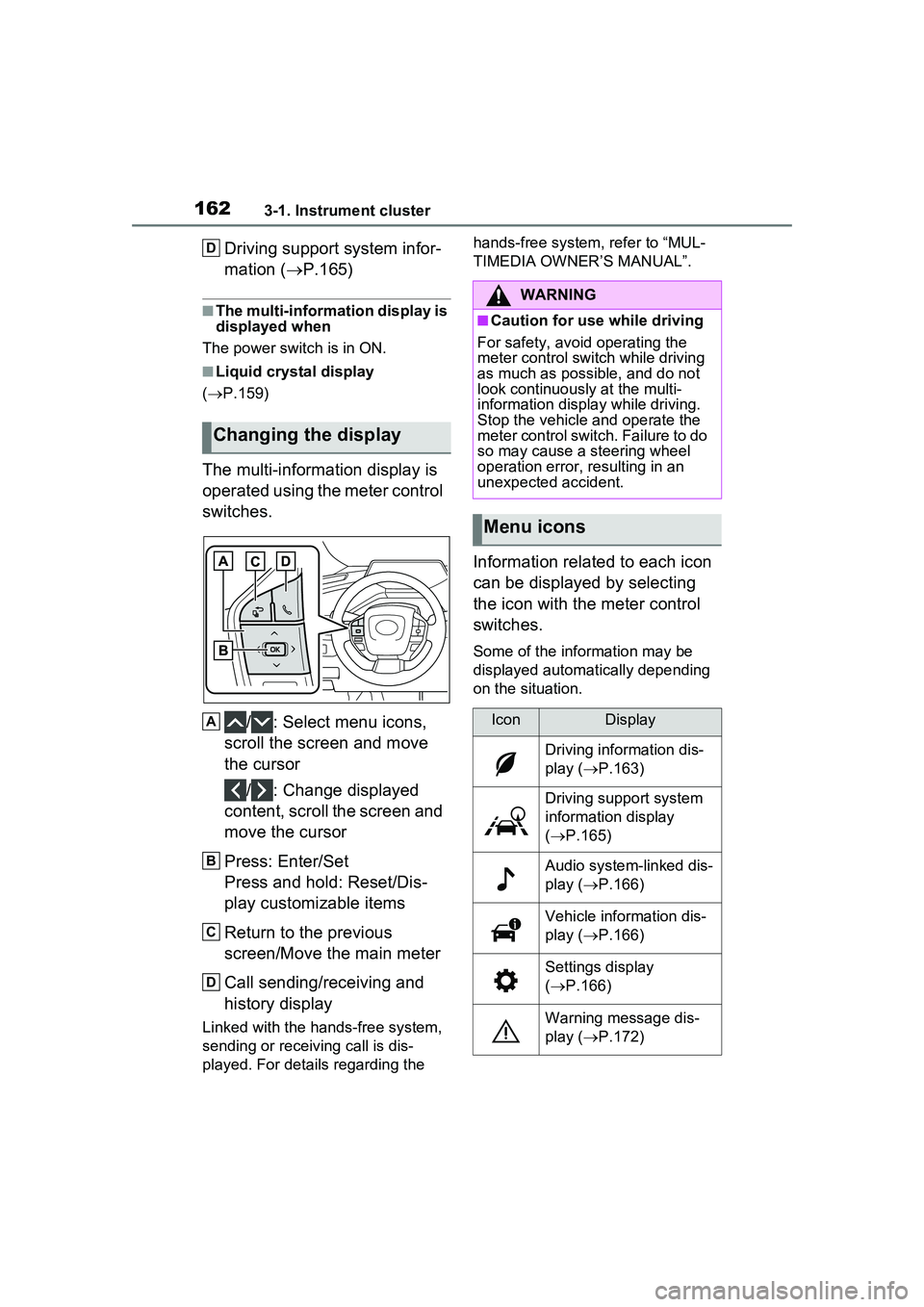
/ : Select menu icons,
scroll the screen and move
the cursor
/ : Change displayed
content, scroll the screen and
move the cursor
Press: Enter/Set
Press and hold: Reset/Dis-
play customizable items
Return to the previous
screen/Move the main meter
Call sending/receiving and
history display
Linked with the hands-free system,
sending or receiving call is dis-
played. For details regarding the hands-free system, refer to “MUL-
TIMEDIA OWNER’S MANUAL”.
Information related to each icon
can be displayed by selecting
the icon with the meter control
switches.
Some of the information may be
displayed automatically depending
on the situation.
Changing the display
D
A
B
C
D
WARNING
■Caution for use while driving
For safety, avoid operating the
meter control switch while driving
as much as possible, and do not
look continuously at the multi-
information displa y while driving.
Stop the vehicle and operate the
meter control switch. Failure to do
so may cause a steering wheel
operation error, resulting in an
unexpected accident.
Menu icons
IconDisplay
Driving information dis-
play ( P.163)
Driving support system
information display
( P.165)
Audio system-linked dis-
play ( P.166)
Vehicle information dis-
play ( P.166)
Settings display
( P.166)
Warning message dis-
play ( P.172)
Page 170 of 680
1703-1. Instrument cluster
system.
•“Timing”
Select to set the alert timing for
FCTA system.
Regenerative brake
Select to set up the following items.
• “Deceleration”
Select to change the regenerative
braking force when Regeneration
Boost is operating. ( P.260)
• “Deceleration Memory”
Select to store the settings for
regenerative braking force.
( P.260)
“TPWS setting” (Tire Pres-
sure Warning System)
( P.516)
• “Tire Set Switching”
Select to register the tire pressure
warning system sensor ID code set.
( P.524)
• “Tire Rotation”
Select to register the position of
each wheel after performing a tire
rotation. ( P.518)
• “Tire Pressure Setting”
Select to perform the tire inflation
pressure setting procedure of the
tire pressure warning system.
( P.520)
• “Pressure unit setting”
Select to change the units of mea-
sure displayed.( P.619)
Driver monitor (if equipped)
Select to enable/disable the driver
monitor warning function. ( P.292)
PBD (Power Back Door) (if equipped) (
P.194)
Select to set up the following items.
• System settings
Select to enable/d isable the power
back door system.
• “Opening Adjustment”
Select the open position when
power back door is fully open.
•“Volume”
Select to set the volume of the
buzzer which sounds when the
power back door system operates.
“Scheduled Maintenance”
Select to reset the scheduled main-
tenance information (message indi-
cating maintenance is required and
distance until the next mainte-
nance) after all maintenance is per-
formed.
Oil Maintenance
Select to reset th e Oil maintenance.
( P.506)
Rear Seat Reminder
( P.188)
Select to enable/disable the rear
seat reminder function.
Digital Keys (if equipped)
Select to reset registered digital
keys. ( P.183)
■ Settings
“Language”
Select to change the language on
the multi-information display.
“Units”
Select to change the unit of mea-
sure for fuel consumption.
“Meter Type”
Page 179 of 680
179
4
4
Before driving
Before driving
4-1. Key informationKeys ............................ 180
Digital Key ................... 183
4-2. Opening, closing and locking the doors
Side doors ................... 185
Back door .................... 191
Smart key system ....... 203
4-3. Adjusting the seats Front seats .................. 209
Rear seats................... 210
Head restraints............ 212
4-4. Adjusting the steering wheel and mirrors
Steering wheel ............ 215
Inside rear view mirror 216
Digital Rear-view Mirror .................................. 217
Outside rear view mirrors .................................. 225
4-5. Opening, closing the win- dows
Power windows ........... 227
4-6. Favorite settings Driving position memory.................................. 230
My Settings ................. 234
Page 215 of 680
2154-4. Adjusting the steering wheel and mirrors
4
Before driving
4-4.Adjusting the steering wheel and mirrors
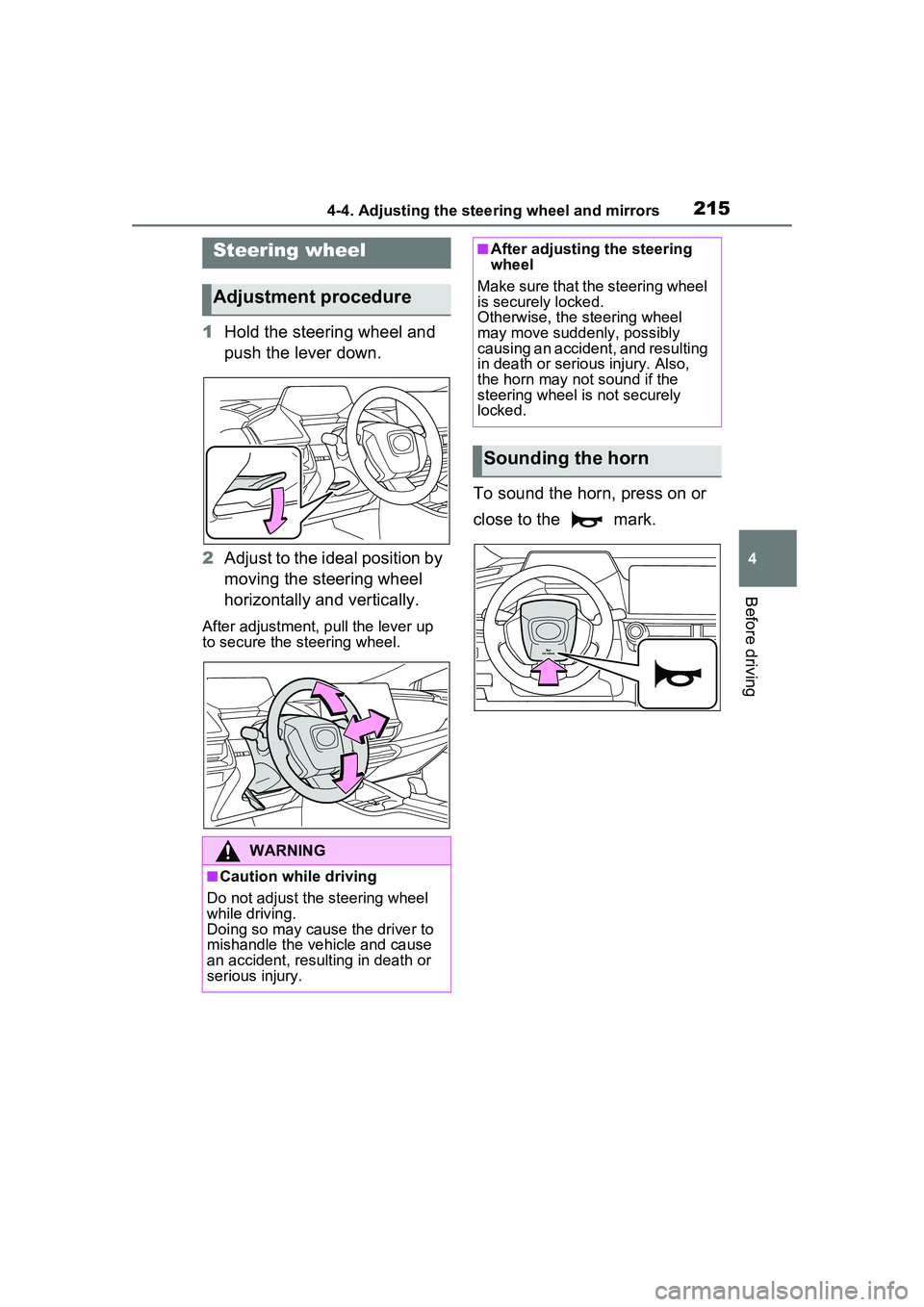
1Hold the steering wheel and
push the lever down.
2 Adjust to the ideal position by
moving the steering wheel
horizontally and vertically.
After adjustment, pull the lever up
to secure the steering wheel.
To sound the horn, press on or
close to the mark.
Steering wheel
Adjustment procedure
WARNING
■Caution while driving
Do not adjust the steering wheel
while driving.
Doing so may cause the driver to
mishandle the vehicle and cause
an accident, resulting in death or
serious injury.
■After adjusting the steering
wheel
Make sure that the steering wheel
is securely locked.
Otherwise, the steering wheel
may move suddenly, possibly
causing an accident, and resulting
in death or serious injury. Also,
the horn may not sound if the
steering wheel is not securely
locked.
Sounding the horn
Page 216 of 680
2164-4. Adjusting the steering wheel and mirrors
*: If equipped
The height of the rear view mir-
ror can be adjusted to suit your
driving posture.
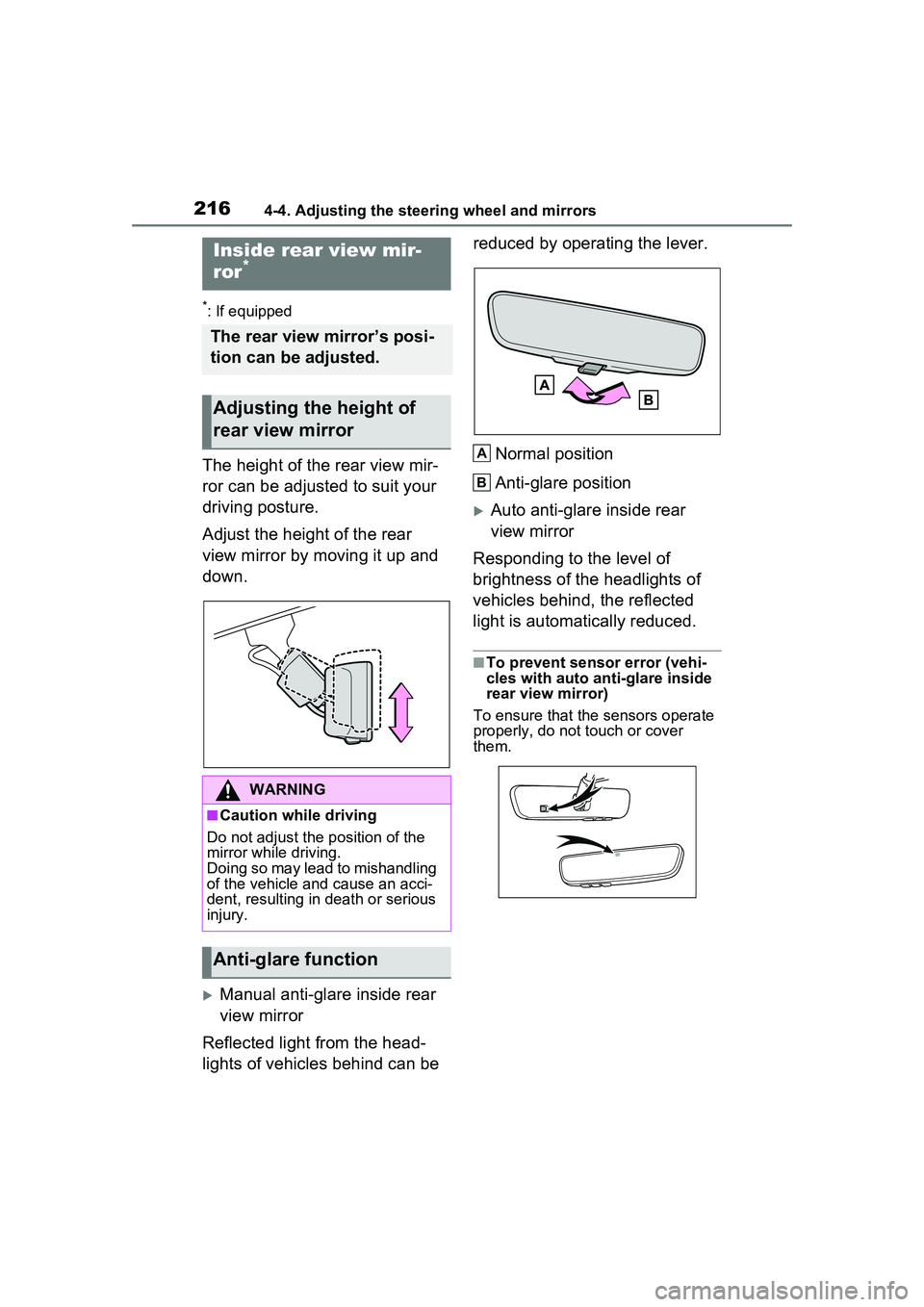
Adjust the height of the rear
view mirror by moving it up and
down.
Manual anti-glare inside rear
view mirror
Reflected light from the head-
lights of vehicles behind can be reduced by operating the lever.
Normal position
Anti-glare position
Auto anti-glare inside rear
view mirror
Responding to the level of
brightness of the headlights of
vehicles behind, the reflected
light is automatically reduced.
■To prevent sensor error (vehi-
cles with auto anti-glare inside
rear view mirror)
To ensure that the sensors operate
properly, do not touch or cover
them.
Inside rear view mir-
ror*
The rear view mirror’s posi-
tion can be adjusted.
Adjusting the height of
rear view mirror
WARNING
■Caution while driving
Do not adjust the position of the
mirror while driving.
Doing so may lead to mishandling
of the vehicle and cause an acci-
dent, resulting in death or serious
injury.
Anti-glare function
A
B
Page 217 of 680
2174-4. Adjusting the steering wheel and mirrors
4
Before driving
*: If equipped
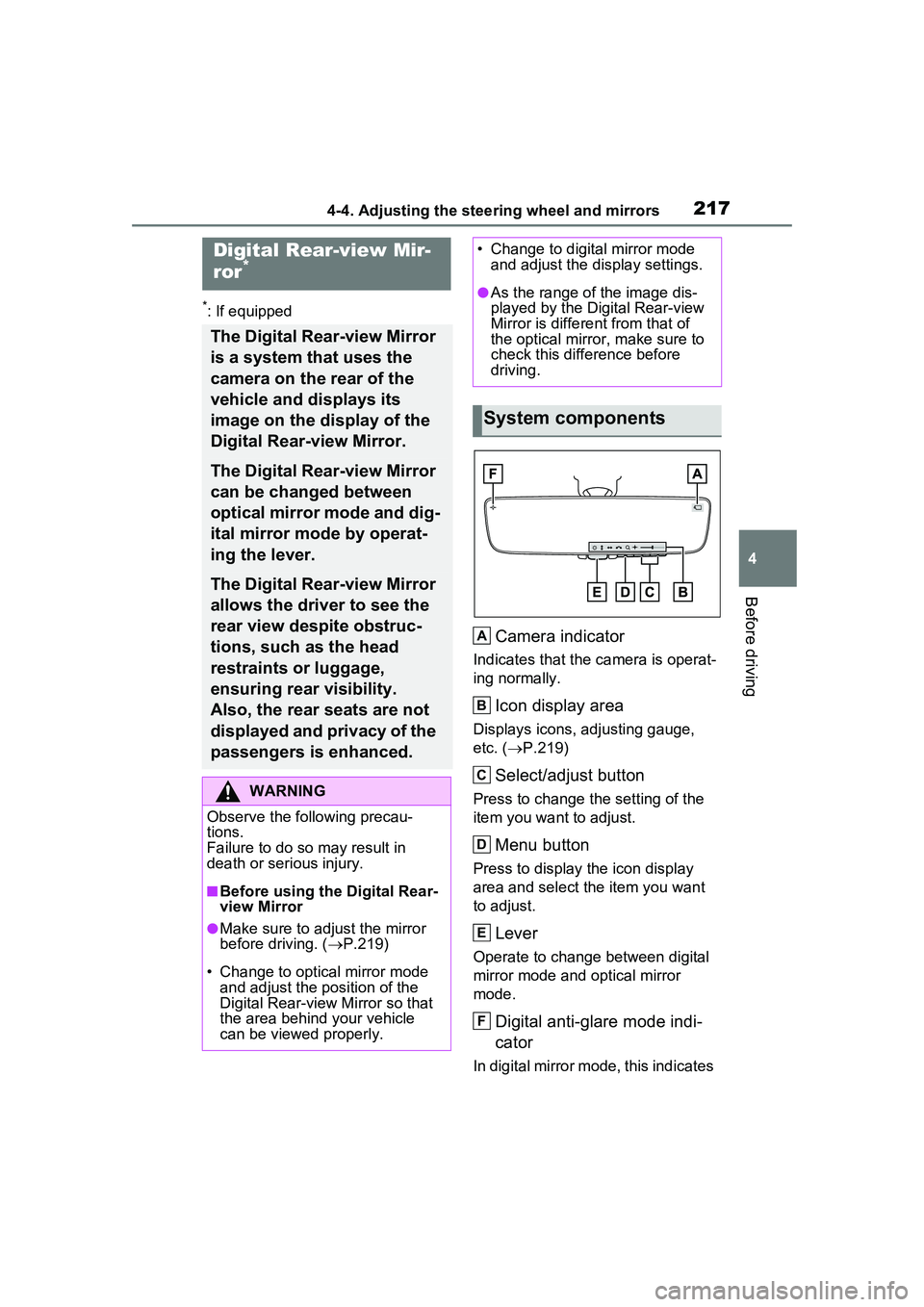
Camera indicator
Indicates that the camera is operat-
ing normally.
Icon display area
Displays icons, adjusting gauge,
etc. (P.219)
Select/adjust button
Press to change the setting of the
item you want to adjust.
Menu button
Press to display the icon display
area and select the item you want
to adjust.
Lever
Operate to change between digital
mirror mode and optical mirror
mode.
Digital anti-glare mode indi-
cator
In digital mirror mode, this indicates
Digital Rear-view Mir-
ror*
The Digital Rear-view Mirror
is a system that uses the
camera on the rear of the
vehicle and displays its
image on the display of the
Digital Rear-view Mirror.
The Digital Rear-view Mirror
can be changed between
optical mirror mode and dig-
ital mirror mode by operat-
ing the lever.
The Digital Rear-view Mirror
allows the driver to see the
rear view despite obstruc-
tions, such as the head
restraints or luggage,
ensuring rear visibility.
Also, the rear seats are not
displayed and privacy of the
passengers is enhanced.
WARNING
Observe the following precau-
tions.
Failure to do so may result in
death or serious injury.
■Before using the Digital Rear-
view Mirror
●Make sure to adjust the mirror
before driving. ( P.219)
• Change to optical mirror mode and adjust the position of the
Digital Rear-view Mirror so that
the area behind your vehicle
can be viewed properly.
• Change to digital mirror mode and adjust the display settings.
●As the range of the image dis-
played by the Digital Rear-view
Mirror is different from that of
the optical mirror, make sure to
check this difference before
driving.
System components
A
B
C
D
E
F
Page 218 of 680
2184-4. Adjusting the steering wheel and mirrors
that the anti-glare function is on.
( P.219)
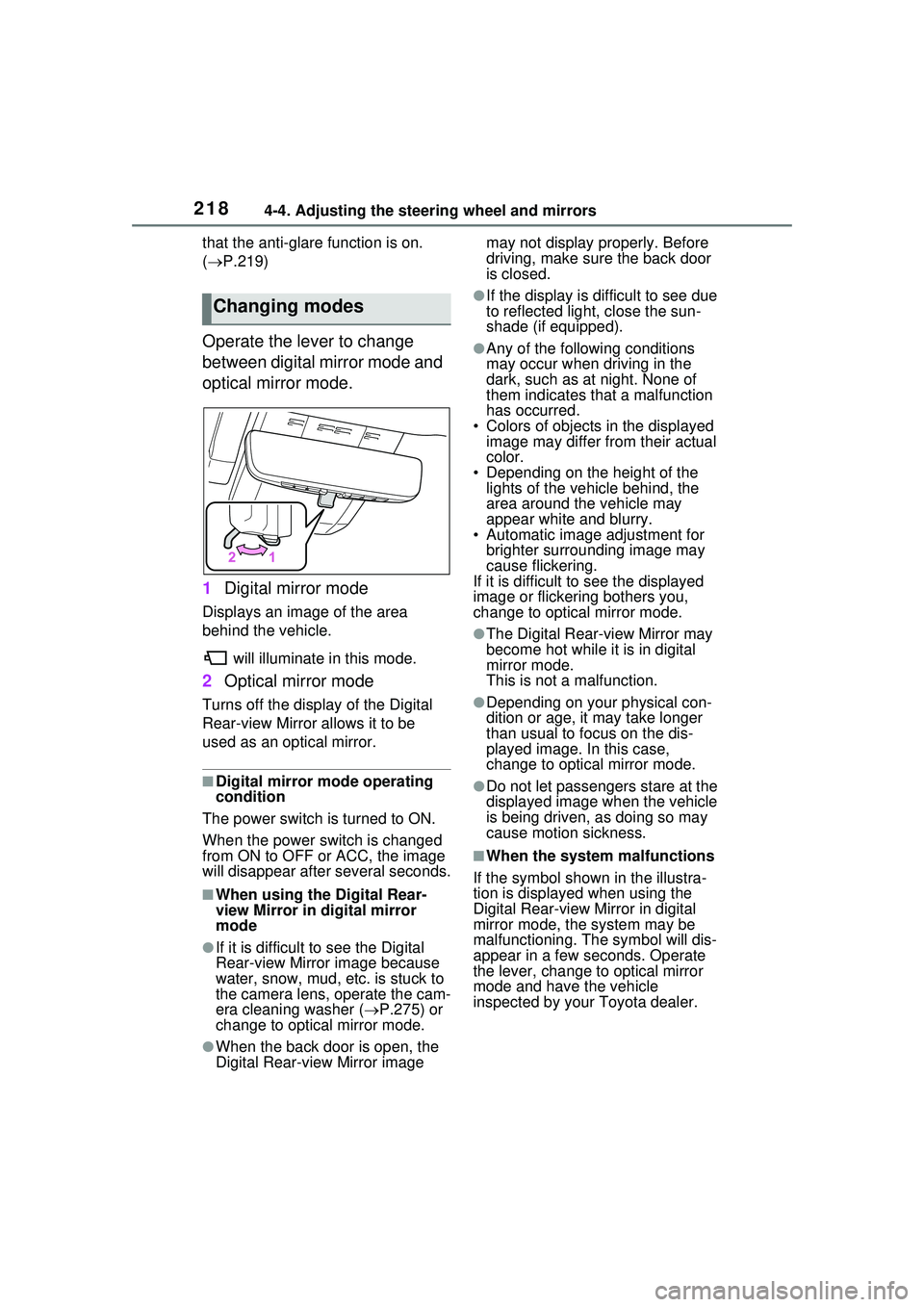
Operate the lever to change
between digital mirror mode and
optical mirror mode.
1 Digital mirror mode
Displays an image of the area
behind the vehicle.
will illuminate in this mode.
2Optical mirror mode
Turns off the display of the Digital
Rear-view Mirror allows it to be
used as an optical mirror.
■Digital mirror mode operating
condition
The power switch is turned to ON.
When the power switch is changed
from ON to OFF or ACC, the image
will disappear afte r several seconds.
■When using the Digital Rear-
view Mirror in digital mirror
mode
●If it is difficult to see the Digital
Rear-view Mirror image because
water, snow, mud, etc. is stuck to
the camera lens, operate the cam-
era cleaning washer ( P.275) or
change to optical mirror mode.
●When the back door is open, the
Digital Rear-view Mirror image may not display properly. Before
driving, make sure the back door
is closed.
●If the display is difficult to see due
to reflected light, close the sun-
shade (if equipped).
●Any of the following conditions
may occur when driving in the
dark, such as at night. None of
them indicates that a malfunction
has occurred.
• Colors of objects in the displayed image may differ from their actual
color.
• Depending on the height of the lights of the vehicle behind, the
area around the vehicle may
appear white and blurry.
• Automatic image adjustment for
brighter surrounding image may
cause flickering.
If it is difficult to see the displayed
image or flickering bothers you,
change to optical mirror mode.
●The Digital Rear-view Mirror may
become hot while it is in digital
mirror mode.
This is not a malfunction.
●Depending on your physical con-
dition or age, it may take longer
than usual to focus on the dis-
played image. In this case,
change to optical mirror mode.
●Do not let passengers stare at the
displayed image when the vehicle
is being driven, as doing so may
cause motion sickness.
■When the system malfunctions
If the symbol shown in the illustra-
tion is displayed when using the
Digital Rear-view Mirror in digital
mirror mode, the system may be
malfunctioning. The symbol will dis-
appear in a few seconds. Operate
the lever, change to optical mirror
mode and have the vehicle
inspected by your Toyota dealer.
Changing modes