Power TOYOTA PRIUS PRIME 2023 Repair Manual
[x] Cancel search | Manufacturer: TOYOTA, Model Year: 2023, Model line: PRIUS PRIME, Model: TOYOTA PRIUS PRIME 2023Pages: 680, PDF Size: 14.97 MB
Page 141 of 680
1412-2. Charging
2
Plug-in hybrid system
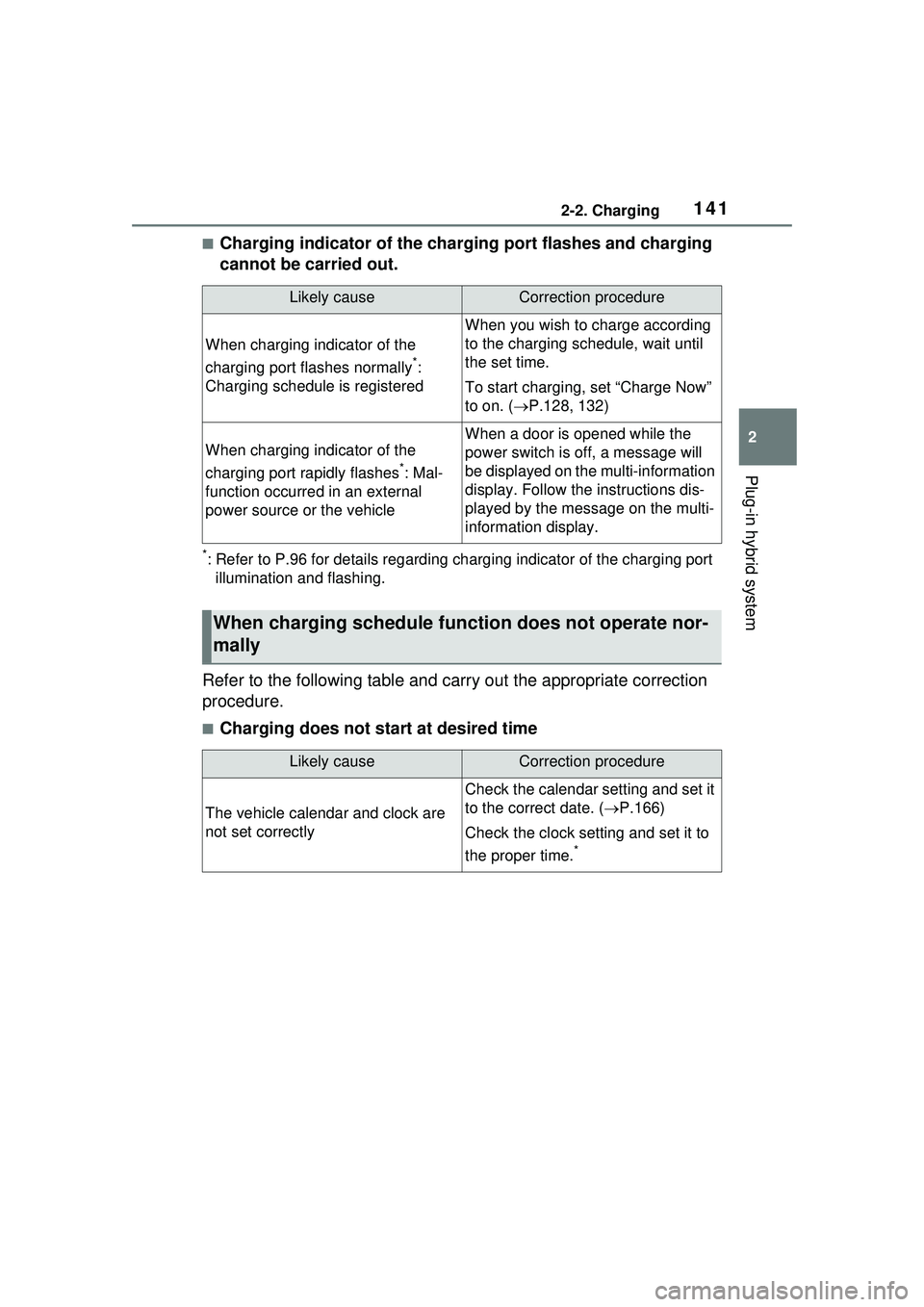
■Charging indicator of the charging port flashes and charging
cannot be carried out.
*: Refer to P.96 for details regarding charging indicator of the charging port illumination and flashing.
Refer to the following table and carry out the appropriate correction
procedure.
■Charging does not start at desired time
Likely causeCorrection procedure
When charging indicator of the
charging port flashes normally
*:
Charging schedule is registered
When you wish to charge according
to the charging schedule, wait until
the set time.
To start charging, set “Charge Now”
to on. ( P.128, 132)
When charging indicator of the
charging port rapidly flashes
*: Mal-
function occurred in an external
power source or the vehicle
When a door is opened while the
power switch is off, a message will
be displayed on th e multi-information
display. Follow the instructions dis-
played by the message on the multi-
information display.
When charging schedule func tion does not operate nor-
mally
Likely causeCorrection procedure
The vehicle calendar and clock are
not set correctly
Check the calendar setting and set it
to the correct date. ( P.166)
Check the clock setting and set it to
the proper time.
*
Page 143 of 680
1432-2. Charging
2
Plug-in hybrid system
When a door is opened with the
power switch off, after charging,
a message is displayed in the
multi-information display.
When this occurs, follow the
instructions displayed on the
screen.
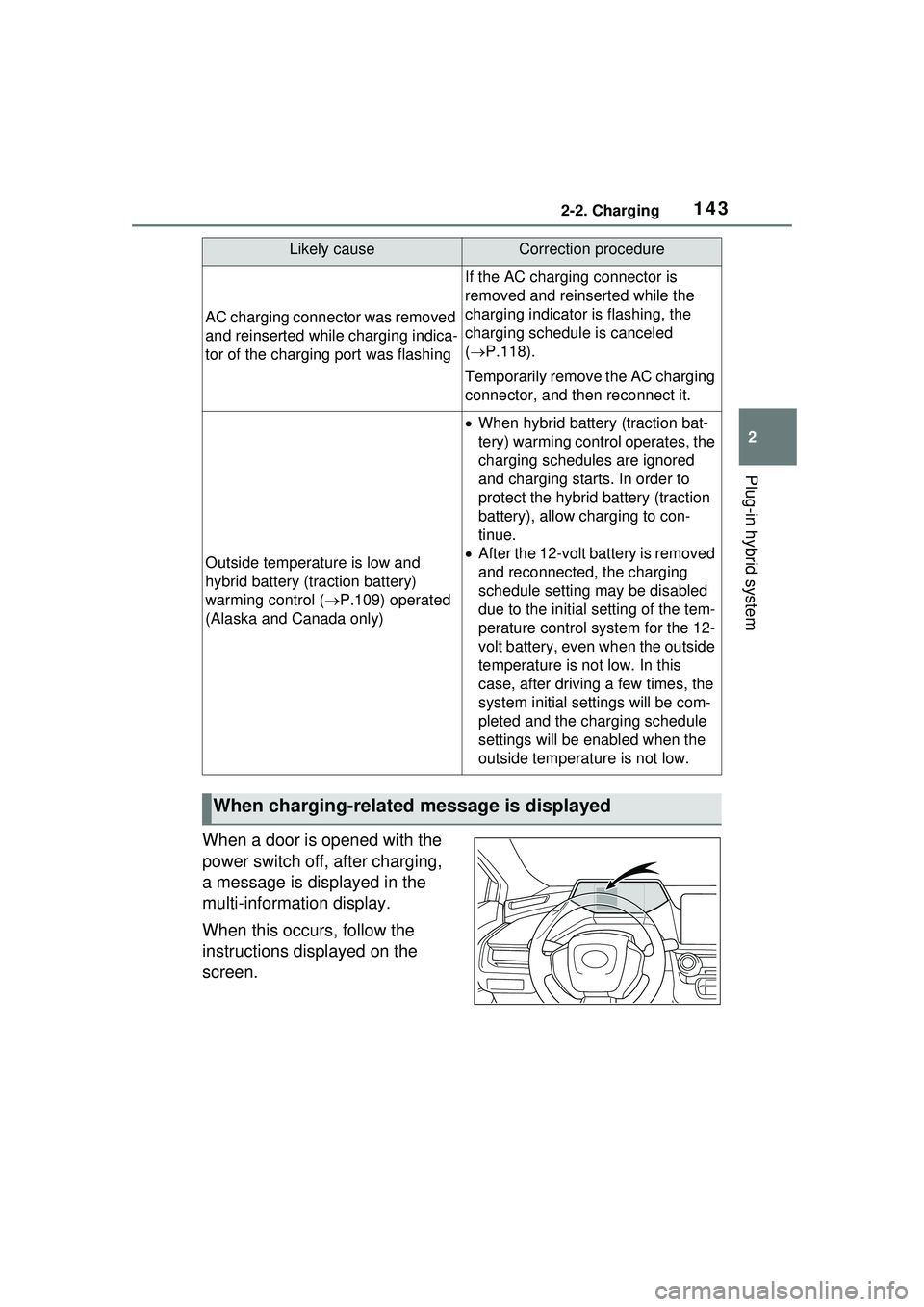
AC charging connector was removed
and reinserted while charging indica-
tor of the charging port was flashing
If the AC charging connector is
removed and reinserted while the
charging indicator is flashing, the
charging schedule is canceled
( P.118).
Temporarily remove the AC charging
connector, and then reconnect it.
Outside temperature is low and
hybrid battery (traction battery)
warming control ( P.109) operated
(Alaska and Canada only)
When hybrid battery (traction bat-
tery) warming control operates, the
charging schedules are ignored
and charging starts. In order to
protect the hybrid battery (traction
battery), allow charging to con-
tinue.
After the 12-volt battery is removed
and reconnected, the charging
schedule setting may be disabled
due to the initial setting of the tem-
perature control system for the 12-
volt battery, even when the outside
temperature is not low. In this
case, after driving a few times, the
system initial settings will be com-
pleted and the charging schedule
settings will be enabled when the
outside temperature is not low.
When charging-related message is displayed
Likely causeCorrection procedure
Page 145 of 680
1452-2. Charging
2
Plug-in hybrid system
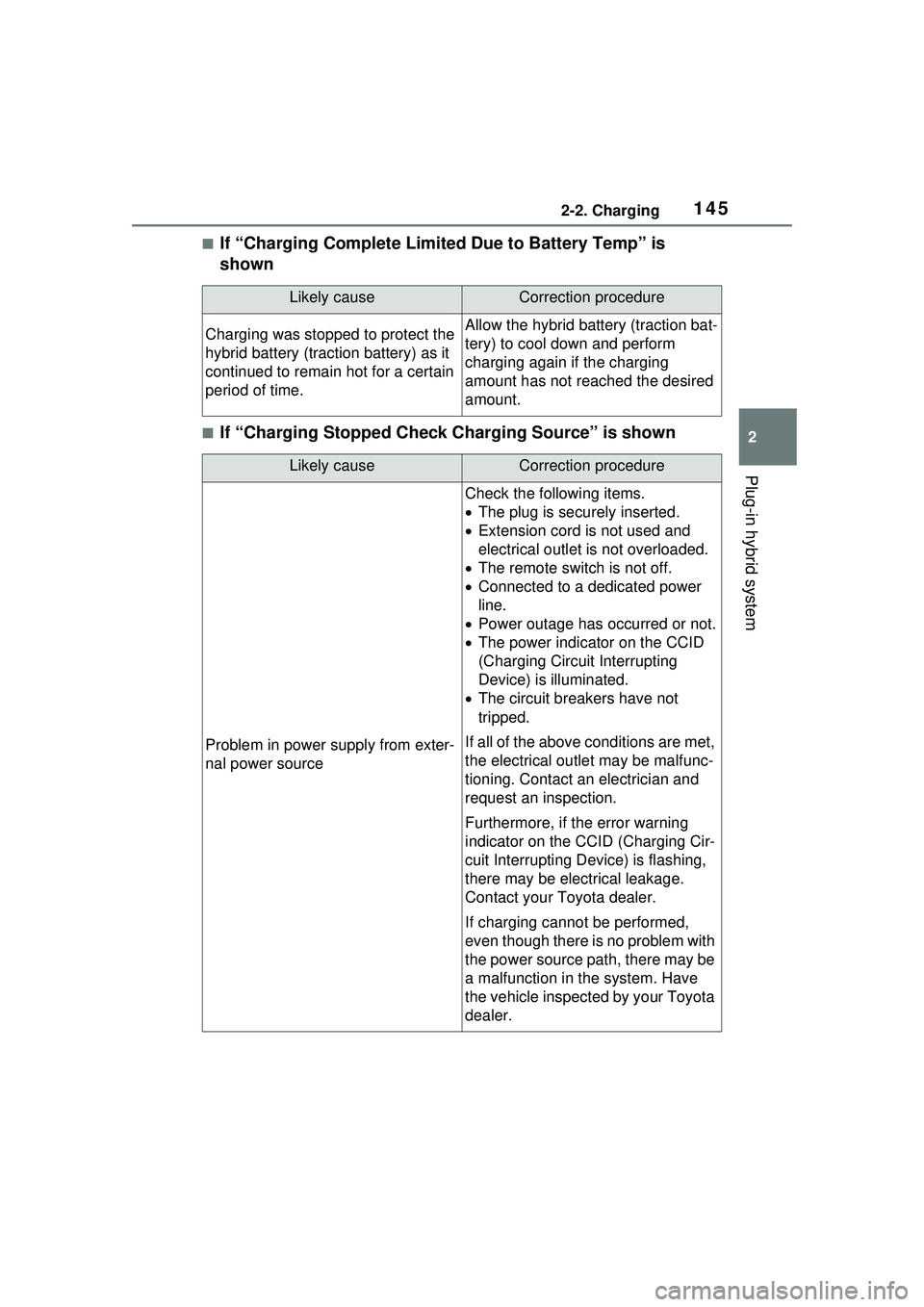
■If “Charging Complete Limited Due to Battery Temp” is
shown
■If “Charging Stopped Check Charging Source” is shown
Likely causeCorrection procedure
Charging was stopped to protect the
hybrid battery (traction battery) as it
continued to remain hot for a certain
period of time.Allow the hybrid battery (traction bat-
tery) to cool down and perform
charging again if the charging
amount has not reached the desired
amount.
Likely causeCorrection procedure
Problem in power supply from exter-
nal power source
Check the following items.
The plug is secu rely inserted.
Extension cord is not used and
electrical outlet is not overloaded.
The remote switch is not off.
Connected to a dedicated power
line.
Power outage has occurred or not.
The power indicator on the CCID
(Charging Circuit Interrupting
Device) is illuminated.
The circuit breakers have not
tripped.
If all of the above conditions are met,
the electrical outlet may be malfunc-
tioning. Contact an electrician and
request an inspection.
Furthermore, if the error warning
indicator on the CCID (Charging Cir-
cuit Interrupting Device) is flashing,
there may be electrical leakage.
Contact your Toyota dealer.
If charging cannot be performed,
even though there is no problem with
the power source path, there may be
a malfunction in the system. Have
the vehicle inspected by your Toyota
dealer.
Page 146 of 680
1462-2. Charging
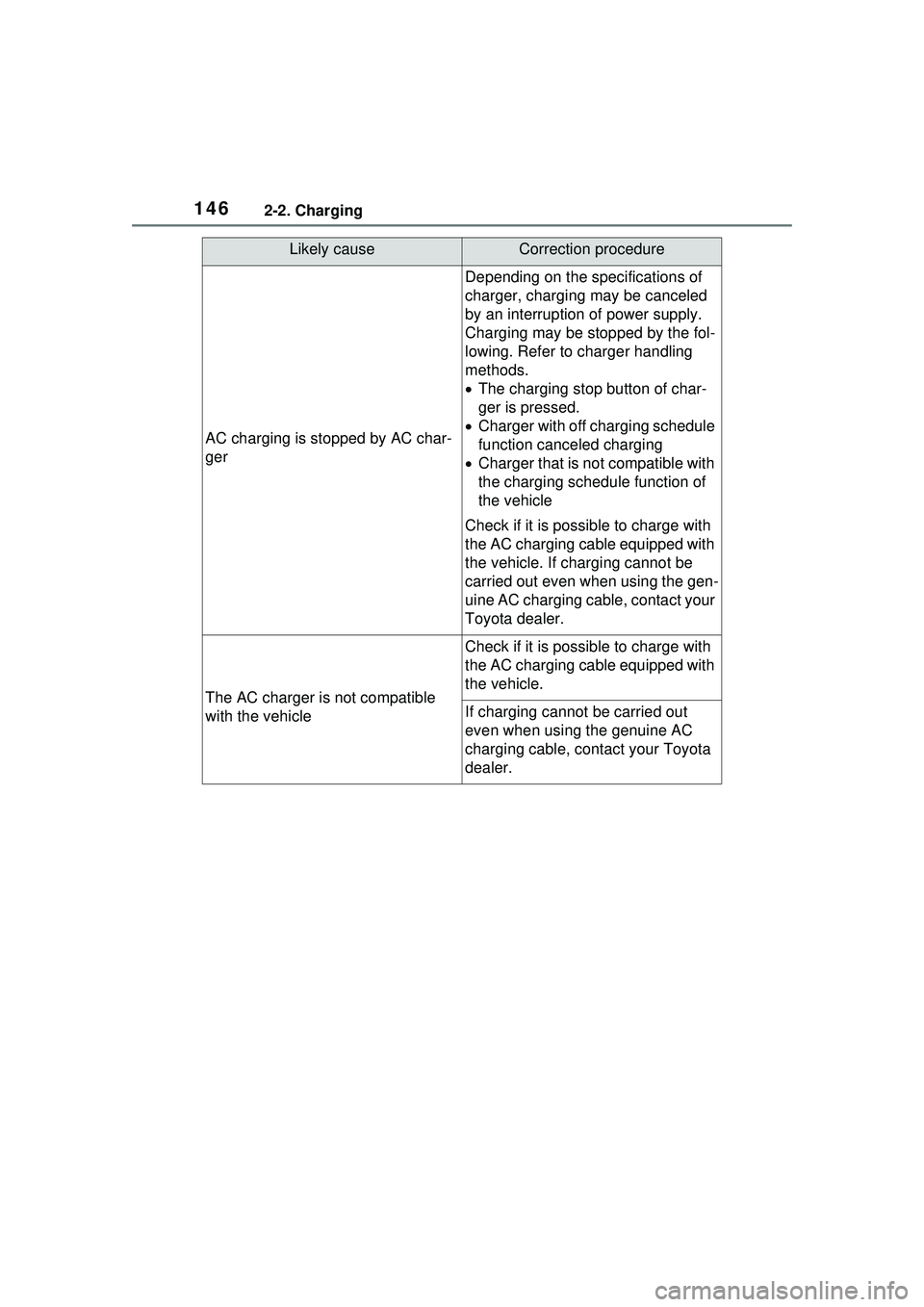
AC charging is stopped by AC char-
ger
Depending on the specifications of
charger, charging may be canceled
by an interruption of power supply.
Charging may be stopped by the fol-
lowing. Refer to charger handling
methods.
The charging stop button of char-
ger is pressed.
Charger with off charging schedule
function canceled charging
Charger that is no t compatible with
the charging schedule function of
the vehicle
Check if it is possi ble to charge with
the AC charging cable equipped with
the vehicle. If charging cannot be
carried out even when using the gen-
uine AC charging cable, contact your
Toyota dealer.
The AC charger is not compatible
with the vehicle
Check if it is possi ble to charge with
the AC charging cable equipped with
the vehicle.
If charging cannot be carried out
even when using the genuine AC
charging cable, contact your Toyota
dealer.
Likely causeCorrection procedure
Page 147 of 680
1472-2. Charging
2
Plug-in hybrid system
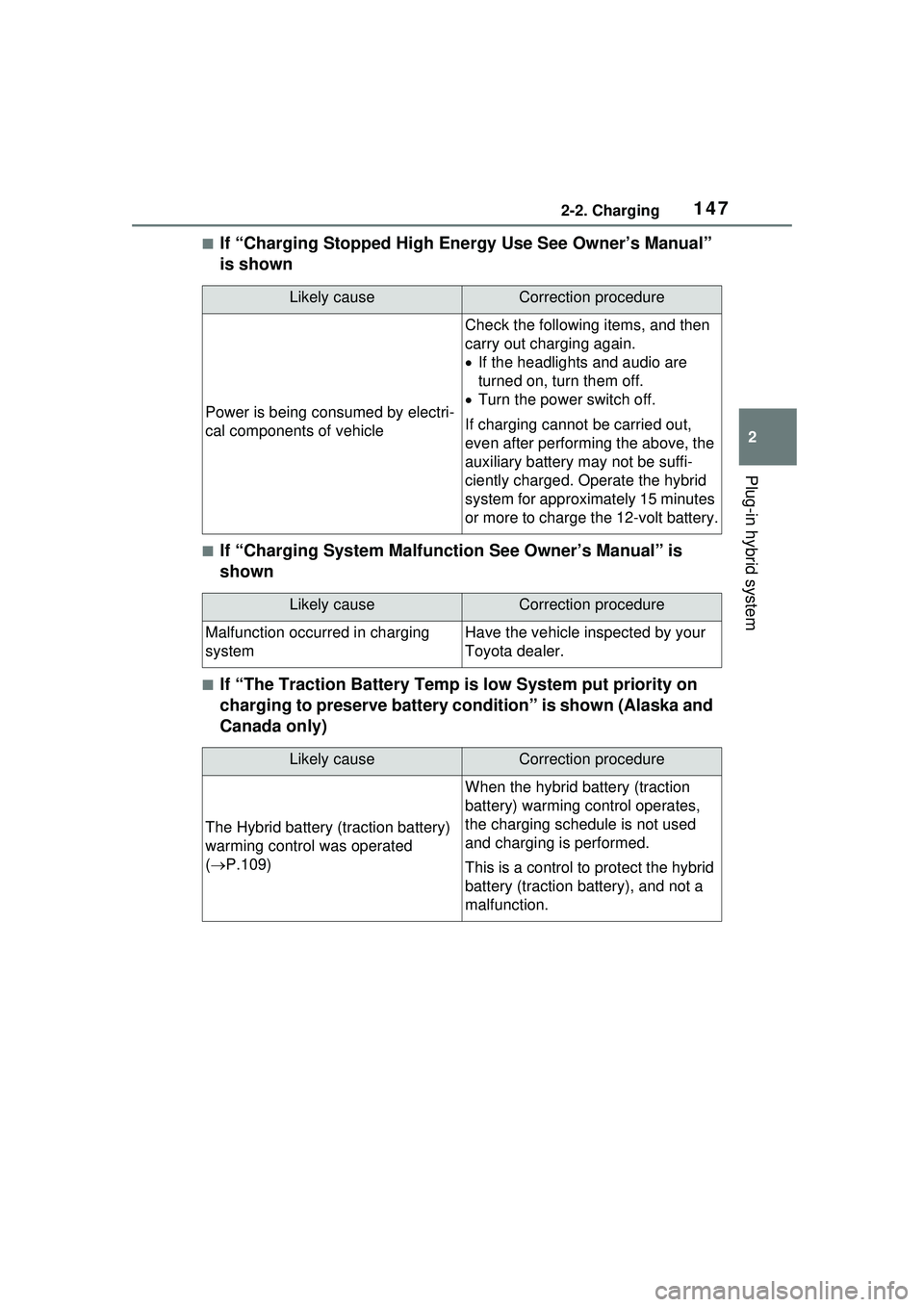
■If “Charging Stopped High Energy Use See Owner’s Manual”
is shown
■If “Charging System Malfunction See Owner’s Manual” is
shown
■If “The Traction Battery Temp is low System put priority on
charging to preserve battery condition” is shown (Alaska and
Canada only)
Likely causeCorrection procedure
Power is being consumed by electri-
cal components of vehicle
Check the following items, and then
carry out charging again.
If the headlights and audio are
turned on, turn them off.
Turn the power switch off.
If charging cannot be carried out,
even after performing the above, the
auxiliary battery may not be suffi-
ciently charged. Operate the hybrid
system for approximately 15 minutes
or more to charge the 12-volt battery.
Likely causeCorrection procedure
Malfunction occurred in charging
systemHave the vehicle inspected by your
Toyota dealer.
Likely causeCorrection procedure
The Hybrid battery (traction battery)
warming control was operated
( P.109)
When the hybrid battery (traction
battery) warming control operates,
the charging schedule is not used
and charging is performed.
This is a control to protect the hybrid
battery (traction battery), and not a
malfunction.
Page 151 of 680
1513-1. Instrument cluster
3
Vehicle status information and indicators
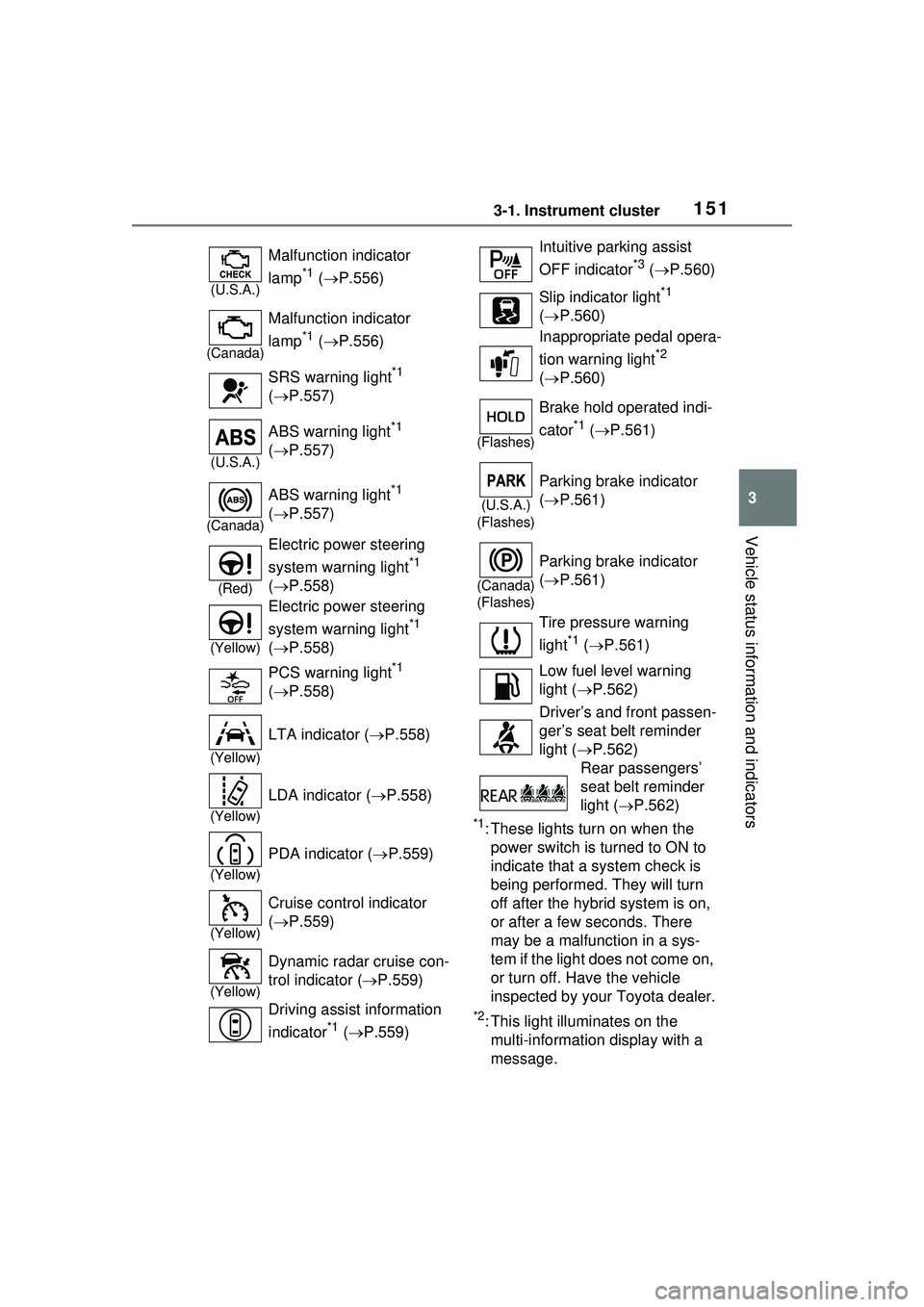
*1: These lights turn on when the power switch is turned to ON to
indicate that a system check is
being performed. They will turn
off after the hybrid system is on,
or after a few seconds. There
may be a malfunction in a sys-
tem if the light does not come on,
or turn off. Have the vehicle
inspected by your Toyota dealer.
*2: This light illuminates on the multi-informatio n display with a
message.
(U.S.A.)
Malfunction indicator
lamp
*1 ( P.556)
(Canada)
Malfunction indicator
lamp
*1 ( P.556)
SRS warning light
*1
( P.557)
(U.S.A.)
ABS warning light*1
( P.557)
(Canada)
ABS warning light*1
( P.557)
(Red)
Electric power steering
system warning light
*1
( P.558)
(Yellow)
Electric power steering
system warning light
*1
( P.558)
PCS warning light
*1
( P.558)
(Yellow)
LTA indicator ( P.558)
(Yellow)
LDA indicator ( P.558)
(Yellow)
PDA indicator ( P.559)
(Yellow)
Cruise control indicator
( P.559)
(Yellow)
Dynamic radar cruise con-
trol indicator ( P.559)
Driving assist information
indicator
*1 ( P.559)
Intuitive parking assist
OFF indicator
*3 ( P.560)
Slip indicator light
*1
( P.560)
Inappropriate pedal opera-
tion warning light
*2
( P.560)
(Flashes)
Brake hold operated indi-
cator
*1 ( P.561)
(U.S.A.)
(Flashes)
Parking brake indicator
( P.561)
(Canada)
(Flashes)
Parking brake indicator
( P.561)
Tire pressure warning
light
*1 ( P.561)
Low fuel level warning
light ( P.562)
Driver’s and front passen-
ger’s seat belt reminder
light ( P.562)
Rear passengers’
seat belt reminder
light ( P.562)
Page 152 of 680
1523-1. Instrument cluster
*3: Intuitive parking assist OFF indi-cator turns on when the power
switch is turned to ON while the
Intuitive parking assist function is
on. It will turn off after a few sec-
onds.
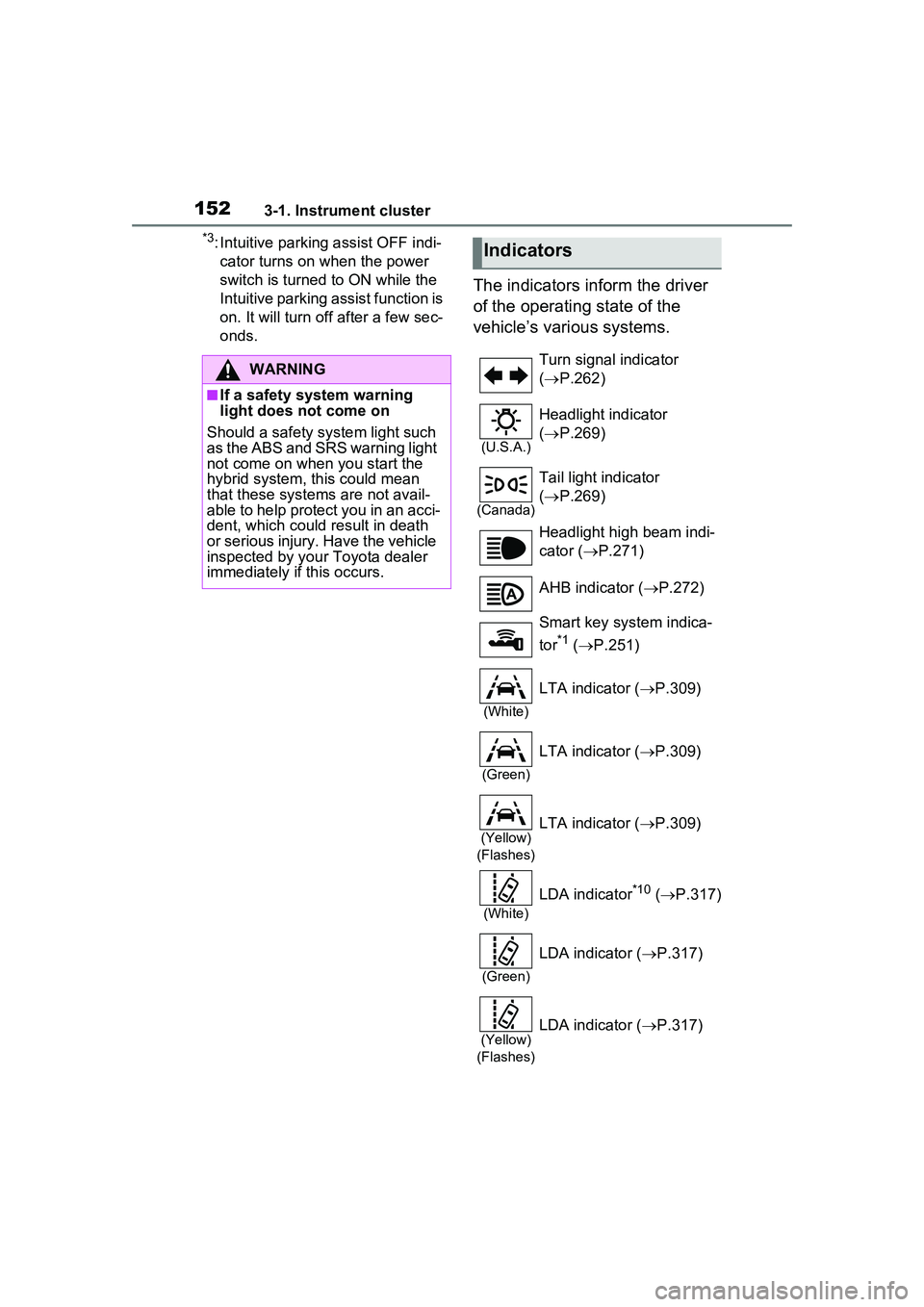
The indicators inform the driver
of the operating state of the
vehicle’s various systems.
WARNING
■If a safety system warning
light does not come on
Should a safety system light such
as the ABS and SRS warning light
not come on when you start the
hybrid system, this could mean
that these systems are not avail-
able to help protect you in an acci-
dent, which could result in death
or serious injury. Have the vehicle
inspected by your Toyota dealer
immediately if this occurs.
Indicators
Turn signal indicator
( P.262)
(U.S.A.)
Headlight indicator
( P.269)
(Canada)
Tail light indicator
( P.269)
Headlight high beam indi-
cator ( P.271)
AHB indicator ( P.272)
Smart key system indica-
tor
*1 ( P.251)
(White)
LTA indicator ( P.309)
(Green)
LTA indicator ( P.309)
(Yellow)
(Flashes)LTA indicator ( P.309)
(White)
LDA indicator*10 ( P.317)
(Green)
LDA indicator ( P.317)
(Yellow)
(Flashes)LDA indicator ( P.317)
Page 154 of 680
1543-1. Instrument cluster
multi-information display with a
message.
*2: The light comes on when the system is turned off.
*3: Intuitive parking assist OFF indi-cator turns on when the power
switch is turned to ON while the
Intuitive parking assist function is
on. It will turn off after a few sec-
onds.
*4: These lights turn on when the power switch is turned to ON to
indicate that a system check is
being performed. They will turn
off after the hybrid system is on,
or after a few seconds. There
may be a malfunction in a sys-
tem if the lights do not turn on, or
turn off. Have the vehicle
inspected by your Toyota dealer.
*5: This light illuminates on the out- side rear view mirrors.
*6: This light illuminates on the over-head console panel.
*7: When the outside temperature is approximately 37°F (3°C) or
lower, the indicator will flash for
approximately 10 seconds, then
stay on.
*8: The displayed indicator changes according to the current plug-in
hybrid system operation mode.
*9: For Puerto Rico
*10: Except for Puerto Rico
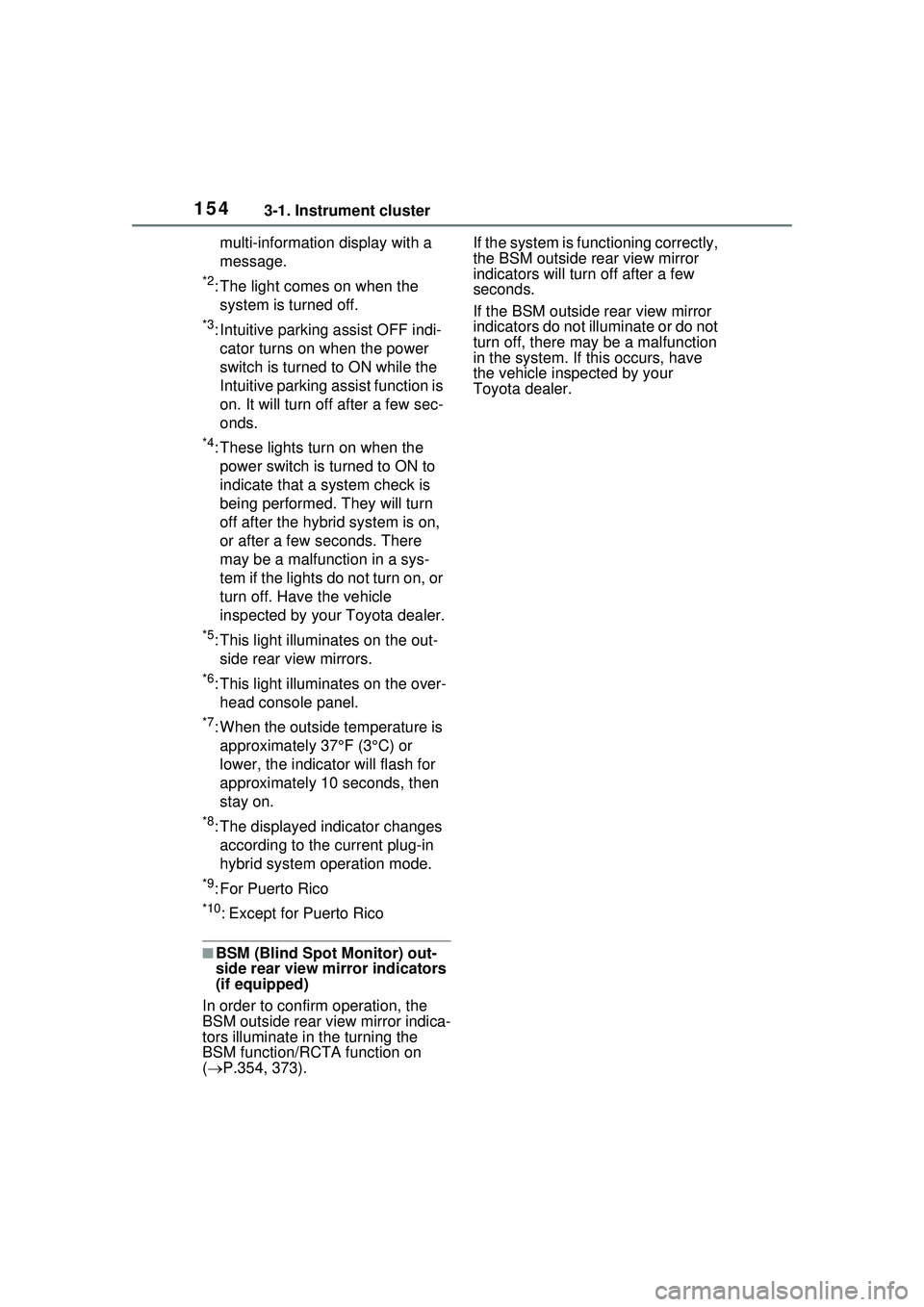
■BSM (Blind Spot Monitor) out-
side rear view mirror indicators
(if equipped)
In order to confirm operation, the
BSM outside rear view mirror indica-
tors illuminate in the turning the
BSM function/RCTA function on
( P.354, 373). If the system is functioning correctly,
the BSM outside rear view mirror
indicators will turn off after a few
seconds.
If the BSM outside rear view mirror
indicators do not illuminate or do not
turn off, there may be a malfunction
in the system. If this occurs, have
the vehicle inspected by your
Toyota dealer.
Page 157 of 680
1573-1. Instrument cluster
3
Vehicle status information and indicators
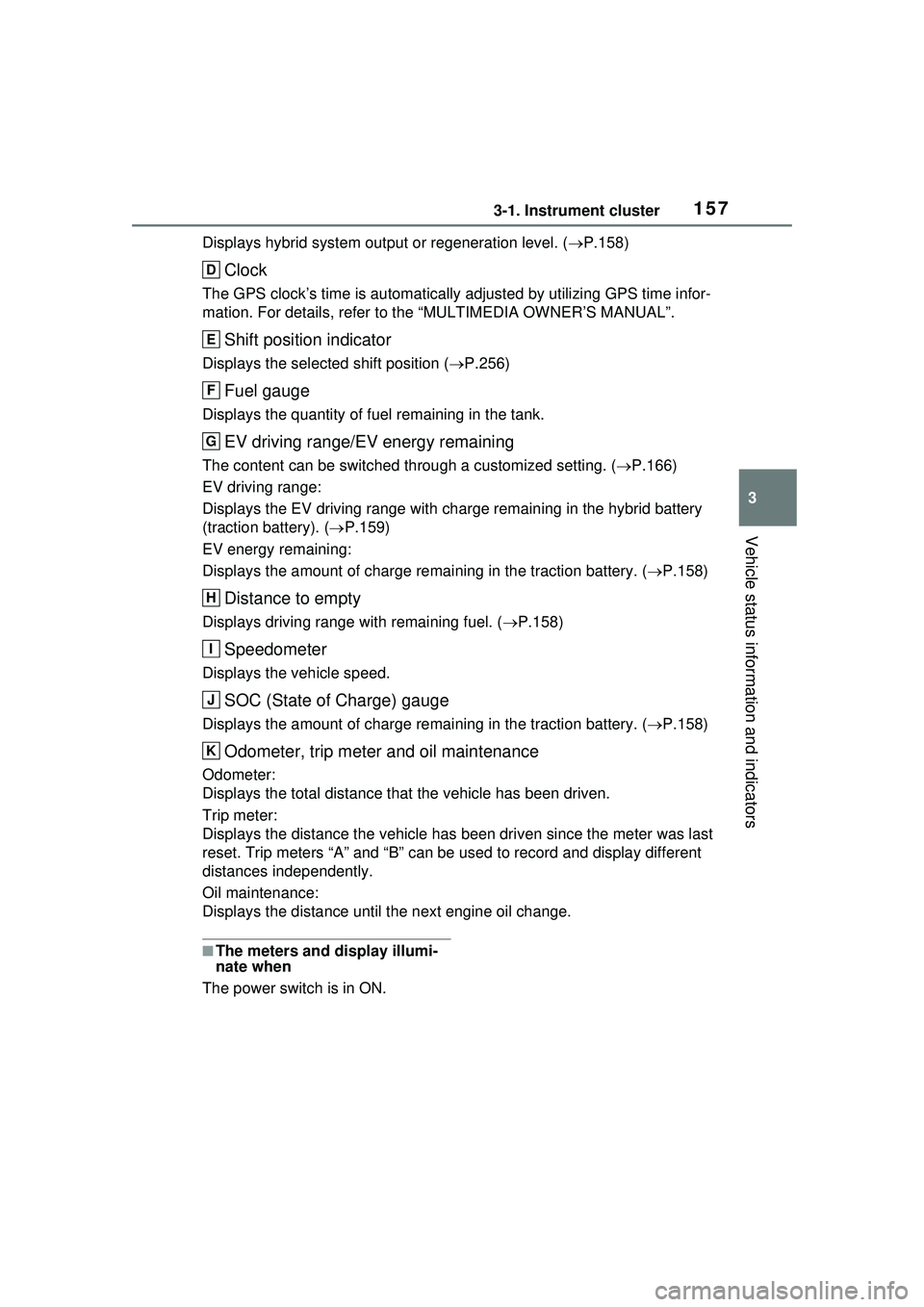
Displays hybrid system output or regeneration level. (P.158)
Clock
The GPS clock’s time is automatically adjusted by utilizing GPS time infor-
mation. For details, refer to the “MULTIMEDIA OWNER’S MANUAL”.
Shift position indicator
Displays the selected shift position ( P.256)
Fuel gauge
Displays the quantity of fuel remaining in the tank.
EV driving range/EV energy remaining
The content can be switched through a customized setting. ( P.166)
EV driving range:
Displays the EV driving range with char ge remaining in the hybrid battery
(traction battery). ( P.159)
EV energy remaining:
Displays the amount of charge remaining in the traction battery. ( P.158)
Distance to empty
Displays driving range with remaining fuel. ( P.158)
Speedometer
Displays the vehicle speed.
SOC (State of Charge) gauge
Displays the amount of charge remaining in the traction battery. ( P.158)
Odometer, trip meter and oil maintenance
Odometer:
Displays the total distance that the vehicle has been driven.
Trip meter:
Displays the distance the vehicle has been driven since the meter was last
reset. Trip meters “A” and “B” can be used to record and display different
distances independently.
Oil maintenance:
Displays the distance until the next engine oil change.
■The meters and display illumi-
nate when
The power switch is in ON.
D
E
F
G
H
I
J
K
Page 158 of 680
1583-1. Instrument cluster
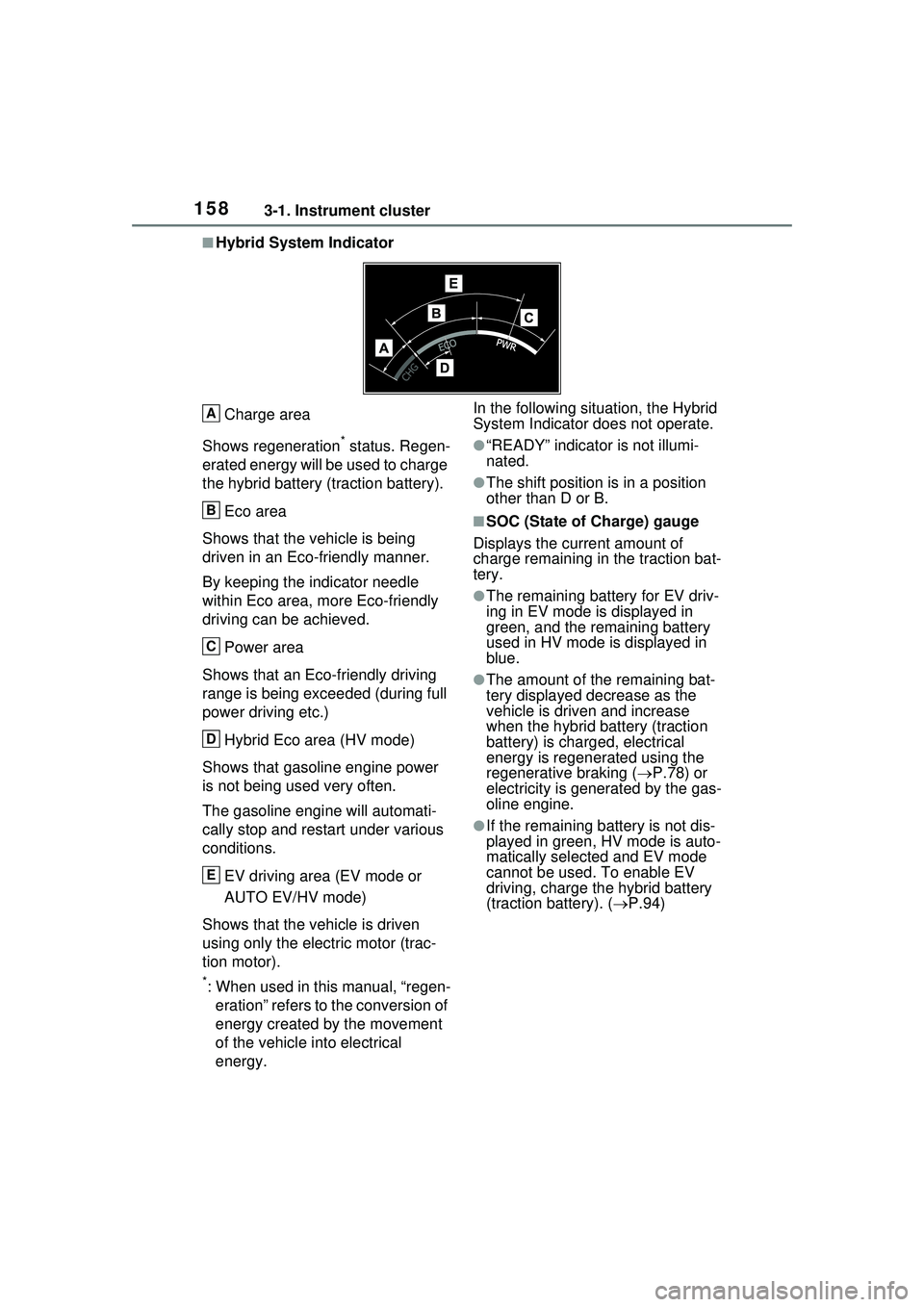
■Hybrid System IndicatorCharge area
Shows regeneration
* status. Regen-
erated energy will be used to charge
the hybrid battery (traction battery).
Eco area
Shows that the vehicle is being
driven in an Eco-friendly manner.
By keeping the indicator needle
within Eco area, more Eco-friendly
driving can be achieved.
Power area
Shows that an Eco-friendly driving
range is being exceeded (during full
power driving etc.)
Hybrid Eco area (HV mode)
Shows that gasoline engine power
is not being used very often.
The gasoline engine will automati-
cally stop and restart under various
conditions.
EV driving area (EV mode or
AUTO EV/HV mode)
Shows that the vehicle is driven
using only the electric motor (trac-
tion motor).
*: When used in this manual, “regen- eration” refers to the conversion of
energy created by the movement
of the vehicle into electrical
energy. In the following situation, the Hybrid
System Indicator does not operate.
●“READY” indicator is not illumi-
nated.
●The shift position is in a position
other than D or B.
■SOC (State of Charge) gauge
Displays the current amount of
charge remaining in the traction bat-
tery.
●The remaining battery for EV driv-
ing in EV mode is displayed in
green, and the remaining battery
used in HV mode is displayed in
blue.
●The amount of the remaining bat-
tery displayed decrease as the
vehicle is driven and increase
when the hybrid battery (traction
battery) is charged, electrical
energy is regenerated using the
regenerative braking ( P.78) or
electricity is generated by the gas-
oline engine.
●If the remaining battery is not dis-
played in green, HV mode is auto-
matically selected and EV mode
cannot be used. To enable EV
driving, charge the hybrid battery
(traction battery). ( P.94)
A
B
C
D
E