Power TOYOTA PRIUS PRIME 2023 Manual PDF
[x] Cancel search | Manufacturer: TOYOTA, Model Year: 2023, Model line: PRIUS PRIME, Model: TOYOTA PRIUS PRIME 2023Pages: 680, PDF Size: 14.97 MB
Page 159 of 680
1593-1. Instrument cluster
3
Vehicle status information and indicators
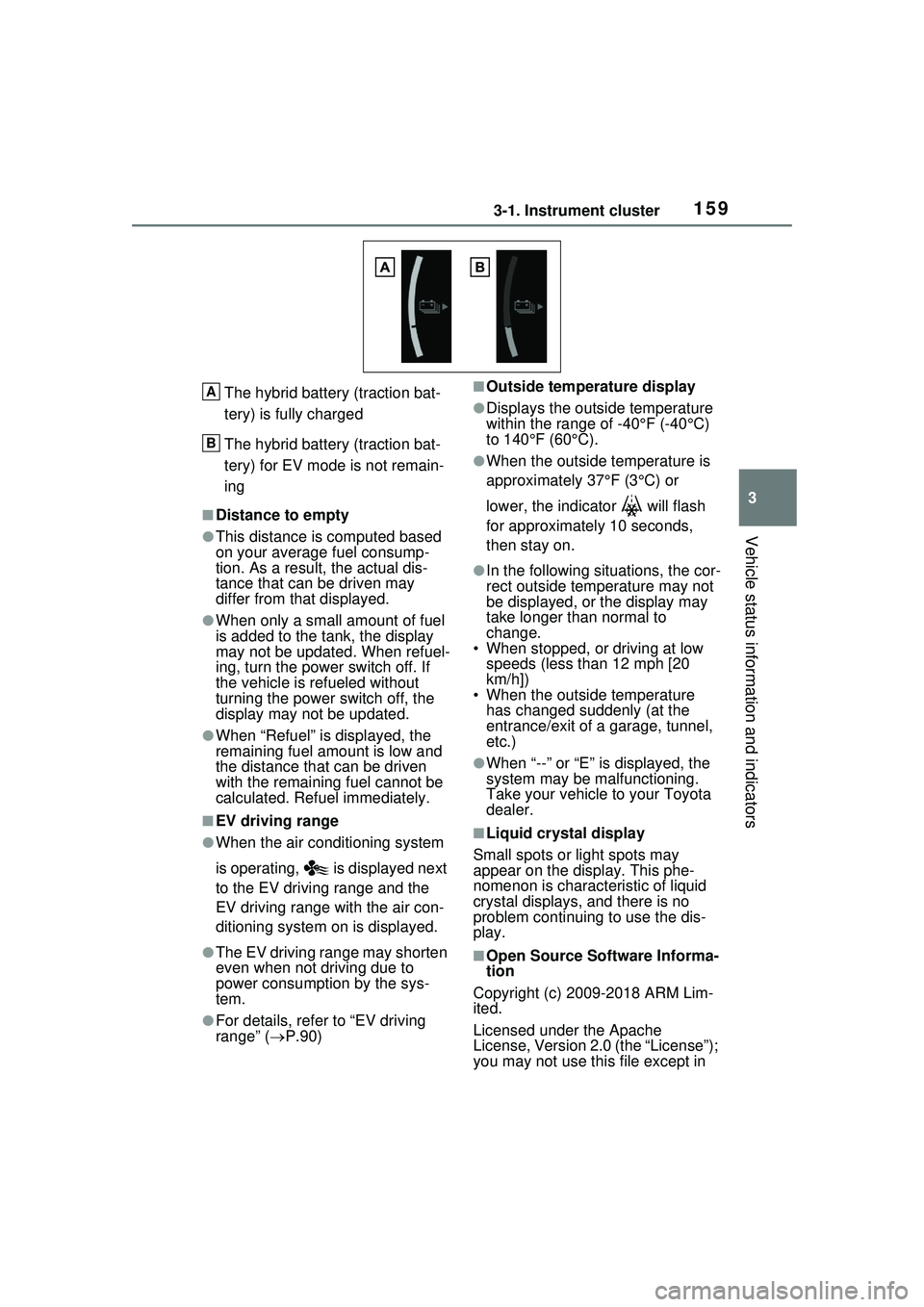
The hybrid battery (traction bat-
tery) is fully charged
The hybrid battery (traction bat-
tery) for EV mode is not remain-
ing
■Distance to empty
●This distance is computed based
on your average fuel consump-
tion. As a result, the actual dis-
tance that can be driven may
differ from that displayed.
●When only a small amount of fuel
is added to the tank, the display
may not be updated. When refuel-
ing, turn the power switch off. If
the vehicle is refueled without
turning the power switch off, the
display may not be updated.
●When “Refuel” is displayed, the
remaining fuel amount is low and
the distance that can be driven
with the remaining fuel cannot be
calculated. Refuel immediately.
■EV driving range
●When the air conditioning system
is operating, is displayed next
to the EV driving range and the
EV driving range with the air con-
ditioning system on is displayed.
●The EV driving range may shorten
even when not driving due to
power consumption by the sys-
tem.
●For details, refer to “EV driving
range” (P.90)
■Outside temperature display
●Displays the outside temperature
within the range of -40°F (-40°C)
to 140°F (60°C).
●When the outside temperature is
approximately 37°F (3°C) or
lower, the indicator will flash
for approximately 10 seconds,
then stay on.
●In the following situations, the cor-
rect outside temperature may not
be displayed, or the display may
take longer th an normal to
change.
• When stopped, or driving at low speeds (less than 12 mph [20
km/h])
• When the outside temperature has changed suddenly (at the
entrance/exit of a garage, tunnel,
etc.)
●When “--” or “E” is displayed, the
system may be malfunctioning.
Take your vehicle to your Toyota
dealer.
■Liquid crystal display
Small spots or light spots may
appear on the display. This phe-
nomenon is characteristic of liquid
crystal displays, and there is no
problem continuing to use the dis-
play.
■Open Source Software Informa-
tion
Copyright (c) 2009-2018 ARM Lim-
ited.
Licensed under the Apache
License, Version 2.0 (the “License”);
you may not use this file except in
A
B
Page 162 of 680
1623-1. Instrument cluster
Driving support system infor-
mation (P.165)
■The multi-information display is
displayed when
The power switch is in ON.
■Liquid crystal display
( P.159)
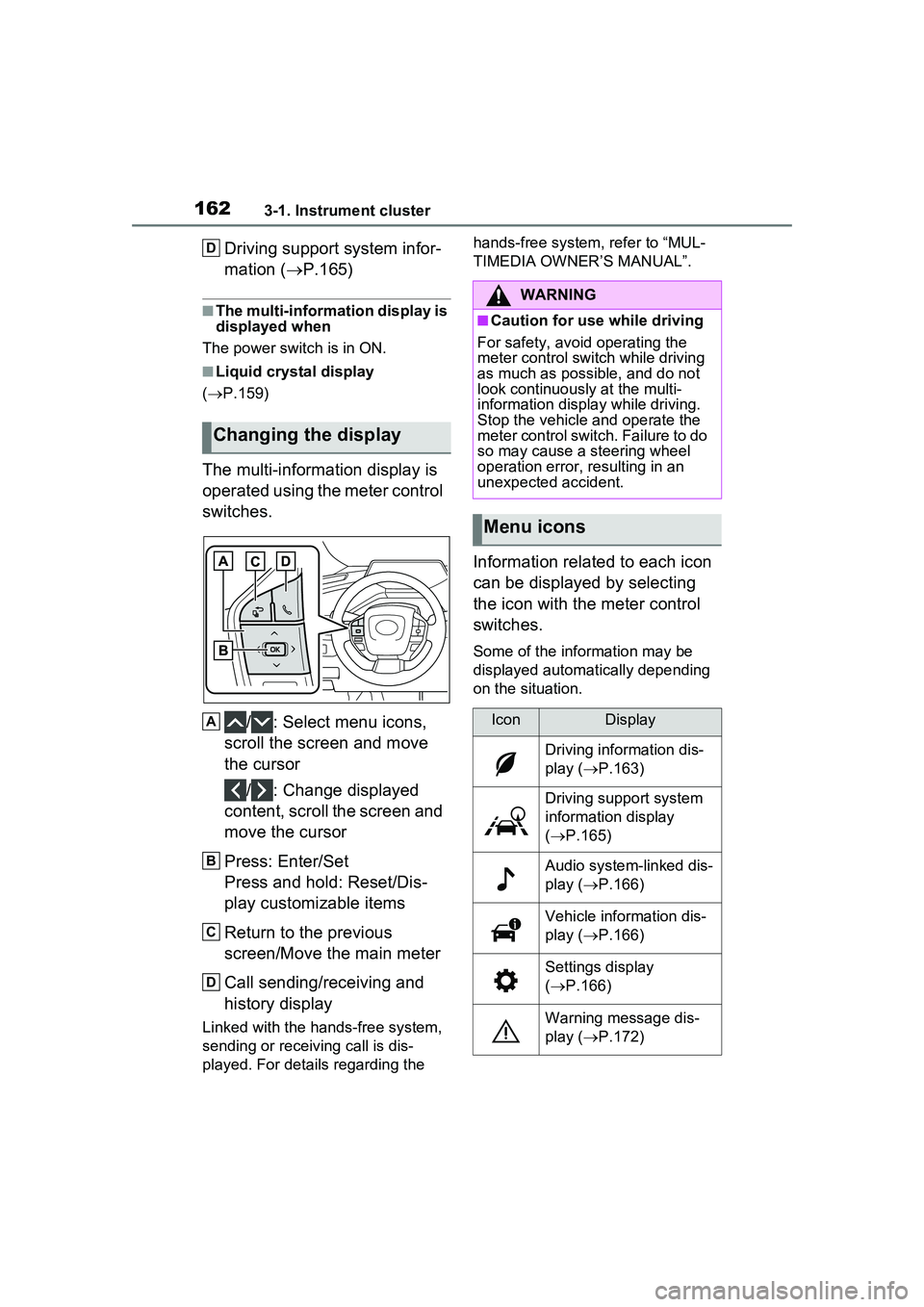
The multi-information display is
operated using the meter control
switches.
/ : Select menu icons,
scroll the screen and move
the cursor
/ : Change displayed
content, scroll the screen and
move the cursor
Press: Enter/Set
Press and hold: Reset/Dis-
play customizable items
Return to the previous
screen/Move the main meter
Call sending/receiving and
history display
Linked with the hands-free system,
sending or receiving call is dis-
played. For details regarding the hands-free system, refer to “MUL-
TIMEDIA OWNER’S MANUAL”.
Information related to each icon
can be displayed by selecting
the icon with the meter control
switches.
Some of the information may be
displayed automatically depending
on the situation.
Changing the display
D
A
B
C
D
WARNING
■Caution for use while driving
For safety, avoid operating the
meter control switch while driving
as much as possible, and do not
look continuously at the multi-
information displa y while driving.
Stop the vehicle and operate the
meter control switch. Failure to do
so may cause a steering wheel
operation error, resulting in an
unexpected accident.
Menu icons
IconDisplay
Driving information dis-
play ( P.163)
Driving support system
information display
( P.165)
Audio system-linked dis-
play ( P.166)
Vehicle information dis-
play ( P.166)
Settings display
( P.166)
Warning message dis-
play ( P.172)
Page 163 of 680
1633-1. Instrument cluster
3
Vehicle status information and indicators
Select to display power con-
sumption or fuel consumption
data in various forms.
■Power Consumption/Fuel
Economy
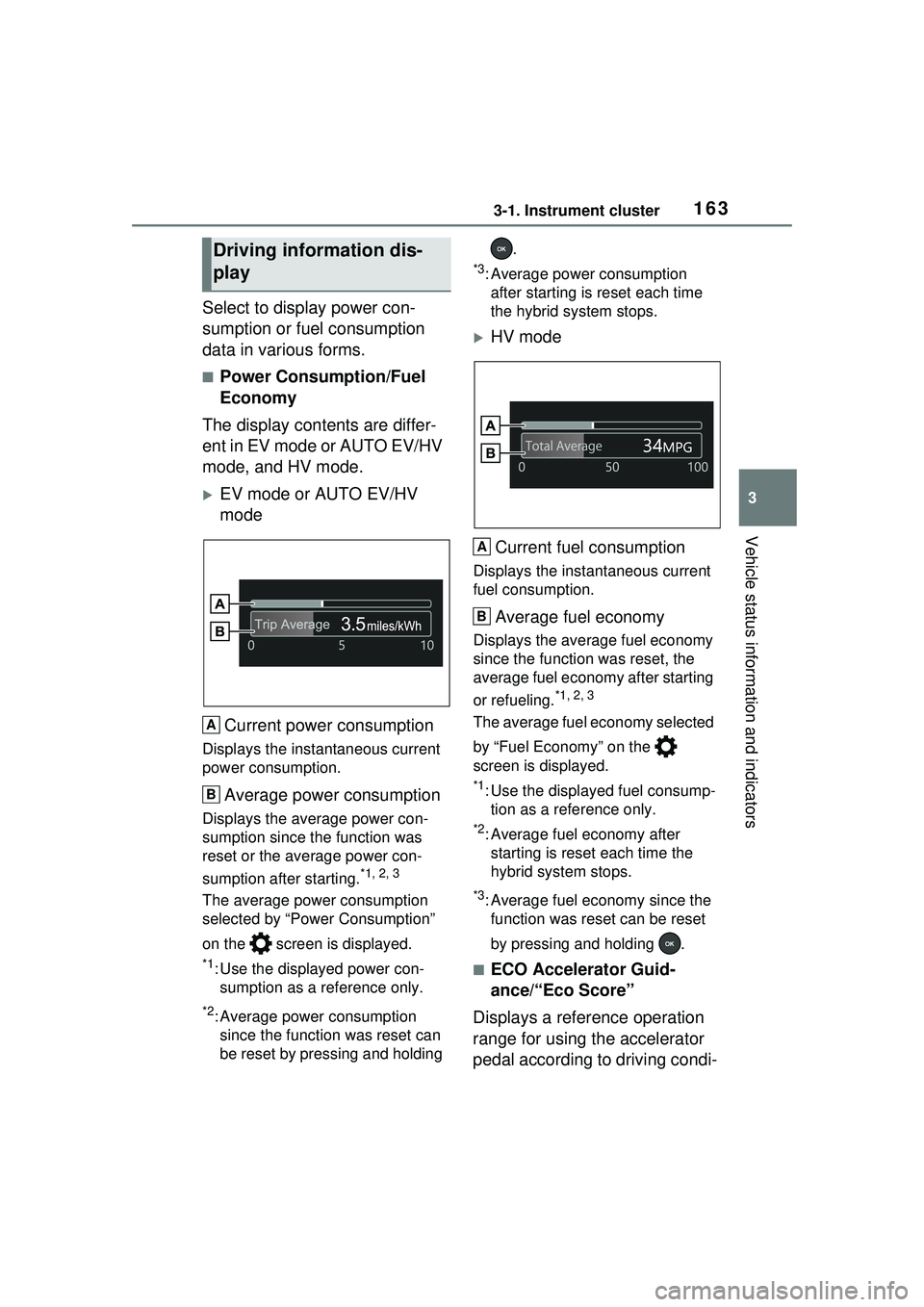
The display contents are differ-
ent in EV mode or AUTO EV/HV
mode, and HV mode.
EV mode or AUTO EV/HV
mode
Current power consumption
Displays the instantaneous current
power consumption.
Average power consumption
Displays the average power con-
sumption since the function was
reset or the average power con-
sumption after starting.
*1, 2, 3
The average power consumption
selected by “Power Consumption”
on the screen is displayed.
*1: Use the displayed power con- sumption as a reference only.
*2: Average power consumption since the function was reset can
be reset by pressing and holding .
*3: Average power consumption
after starting is reset each time
the hybrid system stops.
HV mode
Current fuel consumption
Displays the instantaneous current
fuel consumption.
Average fuel economy
Displays the average fuel economy
since the function was reset, the
average fuel economy after starting
or refueling.
*1, 2, 3
The average fuel economy selected
by “Fuel Economy” on the
screen is displayed.
*1: Use the displayed fuel consump- tion as a reference only.
*2: Average fuel economy after starting is reset each time the
hybrid system stops.
*3: Average fuel economy since the function was reset can be reset
by pressing and holding .
■ECO Accelerator Guid-
ance/“Eco Score”
Displays a reference operation
range for using the accelerator
pedal according to driving condi-
Driving information dis-
play
A
B
A
B
Page 165 of 680
1653-1. Instrument cluster
3
Vehicle status information and indicators
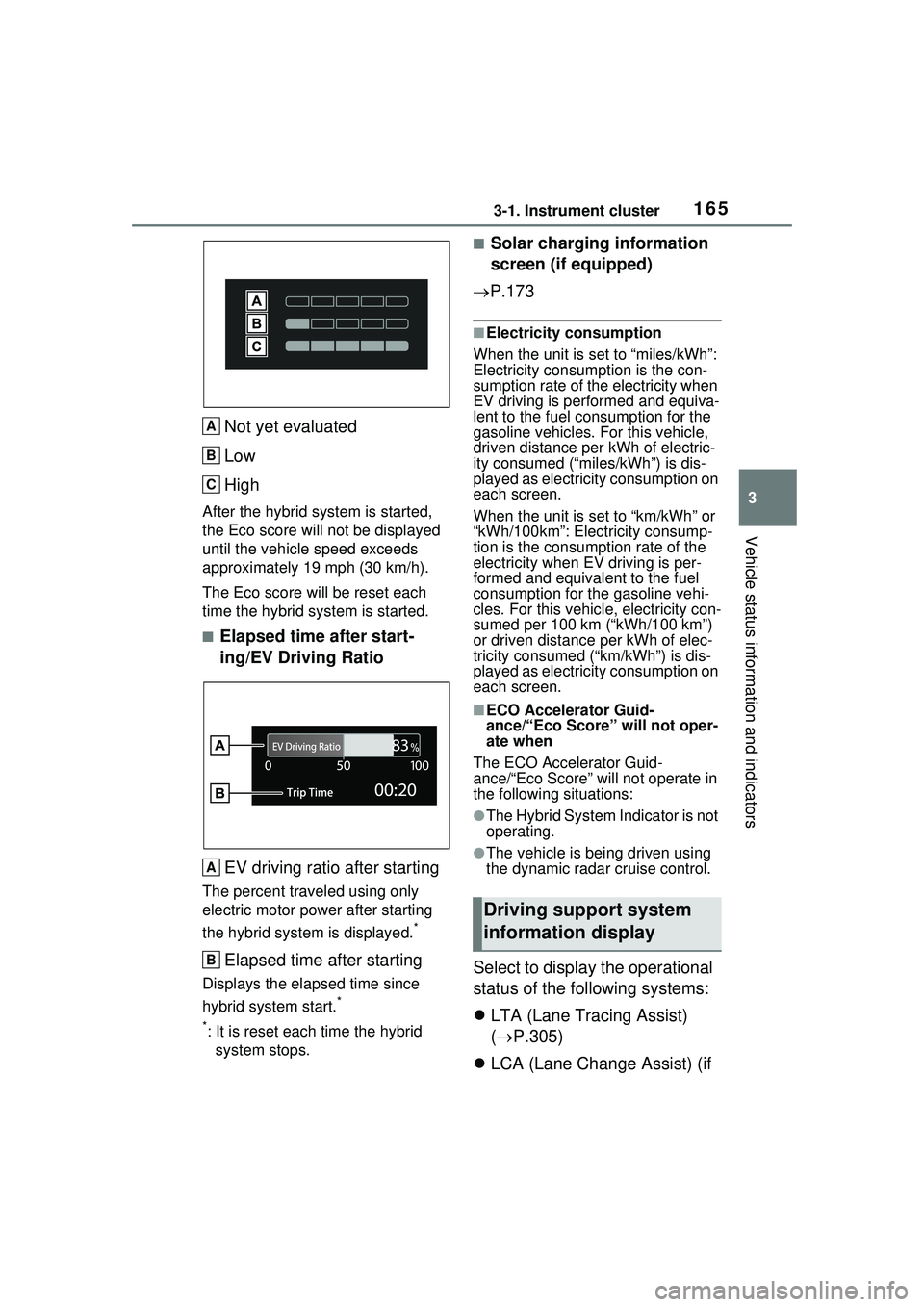
Not yet evaluated
Low
High
After the hybrid system is started,
the Eco score will not be displayed
until the vehicle speed exceeds
approximately 19 mph (30 km/h).
The Eco score will be reset each
time the hybrid system is started.
■Elapsed time after start-
ing/EV Driving RatioEV driving ratio after starting
The percent traveled using only
electric motor power after starting
the hybrid system is displayed.
*
Elapsed time after starting
Displays the elapsed time since
hybrid system start.
*
*
: It is reset each time the hybrid system stops.
■Solar charging information
screen (if equipped)
P.173
■Electricity consumption
When the unit is set to “miles/kWh”:
Electricity consum ption is the con-
sumption rate of the electricity when
EV driving is performed and equiva-
lent to the fuel consumption for the
gasoline vehicles. For this vehicle,
driven distance per kWh of electric-
ity consumed (“miles/kWh”) is dis-
played as electricity consumption on
each screen.
When the unit is set to “km/kWh” or
“kWh/100km”: Electricity consump-
tion is the consumption rate of the
electricity when EV driving is per-
formed and equivalent to the fuel
consumption for the gasoline vehi-
cles. For this vehicl e, electricity con-
sumed per 100 km (“kWh/100 km”)
or driven distance per kWh of elec-
tricity consumed (“km/kWh”) is dis-
played as electricity consumption on
each screen.
■ECO Accelerator Guid-
ance/“Eco Score” will not oper-
ate when
The ECO Accelerator Guid-
ance/“Eco Score” will not operate in
the following situations:
●The Hybrid System Indicator is not
operating.
●The vehicle is being driven using
the dynamic radar cruise control.
Select to display the operational
status of the following systems:
LTA (Lane Tracing Assist)
( P.305)
LCA (Lane Change Assist) (if
A
B
C
A
B
Driving support system
information display
Page 170 of 680
1703-1. Instrument cluster
system.
•“Timing”
Select to set the alert timing for
FCTA system.
Regenerative brake
Select to set up the following items.
• “Deceleration”
Select to change the regenerative
braking force when Regeneration
Boost is operating. ( P.260)
• “Deceleration Memory”
Select to store the settings for
regenerative braking force.
( P.260)
“TPWS setting” (Tire Pres-
sure Warning System)
( P.516)
• “Tire Set Switching”
Select to register the tire pressure
warning system sensor ID code set.
( P.524)
• “Tire Rotation”
Select to register the position of
each wheel after performing a tire
rotation. ( P.518)
• “Tire Pressure Setting”
Select to perform the tire inflation
pressure setting procedure of the
tire pressure warning system.
( P.520)
• “Pressure unit setting”
Select to change the units of mea-
sure displayed.( P.619)
Driver monitor (if equipped)
Select to enable/disable the driver
monitor warning function. ( P.292)
PBD (Power Back Door) (if equipped) (
P.194)
Select to set up the following items.
• System settings
Select to enable/d isable the power
back door system.
• “Opening Adjustment”
Select the open position when
power back door is fully open.
•“Volume”
Select to set the volume of the
buzzer which sounds when the
power back door system operates.
“Scheduled Maintenance”
Select to reset the scheduled main-
tenance information (message indi-
cating maintenance is required and
distance until the next mainte-
nance) after all maintenance is per-
formed.
Oil Maintenance
Select to reset th e Oil maintenance.
( P.506)
Rear Seat Reminder
( P.188)
Select to enable/disable the rear
seat reminder function.
Digital Keys (if equipped)
Select to reset registered digital
keys. ( P.183)
■ Settings
“Language”
Select to change the language on
the multi-information display.
“Units”
Select to change the unit of mea-
sure for fuel consumption.
“Meter Type”
Page 171 of 680
1713-1. Instrument cluster
3
Vehicle status information and indicators
Select to enable/disable Hybrid
System Indicator. (
P.158)
EV indicator
Select to enable/disable the EV
indicator.
EV Drive Information
Select to change the item on the
meter display between “EV Energy
remaining” or “EV Distance remain-
ing”. ( P.155)
(Driving information dis-
play settings)
Select to set up the following items.
• “Hybrid System”
Select to enable/disable the ECO
Accelerator Guidance ( P.158).
• “Fuel Economy”
Select to change the display on
Fuel Economy. ( P.163)
• “Power Consumption”
Select to change the display on
Power Consumption. ( P.163)
(Audio settings)
Select to enable/disable
screen.
(Vehicle information dis-
play settings)
• “Drive Info Type”
Select to change the drive informa-
tion type display between trip and
total. ( P.163)
• “Drive Info Items”
Select to set the items on the upper
and lower side of the drive informa-
tion screen from three items, aver-
age speed, distance and total time.
“Trip Summary”
Select to set the items displayed
from “Drive Info ” or “Charging
Schedule” when the power switch
is turned off.
Pop-Up Display
Select to enable/disable the pop-up
displays, which may appear in
some situations.
“Calendar”
Select to set up the calender. This
can only be set if GPS calibration of
clock is turned off in the multimedia
system settings.
Default Settings
Select to reset the meter display
settings.
■Tire pressure
• It may take a few minutes to dis- play the tire inflation pressure
after the power switch is turned to
ON. It may also take a few min-
utes to display the tire inflation
pressure after inflation pressure
has been adjusted.
• “---” may be displayed if the tire position information cannot be
determined due to unfavorable
radio wave conditions.
• Tire inflation pressure changes with temperature. The displayed
values may also be different from
the values measured using a tire
pressure gauge.
■Suspension of the settings dis-
play
●In the following situations, opera-
tion of the settings display will be
temporarily suspended.
• When a warning message appears on the multi-information
display
• When the vehicle begins to move
Page 172 of 680
1723-1. Instrument cluster
●Settings for functions not
equipped to the vehicle are not
displayed.
●When a function is turned off, the
related settings for that function
are not selectable.
Select to display warning mes-
sages and measures to be
taken if a malfunction is
detected. (P.566)
Displays suggestions to the
driver in the following situations.
To select a response to a dis-
played suggestion, use the
meter control switches.
■Suggestion to enable the
power back door (if
equipped)
If the power back door system is
disabled (setting on set to
off) and the power back door
switch on the instrument panel
is operated, a suggestion mes-
sage will be displayed asking if
you wish to enable the power
back door system. To enable
the power back door system,
select “Yes”.
After enabling the power back door
system, press the power back door
switch again to open or close the
power back door.
■Suggestion to turn off the
headlights
If the headlights are left on for a
certain amount of time after the
power switch has been turned
off, a suggestion message will
be displayed.
When the headlight switch is in
the AUTO position: The mes-
sage asking if you wish to turn
the headlights off is displayed.
To turn the headlights off, select
“Yes”.
If the driver’s door is opened after
the power switch is turned off, this
suggestion message will not be dis-
played.
■Customization
The suggestion function can be
turned on/off. (Customizable fea-
tures: P.619)
WARNING
■Cautions during setting up
the display
As the hybrid system needs to be
operating during setting up the
display, ensure that the vehicle is
parked in a place with adequate
ventilation. In a closed area such
as a garage, exhaust gases
including harmful carbon monox-
ide (CO) may collect and enter
the vehicle. This may lead to
death or a serious health hazard.
NOTICE
■During setting up the display
To prevent 12-volt battery dis-
charge, ensure that the hybrid
system is operating while setting
up the display features.
Warning message display
Suggestion function
Page 174 of 680
1743-1. Instrument cluster
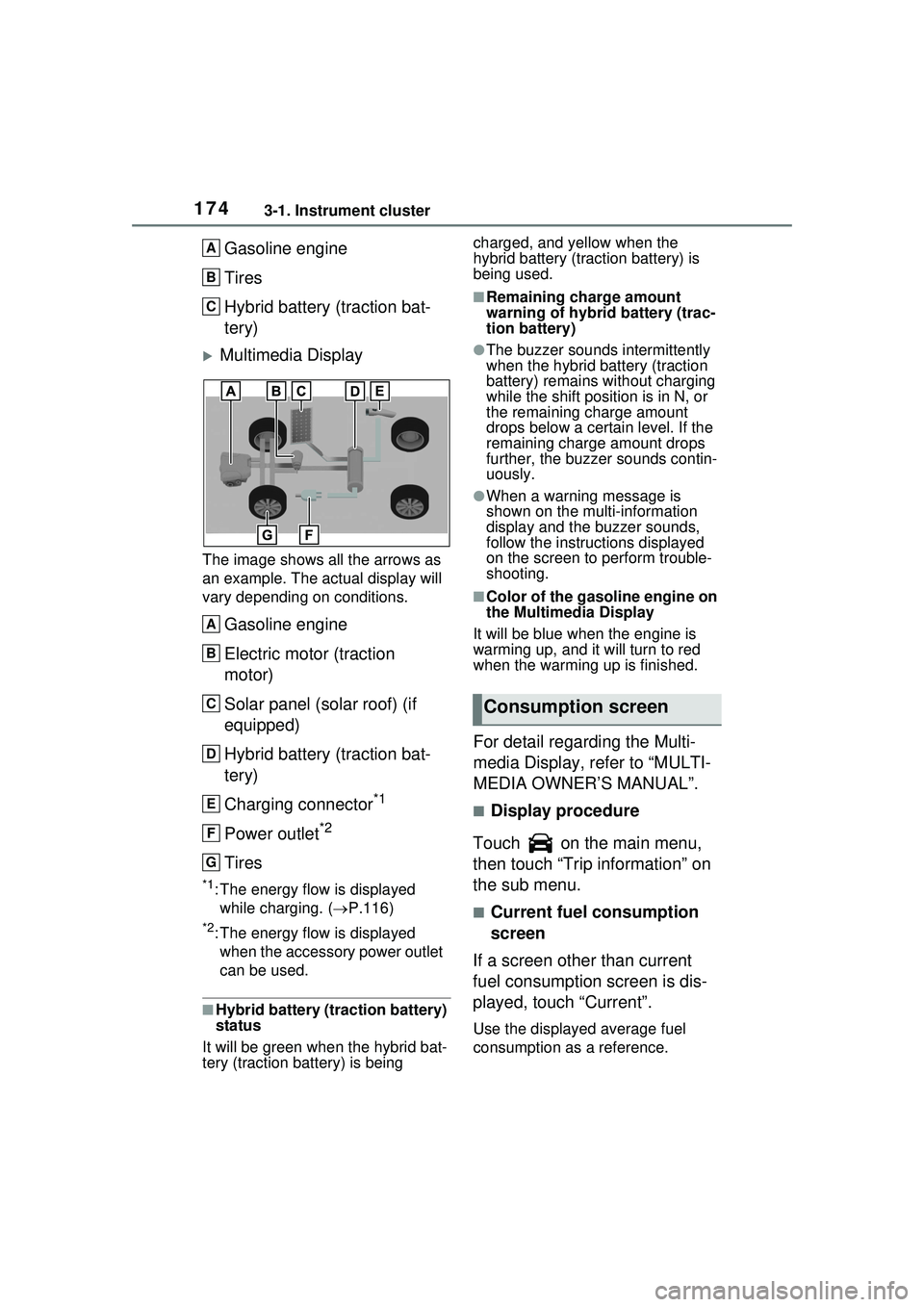
Gasoline engine
Tires
Hybrid battery (traction bat-
tery)
Multimedia Display
The image shows all the arrows as
an example. The actual display will
vary depending on conditions.
Gasoline engine
Electric motor (traction
motor)
Solar panel (solar roof) (if
equipped)
Hybrid battery (traction bat-
tery)
Charging connector
*1
Power outlet*2
Tires
*1: The energy flow is displayed while charging. ( P.116)
*2: The energy flow is displayed
when the accessory power outlet
can be used.
■Hybrid battery (traction battery)
status
It will be green when the hybrid bat-
tery (traction battery) is being charged, and yellow when the
hybrid battery (traction battery) is
being used.
■Remaining charge amount
warning of hybrid battery (trac-
tion battery)
●The buzzer sounds intermittently
when the hybrid battery (traction
battery) remains without charging
while the shift posit
ion is in N, or
the remaining charge amount
drops below a certain level. If the
remaining charge amount drops
further, the buzzer sounds contin-
uously.
●When a warning message is
shown on the multi-information
display and the buzzer sounds,
follow the instruct ions displayed
on the screen to perform trouble-
shooting.
■Color of the gasoline engine on
the Multimedia Display
It will be blue when the engine is
warming up, and it will turn to red
when the warming up is finished.
For detail regarding the Multi-
media Display, refer to “MULTI-
MEDIA OWNER’S MANUAL”.
■Display procedure
Touch on the main menu,
then touch “Trip information” on
the sub menu.
■Current fuel consumption
screen
If a screen other than current
fuel consumption screen is dis-
played, touch “Current”.
Use the displayed average fuel
consumption as a reference.
A
B
C
A
B
C
D
E
F
G
Consumption screen
Page 176 of 680
1763-1. Instrument cluster
Information related to the solar
charging system can be dis-
played.
■Display procedure
Multi-information display
Solar charging information
screen can be displayed on
of the multi-information
display.
For detail regarding the multi-
information display, refer to
P.161.
Multimedia Display
Touch on the main menu,
then touch “Solar charging” on
the sub menu.
For detail regarding the Multimedia
Display, refer to “MULTIMEDIA
OWNER’S MANUAL”.
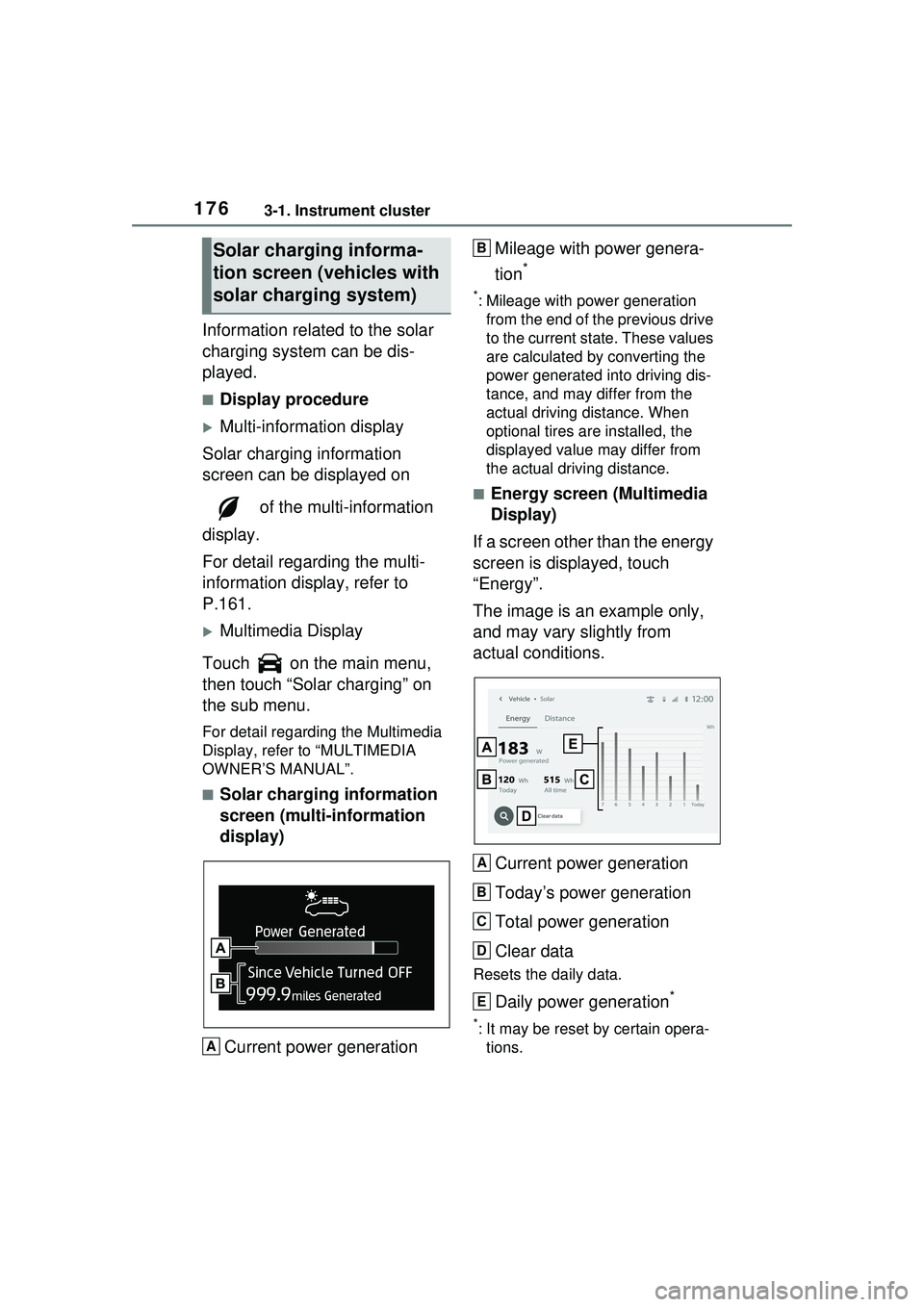
■Solar charging information
screen (multi-information
display)
Current power generation Mileage with power genera-
tion
*
*: Mileage with power generation
from the end of the previous drive
to the current state. These values
are calculated by converting the
power generated into driving dis-
tance, and may differ from the
actual driving distance. When
optional tires are installed, the
displayed value may differ from
the actual driving distance.
■Energy screen (Multimedia
Display)
If a screen other than the energy
screen is displayed, touch
“Energy”.
The image is an example only,
and may vary slightly from
actual conditions.
Current power generation
Today’s power generation
Total power generation
Clear data
Resets the daily data.
Daily power generation*
*: It may be reset by certain opera-tions.
Solar charging informa-
tion screen ( vehicles with
solar charging system)
A
B
A
B
C
D
E
Page 177 of 680
1773-1. Instrument cluster
3
Vehicle status information and indicators
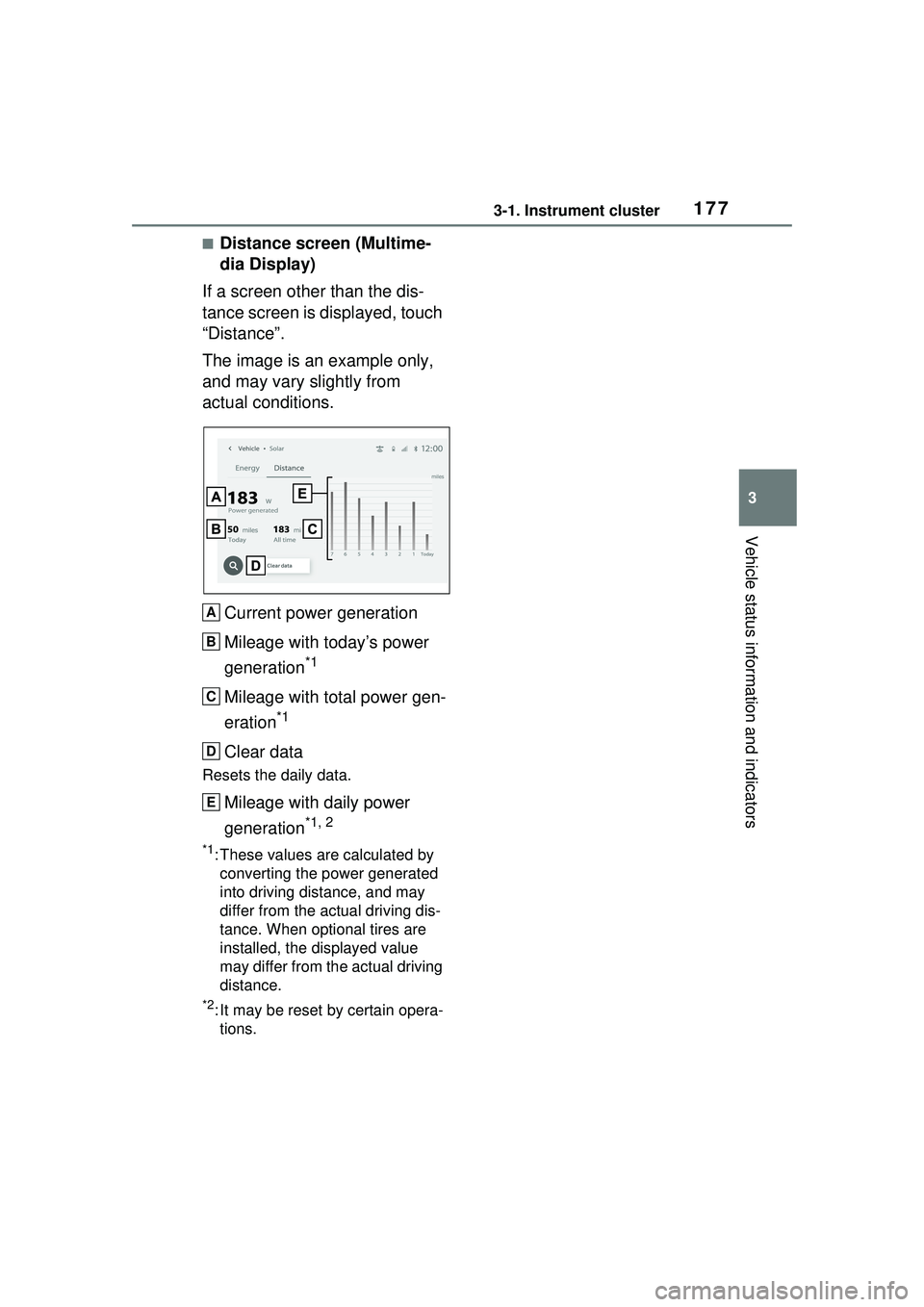
■Distance screen (Multime-
dia Display)
If a screen other than the dis-
tance screen is displayed, touch
“Distance”.
The image is an example only,
and may vary slightly from
actual conditions.
Current power generation
Mileage with today’s power
generation
*1
Mileage with total power gen-
eration
*1
Clear data
Resets the daily data.
Mileage with daily power
generation
*1, 2
*1: These values are calculated by converting the power generated
into driving distance, and may
differ from the actual driving dis-
tance. When optional tires are
installed, the displayed value
may differ from the actual driving
distance.
*2: It may be reset by certain opera-tions.
A
B
C
D
E