lights TOYOTA PRIUS PRIME 2023 Repair Manual
[x] Cancel search | Manufacturer: TOYOTA, Model Year: 2023, Model line: PRIUS PRIME, Model: TOYOTA PRIUS PRIME 2023Pages: 680, PDF Size: 14.97 MB
Page 430 of 680
4305-6. Driving tips
Perform the following according
to the driving conditions:
Do not try to forcibly open a
window or move a wiper that
is frozen. Pour warm water
over the frozen area to melt
the ice. Wipe away the water
immediately to prevent it from
freezing.
To ensure proper operation of
the climate control system
fan, remove any snow that
has accumulated on the air
inlet vents in front of the wind-
shield.
Check for and remove any
excess ice or snow that may
have accumulated on the
exterior lights, outside rear
view mirrors, windows, vehi-
cle’s roof, chassis, around the
tires or on the brakes.
Remove any snow or mud
from the bottom of your shoes
before getting in the vehicle. Accelerate the vehicle slowly,
keep a safe distance between
you and the vehicle ahead, and
drive at a reduced speed suit-
able to road conditions.
Turn automatic mode of the
parking brake off.
Otherwise, the parking brake
may freeze and not be able to
be released automatically.
Also, avoid using the following as
the parking brake may operate
automatically, even if automatic
mode is off.
• Brake hold system
Park the vehicle and shift the
shift position to P without set-
ting the parking brake. The
parking brake may freeze up,
preventing it from being
released. If the vehicle is
parked without setting the
parking brake, make sure to
block the wheels. Failure to
do so may be dangerous
because it may cause the
vehicle to move unexpect-
edly, possibly leading to an
accident.
When the parking brake is in
automatic mode, release the
parking brake after shifting
the shift position to P.
( P.264)
NOTICE
■Repairing or replacing snow
tires
Request repairs or replacement of
snow tires from your Toyota
dealer or legitimate tire retailers.
This is because the removal and
attachment of snow tires affects
the operation of the tire pressure
warning valves and transmitters.
Before driving the vehicle
When driving the vehicle
When parking the vehicle
Page 433 of 680
433
6
6
Interior features
Interior features
6-1. Using the air conditioning system and defogger
Automatic air conditioning system ....................... 434
Heated steering wheel/seat heaters/seat ventilators
.................................. 443
6-2. Using the interior lights Interior lights list .......... 446
6-3. Using the storage features List of storage features 450
Luggage compartment fea- tures .......................... 454
6-4. Using the other interior features
Other interior features . 456
Power outlet (1500 W) 468
When the power outlet (1500 W) cannot be used
properly ..................... 475
Garage door opener.... 477
Page 446 of 680
4466-2. Using the interior lights
6-2.Using the interior lights
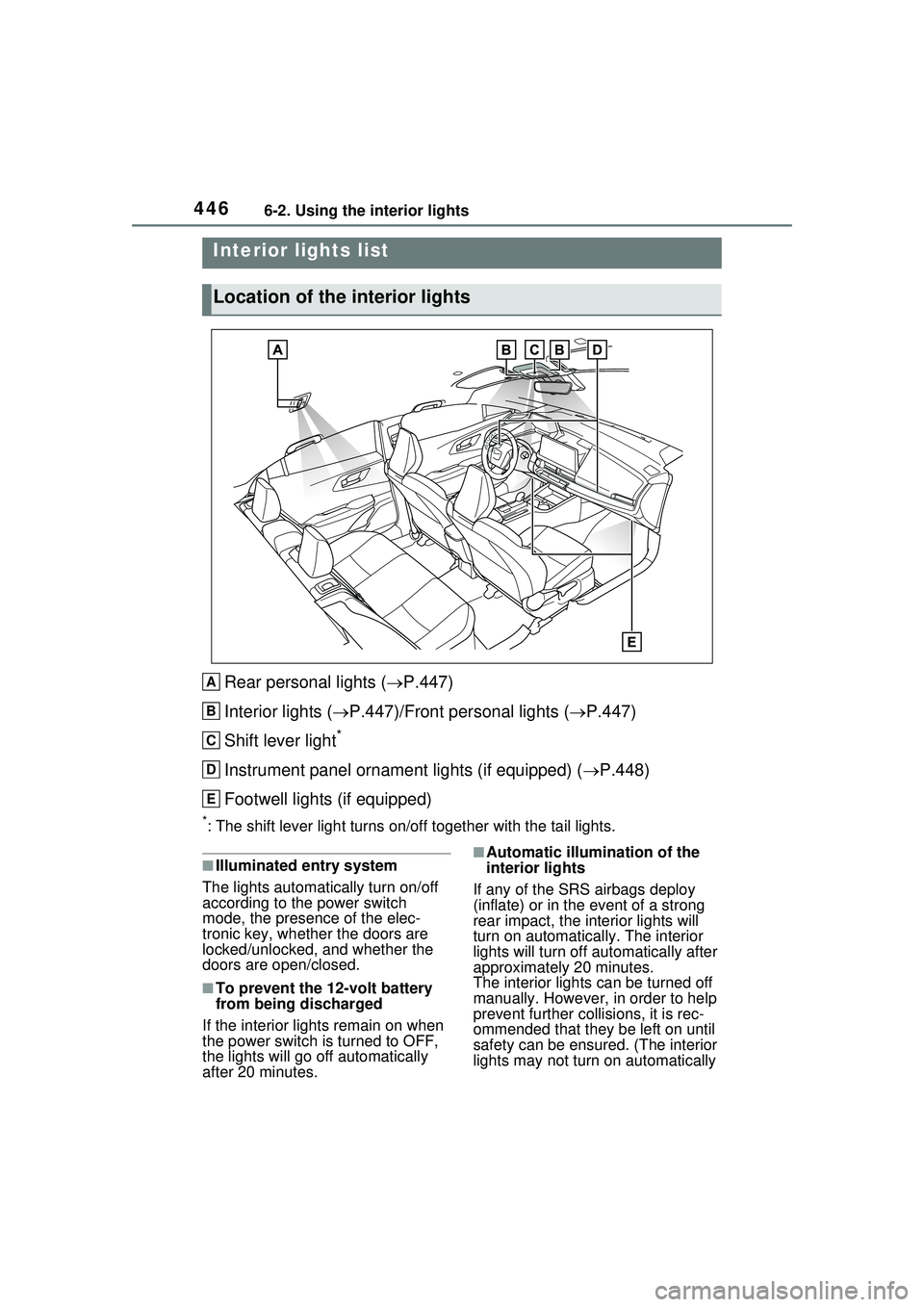
Rear personal lights (P.447)
Interior lights ( P.447)/Front personal lights ( P.447)
Shift lever light
*
Instrument panel ornament lights (if equipped) ( P.448)
Footwell lights (if equipped)
*: The shift lever light turns on/off together with the tail lights.
■Illuminated entry system
The lights automatically turn on/off
according to the power switch
mode, the presence of the elec-
tronic key, whether the doors are
locked/unlocked, and whether the
doors are open/closed.
■To prevent the 12-volt battery
from being discharged
If the interior light s remain on when
the power switch is turned to OFF,
the lights will go off automatically
after 20 minutes.
■Automatic illumina tion of the
interior lights
If any of the SRS airbags deploy
(inflate) or in the event of a strong
rear impact, the interior lights will
turn on automatically. The interior
lights will turn off au tomatically after
approximately 20 minutes.
The interior lights can be turned off
manually. However, in order to help
prevent further collisions, it is rec-
ommended that they be left on until
safety can be ensured. (The interior
lights may not turn on automatically
Interior lights list
Location of the interior lights
A
B
C
D
E
Page 447 of 680
4476-2. Using the interior lights
6
Interior features
depending on the force of the
impact and conditions of the colli-
sion.)
■Customization
Some functions can be customized.
(Customizable features: P.618)
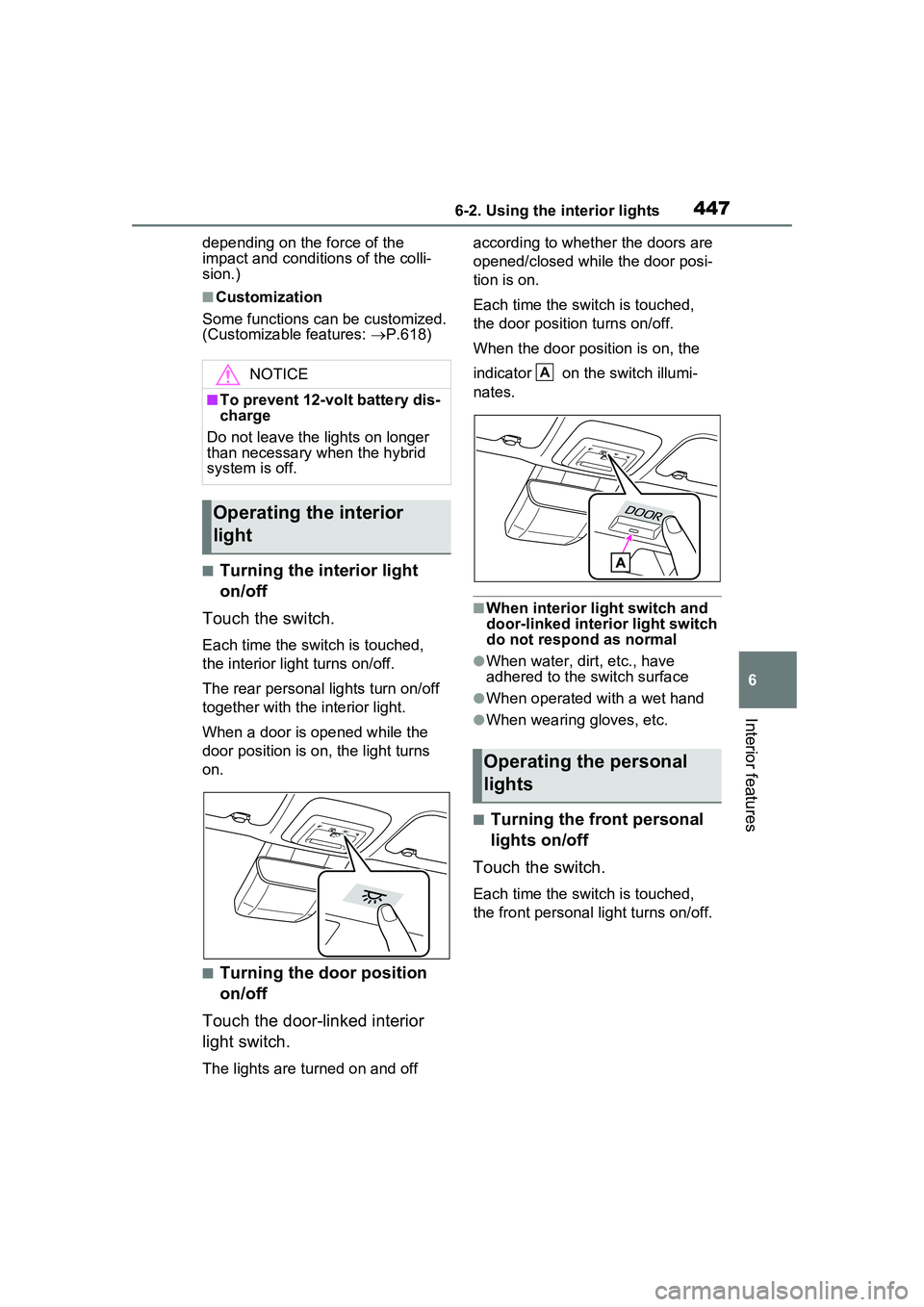
■Turning the interior light
on/off
Touch the switch.
Each time the switch is touched,
the interior light turns on/off.
The rear personal lights turn on/off
together with the interior light.
When a door is opened while the
door position is on, the light turns
on.
■Turning the door position
on/off
Touch the door-linked interior
light switch.
The lights are turned on and off according to whether the doors are
opened/closed while the door posi-
tion is on.
Each time the switch is touched,
the door position turns on/off.
When the door position is on, the
indicator on the switch illumi-
nates.
■When interior light switch and
door-linked interior light switch
do not respond as normal
●When water, dirt, etc., have
adhered to the switch surface
●When operated with a wet hand
●When wearing gloves, etc.
■Turning the front personal
lights on/off
Touch the switch.
Each time the switch is touched,
the front personal light turns on/off.
NOTICE
■To prevent 12-volt battery dis-
charge
Do not leave the lights on longer
than necessary when the hybrid
system is off.
Operating the interior
light
Operating the personal
lights
A
Page 448 of 680
4486-2. Using the interior lights
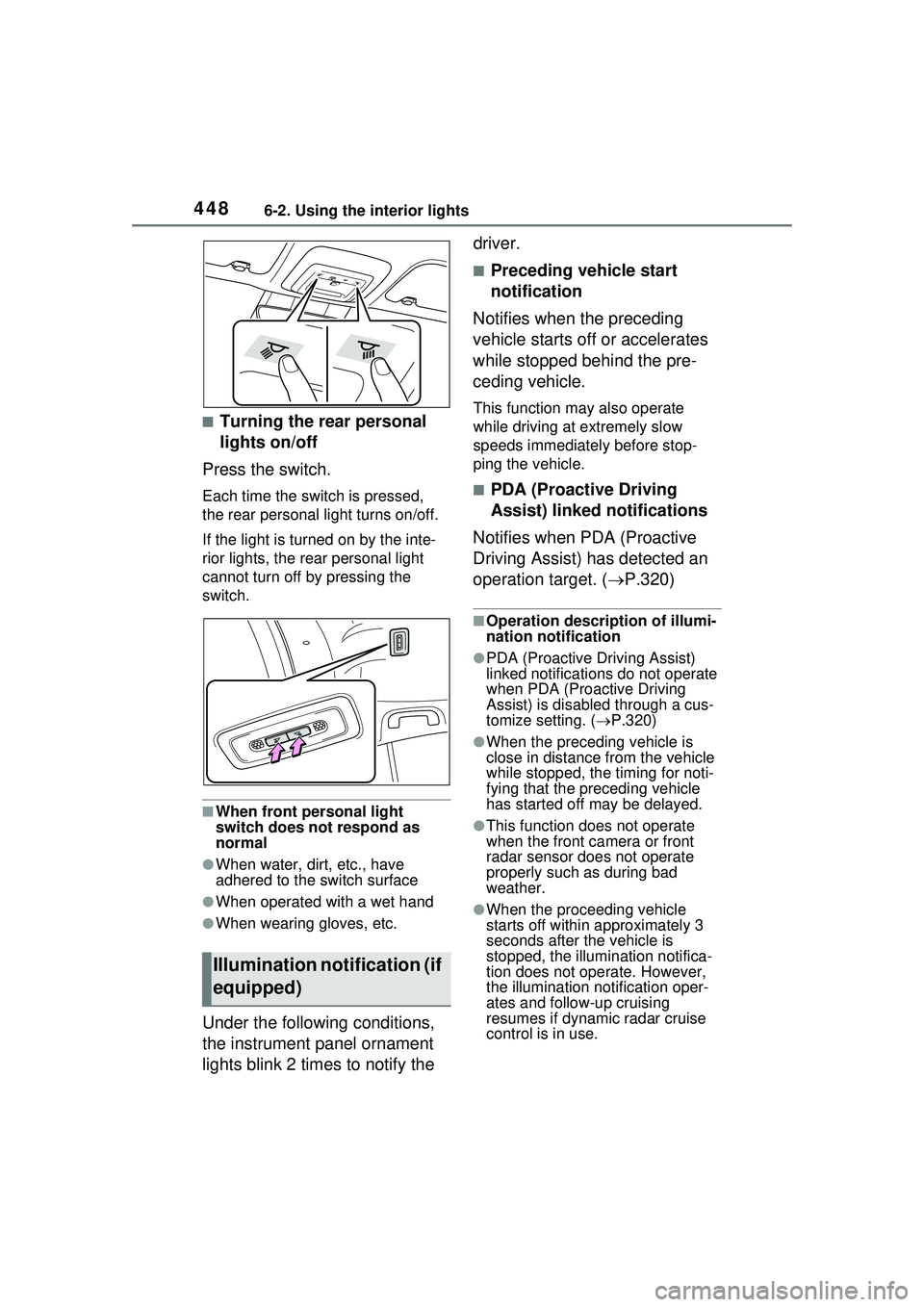
■Turning the rear personal
lights on/off
Press the switch.
Each time the switch is pressed,
the rear personal light turns on/off.
If the light is turned on by the inte-
rior lights, the rear personal light
cannot turn off by pressing the
switch.
■When front personal light
switch does not respond as
normal
●When water, dirt, etc., have
adhered to the switch surface
●When operated with a wet hand
●When wearing gloves, etc.
Under the following conditions,
the instrument panel ornament
lights blink 2 times to notify the driver.
■Preceding vehicle start
notification
Notifies when the preceding
vehicle starts off or accelerates
while stopped behind the pre-
ceding vehicle.
This function may also operate
while driving at extremely slow
speeds immediately before stop-
ping the vehicle.
■PDA (Proactive Driving
Assist) linked notifications
Notifies when PDA (Proactive
Driving Assist) has detected an
operation target. ( P.320)
■Operation description of illumi-
nation notification
●PDA (Proactive Driving Assist)
linked notifications do not operate
when PDA (Proactive Driving
Assist) is disabled through a cus-
tomize setting. (P.320)
●When the preceding vehicle is
close in distance from the vehicle
while stopped, the timing for noti-
fying that the preceding vehicle
has started off may be delayed.
●This function does not operate
when the front ca mera or front
radar sensor does not operate
properly such as during bad
weather.
●When the proceeding vehicle
starts off within approximately 3
seconds after the vehicle is
stopped, the illumi nation notifica-
tion does not operate. However,
the illumination notification oper-
ates and follow-up cruising
resumes if dynamic radar cruise
control is in use.
Illumination notification (if
equipped)
Page 449 of 680
4496-2. Using the interior lights
6
Interior features
■Customization
Settings can be changed to enabled
and disabled illumination notifica-
tions. (Customizable features:
P.618)
Page 451 of 680
4516-3. Using the storage features
6
Interior features
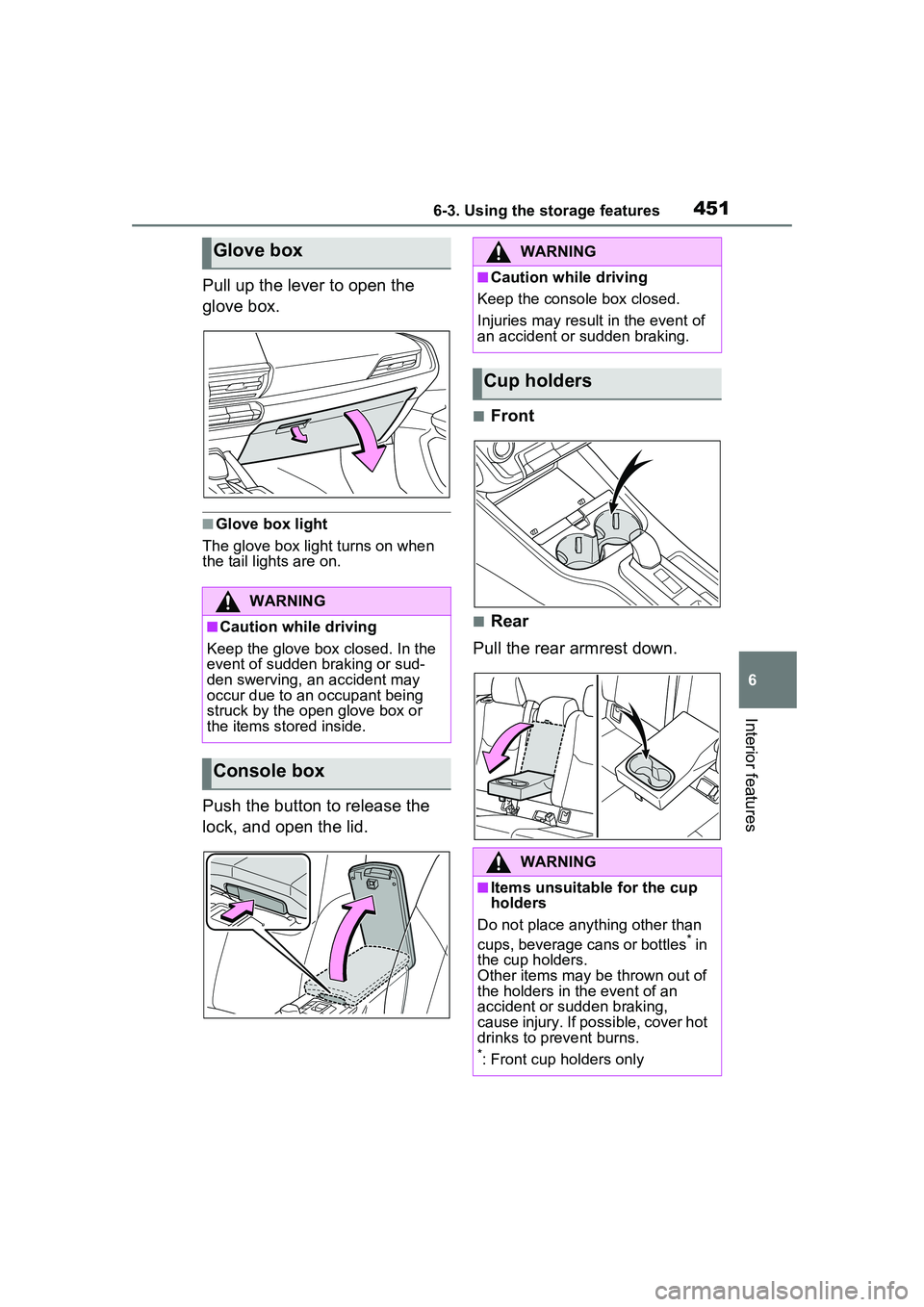
Pull up the lever to open the
glove box.
■Glove box light
The glove box light turns on when
the tail lights are on.
Push the button to release the
lock, and open the lid.
■Front
■Rear
Pull the rear armrest down.
Glove box
WARNING
■Caution while driving
Keep the glove box closed. In the
event of sudden braking or sud-
den swerving, an accident may
occur due to an occupant being
struck by the open glove box or
the items stored inside.
Console box
WARNING
■Caution while driving
Keep the console box closed.
Injuries may result in the event of
an accident or sudden braking.
Cup holders
WARNING
■Items unsuitable for the cup
holders
Do not place anything other than
cups, beverage cans or bottles
* in
the cup holders.
Other items may be thrown out of
the holders in the event of an
accident or sudden braking,
cause injury. If possible, cover hot
drinks to prevent burns.
*: Front cup holders only
Page 456 of 680
4566-4. Using the other interior features
6-4.Using the other interior features
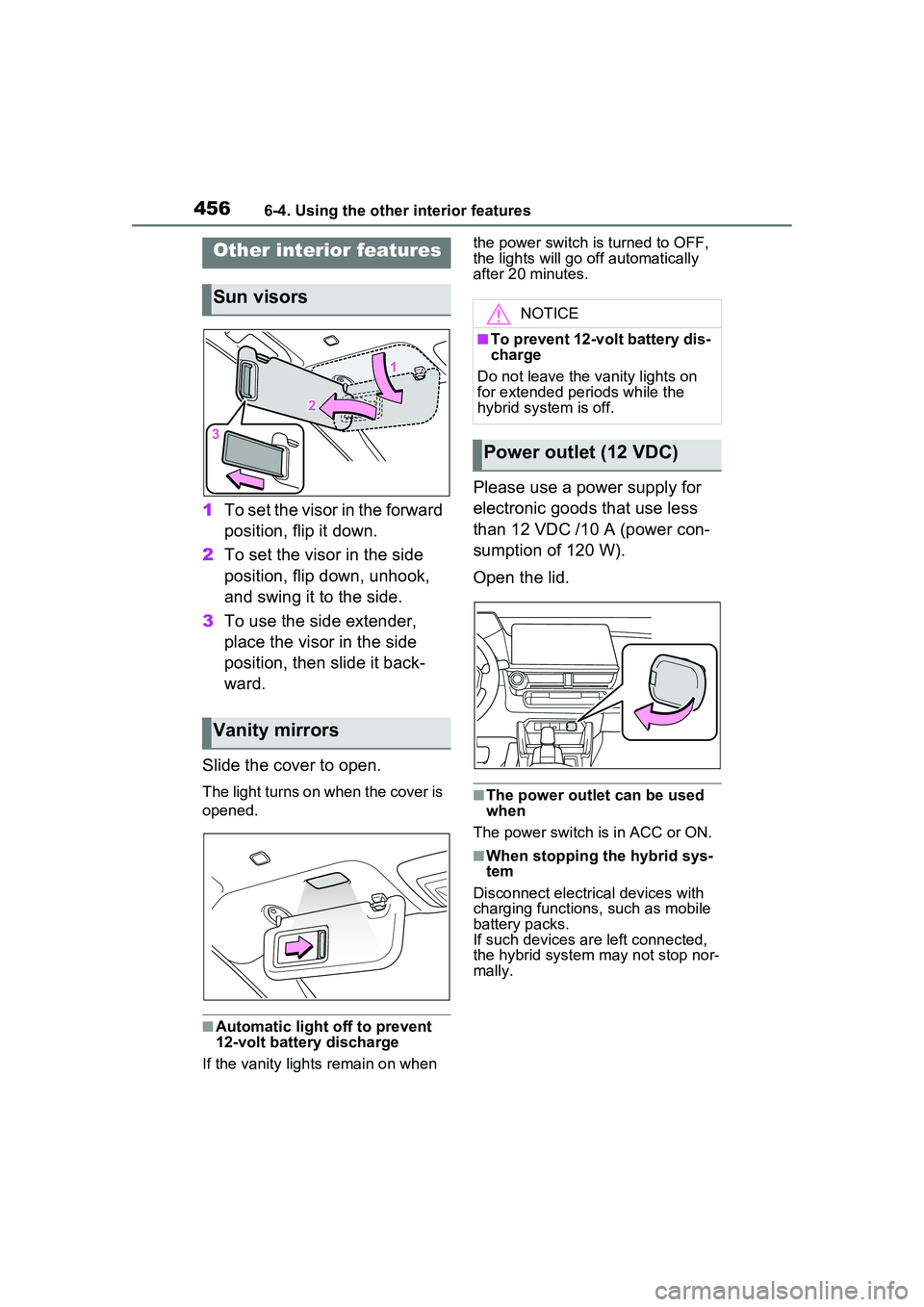
1To set the visor in the forward
position, flip it down.
2 To set the visor in the side
position, flip down, unhook,
and swing it to the side.
3 To use the side extender,
place the visor in the side
position, then slide it back-
ward.
Slide the cover to open.
The light turns on when the cover is
opened.
■Automatic light off to prevent
12-volt battery discharge
If the vanity lights remain on when the power switch is turned to OFF,
the lights will go off automatically
after 20 minutes.
Please use a power supply for
electronic goods that use less
than 12 VDC /10 A (power con-
sumption of 120 W).
Open the lid.
■The power outlet can be used
when
The power switch is in ACC or ON.
■When stopping the hybrid sys-
tem
Disconnect electrical devices with
charging functions, such as mobile
battery packs.
If such devices ar e left connected,
the hybrid system may not stop nor-
mally.
Other interior features
Sun visors
Vanity mirrors
NOTICE
■To prevent 12-volt battery dis-
charge
Do not leave the vanity lights on
for extended periods while the
hybrid system is off.
Power outlet (12 VDC)
Page 461 of 680
4616-4. Using the other interior features
6
Interior features
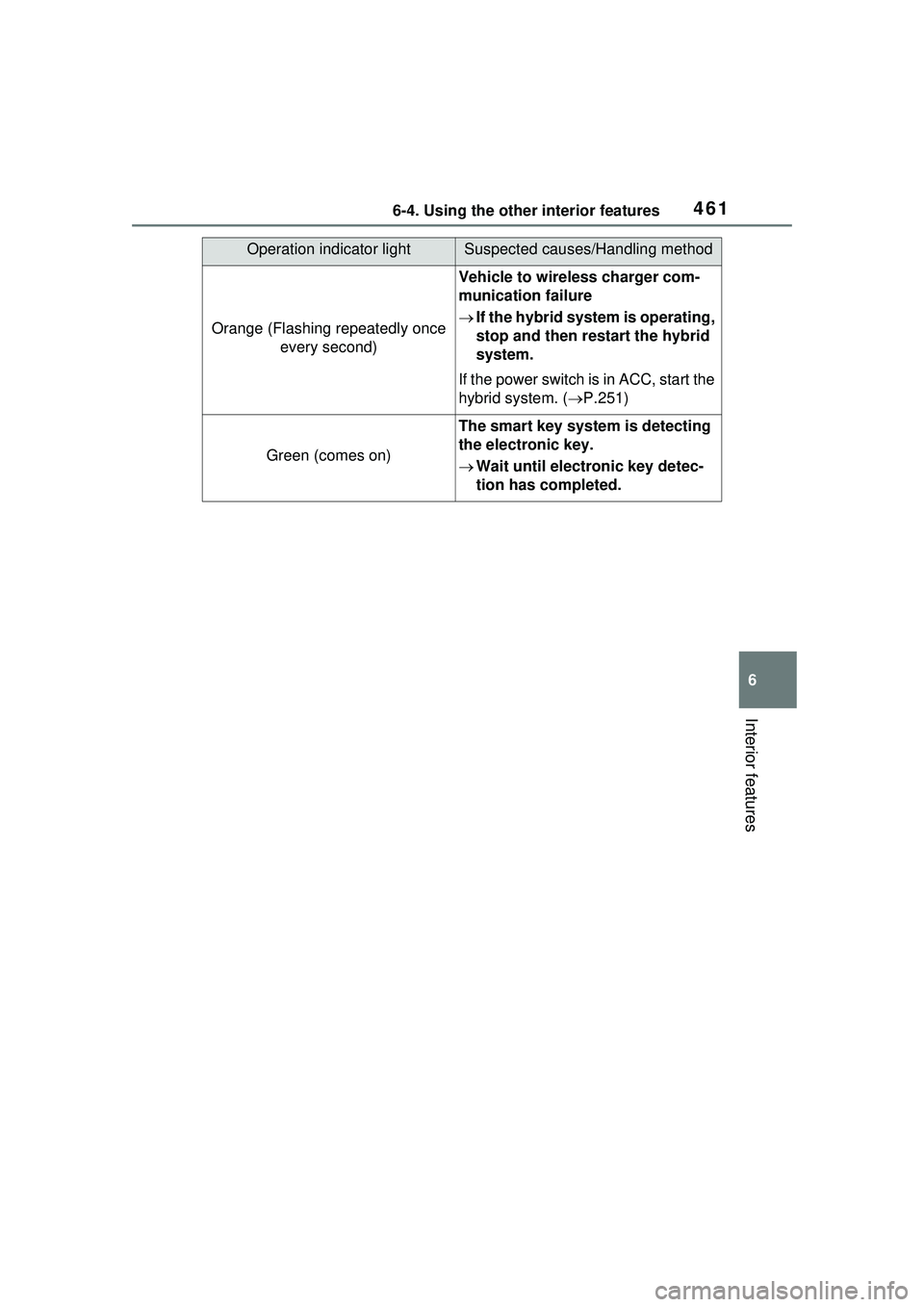
Operation indicator lightSuspected causes/Handling method
Orange (Flashing repeatedly once every second)
Vehicle to wireless charger com-
munication failure
If the hybrid system is operating,
stop and then restart the hybrid
system.
If the power switch is in ACC, start the
hybrid system. ( P.251)
Green (comes on)
The smart key system is detecting
the electronic key.
Wait until electronic key detec-
tion has completed.
Page 462 of 680
4626-4. Using the other interior features
■The wireless charger can be
operated when
The power switch is in ACC or ON.
■Usable smartphones
●Qi standard wireless charge stan-
dard can be used on compatible
devices. However, not all Qi stan- dard devices and compatibility are
guaranteed.
●This product is designed for use
with smartphones with a power
supply of 5 W or less.
●However, charging exceeding 5 W
is supported by the following
smartphones.
• Charging at 7.5 W or less is sup-
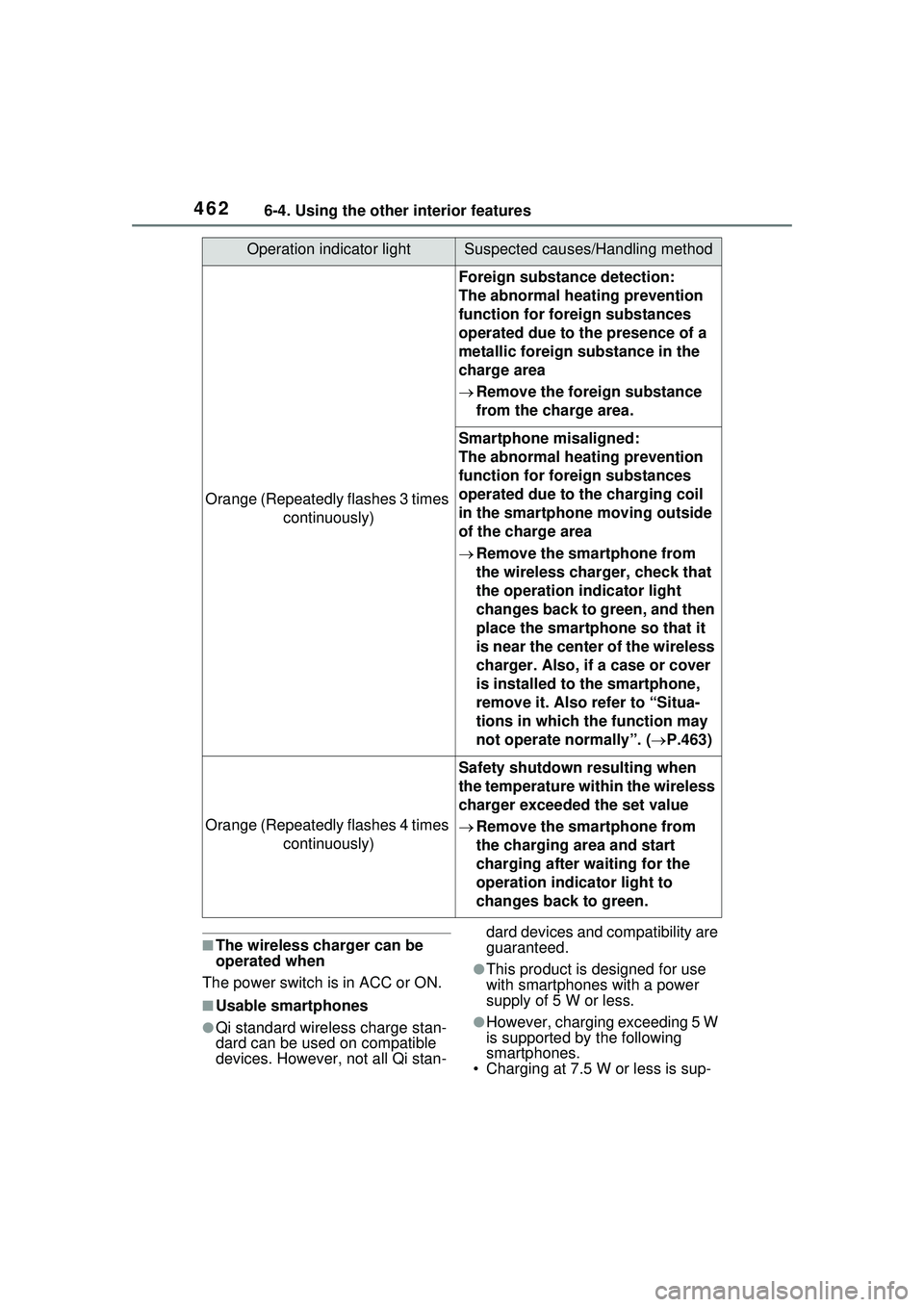
Orange (Repeatedly flashes 3 times
continuously)
Foreign substance detection:
The abnormal heating prevention
function for foreign substances
operated due to the presence of a
metallic foreign substance in the
charge area
Remove the foreign substance
from the charge area.
Smartphone misaligned:
The abnormal heating prevention
function for foreign substances
operated due to the charging coil
in the smartphone moving outside
of the charge area
Remove the smartphone from
the wireless charger, check that
the operation indicator light
changes back to green, and then
place the smartphone so that it
is near the center of the wireless
charger. Also, if a case or cover
is installed to the smartphone,
remove it. Also refer to “Situa-
tions in which the function may
not operate normally”. ( P.463)
Orange (Repeatedly flashes 4 times
continuously)
Safety shutdown resulting when
the temperature within the wireless
charger exceeded the set value
Remove the smartphone from
the charging area and start
charging after waiting for the
operation indicator light to
changes back to green.
Operation indicator lightSuspected causes/Handling method