cooling TOYOTA PRIUS PRIME 2023 Owners Manual
[x] Cancel search | Manufacturer: TOYOTA, Model Year: 2023, Model line: PRIUS PRIME, Model: TOYOTA PRIUS PRIME 2023Pages: 680, PDF Size: 14.97 MB
Page 88 of 680
882-1. Plug-in hybrid system
Primarily using EV mode and
AUTO EV/HV mode when driv-
ing in cities and using HV mode
when driving on highways (or
freeways) can help conserve
fuel and electricity. (P.74)
When using Eco drive mode, the
torque corresponding to the
accelerator pedal depression
amount can be generated more
smoothly than it is in normal
conditions. In addition, the oper-
ation of the air conditioning sys-
tem (heating/cooling) will be
minimized, improving fuel and
electricity economy. ( P.422)
Eco-friendly driving is possible
by keeping the Hybrid System
Indicator within Eco area.
( P.158) Shift the shift position to D when
stopped at a traffic light, or driv-
ing in heavy traffic etc. Shift the
shift position to P when parking.
When using the N, there is no
positive effect on fuel consump-
tion. In the N, the gasoline
engine operates but electricity
cannot be generated. Also,
when using the air conditioning
system, etc., the hybrid battery
(traction battery) power is con-
sumed.
Drive your vehicle smoothly.
Avoid abrupt acceleration and
deceleration. Gradual accel-
eration and deceleration will
make more effective use of
the electric motor (traction
motor) without having to use
gasoline engine power.
Avoid repeated acceleration.
Repeated acceleration con-
sumes hybrid battery (trac-
tion battery) po wer, resulting
in poor fuel consumption. Bat-
tery power can be restored by
driving with the accelerator
pedal slightly released.
Make sure to operate the brakes
Plug-in Hybrid Elec-
tric Vehicle driving
tips
For economical and ecolog-
ical driving, pay attention to
the following points:
Using EV mode, AUTO
EV/HV mode and HV
mode effectively
Using Eco drive mode
Use of Hybrid System
Indicator
Changing the shift posi-
tion
Accelerator pedal/brake
pedal operation
When braking
Page 92 of 680
922-1. Plug-in hybrid system
■Release the accelerator
pedal early before stopping
the vehicle, such as at a
traffic light
The regenerative brake will
operate to convert the kinetic
energy of the vehicle into electri-
cal energy, which will charge the
hybrid battery (traction battery).
The regeneration status can be
checked from the Hybrid Sys-
tem Indicator. ( P.158)
When the brake pedal is
depressed lightly during decel-
eration, the regeneration
amount increases, enabling
more electrical energy to be
recovered.
If the brake pedal is depressed too
strongly, the recovered amount
indicator will reach the maximum
level and the upper limit of the
recoverable en ergy will be
exceeded. Therefore, be sure to
operate the brake pedal early.
■Use the air conditioning
system appropriately, and
also utilize the heated steer-
ing wheel (if equipped) and
seat heaters (if equipped)
In EV mode, the vehicle is
cooled and heated by electrical
energy. (Except in extremely
cold temperatures of approxi-
mately 14°F [-10°C] or less.)
Preventing excessive cooling or
heating of the vehicle will reduce
power consumption and
improve electrical efficiency. When eco air conditioning mode
is used, the air conditioning con-
trol is switched automatically to
a lower setting. (
P.437)
The heated steering wheel and
seat heaters are efficient heat-
ing device that directly warm the
body using less electric power.
When used together with the air
conditioning system, a low tem-
perature setting can be used to
improve electrical and fuel effi-
ciency.
■Check the tire pressure
If the tire pressure is lower than
the specified value, it will
worsen the electrical and fuel
efficiency.
A pressure level 7 psi (50 kPa, 0.5
kgf/cm
2 or bar) lower than the spec-
ified value will cause a worsening of
several percentage points.
■When driving on highways,
use the EV/HV mode selec-
tion switch to drive in HV
mode
The power consumption will
increase significantly if the vehi-
cle is driven in EV mode on
highways.
■Do not load unnecessary
objects in the vehicle
Driving with objects weighing
220 lb. (100 kg) in the vehicle
will worsen the electrical and
fuel efficiency by approximately
3%.
Air resistance also greatly
Page 109 of 680
1092-2. Charging
2
Plug-in hybrid system
start time. (P.123)
■Hybrid battery (traction bat-
tery) warming control
(Alaska and Canada only)
This control operates after the
AC charging cable remains con-
nected to the vehicle for 3 days
and “Battery Heater” automati-
cally stops. It automatically insu-
lates the hybrid battery (traction
battery) in extremely low tem-
peratures.
This control stops 31 days
after the AC charging cable is
connected, even if it is still
connected to the vehicle.
When this control operates,
charging schedule settings
are ignored and charging
starts.
■“Battery Cooler”
When the hybrid battery (trac-
tion battery) is hot and the AC
charging cable is connected to
the vehicle, this function cools
the hybrid battery (traction bat-
tery) before charging is carried
out.
“Battery Cooler” will operate
when the “Battery Cooler” of
the “Charging Settings” on the
multi-information display is
on. ( P.169)
When the charging voltage is
120 V, the function does not
operate.
■Traction battery heating and
cooling system (“Battery
Heater” and “Battery Cooler”)
●The system operates when the
hybrid battery (traction battery) is
below or above a certain tempera-
ture.
●The system may operate when
charging is not being performed.
●When the charging schedule is
used ( P.123), this function will
operate according to the charging
schedule.
■“Battery Heater”
●When “Battery Heater” is operat-
ing, the charging indicator illumi-
nates.
●When the AC charging cable is
removed from the vehicle or
remains connected to the vehicle
for approximately 3 days, the sys-
tem automatically stops.
●When “Battery Heater” is operat-
ing during charging, the charging
time may be longer than normal.
●When the shift position is changed
to any position other than P while
“Battery Heater” is operating, the
hybrid battery (traction battery)
heating operation stops.
●“Battery Heater” may operate
even when the hybrid battery
(traction battery) is fully charged
depending on the temperature of
the hybrid battery (traction bat-
tery).
• The remaining charge of the hybrid battery (traction battery)
decreases when “Battery Heater”
operates. The charging operation
may start again to charge the
hybrid battery (traction battery).
• “Charging Stopped Due to Pulled Charging Connector” may be
shown when the charging connec-
tor is removed while recharging.
( P.143)
Page 110 of 680
1102-2. Charging
■“Battery Cooler”
●The charging indicator is illumi-
nated while “Battery Cooler” is on
standby or operating.
●“Battery Cooler” is implemented
for a maximum of approximately
30 minutes.
●When there is a small amount of
remaining charge in the hybrid
battery (traction battery), even if
the hybrid battery (traction battery)
is hot, “Battery Cooler” may not be
implemented.
●When the hybrid battery (traction
battery) is almost completely
charged, “Battery Cooler” may not
be implemented.
●When the following operations are
performed while “Battery Cooler”
is operating, the hybrid battery
(traction battery) cooling operation
stops.
• The hood is opened
• The power switch is turned to any mode other than off
• “Charge Now” is implemented ( P.124)
●“Battery Cooler” uses the power of
the hybrid battery (traction battery)
and external power source.
• While “Battery Cooler” is operat- ing, the remaining charge of the
hybrid battery ma y not increase
the same amount as during nor-
mal charging.
• The operation of “Battery Cooler”
is recognized as charging by a
charger. The charger that calcu-
lates the fee according to charging
time causes a charging fee.
To enable the use of EV mode
or AUTO EV/HV mode, we rec-
ommend systematically
charging the vehicle.
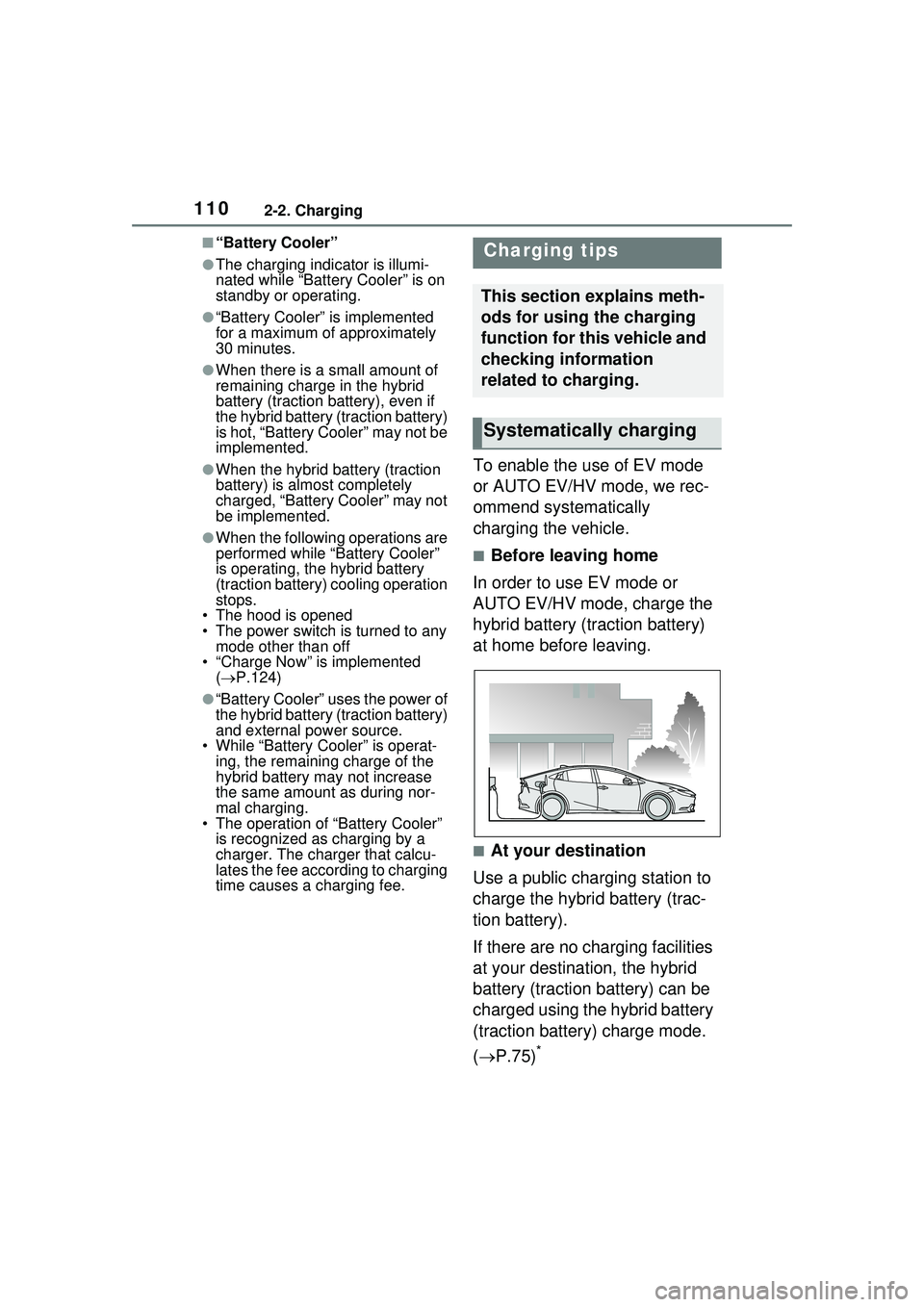
■Before leaving home
In order to use EV mode or
AUTO EV/HV mode, charge the
hybrid battery (traction battery)
at home before leaving.
■At your destination
Use a public charging station to
charge the hybrid battery (trac-
tion battery).
If there are no charging facilities
at your destination, the hybrid
battery (traction battery) can be
charged using the hybrid battery
(traction battery) charge mode.
( P.75)
*
Charging tips
This section explains meth-
ods for using the charging
function for this vehicle and
checking information
related to charging.
Systematically charging
Page 113 of 680
1132-2. Charging
2
Plug-in hybrid system
■Safety functions
●The hybrid system will not start
while the AC charging cable is
attached to the vehicle, even if the
power switch is operated.
●If the AC charging cable is con-
nected while the “READY” indica-
tor is illuminated, the hybrid
system will stop automatically and
driving will not be possible.
■During charging
●The charging starting time may
differ depending on the state of
the vehicle, but this does not indi-
cate a malfunction.
●Cooling fan sounds may be heard
from near the luggage compart-
ment.
●During charging, sounds may be
heard from near the hybrid battery
(traction battery) in accordance
with the operation of the air condi-
tioning system or “Battery Cooler”.
●During and after charging, the lug-
gage compartment and its sur-
rounding area in which the
onboard traction battery charger is
installed may get warm.
●The surface of the CCID
(Charging Circuit Interrupting
Device) may become hot, but this
does not indicate a malfunction.
●Depending on radio wave condi-
tions, interference may be heard
on the radio.
■When charging using a public
charging facility
When charging using a public charging facility, check the setting of
the charging schedule function.
●When the charging schedule is
registered, temporarily turn off the
function or turn “Charge Now” on.
(
P.128, 132)
●When the charging schedule is set
to on, charging will not start even
if the AC charging cable is con-
nected. Also, charging fee may
occur due to connection of the AC
charging cable.
■Using a DC Charger
DC Chargers cannot be used with
this vehicle.
■Capacity reduction of the
hybrid battery (traction battery)
The capacity of the hybrid battery
(traction battery) will decline gradu-
ally when the hybrid battery (traction
battery) is in use. The rate at which
it declines will diff er in accordance
with environmental conditions and
the way in which the vehicle is used.
Observing the following can help
suppress battery capacity decline.
●Avoid parking the vehicle in areas
with a high temperature under
direct sunlight when the hybrid
battery (traction battery) is fully
charged.
●Avoid accelerating and decelerat-
ing frequently and suddenly when
EV driving.
●Avoid frequent driving near the top
speed for EV driving. ( P.79)
●Leave a low level of charge in the
hybrid battery (traction battery)
when leaving the vehicle undriven
for a long period of time.
After confirming that EV mode or
AUTO EV/HV mode has switched
to HV mode, turn the power switch
off.
●Use the charging schedule func-
tion as much as possible in order
to fully charge t he hybrid battery
(traction battery) immediately
before starting off. ( P.123)
Things to know before
charging
Make sure to read the fol-
lowing precautions before
charging the hybrid battery
(traction battery).
Page 120 of 680
1202-2. Charging
2Touch “Vehicle customize” on
the sub menu.
3 Touch “Charging”.
4 Touch “Charging current”.
5 Touch “8A”, and touch “OK”.
WARNING
■When charging
Observe the following precau-
tions.
Failure to do so may cause an
unexpected accident, resulting in
death or serious injury.
●Connect to a power source suit-
able for charging. ( P.106)
●Check that the AC charging
cable, plug and outlet are free of
foreign matter.
●Before charging, check that the
AC charging inlet is not
deformed, damaged or cor-
roded, and check that the inlet
is free of foreign matter such as
dirt, snow and ice.
If there is dirt or dust in these
areas, remove completely
before inserting the charging
connector.
●Only use outlets where the plug
can be securely inserted.
●Do not bundle or wind the AC
charging cable while charging,
as doing so may result in over-
heating.
●Do not touch the terminals of
the charging connector and AC
charging inlet with a sharp metal
objects (needles etc.) or hands,
or short them with foreign
objects.
●When charging outdoors, make
sure to connect to a weather-
proof outlet for outdoor use.
Ensure the weatherproof outlet
cover closes co mpletely. If the
weatherproof outlet cover can-
not be closed, install a weather-
proof outlet cover that will close.
●In order to stop charging at the
charging station, follow the
instructions of the charger.
●If any heat, smoke, odors, noise
or other abnormalities are
noticed during charging, stop
charging immediately.
●Do not insert the plug if the out-
let is submerged in water or
snow.
●When charging while it is raining
or snowing, do not connect or
disconnect the plug if your
hands are wet. Also, do not get
the plug or outlet wet.
●Do not charge the vehicle
during a lightning storm.
●Prevent the AC charging cable
from being caught in the door or
back door.
●Do not let the wheels on the AC
charging cable, plug, charging
connector and CCID (Charging
Circuit Interrupting Device).
●Firmly insert the plug into the
outlet.
●Do not use an extension cord
and converting adaptor.
●Close the hood before using the
charging system. The cooling
fan may start operating sud-
denly. Touching or getting close
to rotating parts such as the fan
may cause your hands or
clothes (especially a necktie or
scarf) to become caught and
result in a serious injury.
Page 221 of 680
2214-4. Adjusting the steering wheel and mirrors
4
Before driving
Rear-view Mirror image
because water, snow, mud, etc.
is stuck to the camera lens,
operate the camera cleaning
washer or change to optical mir-
ror mode. (P.275)
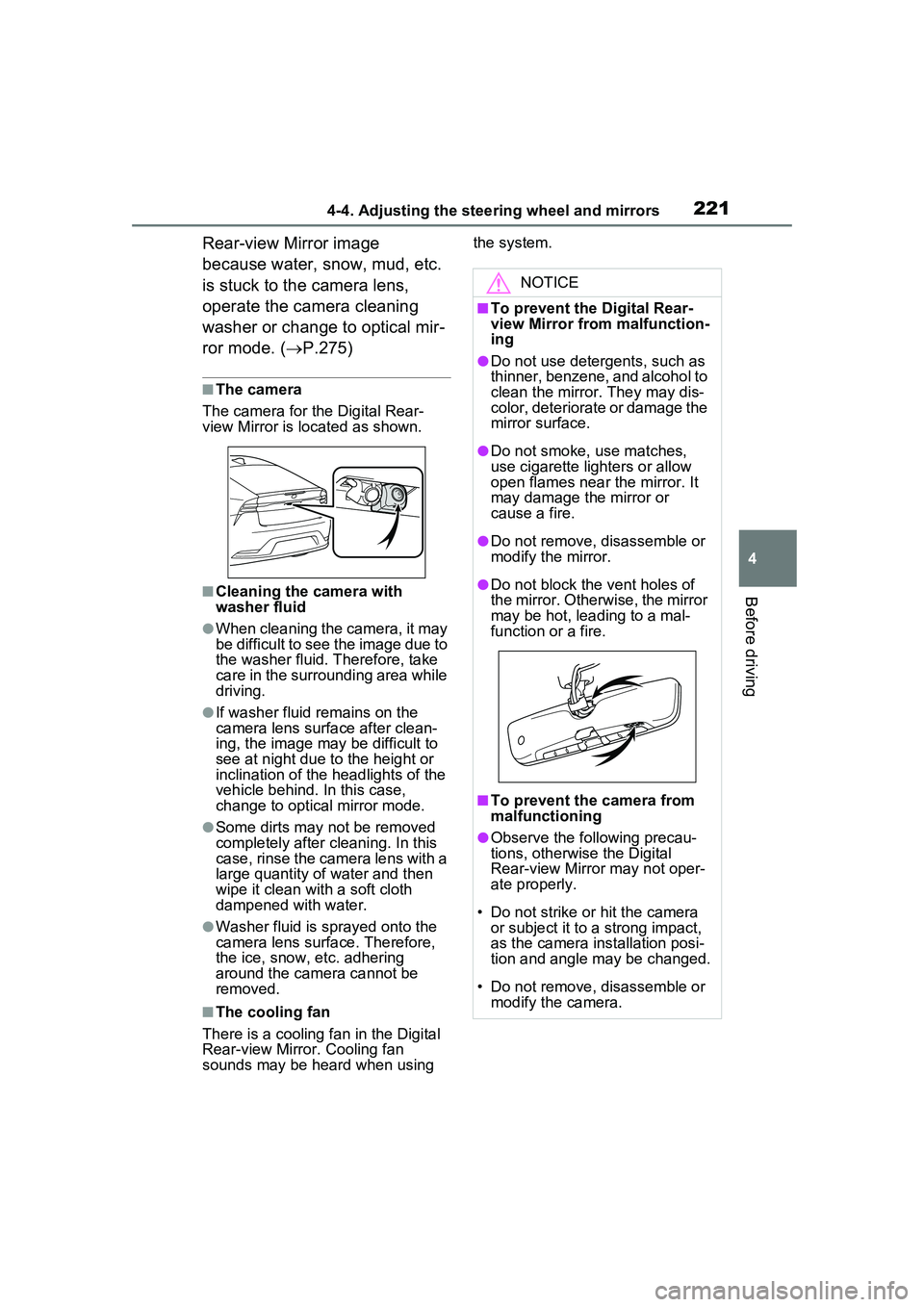
■The camera
The camera for the Digital Rear-
view Mirror is located as shown.
■Cleaning the camera with
washer fluid
●When cleaning the camera, it may
be difficult to see the image due to
the washer fluid. Therefore, take
care in the surrounding area while
driving.
●If washer fluid remains on the
camera lens surface after clean-
ing, the image may be difficult to
see at night due to the height or
inclination of the headlights of the
vehicle behind. In this case,
change to optical mirror mode.
●Some dirts may not be removed
completely after cleaning. In this
case, rinse the camera lens with a
large quantity of water and then
wipe it clean with a soft cloth
dampened with water.
●Washer fluid is sprayed onto the
camera lens surface. Therefore,
the ice, snow, etc. adhering
around the camera cannot be
removed.
■The cooling fan
There is a cooling fan in the Digital
Rear-view Mirror. Cooling fan
sounds may be heard when using the system.
NOTICE
■To prevent the Digital Rear-
view Mirror from malfunction-
ing
●Do not use detergents, such as
thinner, benzene, and alcohol to
clean the mirror. They may dis-
color, deteriorate or damage the
mirror surface.
●Do not smoke, use matches,
use cigarette lighters or allow
open flames near the mirror. It
may damage the mirror or
cause a fire.
●Do not remove, disassemble or
modify the mirror.
●Do not block the vent holes of
the mirror. Other
wise, the mirror
may be hot, leading to a mal-
function or a fire.
■To prevent the camera from
malfunctioning
●Observe the following precau-
tions, otherwise the Digital
Rear-view Mirror may not oper-
ate properly.
• Do not strike or hit the camera or subject it to a strong impact,
as the camera installation posi-
tion and angle may be changed.
• Do not remove, disassemble or modify the camera.
Page 422 of 680
4225-5. Using the driving support systems
around your vehicle and exit from
the parking space manually.
■If “Cannot control speed” is
displayed
The system judged that it cannot
adjust the speed of the vehicle when
using the system in an area with a
slope or step and assistance was
canceled.
Use the system in a level location.
■If “Obstacle detected” is dis-
played
As a moving object or stationary
object that may collide with your
vehicle has been detected, the
hybrid system output control/braking
control operates to suspend
Advanced Park assistance.
Check the condition of the surround-
ing area. To resume assistance,
select the “Start” button on the Multi-
media Display.
■If “No available parking space
to register” is displayed
This message is displayed when
is selected at a parking space that
cannot be detected.
Operate the system at a parking
space where differences in the road
surface can be recognized.
( P.414)
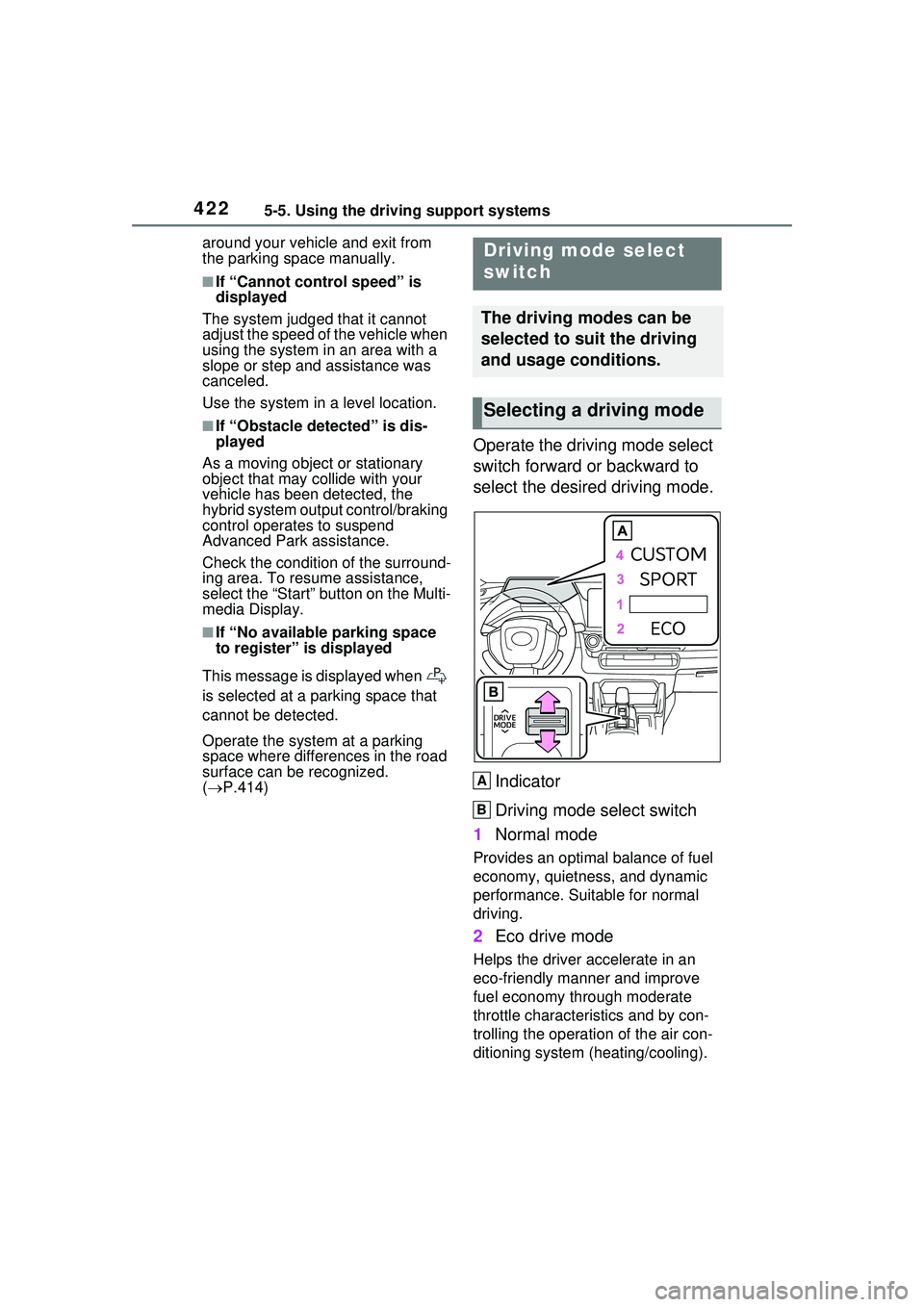
Operate the driving mode select
switch forward or backward to
select the desired driving mode.
Indicator
Driving mode select switch
1 Normal mode
Provides an optimal balance of fuel
economy, quietness, and dynamic
performance. Suitable for normal
driving.
2Eco drive mode
Helps the driver accelerate in an
eco-friendly manner and improve
fuel economy through moderate
throttle characteristics and by con-
trolling the operation of the air con-
ditioning system (heating/cooling).
Driving mode select
switch
The driving modes can be
selected to suit the driving
and usage conditions.
Selecting a driving mode
A
B
Page 423 of 680
4235-5. Using the driving support systems
5
Driving
When Eco drive mode is selected,
Eco drive mode indicator comes
on.
3Sport mode
Controls the hybrid system to pro-
vide quick, powerful acceleration.
This mode also expands the possi-
ble rate of deceleration by operat-
ing the accelerator pedal and
enables acceleration/deceleration
control based on the driver’s inten-
tions. This changes the steering
feel, making it suitable for when
agile driving response is desired,
such as when driving on roads with
many curves.
When Sport mode is selected,
Sport mode indicator comes on.
4Custom mode
Allows you to drive with the power
train, steering wheel and air condi-
tioning system func tions set to your
preferred settings.
Custom mode settings can only be
changed on the drive mode cus-
tomization display of Multimedia
Display. ( P.632)
When the Custom mode is
selected, Custom mode indicator
comes on.
■Operation of the air condition-
ing system in Eco drive mode
When Eco drive mode is selected,
the air conditioning system will auto-
matically be changed to eco air con-
ditioning mode.
Eco air conditioning mode controls
the heating/cooling operations and
fan speed of the air conditioning
system to enhance fuel efficiency.
To improve air conditioning perfor-
mance, perform the following opera-
tions:
●Adjust the fan speed ( P.435)
●Deactivate Eco drive mode
●Turn off eco air conditioning mode
( P.440)
■Automatic deactivation of a
driving mode
●Sport mode and Custom mode
are automatically deactivated and
the driving mode returns to normal
mode when the power switch is
turned to OFF.
●Normal mode and Eco drive mode
are not deactivated until another
driving mode is selected. (Even if
the power switch is turned to OFF,
normal mode and Eco drive mode
will not be automatically deacti-
vated.)
■Customization
The custom mode can be changed.
(Customizable features: P.618)
Page 435 of 680
4356-1. Using the air conditioning system and defogger
6
Interior features
If the “A/C” switch is not pressed,
the system will blow ambient tem-
perature air or heated air.
■Setting the fan speed
Move the fan speed setting knob
upwards to increase the fan
speed and downwards to
decrease the fan speed.
The fan speed is shown on the dis-
play. (7 levels)
Press the “OFF” switch to turn the
fan off.
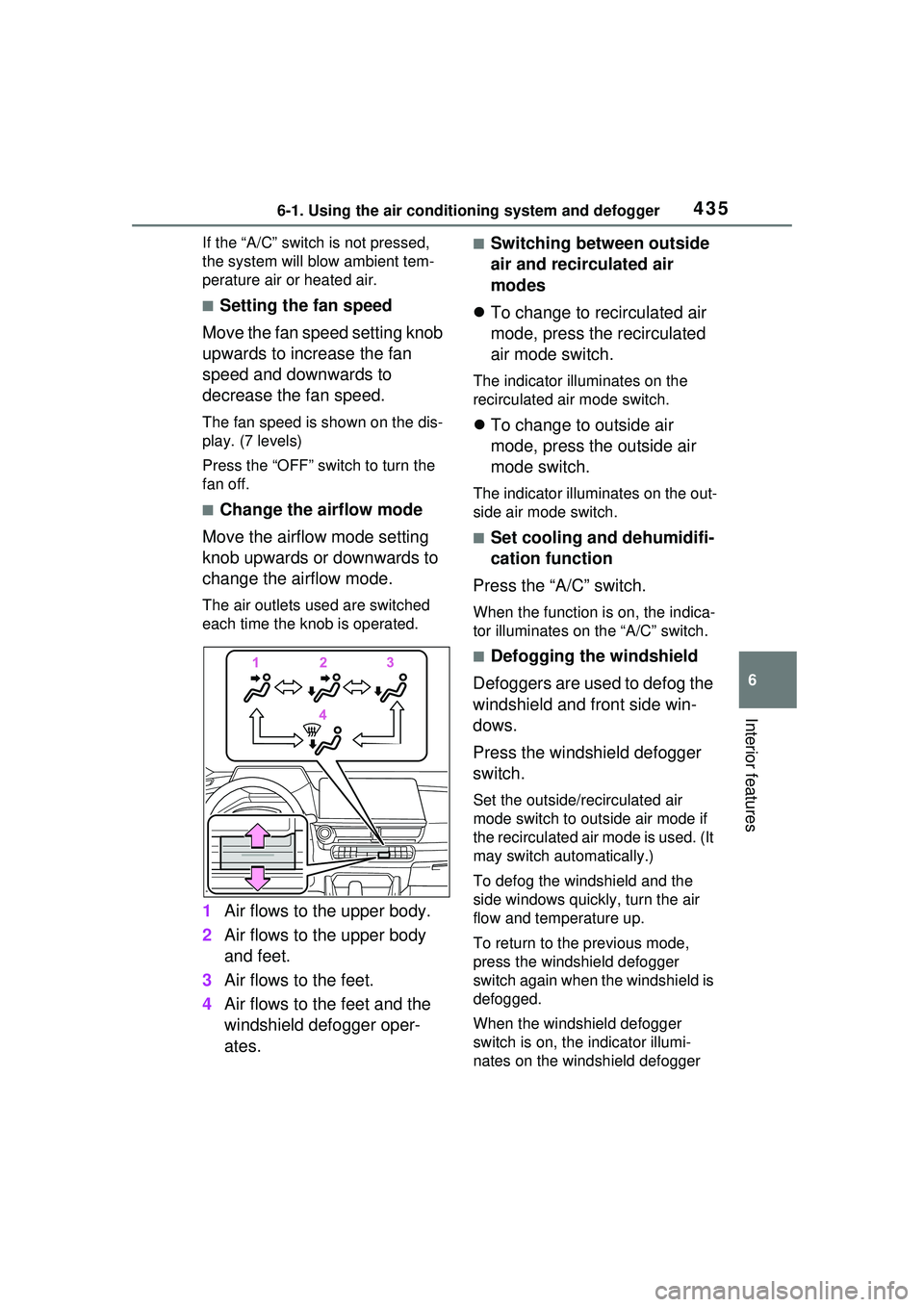
■Change the airflow mode
Move the airflow mode setting
knob upwards or downwards to
change the airflow mode.
The air outlets used are switched
each time the knob is operated.
1 Air flows to the upper body.
2 Air flows to the upper body
and feet.
3 Air flows to the feet.
4 Air flows to the feet and the
windshield defogger oper-
ates.
■Switching between outside
air and recirculated air
modes
To change to recirculated air
mode, press the recirculated
air mode switch.
The indicator illuminates on the
recirculated air mode switch.
To change to outside air
mode, press the outside air
mode switch.
The indicator illuminates on the out-
side air mode switch.
■Set cooling and dehumidifi-
cation function
Press the “A/C” switch.
When the function is on, the indica-
tor illuminates on the “A/C” switch.
■Defogging the windshield
Defoggers are used to defog the
windshield and front side win-
dows.
Press the windshield defogger
switch.
Set the outside/recirculated air
mode switch to outside air mode if
the recirculated air mode is used. (It
may switch automatically.)
To defog the windshield and the
side windows quickly, turn the air
flow and temperature up.
To return to the previous mode,
press the windshield defogger
switch again when the windshield is
defogged.
When the windshield defogger
switch is on, the indicator illumi-
nates on the windshield defogger