language TOYOTA PRIUS PRIME 2023 Owners Manual
[x] Cancel search | Manufacturer: TOYOTA, Model Year: 2023, Model line: PRIUS PRIME, Model: TOYOTA PRIUS PRIME 2023Pages: 680, PDF Size: 14.97 MB
Page 66 of 680
661-3. Emergency assistance
After you have signed the
Telematics Subscription Ser-
vice Agreement and are
enrolled, you can begin receiv-
ing services.
A variety of subscription terms
are available for purchase. Con-
tact your Toyota dealer, call the
following appropriate Customer
Experience Center or push the
“SOS” button in your vehicle for
further subscription details.
The United States
1-800-331-4331
Canada
1-888-869-6828
Puerto Rico
1-877-855-8377
■Safety Connect Services Infor-
mation
●Phone calls using the vehicle’s
Bluetooth® technology will not be
possible when Safety Connect is
active and in use.
●Safety Connect is available begin-
ning Fall 2009 on select Toyota
models (in the contiguous United
States only). Contact with the
Safety Connect response center
is dependent upon the telematics
device being in operative condi-
tion, cellular connection availabil-
ity, and GPS satellite signal
reception, which can limit the abil-
ity to reach the response center or
receive emergency service sup-
port. Enrollment and Telematics
Subscription Service Agreement
are required. A variety of subscrip-
tion terms are available; charges vary by subscripti
on term selected
and location.
●Automatic Collision Notification,
Emergency Assistance and Stolen
Vehicle Location are available in
the United States, including
Hawaii and Alaska, Puerto Rico
and Canada, and Enhanced
Roadside Assistance are avail-
able in the United States, Puerto
Rico and Canada.
●Automatic Collision Notification,
Emergency Assistance, Stolen
Vehicle and Enhanced Road
Assistance are not available in the
U.S. Virgin Islands.
For vehicles first sold in the U.S.
Virgin Islands, no Safety Connect
services will function in or outside
the U.S. Virgin Islands.
●Safety Connect services are not
subject to section 255 of the Tele-
communications Act and the
device is not TTY compatible.
■Languages
The Safety Connect response cen-
ter will offer support in multiple lan-
guages. The Safety Connect system
will offer voice prompts in English,
Spanish, and French. Please indi-
cate your language of choice when
enrolling.
■When contacting the response
center
You may be unable to contact the
response center if the network is
busy.
When the power switch is turned
to ON, the red indicator light
comes on for 2 seconds then
turns off. Afterward, the green
indicator light comes on, indicat-
ing that the service is active.
Subscription
Safety Connect LED light
Indicators
Page 160 of 680
1603-1. Instrument cluster
compliance with the License.
You may obtain a copy of the
License at
http://www.apache.org/licenses/
LICENSE-2.0
Unless required by applicable law or
agreed to in writing, software distrib-
uted under the License is distributed
on an “AS IS” BASIS, WITHOUT
WARRANTIES OR CONDITIONS
OF ANY KIND, either express or
implied. See the License for the
specific language governing permis-
sions and limitations under the
License.
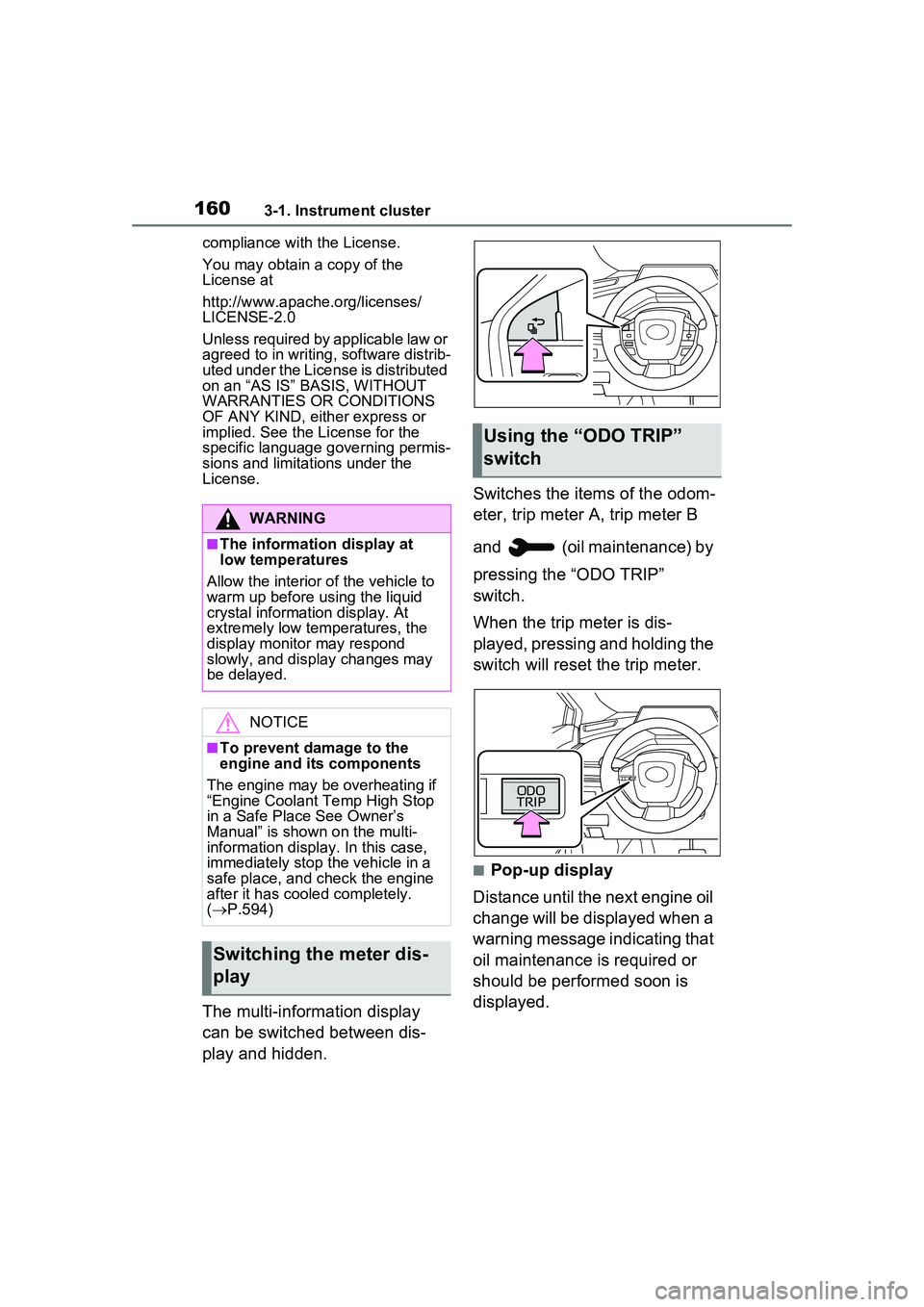
The multi-information display
can be switched between dis-
play and hidden. Switches the items of the odom-
eter, trip meter A, trip meter B
and (oil maintenance) by
pressing the “ODO TRIP”
switch.
When the trip meter is dis-
played, pressing and holding the
switch will reset the trip meter.
■Pop-up display
Distance until the next engine oil
change will be displayed when a
warning message indicating that
oil maintenance is required or
should be performed soon is
displayed.
WARNING
■The information display at
low temperatures
Allow the interior of the vehicle to
warm up before using the liquid
crystal information display. At
extremely low temperatures, the
display monitor may respond
slowly, and display changes may
be delayed.
NOTICE
■To prevent damage to the
engine and its components
The engine may be overheating if
“Engine Coolant Temp High Stop
in a Safe Place See Owner’s
Manual” is shown on the multi-
information display. In this case,
immediately stop the vehicle in a
safe place, and check the engine
after it has cooled completely.
( P.594)
Switching the meter dis-
play
Using the “O DO TRIP”
switch
Page 170 of 680
1703-1. Instrument cluster
system.
•“Timing”
Select to set the alert timing for
FCTA system.
Regenerative brake
Select to set up the following items.
• “Deceleration”
Select to change the regenerative
braking force when Regeneration
Boost is operating. ( P.260)
• “Deceleration Memory”
Select to store the settings for
regenerative braking force.
( P.260)
“TPWS setting” (Tire Pres-
sure Warning System)
( P.516)
• “Tire Set Switching”
Select to register the tire pressure
warning system sensor ID code set.
( P.524)
• “Tire Rotation”
Select to register the position of
each wheel after performing a tire
rotation. ( P.518)
• “Tire Pressure Setting”
Select to perform the tire inflation
pressure setting procedure of the
tire pressure warning system.
( P.520)
• “Pressure unit setting”
Select to change the units of mea-
sure displayed.( P.619)
Driver monitor (if equipped)
Select to enable/disable the driver
monitor warning function. ( P.292)
PBD (Power Back Door) (if equipped) (
P.194)
Select to set up the following items.
• System settings
Select to enable/d isable the power
back door system.
• “Opening Adjustment”
Select the open position when
power back door is fully open.
•“Volume”
Select to set the volume of the
buzzer which sounds when the
power back door system operates.
“Scheduled Maintenance”
Select to reset the scheduled main-
tenance information (message indi-
cating maintenance is required and
distance until the next mainte-
nance) after all maintenance is per-
formed.
Oil Maintenance
Select to reset th e Oil maintenance.
( P.506)
Rear Seat Reminder
( P.188)
Select to enable/disable the rear
seat reminder function.
Digital Keys (if equipped)
Select to reset registered digital
keys. ( P.183)
■ Settings
“Language”
Select to change the language on
the multi-information display.
“Units”
Select to change the unit of mea-
sure for fuel consumption.
“Meter Type”
Page 360 of 680
3605-5. Using the driving support systems
that the system has operated. After
the notification through voice guid-
ance is made, no more voice guid-
ance notifications will be made
again until the door is fully closed.
■Outside rear view mirror indica-
tor visibility
In strong sunlight, the outside rear
view mirror indicator may be difficult
to see.
■Buzzer
If the volume setting of the audio
system is high or the surrounding
area is loud, it may be difficult to
hear the buzzer.
■Voice notifications
In the following situations, voice
notifications will not be output:
●When it is estimated that no occu-
pants are on board*
●After opening a door and entering
the vehicle, until the hybrid system
is started
●When 3 minutes or more have
elapsed since the hybrid system
was stopped
●When the language setting of the
Multimedia Display has been set
to a language that does not sup-
port voice notifications
●When all of the doors have been
locked from outside the vehicle
●When a door remains open for 1
minute or more after the hybrid
system is stopped
●When the ACC mode ( P.618)
has been enabled through a cus- tomize setting on the Multimedia
Display and the hybrid system has
been stopped
●When the parking assist volume
setting on the Multimedia Display
has been set to off
*: For each seating position, judg-
ment is made based on the open-
ing and closing of a door, before
driving for ingress and after driv-
ing for egress.
■Customization
Some functions can be customized.
( P.618)
The safe exit assist system can
be enabled/disabled through a
customize setting. ( P.618)
When the safe exit assist is off,
the driving assist information
indicator will illuminate and a
message will be displayed on
the multi-information display.
Each time the power switch is
turned to ON, the safe exit
assist is enabled.
■Objects that can be detected by the safe exit assist
When the safe exit assist detects the following vehicles or bicycles
behind your vehicle using a rear si de radar sensor, the occupants of
the vehicle are informed through an outside rear view mirror indica-
WARNING
■To ensure the system can
operate properly
P.355
Turning the safe exit
assist system ON/OFF
Safe exit assist operation
Page 620 of 680
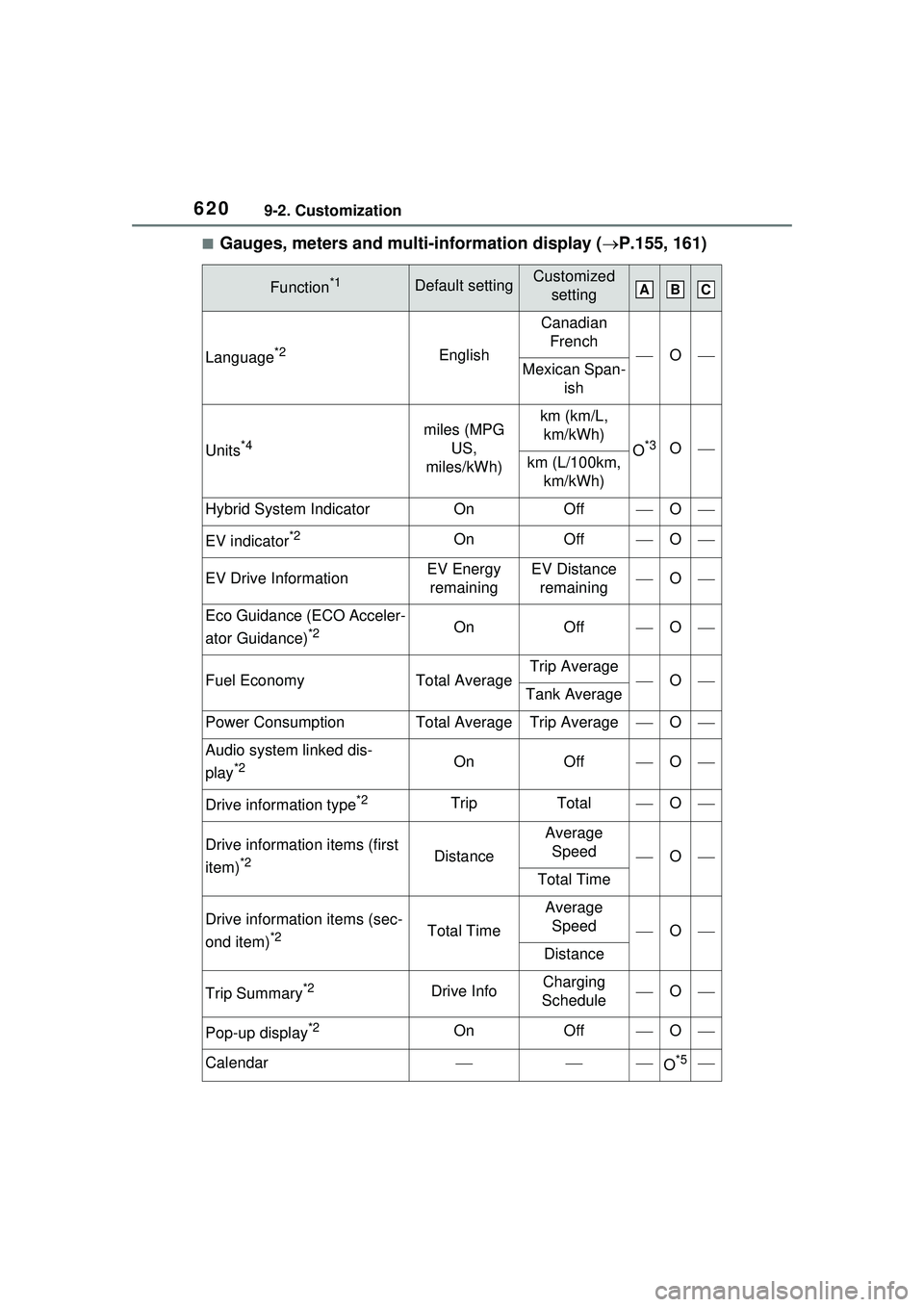
6209-2. Customization
■Gauges, meters and multi-information display (P.155, 161)
Function*1Default settingCustomized
setting
Language*2English
Canadian French
OMexican Span- ish
Units*4miles (MPG US,
miles/kWh)km (km/L, km/kWh)
O*3Okm (L/100km, km/kWh)
Hybrid System IndicatorOnOffO
EV indicator*2OnOffO
EV Drive InformationEV Energy remainingEV Distance remainingO
Eco Guidance (ECO Acceler-
ator Guidance)
*2OnOffO
Fuel EconomyTotal AverageTrip AverageOTank Average
Power ConsumptionTotal AverageTrip AverageO
Audio system linked dis-
play
*2OnOffO
Drive information type*2TripTotalO
Drive information items (first
item)
*2Distance
Average Speed
O
Total Time
Drive information items (sec-
ond item)
*2Total Time
Average Speed
O
Distance
Trip Summary*2Drive InfoCharging
ScheduleO
Pop-up display*2OnOffO
CalendarO*5
ABC