low beam TOYOTA PRIUS PRIME 2023 Owners Manual
[x] Cancel search | Manufacturer: TOYOTA, Model Year: 2023, Model line: PRIUS PRIME, Model: TOYOTA PRIUS PRIME 2023Pages: 680, PDF Size: 14.97 MB
Page 152 of 680
1523-1. Instrument cluster
*3: Intuitive parking assist OFF indi-cator turns on when the power
switch is turned to ON while the
Intuitive parking assist function is
on. It will turn off after a few sec-
onds.
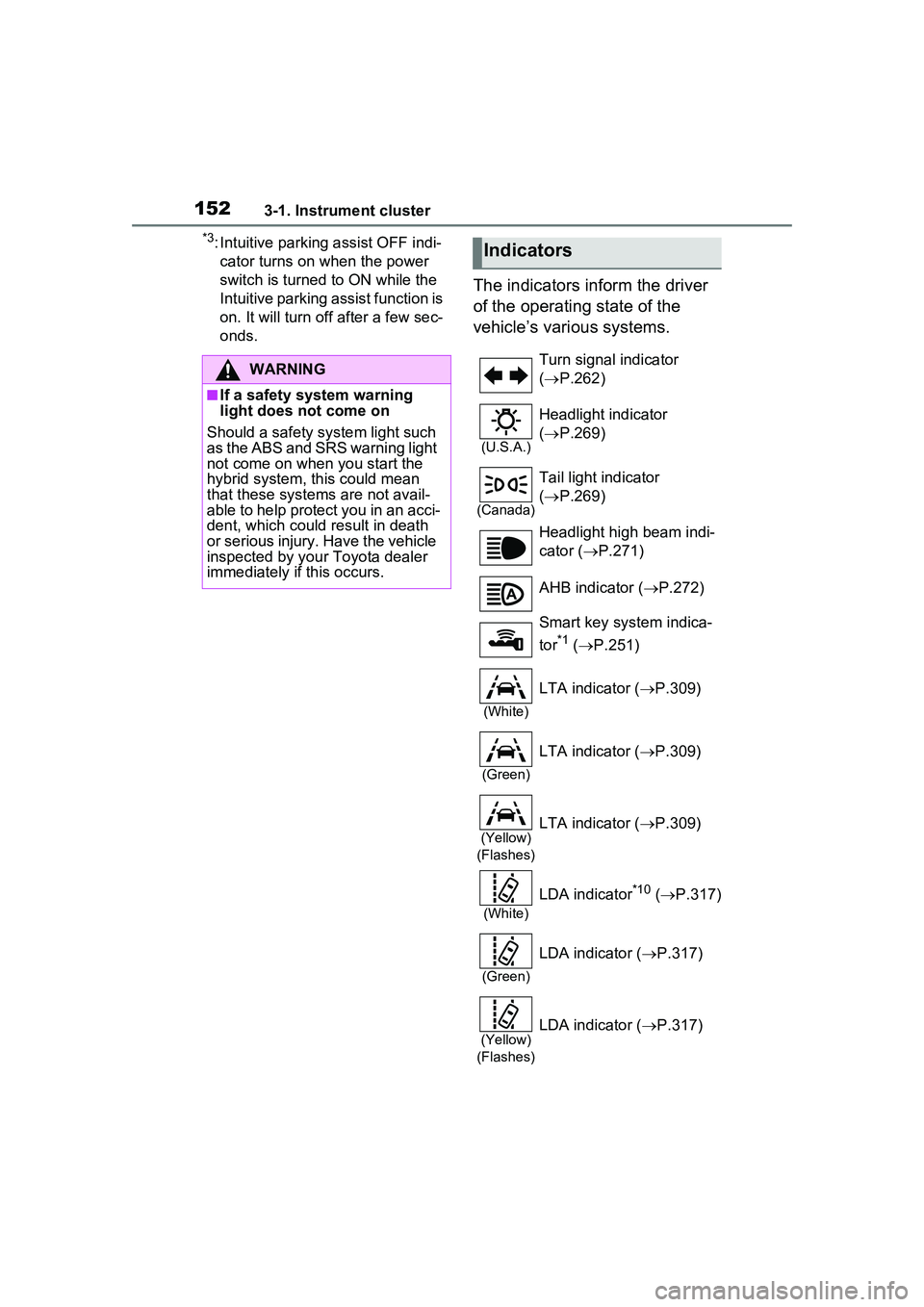
The indicators inform the driver
of the operating state of the
vehicle’s various systems.
WARNING
■If a safety system warning
light does not come on
Should a safety system light such
as the ABS and SRS warning light
not come on when you start the
hybrid system, this could mean
that these systems are not avail-
able to help protect you in an acci-
dent, which could result in death
or serious injury. Have the vehicle
inspected by your Toyota dealer
immediately if this occurs.
Indicators
Turn signal indicator
( P.262)
(U.S.A.)
Headlight indicator
( P.269)
(Canada)
Tail light indicator
( P.269)
Headlight high beam indi-
cator ( P.271)
AHB indicator ( P.272)
Smart key system indica-
tor
*1 ( P.251)
(White)
LTA indicator ( P.309)
(Green)
LTA indicator ( P.309)
(Yellow)
(Flashes)LTA indicator ( P.309)
(White)
LDA indicator*10 ( P.317)
(Green)
LDA indicator ( P.317)
(Yellow)
(Flashes)LDA indicator ( P.317)
Page 270 of 680
2705-3. Operating the lights and wipers
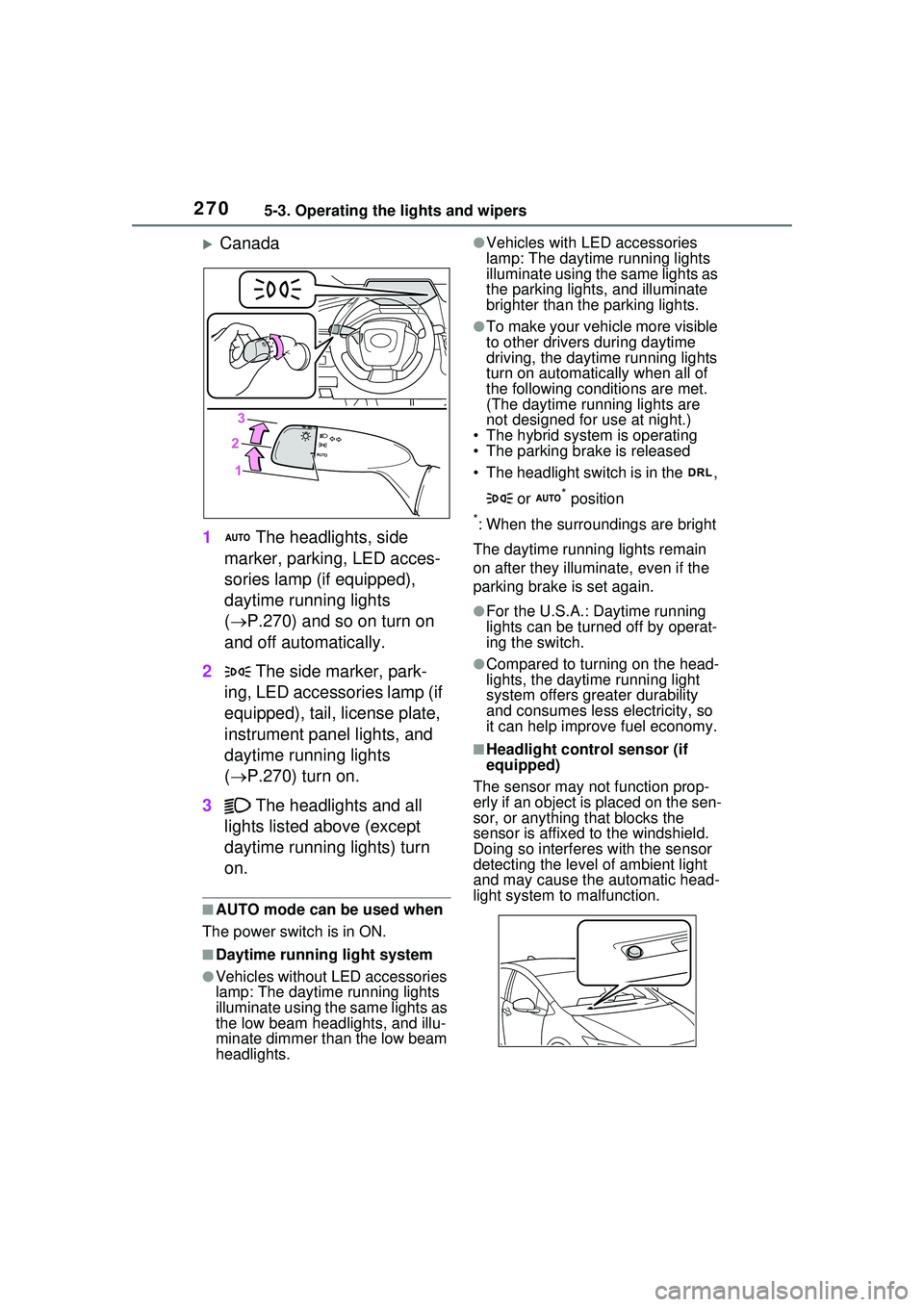
Canada
1 The headlights, side
marker, parking, LED acces-
sories lamp (if equipped),
daytime running lights
( P.270) and so on turn on
and off automatically.
2 The side marker, park-
ing, LED accessories lamp (if
equipped), tail, license plate,
instrument panel lights, and
daytime running lights
( P.270) turn on.
3 The headlights and all
lights listed above (except
daytime running lights) turn
on.
■AUTO mode can be used when
The power switch is in ON.
■Daytime running light system
●Vehicles without LED accessories
lamp: The daytime running lights
illuminate using the same lights as
the low beam head lights, and illu-
minate dimmer than the low beam
headlights.
●Vehicles with LED accessories
lamp: The daytime running lights
illuminate using the same lights as
the parking lights, and illuminate
brighter than the parking lights.
●To make your vehicle more visible
to other drivers during daytime
driving, the daytime running lights
turn on automatically when all of
the following conditions are met.
(The daytime running lights are
not designed for use at night.)
• The hybrid system is operating
• The parking brake is released
• The headlight switch is in the ,
or
* position
*: When the surroundings are bright
The daytime running lights remain
on after they illuminate, even if the
parking brake is set again.
●For the U.S.A.: Daytime running
lights can be turned off by operat-
ing the switch.
●Compared to turning on the head-
lights, the daytime running light
system offers gr eater durability
and consumes less electricity, so
it can help improve fuel economy.
■Headlight control sensor (if
equipped)
The sensor may not function prop-
erly if an object is placed on the sen-
sor, or anything that blocks the
sensor is affixed to the windshield.
Doing so interferes with the sensor
detecting the level of ambient light
and may cause the automatic head-
light system to malfunction.
Page 271 of 680
2715-3. Operating the lights and wipers
5
Driving
■Automatic light off system
●When the headlights are on: The
lights turn off 30 seconds after the
power switch is turned to OFF and
a door is opened and closed. (The
lights turn off immediately if
on the key is pressed after all the
doors are closed.)
●When only the tail lights are on:
The tail lights turn off automati-
cally if the power switch is turned
to OFF and the driver’s door is
opened.
To turn the lights on again, turn the
power switch to ON, or turn the light
switch to the , or posi-
tion once and then back to the
or position.
■Light reminder buzzer
A buzzer sounds when the driver’s
door is opened while the lights are
turned on with the power switch in
OFF (except when the automatic
light off system is operated).
■12-volt battery-saving function
In order to prevent the 12-volt bat-
tery of the vehicle from discharging,
if the headlights and/or tail lights are
on when the power switch is turned
to OFF, the battery saving function
will operate and aut omatically turn
off all the lights after approximately
20 minutes.
When any of the following are per-
formed, the 12-volt battery-saving
function is canceled once and then
reactivated. All the lights will turn off
automatically 20 minutes after the
12-volt battery-saving function has
been reactivated:
●When the headlight switch is oper-
ated
●When a door is opened or closed
■Windshield wiper linked head-
light illumination (if equipped)
When driving during daytime with
the headlight switch is in the
position, if the windshield wipers are
used, the headlights will turn on
automatically after several seconds
to help enhance the visibility of your
vehicle.
■If “Headlight System Malfunc-
tion Visit Your Dealer” is dis-
played on the mu lti-information
display
The system may be malfunctioning.
Have the vehicle inspected by your
Toyota dealer.
■Customization
Settings (e.g. light sensor sensitiv-
ity) can be changed.
(Customizable features: P.618)
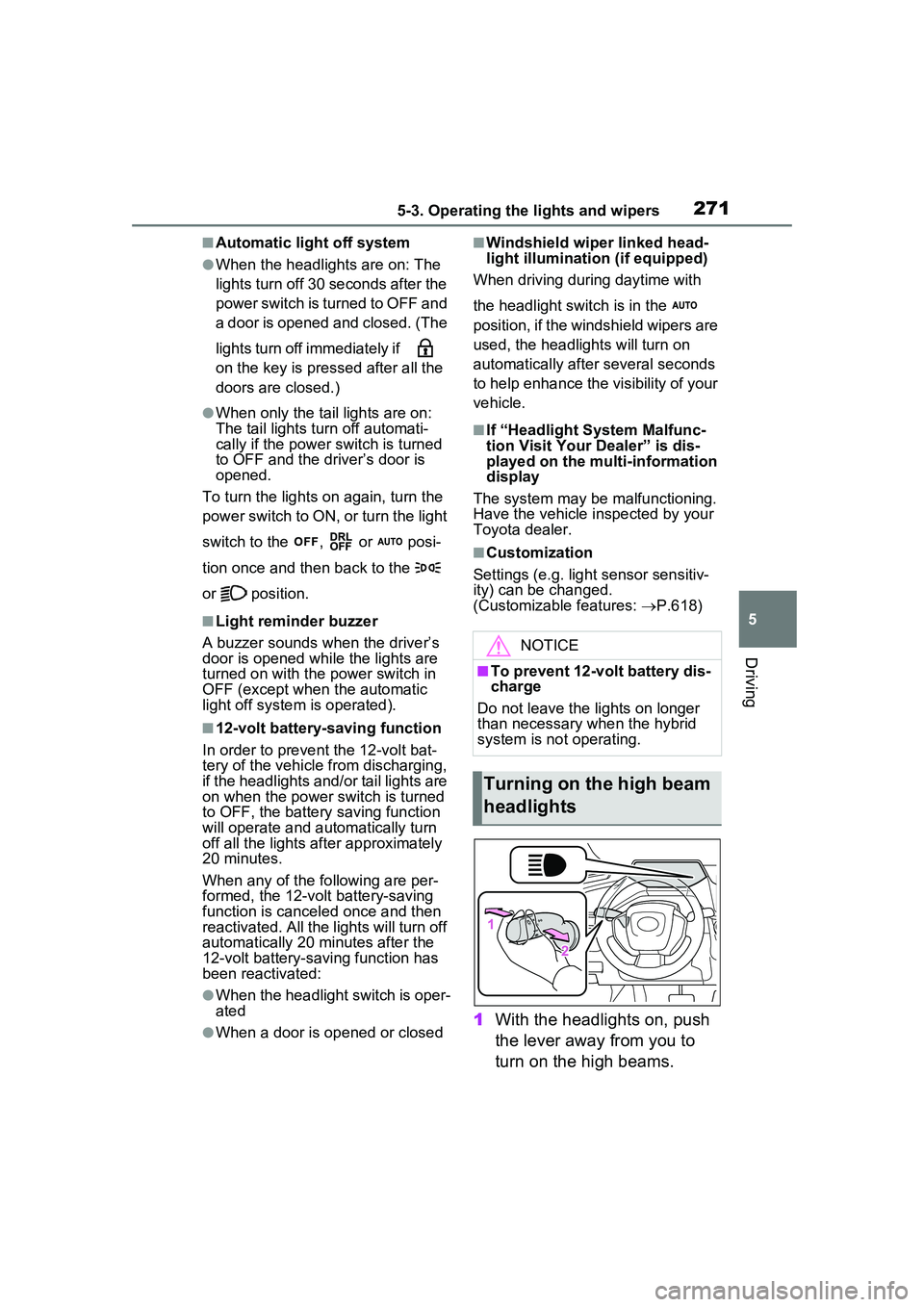
1 With the headlights on, push
the lever away from you to
turn on the high beams.
NOTICE
■To prevent 12-volt battery dis-
charge
Do not leave the lights on longer
than necessary when the hybrid
system is not operating.
Turning on the high beam
headlights
Page 272 of 680
2725-3. Operating the lights and wipers
Pull the lever toward you to the
center position to turn the high
beams off.
2Pull the lever toward you and
release it to flash the high
beams once.
You can flash the high beams with
the headlights on or off.
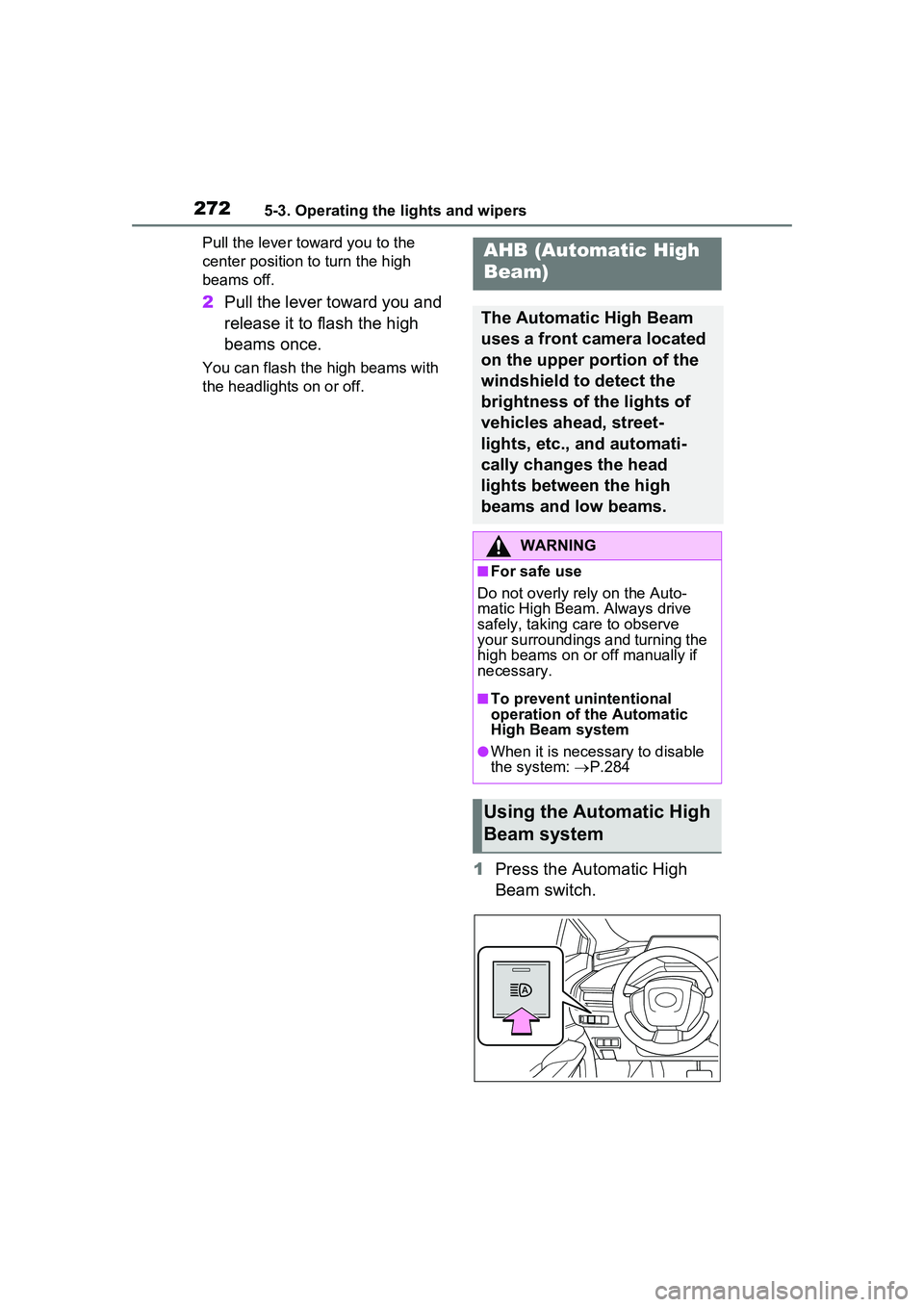
1Press the Automatic High
Beam switch.
AHB (Automatic High
Beam)
The Automatic High Beam
uses a front camera located
on the upper portion of the
windshield to detect the
brightness of the lights of
vehicles ahead, street-
lights, etc., and automati-
cally changes the head
lights between the high
beams and low beams.
WARNING
■For safe use
Do not overly rely on the Auto-
matic High Beam. Always drive
safely, taking care to observe
your surroundings and turning the
high beams on or off manually if
necessary.
■To prevent unintentional
operation of the Automatic
High Beam system
●When it is necessary to disable
the system: P.284
Using the Automatic High
Beam system
Page 273 of 680
2735-3. Operating the lights and wipers
5
Driving
2Turn the headlight switch to
the or position.
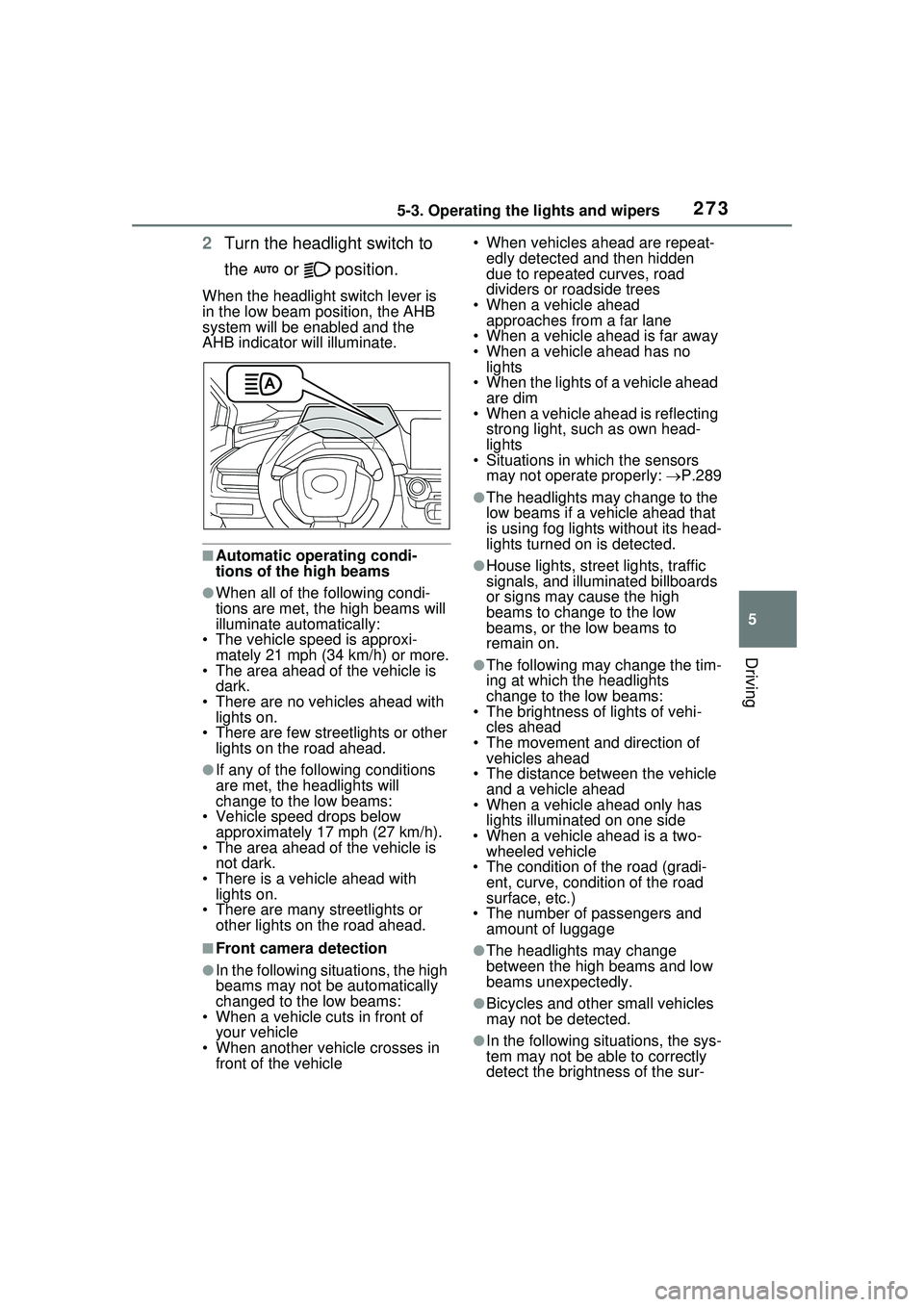
When the headlight switch lever is
in the low beam position, the AHB
system will be enabled and the
AHB indicator will illuminate.
■Automatic operating condi-
tions of the high beams
●When all of the following condi-
tions are met, the high beams will
illuminate automatically:
• The vehicle speed is approxi-
mately 21 mph (34 km/h) or more.
• The area ahead of the vehicle is dark.
• There are no vehicles ahead with lights on.
• There are few streetlights or other
lights on the road ahead.
●If any of the following conditions
are met, the headlights will
change to the low beams:
• Vehicle speed drops below
approximately 17 mph (27 km/h).
• The area ahead of the vehicle is not dark.
• There is a vehicle ahead with lights on.
• There are many streetlights or
other lights on the road ahead.
■Front camera detection
●In the following situations, the high
beams may not be automatically
changed to the low beams:
• When a vehicle cuts in front of your vehicle
• When another vehicle crosses in front of the vehicle • When vehicles ahead are repeat-
edly detected and then hidden
due to repeated curves, road
dividers or roadside trees
• When a vehicle ahead approaches from a far lane
• When a vehicle ahead is far away
• When a vehicle ahead has no lights
• When the lights of a vehicle ahead are dim
• When a vehicle ahead is reflecting
strong light, such as own head-
lights
• Situations in which the sensors
may not operate properly: P.289
●The headlights may change to the
low beams if a vehicle ahead that
is using fog lights without its head-
lights turned on is detected.
●House lights, street lights, traffic
signals, and illuminated billboards
or signs may cause the high
beams to change to the low
beams, or the low beams to
remain on.
●The following may change the tim-
ing at which the headlights
change to the low beams:
• The brightness of lights of vehi-
cles ahead
• The movement and direction of vehicles ahead
• The distance between the vehicle and a vehicle ahead
• When a vehicle ahead only has
lights illuminate d on one side
• When a vehicle ahead is a two- wheeled vehicle
• The condition of the road (gradi- ent, curve, condition of the road
surface, etc.)
• The number of passengers and amount of luggage
●The headlights may change
between the high beams and low
beams unexpectedly.
●Bicycles and other small vehicles
may not be detected.
●In the following situations, the sys-
tem may not be able to correctly
detect the brightness of the sur-
Page 274 of 680
2745-3. Operating the lights and wipers
roundings. This may cause the
low beams to remain on or the
high beams to flash or dazzle
pedestrians or vehicles ahead. In
such a case, it is necessary to
manually change between the
high beams and low beams.
• When there are lights similar to headlights or tail lights in the sur-
rounding area
• When headlights or tail lights of vehicles ahead are turned off,
dirty, changing color, or not aimed
properly
• When the headlights are repeat-
edly changing between the high
beams and low beams.
• When use of the high beams is
inappropriate or when the high
beams may be flashing or daz-
zling pedestrians or other drivers.
• When the vehicle is used in an area in which vehicles travel on
the opposite side of the road of
the country for which the vehicle
was designed, for example using
a vehicle designed for right-hand
traffic in a left-hand traffic area, or
vice versa
• When it is necessary to disable
the system: P.284
• Situations in which the sensors may not operate properly: P.289
■Temporarily reducing front
camera sensitivity
The sensitivity of the front camera
can be temporarily reduced.
1 Turn the power switch off with
the following conditions met.
●The headlight swit ch is in the
or position.
●The headlight switch lever is in the
low beam position.
●The automatic High Beam switch
is on.
2 Turn the power switch to ON.
3 Within 60 seconds after perform-
ing step 2, push the headlight
switch lever to the high beam
position then pull it to the original position quickly 10 times, then
leave the lever in its original
position.
4 If the sensitivity is changed, the
Automatic High Beam indicator
will blink 3 times.
■Changing to the high
beams
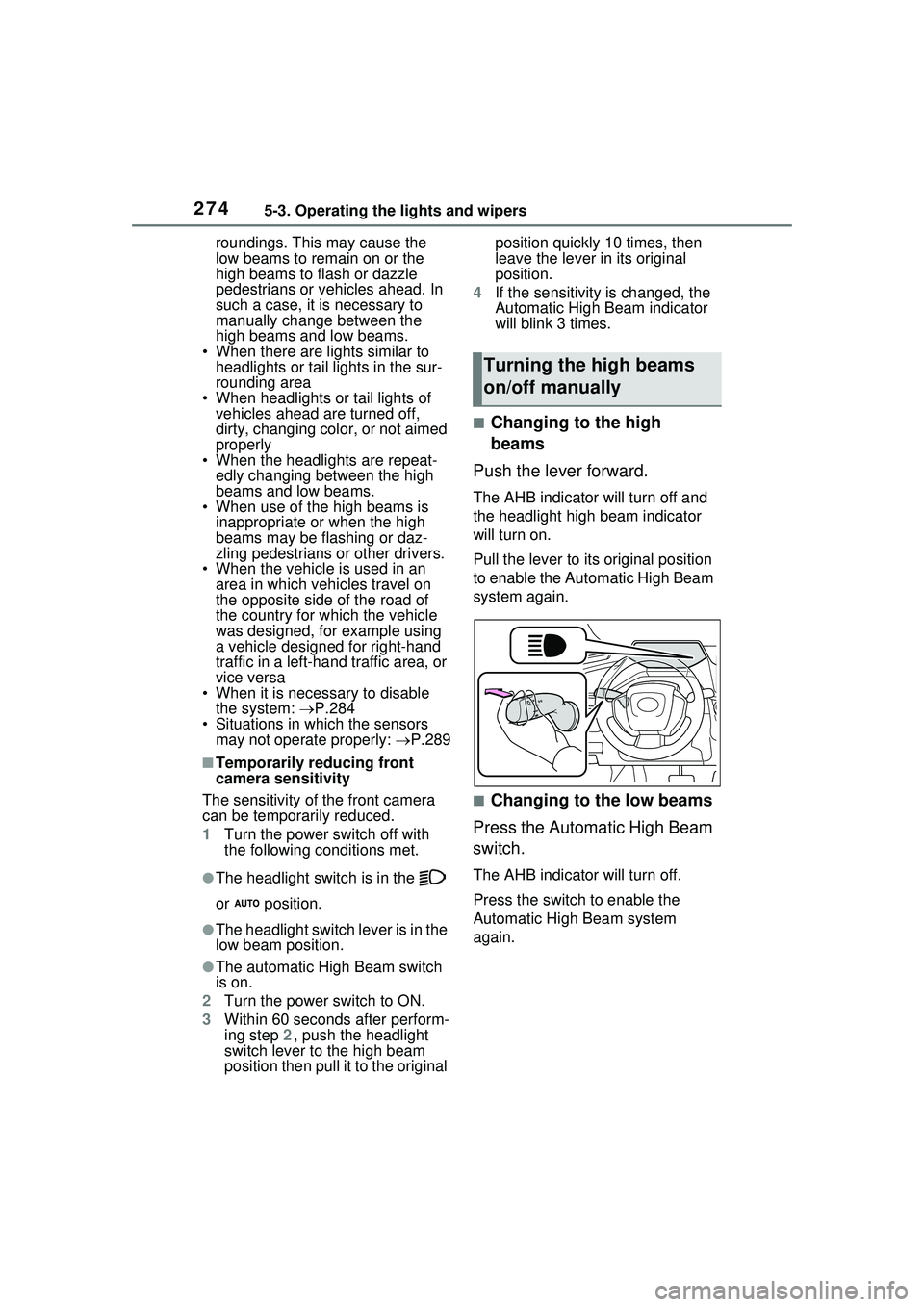
Push the lever forward.
The AHB indicator will turn off and
the headlight high beam indicator
will turn on.
Pull the lever to its original position
to enable the Automatic High Beam
system again.
■Changing to the low beams
Press the Automatic High Beam
switch.
The AHB indicator will turn off.
Press the switch to enable the
Automatic High Beam system
again.
Turning the high beams
on/off manually
Page 275 of 680
2755-3. Operating the lights and wipers
5
Driving
It is recommended to switch to
the low beams when use of the
high beams is inappropriate or
when the high beams may
cause problems or distress to
other drivers or pedestrians
nearby.
Pull the lever rearward and then
return it to its original position.
The high beams will illuminate
while the lever is pulled, however,
after the lever is returned to its orig-
inal position, the low beams will
remain on for a certain amount of
time. After this, the Automatic High
Beam system will operate.
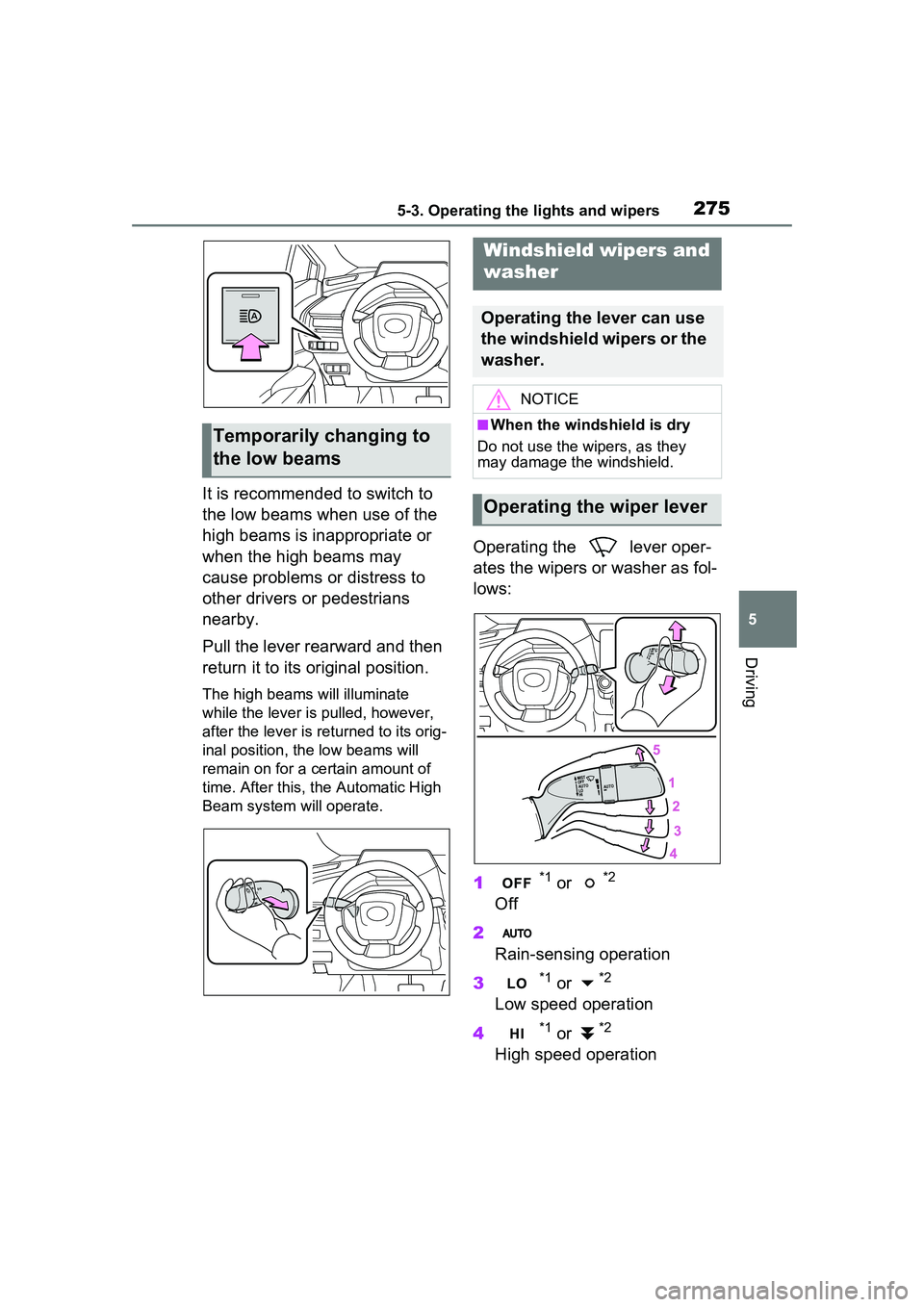
Operating the lever oper-
ates the wipers or washer as fol-
lows:
1
*1 or *2
Off
2
Rain-sensing operation
3
*1 or *2
Low speed operation
4
*1 or *2
High speed operation
Temporarily changing to
the low beams
Windshield wipers and
washer
Operating the lever can use
the windshield wipers or the
washer.
NOTICE
■When the windshield is dry
Do not use the wipers, as they
may damage the windshield.
Operating the wiper lever
Page 285 of 680
2855-5. Using the driving support systems
5
Driving
■AHB (Automatic High
Beam)
P.272
■PCS (Pre-Collision System)
P.293
■LTA (Lane Tracing Assist)
P.305
■LDA (Lane Departure Alert)
P.313
■LCA (Lane Change Assist)*
P.310
■FCTA (Front Cross Traffic
Alert)
*
P.326
■PDA (Proactive Driving
Assist)
P.320
■RSA (Road Sign Assist)*
P.329
■Dynamic radar cruise con-
trol
P.331
■Cruise control
P.342
■Emergency Driving Stop
System
P.345
■Traffic Jam Assist*
P.348
■Driver monitor*
P.292
*: If equipped
Various sensors are used to
obtain the necessary informa-
tion for system operation.
WARNING
●When using an automatic car
wash
●When a sensor is misaligned or
deformed due to a strong
impact being applied to the sen-
sor or the area around the sen-
sor
●When accessories which
obstruct a sensor or light are
temporarily installed to the vehi-
cle
●When a compact spare tire or
tire chains are installed to the
vehicle or an emergency tire
puncture repair kit has been
used
●When the tires are excessively
worn or the inflation pressure of
the tires is low
●When tires other than the manu-
facturer specified size are
installed
●When the vehicle cannot be
driven stably, due to a collision,
malfunction, etc.
Driving assist system
Sensors used by Toyota
Safety Sense 3.0
Page 367 of 680
3675-5. Using the driving support systems
5
Driving
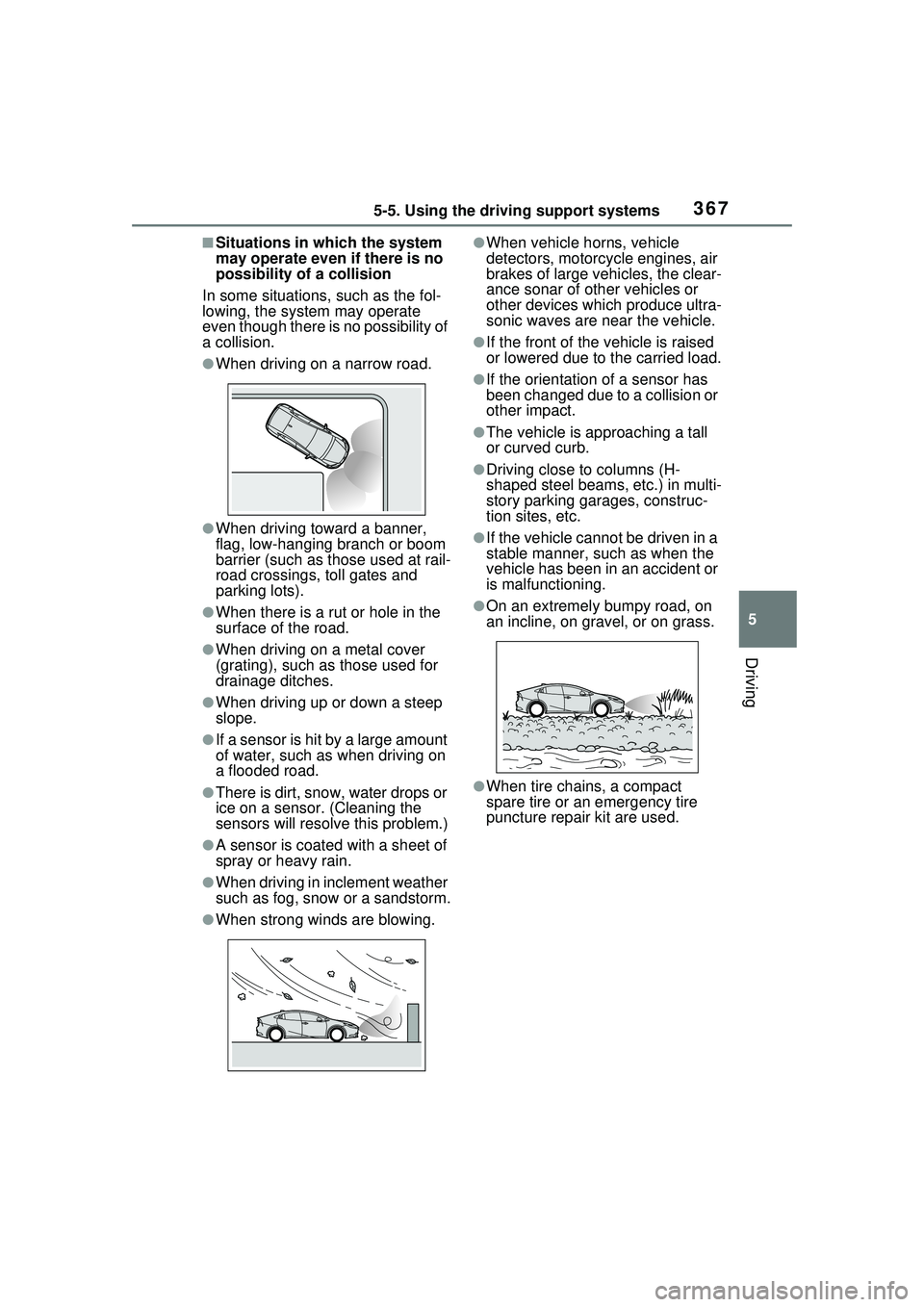
■Situations in which the system
may operate even if there is no
possibility of a collision
In some situations, such as the fol-
lowing, the system may operate
even though there is no possibility of
a collision.
●When driving on a narrow road.
●When driving toward a banner,
flag, low-hanging branch or boom
barrier (such as those used at rail-
road crossings, toll gates and
parking lots).
●When there is a rut or hole in the
surface of the road.
●When driving on a metal cover
(grating), such as those used for
drainage ditches.
●When driving up or down a steep
slope.
●If a sensor is hit by a large amount
of water, such as when driving on
a flooded road.
●There is dirt, snow, water drops or
ice on a sensor. (Cleaning the
sensors will resolve this problem.)
●A sensor is coated with a sheet of
spray or heavy rain.
●When driving in inclement weather
such as fog, snow or a sandstorm.
●When strong winds are blowing.
●When vehicle horns, vehicle
detectors, motorcycle engines, air
brakes of large vehicles, the clear-
ance sonar of other vehicles or
other devices which produce ultra-
sonic waves are near the vehicle.
●If the front of the vehicle is raised
or lowered due to the carried load.
●If the orientation of a sensor has
been changed due to a collision or
other impact.
●The vehicle is approaching a tall
or curved curb.
●Driving close to columns (H-
shaped steel beams, etc.) in multi-
story parking garages, construc-
tion sites, etc.
●If the vehicle cannot be driven in a
stable manner, such as when the
vehicle has been in an accident or
is malfunctioning.
●On an extremely bumpy road, on
an incline, on gravel, or on grass.
●When tire chains, a compact
spare tire or an emergency tire
puncture repair kit are used.
Page 569 of 680
5698-2. Steps to take in an emergency
8
When trouble arises
shift position is in N, shift the shift
position to P when the vehicle is
stopped.
■If “Hybrid System Overheated
Output Power Reduced” is
shown
The message may be shown when
driving under severe operating con-
ditions. (For example, when driving
up a long steep hill or driving up a
steep hill in reverse.)
Coping method: P.595
■If “Traction battery needs to be
protected. Shift into P to
restart.” is shown
This message is displayed when the
hybrid battery (traction battery)
charge has become extremely low
because the shift position has been
left in N for a certain amount of time.
When operating the vehicle, shift to
P and restart the hybrid system.
■If “Shift is in N Release Acceler-
ator Before Shifting” is shown
Message is displayed when the
accelerator pedal has been
depressed and the shift position is in
N. Release the accelerator pedal
and shift the shift position to D or R.
■If “Press brake when vehicle is
stopped Hybrid system may
overheat” is shown
Message is displayed when the
accelerator pedal is depressed to
maintain the vehicle position when
stopped on a upward slope, etc.
If this continues, the hybrid system
may overheat.
Release the accelerator pedal and
depress the brake pedal.
■If “Shift System Malfunction
Shifting Unavailable Drive to a
Safe Place and Stop” or “Shift
System Malfunction Driving
Unavailable” is displayed
There is a malfunction in the shift
control system. Have the vehicle
inspected by your Toyota dealer immediately.
■If “Auto Power OFF to Conserve
Battery” is shown
Power was turned off due to the
automatic power off function.
Next time when starting the hybrid
system, operate the hybrid system
for approximately 5 minutes to
recharge the 12-volt battery.
■If “Parking Assist Unavailable
Low Visibility See Owner’s Man-
ual” is displayed
Indicates one of the following sys-
tems is disabled.
● RCD (Rear Camera Detec-
tion) (if equipped)
● PKSB (Parking Support
Brake) (if equipped)
Remove any dirt or foreign matter
from the rear cameras.
■If “System Malfunction Visit
Your Dealer” is displayed
Indicates one of the following sys-
tems is disabled.
●PCS (Pre-Collision System)
●LDA (Lane Departure Alert)
●LTA (Lane Tracing Assist)
● LCA (Lane Change Assist) (if
equipped)
●AHB (Automatic High Beam)
●Dynamic radar cruise control
● RSA (Road Sign Assist) (if
equipped)
●PDA (Proactive Driving Assist)
● BSM (Blind Spot Monitor) (if
equipped)
● RCTA (Rear Cross Traffic
Alert) (if equipped)
●Safe Exit Assist (if equipped)