oil change TOYOTA PRIUS PRIME 2023 Owners Manual
[x] Cancel search | Manufacturer: TOYOTA, Model Year: 2023, Model line: PRIUS PRIME, Model: TOYOTA PRIUS PRIME 2023Pages: 680, PDF Size: 14.97 MB
Page 156 of 680
1563-1. Instrument cluster
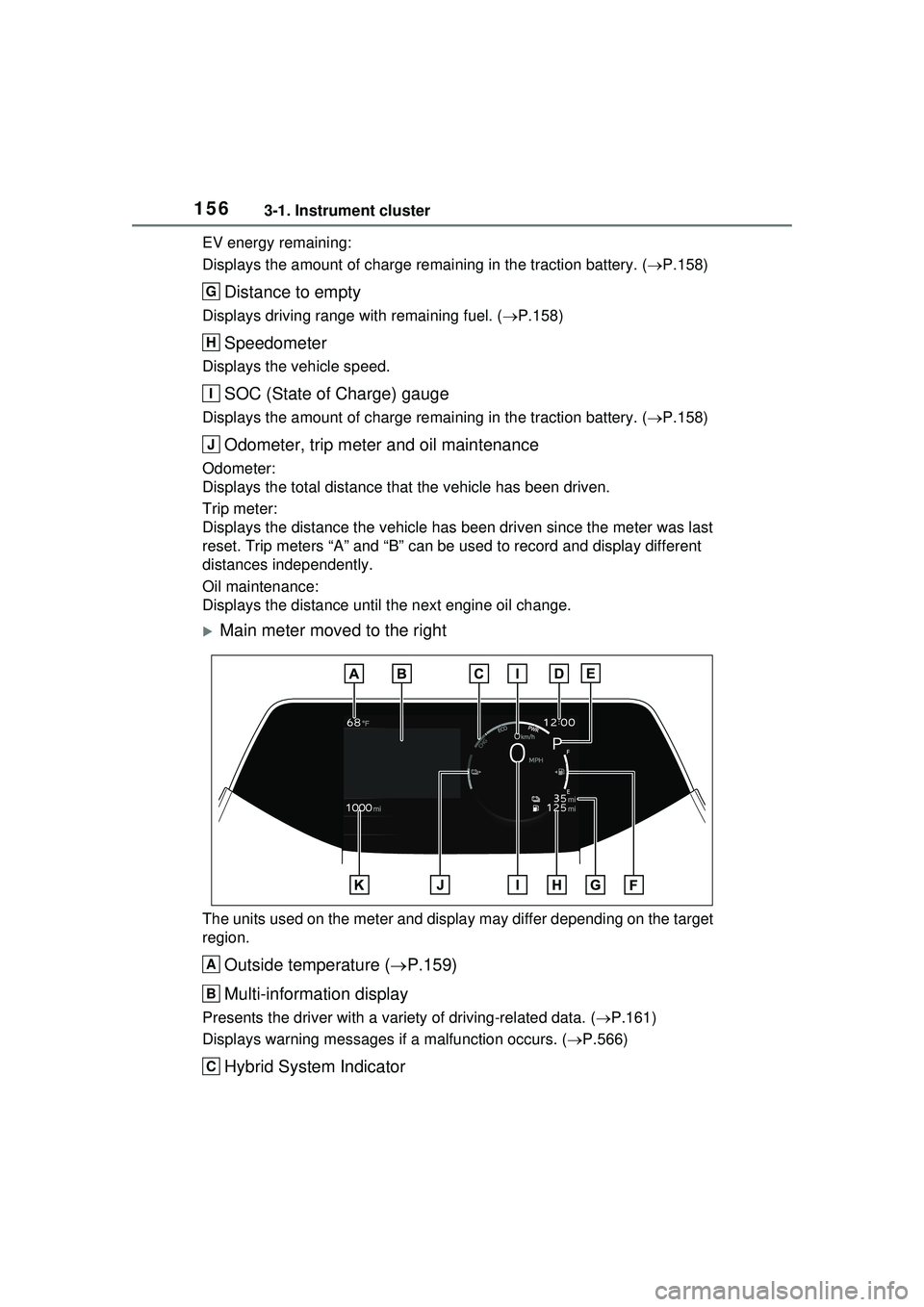
EV energy remaining:
Displays the amount of charge remaining in the traction battery. (P.158)
Distance to empty
Displays driving range with remaining fuel. ( P.158)
Speedometer
Displays the vehicle speed.
SOC (State of Charge) gauge
Displays the amount of charge remaining in the traction battery. ( P.158)
Odometer, trip meter and oil maintenance
Odometer:
Displays the total distance that the vehicle has been driven.
Trip meter:
Displays the distance the vehicle has been driven since the meter was last
reset. Trip meters “A” and “B” can be used to record and display different
distances independently.
Oil maintenance:
Displays the distance until the next engine oil change.
Main meter moved to the right
The units used on the meter and display may differ depending on the target
region.
Outside temperature ( P.159)
Multi-information display
Presents the driver with a vari ety of driving-related data. (P.161)
Displays warning me ssages if a malfunction occurs. ( P.566)
Hybrid System Indicator
G
H
I
J
A
B
C
Page 157 of 680
1573-1. Instrument cluster
3
Vehicle status information and indicators
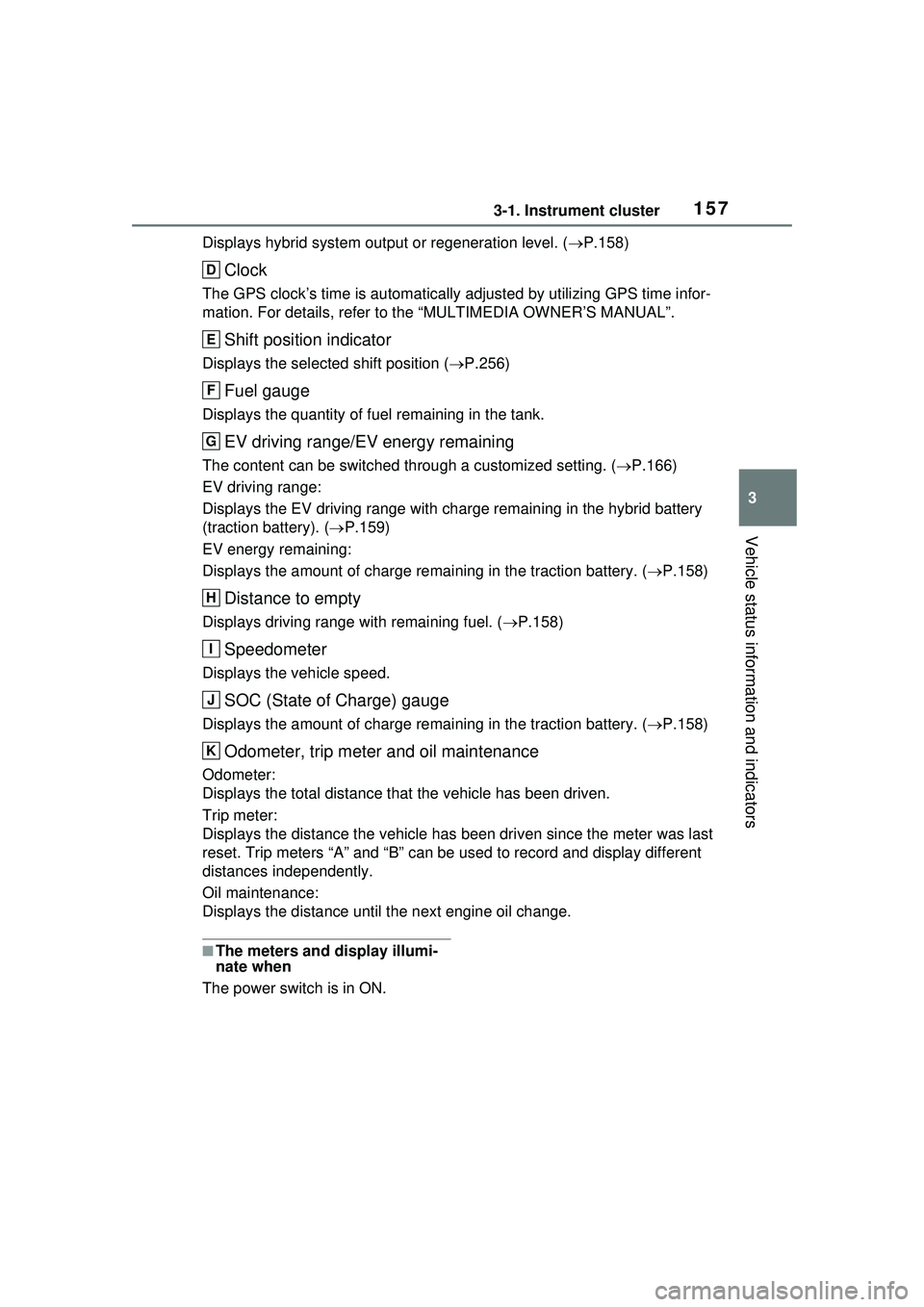
Displays hybrid system output or regeneration level. (P.158)
Clock
The GPS clock’s time is automatically adjusted by utilizing GPS time infor-
mation. For details, refer to the “MULTIMEDIA OWNER’S MANUAL”.
Shift position indicator
Displays the selected shift position ( P.256)
Fuel gauge
Displays the quantity of fuel remaining in the tank.
EV driving range/EV energy remaining
The content can be switched through a customized setting. ( P.166)
EV driving range:
Displays the EV driving range with char ge remaining in the hybrid battery
(traction battery). ( P.159)
EV energy remaining:
Displays the amount of charge remaining in the traction battery. ( P.158)
Distance to empty
Displays driving range with remaining fuel. ( P.158)
Speedometer
Displays the vehicle speed.
SOC (State of Charge) gauge
Displays the amount of charge remaining in the traction battery. ( P.158)
Odometer, trip meter and oil maintenance
Odometer:
Displays the total distance that the vehicle has been driven.
Trip meter:
Displays the distance the vehicle has been driven since the meter was last
reset. Trip meters “A” and “B” can be used to record and display different
distances independently.
Oil maintenance:
Displays the distance until the next engine oil change.
■The meters and display illumi-
nate when
The power switch is in ON.
D
E
F
G
H
I
J
K
Page 160 of 680
1603-1. Instrument cluster
compliance with the License.
You may obtain a copy of the
License at
http://www.apache.org/licenses/
LICENSE-2.0
Unless required by applicable law or
agreed to in writing, software distrib-
uted under the License is distributed
on an “AS IS” BASIS, WITHOUT
WARRANTIES OR CONDITIONS
OF ANY KIND, either express or
implied. See the License for the
specific language governing permis-
sions and limitations under the
License.
The multi-information display
can be switched between dis-
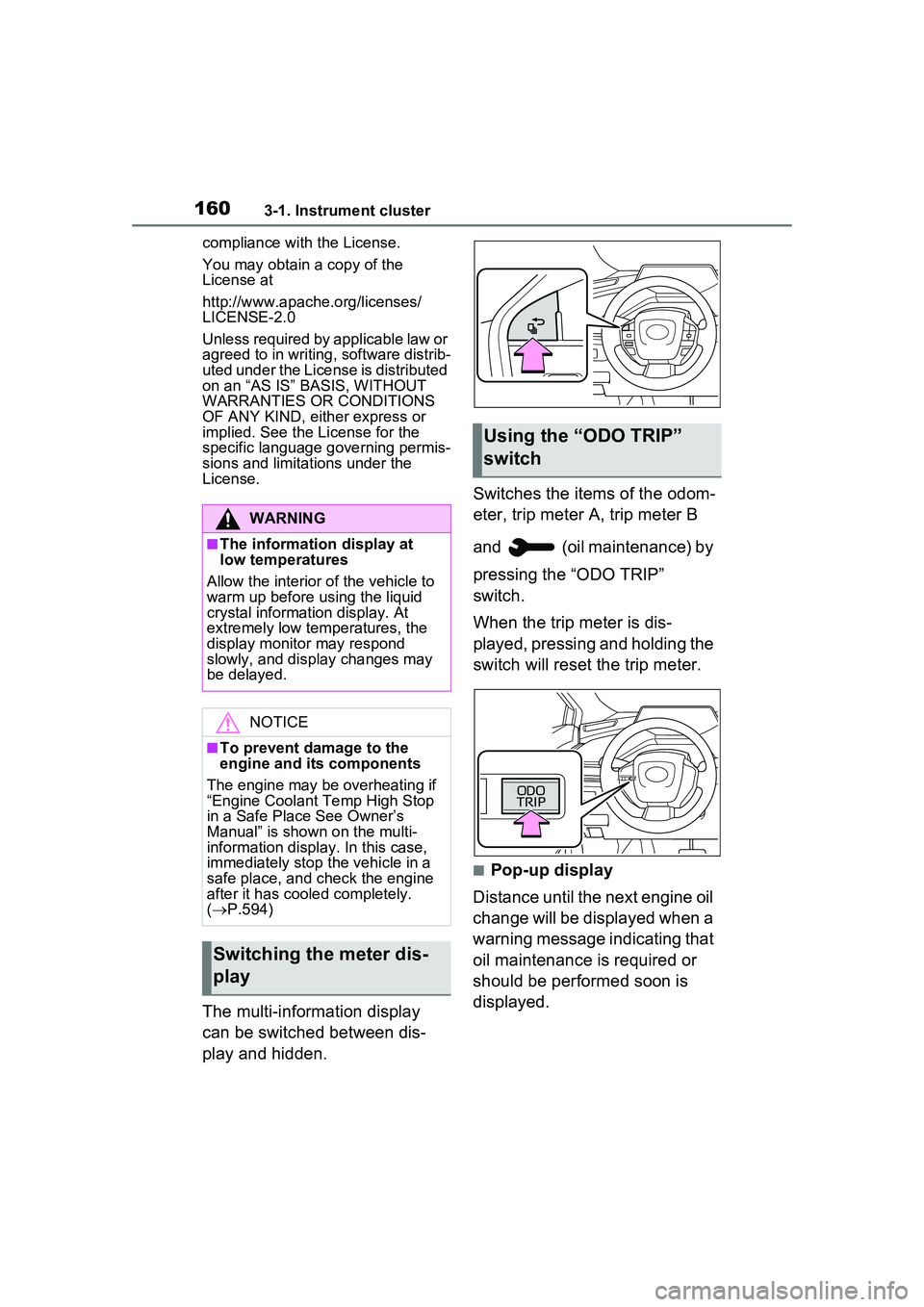
play and hidden. Switches the items of the odom-
eter, trip meter A, trip meter B
and (oil maintenance) by
pressing the “ODO TRIP”
switch.
When the trip meter is dis-
played, pressing and holding the
switch will reset the trip meter.
■Pop-up display
Distance until the next engine oil
change will be displayed when a
warning message indicating that
oil maintenance is required or
should be performed soon is
displayed.
WARNING
■The information display at
low temperatures
Allow the interior of the vehicle to
warm up before using the liquid
crystal information display. At
extremely low temperatures, the
display monitor may respond
slowly, and display changes may
be delayed.
NOTICE
■To prevent damage to the
engine and its components
The engine may be overheating if
“Engine Coolant Temp High Stop
in a Safe Place See Owner’s
Manual” is shown on the multi-
information display. In this case,
immediately stop the vehicle in a
safe place, and check the engine
after it has cooled completely.
( P.594)
Switching the meter dis-
play
Using the “O DO TRIP”
switch
Page 170 of 680
1703-1. Instrument cluster
system.
•“Timing”
Select to set the alert timing for
FCTA system.
Regenerative brake
Select to set up the following items.
• “Deceleration”
Select to change the regenerative
braking force when Regeneration
Boost is operating. ( P.260)
• “Deceleration Memory”
Select to store the settings for
regenerative braking force.
( P.260)
“TPWS setting” (Tire Pres-
sure Warning System)
( P.516)
• “Tire Set Switching”
Select to register the tire pressure
warning system sensor ID code set.
( P.524)
• “Tire Rotation”
Select to register the position of
each wheel after performing a tire
rotation. ( P.518)
• “Tire Pressure Setting”
Select to perform the tire inflation
pressure setting procedure of the
tire pressure warning system.
( P.520)
• “Pressure unit setting”
Select to change the units of mea-
sure displayed.( P.619)
Driver monitor (if equipped)
Select to enable/disable the driver
monitor warning function. ( P.292)
PBD (Power Back Door) (if equipped) (
P.194)
Select to set up the following items.
• System settings
Select to enable/d isable the power
back door system.
• “Opening Adjustment”
Select the open position when
power back door is fully open.
•“Volume”
Select to set the volume of the
buzzer which sounds when the
power back door system operates.
“Scheduled Maintenance”
Select to reset the scheduled main-
tenance information (message indi-
cating maintenance is required and
distance until the next mainte-
nance) after all maintenance is per-
formed.
Oil Maintenance
Select to reset th e Oil maintenance.
( P.506)
Rear Seat Reminder
( P.188)
Select to enable/disable the rear
seat reminder function.
Digital Keys (if equipped)
Select to reset registered digital
keys. ( P.183)
■ Settings
“Language”
Select to change the language on
the multi-information display.
“Units”
Select to change the unit of mea-
sure for fuel consumption.
“Meter Type”
Page 205 of 680
2054-2. Opening, closing and locking the doors
4
Before driving
an area of approximately 11.5 ft.
(3.5 m) of the outside of the vehi-
cle for 40 seconds or longer.
• The smart key system has not been used for 5 days or longer.
●If the smart key system has not
been used for 14 days or longer,
the doors cannot be unlocked at
any doors except the driver’s
door. In this case, take hold of the
driver’s door handle, or use the
wireless remote control or the
mechanical key, to unlock the
doors.
■Turning an electronic key to
battery-saving mode
●When battery-saving mode is set,
battery depletion is minimized by
stopping the electronic key from
receiving radio waves.
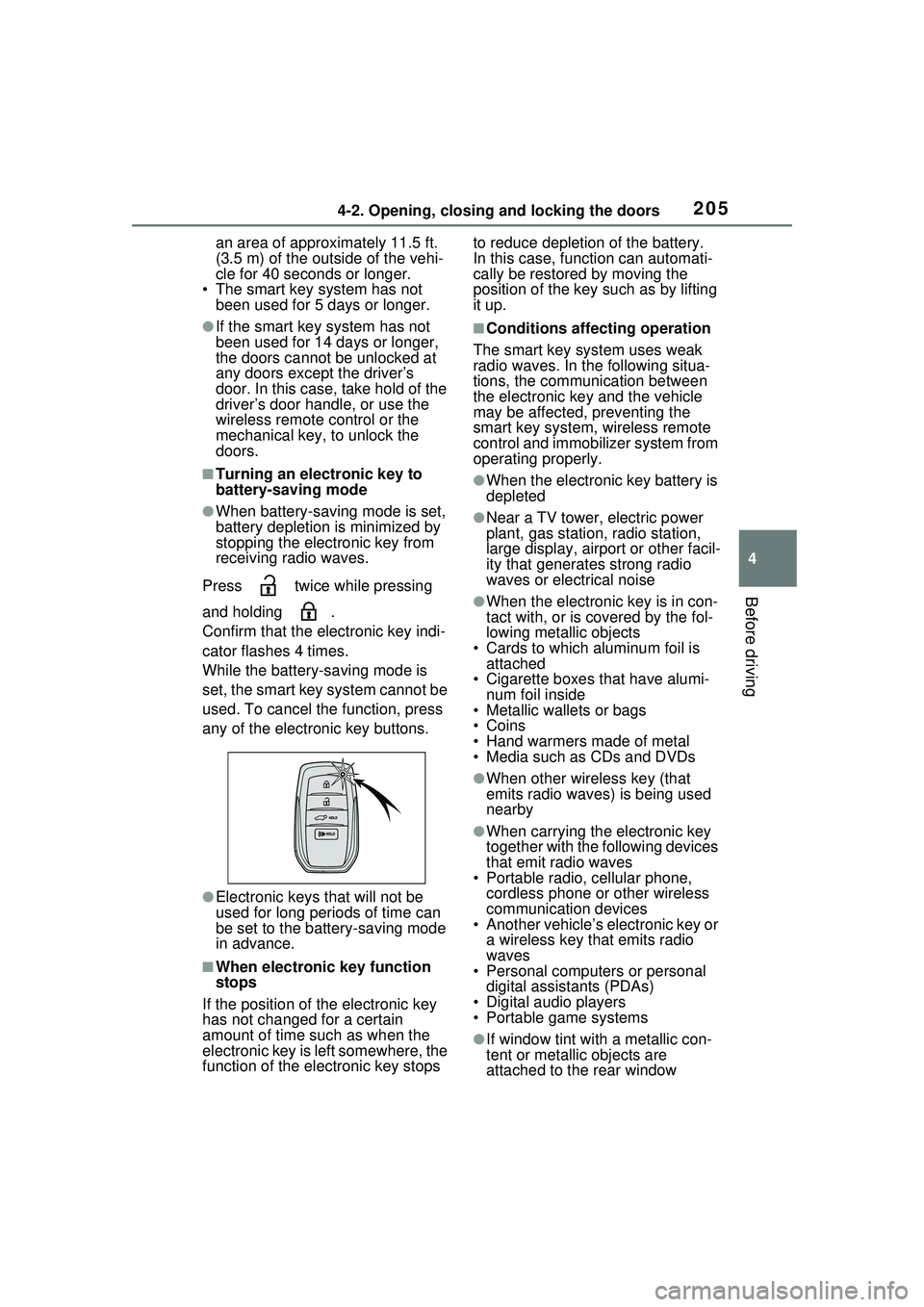
Press twice while pressing
and holding .
Confirm that the electronic key indi-
cator flashes 4 times.
While the battery-saving mode is
set, the smart key system cannot be
used. To cancel the function, press
any of the electronic key buttons.
●Electronic keys that will not be
used for long periods of time can
be set to the battery-saving mode
in advance.
■When electronic key function
stops
If the position of the electronic key
has not changed for a certain
amount of time such as when the
electronic key is left somewhere, the
function of the electronic key stops to reduce depletion of the battery.
In this case, function can automati-
cally be restored by moving the
position of the key such as by lifting
it up.
■Conditions affecting operation
The smart key system uses weak
radio waves. In the following situa-
tions, the communication between
the electronic key and the vehicle
may be affected, preventing the
smart key system, wireless remote
control and immobilizer system from
operating properly.
●When the electronic key battery is
depleted
●Near a TV tower, electric power
plant, gas station, radio station,
large display, airport or other facil-
ity that generates strong radio
waves or electrical noise
●When the electronic key is in con-
tact with, or is covered by the fol-
lowing metallic objects
• Cards to which aluminum foil is attached
• Cigarette boxes that have alumi-
num foil inside
• Metallic wallets or bags
•Coins
• Hand warmers made of metal
• Media such as CDs and DVDs
●When other wireless key (that
emits radio waves) is being used
nearby
●When carrying the electronic key
together with the following devices
that emit radio waves
• Portable radio, cellular phone, cordless phone or other wireless
communication devices
• Another vehicle’s electronic key or a wireless key that emits radio
waves
• Personal computers or personal digital assistants (PDAs)
• Digital audio players
• Portable game systems
●If window tint with a metallic con-
tent or metallic objects are
attached to the rear window
Page 245 of 680
2455-1. Before driving
5
Driving
When the following unusual
operation is performed with the
accelerator pedal depressed,
the hybrid system output may be
restrained.
When the shift position is
shifted to R
*.
When the shift position is
shifted from P or R to forward
drive shift position such as D
*.
When the system operates, a mes-
sage appears on the multi-informa-
tion display. Read the message
and follow the instruction.
*: Depending on the situation, the
shift position may not be
changed.
■Drive-Start Control (DSC)
●When the TRAC is turned off
( P.425), sudden start restraint
control also does not operate. If
your vehicle have trouble escap-
ing from the mud or fresh snow
NOTICE
■If you get a flat tire while driv-
ing
A flat or damaged tire may cause
the following situations. Hold the
steering wheel firmly and gradu-
ally depress the brake pedal to
slow down the vehicle.
●It may be difficult to control your
vehicle.
●The vehicle will make abnormal
sounds or vibrations.
●The vehicle will lean abnor-
mally.
Information on what to do in case
of a flat tire ( P.574)
■When encountering flooded
roads
Do not drive on a road that has
flooded after heavy rain, etc.
Doing so may cause the following
serious damage to the vehicle:
●Engine stalling
●Short in electrical components
●Engine damage caused by
water immersion
In the event that you drive on a
flooded road and the vehicle is
flooded, be sure to have your
Toyota dealer check the following:
●Brake function
●Changes in quantity and quality
of oil and fluid used for the
engine, transmission, tran-
saxle, etc.
●Lubricant condition for the bear-
ings and suspension joints
(where possible), and the func-
tion of all joints, bearings, etc.
If the shift control system is dam-
aged by flooding, it may not be
possible to shift the shift position
to P, or from P to other positions.
In this case, contact your Toyota
dealer.
■When parking the vehicle
Always set the parking brake, and
shift the shift position to P. Failure
to do so may cause the vehicle to
move or the vehicle may acceler-
ate suddenly if the accelerator
pedal is accidentally depressed.
Sudden start restraint
control (Drive-Start Con-
trol [DSC])
Page 315 of 680
3155-5. Using the driving support systems
5
Driving
the following conditions are met:
• The vehicle speed is approxi-mately 30 mph (50 km/h) or more.
Operation may be possible when
the vehicle speed is approximately
25 mph (40 km/h) or more if vehi-
cles, motorcycles, bicycles, or
pedestrians are detected near the
lane.
• The system recognizes a lane or course
*. (When recognized on
only one side, the system will
operate only for the recognized
side.)
• The lane width is approximately
9.8 ft. (3 m) or more.
• The turn signal lever is not being operated.
(Vehicles with BSM: Except when a
vehicle is detected in the direction
that the turn signal lever is oper-
ated.)
• The vehicle is not being driven around a sharp curve.
• The vehicle is not accelerating or
decelerating more than a certain
amount.
• The steering wheel is not being turned sufficiently to perform a
lane change.
• When the VSC or TRAC system is not turned off
*: Boundary between the asphalt
and grass, soil, etc., or structures,
such as a curb, guardrail, etc.
■Temporary cancellation of func-
tions
When the operating conditions are
no longer met, a function may be
temporarily canceled. However,
when the operation conditions are
met again, operation of the function
will automatically be restored.
( P.314)
■Operation of the lane departure
alert function/lane departure
prevention function
●Depending on the vehicle speed, road conditions, lane departure
angle, etc., operation of the lane
departure prevention function may
not be felt or the function may not
operate.
●Depending on the conditions, the
warning buzzer may operate even
if vibration is selected through a
customize setting.
●If a course* is not clear or straight,
the lane departure alert function or
lane departure prevention function
may not operate.
●The lane departure alert function
or lane departure prevention func-
tion may not operate if the system
judges that the vehicle is inten-
tionally being steered to avoid a
pedestrian or parked vehicle.
●Vehicles with BSM: It may not be
possible for the sys tem to judge if
there is danger of a collision with a
vehicle in an adjacent lane.
●Vehicles with a driver monitor
camera: Depending on the driver
condition, the lane departure alert
function or lane departure preven-
tion function changes the timing of
operation.
●The steering assist operation of
the lane departure prevention
function can be overridden by the
steering wheel operation of the
driver.
*: Boundary between the asphalt
and grass, soil, etc., or structures,
such as a curb, guardrail, etc.
■Hands off steering wheel warn-
ing operation
In the following si tuations, a mes-
sage urging the driver to operate the
steering wheel and an icon will be
displayed and a buzzer will sound to
warn the driver. When using the
system, make sure to grip the steer-
ing wheel firmly, regardless of
whether the warning is operating or
not.
Page 462 of 680
4626-4. Using the other interior features
■The wireless charger can be
operated when
The power switch is in ACC or ON.
■Usable smartphones
●Qi standard wireless charge stan-
dard can be used on compatible
devices. However, not all Qi stan- dard devices and compatibility are
guaranteed.
●This product is designed for use
with smartphones with a power
supply of 5 W or less.
●However, charging exceeding 5 W
is supported by the following
smartphones.
• Charging at 7.5 W or less is sup-
Orange (Repeatedly flashes 3 times
continuously)
Foreign substance detection:
The abnormal heating prevention
function for foreign substances
operated due to the presence of a
metallic foreign substance in the
charge area
Remove the foreign substance
from the charge area.
Smartphone misaligned:
The abnormal heating prevention
function for foreign substances
operated due to the charging coil
in the smartphone moving outside
of the charge area
Remove the smartphone from
the wireless charger, check that
the operation indicator light
changes back to green, and then
place the smartphone so that it
is near the center of the wireless
charger. Also, if a case or cover
is installed to the smartphone,
remove it. Also refer to “Situa-
tions in which the function may
not operate normally”. ( P.463)
Orange (Repeatedly flashes 4 times
continuously)
Safety shutdown resulting when
the temperature within the wireless
charger exceeded the set value
Remove the smartphone from
the charging area and start
charging after waiting for the
operation indicator light to
changes back to green.
Operation indicator lightSuspected causes/Handling method
Page 464 of 680
4646-4. Using the other interior features
placed outside the charge area
●The vehicle is in an area where
strong electrical waves or noise
are emitted, such as near a televi-
sion tower, power plant, gasoline
station, broadcasting station, large
display, airport, etc.
●The electronic key is not inside the
vehicle
●Any of the following objects that is
0.08 in. (2 mm) or thicker is stuck
or installed between the charging
side of the smartphone and the
charge area.
• Thick cases or covers
• A case or cover attached with an
uneven or tilted surface, so that
the charging side is not flat
• Thick decorations
• Accessories, such as finger rings, straps, etc.
●When there is a gap between the
charging side of the smartphone
and the charge area due to a pro-
trusion such as a camera on the
charging side of the smartphone.
●When the smartphone is in con-
tact with, or is covered by any of
the following metallic objects:
• A card that has metal on it, such as aluminum foil, etc.
• A pack of cigarettes that includes aluminum foil
• A wallet or bag that is made of
metal
• Coins
• A heating pad
• CDs, DVDs or other media
• A metal accessory
• A case or cover made of metal
• A flip type case with a magnet on the charging side of the smart-
phone
●Electric wave type wireless
remote controls are being used
nearby
●2 or more smartphones are placed
on the wireless charger at the
same time
●When using a smartphone model
with an internal charging coil that is not located near the center of
the smartphone
If charging is abnormal or the opera-
tion indicator light continues to flash
for any other reason, the wireless
charger may be malfunctioning.
Contact your Toyota dealer.
■If the smartphone OS has been
updated
If the smartphone OS has been
updated to a newer version, its
charging specifications may have
changed significantly. For details,
check the information on the manu-
facturer’s website.
■Trademark information
iPhone is a trademark of Apple Inc.,
registered in the U.S. and other
countries.
WARNING
■Caution while driving
When charging a smartphone, for
safety reasons, the driver should
not operate the main part of the
smartphone while driving.
■Caution regarding interfer-
ence with electronic devices
People with implantable cardiac
pacemakers, cardiac resynchroni-
zation therapy-pacemakers or
implantable cardio verters, as well
as any other electrical medical
device, should consult their physi-
cian about the usage of the wire-
less charger.
■To prevent malfunctions or
burns
Observe the following precau-
tions. Failure to do so may result
in a equipment failure and dam-
age, catch fire, burns due to over-
heat or electric shock.
●This product is specialized for
use with smartphones and can-
not charge other devices.
Page 572 of 680
5728-2. Steps to take in an emergency
●LDA (Lane Departure Alert)
●LTA (Lane Tracing Assist)
● LCA (Lane Change Assist) (if
equipped)
●AHB (Automatic High Beam)
●Dynamic radar cruise control
●PDA (Proactive Driving Assist)
Follow the following correction
methods.
• Check if there is any foreign mat- ter attached to the radar sensor or
radar sensor cover and clean
them if necessary ( P.286)
• The radar sensor may be mis-
aligned and will be adjusted auto-
matically while driving. Continue
driving for a while.
■If “Unavailable Activation Con-
dition not Satisfied See Owner’s
Manual” is displayed
The LCA function cannot be
used as the operating conditions
have not been met.
Operate the turn signal lever again
after all of the op erating conditions
are met.
■If “Cruise Control Unavailable
See Owner’s Manual” is dis-
played
Indicates one of the following sys-
tems is disabled.
●Dynamic radar cruise control
●Cruise control
A message is displayed when the
driving assist switch is pushed
repeatedly.
Press the driving assist switch
quickly and firmly.
■If “Driver Monitor Out of Tem-
perature Range Wait until Nor-
mal Temperature” is displayed
Indicates one of the following sys-
tems is disabled.
●Driver monitor (if equipped)
●Traffic Jam Assist (if equipped)
The temperature of the driver moni-
tor camera is outside of the operat-
ing range. Wait for the temperature
to become appropriate.
■If “Driver Monitor Unavailable
See Owner’s Manual” is dis-
played
The lens of the driver monitor cam-
era may be dirty.
When there is dirt on the camera
lens, clean it with a dry, soft cloth so
as to not damage it.
■If “Engine Oil Level Low Add or
Replace” is displayed
The engine oil level may be low.
Check the level of the engine oil,
and add engine oil if necessary.
( P.506) This message may be
displayed if the vehicle is stopped
on a slope. Move the vehicle to a
level surface and check if the mes-
sage disappears.
■If “Maintenance Required
Soon” is shown
Indicates that all maintenance
according to the driven distance on
the maintenance schedule
* should
be performed soon.
Comes on approximately 4500
miles (7200 km) after the message
has been reset.
If necessary, perform maintenance.
Please reset the message after the
maintenance is performed.
( P.495)
*: Refer to the separate “Scheduled
Maintenance Guide” or “Owner’
Manual Supplement” for the main-
tenance interval applicable to your
vehicle.
■If “Maintenance Required Visit
Your Dealer” is shown
Indicates that all maintenance is
required to correspond to the driven