oil temperature TOYOTA PRIUS PRIME 2023 Owners Manual
[x] Cancel search | Manufacturer: TOYOTA, Model Year: 2023, Model line: PRIUS PRIME, Model: TOYOTA PRIUS PRIME 2023Pages: 680, PDF Size: 14.97 MB
Page 150 of 680
1503-1. Instrument cluster
3-1.Instrument cluster
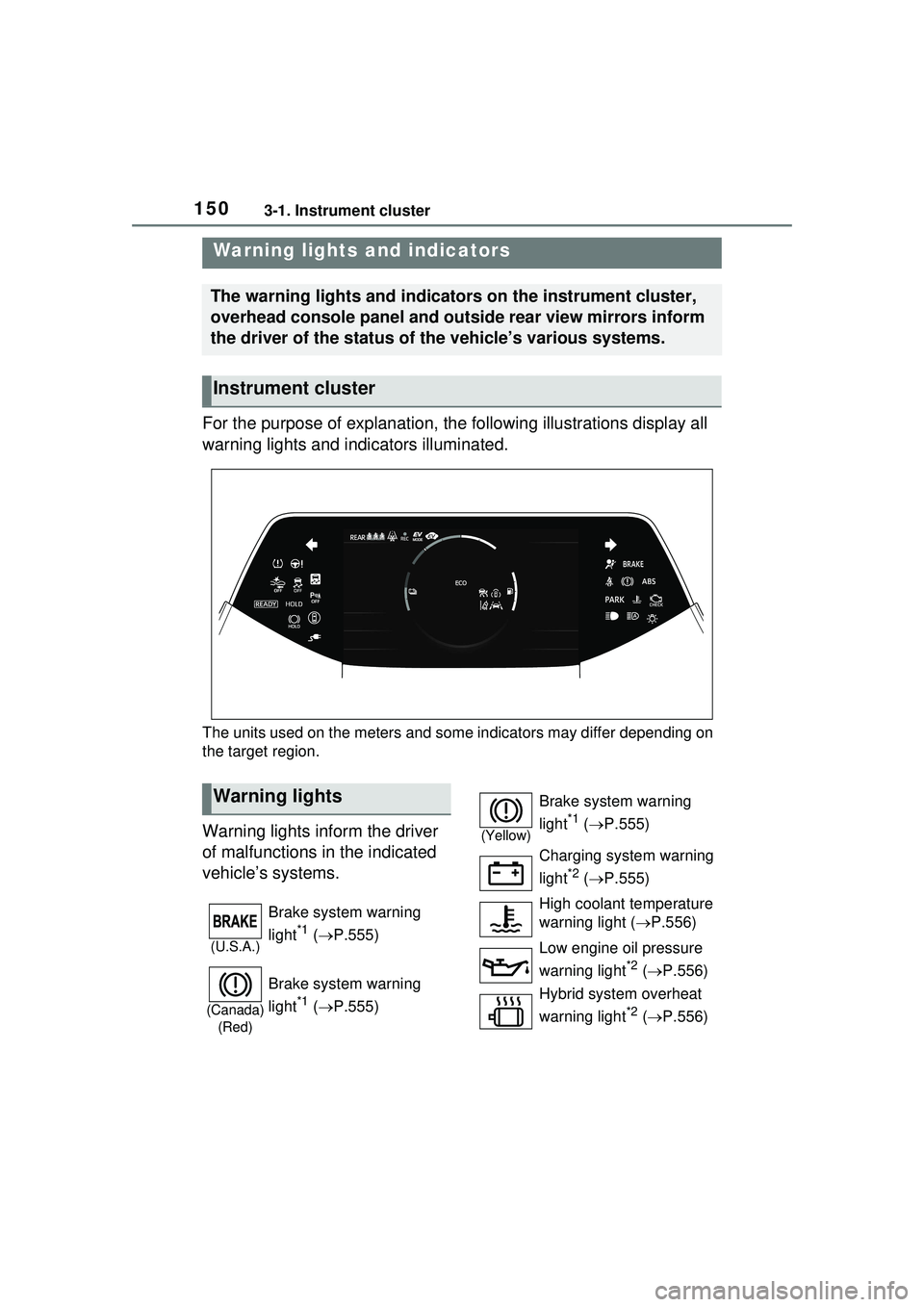
For the purpose of explanation, the following illustrations display all
warning lights and indicators illuminated.
The units used on the meters and some indicators may differ depending on
the target region.
Warning lights inform the driver
of malfunctions in the indicated
vehicle’s systems.
Warning lights and indicators
The warning lights and indicators on the instrument cluster,
overhead console panel and outside rear view mirrors inform
the driver of the status of the vehicle’s various systems.
Instrument cluster
Warning lights
(U.S.A.)
Brake system warning
light
*1 ( P.555)
(Canada)
(Red)
Brake system warning
light
*1 ( P.555)
(Yellow)
Brake system warning
light
*1 ( P.555)
Charging system warning
light
*2 ( P.555)
High coolant temperature
warning light ( P.556)
Low engine oil pressure
warning light
*2 ( P.556)
Hybrid system overheat
warning light
*2 ( P.556)
Page 156 of 680
1563-1. Instrument cluster
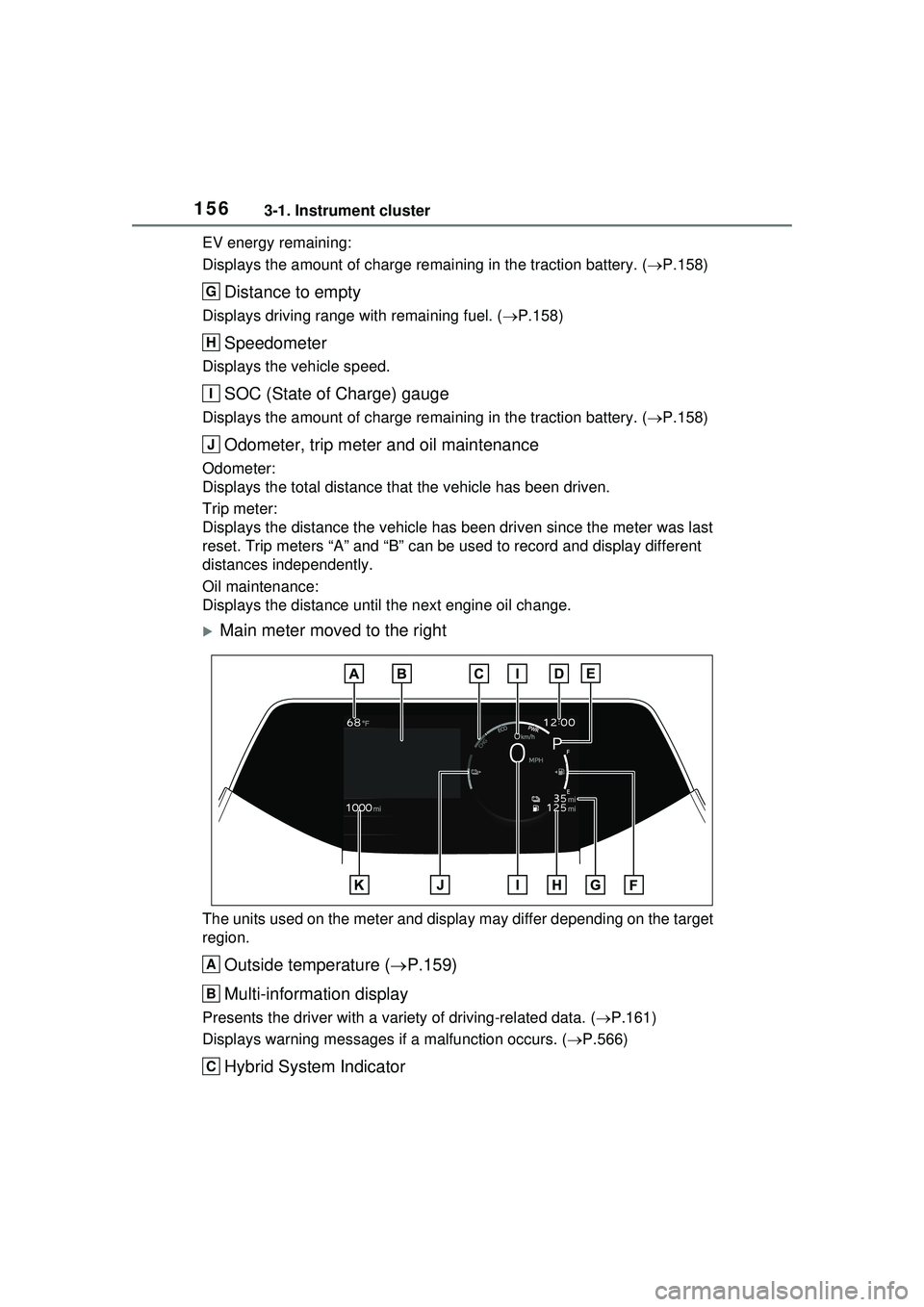
EV energy remaining:
Displays the amount of charge remaining in the traction battery. (P.158)
Distance to empty
Displays driving range with remaining fuel. ( P.158)
Speedometer
Displays the vehicle speed.
SOC (State of Charge) gauge
Displays the amount of charge remaining in the traction battery. ( P.158)
Odometer, trip meter and oil maintenance
Odometer:
Displays the total distance that the vehicle has been driven.
Trip meter:
Displays the distance the vehicle has been driven since the meter was last
reset. Trip meters “A” and “B” can be used to record and display different
distances independently.
Oil maintenance:
Displays the distance until the next engine oil change.
Main meter moved to the right
The units used on the meter and display may differ depending on the target
region.
Outside temperature ( P.159)
Multi-information display
Presents the driver with a vari ety of driving-related data. (P.161)
Displays warning me ssages if a malfunction occurs. ( P.566)
Hybrid System Indicator
G
H
I
J
A
B
C
Page 160 of 680
1603-1. Instrument cluster
compliance with the License.
You may obtain a copy of the
License at
http://www.apache.org/licenses/
LICENSE-2.0
Unless required by applicable law or
agreed to in writing, software distrib-
uted under the License is distributed
on an “AS IS” BASIS, WITHOUT
WARRANTIES OR CONDITIONS
OF ANY KIND, either express or
implied. See the License for the
specific language governing permis-
sions and limitations under the
License.
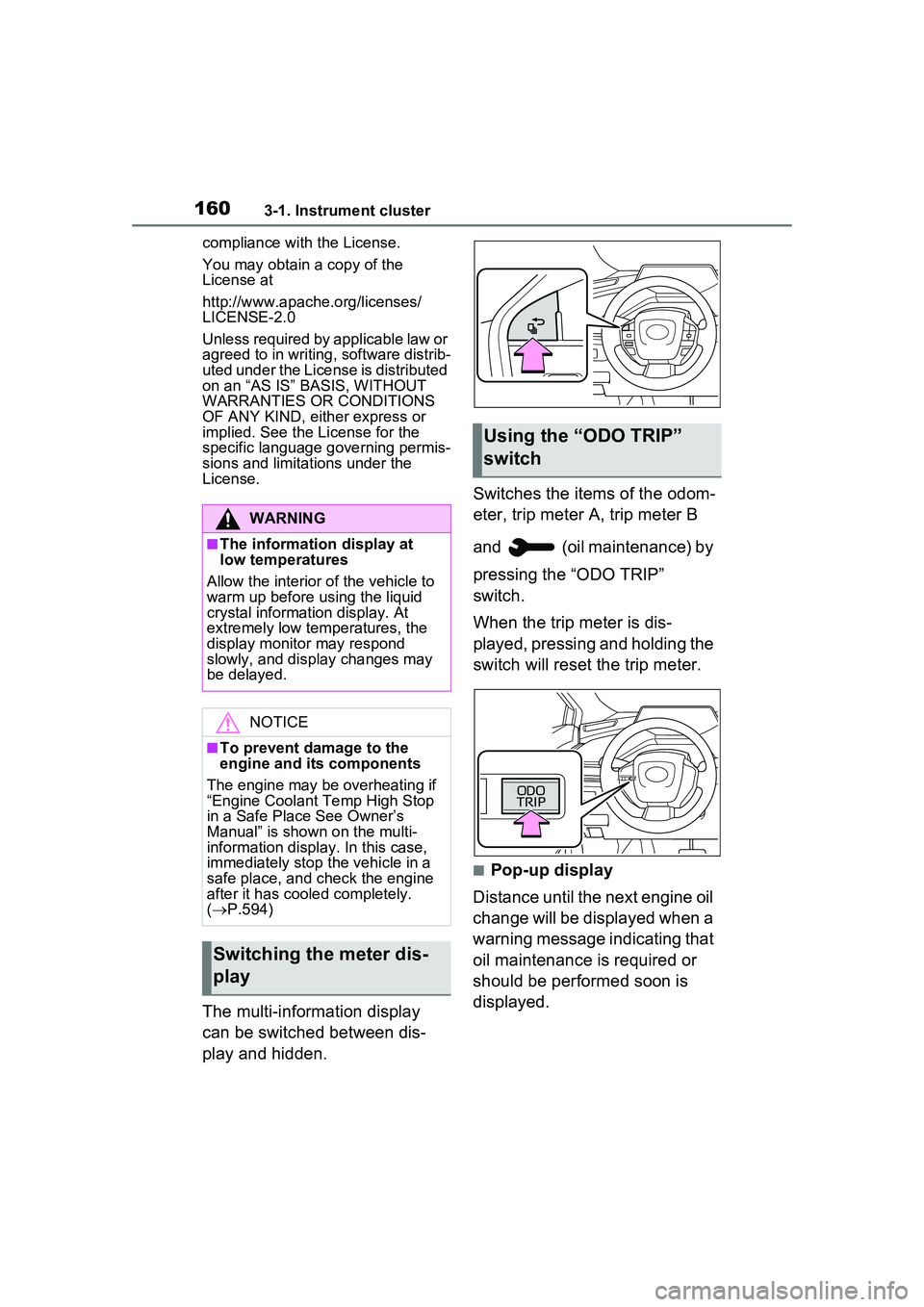
The multi-information display
can be switched between dis-
play and hidden. Switches the items of the odom-
eter, trip meter A, trip meter B
and (oil maintenance) by
pressing the “ODO TRIP”
switch.
When the trip meter is dis-
played, pressing and holding the
switch will reset the trip meter.
■Pop-up display
Distance until the next engine oil
change will be displayed when a
warning message indicating that
oil maintenance is required or
should be performed soon is
displayed.
WARNING
■The information display at
low temperatures
Allow the interior of the vehicle to
warm up before using the liquid
crystal information display. At
extremely low temperatures, the
display monitor may respond
slowly, and display changes may
be delayed.
NOTICE
■To prevent damage to the
engine and its components
The engine may be overheating if
“Engine Coolant Temp High Stop
in a Safe Place See Owner’s
Manual” is shown on the multi-
information display. In this case,
immediately stop the vehicle in a
safe place, and check the engine
after it has cooled completely.
( P.594)
Switching the meter dis-
play
Using the “O DO TRIP”
switch
Page 462 of 680
4626-4. Using the other interior features
■The wireless charger can be
operated when
The power switch is in ACC or ON.
■Usable smartphones
●Qi standard wireless charge stan-
dard can be used on compatible
devices. However, not all Qi stan- dard devices and compatibility are
guaranteed.
●This product is designed for use
with smartphones with a power
supply of 5 W or less.
●However, charging exceeding 5 W
is supported by the following
smartphones.
• Charging at 7.5 W or less is sup-
Orange (Repeatedly flashes 3 times
continuously)
Foreign substance detection:
The abnormal heating prevention
function for foreign substances
operated due to the presence of a
metallic foreign substance in the
charge area
Remove the foreign substance
from the charge area.
Smartphone misaligned:
The abnormal heating prevention
function for foreign substances
operated due to the charging coil
in the smartphone moving outside
of the charge area
Remove the smartphone from
the wireless charger, check that
the operation indicator light
changes back to green, and then
place the smartphone so that it
is near the center of the wireless
charger. Also, if a case or cover
is installed to the smartphone,
remove it. Also refer to “Situa-
tions in which the function may
not operate normally”. ( P.463)
Orange (Repeatedly flashes 4 times
continuously)
Safety shutdown resulting when
the temperature within the wireless
charger exceeded the set value
Remove the smartphone from
the charging area and start
charging after waiting for the
operation indicator light to
changes back to green.
Operation indicator lightSuspected causes/Handling method
Page 500 of 680
5007-3. Do-it-yourself maintenance
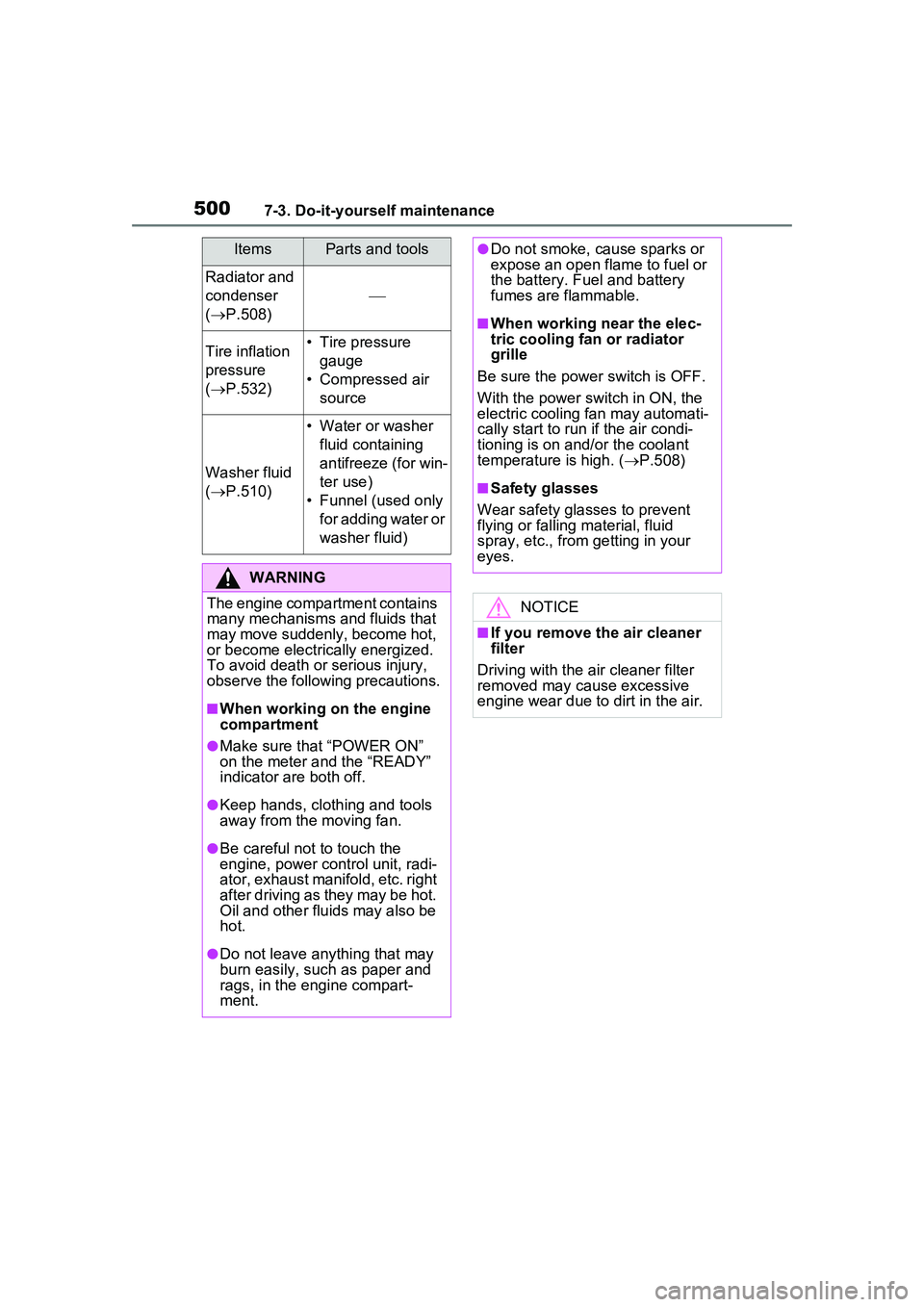
Radiator and
condenser
( P.508)
Tire inflation
pressure
( P.532)• Tire pressure
gauge
• Compressed air source
Washer fluid
( P.510)
• Water or washer
fluid containing
antifreeze (for win-
ter use)
• Funnel (used only for adding water or
washer fluid)
WARNING
The engine compartment contains
many mechanisms and fluids that
may move suddenly, become hot,
or become electrically energized.
To avoid death or serious injury,
observe the following precautions.
■When working on the engine
compartment
●Make sure that “POWER ON”
on the meter and the “READY”
indicator are both off.
●Keep hands, clothing and tools
away from the moving fan.
●Be careful not to touch the
engine, power control unit, radi-
ator, exhaust manifold, etc. right
after driving as they may be hot.
Oil and other fluids may also be
hot.
●Do not leave anything that may
burn easily, such as paper and
rags, in the engine compart-
ment.
ItemsParts and tools●Do not smoke, cause sparks or
expose an open flame to fuel or
the battery. Fuel and battery
fumes are flammable.
■When working near the elec-
tric cooling fan or radiator
grille
Be sure the power switch is OFF.
With the power switch in ON, the
electric cooling fan may automati-
cally start to run if the air condi-
tioning is on and/or the coolant
temperature is high. ( P.508)
■Safety glasses
Wear safety glasses to prevent
flying or falling material, fluid
spray, etc., from getting in your
eyes.
NOTICE
■If you remove the air cleaner
filter
Driving with the air cleaner filter
removed may cause excessive
engine wear due to dirt in the air.
Page 504 of 680
5047-3. Do-it-yourself maintenance
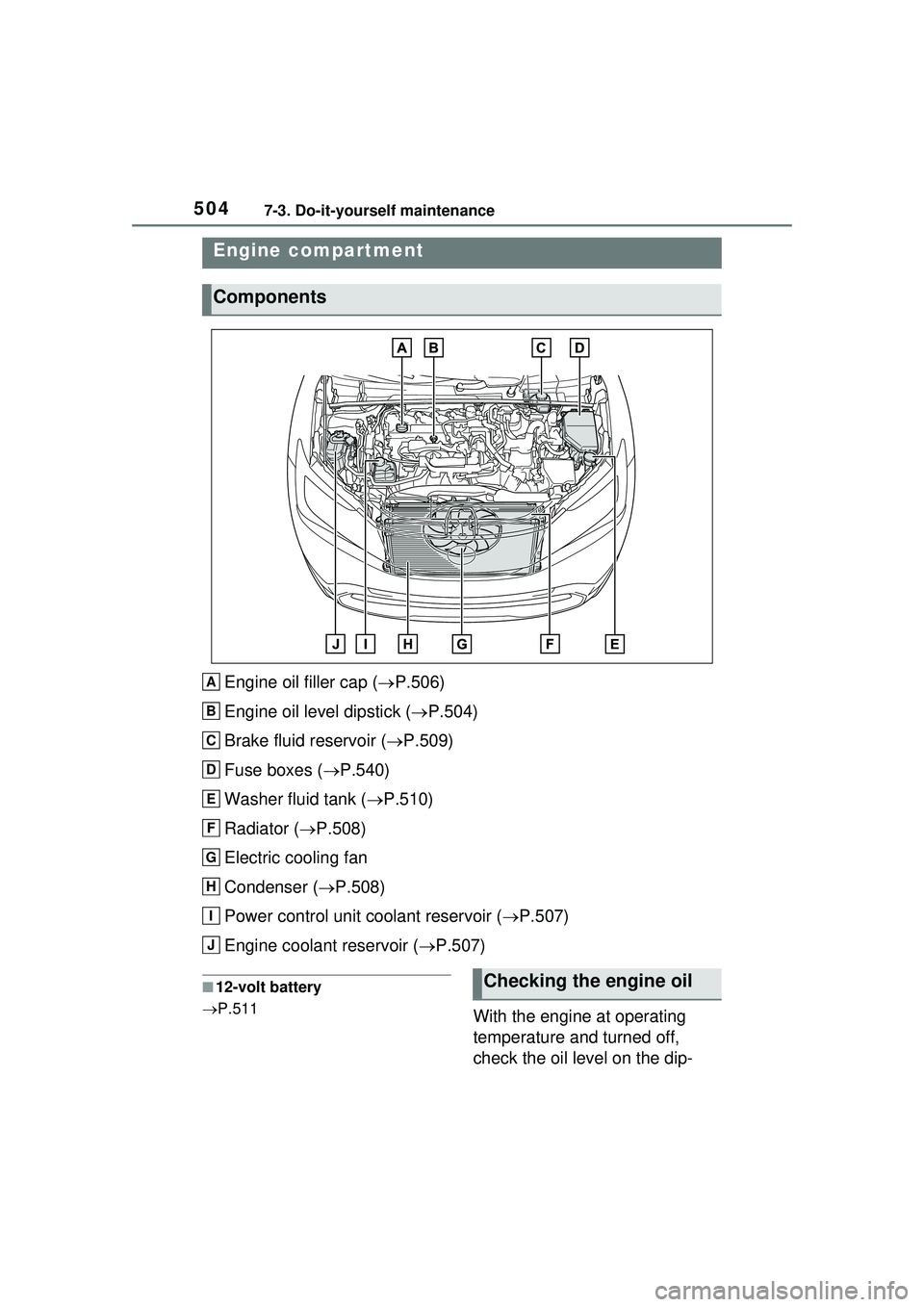
Engine oil filler cap (P.506)
Engine oil level dipstick ( P.504)
Brake fluid reservoir ( P.509)
Fuse boxes ( P.540)
Washer fluid tank ( P.510)
Radiator ( P.508)
Electric cooling fan
Condenser ( P.508)
Power control unit coolant reservoir ( P.507)
Engine coolant reservoir ( P.507)
■12-volt battery
P.511
With the engine at operating
temperature and turned off,
check the oil level on the dip-
Engine compartment
Components
A
B
C
D
E
F
G
H
I
J
Checking the engine oil
Page 505 of 680
5057-3. Do-it-yourself maintenance
7
Maintenance and care
stick.
1Park the vehicle on level
ground. After warming up the
engine and turning off the
hybrid system, wait about 5
minutes for the oil to drain
back into the bottom of the
engine.
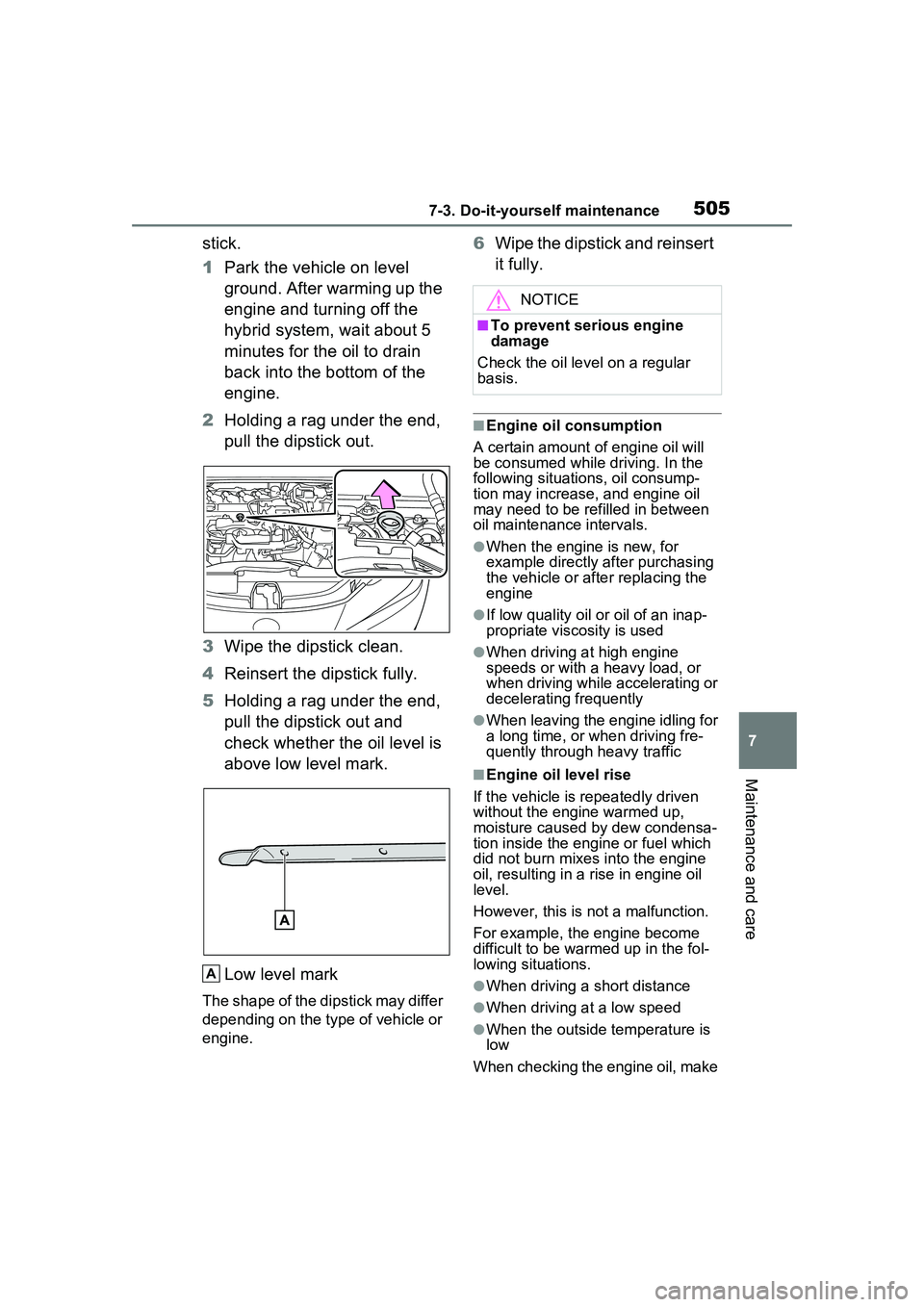
2 Holding a rag under the end,
pull the dipstick out.
3 Wipe the dipstick clean.
4 Reinsert the dipstick fully.
5 Holding a rag under the end,
pull the dipstick out and
check whether the oil level is
above low level mark.
Low level mark
The shape of the dipstick may differ
depending on the type of vehicle or
engine.
6Wipe the dipstick and reinsert
it fully.
■Engine oil consumption
A certain amount of engine oil will
be consumed while driving. In the
following situations, oil consump-
tion may increase, and engine oil
may need to be re filled in between
oil maintenance intervals.
●When the engine is new, for
example directly after purchasing
the vehicle or after replacing the
engine
●If low quality oil or oil of an inap-
propriate viscosity is used
●When driving at high engine
speeds or with a heavy load, or
when driving while accelerating or
decelerating frequently
●When leaving the engine idling for
a long time, or when driving fre-
quently through heavy traffic
■Engine oil level rise
If the vehicle is repeatedly driven
without the engine warmed up,
moisture caused by dew condensa-
tion inside the engine or fuel which
did not burn mixes into the engine
oil, resulting in a rise in engine oil
level.
However, this is not a malfunction.
For example, the engine become
difficult to be warmed up in the fol-
lowing situations.
●When driving a short distance
●When driving at a low speed
●When the outside temperature is
low
When checking the engine oil, make
A
NOTICE
■To prevent serious engine
damage
Check the oil le vel on a regular
basis.
Page 556 of 680
5568-2. Steps to take in an emergency
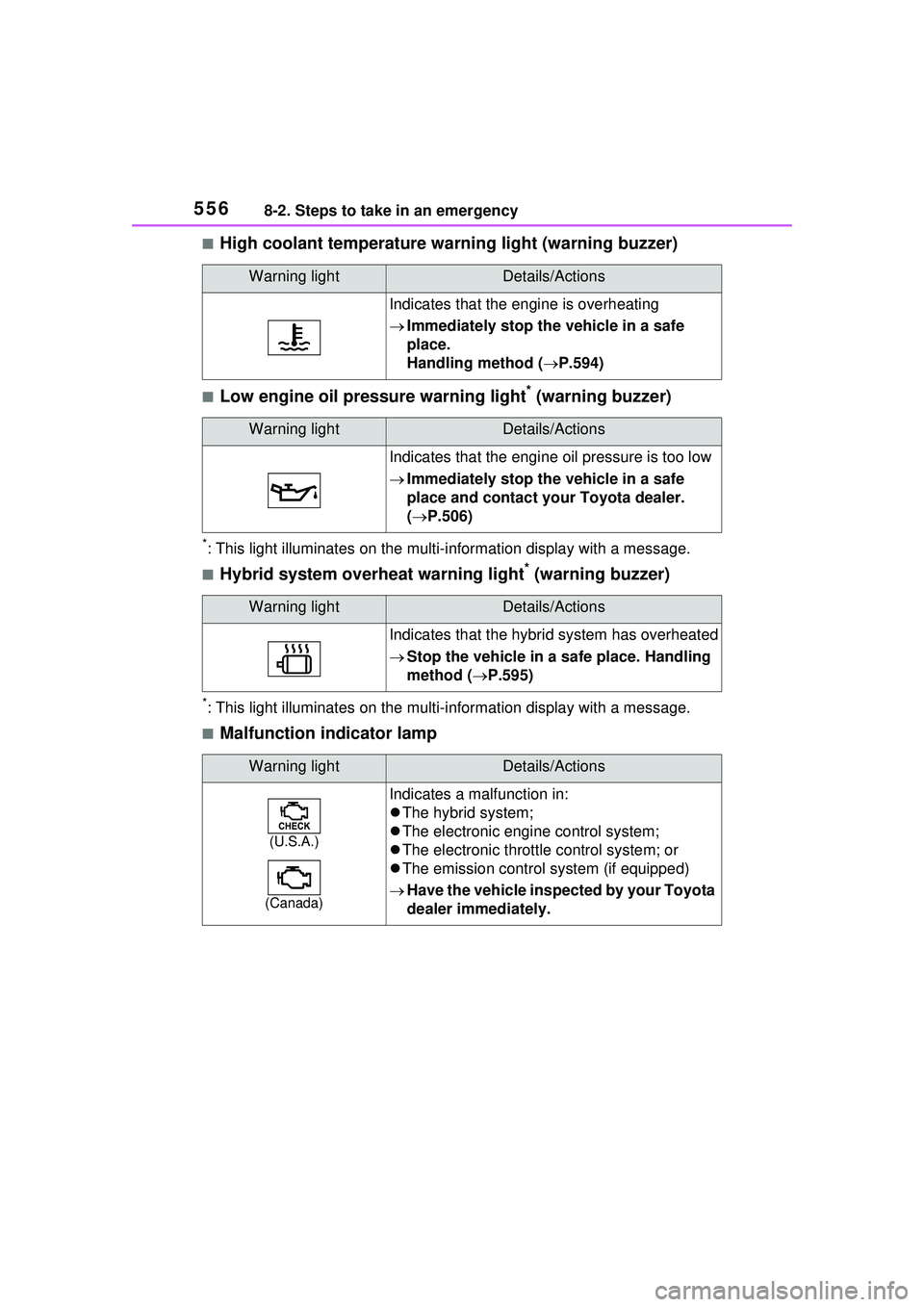
■High coolant temperature warning light (warning buzzer)
■Low engine oil pressure warning light* (warning buzzer)
*: This light illuminates on the multi-information display with a message.
■Hybrid system overheat warning light* (warning buzzer)
*: This light illuminates on the multi- information display with a message.
■Malfunction indicator lamp
Warning lightDetails/Actions
Indicates that the engine is overheating
Immediately stop the vehicle in a safe
place.
Handling method ( P.594)
Warning lightDetails/Actions
Indicates that the engine oil pressure is too low
Immediately stop the vehicle in a safe
place and contact your Toyota dealer.
( P.506)
Warning lightDetails/Actions
Indicates that the hybrid system has overheated
Stop the vehicle in a safe place. Handling
method ( P.595)
Warning lightDetails/Actions
(U.S.A.)
(Canada)
Indicates a malfunction in:
The hybrid system;
The electronic engine control system;
The electronic throttle control system; or
The emission control system (if equipped)
Have the vehicle inspected by your Toyota
dealer immediately.
Page 572 of 680
5728-2. Steps to take in an emergency
●LDA (Lane Departure Alert)
●LTA (Lane Tracing Assist)
● LCA (Lane Change Assist) (if
equipped)
●AHB (Automatic High Beam)
●Dynamic radar cruise control
●PDA (Proactive Driving Assist)
Follow the following correction
methods.
• Check if there is any foreign mat- ter attached to the radar sensor or
radar sensor cover and clean
them if necessary ( P.286)
• The radar sensor may be mis-
aligned and will be adjusted auto-
matically while driving. Continue
driving for a while.
■If “Unavailable Activation Con-
dition not Satisfied See Owner’s
Manual” is displayed
The LCA function cannot be
used as the operating conditions
have not been met.
Operate the turn signal lever again
after all of the op erating conditions
are met.
■If “Cruise Control Unavailable
See Owner’s Manual” is dis-
played
Indicates one of the following sys-
tems is disabled.
●Dynamic radar cruise control
●Cruise control
A message is displayed when the
driving assist switch is pushed
repeatedly.
Press the driving assist switch
quickly and firmly.
■If “Driver Monitor Out of Tem-
perature Range Wait until Nor-
mal Temperature” is displayed
Indicates one of the following sys-
tems is disabled.
●Driver monitor (if equipped)
●Traffic Jam Assist (if equipped)
The temperature of the driver moni-
tor camera is outside of the operat-
ing range. Wait for the temperature
to become appropriate.
■If “Driver Monitor Unavailable
See Owner’s Manual” is dis-
played
The lens of the driver monitor cam-
era may be dirty.
When there is dirt on the camera
lens, clean it with a dry, soft cloth so
as to not damage it.
■If “Engine Oil Level Low Add or
Replace” is displayed
The engine oil level may be low.
Check the level of the engine oil,
and add engine oil if necessary.
( P.506) This message may be
displayed if the vehicle is stopped
on a slope. Move the vehicle to a
level surface and check if the mes-
sage disappears.
■If “Maintenance Required
Soon” is shown
Indicates that all maintenance
according to the driven distance on
the maintenance schedule
* should
be performed soon.
Comes on approximately 4500
miles (7200 km) after the message
has been reset.
If necessary, perform maintenance.
Please reset the message after the
maintenance is performed.
( P.495)
*: Refer to the separate “Scheduled
Maintenance Guide” or “Owner’
Manual Supplement” for the main-
tenance interval applicable to your
vehicle.
■If “Maintenance Required Visit
Your Dealer” is shown
Indicates that all maintenance is
required to correspond to the driven
Page 603 of 680
6039-1. Specifications
9
Vehicle specifications
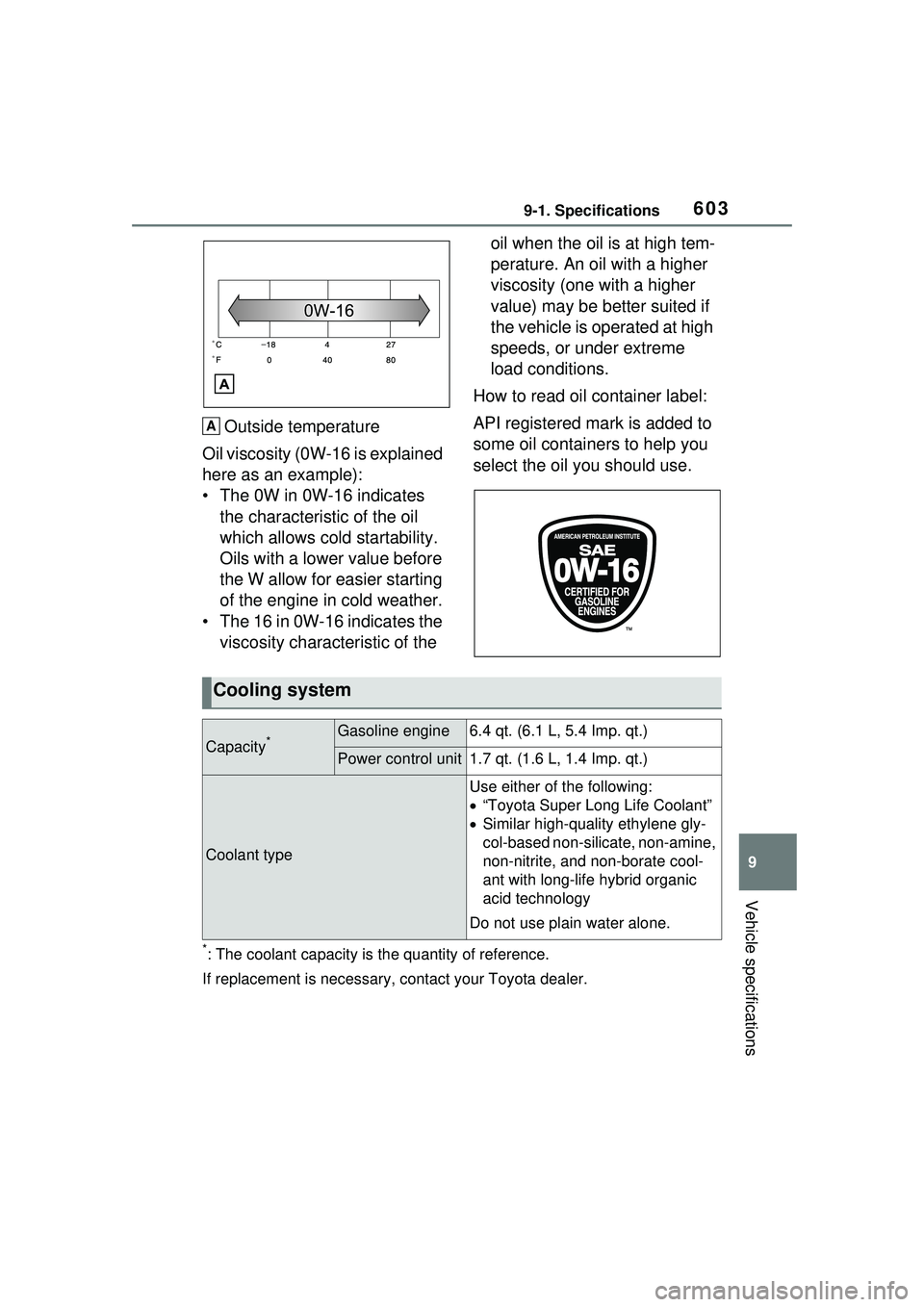
Outside temperature
Oil viscosity (0W-16 is explained
here as an example):
• The 0W in 0W-16 indicates the characteristic of the oil
which allows cold startability.
Oils with a lower value before
the W allow for easier starting
of the engine in cold weather.
• The 16 in 0W-16 indicates the viscosity characteristic of the oil when the oil is at high tem-
perature. An oil with a higher
viscosity (one with a higher
value) may be better suited if
the vehicle is operated at high
speeds, or under extreme
load conditions.
How to read oil container label:
API registered mark is added to
some oil containers to help you
select the oil you should use.
*: The coolant capacity is the quantity of reference.
If replacement is necessary, contact your Toyota dealer.
A
Cooling system
Capacity*Gasoline engine6.4 qt. (6.1 L, 5.4 Imp. qt.)
Power control unit1.7 qt. (1.6 L, 1.4 Imp. qt.)
Coolant type
Use either of the following:
“Toyota Super Long Life Coolant”
Similar high-quality ethylene gly-
col-based non-silic ate, non-amine,
non-nitrite, and non-borate cool-
ant with long-life hybrid organic
acid technology
Do not use plain water alone.