wheel size TOYOTA PRIUS PRIME 2023 Owners Manual
[x] Cancel search | Manufacturer: TOYOTA, Model Year: 2023, Model line: PRIUS PRIME, Model: TOYOTA PRIUS PRIME 2023Pages: 680, PDF Size: 14.97 MB
Page 220 of 680
2204-4. Adjusting the steering wheel and mirrors
■Adjusting the display (digital
mirror mode)
●The icons will disappear if a button
is not operated for approximately
5 seconds or more.
●If the displayed image is adjusted,
it may appear distorted. This is not
a malfunction.
●If the brightness of the Digital
Rear-view Mirror is set too high, it
may cause eye strain. Adjust the
Digital Rear-view Mirror to an
appropriate brightness. If your
eyes become tired, change to
optical mirror mode.
●The brightness of the Digital Rear-
view Mirror will change automati-
cally according to the brightness
of the area in front of your vehicle.
●The digital anti-glare mode oper-
ates only in locations where the
surroundings are dark. Depending
on the surrounding illumination
environment, the image may not
darken and it may not be possible
to reduce headlight glare from
vehicles to the rear.
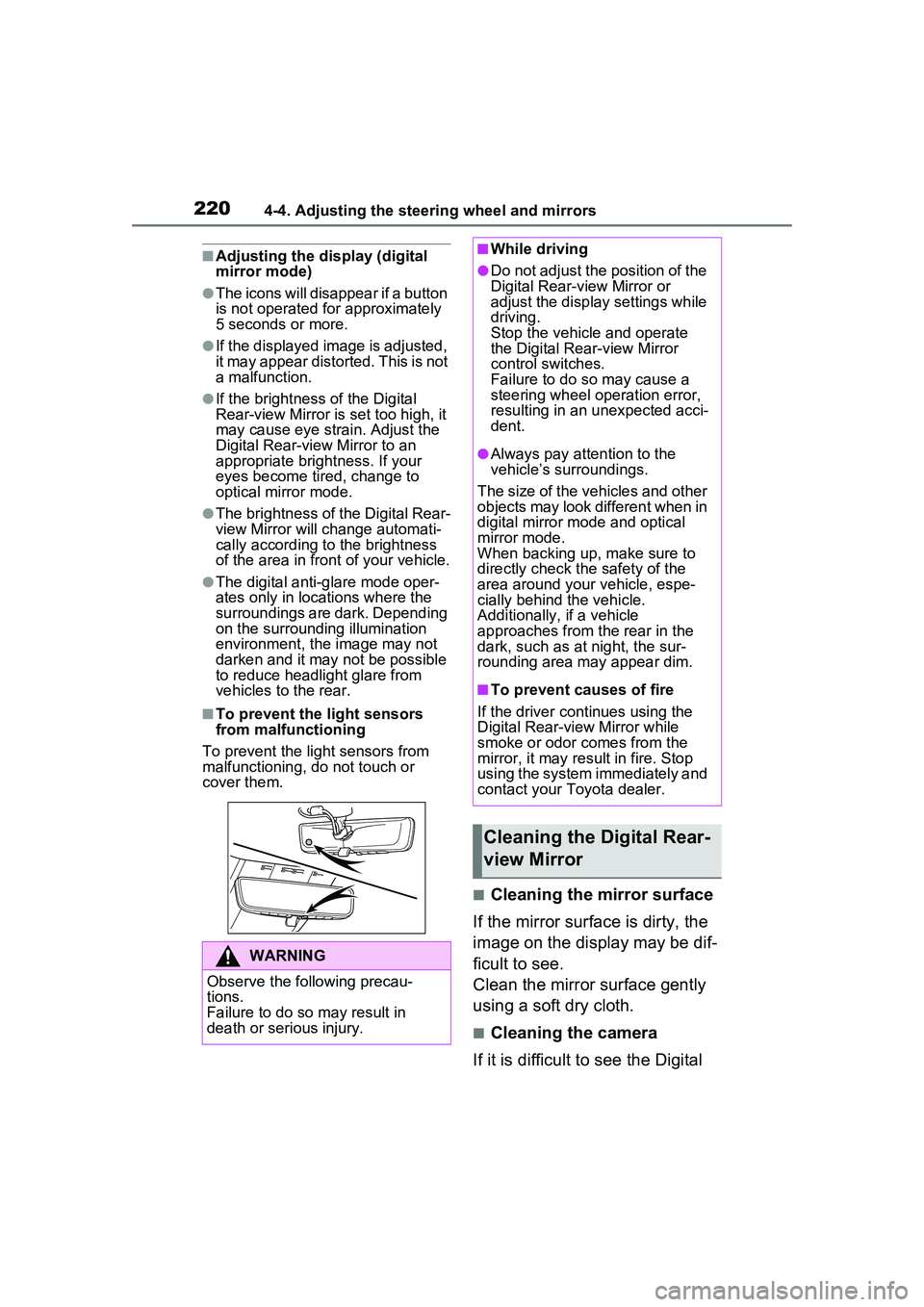
■To prevent the light sensors
from malfunctioning
To prevent the light sensors from
malfunctioning, do not touch or
cover them.
■Cleaning the mirror surface
If the mirror surface is dirty, the
image on the display may be dif-
ficult to see.
Clean the mirror surface gently
using a soft dry cloth.
■Cleaning the camera
If it is difficult to see the Digital
WARNING
Observe the following precau-
tions.
Failure to do so may result in
death or serious injury.
■While driving
●Do not adjust the position of the
Digital Rear-view Mirror or
adjust the displa y settings while
driving.
Stop the vehicle and operate
the Digital Rear-view Mirror
control switches.
Failure to do so may cause a
steering wheel operation error,
resulting in an unexpected acci-
dent.
●Always pay attention to the
vehicle’s surroundings.
The size of the vehicles and other
objects may look different when in
digital mirror mode and optical
mirror mode.
When backing up, make sure to
directly check the safety of the
area around your vehicle, espe-
cially behind the vehicle.
Additionally, if a vehicle
approaches from the rear in the
dark, such as at night, the sur-
rounding area may appear dim.
■To prevent causes of fire
If the driver continues using the
Digital Rear-view Mirror while
smoke or odor comes from the
mirror, it may result in fire. Stop
using the system immediately and
contact your Toyota dealer.
Cleaning the Digital Rear-
view Mirror
Page 301 of 680
3015-5. Using the driving support systems
5
Driving
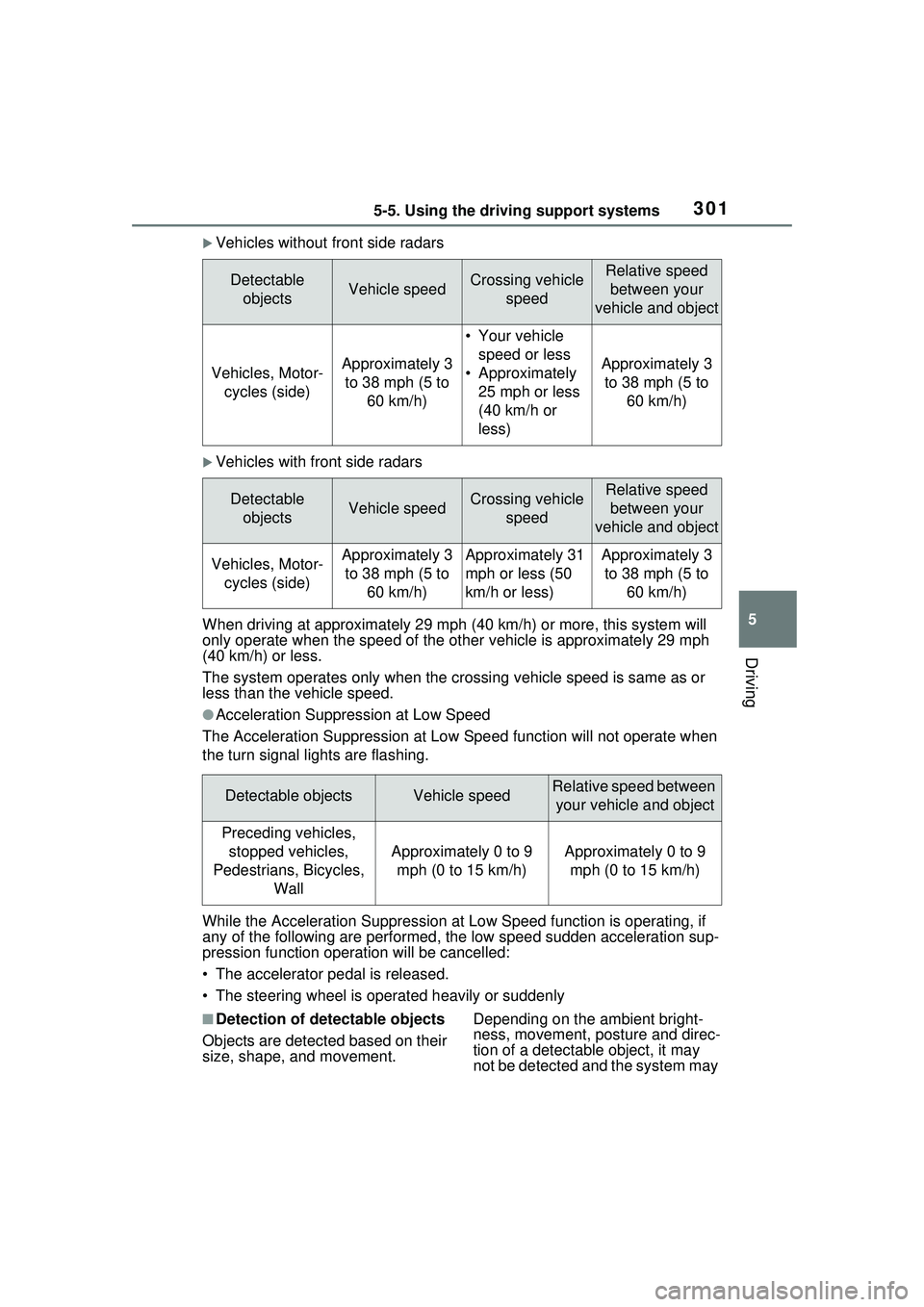
Vehicles without front side radars
Vehicles with front side radars
When driving at approximately 29 m ph (40 km/h) or more, this system will
only operate when the speed of the ot her vehicle is approximately 29 mph
(40 km/h) or less.
The system operates only when the crossing vehicle speed is same as or
less than the vehicle speed.
●Acceleration Suppression at Low Speed
The Acceleration Suppression at Low Speed function will not operate when
the turn signal lights are flashing.
While the Acceleration Suppression at Low Speed function is operating, if
any of the following are performed, the low speed sudden acceleration sup-
pression function operation will be cancelled:
• The accelerator pedal is released.
• The steering wheel is operated heavily or suddenly
■Detection of detectable objects
Objects are detected based on their
size, shape, and movement. Depending on the ambient bright-
ness, movement, posture and direc-
tion of a detectable object, it may
not be detected and the system may
Detectable
objectsVehicle speedCrossing vehicle speedRelative speed between your
vehicle and object
Vehicles, Motor- cycles (side)Approximately 3 to 38 mph (5 to 60 km/h)
• Your vehicle speed or less
• Approximately 25 mph or less
(40 km/h or
less)
Approximately 3 to 38 mph (5 to 60 km/h)
Detectable objectsVehicle speedCrossing vehicle speedRelative speed between your
vehicle and object
Vehicles, Motor- cycles (side)Approximately 3 to 38 mph (5 to 60 km/h)Approximately 31
mph or less (50
km/h or less)Approximately 3 to 38 mph (5 to 60 km/h)
Detectable objectsVehicle speedRelative speed between your vehicle and object
Preceding vehicles, stopped vehicles,
Pedestrians, Bicycles, Wall
Approximately 0 to 9 mph (0 to 15 km/h)Approximately 0 to 9 mph (0 to 15 km/h)
Page 303 of 680
3035-5. Using the driving support systems
5
Driving
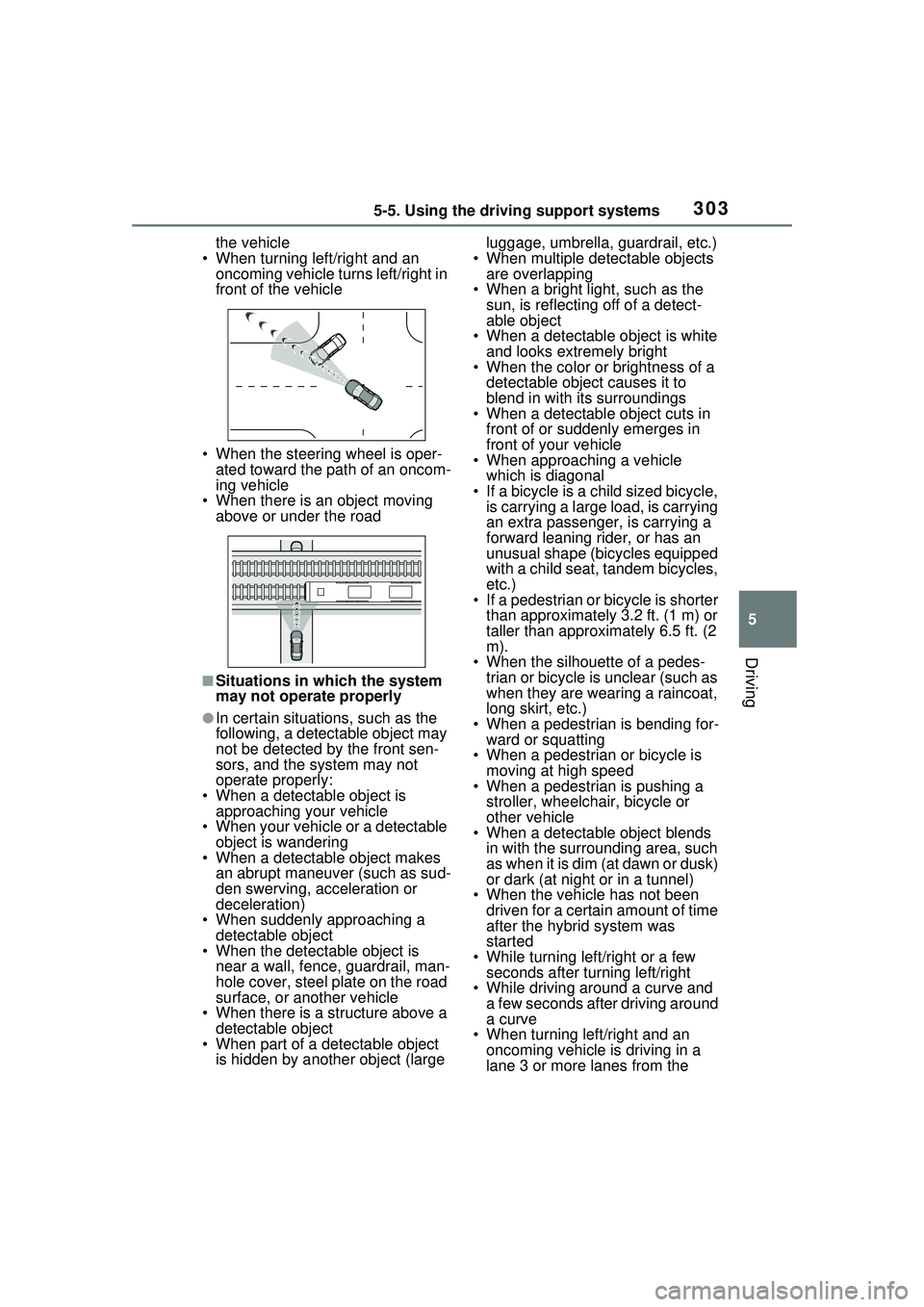
the vehicle
• When turning left/right and an oncoming vehicle turns left/right in
front of the vehicle
• When the steering wheel is oper- ated toward the path of an oncom-
ing vehicle
• When there is an object moving
above or under the road
■Situations in which the system
may not operate properly
●In certain situations, such as the
following, a detectable object may
not be detected by the front sen-
sors, and the system may not
operate properly:
• When a detectable object is approaching your vehicle
• When your vehicle or a detectable object is wandering
• When a detectable object makes
an abrupt maneuver (such as sud-
den swerving, acceleration or
deceleration)
• When suddenly approaching a detectable object
• When the detectable object is
near a wall, fence, guardrail, man-
hole cover, steel plate on the road
surface, or another vehicle
• When there is a structure above a
detectable object
• When part of a detectable object is hidden by another object (large luggage, umbrella, guardrail, etc.)
• When multiple detectable objects are overlapping
• When a bright light, such as the sun, is reflecting off of a detect-
able object
• When a detectable object is white and looks extremely bright
• When the color or brightness of a
detectable object causes it to
blend in with its surroundings
• When a detectable object cuts in
front of or suddenly emerges in
front of your vehicle
• When approaching a vehicle
which is diagonal
• If a bicycle is a child sized bicycle, is carrying a large load, is carrying
an extra passenger, is carrying a
forward leaning rider, or has an
unusual shape (bicycles equipped
with a child seat, tandem bicycles,
etc.)
• If a pedestrian or bicycle is shorter
than approximately 3.2 ft. (1 m) or
taller than approximately 6.5 ft. (2
m).
• When the silhouette of a pedes- trian or bicycle is unclear (such as
when they are wearing a raincoat,
long skirt, etc.)
• When a pedestrian is bending for- ward or squatting
• When a pedestrian or bicycle is moving at high speed
• When a pedestrian is pushing a
stroller, wheelchair, bicycle or
other vehicle
• When a detectable object blends
in with the surrounding area, such
as when it is dim (at dawn or dusk)
or dark (at night or in a tunnel)
• When the vehicle has not been driven for a certain amount of time
after the hybrid system was
started
• While turning left/right or a few seconds after turning left/right
• While driving around a curve and
a few seconds after driving around
a curve
• When turning left/right and an
oncoming vehicle is driving in a
lane 3 or more lanes from the
Page 324 of 680
3245-5. Using the driving support systems
The proactive driving assist
can be enabled/disabled
through a customize setting.
( P.627)
The settings of the proactive
driving assist can be changed
through customize settings.
( P.627)
Depending on the situation, the following indicators or icons will be
displayed.
Some icons cannot be displayed unless the display is changed to
the driving safety support function information screen.
WARNING
●When approaching a vehicle
ahead which is perpendicular or
at an angle to the vehicle, or is
facing the vehicle
●If a parked vehicle is perpendic-
ular or at an angle to the vehicle
●When a bicycle is a child sized
bicycle, is carrying a large load,
is carrying an extra passenger,
or has an unusual shape (bicy-
cles equipped with a child seat,
tandem bicycles, etc.)
●When a pedestrian or bicyclist is
shorter than approximately 3.2
ft. (1 m) or taller than approxi-
mately 6.5 ft. (2 m)
●When the silhouette of a pedes-
trian or bicyclist is unclear (such
as when they are wearing a
raincoat, long skirt, etc.)
●When a pedestrian or bicyclist is
bending forward or squatting
●When a pedestrian or bicyclist is
moving at high speed
●When a pedestrian is pushing a
stroller, wheelchair, bicycle or
other vehicle
●When a detectable object
blends in with the surrounding
area, such as when it is dim (at
dawn or dusk) or dark (at night,
in a tunnel, etc.)
●When the lane width is 13.1 ft.
(4 m) or more
●When the lane width is 8.2 ft.
(2.5 m) or less
●When the vehicle has not been
driven for a certain amount of
time after the hybrid system was
started
●While turning left or right or a
few seconds after turning left or
right
●While changing lanes or a few
seconds after changing lanes
●When entering a curve, driving
around a curve and a few sec-
onds after driving around a
curve
Changing proactive driv-
ing assist settings
System operation display
Page 428 of 680
4285-5. Using the driving support systems
WARNING
■When the TRAC/ABS/VSC is
activated
The slip indicator light flashes.
Always drive care fully. Reckless
driving may cause an accident.
Exercise particular care when the
indicator light flashes.
■When the TRAC/VSC systems
are turned off
Be especially careful and drive at
a speed appropriate to the road
conditions. As these are the sys-
tems to help ensure vehicle stabil-
ity and driving force, do not turn
the TRAC/VSC systems off
unless necessary.
■Replacing tires
Make sure that all tires are of the
specified size, brand, tread pat-
tern and total load capacity. In
addition, make sure that the tires
are inflated to the recommended
tire inflation pressure level.
The ABS, TRAC and VSC sys-
tems will not function correctly if
different tires are installed on the
vehicle.
Contact your Toyota dealer for
further information when replacing
tires or wheels.
■Handling of tires and the sus-
pension
Using tires with any kind of prob-
lem or modifying the suspension
will affect the driv ing assist sys-
tems, and may cause a system to
malfunction.
■Secondary Collision Brake
Do not rely solely upon the Sec-
ondary Collision Brake. This sys-
tem is designed to help reduce
the possibility of further damage
due to a secondary collision, how-
ever, that effect changes accord-
ing to various conditions. Overly
relying on the system may result
in death or serious injury.
Page 429 of 680
4295-6. Driving tips
5
Driving
5-6.Driving tips
Use fluids that are appropriate
to the prevailing outside tem-
peratures.
• Engine oil
• Engine coolant
• Power control unit coolant
• Washer fluid
Have a service technician
inspect the condition of the
12-volt battery.
Have the vehicle fitted with
four snow tires or purchase a
set of tire chains for the front
tires.
*
Ensure that all tires are the same
size and brand, and that chains
match the size of the tires.
*: Tire chains cannot be mounted
on vehicles with 195/50R19 tires.
Winter driving tips
Carry out the necessary
preparations and inspec-
tions before driving the
vehicle in winter. Always
drive the vehicle in a man-
ner appropriate to the pre-
vailing weather conditions.
Preparation for winter
WARNING
■Driving with snow tires
Observe the following precautions
to reduce the risk of accidents.
Failure to do so may result in a
loss of vehicle control and cause
death or serious injury.
●Use tires of the specified size.
●Maintain the recommended
level of air pressure.
●Do not drive in excess of 75
mph (120 km/h), regardless of
the type of snow tires being
used.
●Use snow tires on all, not just
some wheels.
■Driving with tire chains
(except 195/50R19 tires)
Observe the following precautions
to reduce the risk of accidents.
Failure to do so may result in the
vehicle being unable to be driven
safely, and may cause death or
serious injury.
●Do not drive in excess of the
speed limit specified for the tire
chains being used, or 30 mph
(50 km/h), whichever is lower.
●Avoid driving on bumpy road
surfaces or over potholes.
●Avoid sudden acceleration,
abrupt steering, sudden brak-
ing and shifting operations that
cause sudden engine braking.
●Slow down sufficiently before
entering a curve to ensure that
vehicle control is maintained.
●Do not use LTA (Lane Tracing
Assist) system.
●Do not use LDA (Lane Depar-
ture Alert) system.
Page 431 of 680
4315-6. Driving tips
5
Driving
If the vehicle is parked without
setting the parking brake,
confirm that the shift position
cannot be moved out of P.
If the vehicle is left parked
with the brakes damp in cold
temperatures, there is a pos-
sibility of the brakes freezing.
Vehicles without 195/50R19
tires
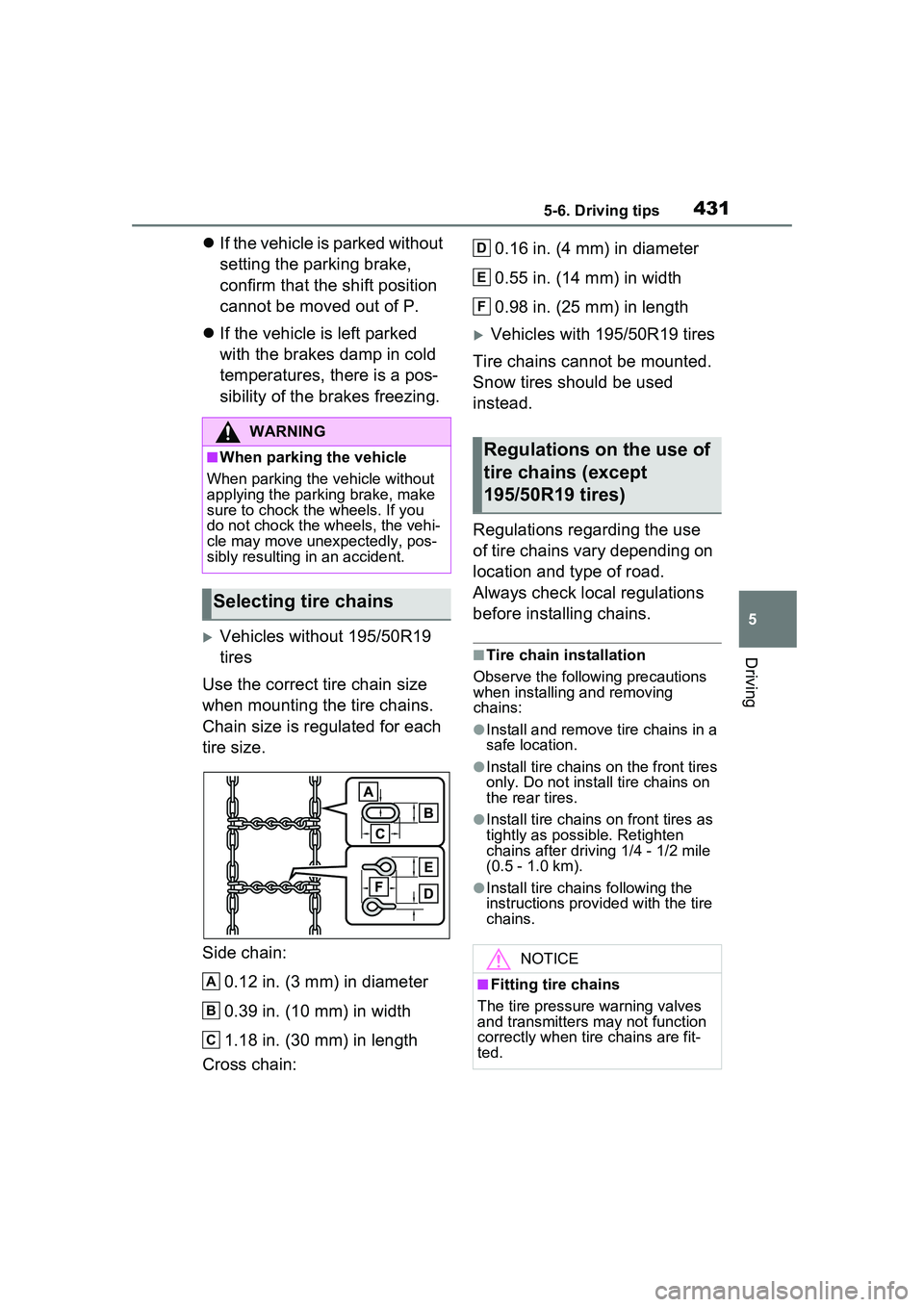
Use the correct tire chain size
when mounting the tire chains.
Chain size is regulated for each
tire size.
Side chain:
0.12 in. (3 mm) in diameter
0.39 in. (10 mm) in width
1.18 in. (30 mm) in length
Cross chain: 0.16 in. (4 mm) in diameter
0.55 in. (14 mm) in width
0.98 in. (25 mm) in length
Vehicles with 195/50R19 tires
Tire chains cannot be mounted.
Snow tires should be used
instead.
Regulations regarding the use
of tire chains vary depending on
location and type of road.
Always check local regulations
before installing chains.
■Tire chain installation
Observe the following precautions
when installing and removing
chains:
●Install and remove tire chains in a
safe location.
●Install tire chains on the front tires
only. Do not install tire chains on
the rear tires.
●Install tire chains on front tires as
tightly as possible. Retighten
chains after driving 1/4 - 1/2 mile
(0.5 - 1.0 km).
●Install tire chains following the
instructions provid ed with the tire
chains.
WARNING
■When parking the vehicle
When parking the vehicle without
applying the parking brake, make
sure to chock the wheels. If you
do not chock the wheels, the vehi-
cle may move unexpectedly, pos-
sibly resulting in an accident.
Selecting tire chains
A
B
C
Regulations on the use of
tire chains (except
195/50R19 tires)
NOTICE
■Fitting tire chains
The tire pressure warning valves
and transmitters may not function
correctly when tire chains are fit-
ted.
D
E
F
Page 514 of 680
5147-3. Do-it-yourself maintenance
indicators are showing on a tire.
■When to replace your vehicle’s
tires
Tires should be replaced if:
●The treadwear indicators are
showing on a tire.
●You have tire damage such as
cuts, splits, cracks deep enough
to expose the fabric, and bulges
indicating internal damage
●A tire goes flat repeatedly or can-
not be properly repaired due to
the size or location of a cut or
other damage
If you are not sure, consult your
Toyota dealer.
■Tire life
Any tire over 6 years old must be
checked by a qualified technician
even if it has seldom or never been
used or damage is not obvious.
■Low profile tires (vehicles with
195/50R19 tires)
Generally, low profile tires will wear
more rapidly and tire grip perfor-
mance will be reduced on snowy
and/or icy roads when compared to
standard tires. Be sure to use snow
tires on snowy and/or icy roads and
drive carefully at a speed appropri-
ate for road and weather conditions.
■Maximum load of tire
Check that the maximum load of the
replacement tire is greater than 1/2
of the Gross Axle Weight Ratings
(GAWR) of either the front axle or
the rear axle, whic hever is greater.
For the GAWR, see the Certification
Label. For the maximum load of the
tire, see the load limit at maximum
cold tire inflation pressure men-
tioned on the sidewall of the tire.
( P.609)
■Tire types
●Summer tires
Summer tires are high-speed per-
formance tires best suited to high-
way driving under dry conditions.
Since summer tires do not have
the same traction performance as
snow tires, summer tires are inad-
equate for driving on snow-cov-
ered or icy roads. For driving on
snow-covered roads or icy roads,
the use of snow tires is recom-
mended. When installing snow
tires, be sure to replace all four
tires.
●All season tires
All season tires are designed to
provide better traction in snow and
to be adequate for driving in most
winter conditions as well as for
use year-round. All season tires,
however, do not have adequate
traction performance compared
with snow tires in heavy or loose
snow. Also, all season tires fall
short in acceleration and handling
performance compared with sum-
mer tires in highway driving.
●Snow tires
For driving on snow-covered
roads or icy roads, we recom-
mend using snow tires. If you
need snow tires, select tires of the
same size, construction and load
capacity as the originally installed
tires. Since your vehicle has radial
tires as original equipment, make
sure your snow tires also have
radial construction. Do not install
studded tires without first checking
local regulation s for possible
restrictions. Snow tires should be
installed on all wheels. ( P.429)
Page 515 of 680
5157-3. Do-it-yourself maintenance
7
Maintenance and care
■If the tread on snow tires wears
down below 0.16 in. (4 mm)
The effectiveness of the tires as
snow tires is lost.
Rotate the tires in the order
shown.
To equalize tire wear and extend
tire life, Toyota recommends that
tire rotation is carried out at the
same interval as tire inspection.
Do not fail to initia lize the tire pres-
sure warning system after tire rota-
WARNING
■When inspecting or replacing
tires
Observe the following precautions
to prevent accidents.
Failure to do so may cause dam-
age to parts of the drivetrain as
well as dangerous handling char-
acteristics, which may lead to an
accident resulting in death or seri-
ous injury.
●Do not mix tires of different
makes, models or tread pat-
terns.
Also, do not mix tires of remark-
ably different treadwear.
●Do not use tire sizes other than
those recommended by Toyota.
●Do not mix differently con-
structed tires (radial, bias-belted
or bias-ply tires).
●Do not mix summer, all season
and snow tires.
●Do not use tires that have been
used on another vehicle.
Do not use tires if you do not
know how they were used previ-
ously.
NOTICE
■Driving on rough roads
Take particular care when driving
on roads with loose surfaces or
potholes.
These conditions may cause
losses in tire in flation pressure,
reducing the cushioning ability of
the tires. In addition, driving on
rough roads may cause damage
to the tires themselves, as well as
the vehicle’s wheels and body.
■Low profile tires (vehicles
with 195/50R19 tires)
Low profile tires may cause
greater damage than usual to the
tire wheel when sustaining impact
from the road surface. Therefore,
pay attention to the following:
●Be sure to use proper tire infla-
tion pressure. If tires are under-
inflated, they may be damaged
more severely.
●Avoid potholes, uneven pave-
ment, curbs and other road haz-
ards. Failure to do so may lead
to severe tire and wheel dam-
age.
■If tire inflation pressure of
each tire becomes low while
driving
Do not continue driving, or your
tires and/or wheels may be
ruined.
Tire rotation
Page 517 of 680
5177-3. Do-it-yourself maintenance
7
Maintenance and care
3Use the meter control
switches ( P.162) to select
( P.166).
4 Use the meter control
switches to select , then
press and hold .
5 Use the meter control
switches to select “TPWS
setting”, then press .
6 Use the meter control
switches to select “Pressure
unit setting”, then press .
7 Use the meter control
switches to select the desired
unit and then press .
■Routine tire inflation pressure
checks
The tire pressure warning system
does not replace routine tire inflation
pressure checks. Make sure to
check tire inflation pressure as part
of your routine of daily vehicle
checks.
■Tire inflation pressure
●It may take a few minutes to dis-
play the tire inflation pressure
after the power switch is turned to
ON.
It may also take a few minutes to
display the tire in flation pressure
after inflation pressure has been
adjusted.
●Tire inflation pressure changes
with temperature. The displayed
values may also be different from
the values measured using a tire
pressure gauge.
■Situations in which the tire
pressure warning system may
not operate properly
●In the following cases, the tire pressure warning system may not
operate properly.
• If non-genuine Toyota wheels are
used.
• A tire has been replaced with a tire that is not an OE (Original
Equipment) tire.
• A tire has been replaced with a tire that is not of the specified size.
• Tire chains etc. are equipped.
• If a window tint that affects the radio wave signals is installed.
• If there is a lot of snow or ice on the vehicle, particularly around the
wheels or wheel housings.
• If the tire inflation pressure is extremely higher than the speci-
fied level.
• If wheel without tire pressure
warning valves and transmitters
are used.
• If the ID code on the tire pressure warning valves and transmitters is
not registered in the tire pressure
warning computer.
●Performance may be affected in
the following situations.
• Near a TV tower, electric power plant, gas station, radio station,
large display, airport or other facil-
ity that generates strong radio
waves or electrical noise
• When carrying a portable radio, cellular phone, cordless phone or
other wireless communication
device
If tire position in formation is not cor-
rectly displayed due to the radio
wave conditions, the display may be
corrected by changing the location
of the vehicle as the radio wave
conditions may change.
●When the vehicle is parked, the
time taken for the warning to start
or go off could be extended.
●When tire inflation pressure
declines rapidly for example when
a tire has burst, the warning may
not function.