instrument panel TOYOTA PRIUS V 2016 ZVW40 / 1.G User Guide
[x] Cancel search | Manufacturer: TOYOTA, Model Year: 2016, Model line: PRIUS V, Model: TOYOTA PRIUS V 2016 ZVW40 / 1.GPages: 620, PDF Size: 29.83 MB
Page 134 of 620

134
PRIUS v_OM_OM47B12U_(U)
3-2. Opening, closing and locking the doors
■Note for the entry function
●Even when the electronic key is within the effective range (detection areas),
the system may not operate properly in the following cases:
• The electronic key is too close to the window or outside door handle, near
the ground, or in a high place when the doors are locked or unlocked.
• The electronic key is near the ground or in a high place, or too close to
the rear bumper center when the back door is opened.
• The electronic key is on the instrument panel, luggage room, floor, or in
the door pockets or glove box when the hybrid system is started or power
switch modes are changed.
●Do not leave the electronic key on top of the instrument panel or near the
door pockets when exiting the vehicle. Depending on the radio wave recep-
tion conditions, it may be detected by the antenna outside the cabin and the
door will become lockable from the outside, possibly trapping the electronic
key inside the vehicle.
●As long as the electronic key is within the effective range, the doors may be
unlocked or locked by anyone.
●Even if the electronic key is not inside the vehicle, it may be possible to start
the hybrid system if the electronic key is near the window.
●The doors may unlock if a large amount of water splashes on the door han-
dle, such as in the rain or in a car wash when the electronic key is within the
effective range. (The door will automatically be locked after approximately
60 seconds if the doors are not opened and closed.)
●If the wireless remote control is used to lock the doors when the electronic
key is near the vehicle, there is a possibility that the door may not be
unlocked by the entry function. (Use the wireless remote control to unlock
the doors.)
●Touching the door lock sensor while wearing gloves may delay or prevent
lock operation. Remove the gloves and touch the lock sensor again.
●When the lock operation is performed using the lock sensor, recognition sig-
nals will be shown up to two consecutive times. After this, no recognition
signals will be given.
●If the door handle becomes wet while the electronic key is within the effec-
tive range, the door may unlock and lock repeatedly. Place the key in a posi-
tion 6 ft. (2 m) or more separate from the vehicle while the vehicle is being
washed. (Take care to ensure that the key is not stolen.)
●If the electronic key is inside the vehicle and a door handle becomes wet
during a car wash, a message may be shown on the multi-information dis-
play (if equipped) and a buzzer will sound outside the vehicle. To turn off the
alarm, lock all the doors.
●The lock sensor may not work properly if it comes into contact with ice,
snow, mud, etc. Clean the lock sensor and attempt to operate it again, or
use the lock sensor on the lower part of the door handle.
Page 163 of 620

PRIUS v_OM_OM47B12U_(U)
1634-1. Before driving
4
Driving
WARNING
Observe the following precautions.
Failure to do so may result in death or serious injury.
■When the vehicle is stopped
●Do not depress the accelerator pedal unnecessarily.
If the shift position is in any position other than P or N, the vehicle may
accelerate suddenly and unexpectedly, causing an accident.
●In order to prevent accidents due to the vehicle rolling away, always keep
depressing the brake pedal while stopped with the “READY” indicator is
illuminated, and apply the parking brake as necessary.
●If the vehicle is stopped on an incline, in order to prevent accidents caused
by the vehicle rolling forward or backward, always depress the brake pedal
and securely apply the parking brake as needed.
●Avoid revving or racing the engine.
Running the engine at high speed while the vehicle is stopped may cause
the exhaust system to overheat, which could result in a fire if combustible
material is nearby.
■When the vehicle is parked
●Do not leave glasses, cigarette lighters, spray cans, or soft drink cans in
the vehicle when it is in the sun.
Doing so may result in the following:
• Gas may leak from a cigarette lighter or spray can, and may lead to a fire.
• The temperature inside the vehicle may cause the plastic lenses and
plastic material of glasses to deform or crack.
• Soft drink cans may fracture, causing the contents to spray over the
interior of the vehicle, and may also cause a short circuit in the vehicle’s
electrical components.
●Do not leave cigarette lighters in the vehicle. If a cigarette lighter is in a
place such as the glove box or on the floor, it may be lit accidentally when
luggage is loaded or the seat is adjusted, causing a fire.
●Do not attach adhesive discs to the windshield or windows. Do not place con-
tainers such as air fresheners on the instrument panel or dashboard. Adhe-
sive discs or containers may act as lenses, causing a fire in the vehicle.
●Do not leave a door or window open if the curved glass is coated with a
metallized film such as a silver-colored one. Reflected sunlight may cause
the glass to act as a lens, causing a fire.
●Always apply the parking brake, shift the shift position to P, stop the hybrid
system and lock the vehicle.
Do not leave the vehicle unattended while the “READY” indicator is illumi-
nated.
●Do not touch the exhaust pipe while the “READY” indicator is illuminated
or immediately after turning the hybrid system off.
Doing so may cause burns.
Page 169 of 620

PRIUS v_OM_OM47B12U_(U)
1694-1. Before driving
4
Driving
WARNING
■Things that must not be carried in the luggage compartment
The following things may cause a fire if loaded in the luggage compart-
ment:
●Receptacles containing gasoline
●Aerosol cans
■Storage precautions
Observe the following precautions.
Failure to do so may prevent the pedals from being depressed properly,
may block the driver’s vision, or may result in items hitting the driver or
passengers, possibly causing an accident.
●Stow cargo and luggage in the luggage compartment whenever possi-
ble.
●Do not stack cargo and luggage in the luggage compartment higher
than the seatbacks.
●When you fold down the rear seats, long items should not be placed
directly behind the front seats.
●Never allow anyone to ride in the luggage compartment. It is not
designed for passengers. They should ride in their seats with their seat
belts properly fastened.
●Do not place cargo or luggage in or on the following locations.
• At the feet of the driver
• On the front passenger or rear seats (when stacking items)
• On the luggage cover
• On the instrument panel
• On the dashboard
●Secure all items in the occupant compartment.
■Capacity and distribution
●Do not exceed the maximum axle weight rating or the total vehicle
weight rating.
●Even if the total load of occupant’s weight and the cargo load is less
than the total load capacity, do not apply the load unevenly. Improper
loading may cause deterioration of steering or braking control which
may cause death or serious injury.
Page 370 of 620
3706-1. Using the air conditioning system and defogger
PRIUS v_OM_OM47B12U_(U)
WARNING
■To prevent the windshield from fogging up
●Do not use during cool air operation in extremely humid weather.
The difference between the temperature of the outside air and that of the
windshield can cause the outer surface of the windshield to fog up, block-
ing your vision.
■To prevent burns
Do not touch the rear view mirror surfaces when the outside rear view mirror
defoggers are on.
NOTICE
■To prevent 12-volt battery discharge
Do not leave the air conditioning system on longer than necessary when the
hybrid system is off.
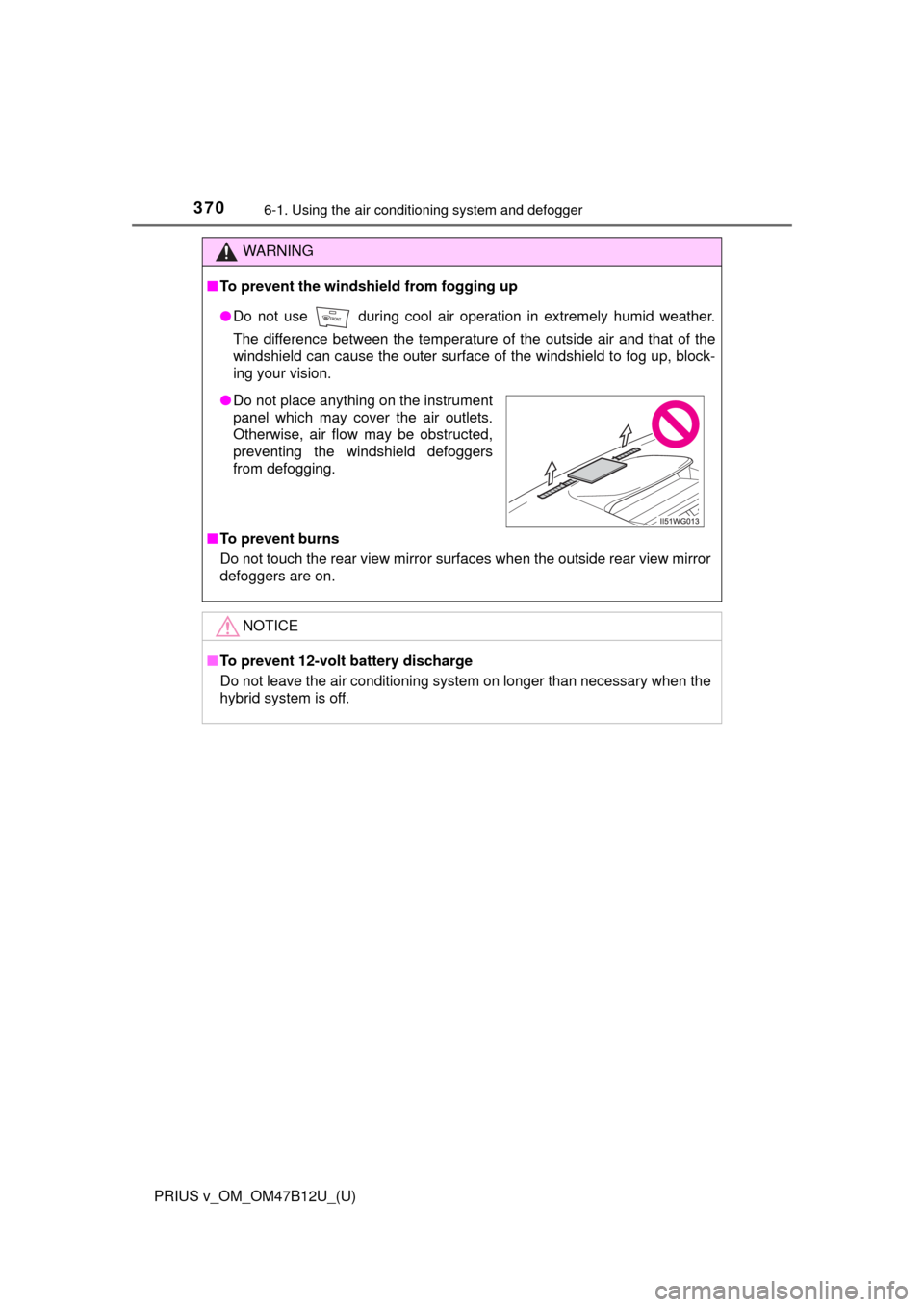
●Do not place anything on the instrument
panel which may cover the air outlets.
Otherwise, air flow may be obstructed,
preventing the windshield defoggers
from defogging.
Page 411 of 620

PRIUS v_OM_OM47B12U_(U)
4117-1. Maintenance and care
7
Maintenance and care
●Remove loose dirt using a vacuum cleaner.
●Apply a mild soap solution to the synthetic leather using a sponge
or soft cloth.
●Allow the solution to soak in for a few minutes. Remove the dirt and
wipe off the solution with a clean, damp cloth.
■Caring for leather areas
Toyota recommends cleaning the interior of the vehicle at least twice a year to
maintain the quality of the vehicle’s interior.
■Shampooing the carpets
There are several commercial foaming-type cleaners available. Use a sponge
or brush to apply the foam. Rub in overlapping circles. Do not use water.
Wipe dirty surfaces and let them dry. Excellent results are obtained by keep-
ing the carpet as dry as possible.
■Seat belts
Clean with mild soap and lukewarm water using a cloth or sponge. Also
check the belts periodically for excessive wear, fraying or cuts.
Cleaning the synthetic leather areas
WARNING
■Water in the vehicle
●Do not splash or spill liquid in the vehicle, such as on the floor, in the
hybrid battery (traction battery) air intake vent, and in the luggage com-
partment.
Doing so may cause the hybrid battery (traction battery), electrical compo-
nents, etc. to malfunction or catch fire.
●Do not get any of the SRS components or wiring in the vehicle interior wet.
(P. 42)
An electrical malfunction may cause the airbags to deploy or not function
properly, resulting in death or serious injury.
■Cleaning the interior (especially instrument panel)
Do not use polish wax or polish cleaner. The instrument panel may reflect
off the windshield, obstructing the driver’s view and leading to an accident,
resulting in death or serious injury.
Page 412 of 620

412
PRIUS v_OM_OM47B12U_(U)
7-1. Maintenance and care
NOTICE
■Cleaning detergents
●Do not use the following types of detergent, as they may discolor the vehi-
cle interior or cause streaks or damage to painted surfaces:
• Non-seat portions: Organic substances such as benzene or gasoline,
alkaline or acidic solutions, dye, and bleach
• Seats: Alkaline or acidic solutions, such as thinner, benzene, and alco-
hol
●Do not use polish wax or polish cleaner. The instrument panel’s or other
interior part’s painted surface may be damaged.
■Preventing damage to leather surfaces
Observe the following precautions to avoid damage to and deterioration of
leather surfaces:
●Remove any dust or dirt from leather surfaces immediately.
●Do not expose the vehicle to direct sunlight for extended periods of time.
Park the vehicle in the shade, especially during summer.
●Do not place items made of vinyl, plastic, or containing wax on the uphol-
stery, as they may stick to the leather surface if the vehicle interior heats
up significantly.
■Water on the floor
Do not wash the vehicle floor with water.
Vehicle systems such as the audio system may be damaged if water comes
into contact with electrical components such as the audio system above or
under the floor of the vehicle. Water may also cause the body to rust.
■When cleaning the inside of the windshield (vehicles with LDA [Lane
Departure Alert] and Automatic High Beam)
Be careful not to touch the camera sensor (P. 227).
If the camera is accidentally scratched or hit, LDA and Automatic High
Beam may not operate properly or may cause a malfunction.
■Cleaning the inside of the rear window
●Do not use glass cleaner to clean the rear window, as this may cause
damage to the rear window defogger heater wires. Use a cloth dampened
with lukewarm water to gently wipe the window clean. Wipe the window in
strokes running parallel to the heater wires.
●Be careful not to scratch or damage the heater wires.
Page 463 of 620
463
PRIUS v_OM_OM47B12U_(U)
7-3. Do-it-yourself maintenance
7
Maintenance and care
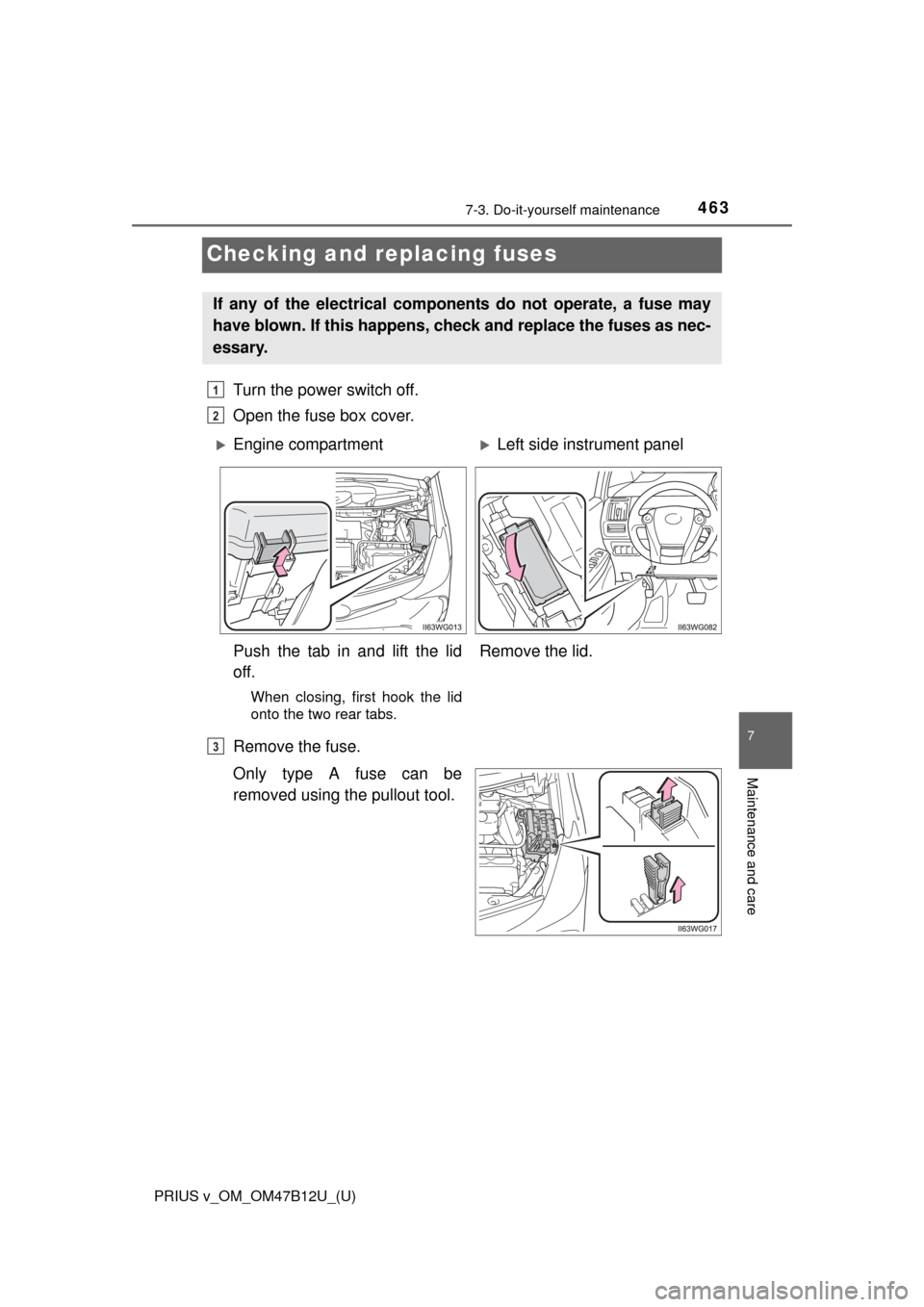
Checking and replacing fuses
Turn the power switch off.
Open the fuse box cover.
Remove the fuse.
Only type A fuse can be
removed using the pullout tool.
If any of the electrical components do not operate, a fuse may
have blown. If this happens, check and replace the fuses as nec-
essary.
1
2
Engine compartmentLeft side instrument panel
Push the tab in and lift the lid
off.
When closing, first hook the lid
onto the two rear tabs.
Remove the lid.
3
Page 553 of 620
PRIUS v_OM_OM47B12U_(U)
5539-1. Specifications
9
Vehicle specifications
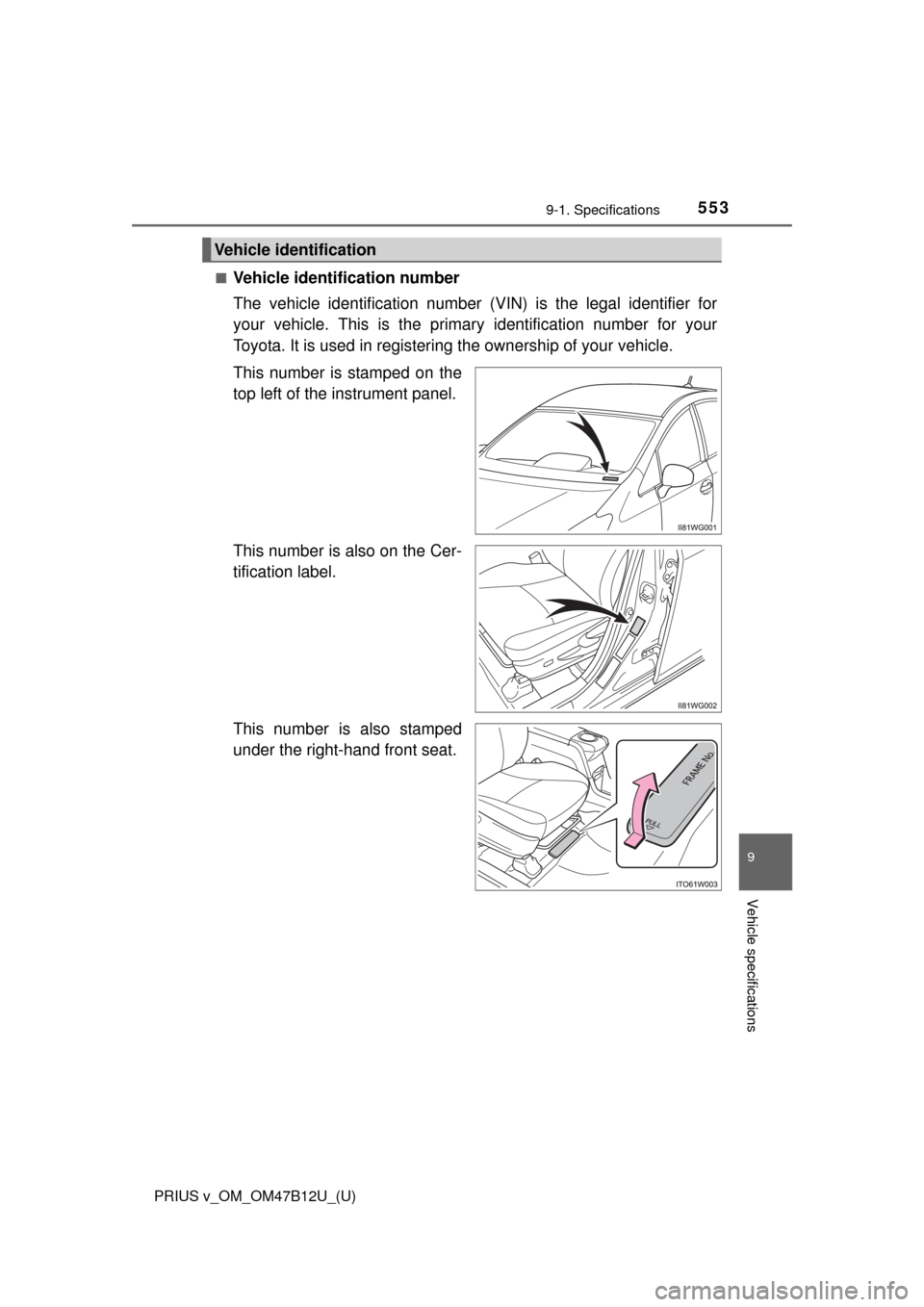
■Vehicle identification number
The vehicle identification number (VIN) is the legal identifier for
your vehicle. This is the primary identification number for your
Toyota. It is used in registering the ownership of your vehicle.
This number is stamped on the
top left of the instrument panel.
This number is also on the Cer-
tification label.
This number is also stamped
under the right-hand front seat.
Vehicle identification
Page 605 of 620

605Alphabetical index
PRIUS v_OM_OM47B12U_(U)
Bluetooth® audio ..................... 321
Bluetooth® phone .................... 323
Deleting the call history......... 343
Making a call ......................... 326
Managing the contacts.......... 339
Message function.................. 333
Phone settings ...................... 338
Receiving a call..................... 329
Speaking on the phone ......... 330
Bottle holders .......................... 378
Brake
Fluid ...................................... 558
Parking brake........................ 188
Regenerative braking.............. 75
Warning light ......................... 490
Brake assist ............................. 246
Break-in tips ............................. 159
Brightness control
Instrument panel
light control ........................... 94
Card holder .............................. 380
Care
Aluminum wheels.................. 407
Exterior ................................. 406
Interior................................... 410
Panoramic roof ..................... 409
Radar sensor ................ 226, 258
Seat belts .............................. 411
Cargo capacity ......................... 171
Cargo hooks............................. 381CD player.................................. 292
Chains ...................................... 264
Child restraint system............... 58
Booster seats definition .......... 59
Booster seat installation ......... 68
Convertible seat definition ...... 59
Convertible seat installation.... 66
Front passenger occupant
classification system ............ 52
Infant seat definition ............... 59
Infant seat installation ............. 65
Installing CRS with LATCH
system .................................. 63
Installing CRS with seat belt ... 65
Installing CRS with top
tether strap ........................... 69
LATCH system ....................... 62
Child safety ................................ 57
12-volt battery precautions ... 441
Airbag precautions.................. 43
Back door precautions .......... 127
Child restraint system ............. 58
How your child should
wear the seat belt ................. 36
Installing child restraints ......... 62
Power window lock switch .... 153
Power window precautions ... 155
Rear door child-protectors .... 123
Removed key battery
precautions......................... 462
Seat belt extender
precautions........................... 40
Seat belt precautions .............. 38
Seat heater precautions ....... 372
C
*: Refer to the “NAVIGATION SYSTEM OWNER’S MANUAL”.
Page 610 of 620

610Alphabetical index
PRIUS v_OM_OM47B12U_(U)
High mounted stoplight
Replacing .............................. 478
Hill-start assist control............ 247
Hood ......................................... 421
Hooks
Cargo hooks ......................... 381
Retaining hooks (floor mat)..... 28
Horn .......................................... 147
Hybrid battery (traction battery)
Location .................................. 77
Specification ......................... 555
Hybrid battery
(traction battery)
air intake vent .......................... 78
Hybrid system ............................ 73
Emergency shut off system .... 78
Energy
monitor/consumption
screen......................... 102, 108
EV drive mode ...................... 179
High voltage components ....... 77
Hybrid System Indicator.......... 98
Hybrid system precautions ..... 77
Hybrid vehicle driving tips ..... 260
If the hybrid system will
not start .............................. 534
Overheating .......................... 543
Power switch......................... 174
Regenerative braking.............. 75
Starting the hybrid system .... 174
Vehicle proximity
notification system ................ 74
Hybrid System Indicator ........... 98
Hybrid transmission ................ 181I/M test ...................................... 418
Identification
Engine .................................. 554
Vehicle .................................. 553
Ignition switch
(Power switch)....................... 174
Auto power off function ......... 176
Changing the power
switch modes ..................... 176
If your vehicle has to be
stopped in an emergency ... 483
Starting the hybrid system .... 174
Ignition switch light
(power switch light) .............. 373
Illuminated entry system ........ 375
Immobilizer system ................... 82
Indicators ................................... 86
Initialization
Items to initialize ................... 583
Maintenance data ................. 414
Tire pressure warning
system ................................ 445
Inside rear view mirror ............ 149
Instrument panel light
control ...................................... 94
Interior lights ........................... 373
Switch ........................... 374, 375
Wattage ................................ 560I