reset TOYOTA PRIUS V 2016 ZVW40 / 1.G User Guide
[x] Cancel search | Manufacturer: TOYOTA, Model Year: 2016, Model line: PRIUS V, Model: TOYOTA PRIUS V 2016 ZVW40 / 1.GPages: 620, PDF Size: 29.83 MB
Page 290 of 620
290
PRIUS v_OM_OM47B12U_(U)
5-4. Using the radio
Radio operation
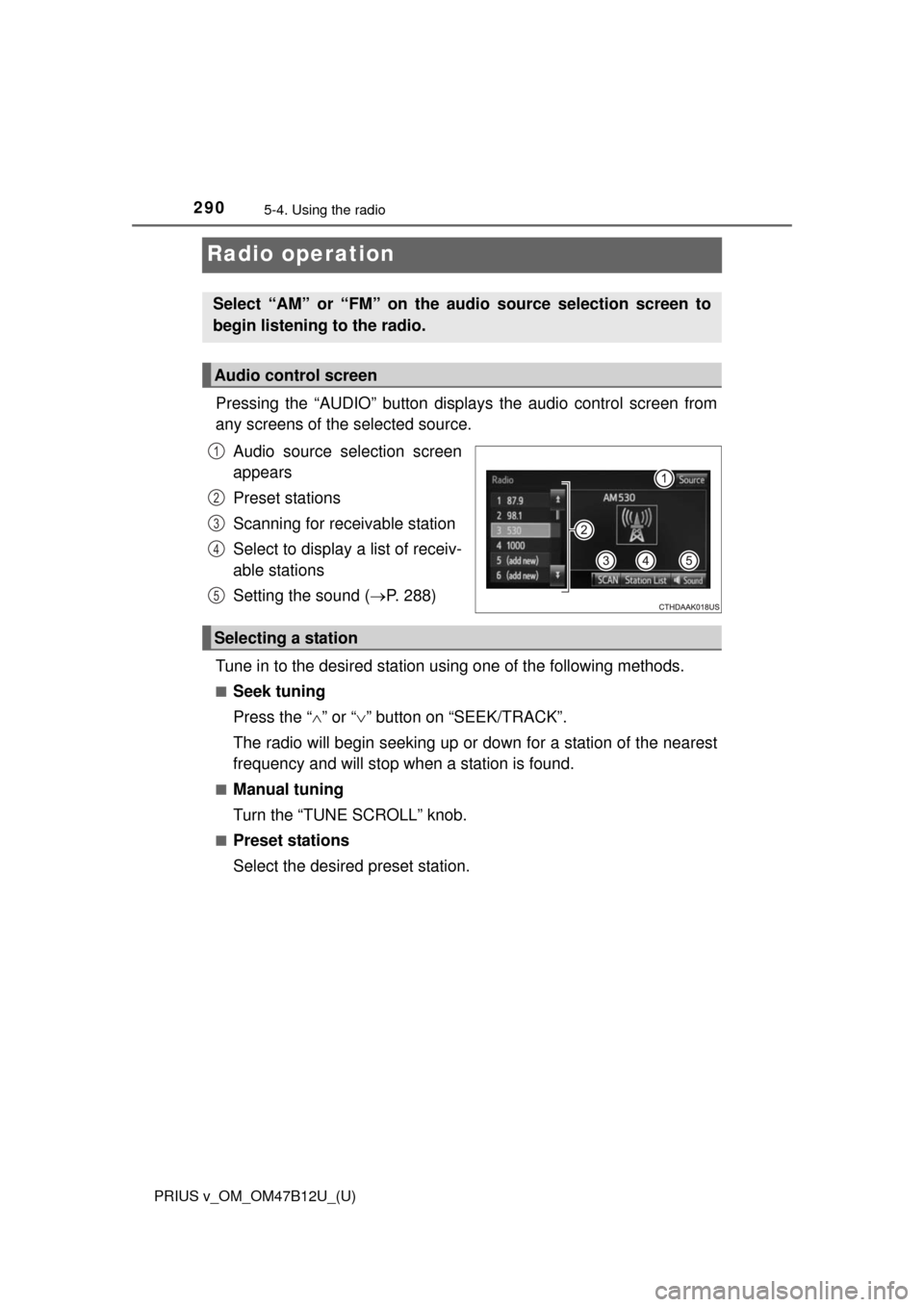
Pressing the “AUDIO” button displays the audio control screen from
any screens of the selected source.
Audio source selection screen
appears
Preset stations
Scanning for receivable station
Select to display a list of receiv-
able stations
Setting the sound (P. 288)
Tune in to the desired station using one of the following methods.
■Seek tuning
Press the “” or “” button on “SEEK/TRACK”.
The radio will begin seeking up or down for a station of the nearest
frequency and will stop when a station is found.
■Manual tuning
Turn the “TUNE SCROLL” knob.
■Preset stations
Select the desired preset station.
Select “AM” or “FM” on the audio source selection screen to
begin listening to the radio.
Audio control screen
1
2
3
4
5
Selecting a station
Page 291 of 620
PRIUS v_OM_OM47B12U_(U)
2915-4. Using the radio
5
Audio system
Search for desired stations by turning the “TUNE SCROLL” knob or
pressing the “” or “” button on “SEEK/TRACK”.
Select “(add new)”.
To change the preset station to a different one, select and hold the preset
station.
Select “Yes”.
Select “OK” after setting the new preset station.
■Refreshing the station list
Select “Refresh” on the “Station List” screen.
To cancel the refresh, select “Cancel Refresh”.
■Reception sensitivity
●Maintaining perfect radio reception at all times is difficult due to the continu-
ally changing position of the antenna, differences in signal strength and sur-
rounding objects, such as trains, transmitters, etc.
●The radio antenna is mounted on the roof. The antenna can be removed
from the base by turning it.
Setting station presets
1
2
3
4
Page 301 of 620
PRIUS v_OM_OM47B12U_(U)
3015-6. Using an external device
5
Audio system
■iPod problems
To resolve most problems encountered when using your iPod, disconnect
your iPod from the vehicle iPod connection and reset it. For instructions on
how to reset your iPod, refer to your iPod Owner’s Manual.
■Error messages
If an error message is displayed, refer to the following table and take the
appropriate measures. If the problem is not rectified, take the vehicle to your
Toyota dealer.
MessageCause/Correction procedures
“Connection error. Please
consult your Owner’s
Manual for instructions on
how to connect the iPod.”
This indicates a problem in the iPod or its con-
nection.
“No music files found.”This indicates that there is no music data in
the iPod.
“No videos found.”This indicates that no video files are included
in the iPod.
“There are no songs avail-
able for playback. Please
add compatible files to
your iPod.”
This indicates that songs are not found in the
iPod.
“Please check the iPod
firmware version.”
This indicates that the software version is not
compatible.
Please check the compatible models.
(P. 302)
“iPod authorization
unsuccessful.”This indicates that the display audio system
failed to authorize the iPod.
Please check your iPod.
Page 339 of 620
339
PRIUS v_OM_OM47B12U_(U)
5-9. Bluetooth® phone
5
Audio system
Contact/Call Histor y Settings
The contact can be transferred from a Bluetooth® phone to the sys-
tem. The contact also can be added, edited and deleted.
The call history can be deleted and contact and favorites can be
changed.
Display the “Phone/Message Settings” screen. (P. 338)
Select “Contact/Call History Settings”.
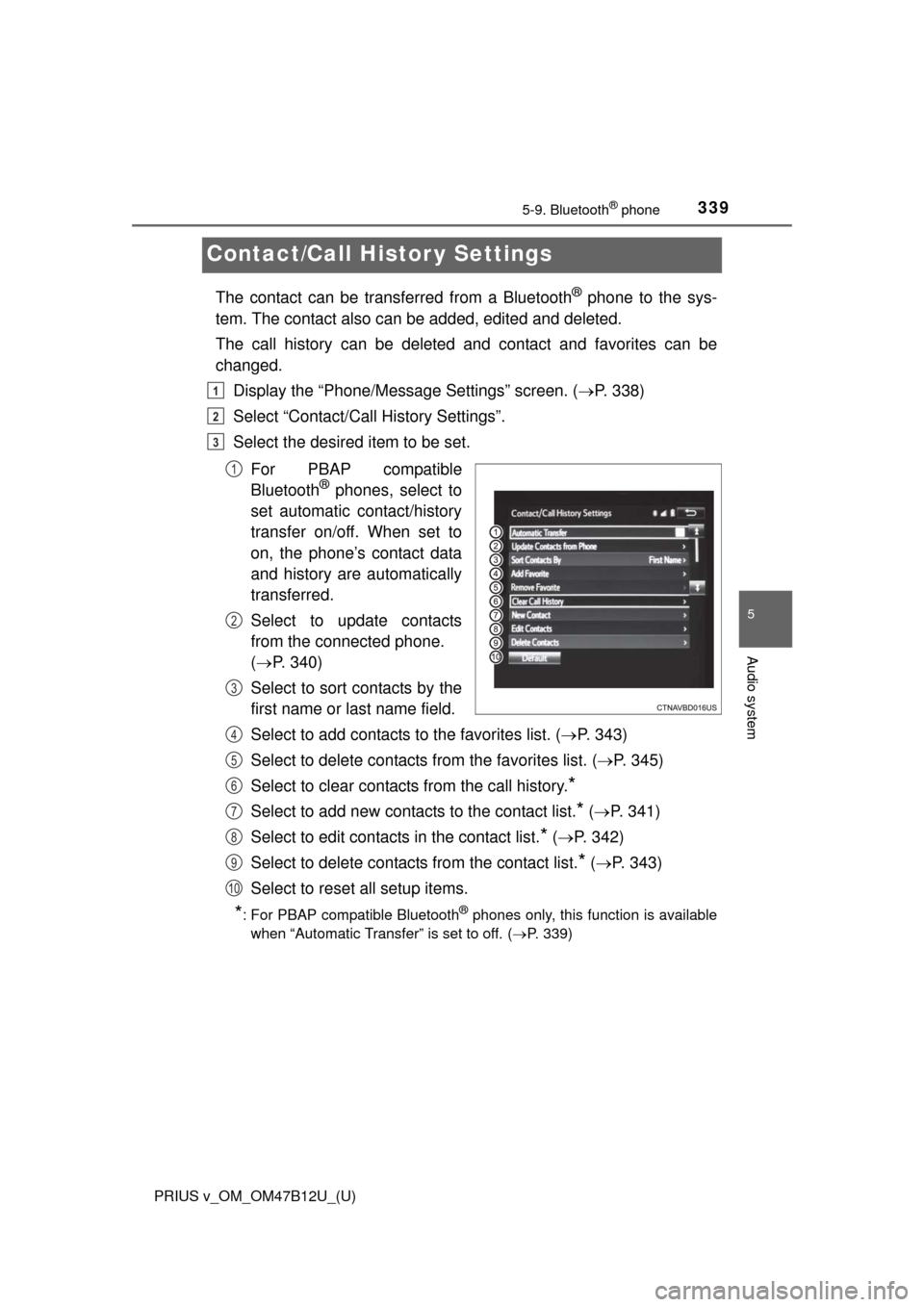
Select the desired item to be set.
For PBAP compatible
Bluetooth
® phones, select to
set automatic contact/history
transfer on/off. When set to
on, the phone’s contact data
and history are automatically
transferred.
Select to update contacts
from the connected phone.
(P. 340)
Select to sort contacts by the
first name or last name field.
Select to add contacts to the favorites list. (P. 343)
Select to delete contacts from the favorites list. (P. 345)
Select to clear contacts from the call history.
*
Select to add new contacts to the contact list.* (P. 341)
Select to edit contacts in the contact list.
* (P. 342)
Select to delete contacts from the contact list.
* (P. 343)
Select to reset all setup items.
*: For PBAP compatible Bluetooth® phones only, this function is available
when “Automatic Transfer” is set to off.
(P. 339)
1
2
3
1
2
3
4
5
6
7
8
9
10
Page 414 of 620
414
PRIUS v_OM_OM47B12U_(U)
7-2. Maintenance
■Repair and replacement
It is recommended that genuine Toyota parts be used for repairs to ensure
performance of each system. If non-Toyota parts are used in replacement or if
a repair shop other than a Toyota dealer performs repairs, confirm the war-
ranty coverage.
■Resetting the maintenance required reminder light/message indicating
maintenance is required (U.S.A. only)
After the required maintenance is preformed according to the maintenance
schedule, please reset the reminder light/message.
To reset the reminder light/message, follow the procedures described below:
Switch the display to the trip meter “A” (P. 91) when the hybrid system is
operating.
Turn the power switch off.
While pressing the MPH or km/h button (P. 93), turn the power switch to
ON mode (do not start the hybrid system because otherwise the reset
mode will be canceled). Continue to press and hold the button until the trip
meter displays “000000” and the indicator stops flashing to indicate that the
reset is complete.
■Allow inspection and repairs to be performed by a Toyota dealer
●Toyota technicians are well-trained specialists and are kept up to date with
the latest service information. They are well informed about the operation of
all systems on your vehicle.
●Keep a copy of the repair order. It proves that the maintenance that has
been performed is under warranty coverage. If any problem should arise
while your vehicle is under warranty, your Toyota dealer will promptly take
care of it.
WARNING
■If your vehicle is not properly maintained
Improper maintenance could result in serious damage to the vehicle and
possible serious injury or death.
■Handling of the 12-volt battery
●Engine exhaust, some of its constituents, and a wide variety of automobile
components contain or emit chemicals known to the State of California to
cause cancer and birth defects and other reproductive harm. Work in a
well ventilated area.
●Oils, fuels and fluids contained in vehicles as well as waste produced by
component wear contain or emit chemicals known to the State of Califor-
nia to cause cancer and birth defects or other reproductive harm. Avoid
exposure and wash any affected area immediately.
●12-volt battery posts, terminals and related accessories contain lead and
lead compounds which are known to cause brain damage. Wash your
hands after handling. (P. 439)
1
2
3
Page 445 of 620
PRIUS v_OM_OM47B12U_(U)
4457-3. Do-it-yourself maintenance
7
Maintenance and care
■How to initialize the tire pressure warning system
Park the vehicle in a safe place and turn the power switch off.
Initialization cannot be performed while the vehicle is moving.
Adjust the tire inflation pressure to the specified cold tire inflation
pressure level. (P. 559)
Make sure to adjust the tire pressure to the specified cold tire inflation
pressure level. The tire pressure warning system will operate based on
this pressure level.
Turn the power switch to ON mode.
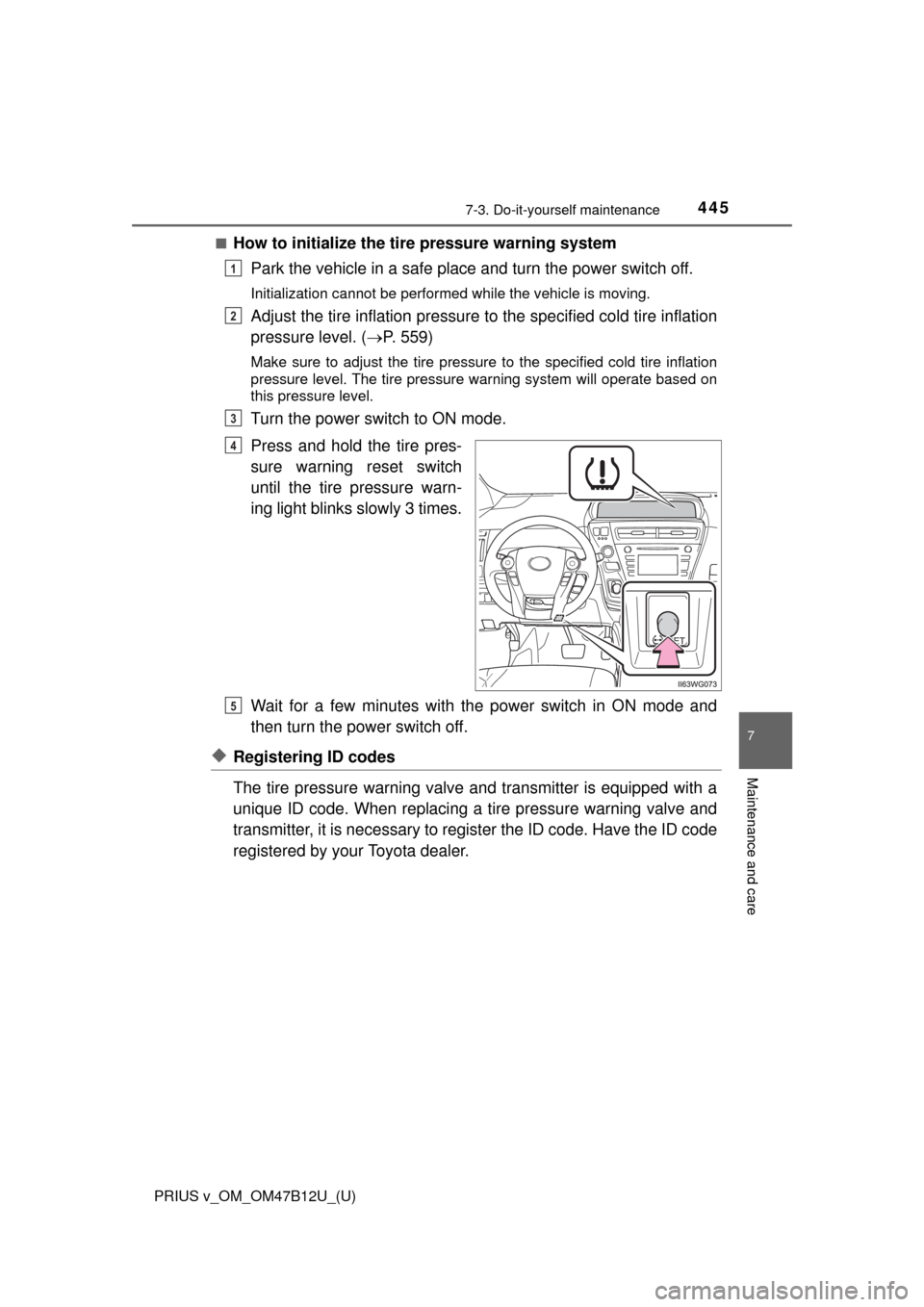
Press and hold the tire pres-
sure warning reset switch
until the tire pressure warn-
ing light blinks slowly 3 times.
Wait for a few minutes with the power switch in ON mode and
then turn the power switch off.
◆Registering ID codes
The tire pressure warning valve and transmitter is equipped with a
unique ID code. When replacing a tire pressure warning valve and
transmitter, it is necessary to register the ID code. Have the ID code
registered by your Toyota dealer.
1
2
3
4
5
Page 449 of 620
PRIUS v_OM_OM47B12U_(U)
4497-3. Do-it-yourself maintenance
7
Maintenance and care
■The initialization operation
●Make sure to carry out initialization after adjusting the tire inflation pressure.
Also, make sure the tires are cold before carrying out initialization or tire
inflation pressure adjustment.
●If you have accidentally turned the power switch off during initialization, it is
not necessary to press the reset switch again as initialization will restart
automatically when the power switch has been turned to ON mode for the
next time.
●If you accidentally press the reset switch when initialization is not necessary,
adjust the tire inflation pressure to the specified level when the tires are
cold, and conduct initialization again.
■When initialization of the tire pressure warning system has failed
Initialization can be completed in a few minutes. However, in the following
cases, the settings have not been recorded and the system will not operate
properly. If repeated attempts to record tire inflation pressure settings are
unsuccessful, have the vehicle inspected by your Toyota dealer.
●When operating the tire pressure warning reset switch, the tire pressure
warning light does not blink 3 times.
●After carrying out the initialization procedure, the tire pressure warning light
blinks for 1 minute then stays on after driving for 20 minutes.
■Certification for the tire pressure warning system
For vehicles sold in the U.S.A., Guam, Saipan and Puerto Rico
FCC ID: PAXPMV107J
FCC ID: HYQ13BDE
NOTE:
This device complies with part 15 of the FCC Rules. Operation is subject to
the following two conditions: (1) This device may not cause harmful interfer-
ence, and (2) this device must accept any interference received, including
interference that may cause undesired operation.
FCC WARNING:
Changes or modifications not expressly approved by the party responsible for
compliance could void the user’s authority to operate the equipment.
For vehicles sold in Canada
NOTE:
Operation is subject to the following two conditions; (1) this device may not
cause interference, and (2) this device must accept any interference, includ-
ing interference that may cause undesired operation of the device.
Page 450 of 620
450
PRIUS v_OM_OM47B12U_(U)
7-3. Do-it-yourself maintenance
WARNING
■When inspecting or replacing tires
Observe the following precautions to prevent accidents.
Failure to do so may cause damage to parts of the drive train as well as
dangerous handling characteristics, which may lead to an accident resulting
in death or serious injury.
●Do not mix tires of different makes, models or tread patterns.
Also, do not mix tires of remarkably different treadwear.
●Do not use tire sizes other than those recommended by Toyota.
●Do not mix differently constructed tires (radial, bias-belted or bias-ply
tires).
●Do not mix summer, all season and snow tires.
●Do not use tires that have been used on another vehicle.
Do not use tires if you do not know how they were used previously.
■When initializing the tire pressure warning system
Do not operate the tire pressure warning reset switch without first adjusting
the tire inflation pressure to the specified level. Otherwise, the tire pressure
warning light may not come on even if the tire inflation pressure is low, or it
may come on when the tire inflation pressure is actually normal.
Page 494 of 620
4948-2. Steps to take in an emergency
PRIUS v_OM_OM47B12U_(U)
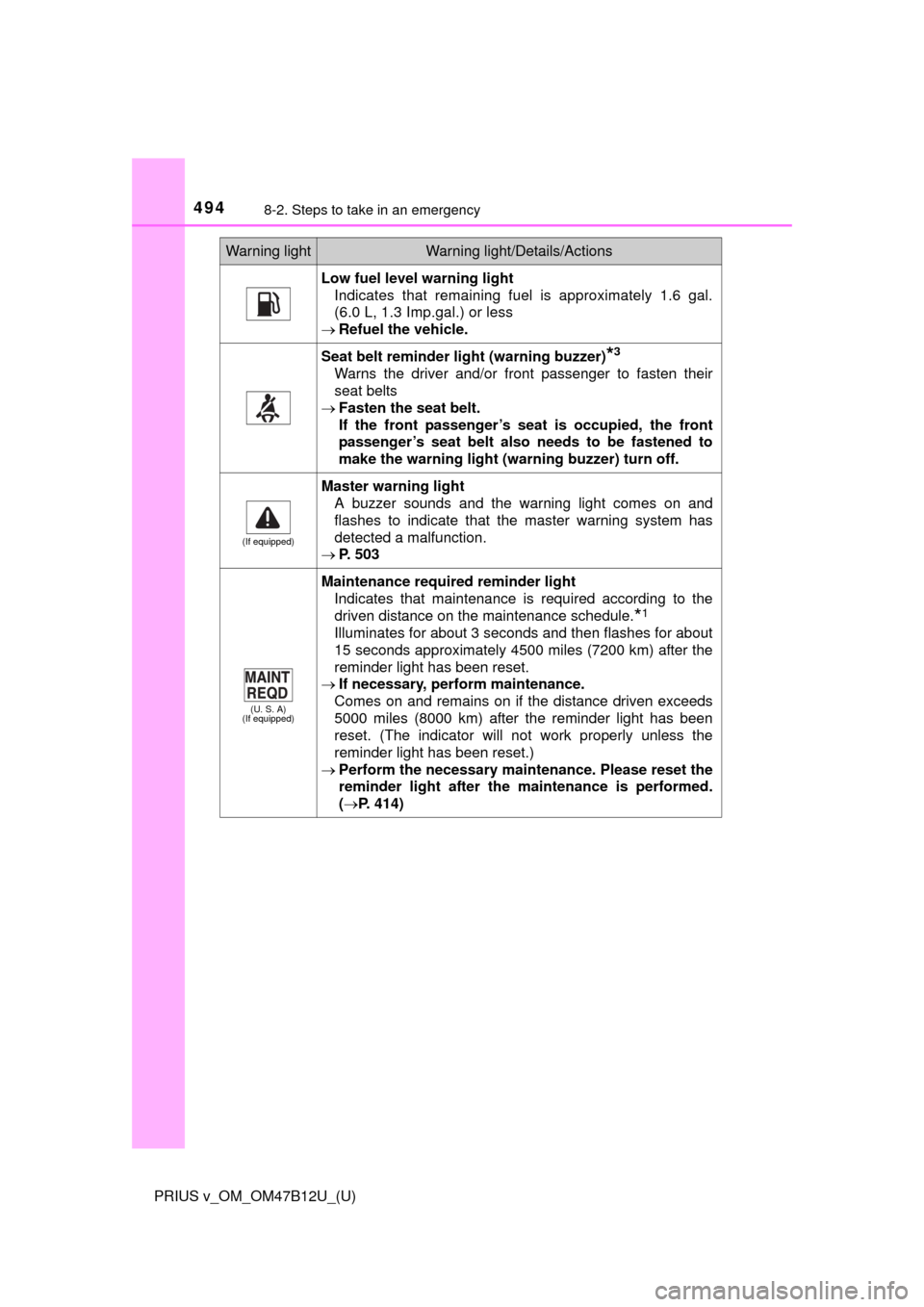
Low fuel level warning light
Indicates that remaining fuel is approximately 1.6 gal.
(6.0 L, 1.3 Imp.gal.) or less
Refuel the vehicle.
Seat belt reminder light (warning buzzer)*3
Warns the driver and/or front passenger to fasten their
seat belts
Fasten the seat belt.
If the front passenger’s seat is occupied, the front
passenger’s seat belt also needs to be fastened to
make the warning light (warning buzzer) turn off.
(If equipped)
Master warning light
A buzzer sounds and the warning light comes on and
flashes to indicate that the master warning system has
detected a malfunction.
P. 503
(U. S. A)
(If equipped)
Maintenance required reminder light
Indicates that maintenance is required according to the
driven distance on the maintenance schedule.
*1
Illuminates for about 3 seconds and then flashes for about
15 seconds approximately 4500 miles (7200 km) after the
reminder light has been reset.
If necessary, perform maintenance.
Comes on and remains on if the distance driven exceeds
5000 miles (8000 km) after the reminder light has been
reset. (The indicator will not work properly unless the
reminder light has been reset.)
Perform the necessary maintenance. Please reset the
reminder light after the maintenance is performed.
(P. 414)
Warning lightWarning light/Details/Actions
Page 497 of 620
4978-2. Steps to take in an emergency
PRIUS v_OM_OM47B12U_(U)
8
When trouble arises
■When the tire pressure warning light comes on
Check the tire inflation pressure and adjust to the appropriate level. Push-
ing the tire pressure warning reset switch will not turn off the tire pressure
warning light.
■The tire pressure warning light may come on due to natural causes
The tire pressure warning light may come on due to natural causes such
as natural air leaks and tire inflation pressure changes caused by temper-
ature. In this case, adjusting the tire inflation pressure will turn off the
warning light (after a few minutes).
■When a tire is replaced with a spare tire
The compact spare tire is not equipped with a tire pressure warning valve
and transmitter. If a tire goes flat, the tire pressure warning light will not
turn off even though the flat tire has been replaced with the spare tire.
Replace the spare tire with the repaired tire and adjust the tire inflation
pressure. The tire pressure warning light will go off after a few minutes.
■If the tire pressure warning system is not functioning
P. 4 4 8
■If the tire pressure warning light frequently comes on after blinking
for 1 minute
If the tire pressure warning light frequently comes on after blinking for
1 minute when the power switch is turned to ON mode, have it checked
by your Toyota dealer.
■Warning buzzer
In some cases, the buzzer may not be heard due to being in a noisy location
or audio sound.