ESP TOYOTA PRIUS V 2018 User Guide
[x] Cancel search | Manufacturer: TOYOTA, Model Year: 2018, Model line: PRIUS V, Model: TOYOTA PRIUS V 2018Pages: 607, PDF Size: 41.96 MB
Page 104 of 607
102
PRIUS v_OM_OM47B78U_(U)
2. Instrument cluster
■Meter display setting initialization
Press or on the meter control switch to select , and then
press .
Press or to select meter setting initialization, press , and then
select “YES”.
■ Customization
The meter settings can be changed. (Customizable features: P. 559)
WARNING
■Caution for use while driving
●When operating the multi-information display while driving, pay extra
attention to the safety of the area around the vehicle.
● Do not look continuously at the multi-information display while driving as
you may fail to see pedestrians, objects on the road, etc. ahead of the
vehicle.
NOTICE
■The multi-information display at low temperatures
Allow the interior of the vehicle to warm up before using the liquid crystal
information display. At extremely low temperatures, the information display
monitor may respond slowly, and display changes may be delayed.
1
2
Page 120 of 607
118
PRIUS v_OM_OM47B78U_(U)
3-2. Opening, closing and locking the doors
■Switching the door unlock function
It is possible to set which doors the entry function unlocks.
Turn the power switch off.
When the indicator on the key surface is turned off, push and hold or
for approximately 5 seconds while pushing the button on the
key.
The setting changes each time an operation is performed, as shown below.
(When changing the setting continuously, release the buttons, wait for at
least 5 seconds, and repeat step .)
■ Customization
Settings (e.g. unlocking function using a key) can be changed.
(Customizable features: P. 559)
1
2
2
Unlocking doorsBeep
Hold the driver’s door handle to
unlock only the driver’s door.
Exterior: Beeps three times
Interior: Pings onceHold the passenger’s door handle or
back door opener to unlock all the
doors.
Hold the front door handle or back
door opener to unlock all the doors.Exterior: Beeps twice
Interior: Pings once
WARNING
■To prevent an accident
Observe the following precautions while driving the vehicle.
Failure to do so may result in a door opening and an occupant throwing out
of the vehicle, resulting in death or serious injury.
●Ensure that all doors are properly closed and locked.
● Do not pull the inside handle of the doors while driving.
Be especially careful for the front doors, as the doors may be opened
even if the inside lock buttons are in locked position.
● Set the rear door child-protector lock s when children are seated in the rear
seats.
■ When opening or closing a door
Check the surroundings of the vehicle such as whether the vehicle is on an
incline, whether there is enough space for a door to open and whether a
strong wind is blowing. When opening or closing the door, hold the door
handle tightly to prepare for any unpredictable movement.
Page 141 of 607
PRIUS v_OM_OM47B78U_(U)
1393-3. Adjusting the seats
3
Operation of each component
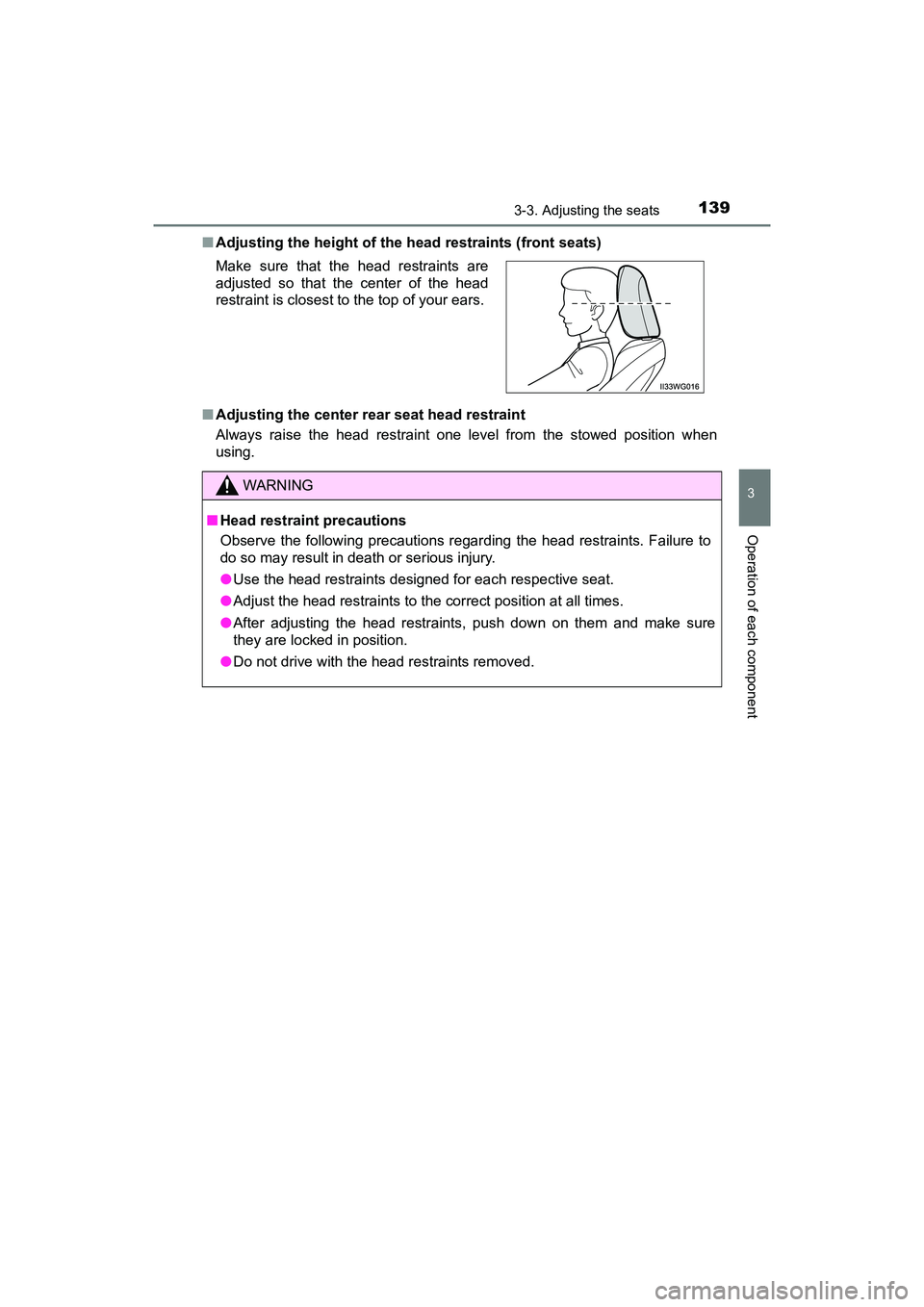
■Adjusting the height of the head restraints (front seats)
■ Adjusting the center rear seat head restraint
Always raise the head restraint one level from the stowed position when
using. Make sure that the head restraints are
adjusted so that the center of the head
restraint is closest to the top of your ears.
WARNING
■Head restraint precautions
Observe the following precautions regarding the head restraints. Failure to
do so may result in death or serious injury.
●Use the head restraints designed for each respective seat.
● Adjust the head restraints to the correct position at all times.
● After adjusting the head restraints, push down on them and make sure
they are locked in position.
● Do not drive with the head restraints removed.
Page 145 of 607
1433-4. Adjusting the steering wheel and mirrors
3
Operation of each component
PRIUS v_OM_OM47B78U_(U)
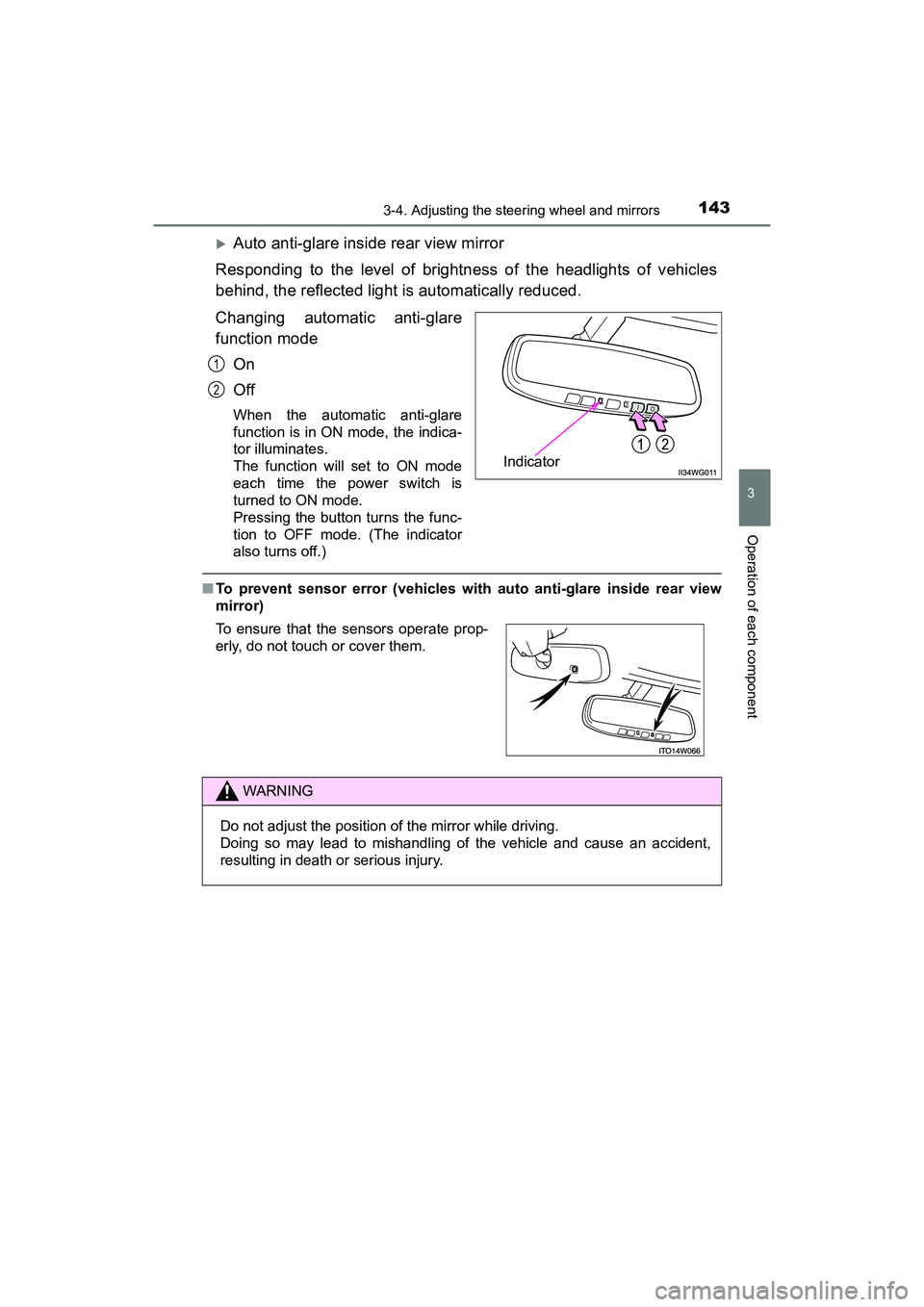
Auto anti-glare inside rear view mirror
Responding to the level of brightness of the headlights of vehicles
behind, the reflected light is automatically reduced.
Changing automatic anti-glare
function mode On
Off
When the automatic anti-glare
function is in ON mode, the indica-
tor illuminates.
The function will set to ON mode
each time the power switch is
turned to ON mode.
Pressing the button turns the func-
tion to OFF mode. (The indicator
also turns off.)
■To prevent sensor error (vehicles with auto anti-glare inside rear view
mirror)
Indicator
1
2
To ensure that the sensors operate prop-
erly, do not touch or cover them.
WARNING
Do not adjust the position of the mirror while driving.
Doing so may lead to mishandling of the vehicle and cause an accident,
resulting in death or serious injury.
Page 150 of 607
148
PRIUS v_OM_OM47B78U_(U)
3-5. Opening and closing the windows
WARNING
Observe the following precautions.
Failing to do so may result in death or serious injury.
■Closing the windows
●The driver is responsible for all the power window operations, including the
operation for the passengers. In order to prevent accidental operation,
especially by a child, do not let a child operate the power windows. It is
possible for children and other passengers to have body parts caught in
the power window. Also, when riding with a child, it is recommended to use
the window lock switch. ( P. 146)
● When exiting the vehicle, turn the power switch off, carry the key and exit
the vehicle along with the child. There may be accidental operation, due to
mischief, etc., that may possibly lead to an accident.
■ Jam protection function
●Never use any part of your body to intentionally activate the up jam protec-
tion function.
● The up jam protection function may not work if something gets jammed
just before the window is fully closed. Be careful not to get any part of your
body jammed in the window.
■ Catch protection function
●Never use any part of your body or clothing to intentionally activate the
catch protection function.
● The catch protection function may not work if something gets caught just
before the window is fully opened. Be careful not to get any part of your
body or clothing caught in the window.
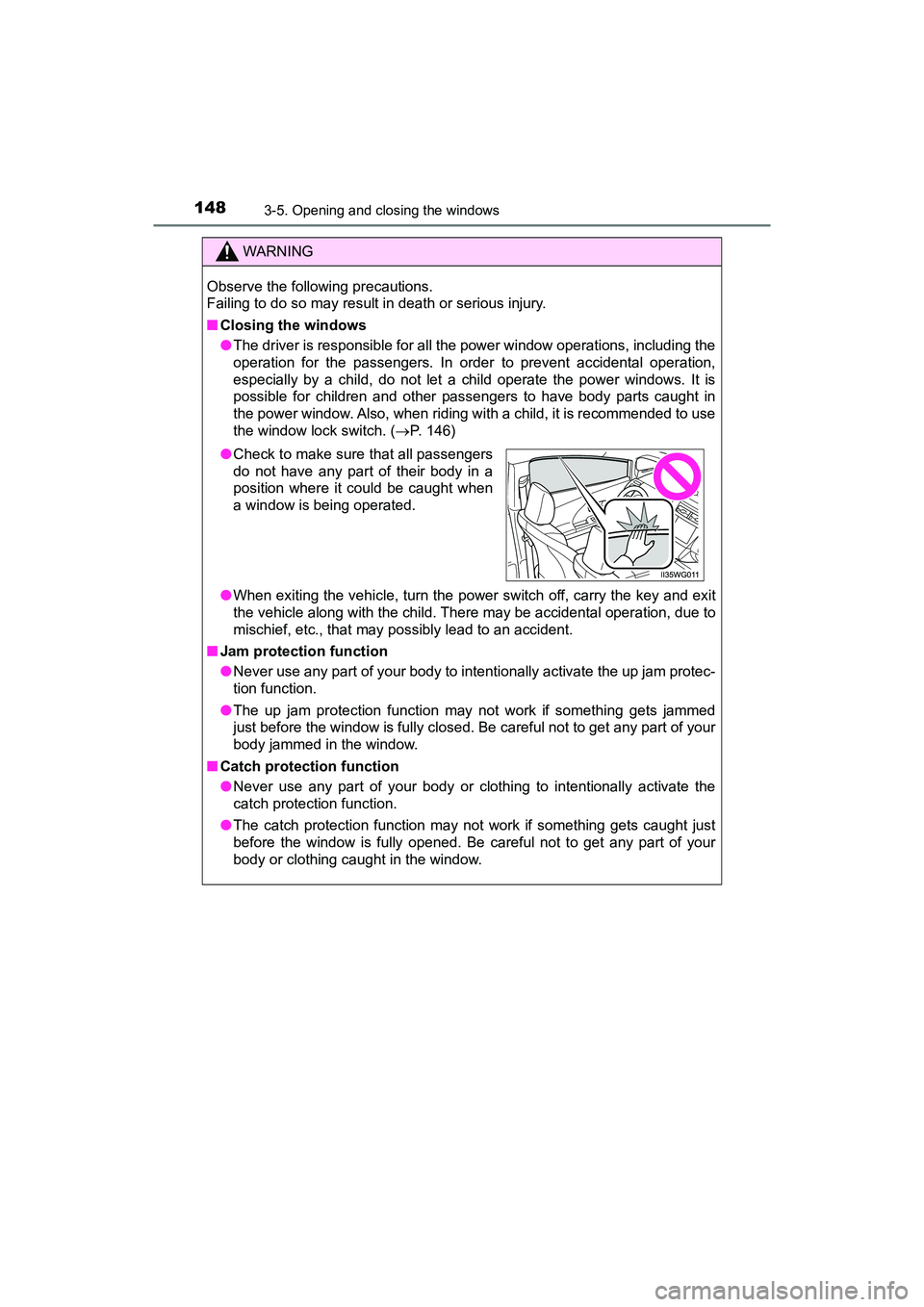
●Check to make sure that all passengers
do not have any part of their body in a
position where it could be caught when
a window is being operated.
Page 153 of 607
PRIUS v_OM_OM47B78U_(U)
1514-1. Before driving
4
Driving
Firmly set the parking brake with the brake pedal depressed, and
then shift the shift position to D.
Release the brake pedal and gently depress the accelerator pedal.
Release the parking brake.
■When starting off on a uphill
The hill-start assist control will activate. ( P. 253)
■ For fuel-efficient driving
Keep in mind that hybrid vehicles are similar to conventional vehicles, and it
is necessary to refrain from activities such as sudden acceleration. ( P. 259)
■ Driving in the rain
●Drive carefully when it is raining, because visibility will be reduced, the win-
dows may become fogged-up, and the road will be slippery.
● Drive carefully when it starts to rain, because the road surface will be espe-
cially slippery.
● Refrain from high speeds when driving on an expressway in the rain,
because there may be a layer of water between the tires and the road sur-
face, preventing the steering and brakes from operating properly.
■ Restraining the hybrid system ou tput (Brake Override System)
● When the accelerator and brake pedals are depressed at the same time, the
hybrid system output may be restrained.
● A warning message is displayed on the multi-information display while the
system is operating. ( P. 492)
■ Restraining sudden start (Drive-Start Control)
●When the following unusual operation is performed, the hybrid system out-
put may be restrained.
• When the shift position is shifted from R to D/B, D/B to R, N to R, P to D/
B, P to R with the accelerator pedal depressed, a warning message
appears on the multi-information display. ( P. 489)
• When the accelerator pedal is depressed too much while the vehicle is in reverse.
● While Drive-Start Control is being activated, your vehicle may have trou-
ble escaping from the mud or fresh snow. In such case, deactivate TRAC
( P. 254) to cancel Drive Start Control so that the vehicle may become
able to escape from the mud or fresh snow.
■ Breaking in your new Toyota
To extend the life of the vehicle, observing the following precautions is recom-
mended:
●For the first 200 miles (300 km):
Avoid sudden stops.
● For the first 1000 miles (1600 km):
Starting off on a uphill
1
2
3
Page 155 of 607
PRIUS v_OM_OM47B78U_(U)
1534-1. Before driving
4
Driving
WARNING
Observe the following precautions.
Failure to do so may result in death or serious injury.
■When starting the vehicle
Always keep your foot on the brake pedal while stopped with the “READY”
indicator is illuminated. This prevents the vehicle from creeping.
■ When driving the vehicle
●Do not drive if you are unfamiliar with the location of the brake and accel-
erator pedals to avoid depressing the wrong pedal.
• Accidentally depressing the accelerator pedal instead of the brake
pedal will result in sudden acceleration that may lead to an accident.
• When backing up, you may twist your body around, leading to a diffi- culty in operating the pedals. Make sure to operate the pedals properly.
• Make sure to keep a correct driving posture even when moving the vehicle only slightly. This allows you to depress the brake and accelera-
tor pedals properly.
• Depress the brake pedal using your right foot. Depressing the brake pedal using your left foot may delay response in an emergency, result-
ing in an accident.
● The driver should pay extra attention to pedestrians when the vehicle is
powered only by the electric motor (traction motor). As there is no engine
noise, the pedestrians may misjudge the vehicle’s movement. Even
though the vehicle is equipped with the vehicle proximity notification sys-
tem, drive with care as pedestrians in the vicinity may still not notice the
vehicle if the surrounding area is noisy.
● Do not drive the vehicle over or st op the vehicle near flammable materials
such as leaves, paper or rags.
The exhaust system and exhaust gases can be extremely hot. These hot
parts may cause a fire if there is any flammable material nearby.
Page 200 of 607
198
PRIUS v_OM_OM47B78U_(U)
4-5. Using the driving support systems
Toyota Safety Sense P
◆PCS (Pre-Collision System)
P. 2 0 5
◆LDA (Lane Departure Alert with steering control)
P. 2 1 7
◆Automatic High Beam
P. 1 8 5
◆Dynamic radar cruise control
P. 2 2 7
The Toyota Safety Sense P consists of the following drive assist
systems and contributes to a safe and comfortable driving expe-
rience:
WARNING
■Toyota Safety Sense P
The Toyota Safety Sense P is designed to operate under the assumption
that the driver will drive safely, and is designed to help reduce the impact to
the occupants and the vehicle in the case of a collision or assist the driver in
normal driving conditions.
As there is a limit to the degree of recognition accuracy and control perfor-
mance that this system can provide, do not overly rely on this system. The
driver is always responsible for paying attention to the vehicle’s surround-
ings and driving safely.
Page 201 of 607
PRIUS v_OM_OM47B78U_(U)
1994-5. Using the driving support systems
4
Driving
The pre-collision system is equipped with a sophisticated computer
that will record certain data, such as:• Accelerator status
• Brake status
• Vehicle speed
• Operation status of the pre-collision system functions
• Information (such as the distance and relative speed between your vehicle and the vehicle ahead or other objects)
• Images from the camera sensor (available only when the pre-colli-
sion braking function or the pre-collision brake assist function was
operating)
The pre-collision system does not record conversations, sounds or
images of the inside of the vehicle.
● Data usage
Toyota may use the data recorded in this computer to diagnose
malfunctions, conduct research and development, and improve
quality.
Toyota will not disclose the recorded data to a third party except:
• With the consent of the vehicle owner or with the consent of the lessee if the vehicle is leased
• In response to an official request by the police, a court of law or a government agency
• For use by Toyota in a lawsuit
• For research purposes where the data is not tied to a specific vehicle or vehicle owner
● Recorded images can be erased using a specialized device.
The image recording function can be disabled. However, if the func-
tion is disabled, data from when the pre-collision system operates
will not be available.
Vehicle data recording
Page 209 of 607
PRIUS v_OM_OM47B78U_(U)
2074-5. Using the driving support systems
4
Driving
WARNING
■Limitations of the pre-collision system
●The driver is solely responsible for safe driving. Always drive safely, taking
care to observe your surroundings.
Do not use the pre-collision system instead of normal braking operations
under any circumstances. This system will not prevent collisions or lessen
collision damage or injury in every situation. Do not overly rely on this sys-
tem. Failure to do so may lead to an accident, resulting in death or serious
injury.
● Although this system is designed to help avoid a collision or help reduce
the impact of the collision, its effectiveness may change according to vari-
ous conditions, therefore the system may not always be able to achieve
the same level of performance.
Read the following conditions carefully. Do not overly rely on this system
and always drive carefully.
• Conditions under which the system may operate even if there is no pos-
sibility of a collision: P. 2 11
• Conditions under which the system may not operate properly: P. 213
● Do not attempt to test the operation of the pre-collision system yourself, as
the system may not operate properly, possibly leading to an accident.
■ Pre-collision braking
●When the pre-collision braking func tion is operating, a large amount of
braking force will be applied.
● If the vehicle is stopped by the operation of the pre-collision braking func-
tion, the pre-collision braking function operation will be canceled after
approximately 2 seconds. Depress the brake pedal as necessary.
● The pre-collision braking function may not operate if certain operations are
performed by the driver. If the accelerator pedal is being depressed
strongly or the steering wheel is being turned, the system may determine
that the driver is taking evasive action and possibly prevent the pre-colli-
sion braking function from operating.
● In some situations, while the pre-collision braking function is operating,
operation of the function may be canceled if the accelerator pedal is
depressed strongly or the steering w heel is turned and the system deter-
mines that the driver is taking evasive action.
● If the brake pedal is being depressed, the system may determine that the
driver is taking evasive action and possibly delay the operation timing of
the pre-collision braking function.