battery TOYOTA PRIUS V 2018 User Guide
[x] Cancel search | Manufacturer: TOYOTA, Model Year: 2018, Model line: PRIUS V, Model: TOYOTA PRIUS V 2018Pages: 607, PDF Size: 41.96 MB
Page 84 of 607
821-2. Hybrid system
PRIUS v_OM_OM47B78U_(U)
WARNING
■Hybrid battery (traction battery)
●Never resell, hand over or modify the hybrid battery. To prevent accidents,
hybrid batteries that have been removed from a disposed vehicle are col-
lected through Toyota dealer. Do not dispose of the battery yourself.
Unless the battery is properly collected, the following may occur, resulting
in death or serious injury:
• The hybrid battery may be illegally disposed of or dumped, and it is haz-
ardous to the environment or someone may touch a high voltage part,
resulting in an electric shock.
• The hybrid battery is intended to be used exclusively with your hybrid
vehicle. If the hybrid battery is used outside of your vehicle or modified
in any way, accidents such as electric shock, heat generation, smoke
generation, an explosion and electrolyte leakage may occur.
When reselling or handing over your vehicle, the possibility of an accident
is extremely high because the person receiving the vehicle may not be
aware of these dangers.
● If your vehicle is disposed of without the hybrid battery having been
removed, there is a danger of serious electric shock if high voltage parts,
cables and their connectors are touched. In the event that your vehicle
must be disposed of, the hybrid battery must be disposed of by your
Toyota dealer or a qualified service shop. If the hybrid battery is not dis-
posed of properly, it may cause electric shock that can result in death or
serious injury.
NOTICE
■Hybrid battery (traction battery) air intake vent
●Do not place objects that will block the air intake vent. The hybrid battery
(traction battery) may overheat and be damaged.
● Clean the air intake vent regularly to prevent the hybrid battery (traction
battery) from overheating.
● Do not get water or foreign materials in the air intake vent as this may
cause a short circuit and damage the hybrid battery (traction battery).
● Do not carry large amounts of water such as water cooler bottles in the
vehicle. If water spills onto the hybrid battery (traction battery), the battery
may be damaged. Have the vehicle inspected by your Toyota dealer.
Page 92 of 607
90
PRIUS v_OM_OM47B78U_(U)
2. Instrument cluster
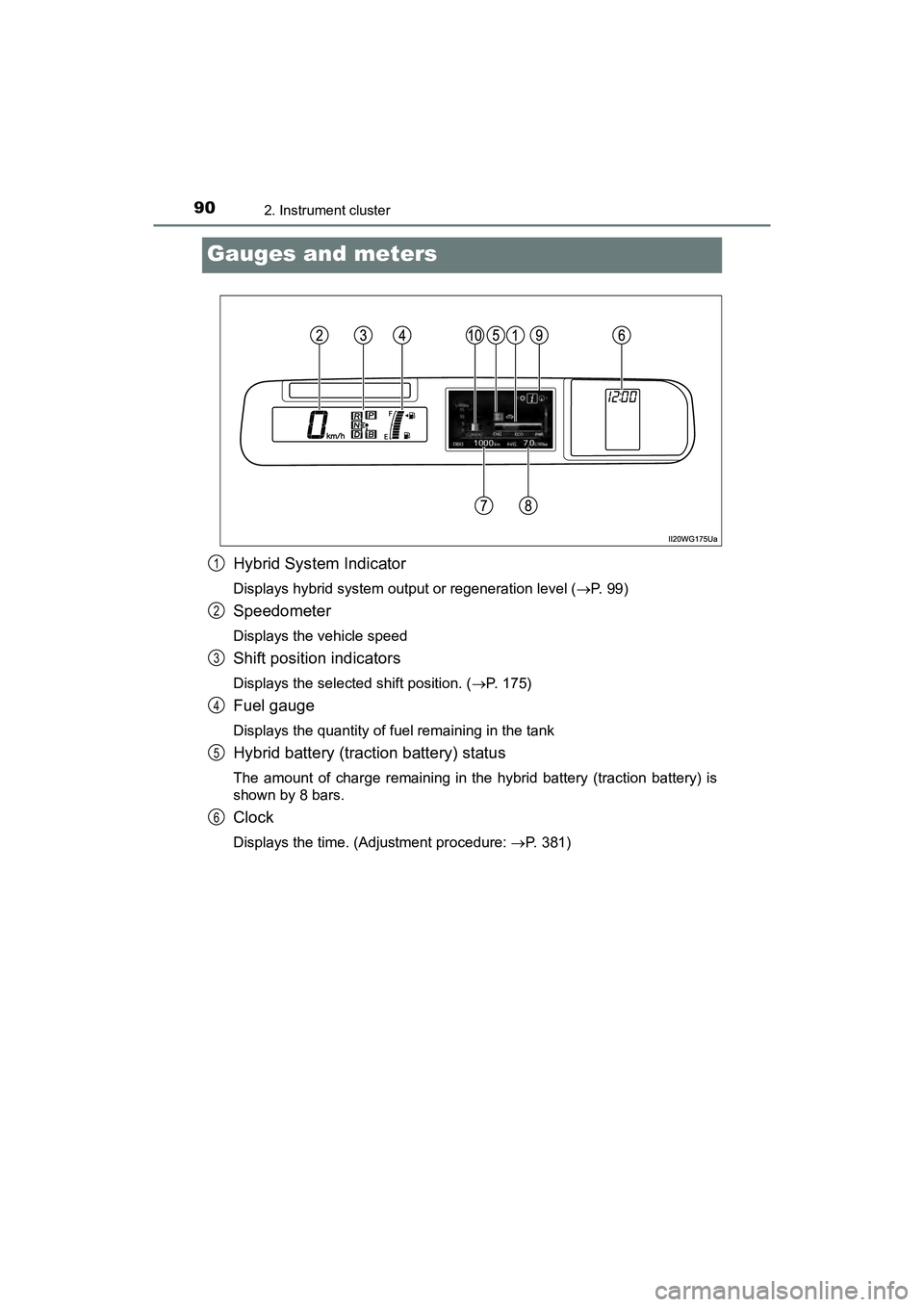
Gauges and meters
Hybrid System Indicator
Displays hybrid system output or regeneration level (P. 9 9 )
Speedometer
Displays the vehicle speed
Shift position indicators
Displays the selected shift position. (P. 175)
Fuel gauge
Displays the quantity of fuel remaining in the tank
Hybrid battery (traction battery) status
The amount of charge remaining in the hybrid battery (traction battery) is
shown by 8 bars.
Clock
Displays the time. (Adjustment procedure: P. 381)
1
2
3
4
5
6
Page 95 of 607
PRIUS v_OM_OM47B78U_(U)
932. Instrument cluster
2
Instrument cluster
■The meters and display illuminate when
The power switch is in ON mode.
■ Remaining hybrid battery (tract ion battery) charge display
The charge amount of the hybrid battery (traction battery) is automatically
controlled by the hybrid system. For this reason, even if electricity is recov-
ered via the regenerative braking, or electricity is generated via the gasoline
engine, the displayed hybrid battery (traction battery) charge amount may not
reach the highest level (level 8). However, this does not indicate a malfunc-
tion.
■ Engine speed
On hybrid vehicles, engine speed is precisely controlled in order to help
improve fuel efficiency and reduce exhaust emissions etc.
■ Brightness of the instrument panel light
If the headlight switch is turned to ON while the surrounding area is dark, the
instrument panel lights will dim.
■ When disconnecting and reconnect ing 12-volt battery terminals
The fuel consumption display and average vehicle speed will be reset.
NOTICE
■ To prevent damage to the engine and its components
The engine may be overheating if the high coolant temperature warning
light comes on or flashes. In this case, immediately stop the vehicle in a
safe place, and check the engine after it has cooled completely. ( P. 528)
■ The information display at low temperatures
Allow the interior of the vehicle to warm up before using the liquid crystal
information display. At extremely low temperatures, the information display
monitor may respond slowly, and display changes may be delayed.
Page 100 of 607
98
PRIUS v_OM_OM47B78U_(U)
2. Instrument cluster
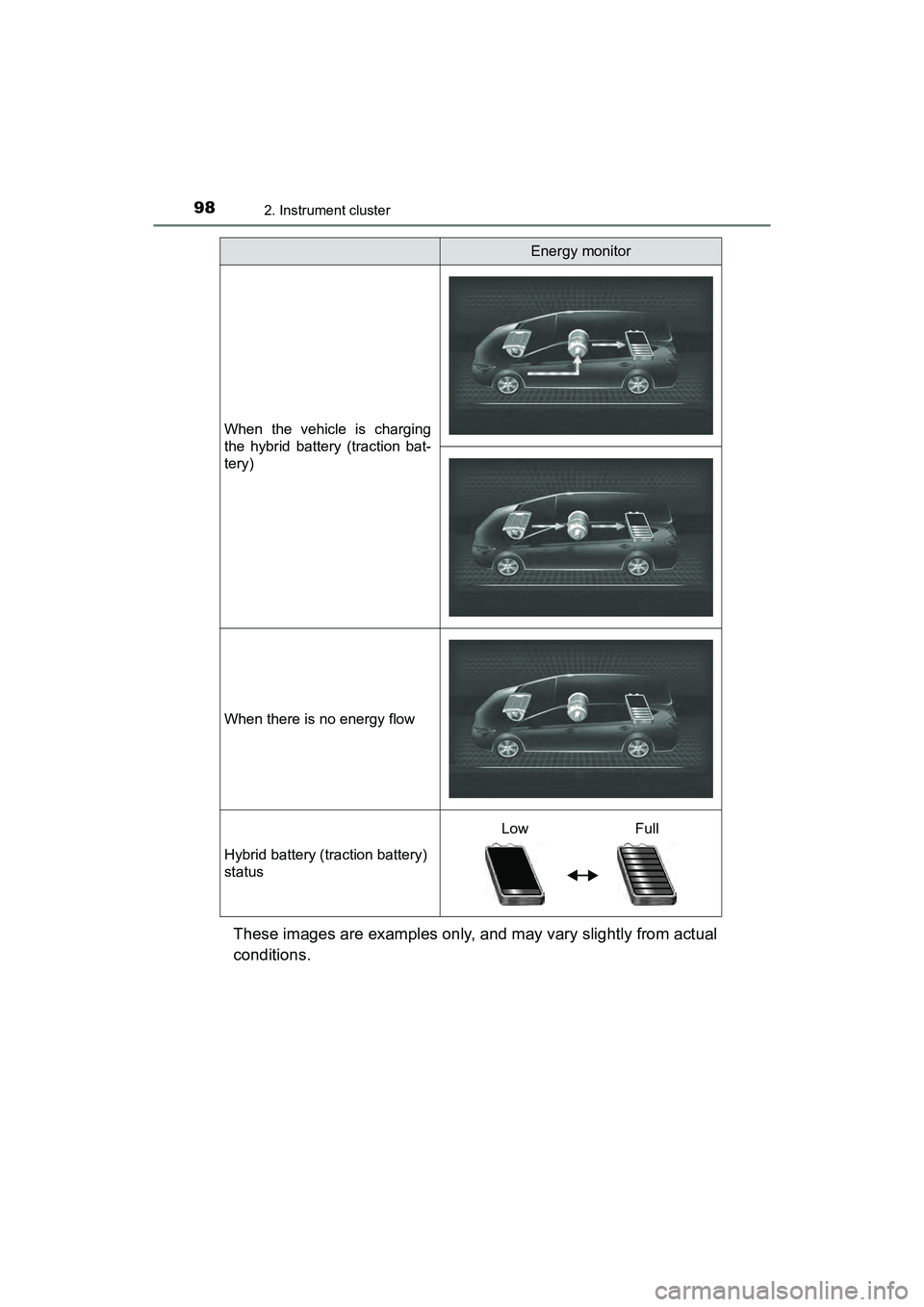
These images are examples only, and may vary slightly from actual
conditions.
When the vehicle is charging
the hybrid battery (traction bat-
tery)
When there is no energy flow
Hybrid battery (traction battery)
status
Energy monitor
LowFull
Page 103 of 607
PRIUS v_OM_OM47B78U_(U)
1012. Instrument cluster
2
Instrument cluster
■System check display
After turning the power switch to ON mode, opening image is displayed while
system operation is checked. When the system check is complete, the nor-
mal screen will return.
■ Pop-up display
When a system that supports pop-up displays, such as the air conditioning
system, is operated, a pop-up display will be temporarily displayed.
■ When disconnecting and reconnect ing 12-volt battery terminals
The fuel consumption display and average vehicle speed will be reset.
■ Liquid crystal display
Small spots or light spots may appear on the display. This phenomenon is
characteristic of liquid crystal displays, and there is no problem continuing to
use the display.
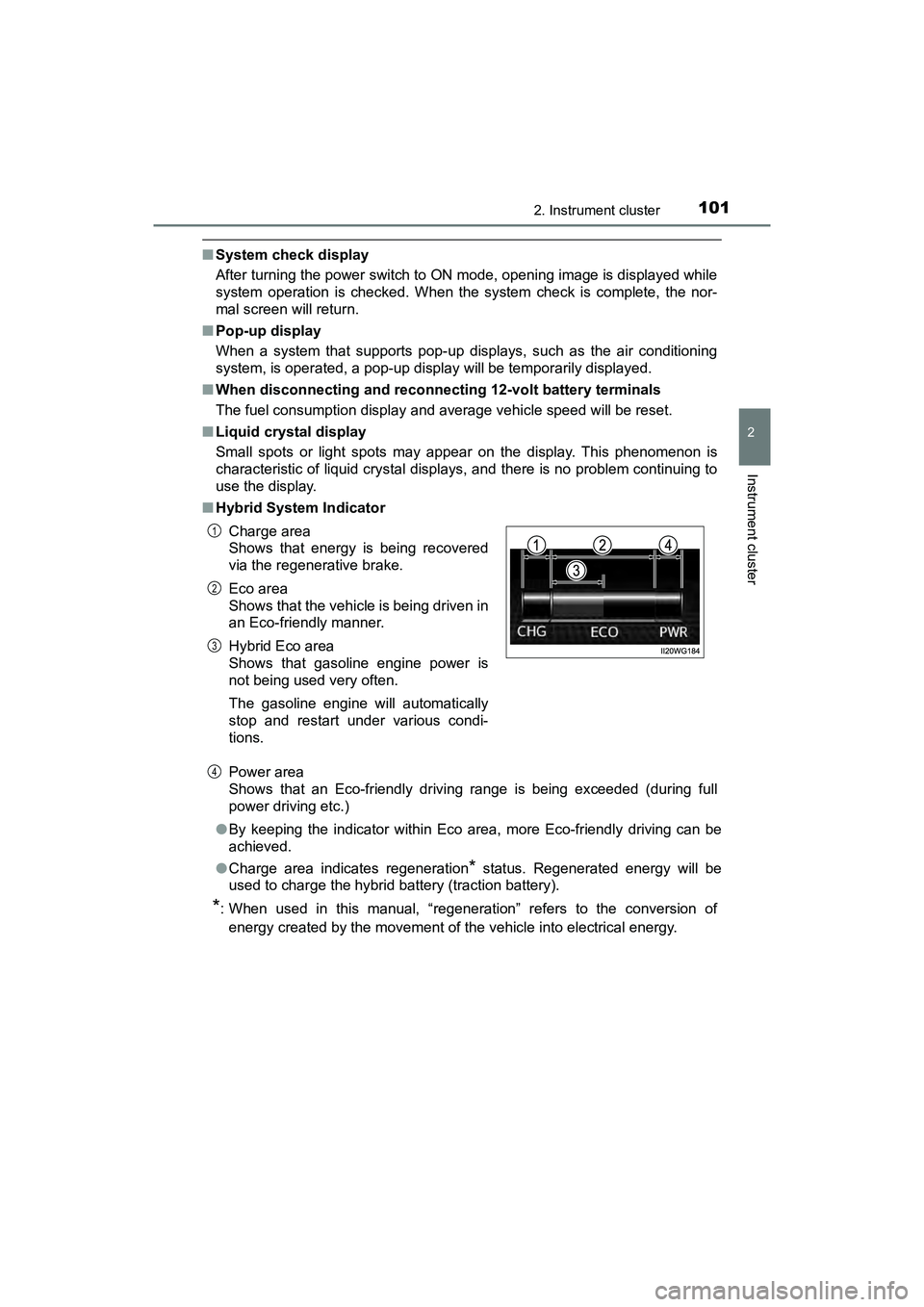
■ Hybrid System Indicator
Power area
Shows that an Eco-friendly drivi ng range is being exceeded (during full
power driving etc.)
● By keeping the indicator within Eco area, more Eco-friendly driving can be
achieved.
● Charge area indicates regeneration
* status. Regenerated energy will be
used to charge the hybrid battery (traction battery).
*: When used in this manual, “regeneration” refers to the conversion of
energy created by the movement of the vehicle into electrical energy. Charge area
Shows that energy is being recovered
via the regenerative brake.
Eco area
Shows that the vehicle is being driven in
an Eco-friendly manner.
Hybrid Eco area
Shows that gasoline engine power is
not being used very often.
The gasoline engine will automatically
stop and restart under various condi-
tions.
1
2
3
4
Page 108 of 607
106
PRIUS v_OM_OM47B78U_(U)
2. Instrument cluster
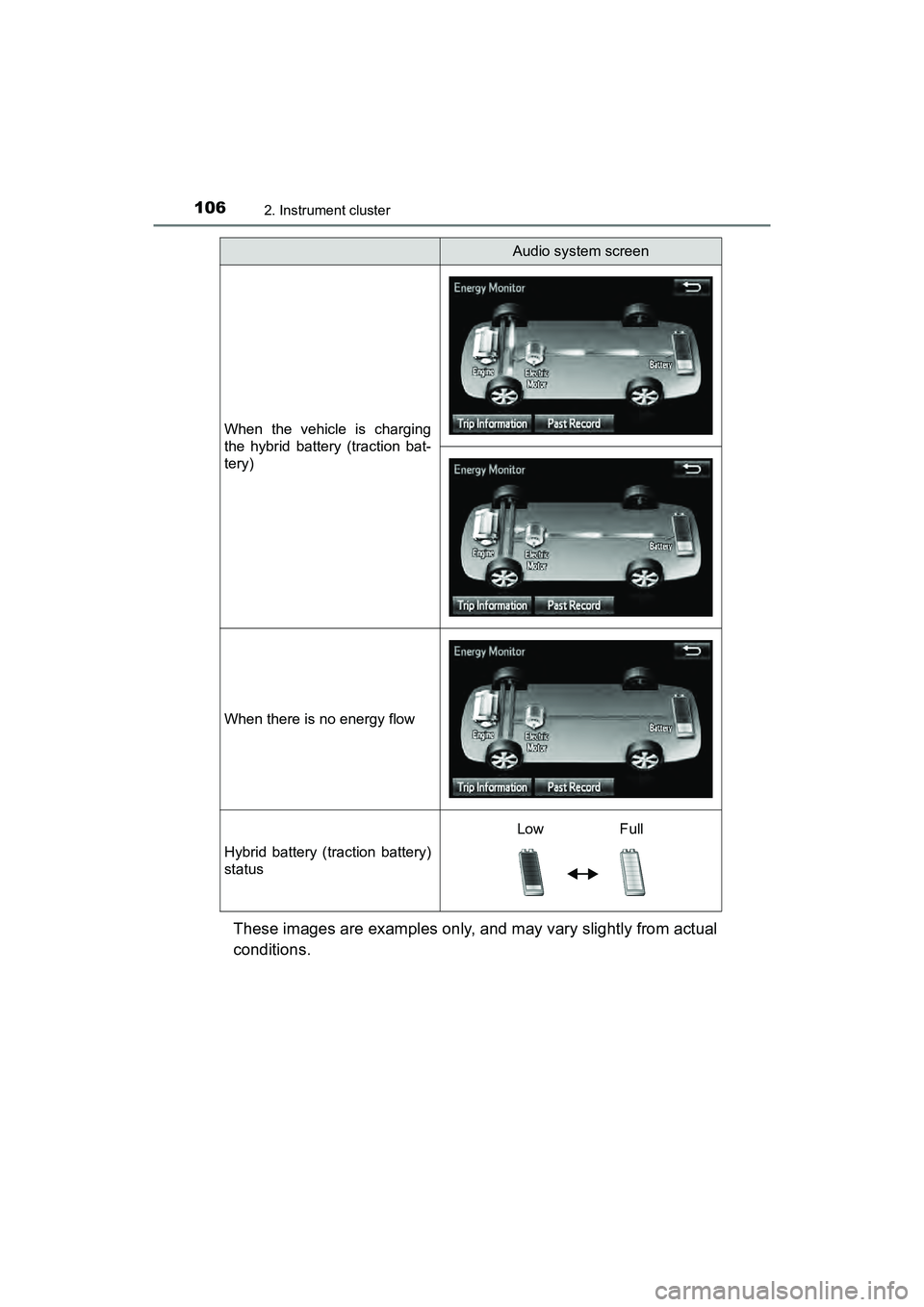
These images are examples only, and may vary slightly from actual
conditions.
When the vehicle is charging
the hybrid battery (traction bat-
tery)
When there is no energy flow
Hybrid battery (traction battery)
status
Audio system screen
LowFull
Page 113 of 607
PRIUS v_OM_OM47B78U_(U)
1113-1. Key information
3
Operation of each component
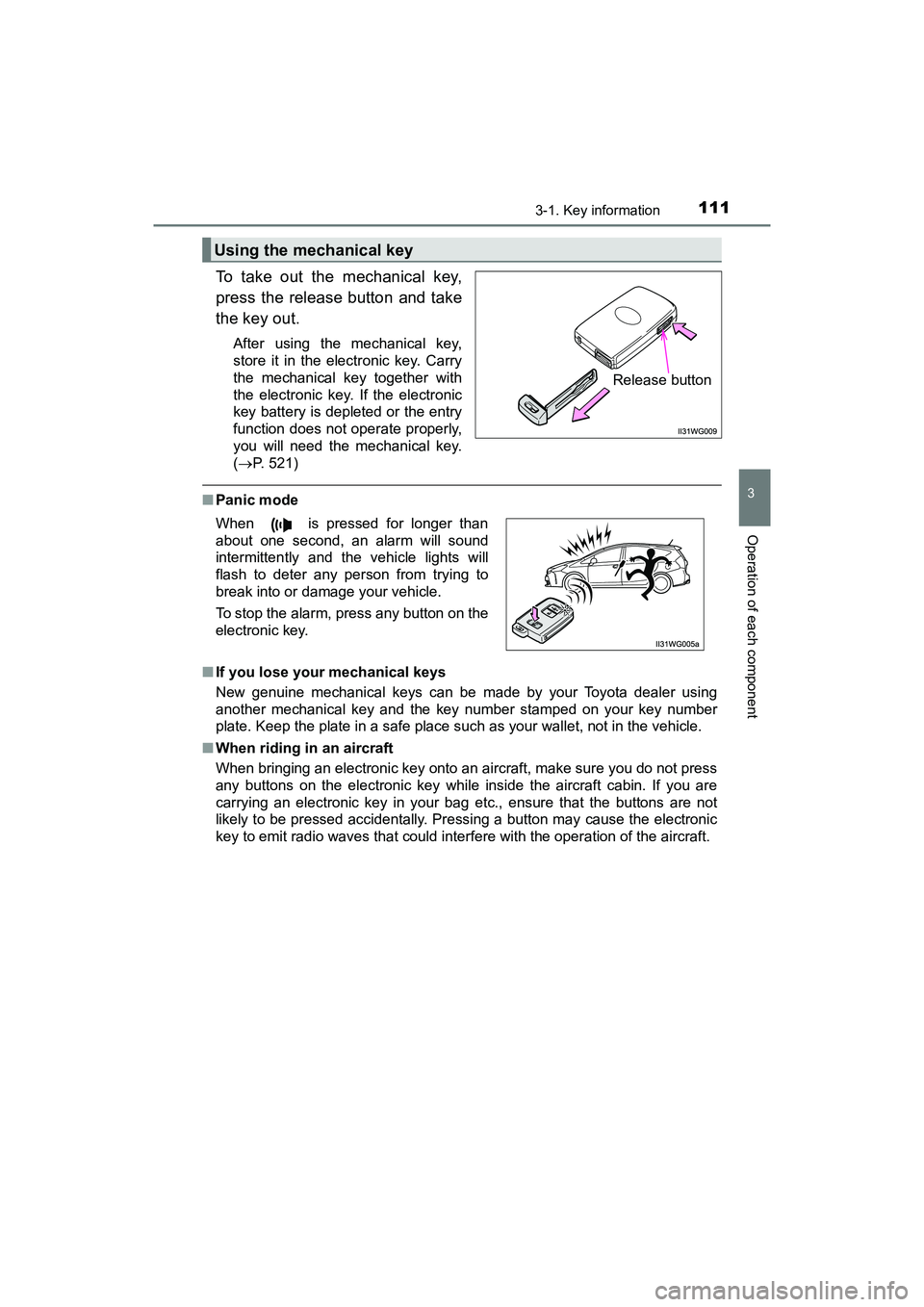
To take out the mechanical key,
press the release button and take
the key out.
After using the mechanical key,
store it in the electronic key. Carry
the mechanical key together with
the electronic key. If the electronic
key battery is depleted or the entry
function does not operate properly,
you will need the mechanical key.
(P. 521)
■ Panic mode
■ If you lose your mechanical keys
New genuine mechanical keys can be made by your Toyota dealer using
another mechanical key and the key number stamped on your key number
plate. Keep the plate in a safe place such as your wallet, not in the vehicle.
■ When riding in an aircraft
When bringing an electronic key onto an aircraft, make sure you do not press
any buttons on the electronic key while inside the aircraft cabin. If you are
carrying an electronic key in your bag etc., ensure that the buttons are not
likely to be pressed accidentally. Pressing a button may cause the electronic
key to emit radio waves that could inte rfere with the operation of the aircraft.
Using the mechanical key
Release button
When is pressed for longer than
about one second, an alarm will sound
intermittently and the vehicle lights will
flash to deter any person from trying to
break into or damage your vehicle.
To stop the alarm, press any button on the
electronic key.
Page 114 of 607
112
PRIUS v_OM_OM47B78U_(U)
3-1. Key information
■Electronic key battery depletion
●The standard battery life is 1 to 2 years.
● If the battery becomes low, an alarm will sound in the cabin, and a message
will be displayed on the multi-information display when the hybrid system
stops. ( P. 504)
● As the electronic key always receives radio waves, the battery will become
depleted even if the electronic key is not used. The following symptoms indi-
cate that the electronic key battery may be depleted. Replace the battery
when necessary. ( P. 449)
• The smart key system or the wireless remote control does not operate.
• The detection area becomes smaller.
• The LED indicator on the key surface does not turn on.
● To avoid serious deterioration, do not leave the electronic key within 3 ft.
(1 m) of the following electrical appliances that produce a magnetic field:
•TVs
• Personal computers
• Cellular phones, cordless phones and battery chargers
• Table lamps
• Induction cookers
■ Replacing the battery
P. 449
■ Confirmation of the registered key number
The number of keys already registered to the vehicle can be confirmed. Ask
your Toyota dealer.
■ If a wrong key is used
The key cylinder rotates freely to isolate inside mechanism.
Page 117 of 607
PRIUS v_OM_OM47B78U_(U)
1153-2. Opening, closing and locking the doors
3
Operation of each component
■Operation signals
A buzzer sounds and the emergency flashers flash to indicate that the doors
have been locked/unlocked. (Locked: Once; Unlocked: Twice)
■ Security feature
If a door is not opened within approximately 60 seconds after the vehicle is
unlocked, the security feature automatically locks the vehicle again.
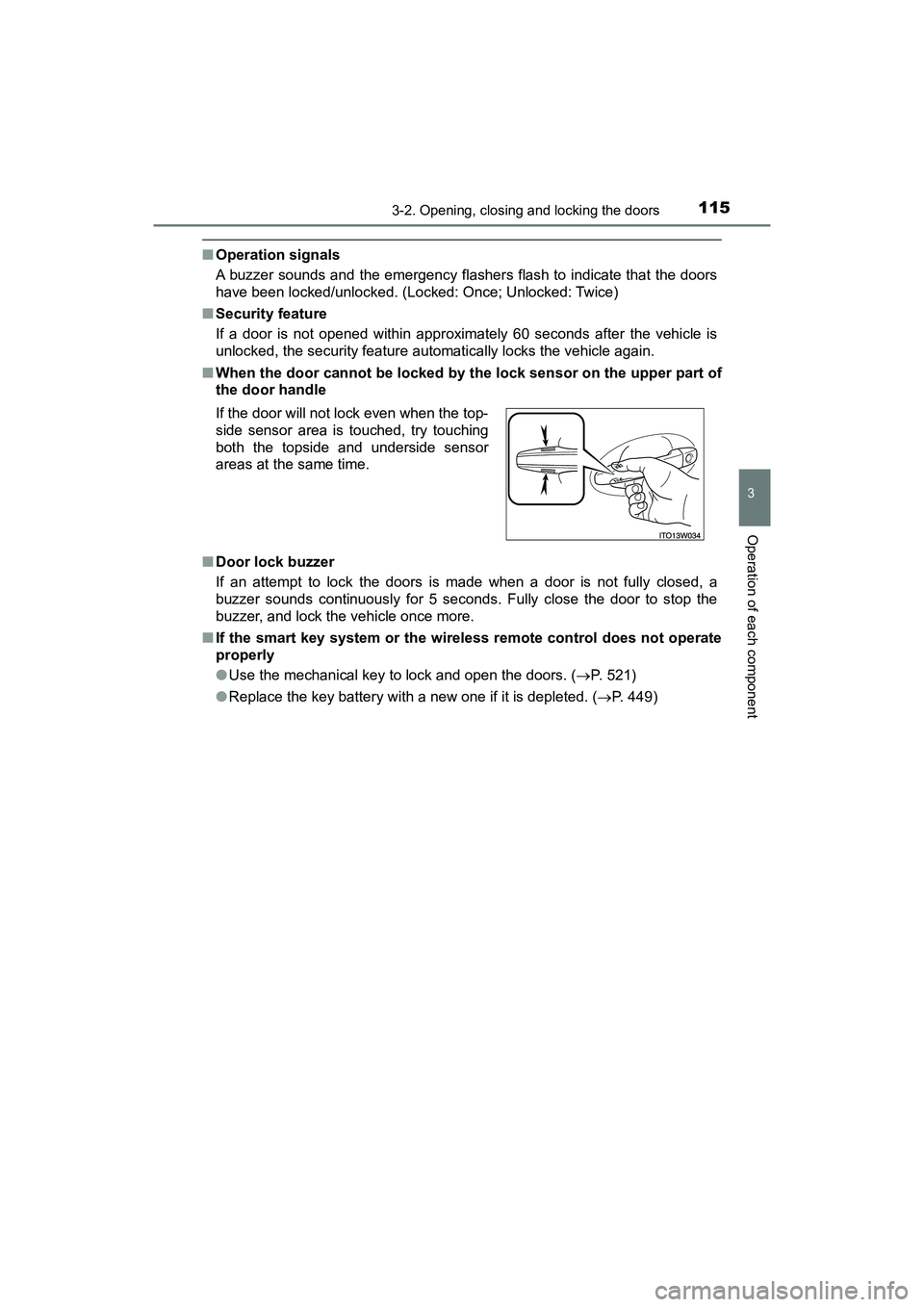
■ When the door cannot be locked by the lock sensor on the upper part of
the door handle
■ Door lock buzzer
If an attempt to lock the doors is made when a door is not fully closed, a
buzzer sounds continuously for 5 seconds. Fully close the door to stop the
buzzer, and lock the vehicle once more.
■ If the smart key system or the wire less remote control does not operate
properly
● Use the mechanical key to lock and open the doors. ( P. 521)
● Replace the key battery with a new one if it is depleted. ( P. 449)
If the door will not lock even when the top-
side sensor area is touched, try touching
both the topside and underside sensor
areas at the same time.
Page 127 of 607
PRIUS v_OM_OM47B78U_(U)
1253-2. Opening, closing and locking the doors
3
Operation of each component
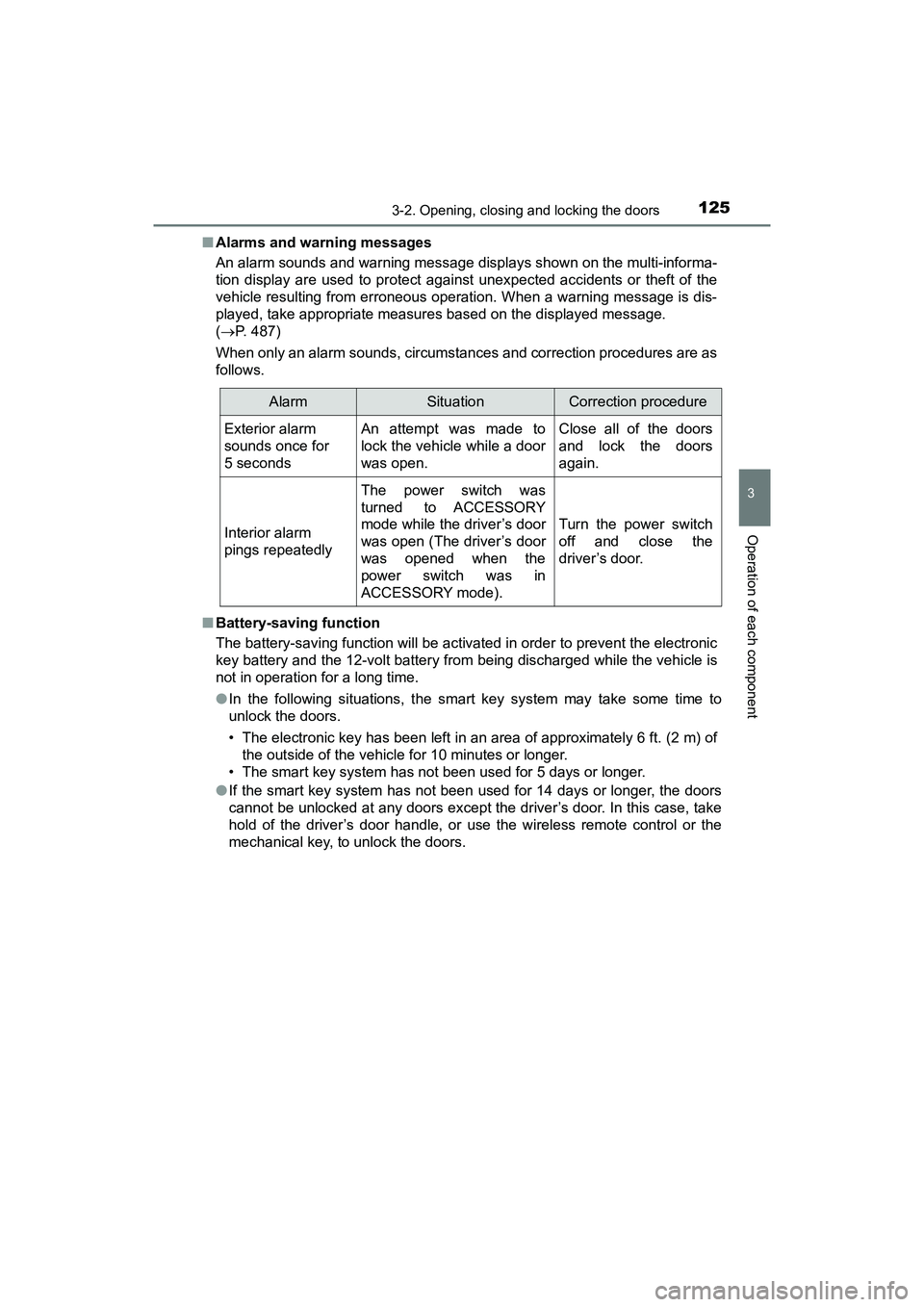
■Alarms and warning messages
An alarm sounds and warning message displays shown on the multi-informa-
tion display are used to protect against unexpected accidents or theft of the
vehicle resulting from erroneous operation. When a warning message is dis-
played, take appropriate measures based on the displayed message.
( P. 487)
When only an alarm sounds, circumstan ces and correction procedures are as
follows.
■ Battery-saving function
The battery-saving function will be activated in order to prevent the electronic
key battery and the 12-volt battery from being discharged while the vehicle is
not in operation for a long time.
●In the following situations, the smart key system may take some time to
unlock the doors.
• The electronic key has been left in an area of approximately 6 ft. (2 m) of
the outside of the vehicle for 10 minutes or longer.
• The smart key system has not been used for 5 days or longer.
● If the smart key system has not been used for 14 days or longer, the doors
cannot be unlocked at any doors except the driver’s door. In this case, take
hold of the driver’s door handle, or use the wireless remote control or the
mechanical key, to unlock the doors.
AlarmSituationCorrection procedure
Exterior alarm
sounds once for
5 secondsAn attempt was made to
lock the vehicle while a door
was open.Close all of the doors
and lock the doors
again.
Interior alarm
pings repeatedly
The power switch was
turned to ACCESSORY
mode while the driver’s door
was open (The driver’s door
was opened when the
power switch was in
ACCESSORY mode).
Turn the power switch
off and close the
driver’s door.