steering TOYOTA PROACE 2016 Owner's Manual
[x] Cancel search | Manufacturer: TOYOTA, Model Year: 2016, Model line: PROACE, Model: TOYOTA PROACE 2016Pages: 516, PDF Size: 91.65 MB
Page 209 of 516
209
Automatic gearbox
Six speed automatic gearbox which offers a choice between the comfort of automatic operation or manual gear changing.Two driving modes are offered:- automatic operation for electronic management of the gears by the gearbox,- manual operation for sequential changing of the gears by the driver.
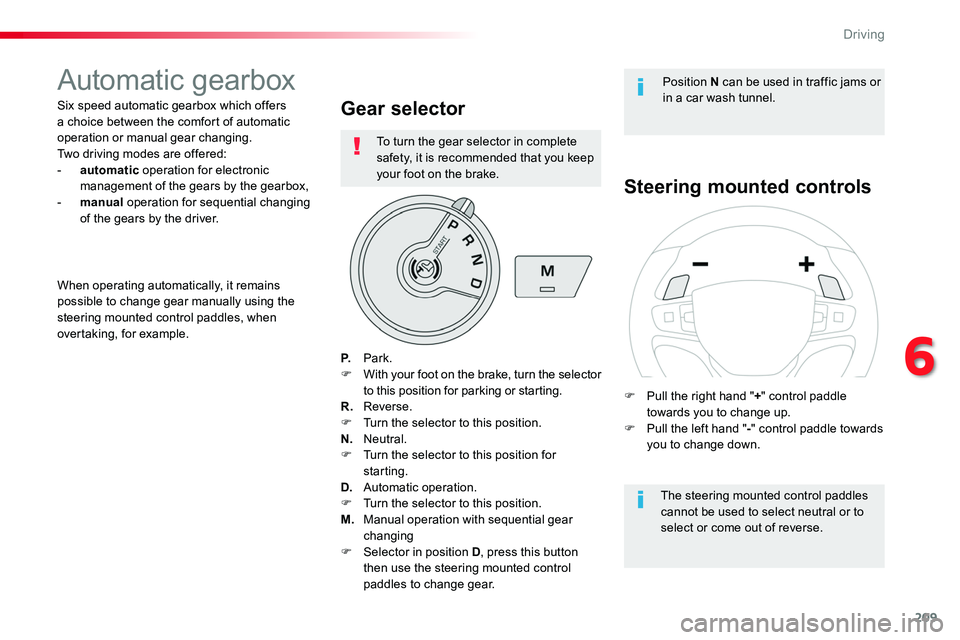
Gear selector
P. Park.F With your foot on the brake, turn the selector to this position for parking or starting.R. Reverse.F Turn the selector to this position.N. Neutral.F Turn the selector to this position for starting.D. Automatic operation.F Turn the selector to this position.
M. Manual operation with sequential gear changingF Selector in position D, press this button then use the steering mounted control paddles to change gear.
Steering mounted controls
The steering mounted control paddles cannot be used to select neutral or to select or come out of reverse.
When operating automatically, it remains possible to change gear manually using the steering mounted control paddles, when overtaking, for example.
Position N can be used in traffic jams or in a car wash tunnel.
F Pull the right hand "+" control paddle towards you to change up.F Pull the left hand "-" control paddle towards you to change down.
To turn the gear selector in complete safety, it is recommended that you keep your foot on the brake.
6
Driving
Page 211 of 516
211
Automatic operation
Never select position N while the vehicle is moving.Never select position P or R unless the vehicle is completely stationary.
Creep function (moving
without using the accelerator)This function provides great flexibility in manoeuvring the vehicle at low speed (when parking, in traffic jams, …).With the engine at idle, parking brake released and position D, M or R selected, the vehicle moves as soon as you take your foot off the brake pedal (even without pressing the accelerator).
As a safety measure (children on board), never leave the vehicle with the engine running and the doors closed.
The gearbox then operates in auto-adaptive mode, without any intervention on the part of the driver. It continuously selects the most suitable gear according to the style of driving, the profile of the road and the load in the vehicle.For maximum acceleration, without touching the selector press the accelerator pedal down fully (kick-down). The gearbox changes down
automatically or maintains the gear selected until the maximum engine speed is reached.On braking, the gearbox changes down automatically to provide effective engine braking.If you release the accelerator sharply, the gearbox will not change to a higher gear, for safety reasons.
F Select position D for automatic changing of the six gears.
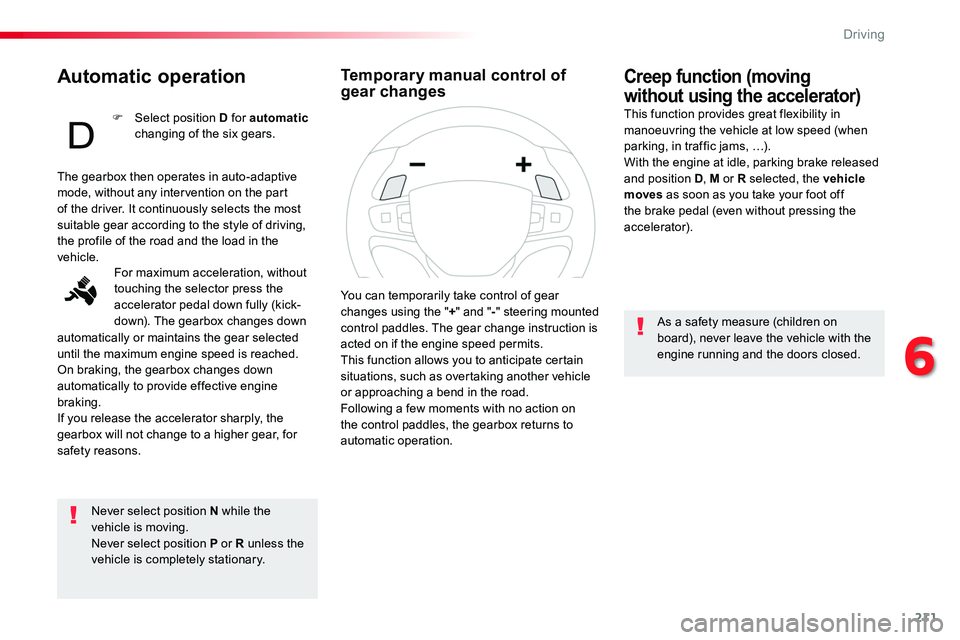
You can temporarily take control of gear changes using the "+" and "-" steering mounted control paddles. The gear change instruction is acted on if the engine speed permits.This function allows you to anticipate certain situations, such as overtaking another vehicle or approaching a bend in the road.Following a few moments with no action on the control paddles, the gearbox returns to automatic operation.
Temporary manual control of gear changes
6
Driving
Page 212 of 516
212
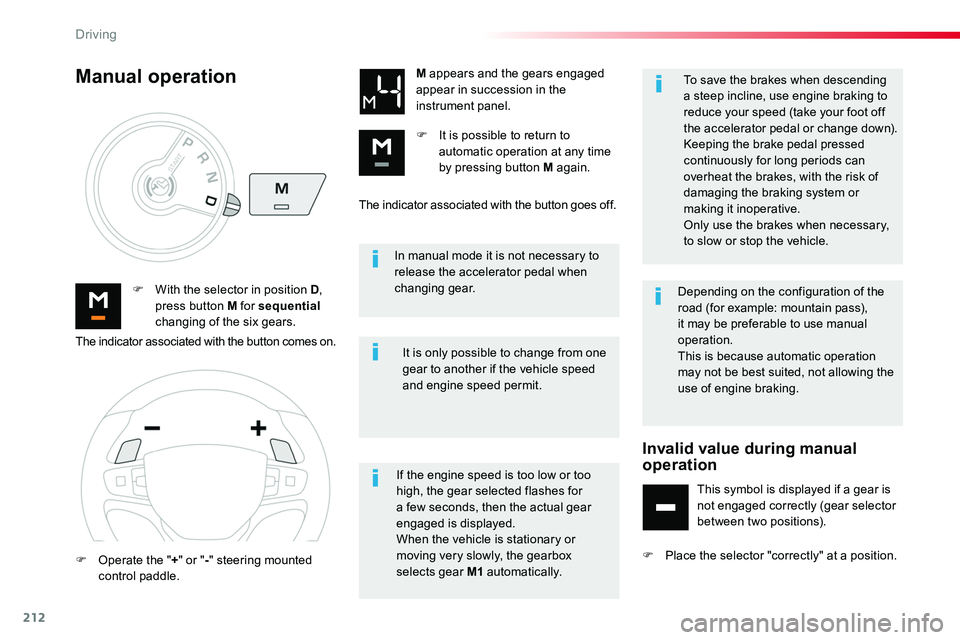
In manual mode it is not necessary to release the accelerator pedal when changing gear.F With the selector in position D, press button M for sequential changing of the six gears.
M appears and the gears engaged appear in succession in the instrument panel.
F It is possible to return to automatic operation at any time by pressing button M again.
It is only possible to change from one gear to another if the vehicle speed and engine speed permit.
Manual operation
If the engine speed is too low or too high, the gear selected flashes for a few seconds, then the actual gear engaged is displayed.When the vehicle is stationary or moving very slowly, the gearbox selects gear M1 automatically.
To save the brakes when descending a steep incline, use engine braking to reduce your speed (take your foot off the accelerator pedal or change down).Keeping the brake pedal pressed continuously for long periods can overheat the brakes, with the risk of damaging the braking system or making it inoperative.
Only use the brakes when necessary, to slow or stop the vehicle.
The indicator associated with the button comes on.
F Operate the "+" or "-" steering mounted control paddle.
The indicator associated with the button goes off.
Depending on the configuration of the road (for example: mountain pass), it may be preferable to use manual operation.This is because automatic operation may not be best suited, not allowing the use of engine braking.
Invalid value during manual operation
This symbol is displayed if a gear is not engaged correctly (gear selector between two positions).
F Place the selector "correctly" at a position.
Driving
Page 214 of 516
214
Electronic gearbox
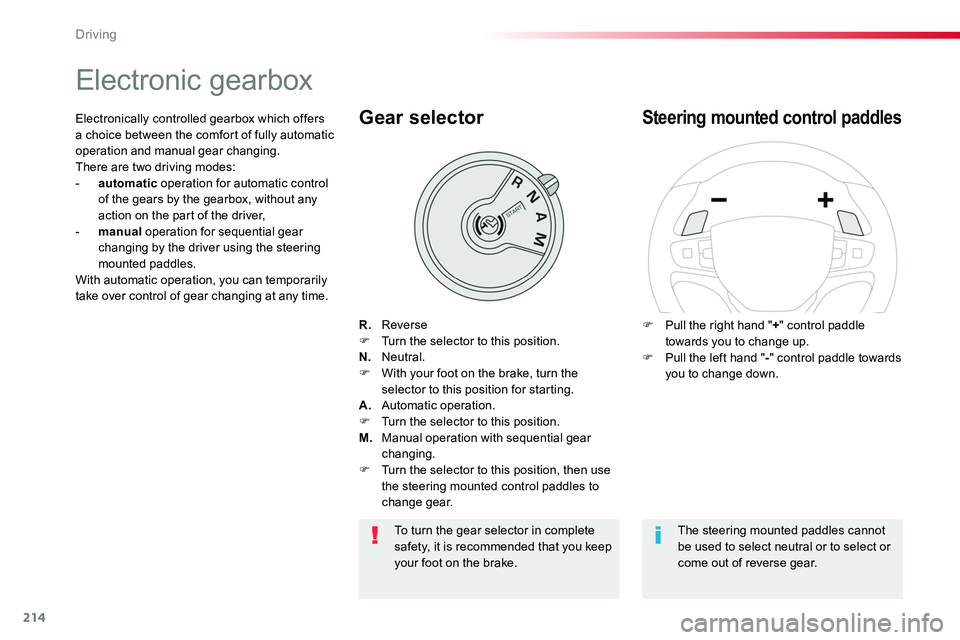
R. ReverseF Turn the selector to this position.N. Neutral.F With your foot on the brake, turn the selector to this position for starting.A. Automatic operation.F Turn the selector to this position.M. Manual operation with sequential gear changing.F Turn the selector to this position, then use the steering mounted control paddles to change gear.
Gear selector
F Pull the right hand "+" control paddle towards you to change up.F Pull the left hand "-" control paddle towards you to change down.
Steering mounted control paddlesElectronically controlled gearbox which offers a choice between the comfort of fully automatic operation and manual gear changing.There are two driving modes:- automatic operation for automatic control of the gears by the gearbox, without any action on the part of the driver,- manual operation for sequential gear changing by the driver using the steering mounted paddles.With automatic operation, you can temporarily take over control of gear changing at any time.
The steering mounted paddles cannot be used to select neutral or to select or come out of reverse gear.
To turn the gear selector in complete safety, it is recommended that you keep your foot on the brake.
Driving
Page 216 of 516
216
Temporary manual control of gear changes
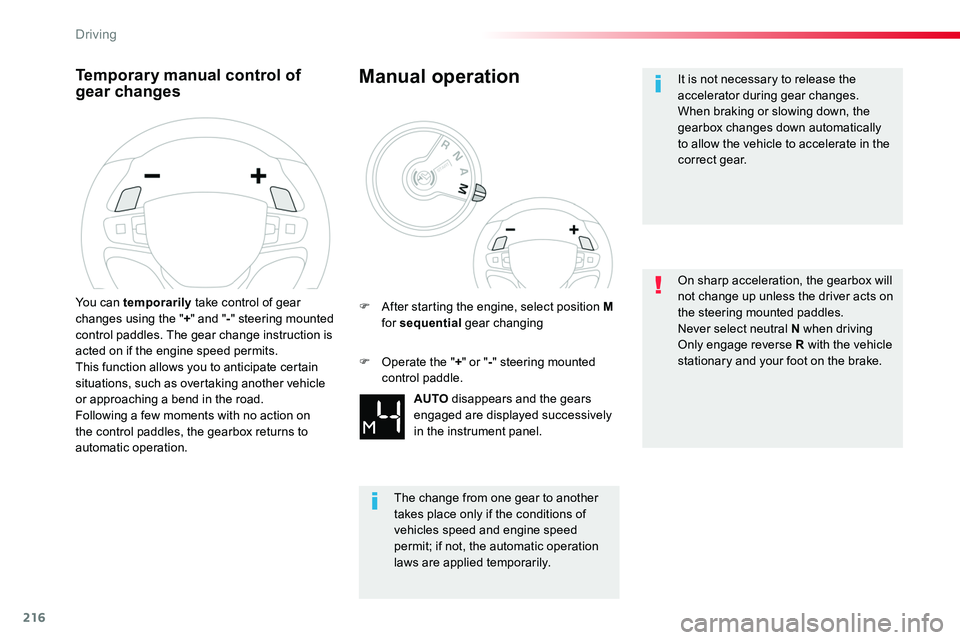
You can temporarily take control of gear changes using the "+" and "-" steering mounted control paddles. The gear change instruction is acted on if the engine speed permits.This function allows you to anticipate certain situations, such as overtaking another vehicle or approaching a bend in the road.Following a few moments with no action on the control paddles, the gearbox returns to automatic operation.
Manual operation
AUTO disappears and the gears engaged are displayed successively
in the instrument panel.
F After starting the engine, select position M for sequential gear changing
The change from one gear to another takes place only if the conditions of vehicles speed and engine speed
permit; if not, the automatic operation laws are applied temporarily.
F Operate the "+" or "-" steering mounted control paddle.
It is not necessary to release the accelerator during gear changes.When braking or slowing down, the gearbox changes down automatically to allow the vehicle to accelerate in the correct gear.
On sharp acceleration, the gearbox will not change up unless the driver acts on the steering mounted paddles.Never select neutral N when drivingOnly engage reverse R with the vehicle stationary and your foot on the brake.
Driving
Page 218 of 516
218
Stop & StartGoing into engine
STOP mode
If your vehicle has a manual gearbox, its speed must be below 12 mph (20 km/h) or stationary (depending on engine); the "ECO" indicator lamp comes on in the instrument panel and the engine goes into standby automatically when you place the gear lever in
neutral and you release the clutch pedal.
For your comfort, during parking manoeuvres, STOP mode is not available for a few seconds after coming out of reverse gear.Stop & Start does not affect the functionality of the vehicle, such as for example, braking, power steering...A slight delay between the vehicle stopping and the engine cutting out may be noticed.
If your vehicle is fitted with Stop & Start, a time counter calculates the time spent in
STOP mode during a journey.It resets to zero every time the ignition is switched on.
Stop & Start time counter
The Stop & Start system puts the engine temporarily into standby - STOP mode - during stops in the traffic (red lights, traffic jams, or other...). The engine restarts automatically - START mode - as soon as you want to move off. The restart takes place instantly, quickly and silently.Per fect for urban use, the Stop & Start system reduces fuel consumption and exhaust emissions as well as the noise level when stationary.
If your vehicle has an automatic gearbox and the vehicle is stationary, the "ECO" indicator lamp comes on and the engine goes into standby automatically when you press the brake pedal or place the gear selector in position N.
If your vehicle has an electronic gearbox and the vehicle's speed is below 5 mph (8 km/h), the "ECO" indicator lamp comes on and the engine goes into standby automatically when you press the brake pedal or place the gear selector in position N.
(minutes / seconds or hours / minutes)
Never refuel with the engine in STOP mode; you must switch off the ignition with the button.
Driving
Page 227 of 516
227
Memorising the speed
setting
This memorisation is in addition to the display of Road Sign Assist.
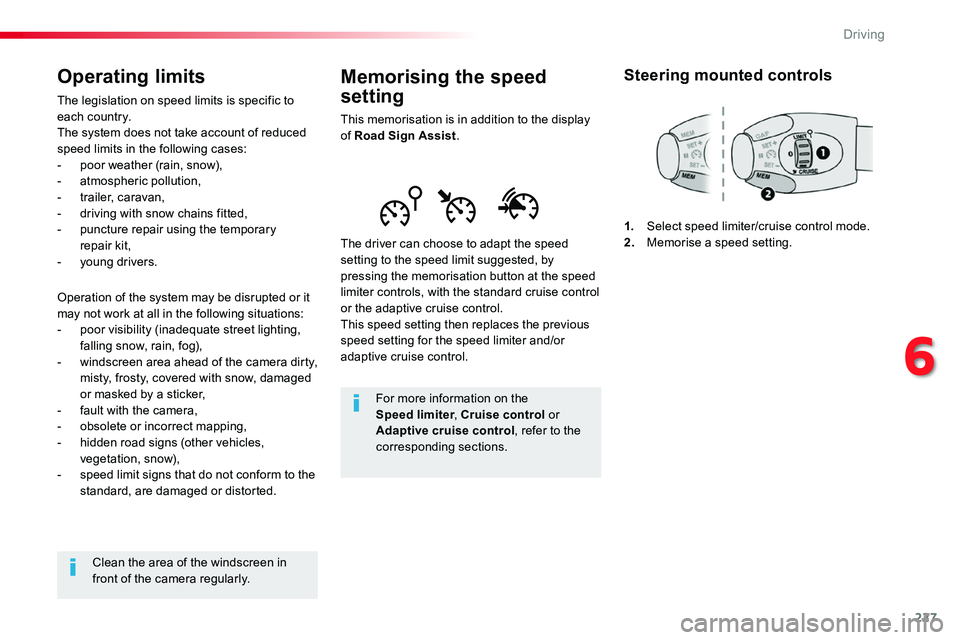
The driver can choose to adapt the speed setting to the speed limit suggested, by pressing the memorisation button at the speed limiter controls, with the standard cruise control or the adaptive cruise control.This speed setting then replaces the previous speed setting for the speed limiter and/or adaptive cruise control.
For more information on the Speed limiter, Cruise control or
Adaptive cruise control, refer to the corresponding sections.
Steering mounted controls
1. Select speed limiter/cruise control mode.2. Memorise a speed setting.
Operating limits
The legislation on speed limits is specific to each country.The system does not take account of reduced speed limits in the following cases:- poor weather (rain, snow),- atmospheric pollution,- trailer, caravan,- driving with snow chains fitted,
- puncture repair using the temporary repair kit,- young drivers.
Operation of the system may be disrupted or it may not work at all in the following situations:- poor visibility (inadequate street lighting, falling snow, rain, fog),- windscreen area ahead of the camera dirty, misty, frosty, covered with snow, damaged or masked by a sticker,- fault with the camera,- obsolete or incorrect mapping,- hidden road signs (other vehicles, vegetation, snow),- speed limit signs that do not conform to the standard, are damaged or distorted.
Clean the area of the windscreen in front of the camera regularly.
6
Driving
Page 229 of 516
229
GAP
MEM
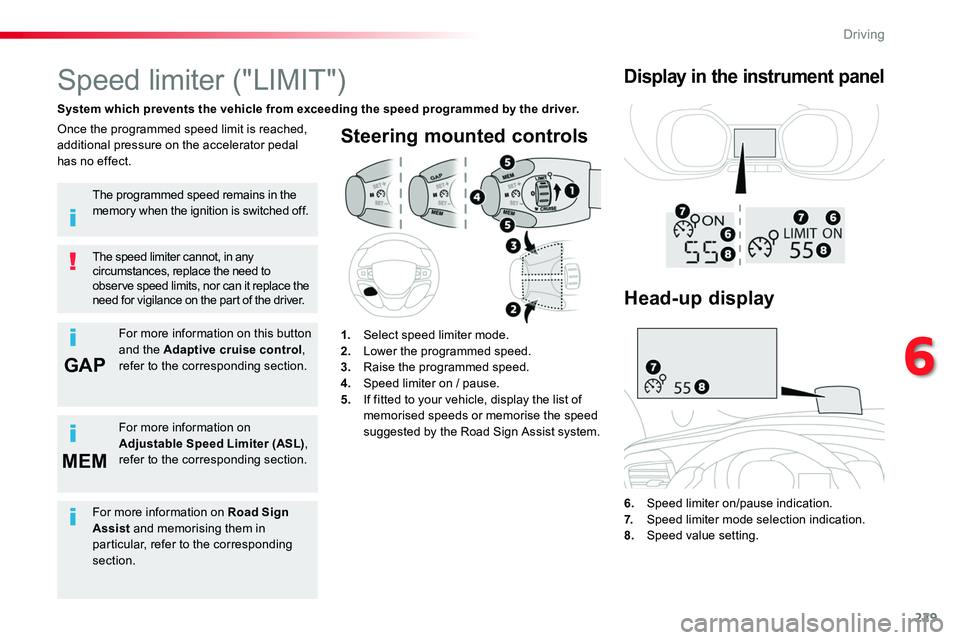
Steering mounted controls
6. Speed limiter on/pause indication.7. Speed limiter mode selection indication.
8. Speed value setting.
Speed limiter ("LIMIT")
System which prevents the vehicle from exceeding the speed programmed by the driver.
The speed limiter cannot, in any circumstances, replace the need to observe speed limits, nor can it replace the need for vigilance on the part of the driver.
Once the programmed speed limit is reached, additional pressure on the accelerator pedal has no effect.
1. Select speed limiter mode.2. Lower the programmed speed.3. Raise the programmed speed.4. Speed limiter on / pause.5. If fitted to your vehicle, display the list of memorised speeds or memorise the speed suggested by the Road Sign Assist system.
Display in the instrument panel
The programmed speed remains in the memory when the ignition is switched off.
For more information on this button and the Adaptive cruise control, refer to the corresponding section.
For more information on Adjustable Speed Limiter (ASL), refer to the corresponding section.
Head-up display
For more information on Road Sign Assist and memorising them in particular, refer to the corresponding section.
6
Driving
Page 232 of 516
232
MEM
MEM
Cruise control ("CRUISE")
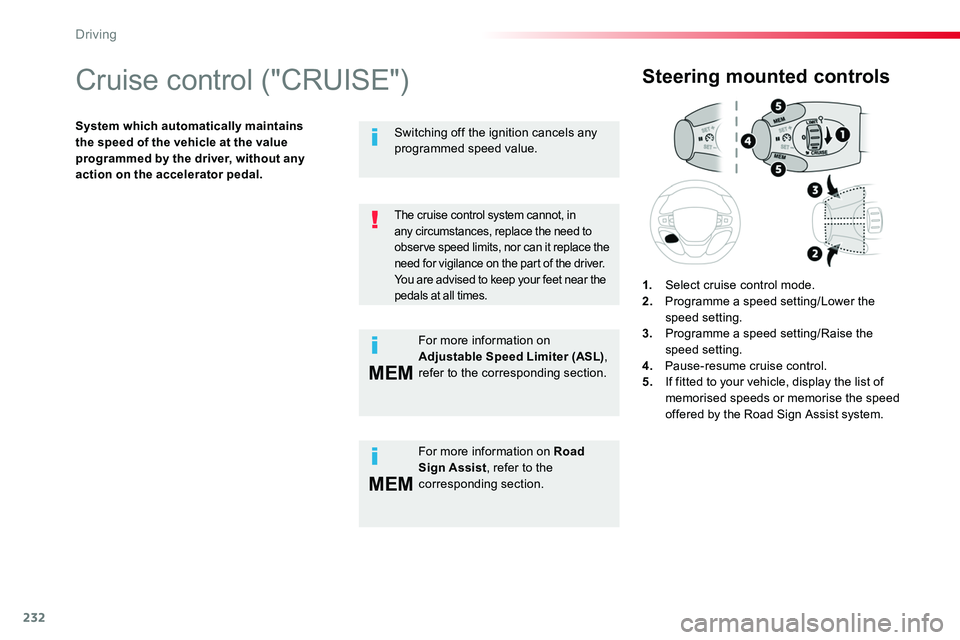
System which automatically maintains the speed of the vehicle at the value programmed by the driver, without any action on the accelerator pedal.
Steering mounted controls
1. Select cruise control mode.2. Programme a speed setting/Lower the speed setting.3. Programme a speed setting/Raise the speed setting.4. Pause-resume cruise control.5. If fitted to your vehicle, display the list of memorised speeds or memorise the speed offered by the Road Sign Assist system.
The cruise control system cannot, in
any circumstances, replace the need to observe speed limits, nor can it replace the need for vigilance on the part of the driver.You are advised to keep your feet near the pedals at all times.
For more information on Road Sign Assist, refer to the corresponding section.
Switching off the ignition cancels any programmed speed value.
For more information on Adjustable Speed Limiter (ASL), refer to the corresponding section.
Driving
Page 236 of 516
236
Adaptive cruise control ("CRUISE")
This systems allows the vehicle's speed to be maintained at a value set by the driver.In addition it allows (when circumstances permit) an inter-vehicle distance that you have selected to be maintained between your vehicle and the vehicle in front.
In the Driving menu, activate/deactivate "Dynamic cruise control".
The state of the system is memorised on switching off the ignition.
Activation / Deactivation
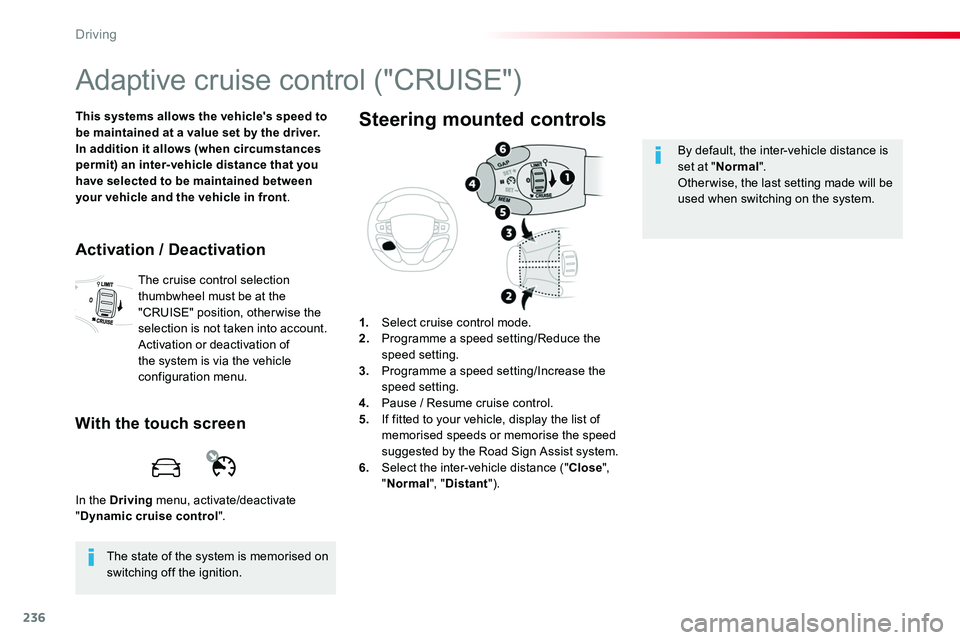
The cruise control selection thumbwheel must be at the "CRUISE" position, otherwise the selection is not taken into account.Activation or deactivation of the system is via the vehicle configuration menu.
With the touch screen
1. Select cruise control mode.2. Programme a speed setting/Reduce the speed setting.3. Programme a speed setting/Increase the speed setting.4. Pause / Resume cruise control.5. If fitted to your vehicle, display the list of
memorised speeds or memorise the speed suggested by the Road Sign Assist system.6. Select the inter-vehicle distance ("Close", "Normal", "Distant").
Steering mounted controls
By default, the inter-vehicle distance is set at "Normal".Otherwise, the last setting made will be used when switching on the system.
Driving