mirror TOYOTA PROACE 2016 Owner's Guide
[x] Cancel search | Manufacturer: TOYOTA, Model Year: 2016, Model line: PROACE, Model: TOYOTA PROACE 2016Pages: 516, PDF Size: 91.65 MB
Page 252 of 516
252
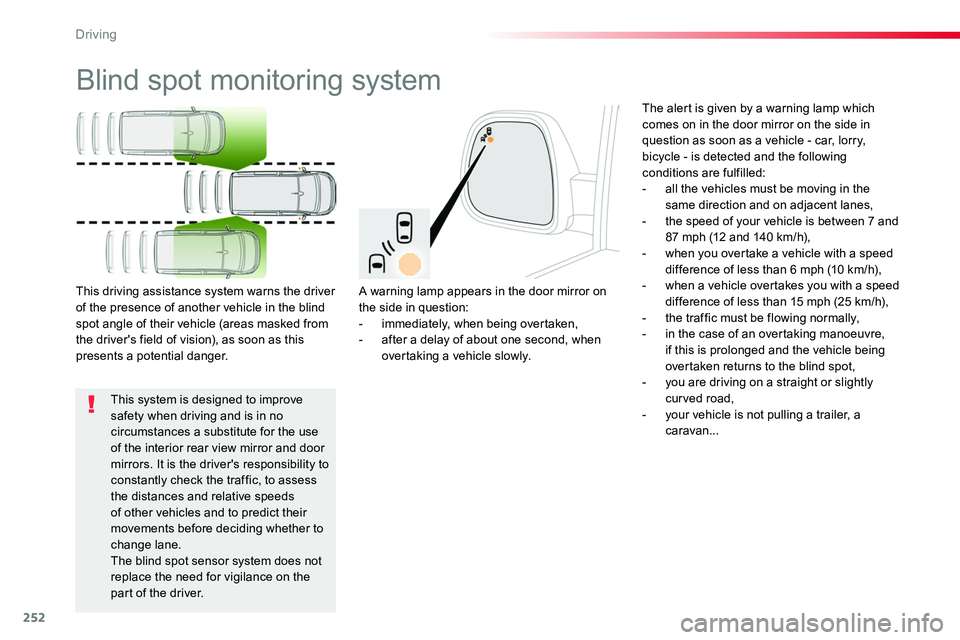
Blind spot monitoring system
A warning lamp appears in the door mirror on the side in question:- immediately, when being overtaken,- after a delay of about one second, when overtaking a vehicle slowly.
This driving assistance system warns the driver of the presence of another vehicle in the blind spot angle of their vehicle (areas masked from the driver's field of vision), as soon as this presents a potential danger.
The alert is given by a warning lamp which comes on in the door mirror on the side in question as soon as a vehicle - car, lorry, bicycle - is detected and the following conditions are fulfilled:- all the vehicles must be moving in the same direction and on adjacent lanes,- the speed of your vehicle is between 7 and 87 mph (12 and 140 km/h),- when you overtake a vehicle with a speed difference of less than 6 mph (10 km/h),- when a vehicle overtakes you with a speed difference of less than 15 mph (25 km/h),- the traffic must be flowing normally,- in the case of an overtaking manoeuvre, if this is prolonged and the vehicle being overtaken returns to the blind spot,- you are driving on a straight or slightly curved road,- your vehicle is not pulling a trailer, a caravan...
This system is designed to improve safety when driving and is in no circumstances a substitute for the use of the interior rear view mirror and door mirrors. It is the driver's responsibility to constantly check the traffic, to assess the distances and relative speeds of other vehicles and to predict their movements before deciding whether to change lane.The blind spot sensor system does not replace the need for vigilance on the part of the driver.
Driving
Page 254 of 516
254
Operating fault
Have it checked by an authorized Toyota dealer or repairer, or another duly qualified and equipped professional.
The system may suffer temporary interference in certain weather conditions (rain, hail...).In particular, driving on a wet sur face or moving from a dry area to a wet area can cause false alerts (for example, the presence of a fog of water droplets in the blind spot angle is interpreted as a vehicle).In bad or wintry weather, ensure that the sensors are not covered by mud, ice or snow.Take care not to cover the warning zone in the door mirrors or the detection zones on the front and rear bumpers with adhesive labels or other objects; they may hamper the correct operation of the system.
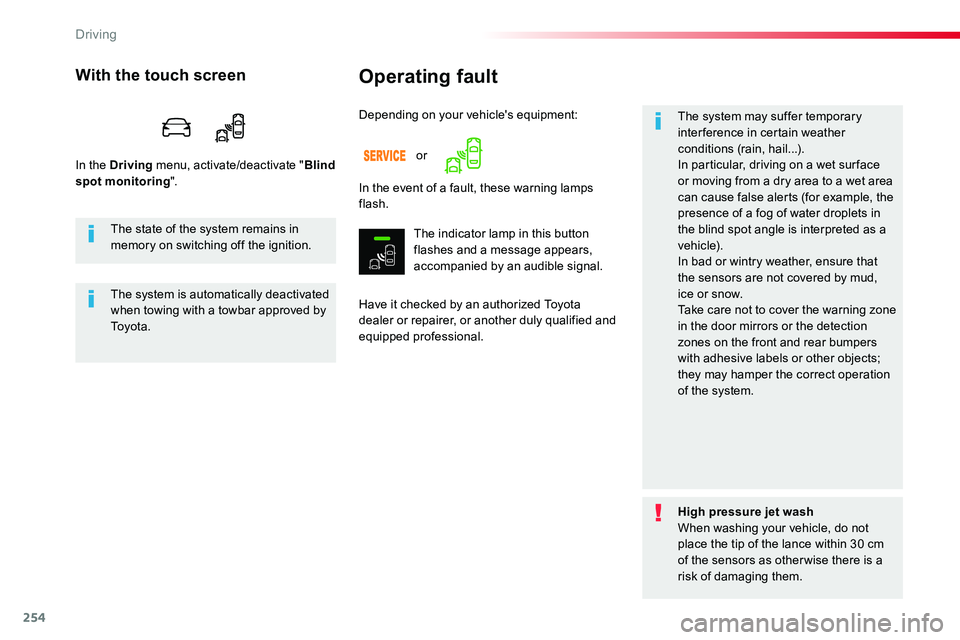
Depending on your vehicle's equipment:
With the touch screen
In the Driving menu, activate/deactivate "Blind spot monitoring".In the event of a fault, these warning lamps flash.
The indicator lamp in this button flashes and a message appears, accompanied by an audible signal.
The state of the system remains in memory on switching off the ignition.
The system is automatically deactivated when towing with a towbar approved by To y o t a .
High pressure jet washWhen washing your vehicle, do not place the tip of the lance within 30 cm of the sensors as otherwise there is a risk of damaging them.
or
Driving
Page 258 of 516
258
Reversing camera with display in the interior mirror
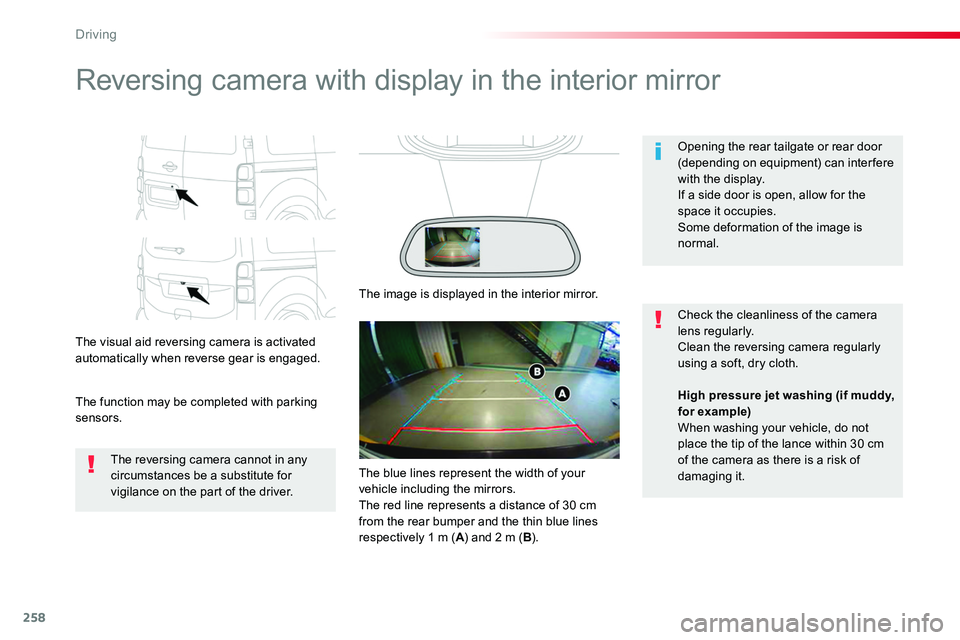
The visual aid reversing camera is activated automatically when reverse gear is engaged.
The function may be completed with parking sensors.
Opening the rear tailgate or rear door (depending on equipment) can interfere with the display.If a side door is open, allow for the space it occupies.
Some deformation of the image is normal.
The reversing camera cannot in any circumstances be a substitute for vigilance on the part of the driver.
Check the cleanliness of the camera lens regularly.Clean the reversing camera regularly using a soft, dry cloth.
The image is displayed in the interior mirror.
High pressure jet washing (if muddy, for example)When washing your vehicle, do not place the tip of the lance within 30 cm of the camera as there is a risk of damaging it.The blue lines represent the width of your vehicle including the mirrors.The red line represents a distance of 30 cm from the rear bumper and the thin blue lines respectively 1 m (A) and 2 m (B).
Driving
Page 260 of 516
260
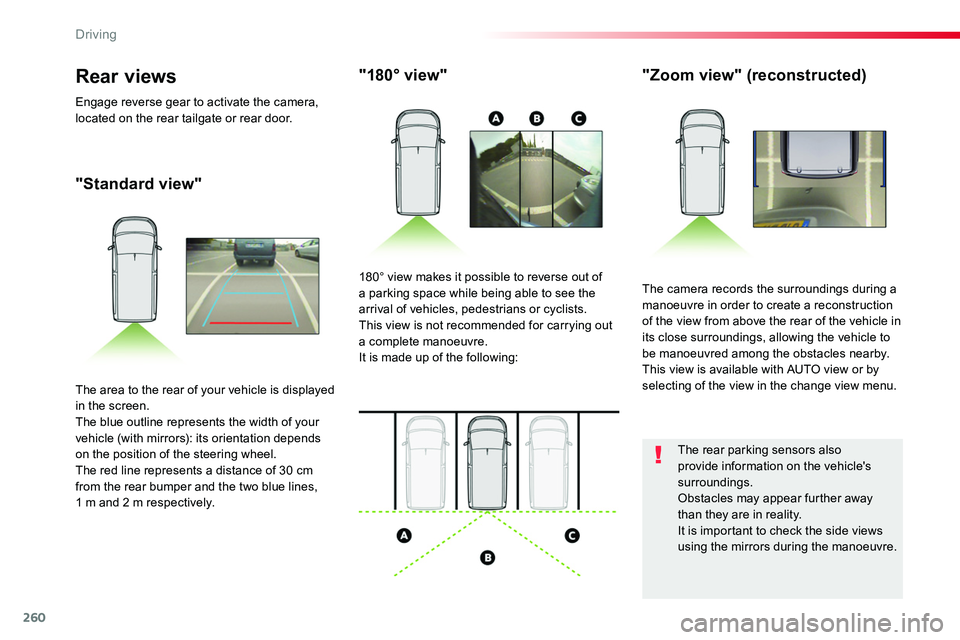
"Standard view"
"180° view""Zoom view" (reconstructed)
The camera records the surroundings during a manoeuvre in order to create a reconstruction of the view from above the rear of the vehicle in its close surroundings, allowing the vehicle to be manoeuvred among the obstacles nearby.This view is available with AUTO view or by selecting of the view in the change view menu.
180° view makes it possible to reverse out of a parking space while being able to see the arrival of vehicles, pedestrians or cyclists.This view is not recommended for carrying out a complete manoeuvre.It is made up of the following:
The area to the rear of your vehicle is displayed in the screen.The blue outline represents the width of your vehicle (with mirrors): its orientation depends on the position of the steering wheel.The red line represents a distance of 30 cm from the rear bumper and the two blue lines, 1 m and 2 m respectively.
Rear views
Engage reverse gear to activate the camera, located on the rear tailgate or rear door.
The rear parking sensors also provide information on the vehicle's surroundings.Obstacles may appear further away than they are in reality.It is important to check the side views using the mirrors during the manoeuvre.
Driving
Page 318 of 516
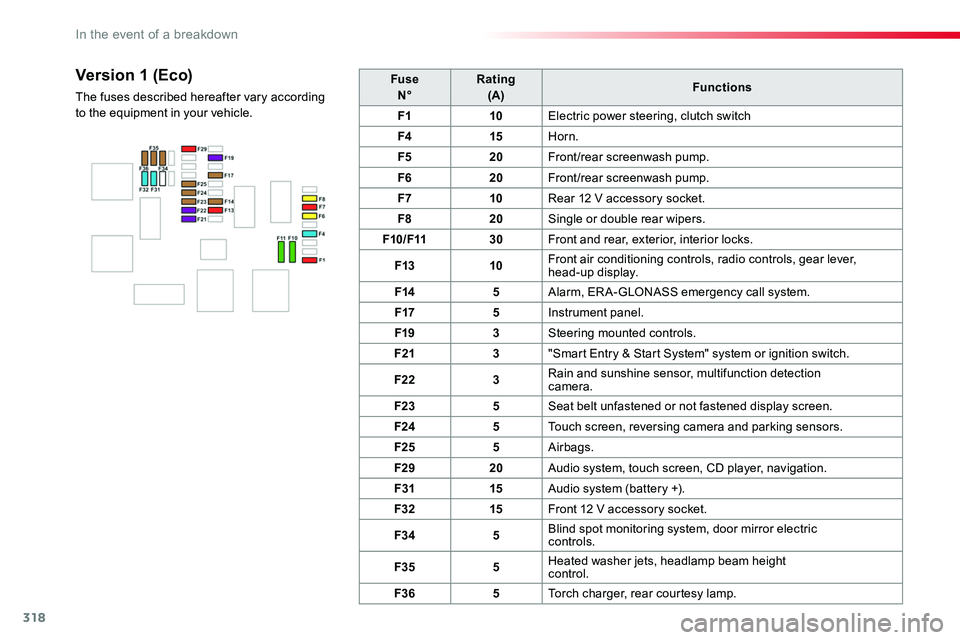
318
FuseN°Rating(A)Functions
F110Electric power steering, clutch switch
F415Horn.
F520Front/rear screenwash pump.
F620Front/rear screenwash pump.
F710Rear 12 V accessory socket.
F820Single or double rear wipers.
F10/F1130Front and rear, exterior, interior locks.
F1310Front air conditioning controls, radio controls, gear lever, head-up display.
F145Alarm, ER A-GLONASS emergency call system.
F175Instrument panel.
F193Steering mounted controls.
F213"Smart Entry & Start System" system or ignition switch.
F223Rain and sunshine sensor, multifunction detection camera.
F235Seat belt unfastened or not fastened display screen.
F245Touch screen, reversing camera and parking sensors.
F255Airbags.
F2920Audio system, touch screen, CD player, navigation.
F3115Audio system (battery +).
F3215Front 12 V accessory socket.
F345Blind spot monitoring system, door mirror electric controls.
F355Heated washer jets, headlamp beam height control.
F365Torch charger, rear courtesy lamp.
Version 1 (Eco)
The fuses described hereafter vary according to the equipment in your vehicle.
In the event of a breakdown
Page 319 of 516
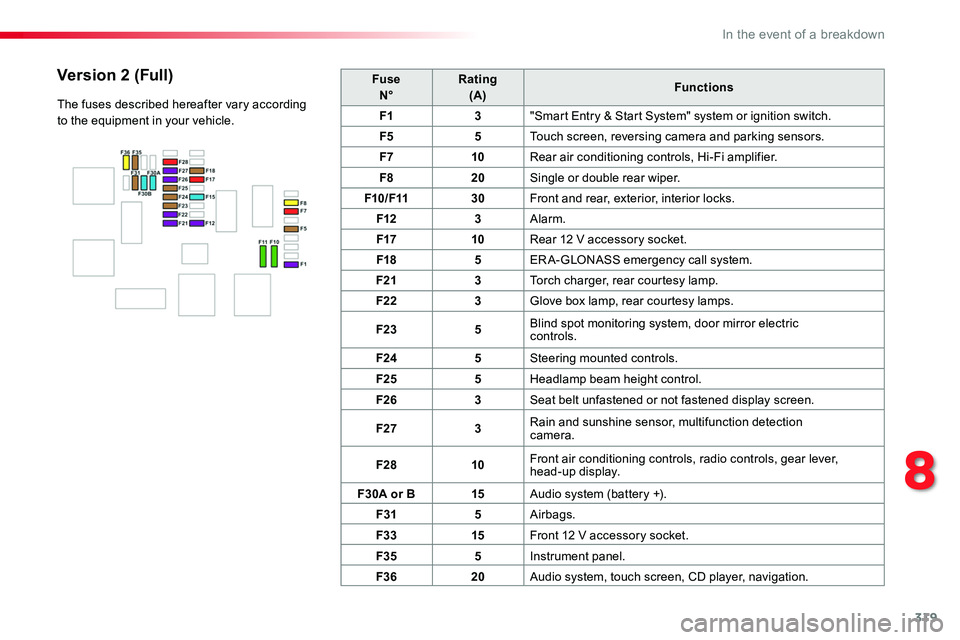
319
FuseN°Rating(A)Functions
F13"Smart Entry & Start System" system or ignition switch.
F55Touch screen, reversing camera and parking sensors.
F710Rear air conditioning controls, Hi-Fi amplifier.
F820Single or double rear wiper.
F10/F1130Front and rear, exterior, interior locks.
F123Alarm.
F1710Rear 12 V accessory socket.
F185ERA-GLONASS emergency call system.
F213Torch charger, rear courtesy lamp.
F223Glove box lamp, rear courtesy lamps.
F235Blind spot monitoring system, door mirror electric controls.
F245Steering mounted controls.
F255Headlamp beam height control.
F263Seat belt unfastened or not fastened display screen.
F273Rain and sunshine sensor, multifunction detection camera.
F2810Front air conditioning controls, radio controls, gear lever, head-up display.
F30A or B15Audio system (battery +).
F315Airbags.
F3315Front 12 V accessory socket.
F355Instrument panel.
F3620Audio system, touch screen, CD player, navigation.
Version 2 (Full)
The fuses described hereafter vary according to the equipment in your vehicle.
8
In the event of a breakdown
Page 328 of 516
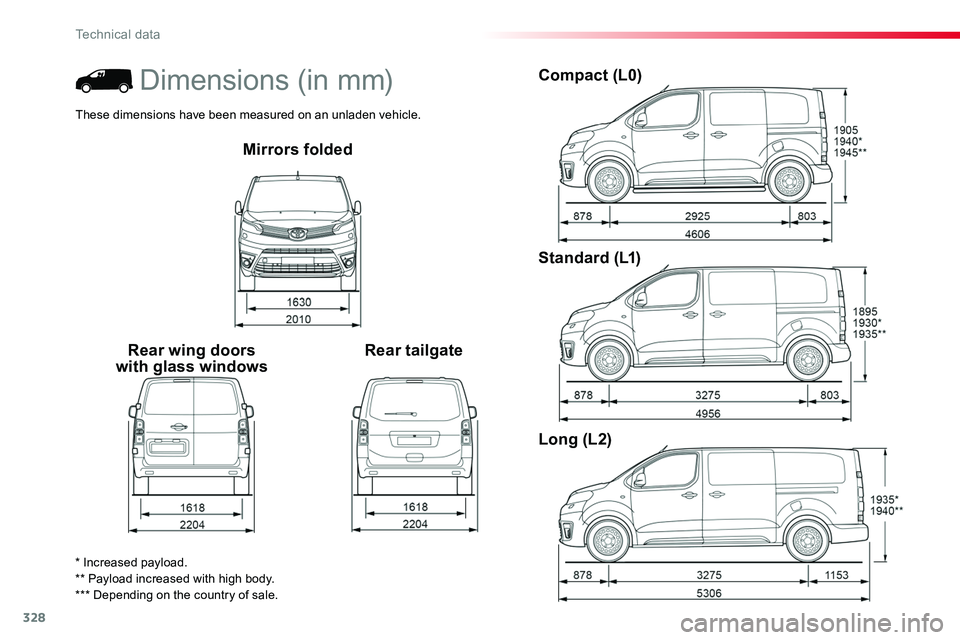
328
Mirrors folded
Rear wing doors with glass windowsRear tailgate
Compact (L0)
Standard (L1)
Long (L2)
* Increased payload.** Payload increased with high body.*** Depending on the country of sale.
Dimensions (in mm)
These dimensions have been measured on an unladen vehicle.
Technical data
Page 330 of 516
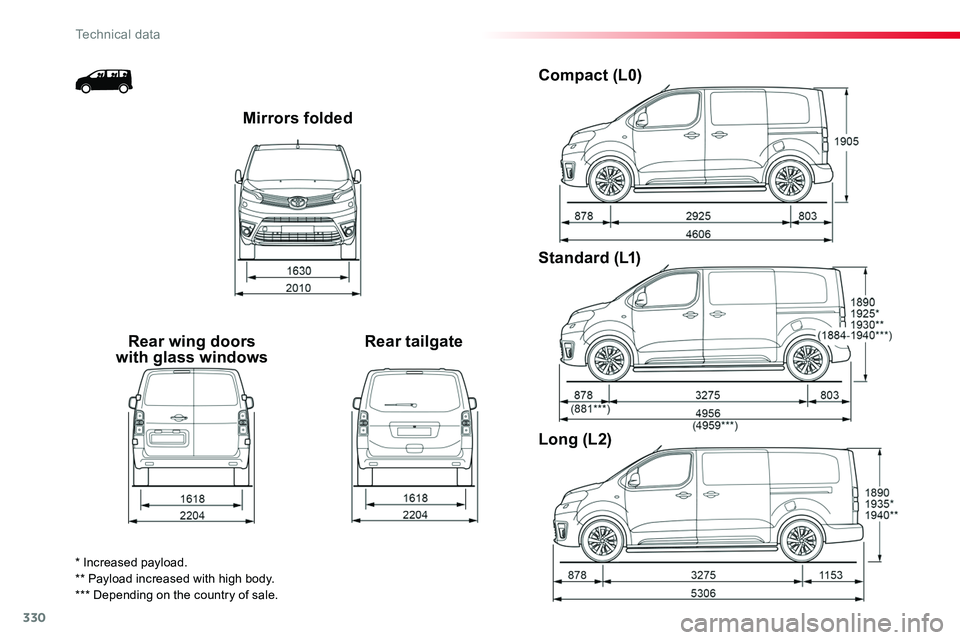
330
Mirrors folded
Rear wing doors with glass windowsRear tailgate
Compact (L0)
Standard (L1)
Long (L2)
* Increased payload.** Payload increased with high body.*** Depending on the country of sale.
Technical data
Page 343 of 516
343
12:13
23 °C531 kHz
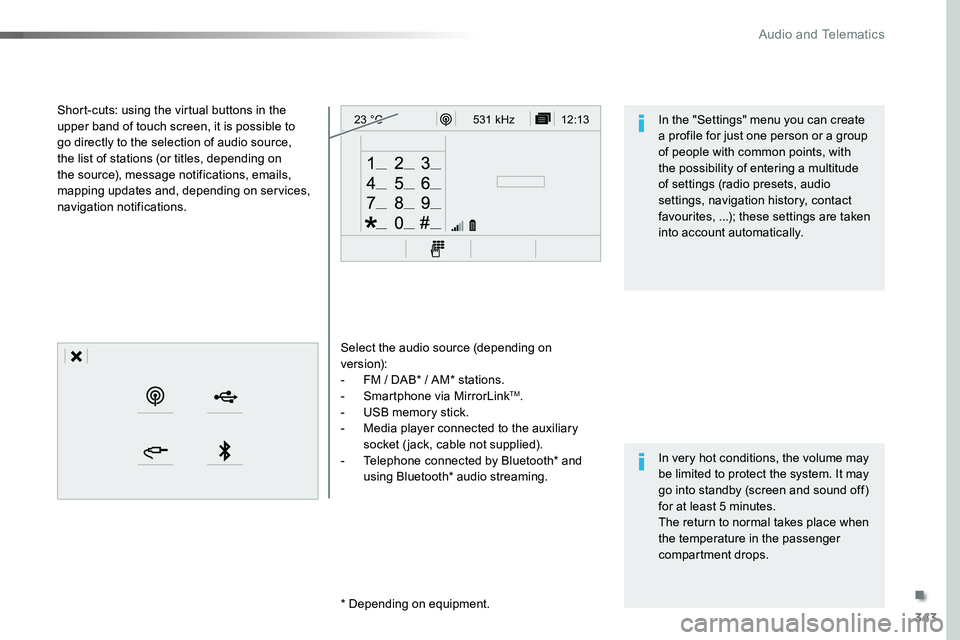
Select the audio source (depending on version):- FM / DAB* / AM* stations.- Smartphone via MirrorLinkTM.- USB memory stick.- Media player connected to the auxiliary socket (jack, cable not supplied).- Telephone connected by Bluetooth* and using Bluetooth* audio streaming.
* Depending on equipment.
Short-cuts: using the virtual buttons in the upper band of touch screen, it is possible to go directly to the selection of audio source, the list of stations (or titles, depending on the source), message notifications, emails, mapping updates and, depending on services, navigation notifications.
In very hot conditions, the volume may be limited to protect the system. It may go into standby (screen and sound off) for at least 5 minutes.The return to normal takes place when the temperature in the passenger compartment drops.
In the "Settings" menu you can create a profile for just one person or a group of people with common points, with the possibility of entering a multitude of settings (radio presets, audio settings, navigation history, contact favourites, ...); these settings are taken into account automatically.
.
Audio and Telematics
Page 345 of 516
345
12:13
23 °C12:13
23 °C531 kH z
FM/87.5 MHz
87.5MH z 12:13
23 °C 87.5 MHz
12:13
23 °C531 kH z12:13
23 °C
Menus
Settings
Radio MediaConnected navigation
Driving
Connectivity
Telephone
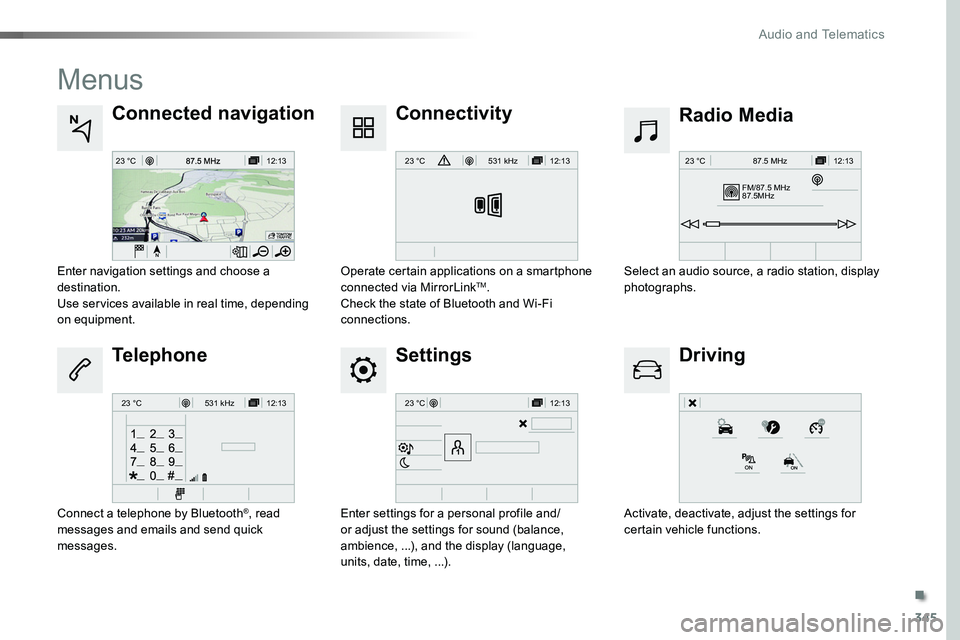
Enter settings for a personal profile and/or adjust the settings for sound (balance, ambience, ...), and the display (language, units, date, time, ...).
Select an audio source, a radio station, display photographs.Enter navigation settings and choose a destination.Use services available in real time, depending on equipment.
Activate, deactivate, adjust the settings for certain vehicle functions.
Operate certain applications on a smartphone connected via MirrorLinkTM.Check the state of Bluetooth and Wi-Fi connections.
Connect a telephone by Bluetooth®, read messages and emails and send quick messages.
.
Audio and Telematics