navigation TOYOTA PROACE 2017 Owner's Guide
[x] Cancel search | Manufacturer: TOYOTA, Model Year: 2017, Model line: PROACE, Model: TOYOTA PROACE 2017Pages: 516, PDF Size: 91.65 MB
Page 376 of 516
376
22
23
1
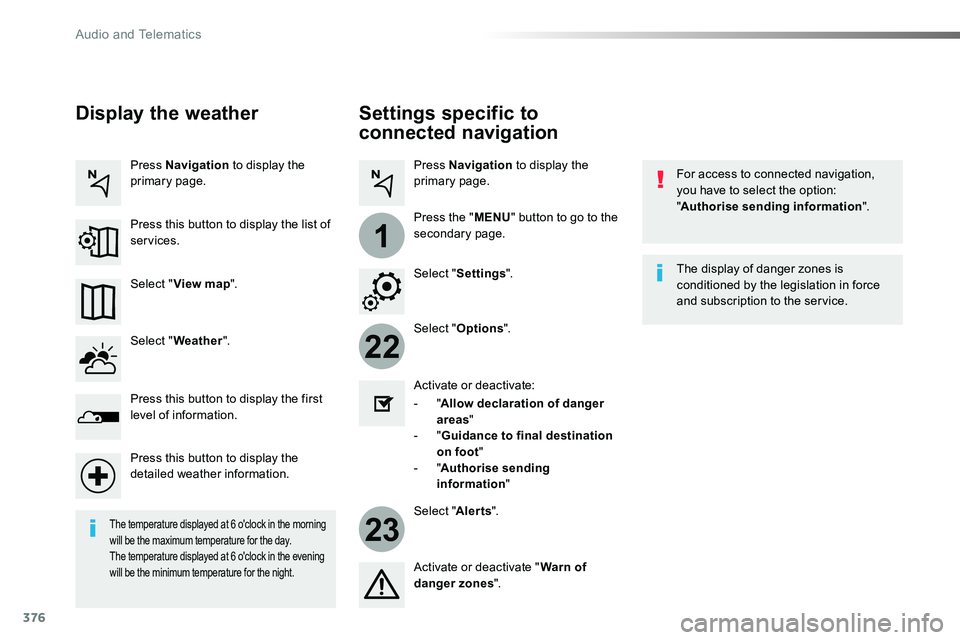
Settings specific to
connected navigation
For access to connected navigation, you have to select the option: "Authorise sending information".
Select "Options".
Select "Alerts".
- "Allow declaration of danger areas"
- "Guidance to final destination on foot"- "Authorise sending information"
Activate or deactivate:
Activate or deactivate "Warn of danger zones".
The display of danger zones is conditioned by the legislation in force and subscription to the service.
The temperature displayed at 6 o'clock in the morning will be the maximum temperature for the day.The temperature displayed at 6 o'clock in the evening will be the minimum temperature for the night.
Select "Settings".
Press Navigation to display the primary page.
Press the "MENU" button to go to the
secondary page.
Display the weather
Select "Weather".
Press this button to display the first level of information.
Press this button to display the detailed weather information.
Select "View map".
Press Navigation to display the primary page.
Press this button to display the list of services.
Audio and Telematics
Page 377 of 516
377
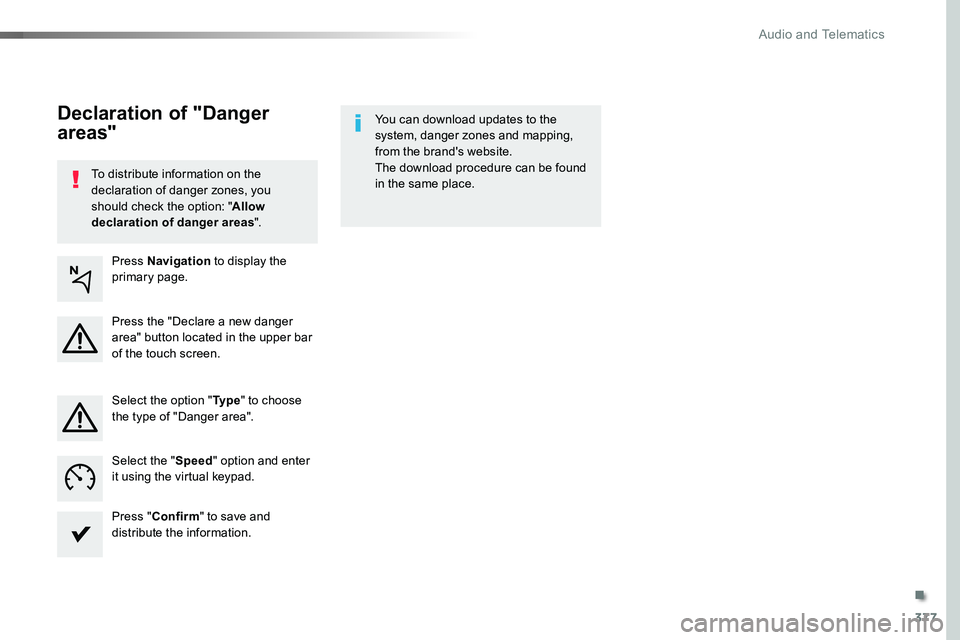
To distribute information on the declaration of danger zones, you should check the option: "Allow declaration of danger areas".
You can download updates to the system, danger zones and mapping, from the brand's website.The download procedure can be found in the same place.
Declaration of "Danger
areas"
Press Navigation to display the primary page.
Press the "Declare a new danger area" button located in the upper bar of the touch screen.
Select the option "Ty p e" to choose the type of "Danger area".
Select the "Speed" option and enter it using the virtual keypad.
Press "Confirm" to save and distribute the information.
.
Audio and Telematics
Page 380 of 516
380
1
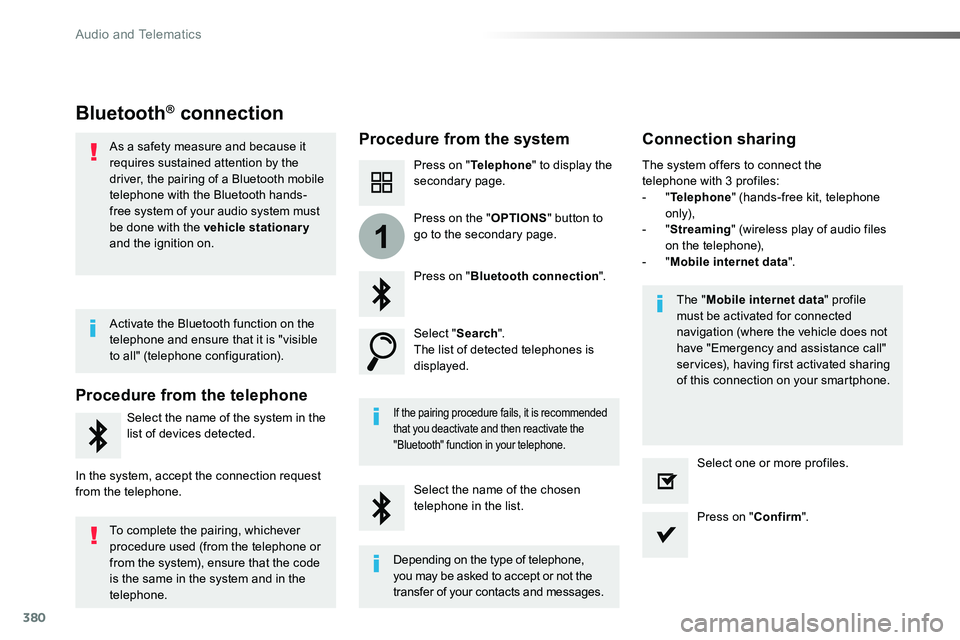
Bluetooth® connection
Procedure from the systemConnection sharing
Press on "Telephone" to display the secondary page.
Press on "Bluetooth connection".
Select "Search".The list of detected telephones is displayed.
If the pairing procedure fails, it is recommended that you deactivate and then reactivate the
"Bluetooth" function in your telephone.
The "Mobile internet data" profile must be activated for connected navigation (where the vehicle does not have "Emergency and assistance call" services), having first activated sharing of this connection on your smartphone.
The system offers to connect the telephone with 3 profiles:- "Telephone" (hands-free kit, telephone only),- "Streaming" (wireless play of audio files on the telephone),- "Mobile internet data".
Select the name of the chosen telephone in the list.Press on "Confirm".
Select one or more profiles.
Press on the "OPTIONS" button to go to the secondary page.
As a safety measure and because it requires sustained attention by the driver, the pairing of a Bluetooth mobile telephone with the Bluetooth hands-free system of your audio system must
be done with the vehicle stationary and the ignition on.
Procedure from the telephone
Select the name of the system in the
list of devices detected.
In the system, accept the connection request from the telephone.
Activate the Bluetooth function on the telephone and ensure that it is "visible to all" (telephone configuration).
To complete the pairing, whichever procedure used (from the telephone or from the system), ensure that the code is the same in the system and in the
telephone.
Depending on the type of telephone, you may be asked to accept or not the
transfer of your contacts and messages.
Audio and Telematics
Page 406 of 516
406
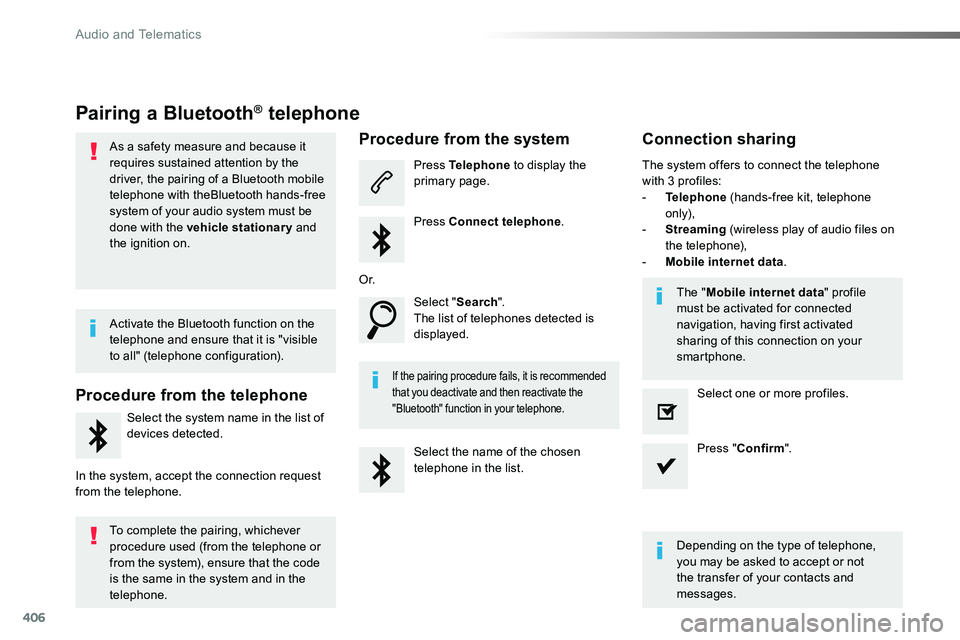
Pairing a Bluetooth® telephone
As a safety measure and because it requires sustained attention by the driver, the pairing of a Bluetooth mobile telephone with theBluetooth hands-free system of your audio system must be
done with the vehicle stationary and the ignition on.
Procedure from the telephone
Select the system name in the list of
devices detected.
In the system, accept the connection request from the telephone.
Procedure from the system
Press Telephone to display the primary page.
Press Connect telephone.
Select "Search".The list of telephones detected is displayed.
If the pairing procedure fails, it is recommended that you deactivate and then reactivate the "Bluetooth" function in your telephone.
The system offers to connect the telephone with 3 profiles:- Telephone (hands-free kit, telephone only),- Streaming (wireless play of audio files on the telephone),- Mobile internet data.
Depending on the type of telephone, you may be asked to accept or not the transfer of your contacts and messages.
Select the name of the chosen telephone in the list.
Press "Confirm".
Select one or more profiles.
O r.
Activate the Bluetooth function on the telephone and ensure that it is "visible to all" (telephone configuration).
To complete the pairing, whichever procedure used (from the telephone or from the system), ensure that the code is the same in the system and in the
telephone.
The "Mobile internet data" profile must be activated for connected navigation, having first activated sharing of this connection on your smartphone.
Connection sharing
Audio and Telematics
Page 422 of 516
422
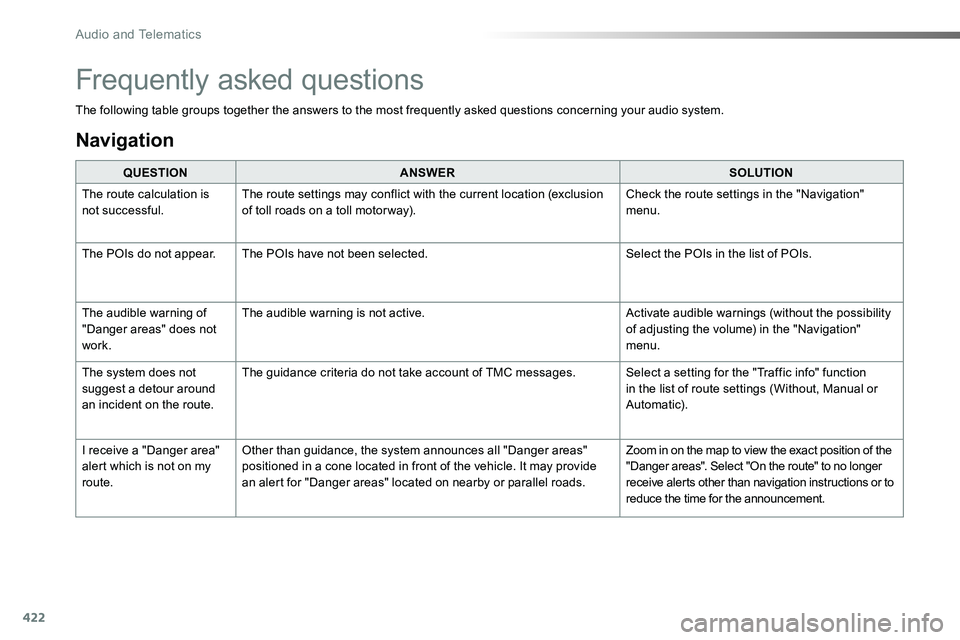
The following table groups together the answers to the most frequently asked questions concerning your audio system.
QUESTIONANSWERSOLUTION
The route calculation is not successful.The route settings may conflict with the current location (exclusion of toll roads on a toll motor way).Check the route settings in the "Navigation" menu.
The POIs do not appear.The POIs have not been selected.Select the POIs in the list of POIs.
The audible warning of "Danger areas" does not work.
The audible warning is not active.Activate audible warnings (without the possibility of adjusting the volume) in the "Navigation" menu.
The system does not suggest a detour around an incident on the route.
The guidance criteria do not take account of TMC messages.Select a setting for the "Traffic info" function in the list of route settings (Without, Manual or Automatic).
I receive a "Danger area" alert which is not on my route.
Other than guidance, the system announces all "Danger areas" positioned in a cone located in front of the vehicle. It may provide an alert for "Danger areas" located on nearby or parallel roads.
Zoom in on the map to view the exact position of the "Danger areas". Select "On the route" to no longer receive alerts other than navigation instructions or to reduce the time for the announcement.
Frequently asked questions
Navigation
Audio and Telematics
Page 509 of 516
509
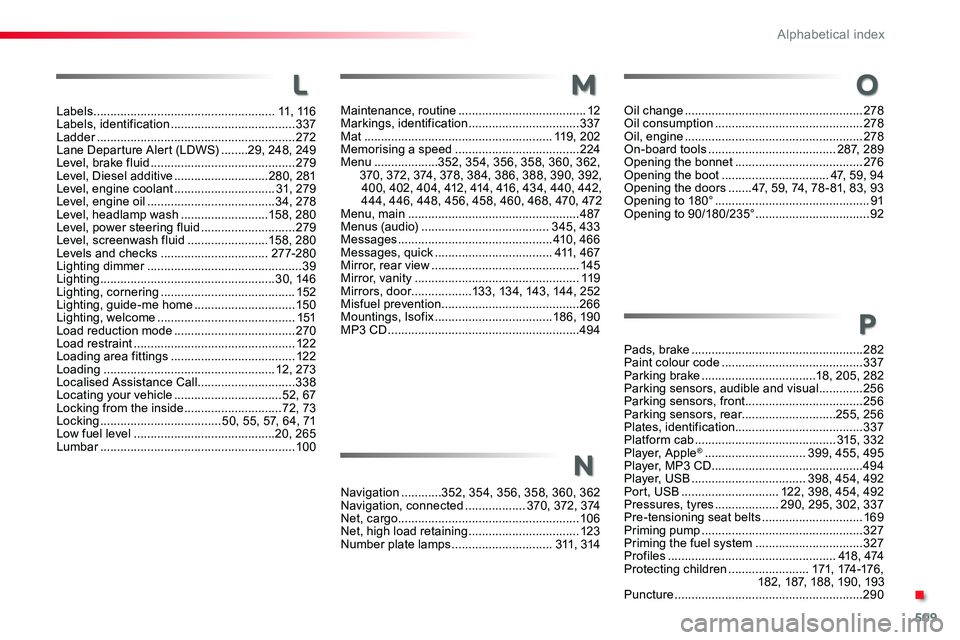
Maintenance, routine ......................................12Markings, identification .................................337Mat ........................................................11 9 , 2 0 2Memorising a speed .....................................224Menu ...................352, 354, 356, 358, 360, 362, 370, 372, 374, 378, 384, 386, 388, 390, 392, 400, 402, 404, 412, 414, 416, 434, 440, 442, 444, 446, 448, 456, 458, 460, 468, 470, 472Menu, main ...................................................487Menus (audio) ......................................345, 433Messages ..............................................410 , 4 6 6Messages, quick ...................................411, 4 6 7Mirror, rear view ............................................145Mirror, vanity .................................................11 9Mirrors, door..................133, 134, 143, 144, 252Misfuel prevention .........................................266Mountings, Isofix ...................................18 6, 19 0MP3 CD .........................................................494
Labels ......................................................11, 11 6Labels, identification .....................................337Ladder ...........................................................272Lane Departure Alert (LDWS) ........29, 248, 249Level, brake fluid ...........................................279Level, Diesel additive ............................280, 281Level, engine coolant ..............................31, 279Level, engine oil ......................................34, 278Level, headlamp wash ..........................15 8, 28 0Level, power steering fluid ............................279Level, screenwash fluid ........................15 8, 28 0Levels and checks ................................27 7-2 8 0Lighting dimmer ..............................................39Lighting ....................................................3 0, 146Lighting, cornering ........................................152Lighting, guide-me home ..............................150Lighting, welcome .........................................151Load reduction mode ....................................270Load restraint ................................................12 2Loading area fittings .....................................12 2Loading ...................................................12, 273Localised Assistance Call .............................338Locating your vehicle ................................52, 67Locking from the inside .............................72, 73Locking ....................................50, 55, 57, 64, 71Low fuel level ..........................................20, 265Lumbar ..........................................................10 0
LM
Navigation ............352, 354, 356, 358, 360, 362Navigation, connected ..................370, 372, 374Net, cargo......................................................10 6Net, high load retaining .................................123Number plate lamps ..............................311, 314
N
Oil change .....................................................278Oil consumption ............................................278Oil, engine .....................................................278On-board tools ......................................287, 289Opening the bonnet ......................................276Opening the boot ................................47, 59, 94Opening the doors .......47, 59, 74, 78 - 81, 83, 93Opening to 180° ..............................................91Opening to 90/180/235° ..................................92
Pads, brake ...................................................282Paint colour code ..........................................337Parking brake ..................................18, 205, 282Parking sensors, audible and visual .............256Parking sensors, front ...................................256Parking sensors, rear............................255, 256Plates, identification......................................337Platform cab ..........................................315, 332Player, Apple® ..............................399, 455, 495Player, MP3 CD .............................................494Player, USB ..................................398, 454, 492Port, USB .............................122, 398, 454, 492Pressures, tyres ...................290, 295, 302, 337Pre-tensioning seat belts ..............................169Priming pump ................................................327Priming the fuel system ................................327Profiles ..................................................418 , 474Protecting children ........................171, 174 -176 , 182, 187, 188, 190, 193Puncture ........................................................290
O
P
.
Alphabetical index
Page 511 of 516
511
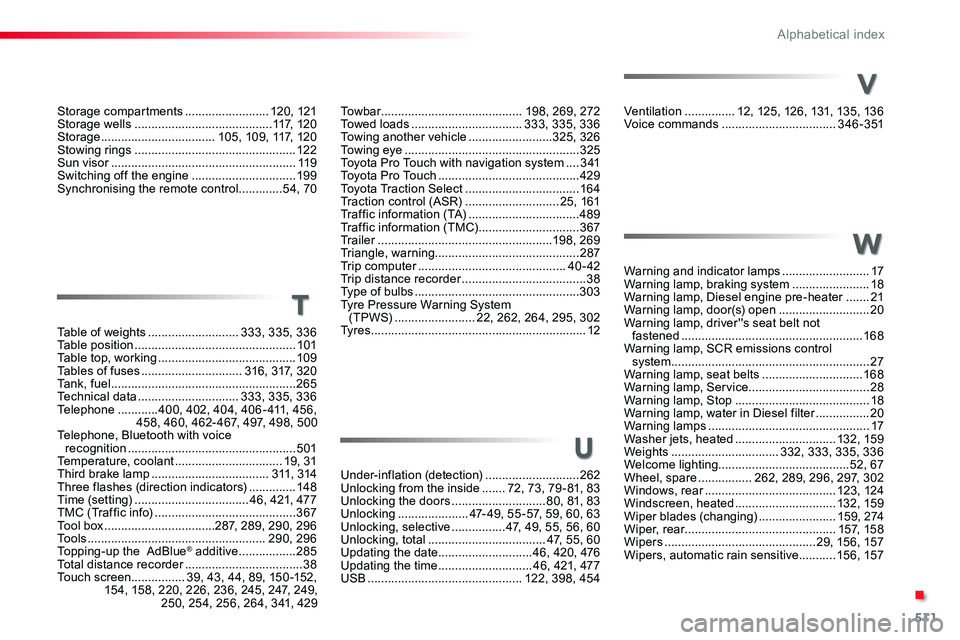
Ventilation ...............12, 125, 126, 131, 135, 136Voice commands ..................................3 4 6 - 3 51
Warning and indicator lamps ..........................17Warning lamp, braking system .......................18Warning lamp, Diesel engine pre-heater .......21Warning lamp, door(s) open ...........................20Warning lamp, driver''s seat belt not fastened ......................................................168Warning lamp, SCR emissions control system ...........................................................27Warning lamp, seat belts ..............................168Warning lamp, Service....................................28Warning lamp, Stop ........................................18Warning lamp, water in Diesel filter ................20Warning lamps ................................................17Washer jets, heated ..............................132, 159Weights ................................332, 333, 335, 336Welcome lighting.......................................52, 67Wheel, spare ................262, 289, 296, 297, 302Windows, rear .......................................123, 124Windscreen, heated ..............................132, 159Wiper blades (changing) .......................15 9 , 2 74Wiper, rear.............................................157, 15 8Wipers .............................................29, 15 6, 157Wipers, automatic rain sensitive ...........15 6, 157
Under-inflation (detection) ............................262Unlocking from the inside .......72, 73, 79 - 81, 83Unlocking the doors ............................80, 81, 83Unlocking .....................47- 49, 55 -57, 59, 60, 63Unlocking, selective ................47, 49, 55, 56, 60Unlocking, total ...................................47, 55, 60Updating the date ............................46, 420, 476Updating the time ............................46, 421, 477USB ..............................................122, 398, 454
Table of weights ...........................333, 335, 336Table position ................................................101Table top, working .........................................109Tables of fuses ..............................316, 317, 320Ta n k , f u e l .......................................................265Technical data ..............................333, 335, 336Telephone ............400, 402, 404, 406 - 411, 456, 458, 460, 462- 467, 497, 498, 500Telephone, Bluetooth with voice recognition ..................................................501Temperature, coolant ................................19, 31Third brake lamp ...................................311, 314Three flashes (direction indicators) ..............148Time (setting) ..................................46, 421, 477TMC (Traffic info) ..........................................367Tool box .................................287, 289, 290, 296To o l s .....................................................290, 296Topping-up the AdBlue® additive .................285Total distance recorder ...................................38Touch screen................39, 43, 44, 89, 150 -152, 154, 158, 220, 226, 236, 245, 247, 249, 250, 254, 256, 264, 341, 429
V
W
U
T
To w b a r ..........................................198, 269, 272Towed loads .................................333, 335, 336Towing another vehicle .........................325, 326Towing eye ....................................................325Toyota Pro Touch with navigation system ....3 41To y o t a P r o To u c h ..........................................429Toyota Traction Select ..................................16 4Traction control (ASR) ............................25, 161Traffic information (TA) .................................489Traffic information (TMC) ..............................367Tr a i l e r ....................................................198, 269Triangle, warning...........................................287Trip computer ............................................40 - 42Trip distance recorder .....................................38Type of bulbs .................................................303Tyre Pressure Warning System (TPWS) ........................22, 262, 264, 295, 302Ty r e s ................................................................12
Storage compartments .........................120, 121Storage wells .........................................117, 1 2 0Storage ..................................105, 109, 117, 120Stowing rings ................................................12 2Sun visor .......................................................11 9Switching off the engine ...............................19 9Synchronising the remote control .............54, 70
.
Alphabetical index