manual radio set TOYOTA PROACE 2017 Owners Manual
[x] Cancel search | Manufacturer: TOYOTA, Model Year: 2017, Model line: PROACE, Model: TOYOTA PROACE 2017Pages: 516, PDF Size: 91.65 MB
Page 6 of 516
6
Instruments and controls
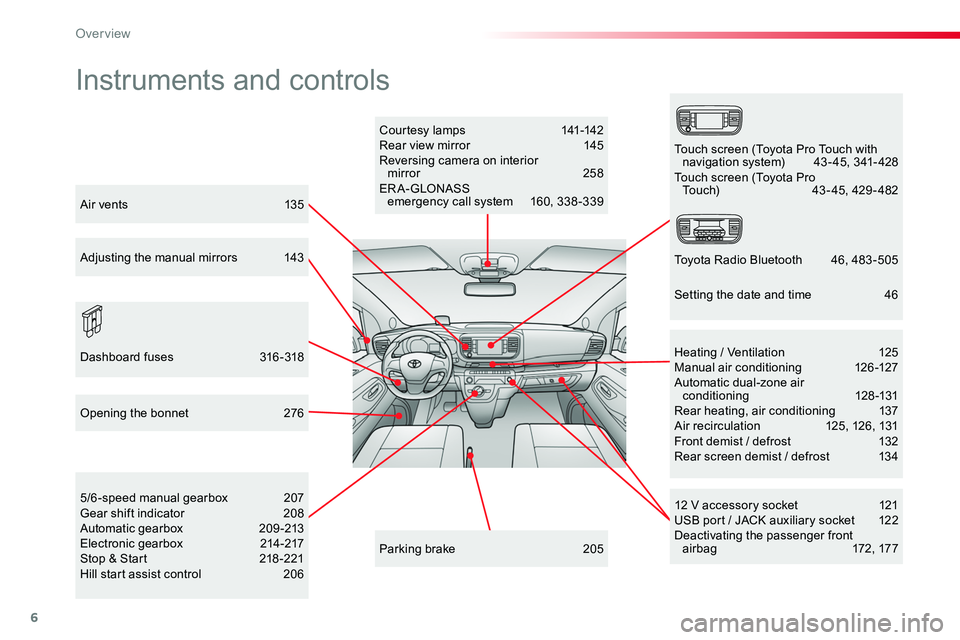
Courtesy lamps 141-142Rear view mirror 145Reversing camera on interior mirror 258ER A- GLONASS emergency call system 160, 338 -339
12 V accessory socket 121USB port / JACK auxiliary socket 122Deactivating the passenger front a i r b a g 172 , 17 7
5/6-speed manual gearbox 207Gear shift indicator 208Automatic gearbox 209-213Electronic gearbox 214-217Stop & Start 218 -221Hill start assist control 206
Heating / Ventilation 125Manual air conditioning 126-127Automatic dual-zone air conditioning 128-131Rear heating, air conditioning 137Air recirculation 125, 126, 131Front demist / defrost 132Rear screen demist / defrost 134
Parking brake 205
Opening the bonnet 276
Dashboard fuses 316-318
Touch screen (Toyota Pro Touch with navigation system) 43 - 45, 341- 428Touch screen (Toyota Pro Touch) 43-45, 429-482
Toyota Radio Bluetooth 46, 483 -505
Air vents 135
Adjusting the manual mirrors 143
Setting the date and time 46
Over view
Page 389 of 516
389
3
2
4
Level 1Level 2Comments
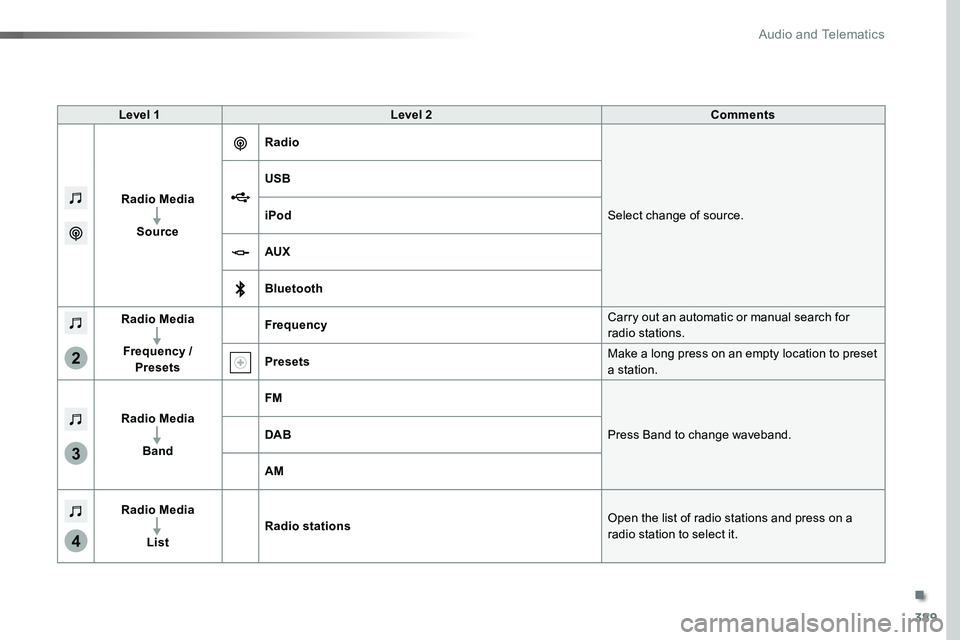
Radio Media
Source
Radio
Select change of source.
USB
iPod
AUX
Bluetooth
Radio Media
Frequency / Presets
FrequencyCarry out an automatic or manual search for radio stations.
PresetsMake a long press on an empty location to preset a station.
Radio Media
Band
FM
Press Band to change waveband.DAB
AM
Radio Media
List
Radio stationsOpen the list of radio stations and press on a
radio station to select it.
.
Audio and Telematics
Page 391 of 516
391
5
12
8
6
13
14
15
9
7
10
11
1
1
1
Level 1Level 2Comments
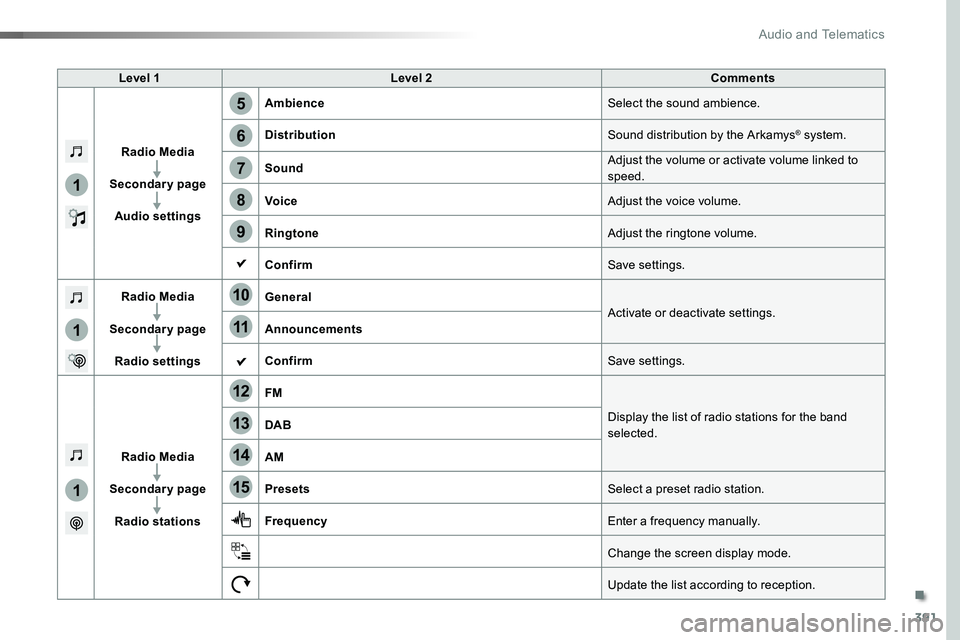
Radio Media
Secondary page
Audio settings
AmbienceSelect the sound ambience.
DistributionSound distribution by the Arkamys® system.
SoundAdjust the volume or activate volume linked to speed.
VoiceAdjust the voice volume.
RingtoneAdjust the ringtone volume.
ConfirmSave settings.
Radio Media
Secondary page
Radio settings
GeneralActivate or deactivate settings.Announcements
ConfirmSave settings.
Radio Media
Secondary page
Radio stations
FM
Display the list of radio stations for the band selected.DAB
AM
PresetsSelect a preset radio station.
FrequencyEnter a frequency manually.
Change the screen display mode.
Update the list according to reception.
.
Audio and Telematics
Page 394 of 516
394
1
2
2
2
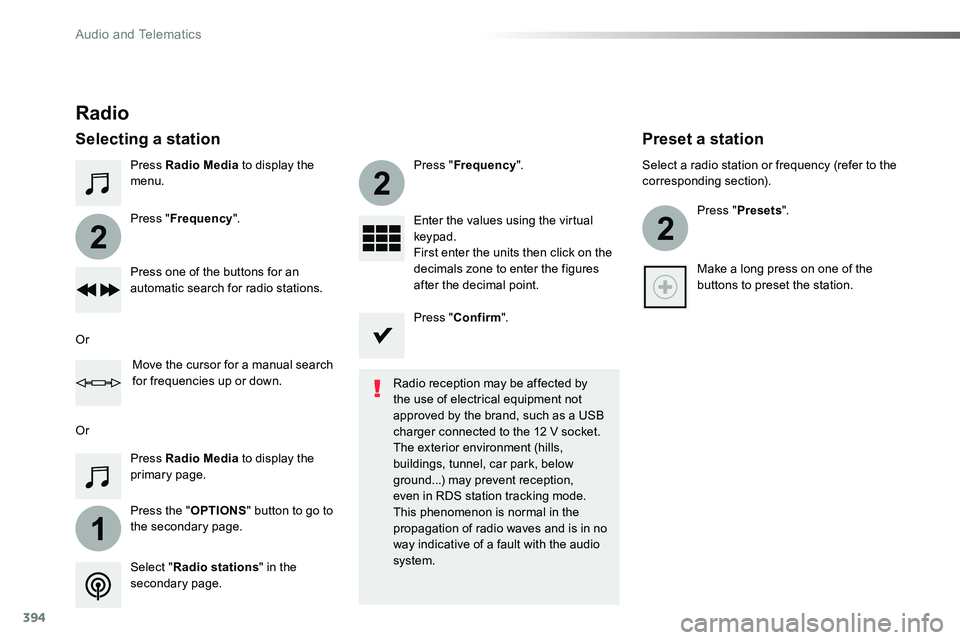
Press Radio Media to display the menu.
Press the "OPTIONS" button to go to the secondary page.
Press "Frequency".
Press "Frequency".
Enter the values using the virtual keypad.First enter the units then click on the decimals zone to enter the figures after the decimal point.Press one of the buttons for an automatic search for radio stations.
Press Radio Media to display the primary page.
Radio
Selecting a station
Radio reception may be affected by the use of electrical equipment not approved by the brand, such as a USB
charger connected to the 12 V socket.The exterior environment (hills, buildings, tunnel, car park, below ground...) may prevent reception, even in RDS station tracking mode. This phenomenon is normal in the propagation of radio waves and is in no way indicative of a fault with the audio system.Select "Radio stations" in the secondary page.
Or
Or
Move the cursor for a manual search for frequencies up or down.
Select a radio station or frequency (refer to the corresponding section).
Press "Presets".
Make a long press on one of the buttons to preset the station.
Preset a station
Press "Confirm".
Audio and Telematics
Page 445 of 516
445
3
2
4
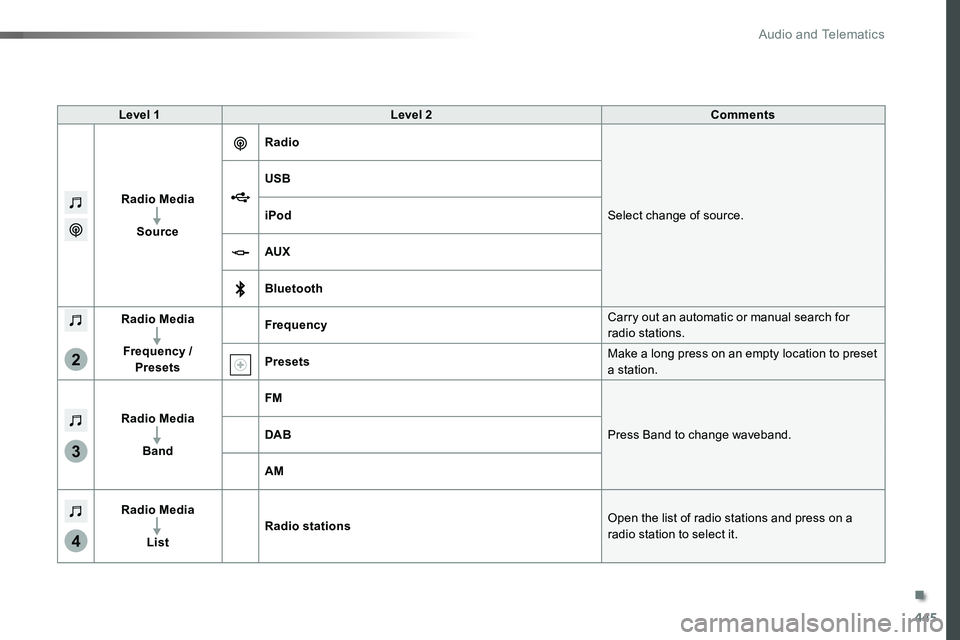
Level 1Level 2Comments
Radio Media
Source
Radio
Select change of source.
USB
iPod
AUX
Bluetooth
Radio Media
Frequency / Presets
FrequencyCarry out an automatic or manual search for radio stations.
PresetsMake a long press on an empty location to preset a station.
Radio Media
Band
FM
Press Band to change waveband.DAB
AM
Radio Media
List
Radio stationsOpen the list of radio stations and press on a
radio station to select it.
.
Audio and Telematics
Page 447 of 516
447
1
1
1
5
12
8
6
13
14
15
9
7
10
11
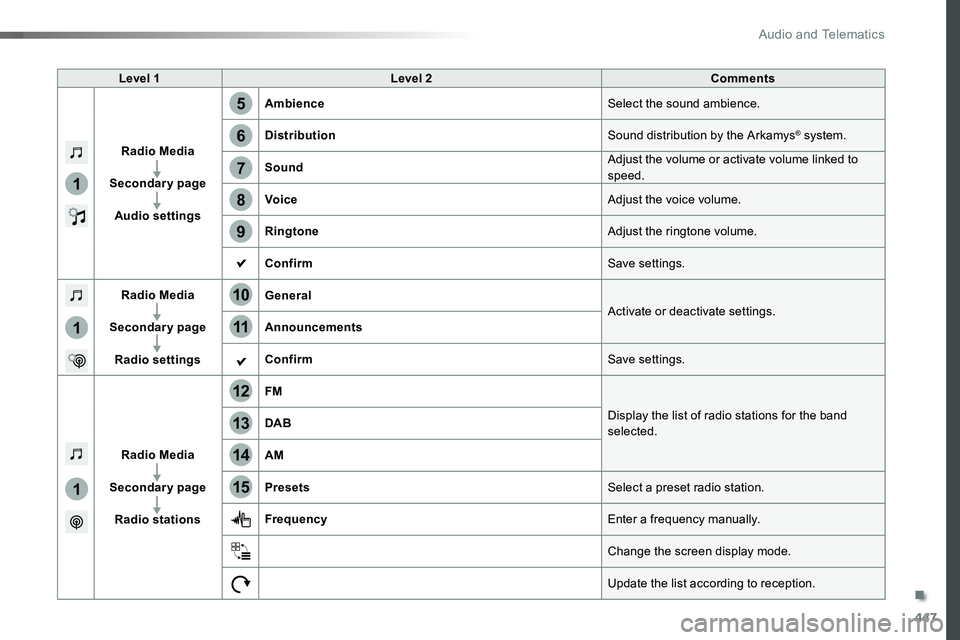
Level 1Level 2Comments
Radio Media
Secondary page
Audio settings
AmbienceSelect the sound ambience.
DistributionSound distribution by the Arkamys® system.
SoundAdjust the volume or activate volume linked to speed.
VoiceAdjust the voice volume.
RingtoneAdjust the ringtone volume.
ConfirmSave settings.
Radio Media
Secondary page
Radio settings
GeneralActivate or deactivate settings.Announcements
ConfirmSave settings.
Radio Media
Secondary page
Radio stations
FM
Display the list of radio stations for the band selected.DAB
AM
PresetsSelect a preset radio station.
FrequencyEnter a frequency manually.
Change the screen display mode.
Update the list according to reception.
.
Audio and Telematics
Page 450 of 516
450
1
2
2
2
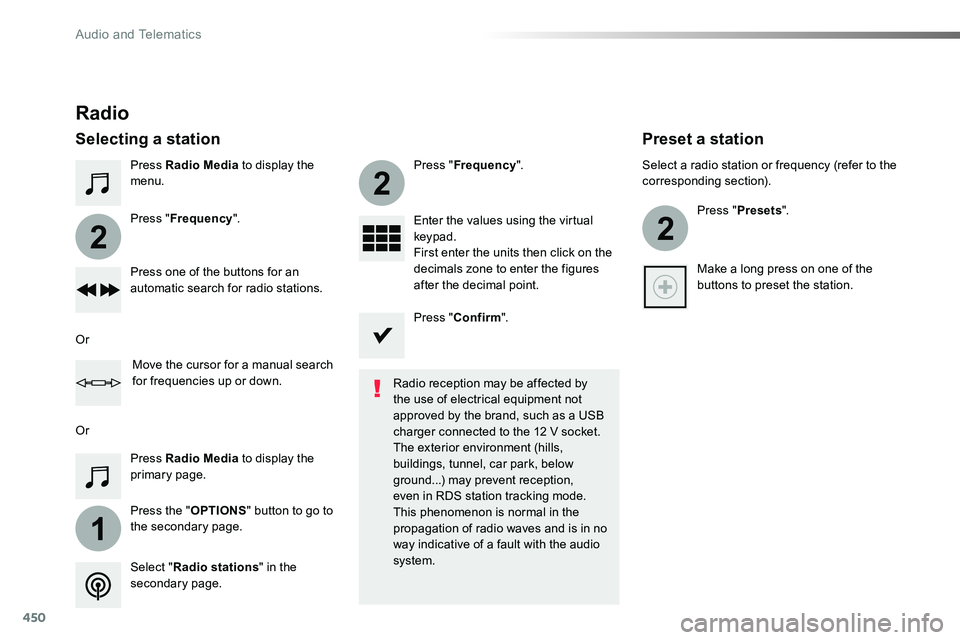
Press Radio Media to display the menu.
Press the "OPTIONS" button to go to the secondary page.
Press "Frequency".
Press "Frequency".
Enter the values using the virtual keypad.First enter the units then click on the decimals zone to enter the figures after the decimal point.Press one of the buttons for an automatic search for radio stations.
Press Radio Media to display the primary page.
Radio
Selecting a station
Radio reception may be affected by the use of electrical equipment not approved by the brand, such as a USB
charger connected to the 12 V socket.The exterior environment (hills, buildings, tunnel, car park, below ground...) may prevent reception, even in RDS station tracking mode. This phenomenon is normal in the propagation of radio waves and is in no way indicative of a fault with the audio system.Select "Radio stations" in the secondary page.
Or
Or
Move the cursor for a manual search for frequencies up or down.
Select a radio station or frequency (refer to the corresponding section).
Press "Presets".
Make a long press on one of the buttons to preset the station.
Preset a station
Press "Confirm".
Audio and Telematics
Page 484 of 516
484
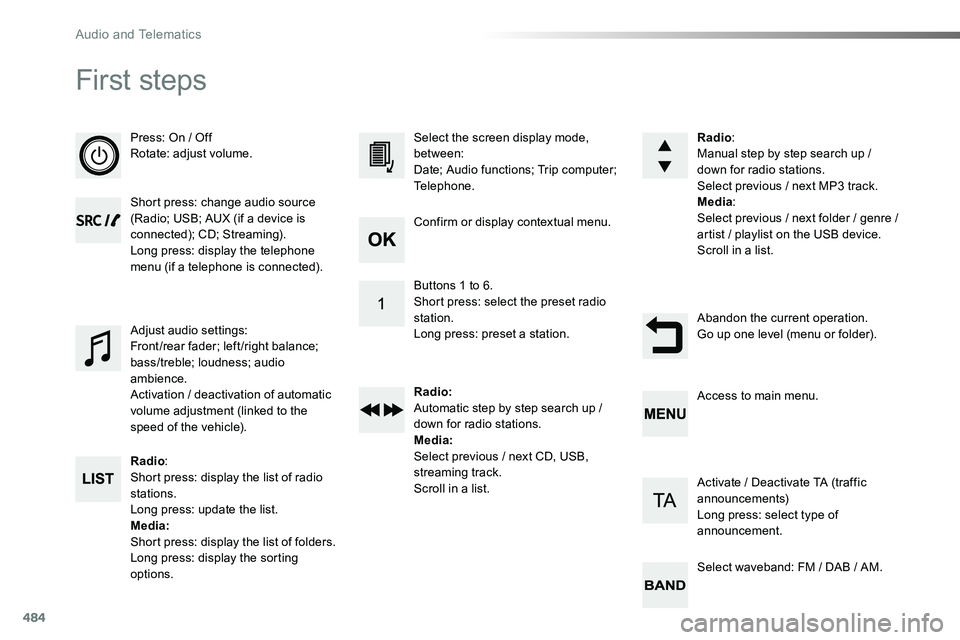
First steps
Press: On / OffRotate: adjust volume.
Short press: change audio source (Radio; USB; AUX (if a device is connected); CD; Streaming).Long press: display the telephone menu (if a telephone is connected).
Radio:Short press: display the list of radio stations.Long press: update the list.Media:Short press: display the list of folders.Long press: display the sorting options.
Select the screen display mode, between:Date; Audio functions; Trip computer; Telephone.
Adjust audio settings:Front/rear fader; left/right balance; bass/treble; loudness; audio ambience.Activation / deactivation of automatic volume adjustment (linked to the speed of the vehicle).
Radio:Manual step by step search up / down for radio stations.Select previous / next MP3 track.Media:Select previous / next folder / genre / artist / playlist on the USB device.Scroll in a list.
Abandon the current operation.Go up one level (menu or folder).
Confirm or display contextual menu.
Buttons 1 to 6.Short press: select the preset radio station.Long press: preset a station.
Radio:Automatic step by step search up / down for radio stations.Media:Select previous / next CD, USB, streaming track.Scroll in a list.
Access to main menu.
Activate / Deactivate TA (traffic announcements)Long press: select type of announcement.
Select waveband: FM / DAB / AM.
Audio and Telematics
Page 510 of 516
510
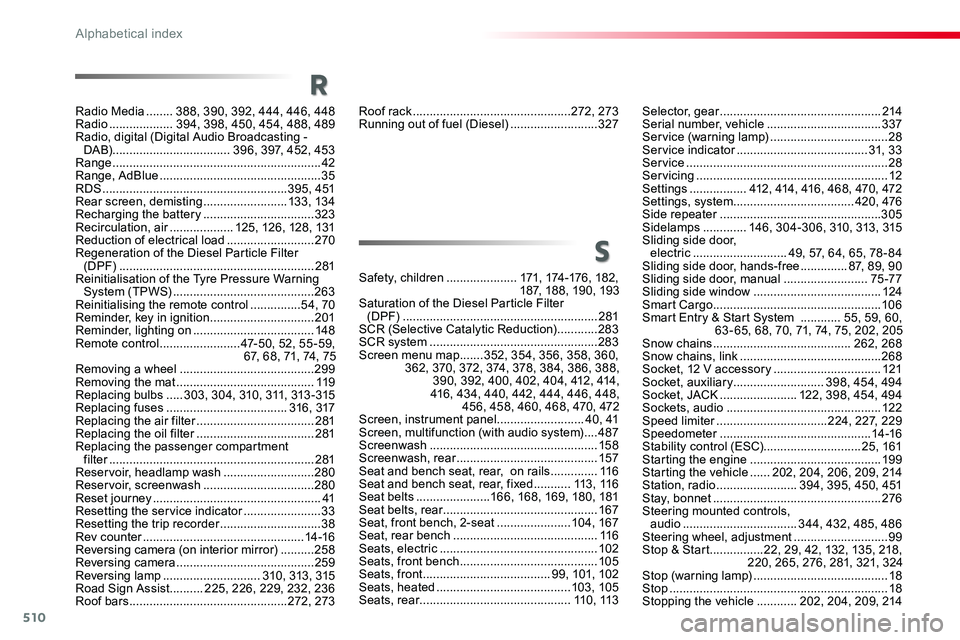
Roof rack ...............................................272, 273Running out of fuel (Diesel) ..........................327
Safety, children .....................171, 174 -176 , 18 2 , 187, 188, 190, 193Saturation of the Diesel Particle Filter (DPF) ..........................................................281SCR (Selective Catalytic Reduction) ............283SCR system ..................................................283Screen menu map .......352, 354, 356, 358, 360, 362, 370, 372, 374, 378, 384, 386, 388, 390, 392, 400, 402, 404, 412, 414, 416, 434, 440, 442, 444, 446, 448, 456, 458, 460, 468, 470, 472Screen, instrument panel ..........................4 0 , 41Screen, multifunction (with audio system) ....487Screenwash ..................................................15 8Screenwash, rear ..........................................157Seat and bench seat, rear, on rails ..............11 6Seat and bench seat, rear, fixed ...........113 , 11 6Seat belts ......................166, 168, 169, 180, 181Seat belts, rear ..............................................167Seat, front bench, 2-seat ......................104, 167Seat, rear bench ...........................................11 6Seats, electric ...............................................102Seats, front bench .........................................105Seats, front ......................................99, 101, 102Seats, heated ........................................103, 105Seats, rear .............................................11 0 , 113
S
Selector, gear ................................................214Serial number, vehicle ..................................337Service (warning lamp) ...................................28Service indicator .......................................31, 3 3Service ............................................................28Servicing .........................................................12Settings .................412, 414, 416, 468, 470, 472Settings, system ....................................420, 476Side repeater ................................................305Sidelamps .............146, 304-306, 310, 313, 315Sliding side door, electric ............................49, 57, 64, 65, 78 - 84Sliding side door, hands-free ..............87, 89, 90Sliding side door, manual .........................75 -77Sliding side window ......................................124Smart Cargo ..................................................10 6Smart Entry & Start System ............55, 59, 60, 63 - 65, 68, 70, 71, 74, 75, 202, 205Snow chains .........................................262, 268Snow chains, link ..........................................268Socket, 12 V accessory ................................121Socket, auxiliary ...........................398, 454, 494Socket, JACK .......................122, 398, 454, 494Sockets, audio ..............................................12 2Speed limiter .................................224, 227, 229Speedometer .............................................14 -16Stability control (ESC).............................25, 161Starting the engine .......................................19 9Starting the vehicle ......202, 204, 206, 209, 214Station, radio ........................394, 395, 450, 451Stay, bonnet ..................................................276Steering mounted controls, audio ..................................344, 432, 485, 486Steering wheel, adjustment ............................99Stop & Start ................22, 29, 42, 132, 135, 218, 220, 265, 276, 281, 321, 324Stop (warning lamp) ........................................18Stop .................................................................18Stopping the vehicle ............202, 204, 209, 214
Radio Media ........388, 390, 392, 444, 446, 448Radio ...................394, 398, 450, 454, 488, 489Radio, digital (Digital Audio Broadcasting - DA B)...................................396, 397, 452, 453Range ..............................................................42Range, AdBlue ................................................35RDS .......................................................3 9 5 , 4 51Rear screen, demisting .........................13 3, 13 4Recharging the battery .................................323Recirculation, air ...................125, 126, 128, 131Reduction of electrical load ..........................270Regeneration of the Diesel Particle Filter (DPF) ..........................................................281Reinitialisation of the Tyre Pressure Warning System (TPWS) ..........................................263Reinitialising the remote control ...............54, 70Reminder, key in ignition ...............................201Reminder, lighting on ....................................148Remote control ........................47-50, 52, 55 -59, 67, 68, 71, 74, 75Removing a wheel ........................................299Removing the mat .........................................11 9Replacing bulbs .....3 03, 3 0 4, 310, 311, 313 - 315Replacing fuses ....................................316, 317Replacing the air filter ...................................281Replacing the oil filter ...................................281Replacing the passenger compartment filter .............................................................281Reservoir, headlamp wash ...........................280Reservoir, screenwash .................................280Reset journey ..................................................41Resetting the service indicator .......................33Resetting the trip recorder ..............................38Rev counter ................................................14 -16Reversing camera (on interior mirror) ..........258Reversing camera .........................................259Reversing lamp .............................310, 313, 315Road Sign Assist ..........225, 226, 229, 232, 236Roof bars ...............................................272, 273
R
Alphabetical index