ad blue TOYOTA PROACE 2018 User Guide
[x] Cancel search | Manufacturer: TOYOTA, Model Year: 2018, Model line: PROACE, Model: TOYOTA PROACE 2018Pages: 516, PDF Size: 90.91 MB
Page 28 of 516
28
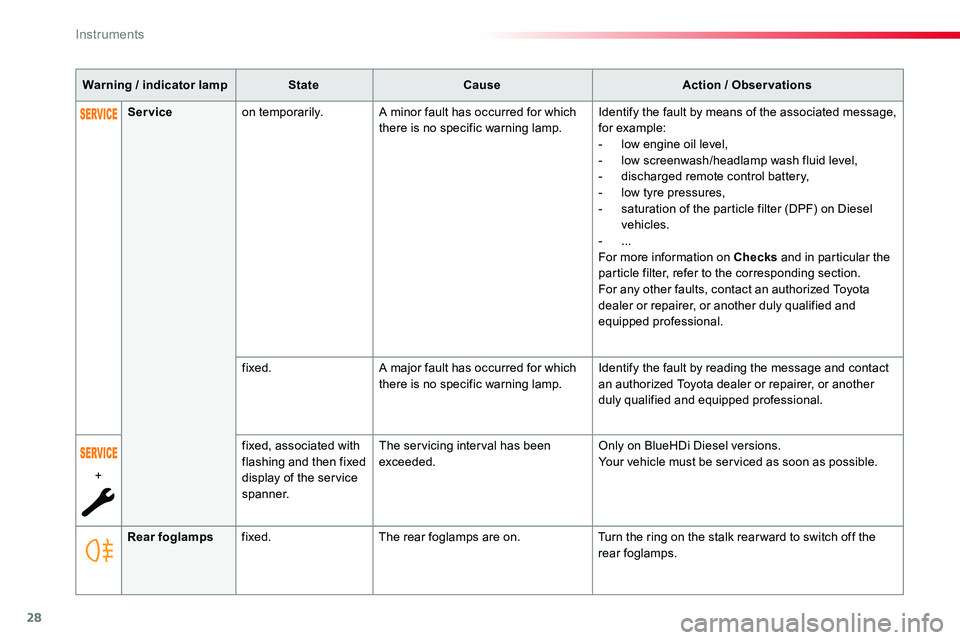
Warning / indicator lampStateCauseAction / Observations
Rear foglampsfixed.The rear foglamps are on.Turn the ring on the stalk rear ward to switch off the rear foglamps.
Serviceon temporarily.A minor fault has occurred for which there is no specific warning lamp.Identify the fault by means of the associated message, for example:- low engine oil level,- low screenwash/headlamp wash fluid level,- discharged remote control battery,- low tyre pressures,- saturation of the particle filter (DPF) on Diesel
vehicles.- ...For more information on Checks and in particular the particle filter, refer to the corresponding section.For any other faults, contact an authorized Toyota dealer or repairer, or another duly qualified and equipped professional.
fixed.A major fault has occurred for which there is no specific warning lamp.Identify the fault by reading the message and contact an authorized Toyota dealer or repairer, or another duly qualified and equipped professional.
+
fixed, associated with flashing and then fixed display of the service spanner.
The servicing interval has been exceeded.Only on BlueHDi Diesel versions.Your vehicle must be serviced as soon as possible.
Instruments
Page 31 of 516
31
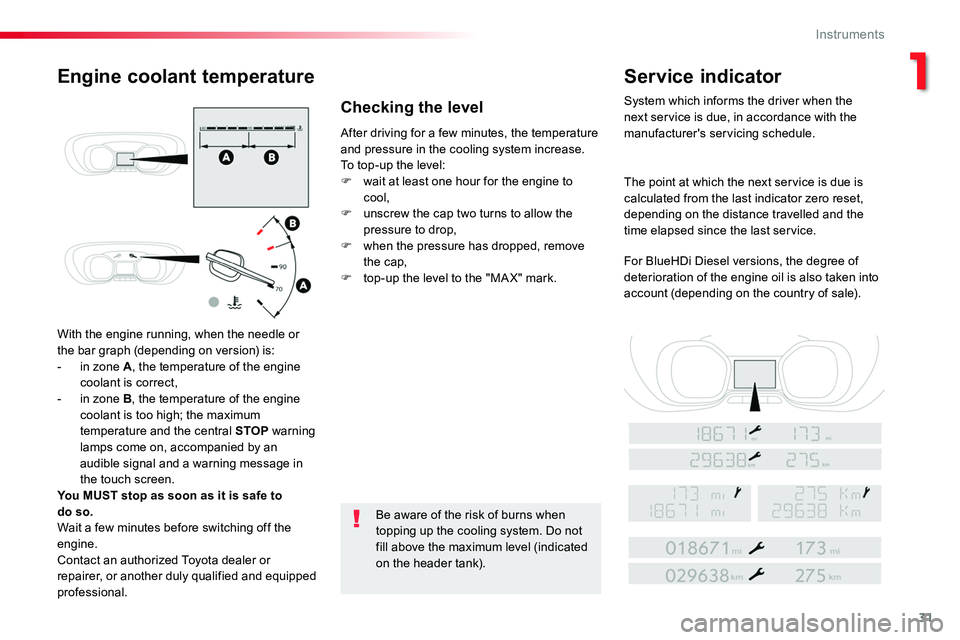
With the engine running, when the needle or the bar graph (depending on version) is:- in zone A, the temperature of the engine coolant is correct,- in zone B, the temperature of the engine coolant is too high; the maximum
temperature and the central STOP warning lamps come on, accompanied by an audible signal and a warning message in the touch screen.You MUST stop as soon as it is safe to do so.Wait a few minutes before switching off the engine.Contact an authorized Toyota dealer orrepairer, or another duly qualified and equipped
professional.
After driving for a few minutes, the temperature and pressure in the cooling system increase.To top-up the level:F wait at least one hour for the engine to cool,F unscrew the cap two turns to allow the pressure to drop,F when the pressure has dropped, remove the cap,F top-up the level to the "MA X" mark.
Be aware of the risk of burns when topping up the cooling system. Do not
fill above the maximum level (indicated on the header tank).
Engine coolant temperatureService indicator
System which informs the driver when the next service is due, in accordance with the manufacturer's servicing schedule.
The point at which the next service is due is calculated from the last indicator zero reset, depending on the distance travelled and the time elapsed since the last service.
For BlueHDi Diesel versions, the degree of deterioration of the engine oil is also taken into account (depending on the country of sale).
Checking the level
1
Instruments
Page 32 of 516
32
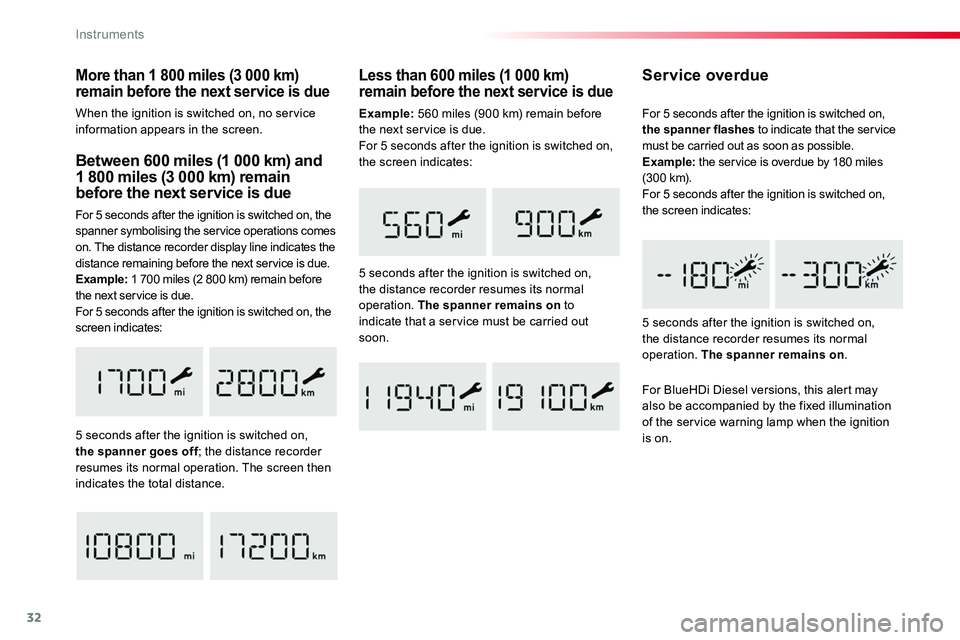
Between 600 miles (1 000 km) and 1 800 miles (3 000 km) remain before the next service is due
For 5 seconds after the ignition is switched on, the spanner symbolising the service operations comes on. The distance recorder display line indicates the distance remaining before the next service is due.Example: 1 700 miles (2 800 km) remain before the next service is due.For 5 seconds after the ignition is switched on, the screen indicates:
5 seconds after the ignition is switched on, the spanner goes off; the distance recorder resumes its normal operation. The screen then indicates the total distance.
Service overdue
5 seconds after the ignition is switched on, the distance recorder resumes its normal operation. The spanner remains on.
For 5 seconds after the ignition is switched on, the spanner flashes to indicate that the service must be carried out as soon as possible.Example: the service is overdue by 180 miles (300 km).For 5 seconds after the ignition is switched on, the screen indicates:
Less than 600 miles (1 000 km) remain before the next service is due
5 seconds after the ignition is switched on, the distance recorder resumes its normal operation. The spanner remains on to indicate that a service must be carried out soon.
For BlueHDi Diesel versions, this alert may also be accompanied by the fixed illumination of the service warning lamp when the ignition
is on.
More than 1 800 miles (3 000 km) remain before the next service is due
When the ignition is switched on, no service information appears in the screen.Example: 560 miles (900 km) remain before the next service is due.For 5 seconds after the ignition is switched on, the screen indicates:
Instruments
Page 33 of 516
33
The distance remaining may be weighted by the time factor, depending on the driving conditions.Therefore, the spanner may also come on if you have exceeded the period since the last service, indicated in the manufacturer's service schedule.For BlueHDi Diesel versions, the spanner may also be brought on earlier
than expected, depending on the degree of deterioration of the engine oil (depending on the country of sale).The rate of deterioration of the engine oil depends on the driving conditions in which the vehicle is used.
Resetting the service indicatorIf you have to disconnect the battery following this operation, lock the vehicle and wait at least five minutes for the reset to be registered.
You can access the service information at any time.
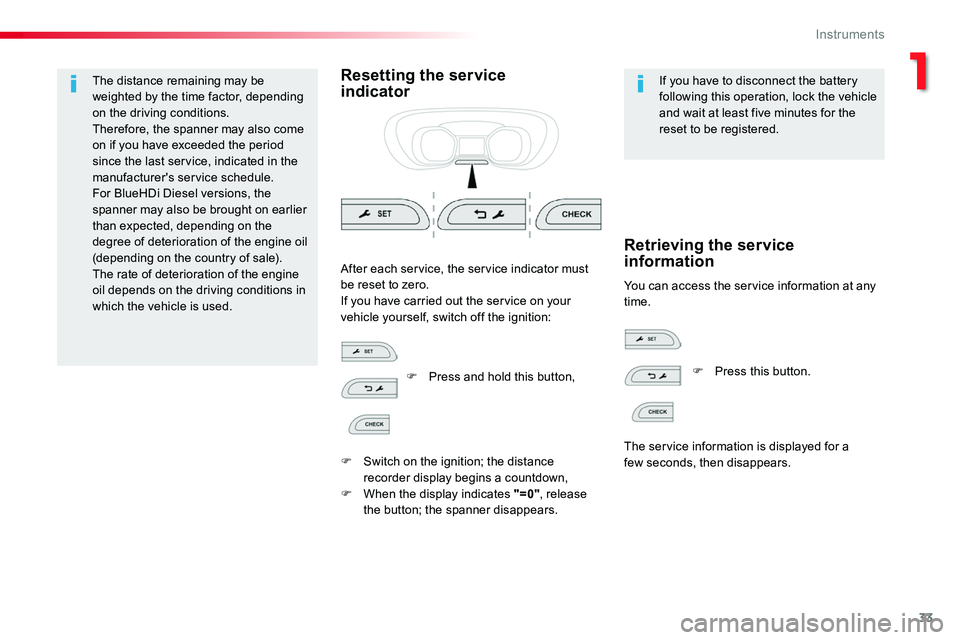
After each service, the service indicator must be reset to zero.If you have carried out the service on your vehicle yourself, switch off the ignition:
Retrieving the service information
F Press and hold this button,
F Switch on the ignition; the distance recorder display begins a countdown,F When the display indicates "=0", release the button; the spanner disappears.
F Press this button.
The service information is displayed for a few seconds, then disappears.
1
Instruments
Page 35 of 516
35
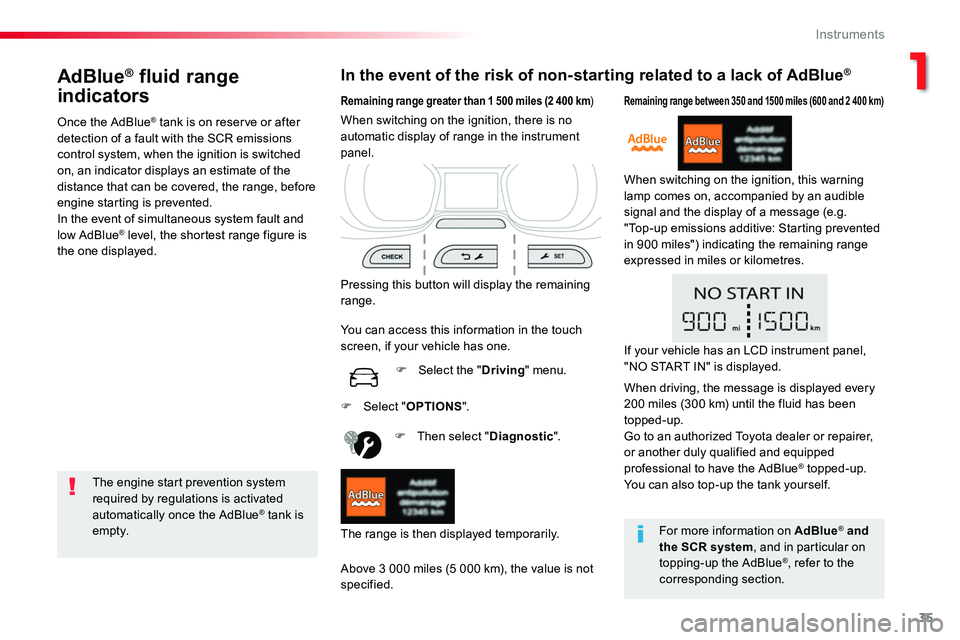
AdBlue® fluid range
indicators
Once the AdBlue® tank is on reserve or after detection of a fault with the SCR emissions control system, when the ignition is switched on, an indicator displays an estimate of the distance that can be covered, the range, before engine starting is prevented.In the event of simultaneous system fault and
low AdBlue® level, the shortest range figure is the one displayed.
In the event of the risk of non-starting related to a lack of AdBlue®
The engine start prevention system required by regulations is activated automatically once the AdBlue® tank is e m pt y.
Remaining range greater than 1 500 miles (2 400 km)
Pressing this button will display the remaining range.
F Then select "Diagnostic".
Above 3 000 miles (5 000 km), the value is not specified.
When switching on the ignition, there is no automatic display of range in the instrument panel.
The range is then displayed temporarily.
You can access this information in the touch screen, if your vehicle has one.
F Select the "Driving" menu.
Remaining range between 350 and 1500 miles (600 and 2 400 km)
When switching on the ignition, this warning lamp comes on, accompanied by an audible signal and the display of a message (e.g. "Top-up emissions additive: Starting prevented in 900 miles") indicating the remaining range expressed in miles or kilometres.
F Select "OPTIONS".
For more information on AdBlue® and
the SCR system, and in particular on topping-up the AdBlue®, refer to the corresponding section.
If your vehicle has an LCD instrument panel, "NO START IN" is displayed.
When driving, the message is displayed every 200 miles (300 km) until the fluid has been topped-up.Go to an authorized Toyota dealer or repairer, or another duly qualified and equipped professional to have the AdBlue® topped-up.You can also top-up the tank yourself.
1
Instruments
Page 36 of 516
36
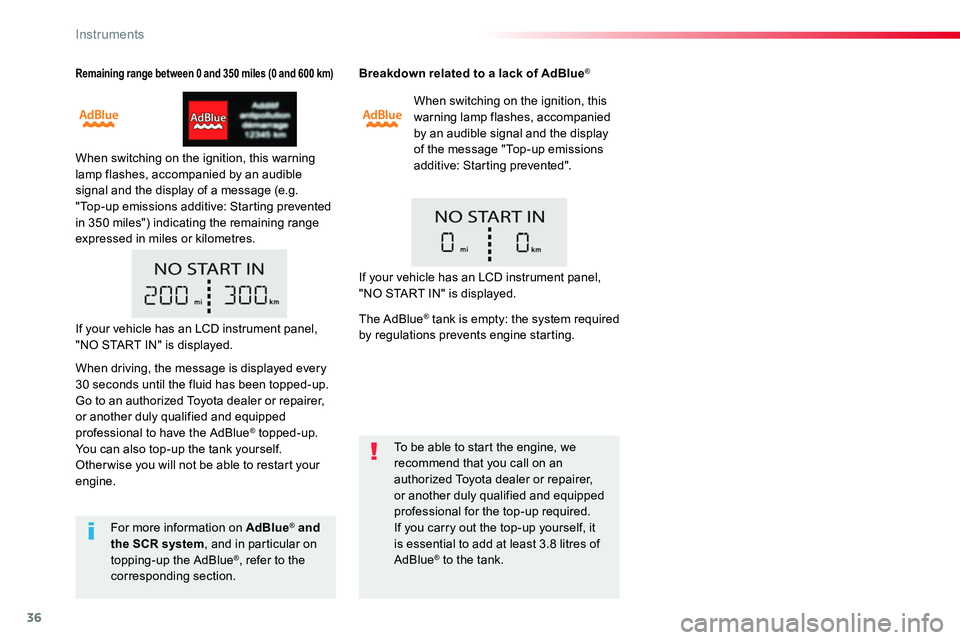
Remaining range between 0 and 350 miles (0 and 600 km)
When switching on the ignition, this warning lamp flashes, accompanied by an audible signal and the display of a message (e.g. "Top-up emissions additive: Starting prevented in 350 miles") indicating the remaining range expressed in miles or kilometres.
Breakdown related to a lack of AdBlue®
When switching on the ignition, this warning lamp flashes, accompanied by an audible signal and the display of the message "Top-up emissions additive: Starting prevented".
To be able to start the engine, we recommend that you call on an authorized Toyota dealer or repairer, or another duly qualified and equipped professional for the top-up required.If you carry out the top-up yourself, it is essential to add at least 3.8 litres of AdBlue® to the tank.
For more information on AdBlue® and the SCR system, and in particular on topping-up the AdBlue®, refer to the corresponding section.
If your vehicle has an LCD instrument panel, "NO START IN" is displayed.
If your vehicle has an LCD instrument panel, "NO START IN" is displayed.
When driving, the message is displayed every 30 seconds until the fluid has been topped-up.Go to an authorized Toyota dealer or repairer, or another duly qualified and equipped professional to have the AdBlue® topped-up.You can also top-up the tank yourself.Other wise you will not be able to restart your engine.
The AdBlue® tank is empty: the system required by regulations prevents engine starting.
Instruments
Page 137 of 516
137
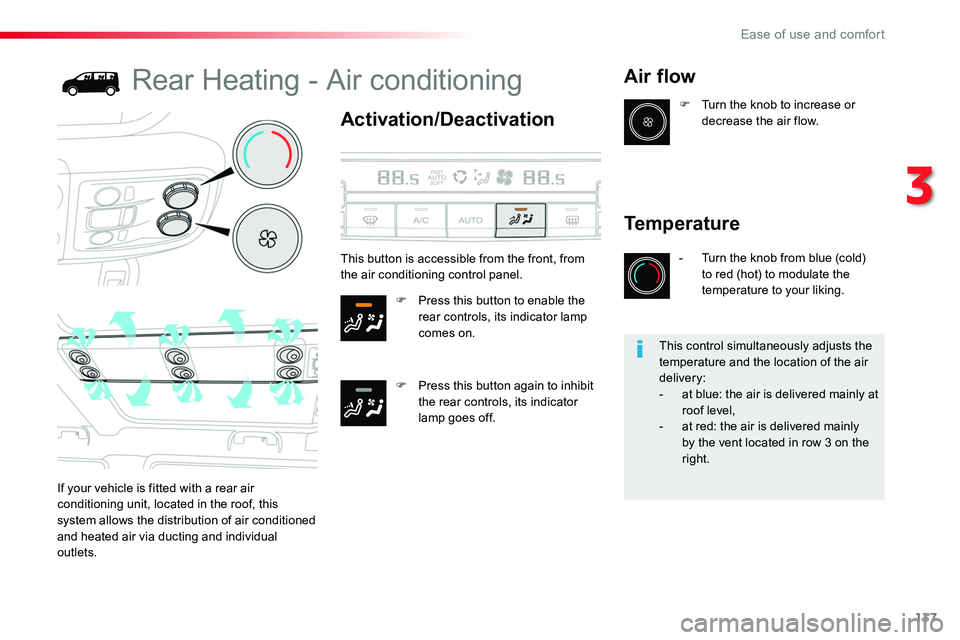
Rear Heating - Air conditioning
Activation/Deactivation
F Press this button to enable the rear controls, its indicator lamp comes on.
F Press this button again to inhibit the rear controls, its indicator lamp goes off.
Air flow
If your vehicle is fitted with a rear air conditioning unit, located in the roof, this system allows the distribution of air conditioned
and heated air via ducting and individual outlets.
F Turn the knob to increase or decrease the air flow.
Temperature
- Turn the knob from blue (cold) to red (hot) to modulate the temperature to your liking.
This button is accessible from the front, from the air conditioning control panel.
This control simultaneously adjusts the temperature and the location of the air delivery:- at blue: the air is delivered mainly at roof level,- at red: the air is delivered mainly by the vent located in row 3 on the right.
3
Ease of use and comfort
Page 258 of 516
258
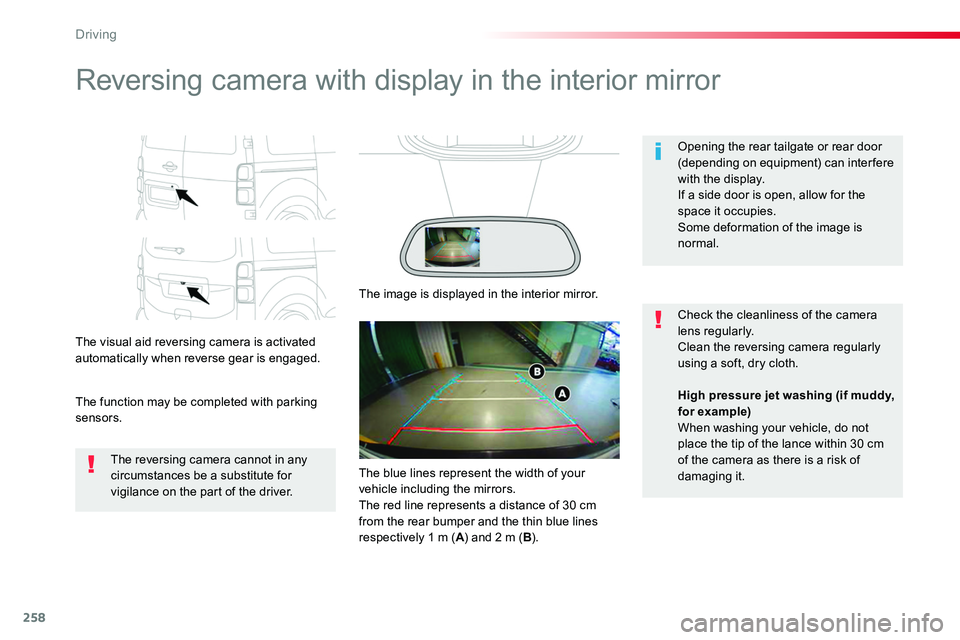
Reversing camera with display in the interior mirror
The visual aid reversing camera is activated automatically when reverse gear is engaged.
The function may be completed with parking sensors.
Opening the rear tailgate or rear door (depending on equipment) can inter fere with the display.If a side door is open, allow for the space it occupies.
Some deformation of the image is normal.
The reversing camera cannot in any circumstances be a substitute for vigilance on the part of the driver.
Check the cleanliness of the camera lens regularly.Clean the reversing camera regularly using a soft, dry cloth.
The image is displayed in the interior mirror.
High pressure jet washing (if muddy, for example)When washing your vehicle, do not place the tip of the lance within 30 cm of the camera as there is a risk of damaging it.The blue lines represent the width of your vehicle including the mirrors.The red line represents a distance of 30 cm from the rear bumper and the thin blue lines respectively 1 m (A) and 2 m (B).
Driving
Page 259 of 516
259
180° rear vision
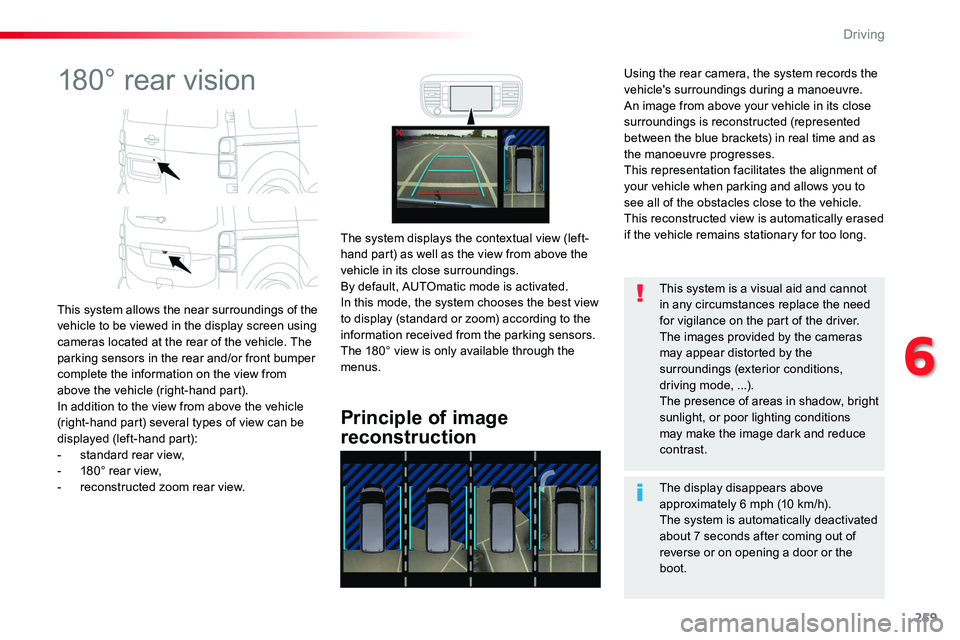
This system allows the near surroundings of the vehicle to be viewed in the display screen using cameras located at the rear of the vehicle. The parking sensors in the rear and/or front bumper complete the information on the view from above the vehicle (right-hand part).In addition to the view from above the vehicle (right-hand part) several types of view can be displayed (left-hand part):- standard rear view,- 180° rear view,- reconstructed zoom rear view.
Principle of image
reconstruction
The system displays the contextual view (left-hand part) as well as the view from above the vehicle in its close surroundings.By default, AUTOmatic mode is activated.In this mode, the system chooses the best view to display (standard or zoom) according to the information received from the parking sensors.The 180° view is only available through the menus.
The display disappears above approximately 6 mph (10 km/h).The system is automatically deactivated
about 7 seconds after coming out of reverse or on opening a door or the boot.
This system is a visual aid and cannot in any circumstances replace the need for vigilance on the part of the driver.The images provided by the cameras may appear distorted by the surroundings (exterior conditions, driving mode, ...).The presence of areas in shadow, bright sunlight, or poor lighting conditions may make the image dark and reduce contrast.
Using the rear camera, the system records the vehicle's surroundings during a manoeuvre. An image from above your vehicle in its close surroundings is reconstructed (represented between the blue brackets) in real time and as the manoeuvre progresses.This representation facilitates the alignment of your vehicle when parking and allows you to see all of the obstacles close to the vehicle.This reconstructed view is automatically erased if the vehicle remains stationary for too long.
6
Driving
Page 260 of 516
260
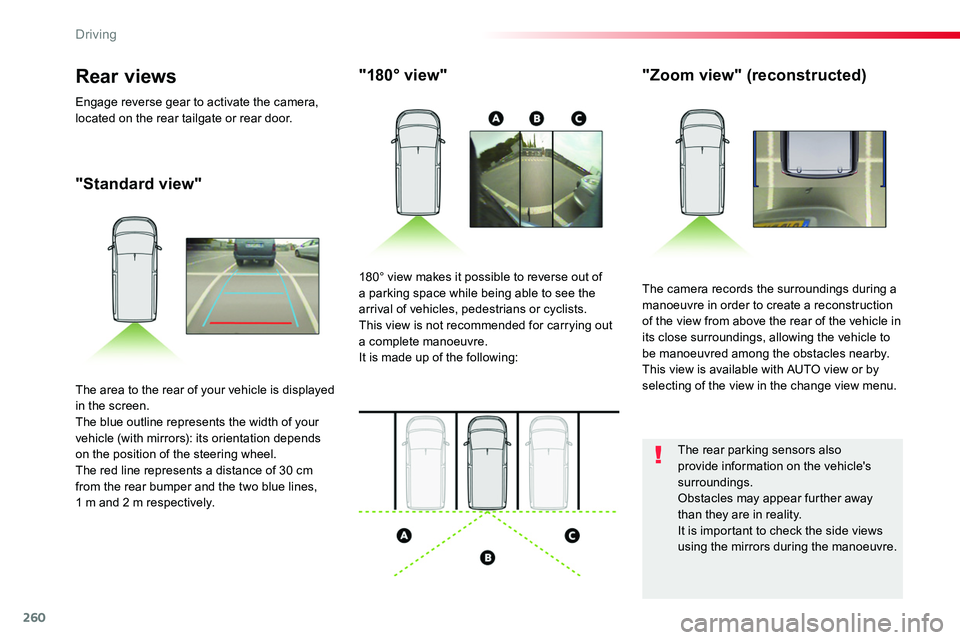
"Standard view"
"180° view""Zoom view" (reconstructed)
The camera records the surroundings during a manoeuvre in order to create a reconstruction of the view from above the rear of the vehicle in its close surroundings, allowing the vehicle to be manoeuvred among the obstacles nearby.This view is available with AUTO view or by selecting of the view in the change view menu.
180° view makes it possible to reverse out of a parking space while being able to see the arrival of vehicles, pedestrians or cyclists.This view is not recommended for carrying out a complete manoeuvre.It is made up of the following:
The area to the rear of your vehicle is displayed in the screen.The blue outline represents the width of your vehicle (with mirrors): its orientation depends on the position of the steering wheel.The red line represents a distance of 30 cm from the rear bumper and the two blue lines, 1 m and 2 m respectively.
Rear views
Engage reverse gear to activate the camera, located on the rear tailgate or rear door.
The rear parking sensors also provide information on the vehicle's surroundings.Obstacles may appear further away than they are in reality.It is important to check the side views using the mirrors during the manoeuvre.
Driving