buttons TOYOTA PROACE 2018 User Guide
[x] Cancel search | Manufacturer: TOYOTA, Model Year: 2018, Model line: PROACE, Model: TOYOTA PROACE 2018Pages: 516, PDF Size: 90.91 MB
Page 70 of 516
70
Changing the battery
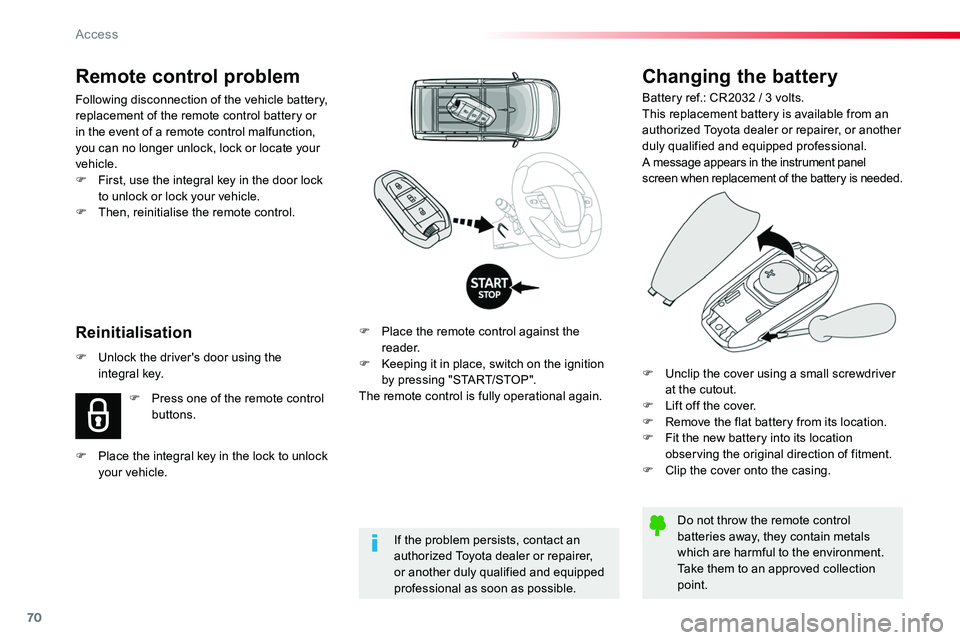
Battery ref.: CR2032 / 3 volts.This replacement battery is available from an authorized Toyota dealer or repairer, or another duly qualified and equipped professional.A message appears in the instrument panel screen when replacement of the battery is needed.
Do not throw the remote control batteries away, they contain metals which are harmful to the environment.Take them to an approved collection
point.
F Place the remote control against the reader.F Keeping it in place, switch on the ignition by pressing "START/STOP".The remote control is fully operational again.
Reinitialisation
Remote control problem
Following disconnection of the vehicle battery, replacement of the remote control battery or in the event of a remote control malfunction, you can no longer unlock, lock or locate your vehicle.F First, use the integral key in the door lock to unlock or lock your vehicle.F Then, reinitialise the remote control.
If the problem persists, contact an authorized Toyota dealer or repairer, or another duly qualified and equipped
professional as soon as possible.
F Unlock the driver's door using the integral key.
F Press one of the remote control buttons.
F Place the integral key in the lock to unlock your vehicle.
F Unclip the cover using a small screwdriver at the cutout.F Lift off the cover.F Remove the flat battery from its location.F Fit the new battery into its location observing the original direction of fitment.F Clip the cover onto the casing.
Access
Page 71 of 516
71
Lost keys, remote control
Visit an authorized Toyota dealer or repairer, or another duly qualified and equipped professional with the vehicle's registration certificate, your personal identification documents and if possible, the label bearing the key code.The an authorized Toyota dealer or repairer, or another duly qualified and equipped professional will be able to retrieve the key code and the transponder code required to order a new key.
Locking the vehicle
Driving with the doors locked may make access to the passenger compartment by the emergency services more difficult in an emergency.As a safety precaution (with children on board), remove the key from the ignition or take the remote control with you when leaving the vehicle, even for a short time.
When purchasing a second-hand vehicle
Have the key codes memorised by an authorized Toyota dealer or repairer, or another duly qualified and equipped professional, to ensure that the keys in your possession are the only ones which can start the vehicle.
Electrical interference
The Smart Entry & Start System + Push-button start remote control may not operate if close to certain electronic devices: telephone, laptop computer, strong magnetic fields, ...
Accumulations (water, dust, grime, salt...) on the inner sur face of the door handle may affect detection.If cleaning the inner sur face of the door handle using a cloth does not restore detection, contact an authorized Toyota dealer or repairer, or another duly qualified and equipped professional.A sudden splash of water (stream of water, high pressure jet washer, …) may be identified by the system as the desire to open the vehicle.
Remote control
The high frequency remote control is a sensitive system; do not operate it while it is in your pocket as there is a possibility that it may unlock the vehicle, without you being aware of it.Do not repeatedly press the buttons of your remote control out of range and out of sight of your vehicle. You run the risk of stopping it from working and the remote control would have to be reinitialised.The remote control does not operate when the key is in the ignition, even when the ignition is switched off.
Anti-theft protection
Do not make any modifications to the electronic engine immobiliser system; this could cause malfunctions.Do not forget to turn the steering to engage the steering lock.
2
Access
Page 78 of 516
78
Electric sliding side door(s)
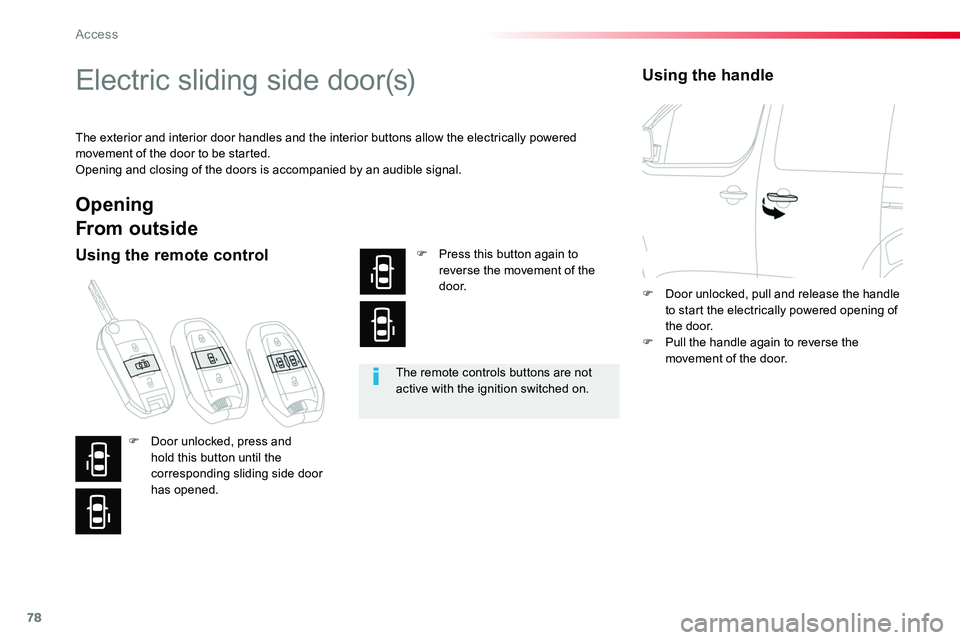
The exterior and interior door handles and the interior buttons allow the electrically powered movement of the door to be started.Opening and closing of the doors is accompanied by an audible signal.
The remote controls buttons are not active with the ignition switched on.
Opening
From outside
Using the remote controlF Press this button again to reverse the movement of the d o o r.
Using the handle
F Door unlocked, press and hold this button until the corresponding sliding side door has opened.
F Door unlocked, pull and release the handle to start the electrically powered opening of the door.F Pull the handle again to reverse the movement of the door.
Access
Page 82 of 516
82
The remote controls buttons are not active with the ignition switched on.
Closing
From outside
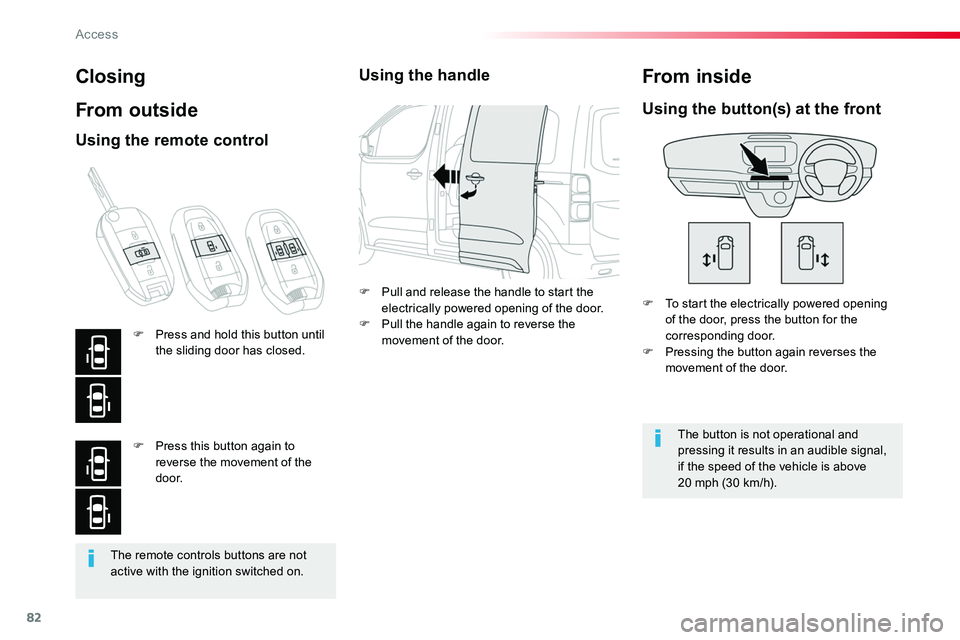
F To start the electrically powered opening of the door, press the button for the corresponding door.F Pressing the button again reverses the movement of the door.
Using the button(s) at the front
The button is not operational and pressing it results in an audible signal, if the speed of the vehicle is above 20 mph (30 km/h).
From inside
Using the remote control
F Press and hold this button until the sliding door has closed.
F Press this button again to reverse the movement of the d o o r.
Using the handle
F Pull and release the handle to start the electrically powered opening of the door.F Pull the handle again to reverse the movement of the door.
Access
Page 125 of 516
125
Temperature
Air flow
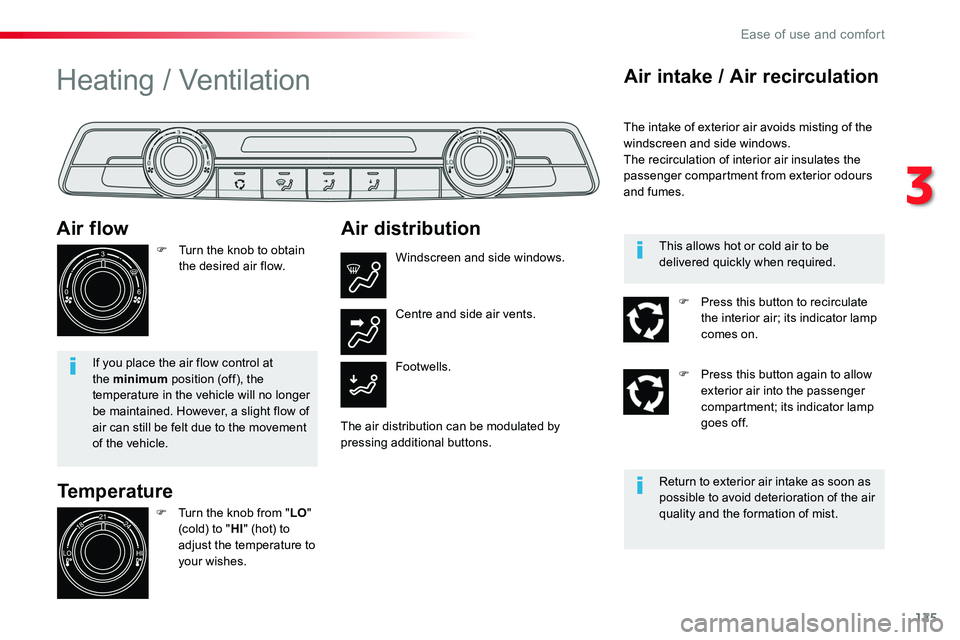
F Turn the knob to obtain the desired air flow.
If you place the air flow control at the minimum position (off), the temperature in the vehicle will no longer be maintained. However, a slight flow of air can still be felt due to the movement of the vehicle.
Heating / Ventilation
F Turn the knob from "LO" (cold) to "HI" (hot) to
adjust the temperature to your wishes.
Air distribution
Windscreen and side windows.
Footwells.
Centre and side air vents.
The air distribution can be modulated by pressing additional buttons.
Air intake / Air recirculation
The intake of exterior air avoids misting of the windscreen and side windows.The recirculation of interior air insulates the passenger compartment from exterior odours and fumes.
Return to exterior air intake as soon as possible to avoid deterioration of the air quality and the formation of mist.
This allows hot or cold air to be delivered quickly when required.
F Press this button to recirculate the interior air; its indicator lamp comes on.
F Press this button again to allow exterior air into the passenger compartment; its indicator lamp goes off.
3
Ease of use and comfort
Page 126 of 516
126
The air conditioning system only operates with the engine running.
Manual air conditioning
Temperature
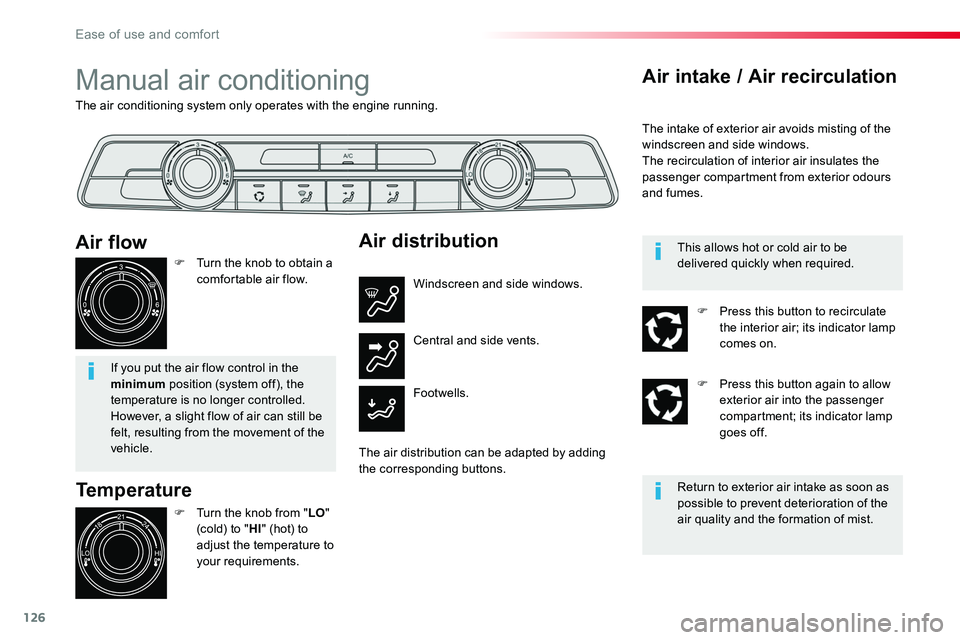
F Turn the knob from "LO" (cold) to "HI" (hot) to
adjust the temperature to your requirements.
Air flow
F Turn the knob to obtain a comfortable air flow.
If you put the air flow control in the minimum position (system off), the temperature is no longer controlled. However, a slight flow of air can still be
felt, resulting from the movement of the vehicle.
Air distribution
Windscreen and side windows.
Footwells.
Central and side vents.
The air distribution can be adapted by adding the corresponding buttons.
Air intake / Air recirculation
The intake of exterior air avoids misting of the windscreen and side windows.The recirculation of interior air insulates the passenger compartment from exterior odours and fumes.
Return to exterior air intake as soon as possible to prevent deterioration of the air quality and the formation of mist.
This allows hot or cold air to be delivered quickly when required.
F Press this button to recirculate the interior air; its indicator lamp comes on.
F Press this button again to allow exterior air into the passenger compartment; its indicator lamp goes off.
Ease of use and comfort
Page 222 of 516
222
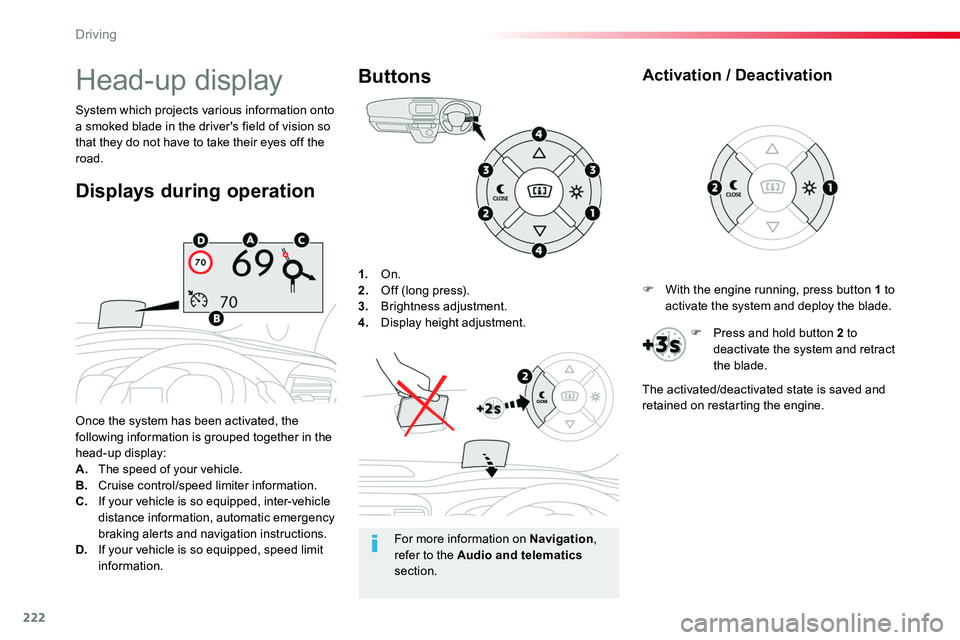
1. On.2. Off (long press).3. Brightness adjustment.4. Display height adjustment.
Once the system has been activated, the following information is grouped together in the head-up display:A. The speed of your vehicle.B. Cruise control/speed limiter information.C. If your vehicle is so equipped, inter-vehicle distance information, automatic emergency
braking alerts and navigation instructions.D. If your vehicle is so equipped, speed limit information.
System which projects various information onto a smoked blade in the driver's field of vision so that they do not have to take their eyes off the road.
Buttons
Displays during operation
Head-up display
For more information on Navigation, refer to the Audio and telematics section.
F With the engine running, press button 1 to activate the system and deploy the blade.
Activation / Deactivation
F Press and hold button 2 to deactivate the system and retract the blade.
The activated/deactivated state is saved and retained on restarting the engine.
Driving
Page 223 of 516
223
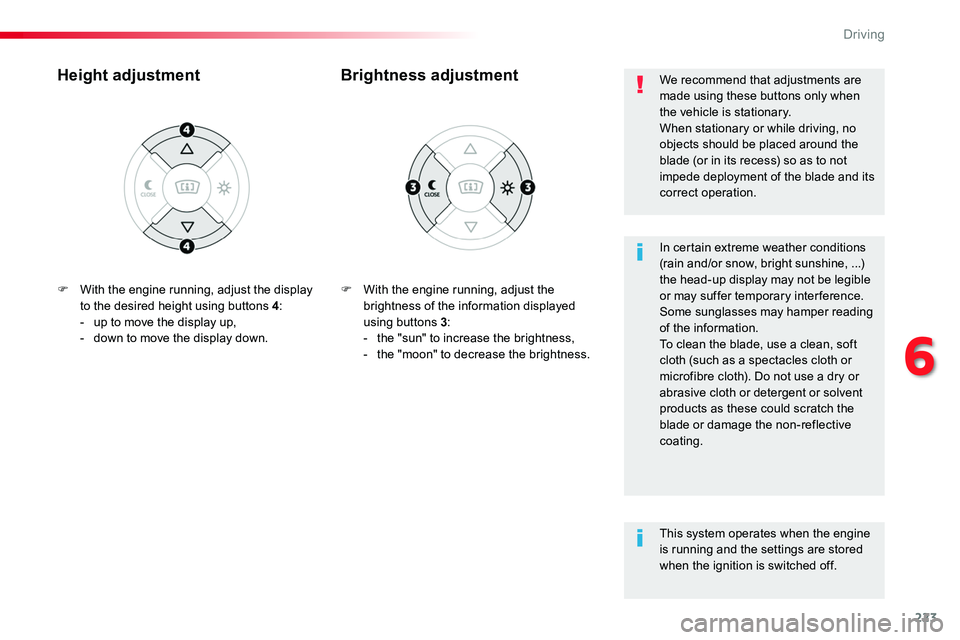
F With the engine running, adjust the brightness of the information displayed using buttons 3:- the "sun" to increase the brightness,- the "moon" to decrease the brightness.
Brightness adjustmentHeight adjustment
In certain extreme weather conditions (rain and/or snow, bright sunshine, ...) the head-up display may not be legible or may suffer temporary inter ference.Some sunglasses may hamper reading of the information.To clean the blade, use a clean, soft cloth (such as a spectacles cloth or microfibre cloth). Do not use a dry or abrasive cloth or detergent or solvent products as these could scratch the blade or damage the non-reflective coating.
We recommend that adjustments are made using these buttons only when the vehicle is stationary.When stationary or while driving, no objects should be placed around the blade (or in its recess) so as to not impede deployment of the blade and its correct operation.
This system operates when the engine is running and the settings are stored when the ignition is switched off.
F With the engine running, adjust the display to the desired height using buttons 4:- up to move the display up,- down to move the display down.
6
Driving
Page 230 of 516
230
Switching on / Pause
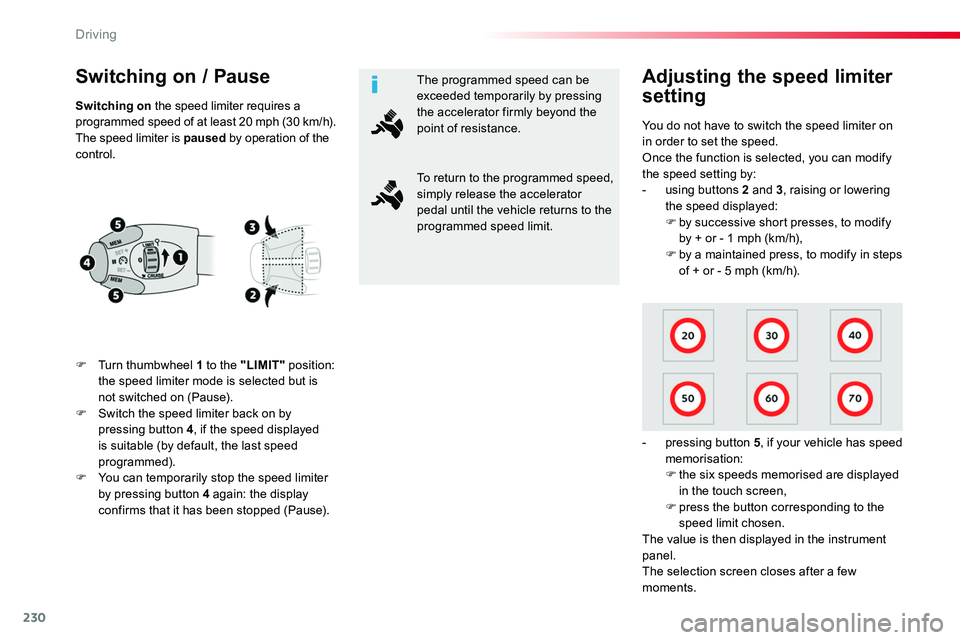
F Turn thumbwheel 1 to the "LIMIT" position: the speed limiter mode is selected but is not switched on (Pause).F Switch the speed limiter back on by pressing button 4, if the speed displayed
is suitable (by default, the last speed programmed).F You can temporarily stop the speed limiter by pressing button 4 again: the display confirms that it has been stopped (Pause).
You do not have to switch the speed limiter on in order to set the speed.Once the function is selected, you can modify the speed setting by:- using buttons 2 and 3, raising or lowering the speed displayed:F by successive short presses, to modify
by + or - 1 mph (km/h),F by a maintained press, to modify in steps of + or - 5 mph (km/h).
- pressing button 5, if your vehicle has speed memorisation:F the six speeds memorised are displayed in the touch screen,F press the button corresponding to the speed limit chosen.The value is then displayed in the instrument panel.The selection screen closes after a few moments.
Adjusting the speed limiter
settingSwitching on the speed limiter requires a programmed speed of at least 20 mph (30 km/h).The speed limiter is paused by operation of the control.
The programmed speed can be exceeded temporarily by pressing the accelerator firmly beyond the point of resistance.
To return to the programmed speed, simply release the accelerator pedal until the vehicle returns to the programmed speed limit.
Driving
Page 234 of 516
234
Pause
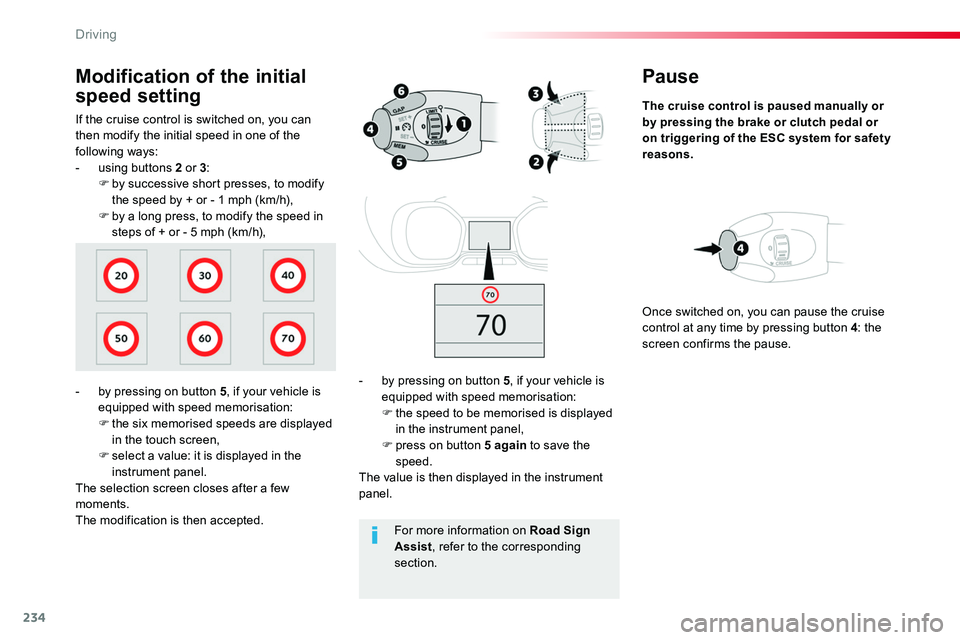
The cruise control is paused manually or by pressing the brake or clutch pedal or on triggering of the ESC system for safety reasons.
- by pressing on button 5, if your vehicle is equipped with speed memorisation:F the speed to be memorised is displayed in the instrument panel,F press on button 5 again to save the speed.The value is then displayed in the instrument panel.
Once switched on, you can pause the cruise control at any time by pressing button 4: the screen confirms the pause.
If the cruise control is switched on, you can then modify the initial speed in one of the following ways:- using buttons 2 or 3:F by successive short presses, to modify the speed by + or - 1 mph (km/h),F by a long press, to modify the speed in steps of + or - 5 mph (km/h),
Modification of the initial
speed setting
- by pressing on button 5, if your vehicle is equipped with speed memorisation:F the six memorised speeds are displayed in the touch screen,F select a value: it is displayed in the instrument panel.The selection screen closes after a few moments.The modification is then accepted.For more information on Road Sign Assist, refer to the corresponding section.
Driving