service TOYOTA PROACE 2018 Workshop Manual
[x] Cancel search | Manufacturer: TOYOTA, Model Year: 2018, Model line: PROACE, Model: TOYOTA PROACE 2018Pages: 516, PDF Size: 90.91 MB
Page 480 of 516
480
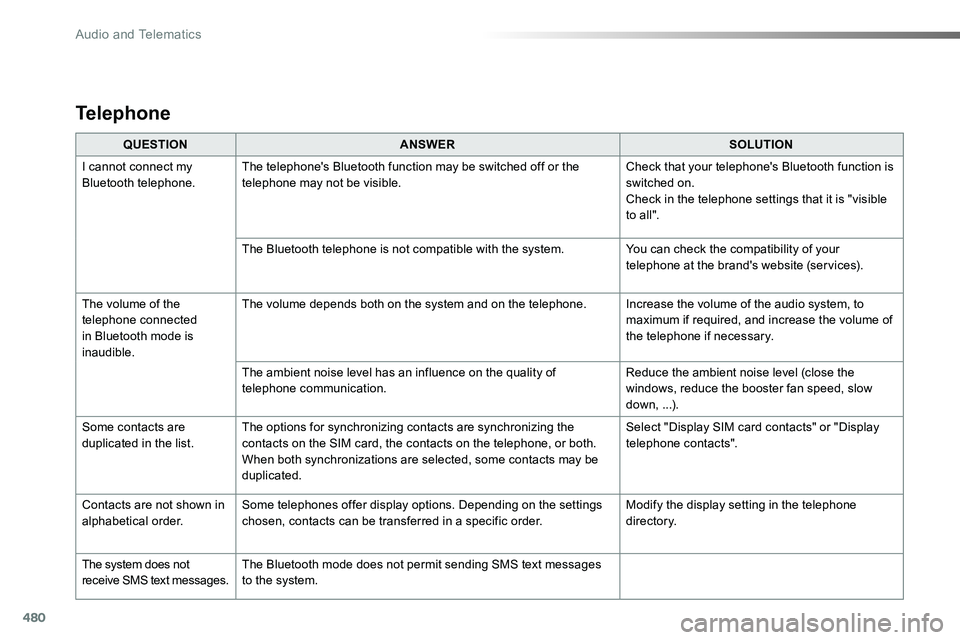
QUESTIONANSWERSOLUTION
I cannot connect my Bluetooth telephone.The telephone's Bluetooth function may be switched off or the telephone may not be visible.Check that your telephone's Bluetooth function is switched on.Check in the telephone settings that it is "visible to all ".
The Bluetooth telephone is not compatible with the system.You can check the compatibility of your telephone at the brand's website (services).
The volume of the telephone connected in Bluetooth mode is inaudible.
The volume depends both on the system and on the telephone.Increase the volume of the audio system, to maximum if required, and increase the volume of the telephone if necessary.
The ambient noise level has an influence on the quality of telephone communication.Reduce the ambient noise level (close the windows, reduce the booster fan speed, slow down, ...).
Some contacts are duplicated in the list.The options for synchronizing contacts are synchronizing the contacts on the SIM card, the contacts on the telephone, or both. When both synchronizations are selected, some contacts may be duplicated.
Select "Display SIM card contacts" or "Display telephone contacts".
Contacts are not shown in alphabetical order.Some telephones offer display options. Depending on the settings chosen, contacts can be transferred in a specific order.Modify the display setting in the telephone di r e c to r y.
The system does not receive SMS text messages.The Bluetooth mode does not permit sending SMS text messages to the system.
Telephone
Audio and Telematics
Page 490 of 516
490
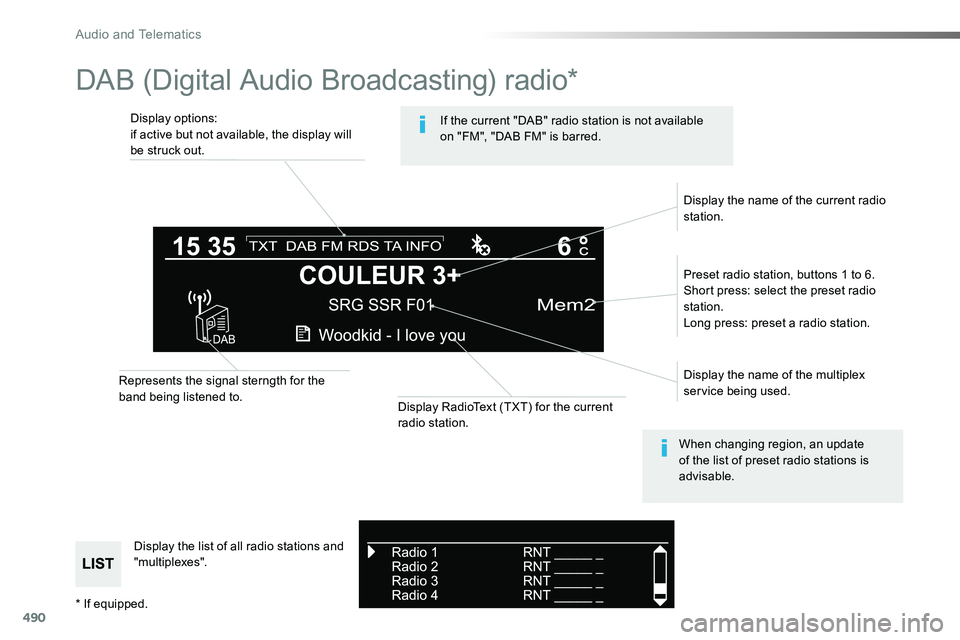
DAB (Digital Audio Broadcasting) radio*
Display options:if active but not available, the display will be struck out.
Preset radio station, buttons 1 to 6.Short press: select the preset radio station.Long press: preset a radio station.
Display the name of the multiplex service being used.
Display the list of all radio stations and "multiplexes".
Represents the signal sterngth for the band being listened to.Display RadioText (TXT) for the current radio station.
Display the name of the current radio station.
If the current "DAB" radio station is not available on "FM", "DAB FM" is barred.
When changing region, an update of the list of preset radio stations is advisable.
* If equipped.
Audio and Telematics
Page 491 of 516
491
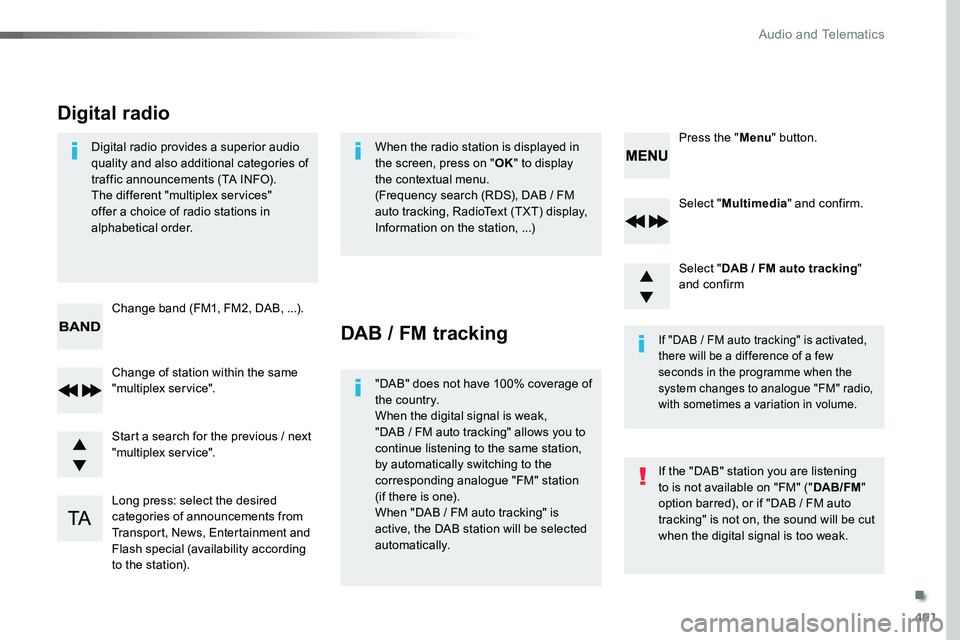
Select "Multimedia" and confirm.
Select "DAB / FM auto tracking" and confirm
Long press: select the desired categories of announcements from Transport, News, Entertainment and Flash special (availability according to the station).
Change of station within the same "multiplex service".
Press the "Menu" button.
Start a search for the previous / next "multiplex service".
Change band (FM1, FM2, DAB, ...).
Digital radio provides a superior audio quality and also additional categories of traffic announcements (TA INFO).The different "multiplex services" offer a choice of radio stations in alphabetical order.
Digital radio
When the radio station is displayed in the screen, press on "OK" to display the contextual menu.(Frequency search (RDS), DAB / FM auto tracking, RadioText (TXT) display, Information on the station, ...)
DAB / FM tracking
"DAB" does not have 100% coverage of the country.When the digital signal is weak,
"DAB / FM auto tracking" allows you to continue listening to the same station, by automatically switching to the corresponding analogue "FM" station (if there is one).When "DAB / FM auto tracking" is active, the DAB station will be selected automatically.
If "DAB / FM auto tracking" is activated, there will be a difference of a few seconds in the programme when the system changes to analogue "FM" radio, with sometimes a variation in volume.
If the "DAB" station you are listening to is not available on "FM" ("DAB/FM" option barred), or if "DAB / FM auto tracking" is not on, the sound will be cut when the digital signal is too weak.
.
Audio and Telematics
Page 497 of 516
497
Telephone
Pairing a Bluetooth® telephone
As a safety measure and because it requires the sustained attention of the driver, the pairing of your a Bluetooth telephone to the Bluetooth hands-free audio system must only be carried
out with the vehicle stationary and the ignition on
The services available depend on the network, the SIM card and the compatibility of the Bluetooth telephone used.Refer to the instructions for your telephone and to your service provider for the services available to you.
Activate the telephone's Bluetooth function and ensure that it is "visible to all" (telephone configuration).
* If your telephone is fully compatible.
The "Telephone" menu gives access to the following functions in particular: "Directory" *, "Calls list", "View paired devices".Depending on the type of telephone, you may be asked to accept or confirm access by the system to each of these functions.
If pairing fails, the number of attempts is not restricted.A message appears in the screen confirming the pairing.
Procedure from the telephoneCompleting the pairing
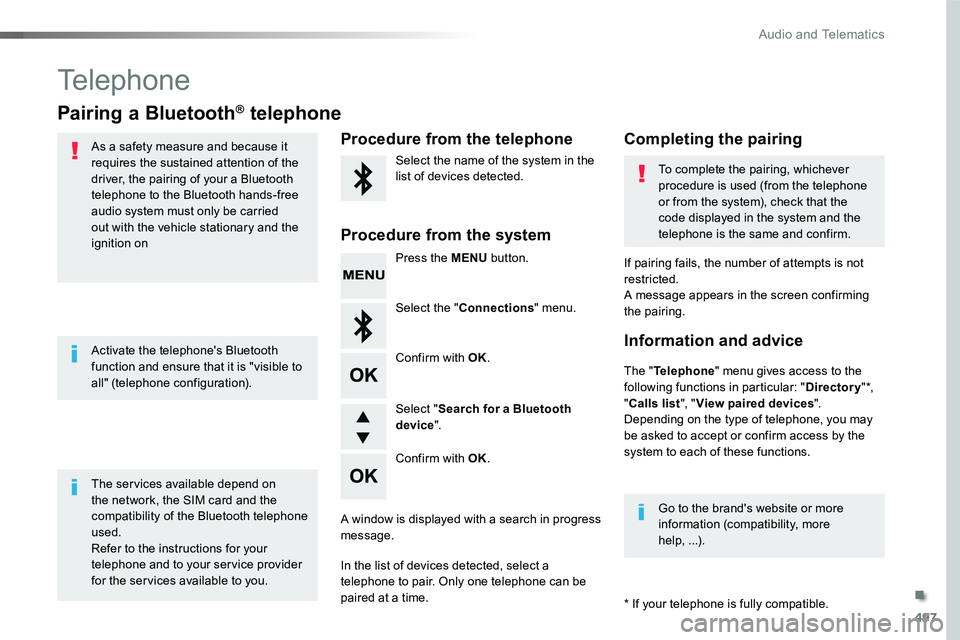
Procedure from the system
Select the name of the system in the list of devices detected.To complete the pairing, whichever procedure is used (from the telephone or from the system), check that the code displayed in the system and the
telephone is the same and confirm.
Press the MENU button.
Select the "Connections" menu.
Confirm with OK.
A window is displayed with a search in progress message.
In the list of devices detected, select a telephone to pair. Only one telephone can be
paired at a time.
Confirm with OK.
Select "Search for a Bluetooth device".
Information and advice
Go to the brand's website or more information (compatibility, more help, ...).
.
Audio and Telematics
Page 505 of 516
505
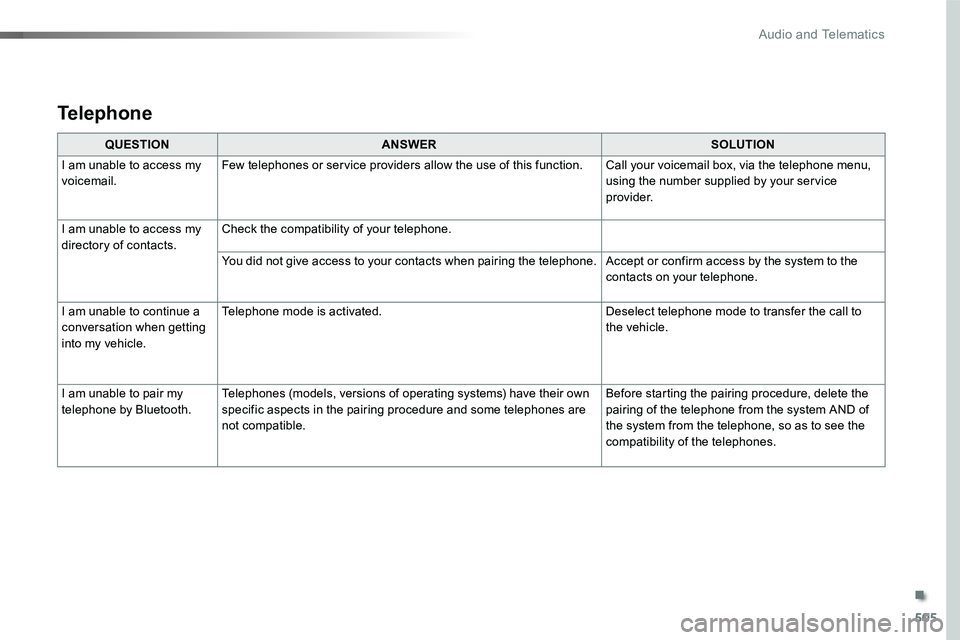
QUESTIONANSWERSOLUTION
I am unable to access my voicemail.Few telephones or service providers allow the use of this function.Call your voicemail box, via the telephone menu, using the number supplied by your service provider.
I am unable to access my directory of contacts.Check the compatibility of your telephone.
You did not give access to your contacts when pairing the telephone.Accept or confirm access by the system to the contacts on your telephone.
I am unable to continue a conversation when getting into my vehicle.
Telephone mode is activated.Deselect telephone mode to transfer the call to the vehicle.
I am unable to pair my telephone by Bluetooth.Telephones (models, versions of operating systems) have their own specific aspects in the pairing procedure and some telephones are not compatible.
Before starting the pairing procedure, delete the pairing of the telephone from the system AND of the system from the telephone, so as to see the compatibility of the telephones.
Telephone
.
Audio and Telematics
Page 510 of 516
510
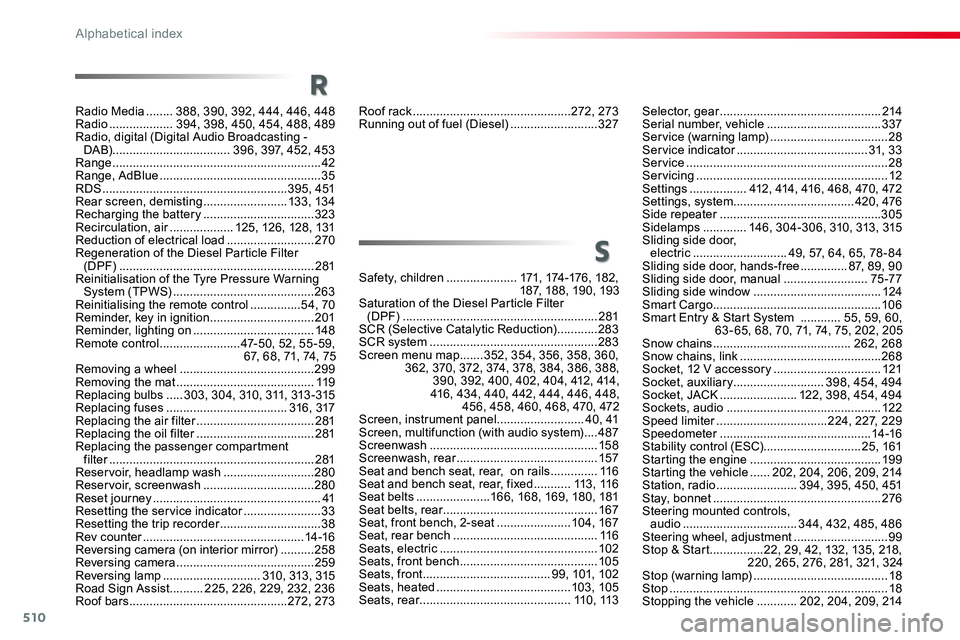
Roof rack ...............................................272, 273Running out of fuel (Diesel) ..........................327
Safety, children .....................171, 174-176, 182, 187, 188, 190, 193Saturation of the Diesel Particle Filter (DPF) ..........................................................281SCR (Selective Catalytic Reduction) ............283SCR system ..................................................283Screen menu map .......352, 354, 356, 358, 360, 362, 370, 372, 374, 378, 384, 386, 388, 390, 392, 400, 402, 404, 412, 414, 416, 434, 440, 442, 444, 446, 448, 456, 458, 460, 468, 470, 472Screen, instrument panel ..........................40, 41Screen, multifunction (with audio system) ....487Screenwash ..................................................15 8Screenwash, rear ..........................................157Seat and bench seat, rear, on rails ..............11 6Seat and bench seat, rear, fixed ...........113 , 11 6Seat belts ......................166, 168, 169, 180, 181Seat belts, rear ..............................................167Seat, front bench, 2-seat ......................104, 167Seat, rear bench ...........................................11 6Seats, electric ...............................................102Seats, front bench .........................................105Seats, front ......................................99, 101, 102Seats, heated ........................................103, 105Seats, rear .............................................11 0 , 113
S
Selector, gear ................................................214Serial number, vehicle ..................................337Service (warning lamp) ...................................28Service indicator .......................................31, 33Service ............................................................28Servicing .........................................................12Settings .................412, 414, 416, 468, 470, 472Settings, system ....................................420, 476Side repeater ................................................305Sidelamps .............146, 304-306, 310, 313, 315Sliding side door, electric ............................49, 57, 64, 65, 78 - 84Sliding side door, hands-free ..............87, 89, 90Sliding side door, manual .........................75 -77Sliding side window ......................................124Smart Cargo ..................................................10 6Smart Entry & Start System ............55, 59, 60, 63 - 65, 68, 70, 71, 74, 75, 202, 205Snow chains .........................................262, 268Snow chains, link ..........................................268Socket, 12 V accessory ................................121Socket, auxiliary ...........................398, 454, 494Socket, JACK .......................122, 398, 454, 494Sockets, audio ..............................................12 2Speed limiter .................................224, 227, 229Speedometer .............................................14 -16Stability control (ESC).............................25, 161Starting the engine .......................................19 9Starting the vehicle ......202, 204, 206, 209, 214Station, radio ........................394, 395, 450, 451Stay, bonnet ..................................................276Steering mounted controls, audio ..................................344, 432, 485, 486Steering wheel, adjustment ............................99Stop & Start ................22, 29, 42, 132, 135, 218, 220, 265, 276, 281, 321, 324Stop (warning lamp) ........................................18Stop .................................................................18Stopping the vehicle ............202, 204, 209, 214
Radio Media ........388, 390, 392, 444, 446, 448Radio ...................394, 398, 450, 454, 488, 489Radio, digital (Digital Audio Broadcasting - DA B)...................................396, 397, 452, 453Range ..............................................................42Range, AdBlue ................................................35RDS .......................................................395, 451Rear screen, demisting .........................13 3, 13 4Recharging the battery .................................323Recirculation, air ...................125, 126, 128, 131Reduction of electrical load ..........................270Regeneration of the Diesel Particle Filter (DPF) ..........................................................281Reinitialisation of the Tyre Pressure Warning System (TPWS) ..........................................263Reinitialising the remote control ...............54, 70Reminder, key in ignition ...............................201Reminder, lighting on ....................................148Remote control ........................47-50, 52, 55 -59, 67, 68, 71, 74, 75Removing a wheel ........................................299Removing the mat .........................................11 9Replacing bulbs .....303, 304, 310, 311, 313 -315Replacing fuses ....................................316, 317Replacing the air filter ...................................281Replacing the oil filter ...................................281Replacing the passenger compartment filter .............................................................281Reservoir, headlamp wash ...........................280Reservoir, screenwash .................................280Reset journey ..................................................41Resetting the service indicator .......................33Resetting the trip recorder ..............................38Rev counter ................................................14 -16Reversing camera (on interior mirror) ..........258Reversing camera .........................................259Reversing lamp .............................310, 313, 315Road Sign Assist ..........225, 226, 229, 232, 236Roof bars ...............................................272, 273
R
Alphabetical index
Page 511 of 516
511
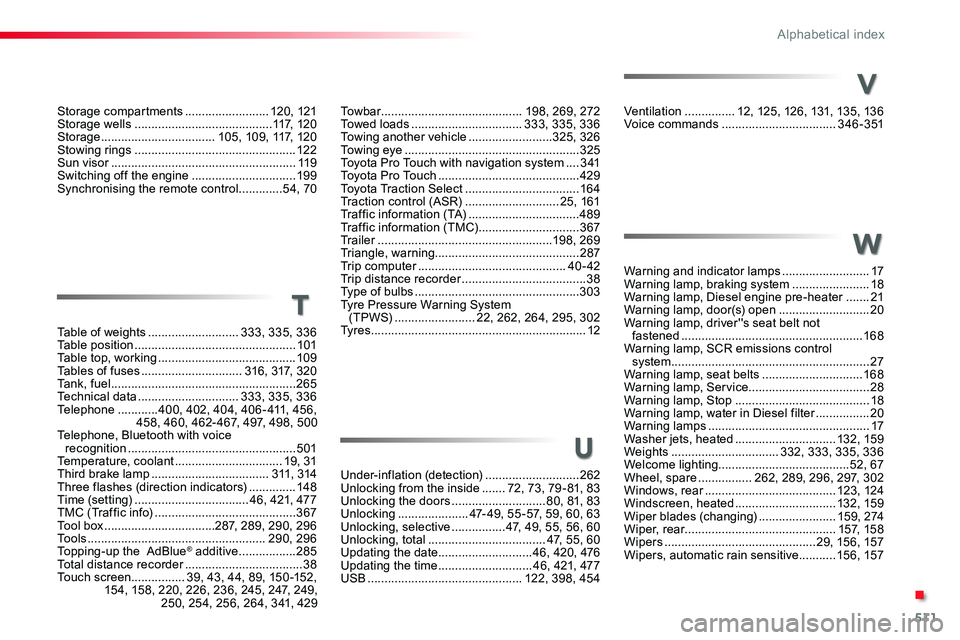
Ventilation ...............12, 125, 126, 131, 135, 136Voice commands ..................................3 4 6 - 3 51
Warning and indicator lamps ..........................17Warning lamp, braking system .......................18Warning lamp, Diesel engine pre-heater .......21Warning lamp, door(s) open ...........................20Warning lamp, driver''s seat belt not fastened ......................................................168Warning lamp, SCR emissions control system ...........................................................27Warning lamp, seat belts ..............................168Warning lamp, Service....................................28Warning lamp, Stop ........................................18Warning lamp, water in Diesel filter ................20Warning lamps ................................................17Washer jets, heated ..............................132, 159Weights ................................332, 333, 335, 336Welcome lighting.......................................52, 67Wheel, spare ................262, 289, 296, 297, 302Windows, rear .......................................123, 124Windscreen, heated ..............................132, 159Wiper blades (changing) .......................159, 274Wiper, rear.............................................157, 15 8Wipers .............................................29, 156, 157Wipers, automatic rain sensitive ...........15 6, 157
Under-inflation (detection) ............................262Unlocking from the inside .......72, 73, 79 - 81, 83Unlocking the doors ............................80, 81, 83Unlocking .....................47- 49, 55 -57, 59, 60, 63Unlocking, selective ................47, 49, 55, 56, 60Unlocking, total ...................................47, 55, 60Updating the date ............................46, 420, 476Updating the time ............................46, 421, 477USB ..............................................122, 398, 454
Table of weights ...........................333, 335, 336Table position ................................................101Table top, working .........................................109Tables of fuses ..............................316, 317, 320Tank, fuel .......................................................265Technical data ..............................333, 335, 336Telephone ............400, 402, 404, 406 - 411, 456, 458, 460, 462- 467, 497, 498, 500Telephone, Bluetooth with voice recognition ..................................................501Temperature, coolant ................................19, 31Third brake lamp ...................................311, 314Three flashes (direction indicators) ..............148Time (setting) ..................................46, 421, 477TMC (Traffic info) ..........................................367Tool box .................................287, 289, 290, 296To o l s .....................................................290, 296Topping-up the AdBlue® additive .................285Total distance recorder ...................................38Touch screen................39, 43, 44, 89, 150 -152, 154, 158, 220, 226, 236, 245, 247, 249, 250, 254, 256, 264, 341, 429
V
W
U
T
To w b a r ..........................................198, 269, 272Towed loads .................................333, 335, 336Towing another vehicle .........................325, 326Towing eye ....................................................325Toyota Pro Touch with navigation system ....3 41To y o t a P r o To u c h ..........................................429Toyota Traction Select ..................................16 4Traction control (ASR) ............................25, 161Traffic information (TA) .................................489Traffic information (TMC) ..............................367Tr a i l e r ....................................................198, 269Triangle, warning...........................................287Trip computer ............................................40 - 42Trip distance recorder .....................................38Type of bulbs .................................................303Tyre Pressure Warning System (TPWS) ........................22, 262, 264, 295, 302Ty r e s ................................................................12
Storage compartments .........................120, 121Storage wells .........................................117, 120Storage ..................................105, 109, 117, 120Stowing rings ................................................12 2Sun visor .......................................................11 9Switching off the engine ...............................19 9Synchronising the remote control .............54, 70
.
Alphabetical index