engine TOYOTA PROACE 2020 Owners Manual (in English)
[x] Cancel search | Manufacturer: TOYOTA, Model Year: 2020, Model line: PROACE, Model: TOYOTA PROACE 2020Pages: 430, PDF Size: 48.01 MB
Page 341 of 430
341
Toyota Pro Touch with
navigation system
GPS navigation -
Applications - Multimedia
audio system - Bluetooth®
telephone
The various functions and settings described differ according to the version and configuration of the vehicle.
For safety reasons and because they require continued attention on the part of the driver, the following operations must be carried out with the vehicle stationary and the ignition switched off:- Using a smartphone.- Pairing a Bluetooth mobile phone to the hands-free Bluetooth system of the audio system.- Smartphone connection operations for CarPlay®, MirrorLinkTM or Android Auto (certain applications interrupt their display when the vehicle starts to move again).- Watching a video (the video stops when the vehicle starts to move again).- The configuration of profiles.
The system is protected in such a way that it will only operate in the vehicle.The display of the message Energy Economy Mode signals that a change to standby is imminent.
First steps
With the engine running, a press mutes the sound.With the ignition off, a press turns the system on.
Increase or decrease the volume using the wheel or the "plus" or "minus" buttons (depending on the equipment).
Use the menu buttons on either side of or below the touch screen for access to the menus, then press the virtual buttons in the touch screen.
Depending on the model, use the "Source" or "Menu" buttons to access the rolling menus, then press the virtual buttons in the touch screen.
Display the rolling menus at any time by pressing the screen briefly with three fingers.
All of the touch areas of the screen are white.Press the back arrow to go back a level.Press "OK" to confirm.
ContentsFirst steps 341Steering mounted controls 342Menus 343Voice commands 344Navigation 352Connected navigation 354Applications 357Radio 360DAB (Digital Audio Broadcasting) radio 362Media 362Telephone 364Frequently asked questions 370
.
Toyota Pro Touch with navigation system
Page 356 of 430
356
Notification of "Danger
zones"
To issue notification of danger zones, select the option: "Allow notification of danger zones".
Press Navigation to display the primary page.
Press the "Repor t a new danger zone" button located in the side bars or the upper bar of the touch screen (depending on equipment).
Select the option "Ty p e" to choose the type of "Danger zone".
Select the "Speed" option and enter it using the virtual keypad.
Press "OK" to save and distribute the information.
Authorising sending
information
Press Settings to display the primary page.
Press the "OPTIONS" button to go to the secondary page.
Select "System settings".
Select the "Privacy mode" tab.
Activate or deactivate:- "No sharing (data, vehicle position)".- "Data sharing only"- "Sharing data and the vehicle position"
"Danger zones" pack
updates
Press Settings to display the primary page.
Press the "OPTIONS" button to go to the secondary page.
Select "System settings".
Select the "System info" tab.
Select "View" to display the versions of the different modules installed in the system.
Select "Update(s) due".
It is possible to download system and map updates from the Brand’s website.The update procedure is also available there.
After the updates have downloaded, installation on the vehicle must be done with the engine running and vehicle stationary.
Displaying the weather
Press Navigation to display the primary page.
Press this button to display the list of services.
Select "View map".
It is possible to access the "Notifications" at any time in the upper bar.
The display of danger zones depends on the legislation in force and subscription to the service.
Toyota Pro Touch with navigation system
Page 376 of 430
376
Settings
QUESTIONRESPONSESOLUTION
When changing the setting of treble and bass, the equalizer setting is deselected.When changing the equalizer setting, the treble and bass settings are reset.
The selection of an equalizer setting imposes the settings for treble and bass and vice versa.Modify the treble and bass or equalizer settings to obtain the desired musical ambience.
When changing the balance setting, distribution is deselected.When changing the distribution setting, the balance setting is deselected.
The selection of a distribution setting imposes the balance settings and vice versa.Modify the balance setting or the distribution setting to obtain the desired sound quality.
There is a difference in sound quality between the different audio sources.To allow for optimal listening quality, the audio settings can be tailored to different sound sources, which can generate audible differences when changing source.
Check that the audio settings are adapted to the sources listened to. It is recommended that the audio settings (Bass:, Treble:, Balance) be adjusted to the middle position, select the "None" musical ambience and set the loudness correction to the "Active" position in CD mode or to the "Inactive" position in radio mode.
When the engine is off, the system switches off after several minutes of use.When the engine is switched off, the system's operating time depends on the state of charge of the battery.The switch-off is normal: the system automatically goes into energy economy mode and switches off to maintain an adequate charge in the battery.
Start then vehicle’s engine to increase the charge of the battery.
The date and time cannot be set.Setting of the date and time is only available if the synchronisation with the satellites is deactivated.
Settings menu / Options / Time-Date setting. Select the "Time" tab and deactivate the "GPS synchronisation" (UTC).
Toyota Pro Touch with navigation system
Page 377 of 430
377
To y o t a P r o To u c h
Multimedia audio system -
Applications - Bluetooth®
telephone
For safety reasons and because they require continued attention on the part of the driver, the following operations must be carried out with the vehicle stationary and the ignition on:- Using a smartphone.- Pairing a Bluetooth mobile phone to the hands-free Bluetooth system of the car radio.- Smartphone connection operations for CarPlay®, MirrorLinkTM or Android Auto (certain applications interrupt their display when the vehicle starts to move again).- The configuration of profiles.
The system is protected in such a way that it will only operate in the vehicle.The display of the message Energy Economy Mode signals that a change to standby is imminent.
First steps
With the engine running, a press mutes the sound.With the ignition off, a press turns the system on.
Increase or decrease the volume using the wheel or the "plus" or "minus" buttons (depending on the equipment).
Use the buttons on either side of or below the touch screen for access to the menus, then press the virtual buttons in the touch screen.
Depending on the model, use the "Source" or "Menu" buttons on the left of the touch screen for access to the menus, then press the virtual buttons in the touch screen.
At all times it is possible to display the rolling menus by pressing the screen briefly with three fingers.
All of the touch areas of the screen are white.For pages with multiple tabs at the bottom of
the screen, it is possible to switch between pages either by tapping the tab for the desired page, or by using a finger, sliding the pages to the left or to the right.Press in the grey zone to go back up a level or to confirm.
Table des matièresFirst steps 377Steering mounted controls 378Menus 379Applications 381Radio 381DAB (Digital Audio Broadcasting) radio 383Media 384Telephone 386Frequently asked questions 392
.
Toyota Pro Touch
Page 396 of 430
396
Settings
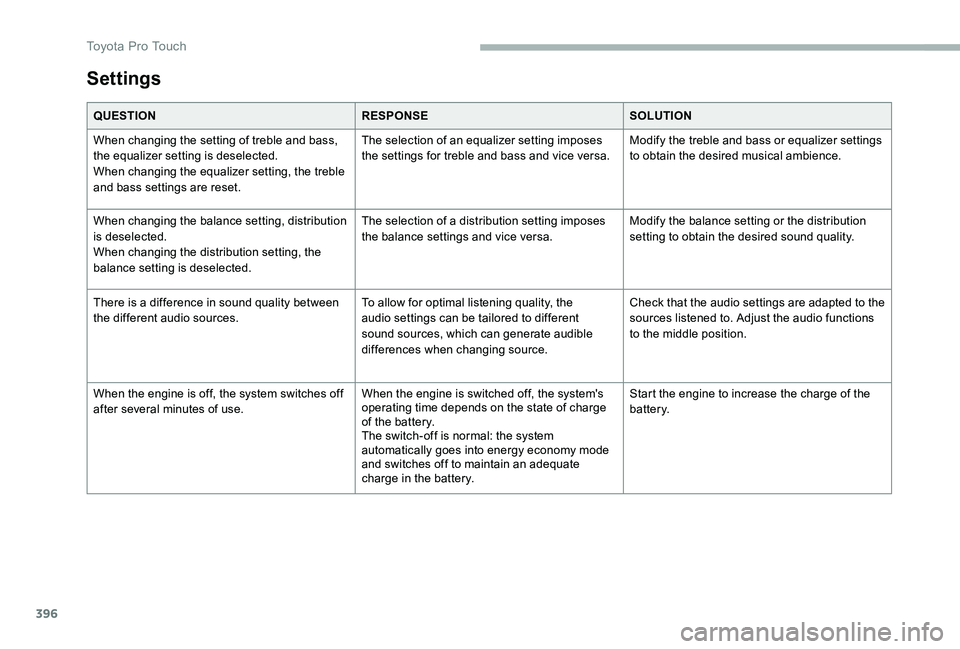
QUESTIONRESPONSESOLUTION
When changing the setting of treble and bass, the equalizer setting is deselected.When changing the equalizer setting, the treble and bass settings are reset.
The selection of an equalizer setting imposes the settings for treble and bass and vice versa.Modify the treble and bass or equalizer settings to obtain the desired musical ambience.
When changing the balance setting, distribution is deselected.When changing the distribution setting, the balance setting is deselected.
The selection of a distribution setting imposes the balance settings and vice versa.Modify the balance setting or the distribution setting to obtain the desired sound quality.
There is a difference in sound quality between the different audio sources.To allow for optimal listening quality, the audio settings can be tailored to different sound sources, which can generate audible differences when changing source.
Check that the audio settings are adapted to the sources listened to. Adjust the audio functions to the middle position.
When the engine is off, the system switches off after several minutes of use.When the engine is switched off, the system's operating time depends on the state of charge of the battery.The switch-off is normal: the system automatically goes into energy economy mode and switches off to maintain an adequate charge in the battery.
Start the engine to increase the charge of the battery.
Toyota Pro Touch
Page 397 of 430
397
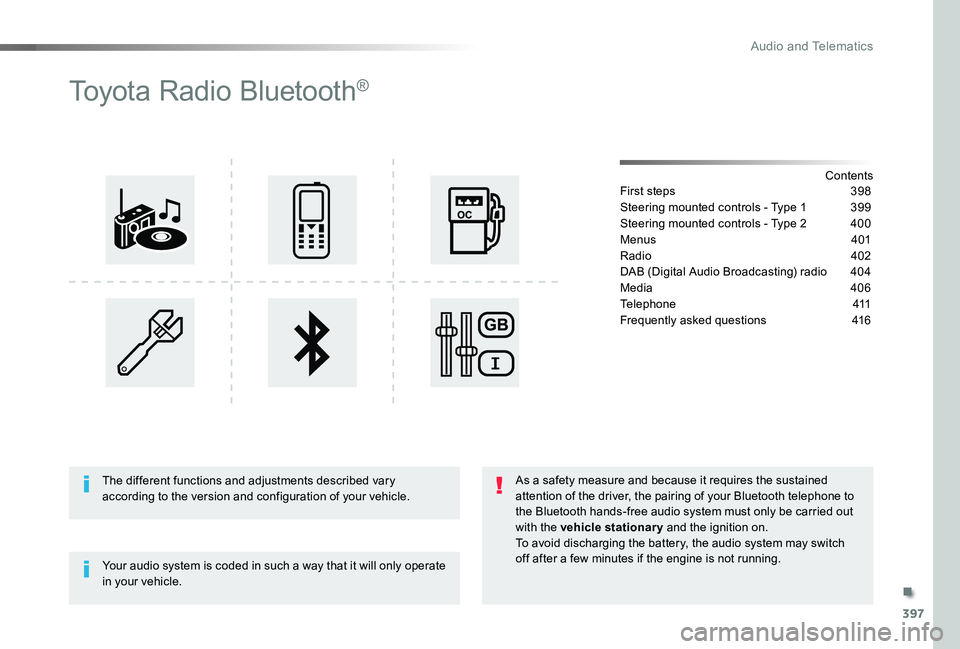
Toyota Radio Bluetooth®
ContentsFirst steps 398
Steering mounted controls - Type 1 399
Steering mounted controls - Type 2 400
Menus 401
Radio 402
DAB (Digital Audio Broadcasting) radio 404
Media 406
Telephone 411
Frequently asked questions 416
Your audio system is coded in such a way that it will only operate in your vehicle.
The different functions and adjustments described vary according to the version and configuration of your vehicle.
As a safety measure and because it requires the sustained attention of the driver, the pairing of your Bluetooth telephone to the Bluetooth hands-free audio system must only be carried out with the vehicle stationary and the ignition on.To avoid discharging the battery, the audio system may switch off after a few minutes if the engine is not running.
.
Audio and Telematics
Page 416 of 430
416
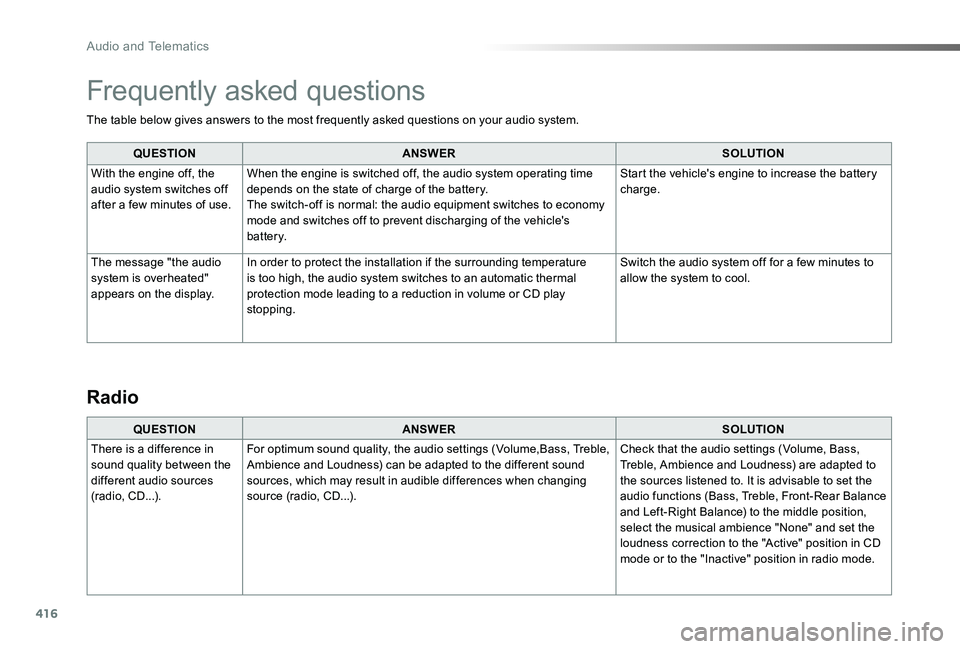
The table below gives answers to the most frequently asked questions on your audio system.
QUESTIONANSWERSOLUTION
With the engine off, the audio system switches off after a few minutes of use.
When the engine is switched off, the audio system operating time depends on the state of charge of the battery.The switch-off is normal: the audio equipment switches to economy mode and switches off to prevent discharging of the vehicle's battery.
Start the vehicle's engine to increase the battery charge.
The message "the audio system is overheated" appears on the display.
In order to protect the installation if the surrounding temperature is too high, the audio system switches to an automatic thermal protection mode leading to a reduction in volume or CD play stopping.
Switch the audio system off for a few minutes to allow the system to cool.
Frequently asked questions
QUESTIONANSWERSOLUTION
There is a difference in sound quality between the different audio sources (radio, CD...).
For optimum sound quality, the audio settings (Volume,Bass, Treble, Ambience and Loudness) can be adapted to the different sound sources, which may result in audible differences when changing source (radio, CD...).
Check that the audio settings (Volume, Bass, Treble, Ambience and Loudness) are adapted to the sources listened to. It is advisable to set the audio functions (Bass, Treble, Front-Rear Balance and Left-Right Balance) to the middle position, select the musical ambience "None" and set the loudness correction to the "Active" position in CD mode or to the "Inactive" position in radio mode.
Radio
Audio and Telematics
Page 420 of 430
420
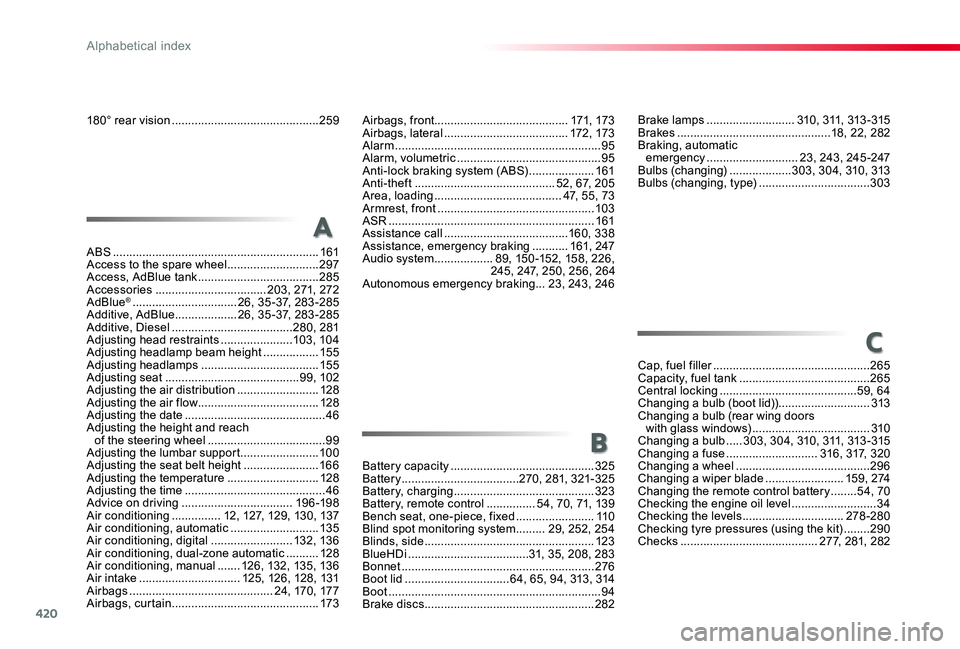
180° rear vision .............................................259
ABS ...............................................................161Access to the spare wheel ............................297Access, AdBlue tank .....................................285Accessories ..................................203, 271, 272AdBlue® ................................26, 35 -37, 283 -285Additive, AdBlue ...................26, 35 -37, 283 -285Additive, Diesel .....................................280, 281Adjusting head restraints ......................103, 104Adjusting headlamp beam height .................15 5Adjusting headlamps ....................................15 5Adjusting seat .........................................99, 102Adjusting the air distribution .........................128Adjusting the air flow .....................................128Adjusting the date ...........................................46Adjusting the height and reach of the steering wheel ....................................99Adjusting the lumbar support ........................10 0Adjusting the seat belt height .......................166Adjusting the temperature ............................128Adjusting the time ...........................................46Advice on driving ..................................19 6 -198Air conditioning ...............12, 127, 129, 130, 137Air conditioning, automatic ...........................13 5Air conditioning, digital .........................132, 13 6Air conditioning, dual-zone automatic ..........128Air conditioning, manual .......126, 132, 13 5, 13 6Air intake ...............................125, 126, 128, 131Airbags ............................................24, 170, 17 7Airbags, curtain .............................................173
Airbags, front.........................................171, 173Airbags, lateral ......................................172 , 173Alarm ...............................................................95Alarm, volumetric ............................................95Anti-lock braking system (ABS) ....................161Anti-theft ...........................................52, 67, 205Area, loading .......................................47, 55, 73Armrest, front ................................................103ASR ...............................................................161Assistance call ......................................160, 338Assistance, emergency braking ...........161, 247Audio system ..................89, 150 -152, 158, 226, 245, 247, 250, 256, 264Autonomous emergency braking ...23, 243, 246
A
C
B
Brake lamps ...........................310, 311, 313 - 315Brakes ...............................................18, 22, 282Braking, automatic emergency ............................23, 243, 245 -247Bulbs (changing) ...................303, 304, 310, 313Bulbs (changing, type) ..................................303
Cap, fuel filler ................................................265Capacity, fuel tank ........................................265Central locking ..........................................59, 64Changing a bulb (boot lid))............................313Changing a bulb (rear wing doors with glass windows) ....................................310Changing a bulb .....3 03, 3 0 4, 310, 311, 313 - 315Changing a fuse ............................316, 317, 320Changing a wheel .........................................296Changing a wiper blade ........................15 9 , 2 74Changing the remote control battery ........54, 70Checking the engine oil level ..........................34Checking the levels ...............................278-280Checking tyre pressures (using the kit) ........290Checks ..........................................277, 281, 282
Battery capacity ............................................325Battery ....................................270, 281, 321-325Battery, charging ...........................................323Battery, remote control ...............54, 70, 71, 139Bench seat, one-piece, fixed ........................11 0Blind spot monitoring system .........29, 252, 254Blinds, side ....................................................123BlueHDi .....................................31, 35, 208, 283Bonnet ...........................................................276Boot lid ................................64, 65, 94, 313, 314Boot .................................................................94Brake discs ....................................................282
Alphabetical index
Page 421 of 430
421
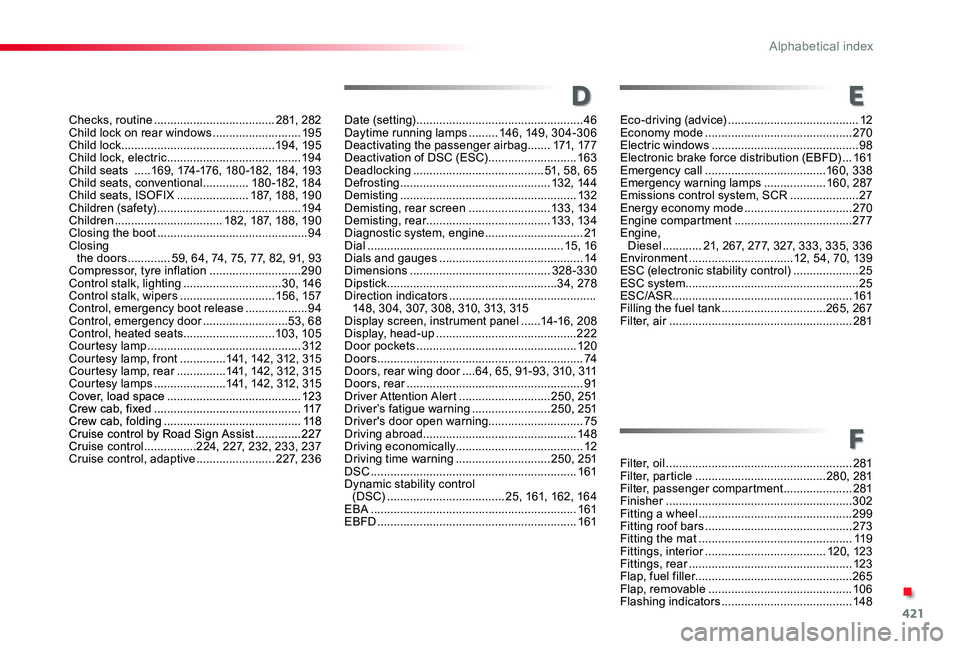
Checks, routine .....................................281, 282Child lock on rear windows ...........................195Child lock ...............................................19 4, 195Child lock, electric .........................................19 4Child seats .....169, 174-176, 180 -182, 184, 193Child seats, conventional ..............18 0 -182, 18 4Child seats, ISOFIX ......................187, 188, 190Children (safety) ............................................19 4Children .................................182, 187, 188, 190Closing the boot ..............................................94Closing the doors .............59, 64, 74, 75, 77, 82, 91, 93Compressor, tyre inflation ............................290Control stalk, lighting ..............................3 0, 14 6Control stalk, wipers .............................15 6, 157Control, emergency boot release ...................94Control, emergency door ..........................53, 68Control, heated seats ............................103, 105Courtesy lamp ...............................................312Courtesy lamp, front ..............141, 142, 312, 315Courtesy lamp, rear ...............141, 142, 312, 315Courtesy lamps ......................141, 142, 312, 315Cover, load space .........................................123Crew cab, fixed .............................................117Crew cab, folding ..........................................11 8Cruise control by Road Sign Assist ..............227Cruise control ................224, 227, 232, 233, 237Cruise control, adaptive ........................2 2 7, 2 3 6Filter, oil .........................................................281Filter, particle ........................................280, 281Filter, passenger compartment .....................281Finisher .........................................................302Fitting a wheel ...............................................299Fitting roof bars .............................................273Fitting the mat ...............................................11 9Fittings, interior .....................................120, 123Fittings, rear ..................................................123Flap, fuel filler ................................................265Flap, removable ............................................10 6Flashing indicators ........................................148
D
F
E
Date (setting) ...................................................46Daytime running lamps .........14 6, 149, 3 0 4 - 3 0 6Deactivating the passenger airbag .......171, 17 7Deactivation of DSC (ESC) ...........................163Deadlocking ........................................51, 58, 65Defrosting ..............................................132, 14 4Demisting ......................................................132Demisting, rear screen .........................13 3, 13 4Demisting, rear ......................................13 3, 13 4Diagnostic system, engine ..............................21Dial ............................................................15, 16Dials and gauges ............................................14Dimensions ...........................................328-330Dipstick ....................................................34, 278Direction indicators .............................................148, 304, 307, 308, 310, 313, 315Display screen, instrument panel ......14 -16 , 2 0 8Display, head-up ...........................................222Door pockets .................................................120Doors ...............................................................74Doors, rear wing door ....64, 65, 91-93, 310, 311Doors, rear ......................................................91Driver Attention Alert ............................250, 251Driver’s fatigue warning ........................250, 251Driver's door open warning .............................75Driving abroad...............................................148Driving economically.......................................12Driving time warning .............................250, 251DSC ...............................................................161Dynamic stability control (DSC) ....................................25, 161, 162, 16 4EBA ...............................................................161EBFD .............................................................161
Eco-driving (advice) ........................................12Economy mode .............................................270Electric windows .............................................98Electronic brake force distribution (EBFD) ...161Emergency call .....................................160, 338Emergency warning lamps ...................160, 287Emissions control system, SCR .....................27Energy economy mode .................................270Engine compartment ....................................277Engine, Diesel ............21, 267, 277, 327, 333, 335, 336Environment ................................12, 54, 70, 139ESC (electronic stability control) ....................25ESC system .....................................................25ESC/ASR .......................................................161Filling the fuel tank ................................265, 267Filter, air ........................................................281
.
Alphabetical index
Page 422 of 430
422
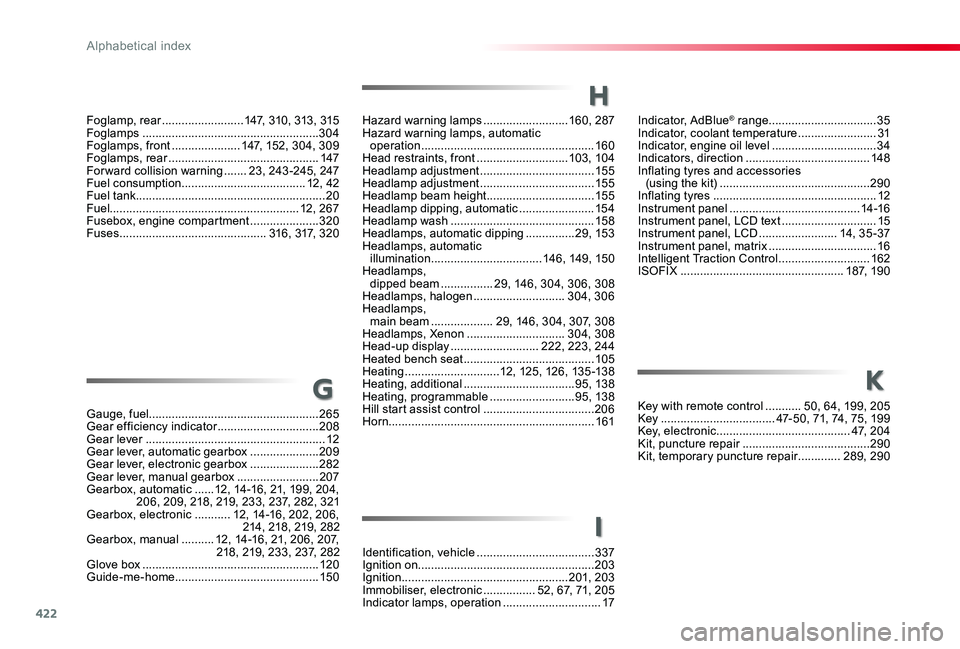
Indicator, AdBlue® range .................................35Indicator, coolant temperature ........................31Indicator, engine oil level ................................34Indicators, direction ......................................148Inflating tyres and accessories (using the kit) ..............................................290Inflating tyres ..................................................12Instrument panel ........................................14 -16Instrument panel, LCD text .............................15Instrument panel, LCD ........................14, 3 5 - 37Instrument panel, matrix .................................16Intelligent Traction Control ............................162ISOFIX ..................................................187, 190
Hazard warning lamps ..........................160, 287Hazard warning lamps, automatic operation .....................................................160Head restraints, front ............................103, 104Headlamp adjustment ...................................15 5Headlamp adjustment ...................................15 5Headlamp beam height .................................15 5Headlamp dipping, automatic .......................15 4Headlamp wash ............................................15 8Headlamps, automatic dipping ...............29, 15 3Headlamps, automatic illumination ..................................14 6, 149, 15 0Headlamps, dipped beam ................29, 146, 304, 306, 308Headlamps, halogen ............................304, 306Headlamps, main beam ...................29, 146, 304, 307, 308Headlamps, Xenon ..............................304, 308Head-up display ...........................222, 223, 244Heated bench seat ........................................105Heating .............................12, 125, 126, 13 5 -13 8Heating, additional ..................................95, 138Heating, programmable ..........................95, 138Hill start assist control ..................................206Horn...............................................................161
H
Foglamp, rear .........................147, 310, 313, 315Foglamps ......................................................304Foglamps, front .....................147, 152, 304, 309Foglamps, rear ..............................................147Forward collision warning .......23, 243 -245, 247Fuel consumption ......................................12, 42Fuel tank..........................................................20Fuel..........................................................12, 267Fusebox, engine compartment .....................320Fuses .............................................316, 317, 320
Gauge, fuel....................................................265Gear efficiency indicator ...............................208Gear lever .......................................................12Gear lever, automatic gearbox .....................209Gear lever, electronic gearbox .....................282Gear lever, manual gearbox .........................207Gearbox, automatic ......12, 14-16, 21, 199, 204, 206, 209, 218, 219, 233, 237, 282, 321Gearbox, electronic ...........12, 14-16, 202, 206, 214, 218, 219, 282Gearbox, manual ..........12, 14-16, 21, 206, 207, 218, 219, 233, 237, 282Glove box ......................................................120Guide-me-home ............................................15 0
GKey with remote control ...........50, 64, 199, 205Key ...................................47-50, 71, 74, 75, 199Key, electronic .........................................4 7, 2 0 4Kit, puncture repair .......................................290Kit, temporary puncture repair .............289, 290
Identification, vehicle ....................................337Ignition on......................................................203Ignition ...................................................201, 203Immobiliser, electronic ................52, 67, 71, 205Indicator lamps, operation ..............................17
K
I
Alphabetical index