ad blue TOYOTA PROACE 2020 (in English) Service Manual
[x] Cancel search | Manufacturer: TOYOTA, Model Year: 2020, Model line: PROACE, Model: TOYOTA PROACE 2020Pages: 430, PDF Size: 48.01 MB
Page 365 of 430
365
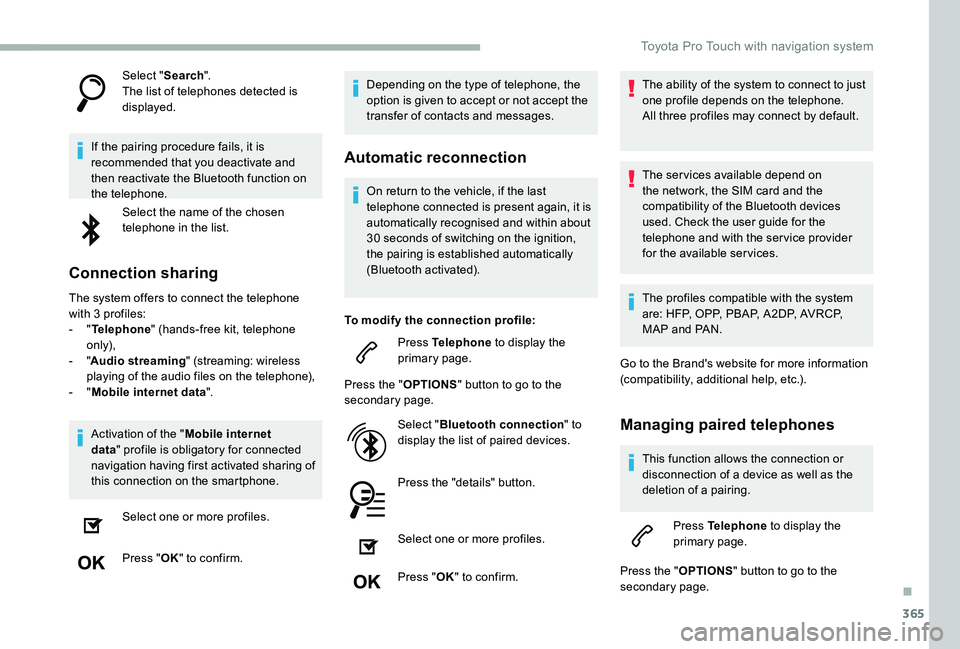
Select "Search".The list of telephones detected is displayed.
If the pairing procedure fails, it is recommended that you deactivate and then reactivate the Bluetooth function on the telephone.
Select the name of the chosen telephone in the list.
Connection sharing
The system offers to connect the telephone with 3 profiles:- "Telephone" (hands-free kit, telephone only),- "Audio streaming" (streaming: wireless playing of the audio files on the telephone),- "Mobile internet data".
Activation of the "Mobile internet
data" profile is obligatory for connected navigation having first activated sharing of this connection on the smartphone.
Select one or more profiles.
Press "OK" to confirm.
Depending on the type of telephone, the option is given to accept or not accept the transfer of contacts and messages.
Automatic reconnection
On return to the vehicle, if the last telephone connected is present again, it is automatically recognised and within about 30 seconds of switching on the ignition,
the pairing is established automatically (Bluetooth activated).
To modify the connection profile:
Press Telephone to display the primary page.
Press the "OPTIONS" button to go to the secondary page.
Select "Bluetooth connection" to display the list of paired devices.
Press the "details" button.
Select one or more profiles.
Press "OK" to confirm.
The ability of the system to connect to just one profile depends on the telephone.All three profiles may connect by default.
The services available depend on the network, the SIM card and the compatibility of the Bluetooth devices used. Check the user guide for the telephone and with the service provider for the available services.
The profiles compatible with the system are: HFP, OPP, PBAP, A 2DP, AVRCP, MAP and PAN.
Go to the Brand's website for more information (compatibility, additional help, etc.).
Managing paired telephones
This function allows the connection or disconnection of a device as well as the deletion of a pairing.
Press Telephone to display the primary page.
Press the "OPTIONS" button to go to the secondary page.
.
Toyota Pro Touch with navigation system
Page 366 of 430
366
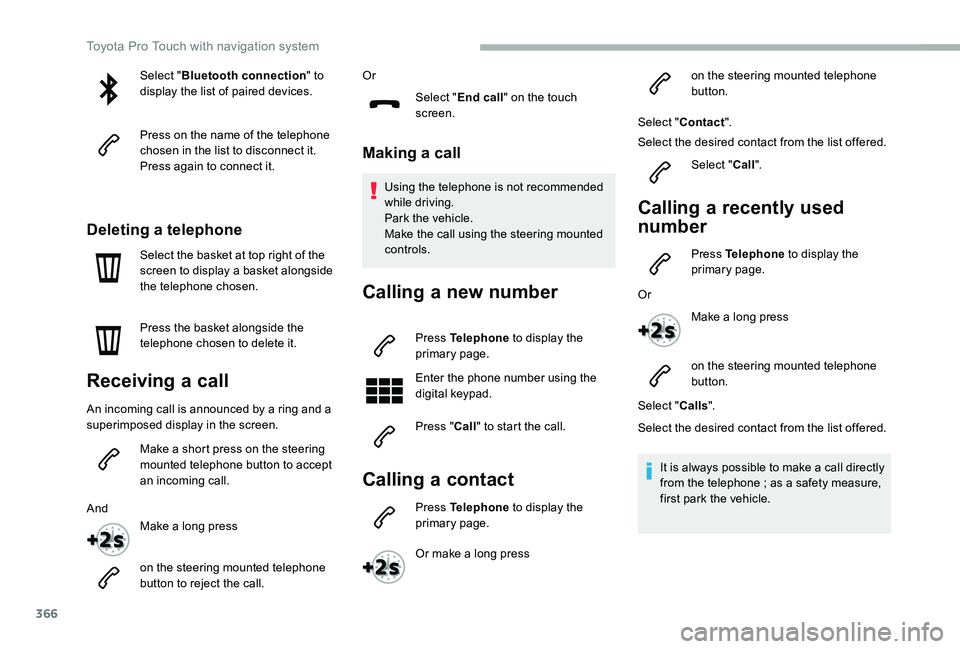
Select "Bluetooth connection" to display the list of paired devices.
Press on the name of the telephone chosen in the list to disconnect it.Press again to connect it.
Deleting a telephone
Select the basket at top right of the screen to display a basket alongside the telephone chosen.
Press the basket alongside the telephone chosen to delete it.
Receiving a call
An incoming call is announced by a ring and a superimposed display in the screen.
Make a short press on the steering mounted telephone button to accept an incoming call.
And
Make a long press
on the steering mounted telephone button to reject the call.
Or
Select "End call" on the touch screen.
Making a call
Using the telephone is not recommended while driving.Park the vehicle.Make the call using the steering mounted controls.
Calling a new number
Press Telephone to display the primary page.
Enter the phone number using the digital keypad.
Press "Call" to start the call.
Calling a contact
Press Telephone to display the primary page.
Or make a long press
on the steering mounted telephone button.
Select "Contact".
Select the desired contact from the list offered.
Select "Call".
Calling a recently used
number
Press Telephone to display the primary page.
Or
Make a long press
on the steering mounted telephone button.
Select "Calls".
Select the desired contact from the list offered.
It is always possible to make a call directly from the telephone ; as a safety measure, first park the vehicle.
Toyota Pro Touch with navigation system
Page 367 of 430
367
Managing contacts/entries
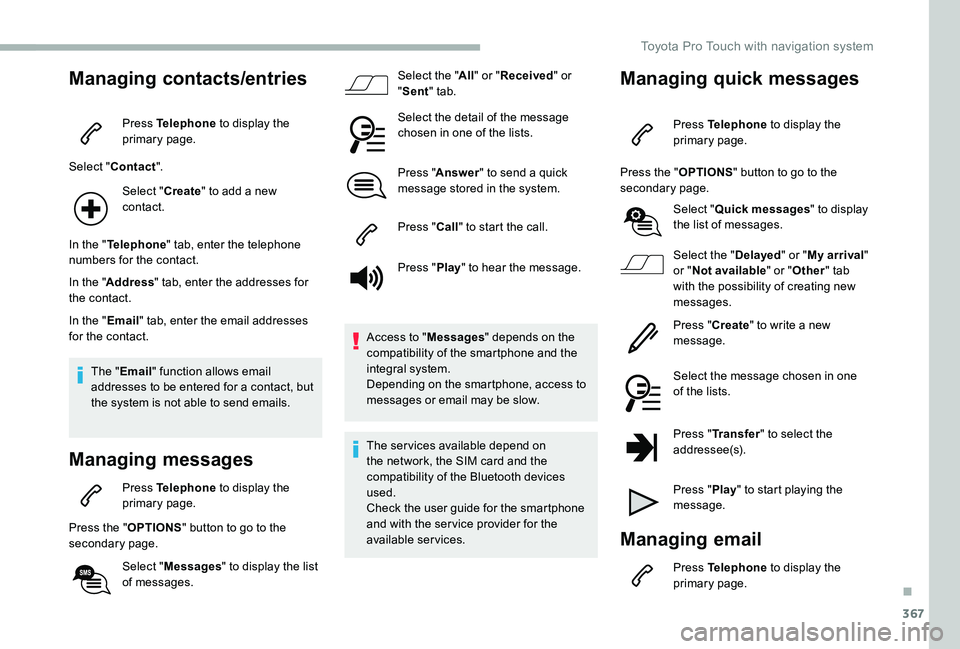
Press Telephone to display the primary page.
Select "Contact".
Select "Create" to add a new contact.
In the "Telephone" tab, enter the telephone numbers for the contact.
In the "Address" tab, enter the addresses for the contact.
In the "Email" tab, enter the email addresses for the contact.
The "Email" function allows email addresses to be entered for a contact, but the system is not able to send emails.
Managing messages
Press Telephone to display the primary page.
Press the "OPTIONS" button to go to the secondary page.
Select "Messages" to display the list of messages.
Select the "All" or "Received" or "Sent" tab.
Select the detail of the message chosen in one of the lists.
Press "Answer" to send a quick message stored in the system.
Press "Call" to start the call.
Press "Play" to hear the message.
Access to "Messages" depends on the compatibility of the smartphone and the integral system.Depending on the smartphone, access to messages or email may be slow.
The services available depend on the network, the SIM card and the compatibility of the Bluetooth devices used.Check the user guide for the smartphone and with the ser vice provider for the available services.
Managing quick messages
Press Telephone to display the primary page.
Press the "OPTIONS" button to go to the secondary page.
Select "Quick messages" to display the list of messages.
Select the "Delayed" or "My arrival" or "Not available" or "Other" tab with the possibility of creating new messages.
Press "Create" to write a new message.
Select the message chosen in one of the lists.
Press "Transfer" to select the
addressee(s).
Press "Play" to start playing the message.
Managing email
Press Telephone to display the primary page.
.
Toyota Pro Touch with navigation system
Page 374 of 430
374
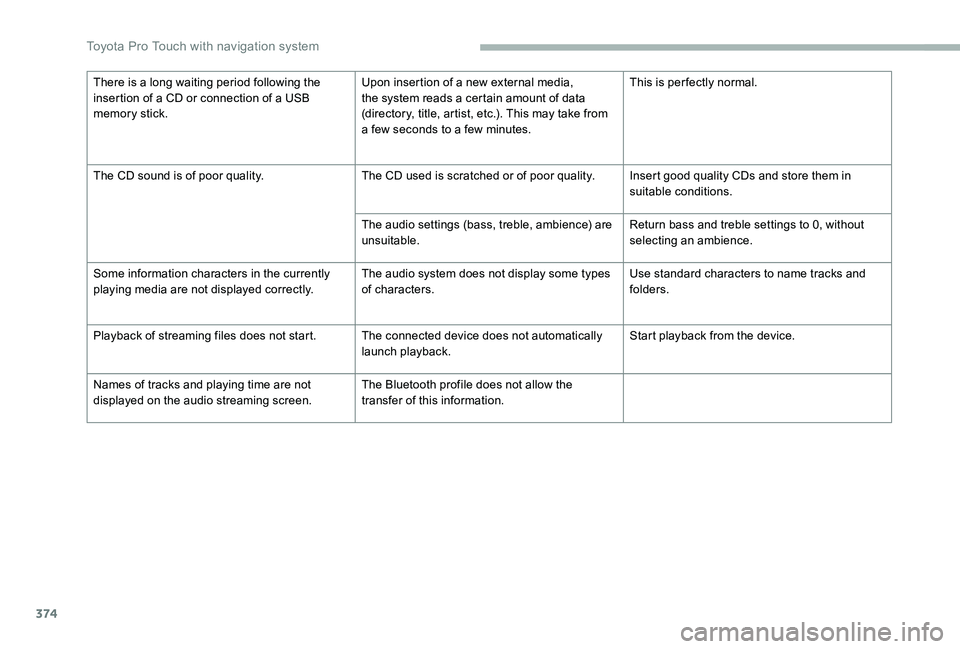
There is a long waiting period following the insertion of a CD or connection of a USB memory stick.
Upon insertion of a new external media, the system reads a certain amount of data (directory, title, artist, etc.). This may take from a few seconds to a few minutes.
This is per fectly normal.
The CD sound is of poor quality.The CD used is scratched or of poor quality.Insert good quality CDs and store them in suitable conditions.
The audio settings (bass, treble, ambience) are unsuitable.Return bass and treble settings to 0, without selecting an ambience.
Some information characters in the currently playing media are not displayed correctly.The audio system does not display some types of characters.Use standard characters to name tracks and folders.
Playback of streaming files does not start.The connected device does not automatically launch playback.Start playback from the device.
Names of tracks and playing time are not displayed on the audio streaming screen.The Bluetooth profile does not allow the transfer of this information.
Toyota Pro Touch with navigation system
Page 375 of 430
375
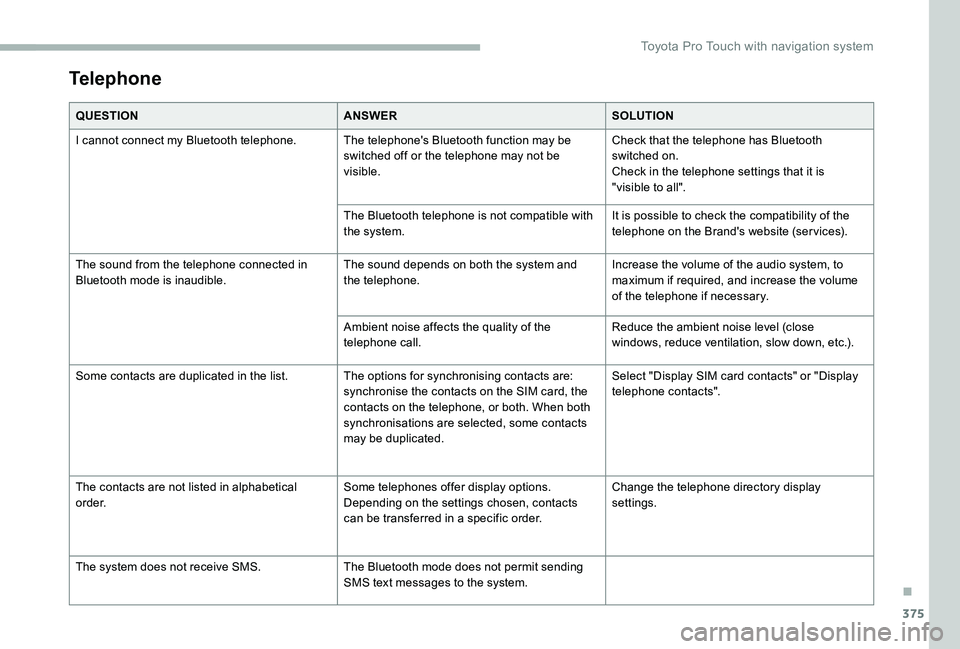
Telephone
QUESTIONANSWERSOLUTION
I cannot connect my Bluetooth telephone.The telephone's Bluetooth function may be switched off or the telephone may not be visible.
Check that the telephone has Bluetooth switched on.Check in the telephone settings that it is "visible to all".
The Bluetooth telephone is not compatible with the system.It is possible to check the compatibility of the telephone on the Brand's website (services).
The sound from the telephone connected in Bluetooth mode is inaudible.The sound depends on both the system and the telephone.Increase the volume of the audio system, to maximum if required, and increase the volume of the telephone if necessary.
Ambient noise affects the quality of the telephone call.Reduce the ambient noise level (close windows, reduce ventilation, slow down, etc.).
Some contacts are duplicated in the list.The options for synchronising contacts are: synchronise the contacts on the SIM card, the contacts on the telephone, or both. When both synchronisations are selected, some contacts may be duplicated.
Select "Display SIM card contacts" or "Display telephone contacts".
The contacts are not listed in alphabetical o r d e r.Some telephones offer display options. Depending on the settings chosen, contacts can be transferred in a specific order.
Change the telephone directory display settings.
The system does not receive SMS.The Bluetooth mode does not permit sending SMS text messages to the system.
.
Toyota Pro Touch with navigation system
Page 377 of 430
377
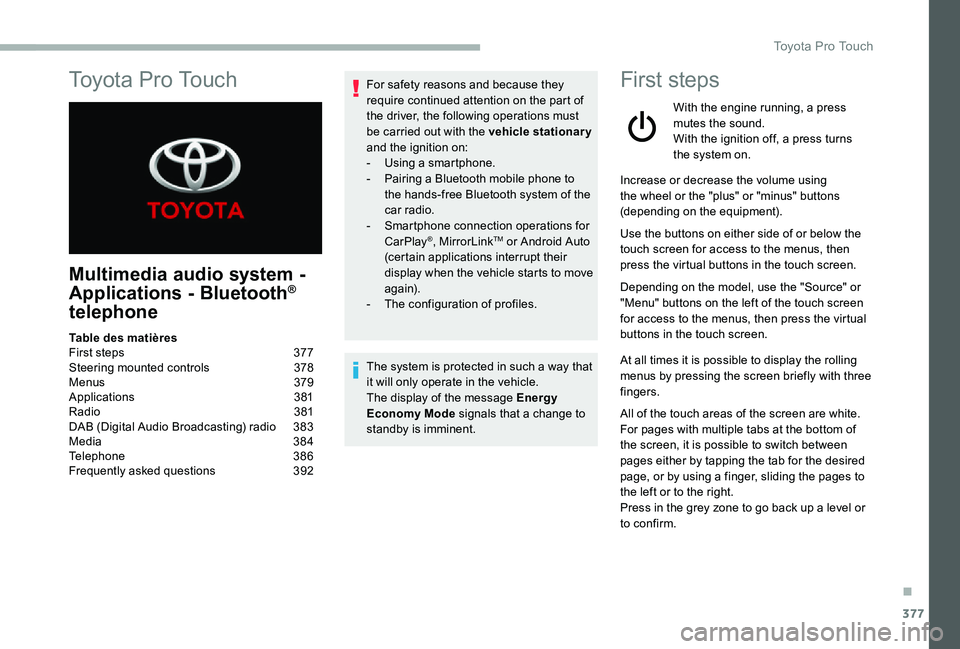
To y o t a P r o To u c h
Multimedia audio system -
Applications - Bluetooth®
telephone
For safety reasons and because they require continued attention on the part of the driver, the following operations must be carried out with the vehicle stationary and the ignition on:- Using a smartphone.- Pairing a Bluetooth mobile phone to the hands-free Bluetooth system of the car radio.- Smartphone connection operations for CarPlay®, MirrorLinkTM or Android Auto (certain applications interrupt their display when the vehicle starts to move again).- The configuration of profiles.
The system is protected in such a way that it will only operate in the vehicle.The display of the message Energy Economy Mode signals that a change to standby is imminent.
First steps
With the engine running, a press mutes the sound.With the ignition off, a press turns the system on.
Increase or decrease the volume using the wheel or the "plus" or "minus" buttons (depending on the equipment).
Use the buttons on either side of or below the touch screen for access to the menus, then press the virtual buttons in the touch screen.
Depending on the model, use the "Source" or "Menu" buttons on the left of the touch screen for access to the menus, then press the virtual buttons in the touch screen.
At all times it is possible to display the rolling menus by pressing the screen briefly with three fingers.
All of the touch areas of the screen are white.For pages with multiple tabs at the bottom of
the screen, it is possible to switch between pages either by tapping the tab for the desired page, or by using a finger, sliding the pages to the left or to the right.Press in the grey zone to go back up a level or to confirm.
Table des matièresFirst steps 377Steering mounted controls 378Menus 379Applications 381Radio 381DAB (Digital Audio Broadcasting) radio 383Media 384Telephone 386Frequently asked questions 392
.
Toyota Pro Touch
Page 378 of 430
378
The touch screen is of the "capacitive" type.To clean the screen, use a soft, non-abrasive cloth (e.g. spectacles cloth) with no additional product.Do not use sharp objects on the screen.Do not touch the screen with wet hands.
Certain information is displayed permanently in the upper bar of the touch screen:- Reminder of the air conditioning information (depending on version), and direct access to the corresponding menu.- Reminder of the Radio Media and Telephone menu information.- Reminder of the privacy information.- Access to the Settings of the touch screen and digital instrument panel.
Selection of the audio source (depending on
equipment):- FM/DAB/AM radio stations (depending on equipment).- Telephone connected via Bluetooth and Bluetooth multimedia broadcast (streaming).- USB memory stick.- Media player connected via the auxiliary socket (depending on equipment).- CD player (depending on equipment).
In the "Settings" menu it is possible to create a profile for just one person or a group of people with shared interests, with the possibility of entering multiple settings (radio presets, audio settings, ambiences, etc.) ; these settings are taken into account automatically.
In very hot conditions, the volume may
be limited to protect the system. It may go into standby (screen and sound off) for at least 5 minutes.The return to normal takes place when the temperature in the passenger compartment has dropped.
Press the back arrow to go back a level or confirm.Steering mounted controls
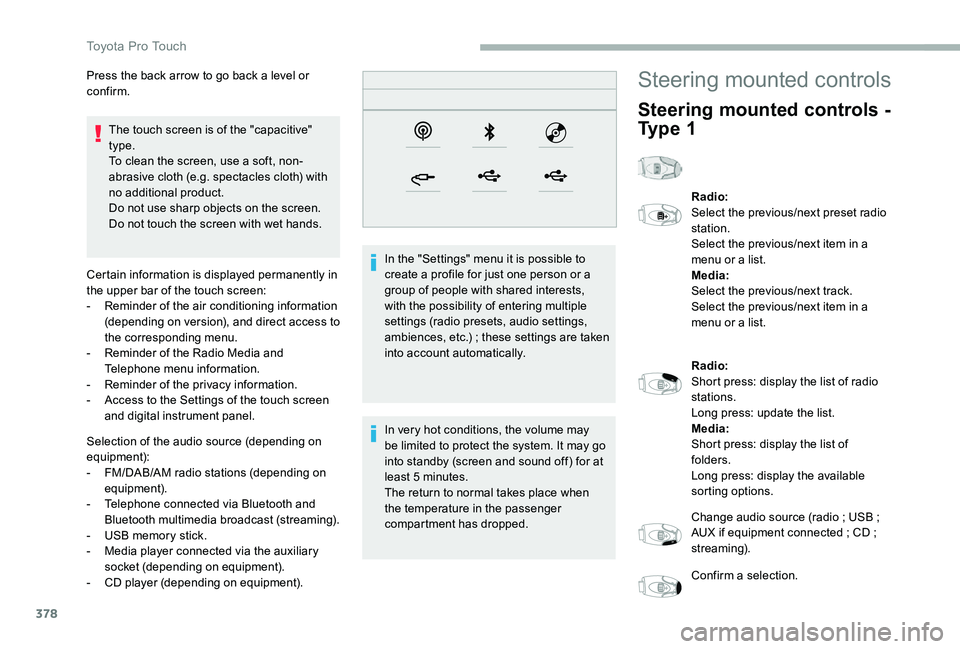
Steering mounted controls -
Ty p e 1
Radio:Select the previous/next preset radio station.Select the previous/next item in a menu or a list.Media:Select the previous/next track.Select the previous/next item in a menu or a list.
Radio:Short press: display the list of radio stations.Long press: update the list.Media:Short press: display the list of folders.Long press: display the available sorting options.
Change audio source (radio ; USB ; AUX if equipment connected ; CD ; streaming).
Confirm a selection.
Toyota Pro Touch
Page 380 of 430
380
21,518,5
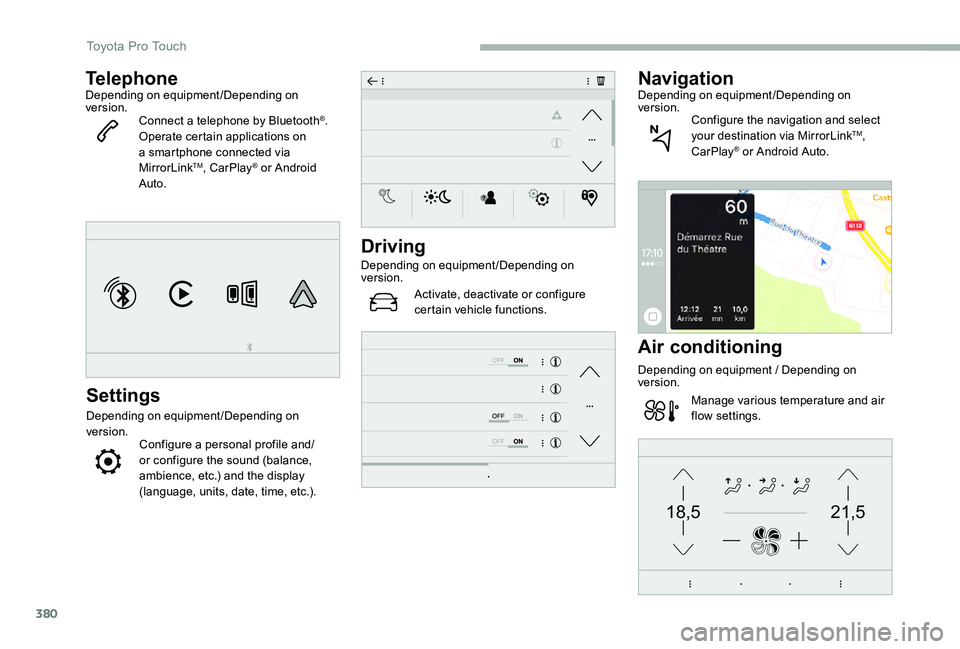
TelephoneDepending on equipment/Depending on version.Connect a telephone by Bluetooth®.Operate certain applications on a smartphone connected via MirrorLinkTM, CarPlay® or Android Auto.
Settings
Depending on equipment/Depending on version.Configure a personal profile and/or configure the sound (balance, ambience, etc.) and the display (language, units, date, time, etc.).
Driving
Depending on equipment/Depending on version.
Activate, deactivate or configure certain vehicle functions.
NavigationDepending on equipment/Depending on version.Configure the navigation and select your destination via MirrorLinkTM, CarPlay® or Android Auto.
Air conditioning
Depending on equipment / Depending on version.
Manage various temperature and air flow settings.
Toyota Pro Touch
Page 385 of 430
385
Bluetooth®streaming
Streaming allows you to listen to music from your smartphone.
The Bluetooth profile must be activated, first adjust the volume on the portable device (to a high level).Then adjust the volume of the system.
If play does not start automatically, it may be necessary to start the audio playback from the smartphone.
Control is from the portable device or by using the system's touch buttons.
Once connected in Streaming mode, the smartphone is considered to be a media source.
Connecting Apple® players
Connect the Apple® player to the USB socket using a suitable cable (not supplied).Play starts automatically.
Control is via the audio system.
The classifications available are those of the portable device connected (artists/albums/genres/playlists/audio books/podcasts). It is also possible to use a classification structured in the form of a library.The default classification used is by artist. To modify the classification used, return to the first level of the menu then select the desired classification (playlists for example) and confirm to go down through the menu to the desired track.
The version of software in the audio system may not be compatible with the generation of the Apple® p l aye r.To protect the system, do not use a USB hub.
The audio system will only play audio files with ".wav", ".wma", ".aac", ".ogg" and ".mp3" file extensions and with a bit rate of between 32 Kbps and 320 Kbps.It also supports VBR (Variable Bit Rate) mode.No other file types (".mp4", etc.) can be read.Files of the ".wma" type should be to the wma 9 standard.Sampling frequencies supported are 11, 22, 44
and 48 kHz.
Information and advice
The system supports USB mass storage devices, BlackBerry® devices or Apple® players via the USB sockets. The adapter cable is not supplied.Device management is via the audio system controls.Other devices, not recognised on connection, must be connected to the auxiliary socket using a Jack cable (not supplied) or via Bluetooth streaming, depending on compatibility.
.
Toyota Pro Touch
Page 386 of 430
386
It is recommended that file names are less than 20 characters long and do not contain any special characters (e.g. « » ? . ; ù) so as to avoid any reading or display problems.
Use only USB memory sticks in FAT32 format (File Allocation Table).
It is recommended that the original USB cable for the portable device be used.
In order to be able to play a burned CDR or
CDRW, select standards ISO 9660 level 1, 2, or Joliet, if possible, when burning the CD.If the disc is burned in another format, it may not be played correctly.It is recommended that the same burning standard be always used on an individual disc, with the lowest speed possible (4x maximum) for the best acoustic quality.In the particular case of a multi-session CD, the Joliet standard is recommended.
TelephoneMirrorLinkTM smartphone
connection
The "MirrorLinkTM" function requires a compatible smartphone and applications.
Telephone not connected by Bluetooth®
Connect a USB cable. The smartphone charges when connected by the USB cable.
From the system, press "Telephone" to display the primary page.
Press "MirrorLinkTM" to start the application in the system.
Depending on the smartphone, it may be necessary to activate the "MirrorLinkTM" function.
During the procedure, several screen pages relating to certain functions are displayed.Accept to start and complete the connection.
When connecting a smartphone to the system, it is recommended that Bluetooth® be started on the smartphone.
Telephone connected by Bluetooth®
From the system, press "Telephone" to display the primary
page.
USB sockets
Depending on equipment, for more information on the USB sockets compatible with the CarPlay®, MirrorLinkTM or Android Auto applications, refer to the "Ease of use and comfort" section.
The synchronisation of a smartphone allows users to display applications adapted to the CarPlay®, MirrorLinkTM or Android Auto technology of the smartphone on the vehicle screen. For the CarPlay® technology, the CarPlay® function must be activated on the smartphone beforehand.For the communication process between the smartphone and the system to work, it is essential in all cases that the smartphone is unlocked.As the principles and standards are constantly changing, it is recommended that you keep the smar tphone's operating system up-to- date, as well as the date and time of the smar tphone and of the system.For the list of eligible smartphones, go to the Brand's national website.
Connect a USB cable. The smartphone charges when connected by the USB cable.
Toyota Pro Touch