ad blue TOYOTA PROACE 2021 User Guide
[x] Cancel search | Manufacturer: TOYOTA, Model Year: 2021, Model line: PROACE, Model: TOYOTA PROACE 2021Pages: 360, PDF Size: 70.79 MB
Page 94 of 360
94
Rear heating - air
conditioning
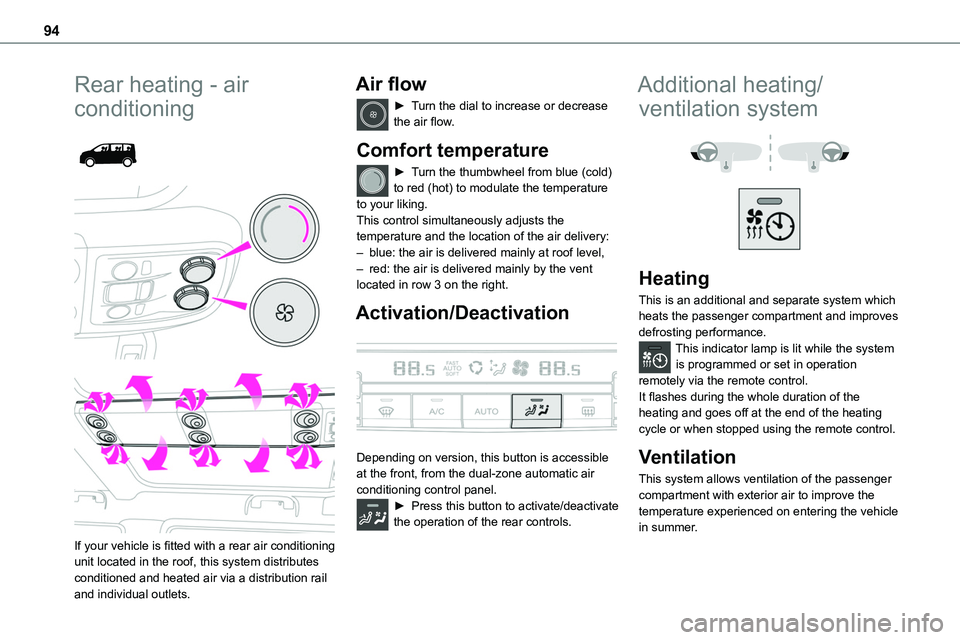
If your vehicle is fitted with a rear air conditioning unit located in the roof, this system distributes conditioned and heated air via a distribution rail and individual outlets.
Air flow
► Turn the dial to increase or decrease the air flow.
Comfort temperature
► Turn the thumbwheel from blue (cold) to red (hot) to modulate the temperature to your liking.This control simultaneously adjusts the
temperature and the location of the air delivery:– blue: the air is delivered mainly at roof level,– red: the air is delivered mainly by the vent located in row 3 on the right.
Activation/Deactivation
Depending on version, this button is accessible at the front, from the dual-zone automatic air conditioning control panel.► Press this button to activate/deactivate the operation of the rear controls.
Additional heating/
ventilation system
Heating
This is an additional and separate system which heats the passenger compartment and improves defrosting performance.This indicator lamp is lit while the system is programmed or set in operation remotely via the remote control.It flashes during the whole duration of the heating and goes off at the end of the heating cycle or when stopped using the remote control.
Ventilation
This system allows ventilation of the passenger compartment with exterior air to improve the temperature experienced on entering the vehicle in summer.
Page 95 of 360
95
Ease of use and comfort
3
Programming
With a TOYOTA Pro Touch with navigation system, use the remote control to start/stop the additional heating.With a Bluetooth® audio system or a TOYOTA Pro Touch, use the remote control to start/stop the additional heating and/or adjust the pre-heating times.
With Bluetooth® audio system
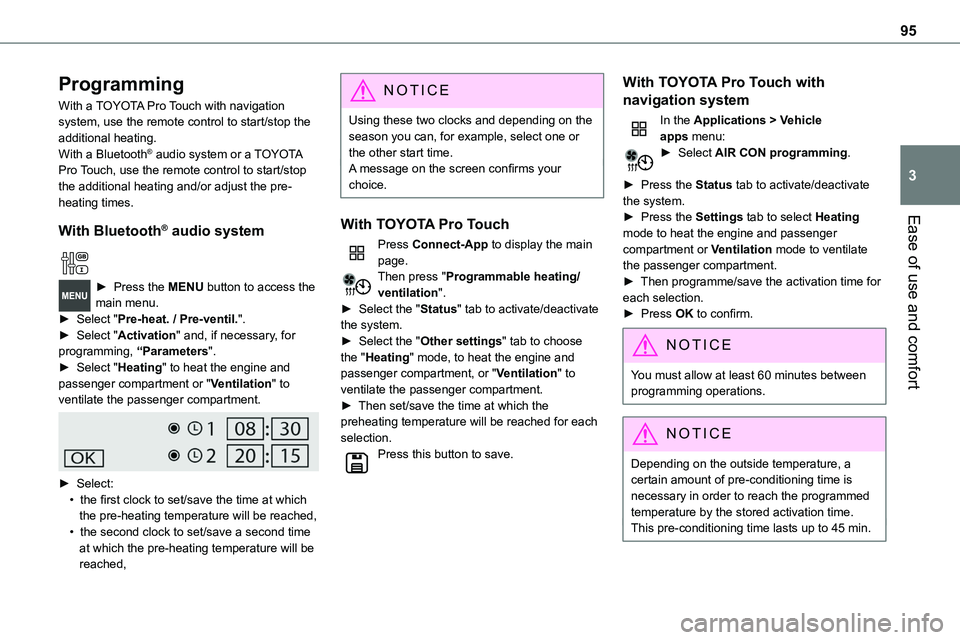
► Press the MENU button to access the main menu. ► Select "Pre-heat. / Pre-ventil.".► Select "Activation" and, if necessary, for programming, “Parameters".► Select "Heating" to heat the engine and passenger compartment or "Ventilation" to ventilate the passenger compartment.
► Select:• the first clock to set/save the time at which the pre-heating temperature will be reached,• the second clock to set/save a second time at which the pre-heating temperature will be reached,
N OTIC E
Using these two clocks and depending on the season you can, for example, select one or the other start time.A message on the screen confirms your choice.
With TOYOTA Pro Touch
Press Connect-App to display the main page.Then press "Programmable heating/ventilation".► Select the "Status" tab to activate/deactivate the system.► Select the "Other settings" tab to choose the "Heating" mode, to heat the engine and passenger compartment, or "Ventilation" to ventilate the passenger compartment.► Then set/save the time at which the preheating temperature will be reached for each selection.Press this button to save.
With TOYOTA Pro Touch with
navigation system
In the Applications > Vehicle apps menu:► Select AIR CON programming.
► Press the Status tab to activate/deactivate the system.► Press the Settings tab to select Heating
mode to heat the engine and passenger compartment or Ventilation mode to ventilate the passenger compartment.► Then programme/save the activation time for each selection.► Press OK to confirm.
NOTIC E
You must allow at least 60 minutes between programming operations.
NOTIC E
Depending on the outside temperature, a certain amount of pre-conditioning time is necessary in order to reach the programmed temperature by the stored activation time.This pre-conditioning time lasts up to 45 min.
Page 98 of 360
98
A/C preconditioning
(Electric)
This function allows you to programme the temperature in the passenger compartment to reach a pre-defined, non-modifiable temperature (approx. 21°C) before you enter the vehicle, on the days and at the times of your choice.This function is available when the vehicle is
connected or not connected.
Programming
With Bluetooth® audio system
Temperature pre-conditioning is not available with the Bluetooth® audio system.
With TOYOTA Pro Touch or TOYOTA Pro Touch with navigation system
Programming can be carried out from a smartphone using the MyToyota application (Available soon).For more information on the Remotely-operable functions, refer to the corresponding section.
With TOYOTA Pro Touch with navigation system
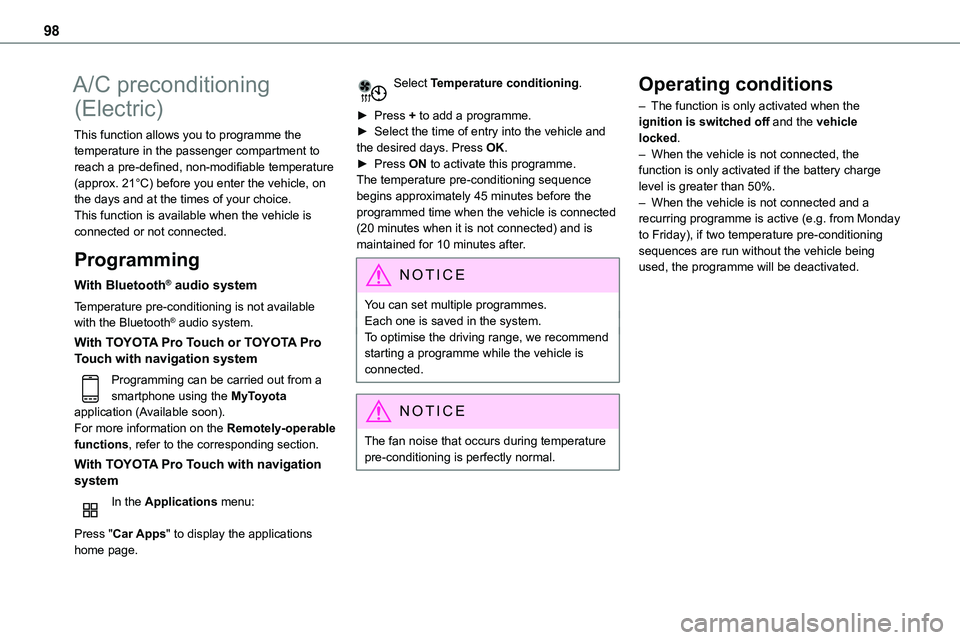
In the Applications menu:
Press "Car Apps" to display the applications home page.
Select Temperature conditioning.
► Press + to add a programme.► Select the time of entry into the vehicle and the desired days. Press OK.► Press ON to activate this programme.The temperature pre-conditioning sequence begins approximately 45 minutes before the programmed time when the vehicle is connected
(20 minutes when it is not connected) and is maintained for 10 minutes after.
NOTIC E
You can set multiple programmes.Each one is saved in the system.To optimise the driving range, we recommend starting a programme while the vehicle is connected.
NOTIC E
The fan noise that occurs during temperature pre-conditioning is perfectly normal.
Operating conditions
– The function is only activated when the ignition is switched off and the vehicle locked.– When the vehicle is not connected, the function is only activated if the battery charge level is greater than 50%.– When the vehicle is not connected and a recurring programme is active (e.g. from Monday
to Friday), if two temperature pre-conditioning sequences are run without the vehicle being used, the programme will be deactivated.
Page 194 of 360
194
Malfunction
In the event of a malfunction when changing into reverse gear, this warning lamp lights up on the instrument panel, accompanied by the display of a message and an audible signal (short beep).Have it checked by any authorized Toyota retailer or Toyota authorized repairer, or any reliable repairer.
VisioPark Light
WARNI NG
Refer to the General recommendations on the use of driving and manoeuvring aids.
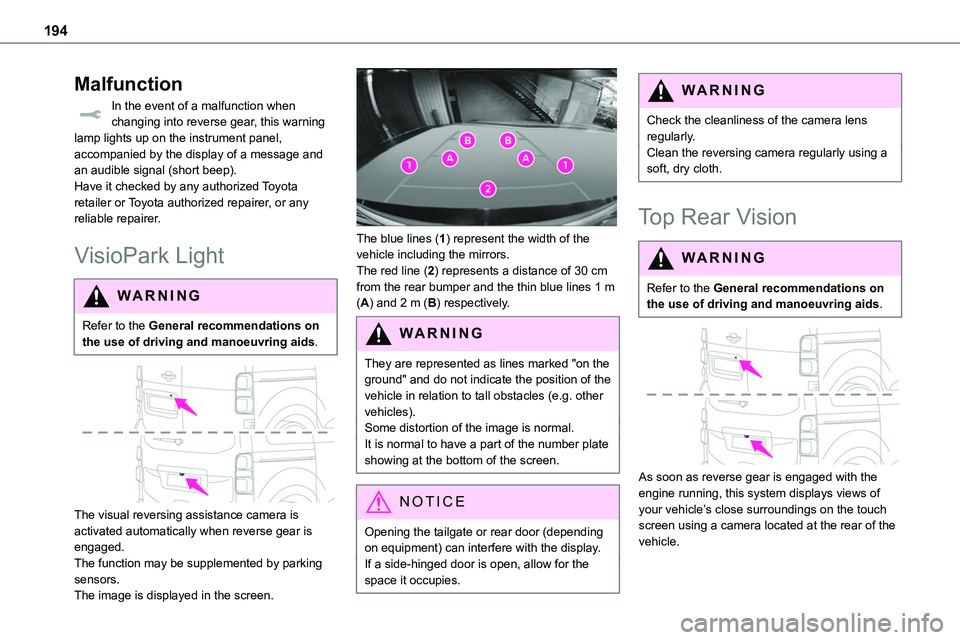
The visual reversing assistance camera is activated automatically when reverse gear is engaged.The function may be supplemented by parking sensors.The image is displayed in the screen.
The blue lines (1) represent the width of the vehicle including the mirrors.The red line (2) represents a distance of 30 cm from the rear bumper and the thin blue lines 1 m (A) and 2 m (B) respectively.
WARNI NG
They are represented as lines marked "on the ground" and do not indicate the position of the vehicle in relation to tall obstacles (e.g. other vehicles).Some distortion of the image is normal.It is normal to have a part of the number plate showing at the bottom of the screen.
NOTIC E
Opening the tailgate or rear door (depending on equipment) can interfere with the display.If a side-hinged door is open, allow for the space it occupies.
WARNI NG
Check the cleanliness of the camera lens regularly.Clean the reversing camera regularly using a soft, dry cloth.
Top Rear Vision
WARNI NG
Refer to the General recommendations on the use of driving and manoeuvring aids.
As soon as reverse gear is engaged with the engine running, this system displays views of your vehicle’s close surroundings on the touch screen using a camera located at the rear of the vehicle.
Page 196 of 360
196
NOTIC E
The function will be deactivated:– If a trailer is attached or a bicycle carrier is fitted on a towing device (vehicle fitted with a towing device installed in line with the manufacturer's recommendations).– Above about 6 mph (10 km/h).– When the boot is opened.
– Upon changing out of reverse gear (the image remains displayed for 7 seconds).– By pressing the white arrow in the upper-left corner of the touch screen.
AUTO mode
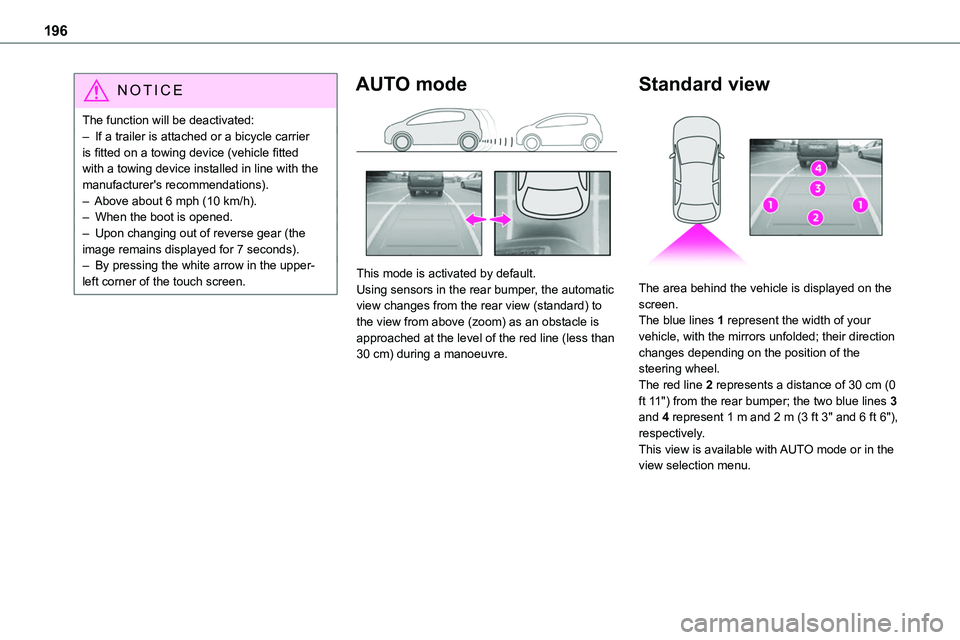
This mode is activated by default.Using sensors in the rear bumper, the automatic view changes from the rear view (standard) to the view from above (zoom) as an obstacle is approached at the level of the red line (less than 30 cm) during a manoeuvre.
Standard view
The area behind the vehicle is displayed on the screen.The blue lines 1 represent the width of your vehicle, with the mirrors unfolded; their direction changes depending on the position of the steering wheel.The red line 2 represents a distance of 30 cm (0 ft 11") from the rear bumper; the two blue lines 3 and 4 represent 1 m and 2 m (3 ft 3" and 6 ft 6"), respectively.This view is available with AUTO mode or in the view selection menu.
Page 202 of 360
202
Traction battery
This battery stores the energy that powers the electric motor and the thermal comfort equipment in the passenger compartment. It is discharged during use, and must therefore be regularly recharged. There is no need to wait for the traction battery to fall to its reserve level before recharging.Battery life may vary according to the type of
driving, the route, thermal comfort equipment usage and battery component ageing.
NOTIC E
The traction battery ageing process is influenced by multiple factors, including climate conditions, the distance travelled and how often it has been fast-charged.
WARNI NG
In the event of damage to the traction batteryIt is strictly prohibited to work on the vehicle yourself.Do not touch liquids coming from the battery, and in the event of skin contact with these products, wash abundantly with water and contact a doctor as soon as possible.Contact any authorized Toyota retailer or Toyota authorized repairer, or any reliable
repairer to have the system checked.
Charging connectors and
indicator lamps
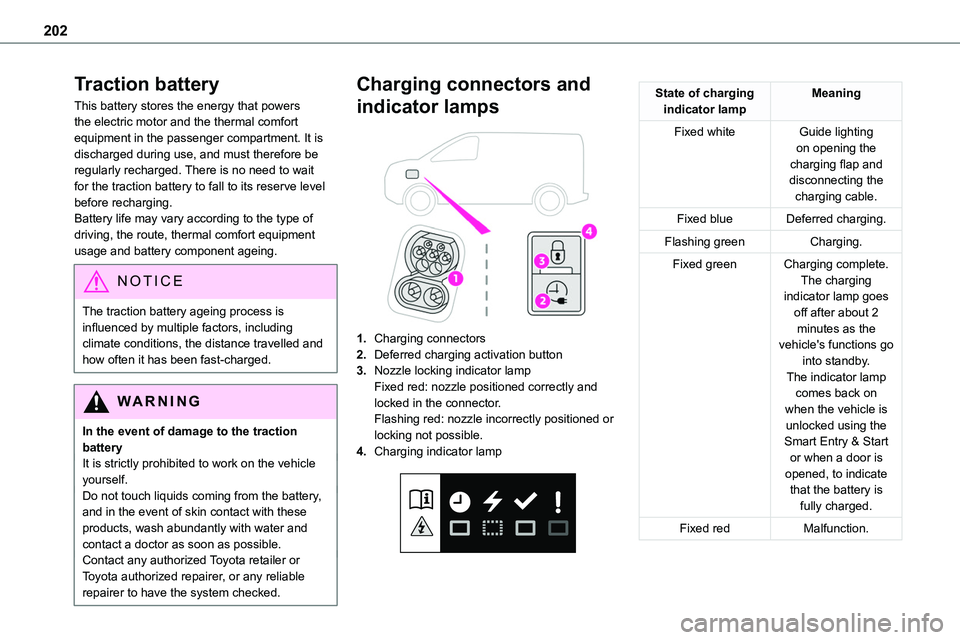
1.Charging connectors
2.Deferred charging activation button
3.Nozzle locking indicator lampFixed red: nozzle positioned correctly and locked in the connector.Flashing red: nozzle incorrectly positioned or
locking not possible.
4.Charging indicator lamp
State of charging indicator lampMeaning
Fixed whiteGuide lighting on opening the charging flap and disconnecting the charging cable.
Fixed blueDeferred charging.
Flashing greenCharging.
Fixed greenCharging complete.The charging indicator lamp goes off after about 2 minutes as the vehicle's functions go into standby.The indicator lamp comes back on when the vehicle is unlocked using the Smart Entry & Start or when a door is opened, to indicate that the battery is fully charged.
Fixed redMalfunction.
Page 210 of 360
210
► Connect the charging cable from the control unit to the domestic socket.When the connection is made, all of the indicator lamps on the control unit light up, then only the POWER indicator lamp remains on in green.► Remove the protective cover from the charging nozzle.► Insert the nozzle into the charging connector.The start of charging is confirmed by the flashing
green CHARGE indicator lamps in the flap, then those on the control unit.If this is not the case, charging has not started; restart the procedure, ensuring that all connections are properly established.The red indicator lamp in the flap comes on to indicate that the nozzle is locked.
NOTIC E
When charging is complete and while the charging cable is still connected, opening the driver's door will display the charge level on the instrument panel for about 20 seconds.
Accelerated charging, mode 3
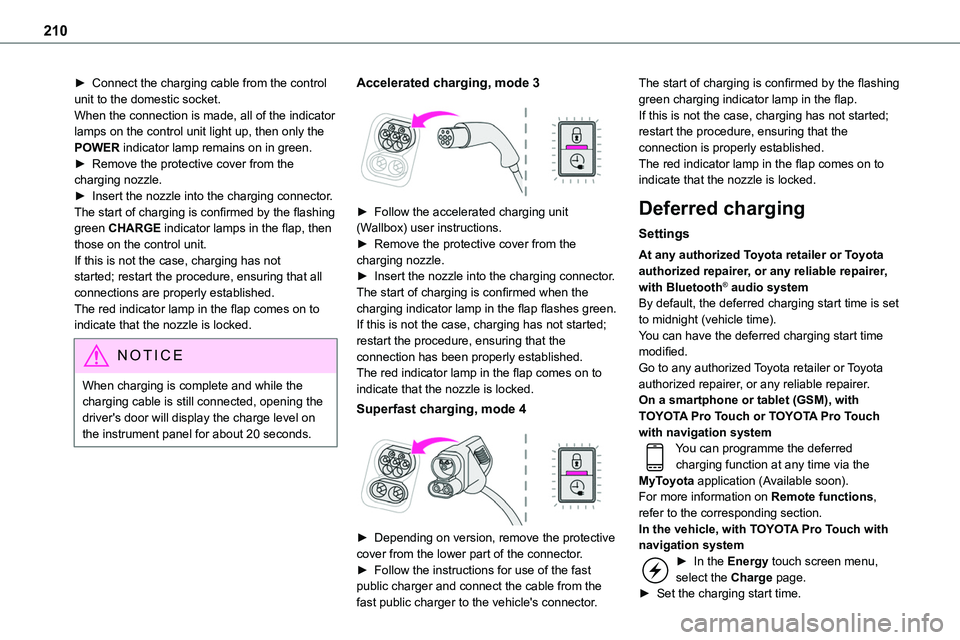
► Follow the accelerated charging unit (Wallbox) user instructions.► Remove the protective cover from the charging nozzle.► Insert the nozzle into the charging connector.The start of charging is confirmed when the charging indicator lamp in the flap flashes green.If this is not the case, charging has not started; restart the procedure, ensuring that the connection has been properly established.The red indicator lamp in the flap comes on to indicate that the nozzle is locked.
Superfast charging, mode 4
► Depending on version, remove the protective cover from the lower part of the connector.► Follow the instructions for use of the fast public charger and connect the cable from the fast public charger to the vehicle's connector.
The start of charging is confirmed by the flashing green charging indicator lamp in the flap.If this is not the case, charging has not started; restart the procedure, ensuring that the connection is properly established.The red indicator lamp in the flap comes on to indicate that the nozzle is locked.
Deferred charging
Settings
At any authorized Toyota retailer or Toyota authorized repairer, or any reliable repairer, with Bluetooth® audio systemBy default, the deferred charging start time is set to midnight (vehicle time).You can have the deferred charging start time modified.Go to any authorized Toyota retailer or Toyota authorized repairer, or any reliable repairer.On a smartphone or tablet (GSM), with TOYOTA Pro Touch or TOYOTA Pro Touch with navigation systemYou can programme the deferred charging function at any time via the MyToyota application (Available soon).For more information on Remote functions, refer to the corresponding section.In the vehicle, with TOYOTA Pro Touch with navigation system► In the Energy touch screen menu, select the Charge page.► Set the charging start time.
Page 211 of 360
2 11
Practical information
7
► Press OK.The setting is saved in the system.
Activation
NOTIC E
Deferred charging is only possible with modes 2 and 3.
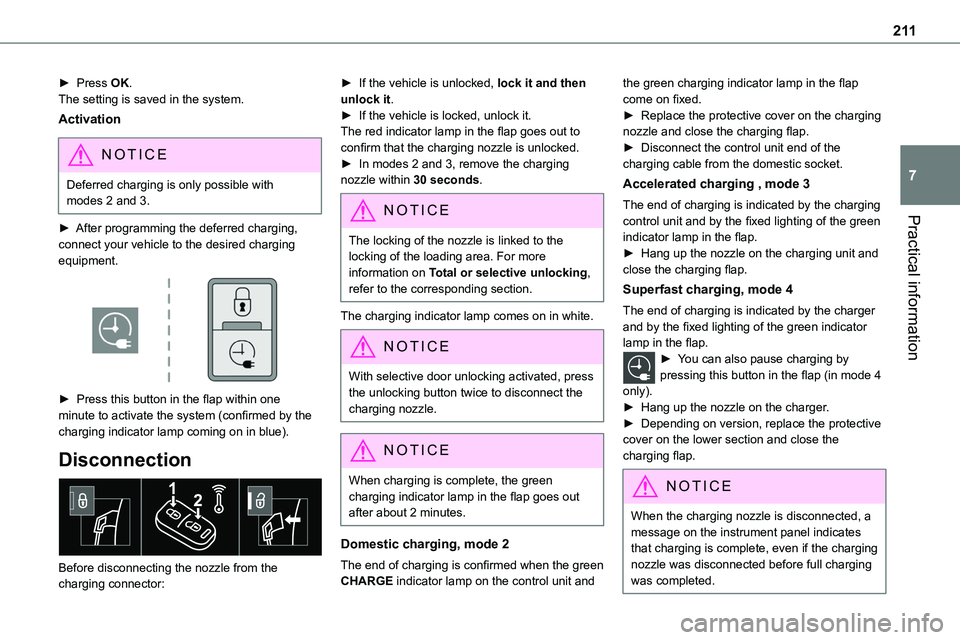
► After programming the deferred charging, connect your vehicle to the desired charging equipment.
► Press this button in the flap within one minute to activate the system (confirmed by the
charging indicator lamp coming on in blue).
Disconnection
Before disconnecting the nozzle from the charging connector:
► If the vehicle is unlocked, lock it and then unlock it.► If the vehicle is locked, unlock it.The red indicator lamp in the flap goes out to confirm that the charging nozzle is unlocked.► In modes 2 and 3, remove the charging nozzle within 30 seconds.
NOTIC E
The locking of the nozzle is linked to the locking of the loading area. For more information on Total or selective unlocking, refer to the corresponding section.
The charging indicator lamp comes on in white.
NOTIC E
With selective door unlocking activated, press the unlocking button twice to disconnect the charging nozzle.
NOTIC E
When charging is complete, the green charging indicator lamp in the flap goes out after about 2 minutes.
Domestic charging, mode 2
The end of charging is confirmed when the green CHARGE indicator lamp on the control unit and
the green charging indicator lamp in the flap come on fixed.► Replace the protective cover on the charging nozzle and close the charging flap.► Disconnect the control unit end of the charging cable from the domestic socket.
Accelerated charging , mode 3
The end of charging is indicated by the charging control unit and by the fixed lighting of the green
indicator lamp in the flap.► Hang up the nozzle on the charging unit and close the charging flap.
Superfast charging, mode 4
The end of charging is indicated by the charger and by the fixed lighting of the green indicator lamp in the flap.► You can also pause charging by pressing this button in the flap (in mode 4 only).► Hang up the nozzle on the charger.► Depending on version, replace the protective cover on the lower section and close the charging flap.
NOTIC E
When the charging nozzle is disconnected, a message on the instrument panel indicates
that charging is complete, even if the charging nozzle was disconnected before full charging was completed.
Page 219 of 360
219
Practical information
7
If the level is close to or below the "MIN" mark, it is essential to top it up.When the engine is hot, the temperature of the coolant is regulated by the fan.As the cooling system is pressurised, wait at least one hour after switching off the engine before carrying out any work.In order to avoid the risk of scalding if you need to top up in an emergency, wrap a cloth around
the cap and unscrew the cap by two turns to allow the pressure to drop.Once the pressure has dropped, remove the cap and top up to the required level.
(Electric)
WARNI NG
Do not top up the coolant.
If the level is close to or below the "MIN" mark, it is essential to contact any authorized Toyota retailer or Toyota authorized repairer, or any reliable repairer.
Screenwash fluid
Top up to the required level when necessary.
Fluid specification
The fluid must be topped up with a ready-to-use mixture.In winter (temperatures below zero), a liquid containing an agent to prevent freezing must
be used which is appropriate for the prevailing conditions, in order to protect the elements of the system (pump, tank, ducts, jets, etc.).
WARNI NG
Filling with pure water is prohibited under all circumstances (risk of freezing, limestone deposits, etc.).
Diesel fuel additive (Diesel
with particle filter)
or On reaching the minimum level in the particle filter additive tank, this warning lamp comes on fixed, accompanied by an audible warning and a message warning that the additive level is too low.
Topping up
The topping up of this additive must be carried out quickly.
Go to any authorized Toyota retailer or Toyota authorized repairer, or any reliable repairer.
AdBlue (Diesel engines)
An alert is triggered when the reserve level is reached.For more information on the Indicators and in particular the AdBlue range indicators, refer to the corresponding section.
To avoid the vehicle being immobilised in accordance with regulations, you must top up the AdBlue tank.For more information on AdBlue, and in particular the supply of AdBlue, refer to the corresponding section.
Checks
Unless otherwise indicated, check these components in accordance with the manufacturer's service schedule and according to your engine.Otherwise, have them checked by any authorized Toyota retailer or Toyota authorized repairer, or any reliable repairer.
Page 222 of 360
222
Fitting different tyres on the front and rear axles can cause the VSC to mistime.Always mark the direction of rotation on the tyres that will be stored when fitting winter or summer tyres. Store them in a cool, dry place and away from direct exposure to the sun's rays.Winter or 4-seasons tyres can be identified by this symbol on their sidewalls.
Shock absorbers
It is not easy for drivers to detect when shock absorbers are worn. Nevertheless, the shock absorbers have a major impact on road holding and braking performance.For your safety and driving comfort, it is important to have them regularly checked by any authorized Toyota retailer or Toyota authorized repairer, or any reliable repairer.
Timing and accessory kits
The timing and accessory kits are used from the time the engine is started until it is switched off. It is normal for them to wear over time.A faulty timing or accessory kit can damage the engine, rendering it unusable. Observe the recommended replacement frequency, stated in distance travelled or time elapsed, whichever is reached first.
AdBlue® (Diesel engines)
To respect the environment and ensure compliance with the Euro 6 standard, without adversely affecting the performance or fuel consumption of its Diesel engines, TOYOTA has taken the decision to equip its vehicles with a system that associates SCR (Selective Catalytic Reduction) with a Diesel particle filter (DPF) for
the treatment of exhaust gases.
SCR system
Using a liquid called AdBlue® that contains urea, a catalytic converter turns up to 85% of the nitrogen oxides (NOx) into nitrogen and water, which are harmless to health and the environment.The AdBlue® is contained in a special tank holding about 20 litres.Its capacity allows a driving range of approximately 3,000 miles (5,000 km) (which may vary considerably depending on your driving style and the vehicle). An alert system is automatically triggered when the remaining range reaches 1,500 miles (2,400 km), i.e. once the reserve level has been reached.Several alerts are triggered successively during the remaining 1,500 miles (2,400 km) until the tank is empty and the vehicle is immobilised.If the estimated distance travelled by the vehicle between two services is greater than 3,000 miles (5,000 km), it will be necessary to top up the AdBlue.
NOTIC E
For more information on the Warning and indicator lamps and the associated alerts, or the Indicators, please refer to the corresponding sections.
WARNI NG
Once the AdBlue® tank is empty, a device required by law prevents the engine from being restarted.If the SCR system is faulty, the level of emissions from the vehicle will no longer meet the Euro 6 standard and the vehicle starts polluting the environment.In the event of a confirmed SCR system malfunction, it is essential to visit any authorized Toyota retailer or Toyota authorized repairer, or any reliable repairer. After 685 miles (1,100 km), a device is automatically activated to prevent the engine from starting.In both cases, a range indicator indicates the distance that can be travelled before the vehicle is stopped.