maintenance TOYOTA PROACE 2021 User Guide
[x] Cancel search | Manufacturer: TOYOTA, Model Year: 2021, Model line: PROACE, Model: TOYOTA PROACE 2021Pages: 360, PDF Size: 70.79 MB
Page 217 of 360
217
Practical information
7
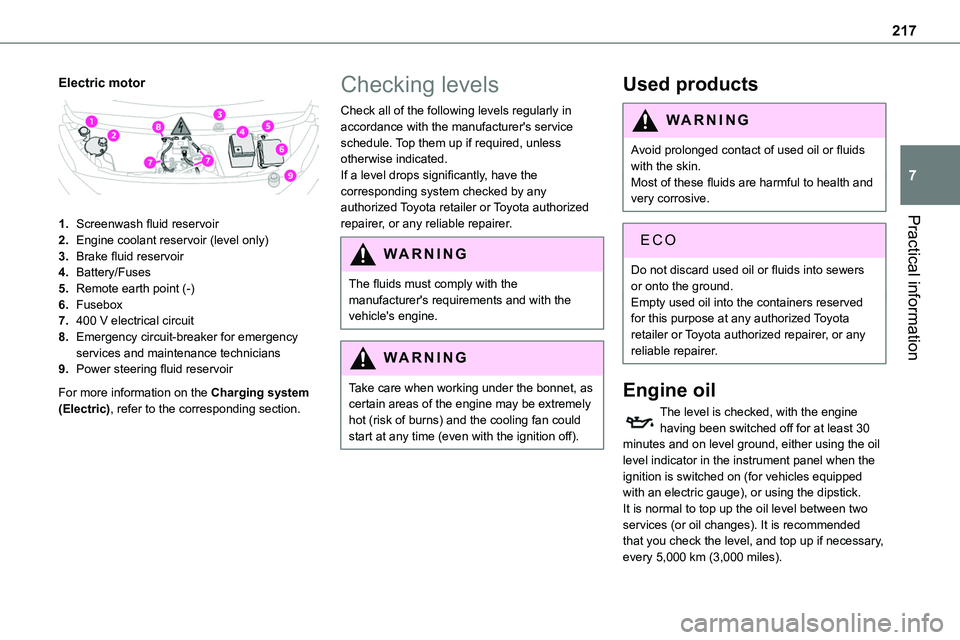
Electric motor
1.Screenwash fluid reservoir
2.Engine coolant reservoir (level only)
3.Brake fluid reservoir
4.Battery/Fuses
5.Remote earth point (-)
6.Fusebox
7.400 V electrical circuit
8.Emergency circuit-breaker for emergency services and maintenance technicians
9.Power steering fluid reservoir
For more information on the Charging system (Electric), refer to the corresponding section.
Checking levels
Check all of the following levels regularly in accordance with the manufacturer's service schedule. Top them up if required, unless otherwise indicated.If a level drops significantly, have the corresponding system checked by any authorized Toyota retailer or Toyota authorized
repairer, or any reliable repairer.
WARNI NG
The fluids must comply with the manufacturer's requirements and with the vehicle's engine.
WARNI NG
Take care when working under the bonnet, as certain areas of the engine may be extremely hot (risk of burns) and the cooling fan could start at any time (even with the ignition off).
Used products
WARNI NG
Avoid prolonged contact of used oil or fluids with the skin.Most of these fluids are harmful to health and very corrosive.
ECO
Do not discard used oil or fluids into sewers or onto the ground.Empty used oil into the containers reserved for this purpose at any authorized Toyota retailer or Toyota authorized repairer, or any reliable repairer.
Engine oil
The level is checked, with the engine having been switched off for at least 30 minutes and on level ground, either using the oil level indicator in the instrument panel when the ignition is switched on (for vehicles equipped with an electric gauge), or using the dipstick.It is normal to top up the oil level between two services (or oil changes). It is recommended that you check the level, and top up if necessary, every 5,000 km (3,000 miles).
Page 220 of 360
220
WARNI NG
Only use products recommended by TOYOTA or products of equivalent quality and specification.In order to optimise the operation of components as important as those in the braking system, TOYOTA selects and offers very specific products.
12 V battery
The battery does not require any maintenance.However, check regularly that the terminals are correctly tightened (versions without quick release terminals) and that the connections are clean.
NOTIC E
For more information on the precautions to take before any work on the 12 V battery, refer to the corresponding section.
WARNI NG
Versions equipped with Stop & Start are fitted with a 12 V lead-acid battery of specific technology and specification.Its replacement should be carried out only by any authorized Toyota retailer or Toyota authorized repairer, or any reliable repairer.
Passenger compartment
filter
Depending on the environment and the use of the vehicle (e.g. dusty atmosphere, city driving), change it twice as often, if necessary.
NOTIC E
A clogged passenger compartment filter can adversely affect air conditioning system performance and generate undesirable odours.
Air filter
Depending on the environment and the use of the vehicle (e.g. dusty atmosphere,
city driving), change it twice as often, if necessary.
Oil filter
Change the oil filter each time the engine oil is changed.
Particle filter (Diesel)
The start of clogging of the particle filter is indicated by the temporary lighting of this warning lamp, accompanied by an alert message.
As soon as the traffic conditions permit, regenerate the filter by driving at a speed of at least 60 km/h (37 mph) until the warning lamp goes off.
NOTIC E
If the warning lamp stays on, this indicates a low Diesel additive level.For more information on Checking levels, refer to the corresponding section.
NOTIC E
Following prolonged operation of the vehicle at very low speed or at idle, you may, in exceptional circumstances, notice the emission of water vapour at the exhaust while accelerating. This has no impact on the vehicle’s behaviour or the environment.
Page 221 of 360
221
Practical information
7
NOTIC E
New vehicleDuring the first few particle filter regeneration operations, you may notice a "burning" smell. This is perfectly normal.
Manual gearbox
The gearbox does not require any maintenance (no oil change).
Automatic gearbox
The gearbox does not require any maintenance (no oil change).
Drive selector (Electric)
The drive selector does not require any maintenance.
Manual parking brake
If you notice excessive brake lever travel or decreased effectiveness, the parking brake must be adjusted, even between two services.This system must be checked by any authorized Toyota retailer or Toyota authorized repairer, or any reliable repairer.
Electric parking brake
This system does not require any routine servicing. However, in the event of a
problem, do not hesitate to have the system checked by a TOYOTA dealer or a qualified workshop.
NOTIC E
For more information on the Electric parking brake, refer to the corresponding section.
Brake pads
Brake wear depends on the style of driving, particularly in the case of vehicles used in town, over short distances. It may be necessary to have the condition of the brakes checked, even between vehicle services.Unless there is a leak in the circuit, a drop in the brake fluid level indicates that the brake pads are worn.
NOTIC E
After washing the vehicle, moisture, or in wintry conditions, ice can form on the brake discs and pads: braking efficiency may be reduced. Gently dab the brakes to dry and defrost them.
Brake disc/drum wear
For any information on checking brake disc/drum wear, contact any authorized Toyota retailer or Toyota authorized repairer, or any reliable repairer.
Wheels and tyres
The inflation pressure of all tyres, including the spare wheel, must be checked on "cold” tyres.The pressures indicated on the tyre pressure label are valid for "cold" tyres. If you have driven for more than 10 minutes or more than 10 km (6 miles) at over 50 km/h (31 mph), add 0.3 bar (30 kPa) to the values indicated on the label.
WARNI NG
Under-inflation increases fuel consumption. Non-compliant tyre pressure causes premature wear on tyres and has an adverse effect on the vehicle's road holding - risk of an accident!
Driving with worn or damaged tyres reduces the braking and road holding performance of the vehicle. It is recommended to regularly check the condition of the tyres (tread and sidewalls) and wheel rims as well as the presence of the valves.When the wear indicators no longer appear set back from the tread, the depth of the grooves is less than 1.6 mm; it is imperative to replace the tyres.Using different size wheels and tyres from those specified can affect the lifetime of tyres, wheel
rotation, ground clearance, the speedometer reading and have an adverse effect on road holding.
Page 226 of 360
226
With drive selector (Electric)
and electric parking brake /
Release procedure
► With the vehicle stationary and the engine running, depress the brake pedal and select mode N.
Within 5 seconds:► Depress and hold the brake pedal, then observe this order: switch off the engine (if start with START/STOP, press and hold the button for 2 seconds) and move the push selector forwards or backwards.► Release the brake pedal, then switch on the ignition.► Place your foot on the brake and press the electric parking brake control to release it.► Release the brake pedal, then switch off the ignition.
NOTIC E
Smart Entry & StartYou must not depress the brake pedal while switching the ignition on again, then switching it off. If you do, the engine will start, requiring you to restart the procedure.
WARNI NG
A message is displayed on the instrument panel to confirm the unlocking of the wheels for 15 minutes.When the vehicle is free-wheeling, the audio system cannot be updated (message displayed on the instrument panel).
Reverting to normal operation
► While depressing the brake pedal, restart the engine, then set the gear selector to P.
Advice on care and
maintenance
General recommendations
Observe the following recommendations to avoid damaging the vehicle.
Exterior
WARNI NG
Never use a high-pressure jet wash in the engine compartment - risk of damaging the electrical components!Do not wash the vehicle in bright sunshine or extremely cold conditions.
NOTIC E
When washing the vehicle in an automatic roller-brush car wash, be sure to lock the doors and, depending on version, move the electronic key away and deactivate the “hands-free” function (Hands-Free Access).When using a pressure washer, hold the lance at least 30 cm from the vehicle (particularly when cleaning areas containing chipped paint, sensors or seals).Promptly clean up any stains containing chemicals liable to damage the vehicle's paint (including tree resin, bird droppings, insect
secretions, pollen and tar).
Page 227 of 360
227
Practical information
7
If justified by the environment, clean the vehicle frequently to remove salty deposits (in coastal areas), soot (in industrial areas) and mud/salts (in wet or cold areas). These substances can be highly corrosive.Contact any authorized Toyota retailer or Toyota authorized repairer, or any reliable repairer for advice on removing stubborn stains requiring special products (such as tar
or insect removers).Preferably, have paint touch-ups performed by any authorized Toyota retailer or Toyota authorized repairer, or any reliable repairer.
Interior
WARNI NG
When washing the vehicle, never use a water hose or high-pressure jet to clean the interior.Liquids carried in cups or other open containers can spill, presenting a risk of damage to the instruments and controls and the controls located on the centre console. Be vigilant!To clean instrument panels, touch screens or other displays, wipe gently with a soft, dry cloth. Do not use products (e.g. alcohol,
disinfectant) or soapy water directly on these surfaces - risk of damage!
Bodywork
High-gloss paint
WARNI NG
Do not use abrasive products or solvents, petrol or oil to clean the bodywork.Never use an abrasive sponge to clean stubborn stains. Risk of scratching the paintwork!Do not apply polish in strong sunshine, or to plastic or rubber parts.
NOTIC E
Use a soft sponge and soapy water or a pH neutral product.Gently wipe the bodywork with a clean microfibre cloth.Apply polish with the vehicle clean and dry.Comply with the instructions for use stated on the product.
Textured paint
This type of paint reacts under the effect of light, through variations in appearance and finish that highlight the lines and contours of the vehicle. Its varnish is enriched with particles that remain visible and create a unique satin effect with relief. Its slightly granular texture gives it a
surprising touch.
WARNI NG
Never attempt to clean without water.Never clean your vehicle in an automatic roller-brush car wash.Never select the programme with hot wax finish.Never use high-pressure lances equipped with brushes - risk of scratching paint!
Never apply glossy polish or preservatives to the bodywork or alloy wheels; these products irreversibly reveal glossy or spotted areas.
NOTIC E
Choose high-pressure wash, or at least high-flow water jet.Rinse the vehicle with demineralised water.Only a clean microfibre cloth is recommended for wiping the vehicle; pass it over the vehicle without rubbing.Carefully wipe off any fuel spilt on the bodywork using a soft cloth, then allow to dry.Clean off minor marks (for example, finger marks), using a maintenance product recommended by TOYOTA.
Page 235 of 360
235
In the event of a breakdown
8
► Remove the pipe assembly 2.► Hold the compressor up vertically.► Unscrew the cartridge 4 from the bottom.To fit the new cartridge and new pipe, carry out these operations in reverse order.
WARNI NG
Beware of fluid discharge.The expiry date of the fluid is indicated on the cartridge.The sealant cartridge is designed for single use; it must be replaced even if only partly used.After use, do not discard the cartridge in standard waste, take it to any authorized Toyota retailer or Toyota authorized repairer, or any reliable repairer waste disposal site.Do not forget to obtain a new cartridge, available from any authorized Toyota retailer or Toyota authorized repairer, or any reliable repairer.
Spare wheel
Access to the tools
The tools are stowed in a tool box.
NOTIC E
For more information on the Tool box, refer to the corresponding section.
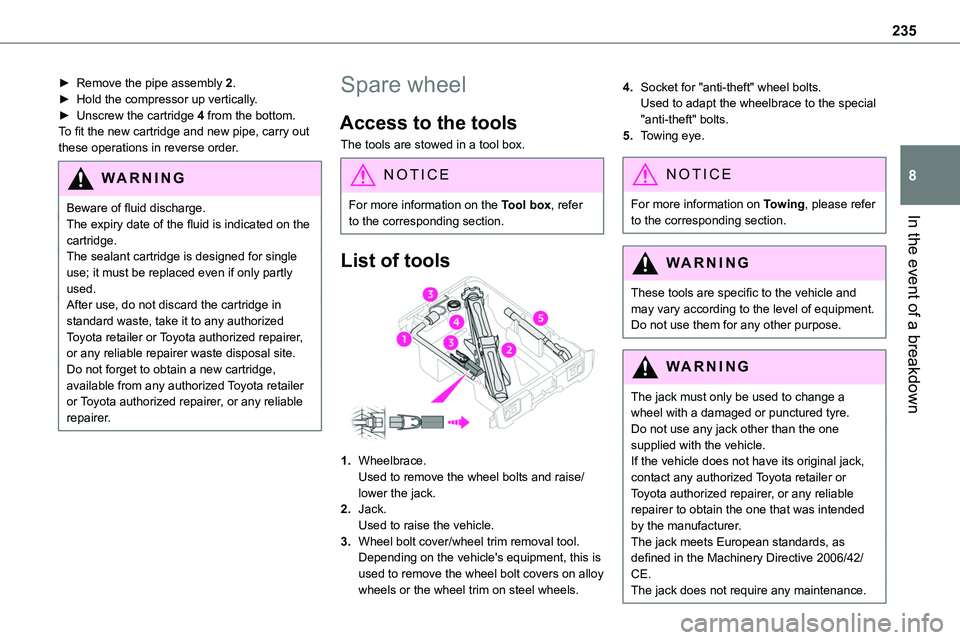
List of tools
1.Wheelbrace.Used to remove the wheel bolts and raise/lower the jack.
2.Jack.Used to raise the vehicle.
3.Wheel bolt cover/wheel trim removal tool.Depending on the vehicle's equipment, this is used to remove the wheel bolt covers on alloy wheels or the wheel trim on steel wheels.
4.Socket for "anti-theft" wheel bolts.Used to adapt the wheelbrace to the special "anti-theft" bolts.
5.Towing eye.
NOTIC E
For more information on Towing, please refer to the corresponding section.
WARNI NG
These tools are specific to the vehicle and may vary according to the level of equipment.Do not use them for any other purpose.
WARNI NG
The jack must only be used to change a wheel with a damaged or punctured tyre.Do not use any jack other than the one supplied with the vehicle.If the vehicle does not have its original jack, contact any authorized Toyota retailer or Toyota authorized repairer, or any reliable repairer to obtain the one that was intended by the manufacturer.
The jack meets European standards, as defined in the Machinery Directive 2006/42/CE.The jack does not require any maintenance.
Page 267 of 360
267
Bluetooth® audio system
10
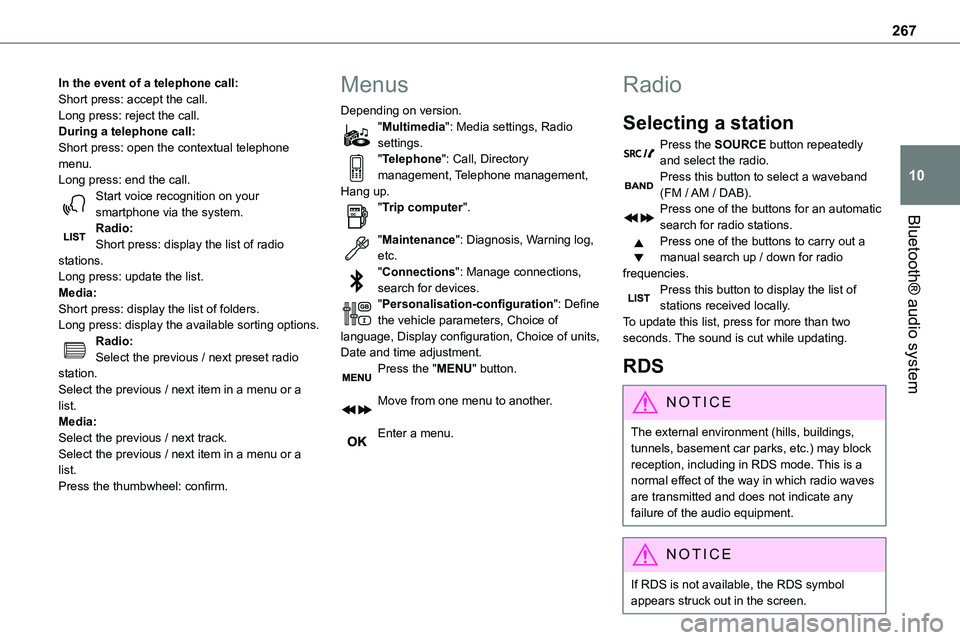
In the event of a telephone call:Short press: accept the call.Long press: reject the call.During a telephone call:Short press: open the contextual telephone menu.Long press: end the call.Start voice recognition on your smartphone via the system.
Radio:Short press: display the list of radio stations.Long press: update the list.Media:Short press: display the list of folders.Long press: display the available sorting options.Radio:Select the previous / next preset radio station.Select the previous / next item in a menu or a list.Media:Select the previous / next track.Select the previous / next item in a menu or a list.Press the thumbwheel: confirm.
Menus
Depending on version."Multimedia": Media settings, Radio settings."Telephone": Call, Directory management, Telephone management, Hang up."Trip computer".
"Maintenance": Diagnosis, Warning log, etc."Connections": Manage connections, search for devices."Personalisation-configuration": Define the vehicle parameters, Choice of language, Display configuration, Choice of units, Date and time adjustment.Press the "MENU" button.
Move from one menu to another.
Enter a menu.
Radio
Selecting a station
Press the SOURCE button repeatedly and select the radio.Press this button to select a waveband (FM / AM / DAB).Press one of the buttons for an automatic
search for radio stations.Press one of the buttons to carry out a manual search up / down for radio frequencies.Press this button to display the list of stations received locally.To update this list, press for more than two seconds. The sound is cut while updating.
RDS
NOTIC E
The external environment (hills, buildings, tunnels, basement car parks, etc.) may block reception, including in RDS mode. This is a normal effect of the way in which radio waves are transmitted and does not indicate any failure of the audio equipment.
NOTIC E
If RDS is not available, the RDS symbol appears struck out in the screen.
Page 320 of 360
320
Recording event data
Electronic control units are installed in your vehicle. These control units process data received from the vehicle's sensors, for example, or data they generate themselves or exchange with each other. Some of these control units are required for the correct operation of your vehicle, some others assist you while driving (driving or
manoeuvring aids), while others provide comfort or infotainment functions.The following contains general information about how data is processed within the vehicle.You will find additional information about the specific data which is downloaded, stored and transmitted to third parties and what it is used for in your vehicle under the keyword "Data protection". This information is directly associated with the references for the functions in question contained in the corresponding vehicle handbook, or in the general terms and conditions of sale.This information is also available online.
Vehicle operating data
The control units process the data used for the operation of the vehicle. This data includes, for example: – Information about the state of the vehicle (e.g. speed, travel time, lateral acceleration, wheel rotation rate, fastened seat belts display). – Environmental conditions (e.g. temperature, rain sensor, distance sensor).
As a general rule, this data is temporary, is not stored for longer than one operating cycle and is only used within the vehicle itself. The control units often record this data (including the vehicle's key). This function allows either the temporary or permanent storage of information about the state of the vehicle, stresses on components, servicing requirements, as well as events and technical errors. Depending on the vehicle's equipment level, the data stored is as follows: – Operating state of system components (e.g. filling level, tyre pressures, battery charge status). – Faults and malfunctions in important system components (e.g. lamps, brakes). – System reactions in specific driving situations (e.g. deployment of an airbag, triggering of stability control and braking systems). – Information about events which have damaged the vehicle.
– For electric and rechargeable hybrid vehicles, the traction battery charge level and the estimated driving range. In particular circumstances (e.g. if the vehicle has detected a malfunction), it may be necessary to record data which would otherwise simply not be stored. When taking your vehicle in for servicing (e.g. repairs, maintenance), the stored operating
data may be read along with the vehicle's identification number and used if necessary. The personnel working for the servicing network (e.g. garages, manufacturers) or third parties (e.g. roadside assistance agents) may read the vehicle's data. This also applies to work carried out under warranty and quality assurance measures. This data is generally read via the OBD (On-Board Diagnostics) port fitted by law to the vehicle. It is used to report on the technical state of the vehicle or its components and facilitates the diagnosis of malfunctions, in compliance with warranty obligations and for quality improvement. This data, in particular the information relating to stress on components, technical events, operator errors and other malfunctions, is sent to the Manufacturer, if necessary, along with the vehicle's identification number. The Manufacturer's liability may also be engaged. The Manufacturer may also use the operating data taken from the vehicle for product recalls. This data may also be used to check the
Page 323 of 360
323
Alphabetical index
A
ABS 11 4Accelerated charging unit (Wallbox) 203Accessories 111, 156Access to the 3rd row 65, 67Access to the spare wheel 236Active Safety Brake 186–188
AdBlue® 20, 222AdBlue® tank 223Additive, Diesel 219–220Adjusting head restraints 55Adjusting seat 53–55Adjusting the air distribution 90–91Adjusting the air flow 90–91Adjusting the date 29, 290, 316Adjusting the height and reach of the steering wheel 58Adjusting the lumbar support 53Adjusting the seat angle 53, 55Adjusting the seat belt height 11 9Adjusting the temperature 90–91Adjusting the time 29, 290, 316Advice on care and maintenance 201, 226Advice on driving 8, 150–151Airbags 122, 124–125, 127Airbags, curtain 123, 125Airbags, front 122, 124, 127Airbags, lateral 123–124Air conditioning 88, 92, 94Air conditioning, digital 93Air conditioning, dual-zone automatic 90–91
Air conditioning, manual 89–90, 93Air intake 90–92Air vents 88Alarm 50–52Android Auto connection 286, 306Anti-lock braking system (ABS) 11 4–11 5Anti-pinch 84Antitheft / Immobiliser 31
Apple CarPlay connection 286, 306Applications 306Area, loading 33, 41–42, 81Armrest, front 56, 76Assistance call 11 2–11 3Assistance, emergency braking 11 5, 187Audible warning 11 4Audio streaming (Bluetooth) 272, 284–285, 3 11
B
Battery 212, 248Battery, 12 V 220, 248–251Battery, ancillaries 248Battery, charging 250Battery, remote control 39–40, 96Bench seat, one-piece, fixed 65–66Blind, panoramic roof 84Blind spot monitoring system 192Blind spot sensors 191Blinds, side 83BlueHDi 229
Bluetooth (hands-free) 273, 287–288, 312Bluetooth (telephone) 287–288, 312–313Bodywork 227Bonnet 215–216Boot 49Boot lid 36–37, 39, 49Bottle holder 76Brake discs 221
Brake lamps 243, 245Brakes 221Braking 166Braking assistance system 11 4–11 5Braking, automatic emergency 186–188Braking, dynamic emergency 158–160Brightness 289Bulbs 240Bulbs (changing) 239, 243
C
Capacity, fuel tank 198–200Cap, fuel filler 199–200Care of the bodywork 227CD 271, 284CD, MP3 271, 284Central locking 30, 36, 40Changing a bulb 239, 243, 245Changing a bulb (side-hinged doors) 243Changing a fuse 245–247Changing a wheel 235Changing a wiper blade 109
Page 326 of 360
326
Hill start assist 160–161Histogramme, fuel consumption 27–28Horn 11 4
I
Ignition 155–156, 314
Ignition on 156Immobiliser, electronic 152Indicator, AdBlue® range 20Indicator, coolant temperature 18–19Indicator, engine oil level 19Indicator lamps, operation 101Indicators, direction 102Inflating tyres 221, 264Inflating tyres and accessories (using the kit) 231–234Information, vehicle 320Infrared camera 172Instrument panel 10, 173Intelligent Traction Control 11 6Internet browser 303, 306ISOFIX 144, 144–145
J
Jack 235Jump starting 249
K
Key 30–31, 33–34, 36, 38Key, electronic 30, 156Keyless Entry and Starting 30–32, 34–37, 153, 155–156Key not recognised 156Key with remote control 36
Kit, hands-free 273, 287–288, 312Kit, puncture repair 232–234Kit, temporary puncture repair 231–234
L
Labels 6, 64Labels, identification 264Lane Departure Warning System (LDWS) 188–189Leather (care) 228Level, AdBlue® 219Level, brake fluid 218Level, Diesel additive 219–220Level, engine coolant 18–19, 218Level, engine oil 19, 217Level, headlamp wash 107Level, power steering fluid 218Levels and checks 216–219Level, screenwash fluid 107, 219Lighting 101Lighting dimmer 23Lighting, exterior 101
Lighting, guide-me home 103Lighting, interior 99, 106Lighting, mood 106Lighting, welcome 103–104Loading 81, 214Loading area fittings 80Load reduction mode 212Load restraint 81
Locating your vehicle 31Locking 30–31, 36Locking from the inside 40–42Locking the doors 40–41Low fuel level 198–200Lumbar 53, 57
M
Mains socket (domestic network) 203Maintenance (advice) 201, 226Maintenance, routine 173, 219, 222Manoeuvring aids (recommendations) 171Map reading lamps 99Markings, identification 264Massage function 57Mat 76–77, 173Memorising a speed 174Menu 286Menu, main 26, 267Menus (audio) 280–281, 295–296Menu short cuts 26Messages 314