mirror TOYOTA PROACE 2023 Owner's Manual
[x] Cancel search | Manufacturer: TOYOTA, Model Year: 2023, Model line: PROACE, Model: TOYOTA PROACE 2023Pages: 360, PDF Size: 70.22 MB
Page 192 of 360
192
Malfunction
In the event of a malfunction when changing into reverse gear, this warning lamp lights up on the instrument panel, accompanied by the display of a message and an audible signal (short beep).Have it checked by any authorized Toyota retailer or Toyota authorized repairer, or any reliable repairer.
VisioPark Light
WARNI NG
Refer to the General recommendations on the use of driving and manoeuvring aids.
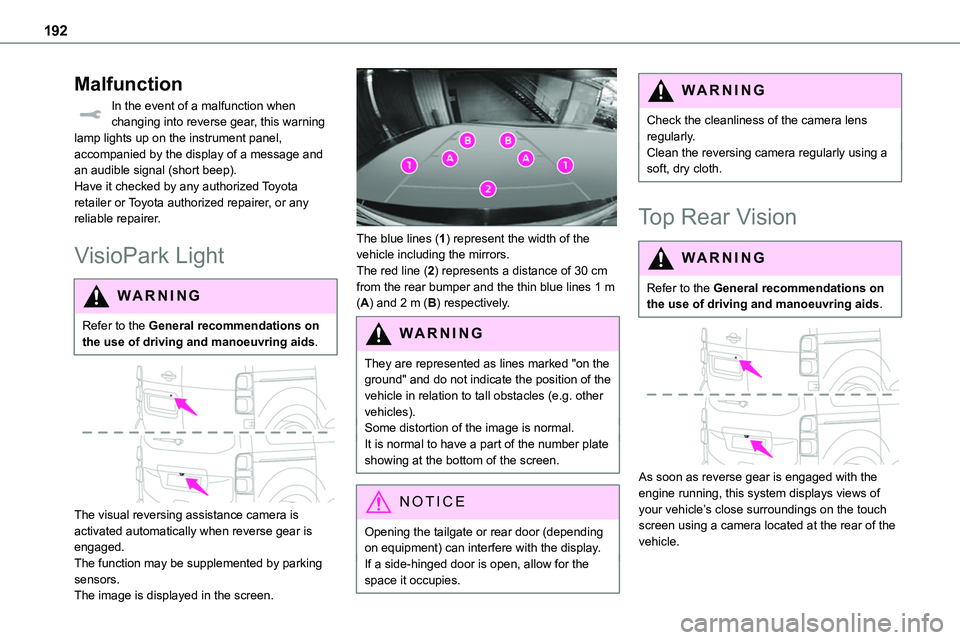
The visual reversing assistance camera is activated automatically when reverse gear is engaged.The function may be supplemented by parking sensors.The image is displayed in the screen.
The blue lines (1) represent the width of the vehicle including the mirrors.The red line (2) represents a distance of 30 cm from the rear bumper and the thin blue lines 1 m (A) and 2 m (B) respectively.
WARNI NG
They are represented as lines marked "on the ground" and do not indicate the position of the vehicle in relation to tall obstacles (e.g. other vehicles).Some distortion of the image is normal.It is normal to have a part of the number plate showing at the bottom of the screen.
NOTIC E
Opening the tailgate or rear door (depending on equipment) can interfere with the display.If a side-hinged door is open, allow for the space it occupies.
WARNI NG
Check the cleanliness of the camera lens regularly.Clean the reversing camera regularly using a soft, dry cloth.
Top Rear Vision
WARNI NG
Refer to the General recommendations on the use of driving and manoeuvring aids.
As soon as reverse gear is engaged with the engine running, this system displays views of your vehicle’s close surroundings on the touch screen using a camera located at the rear of the vehicle.
Page 194 of 360
194
NOTIC E
The function will be deactivated:– If a trailer is attached or a bicycle carrier is fitted on a towing device (vehicle fitted with a towing device installed in line with the manufacturer's recommendations).– Above about 6 mph (10 km/h).– When the boot is opened.
– Upon changing out of reverse gear (the image remains displayed for 7 seconds).– By pressing the white arrow in the upper-left corner of the touch screen.
AUTO mode
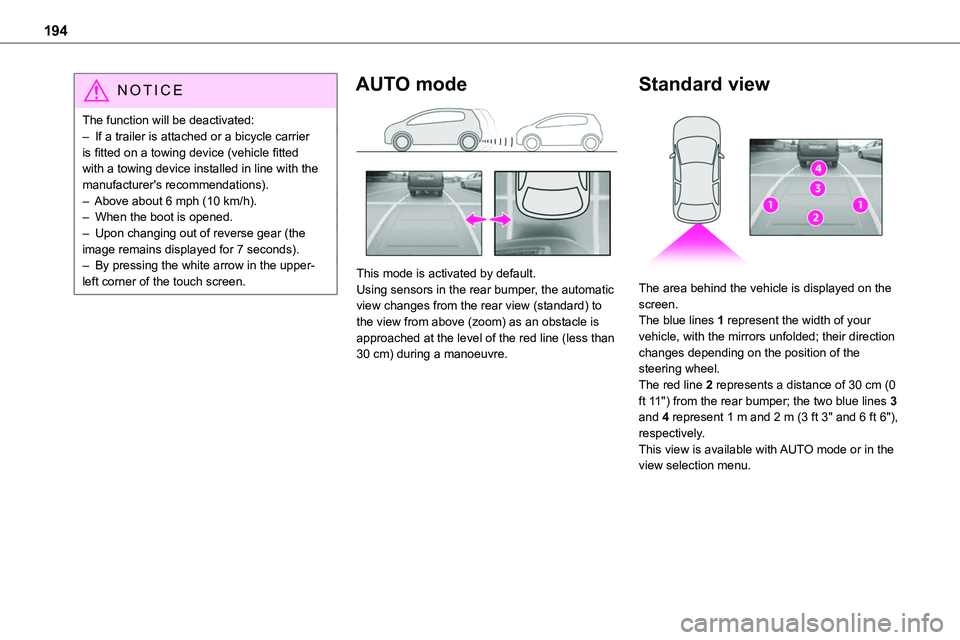
This mode is activated by default.Using sensors in the rear bumper, the automatic view changes from the rear view (standard) to the view from above (zoom) as an obstacle is approached at the level of the red line (less than 30 cm) during a manoeuvre.
Standard view
The area behind the vehicle is displayed on the screen.The blue lines 1 represent the width of your vehicle, with the mirrors unfolded; their direction changes depending on the position of the steering wheel.The red line 2 represents a distance of 30 cm (0 ft 11") from the rear bumper; the two blue lines 3 and 4 represent 1 m and 2 m (3 ft 3" and 6 ft 6"), respectively.This view is available with AUTO mode or in the view selection menu.
Page 195 of 360
195
Driving
6
Zoom view
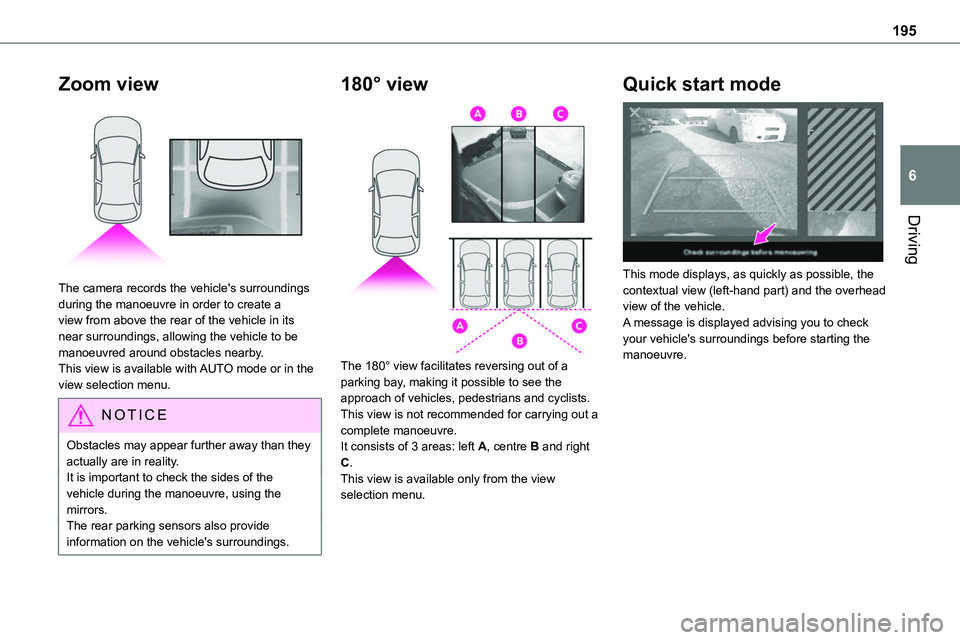
The camera records the vehicle's surroundings during the manoeuvre in order to create a view from above the rear of the vehicle in its near surroundings, allowing the vehicle to be manoeuvred around obstacles nearby.This view is available with AUTO mode or in the view selection menu.
NOTIC E
Obstacles may appear further away than they actually are in reality.It is important to check the sides of the vehicle during the manoeuvre, using the mirrors.The rear parking sensors also provide information on the vehicle's surroundings.
180° view
The 180° view facilitates reversing out of a parking bay, making it possible to see the approach of vehicles, pedestrians and cyclists.This view is not recommended for carrying out a
complete manoeuvre.It consists of 3 areas: left A, centre B and right C.This view is available only from the view selection menu.
Quick start mode
This mode displays, as quickly as possible, the contextual view (left-hand part) and the overhead view of the vehicle.A message is displayed advising you to check your vehicle's surroundings before starting the manoeuvre.
Page 260 of 360
260
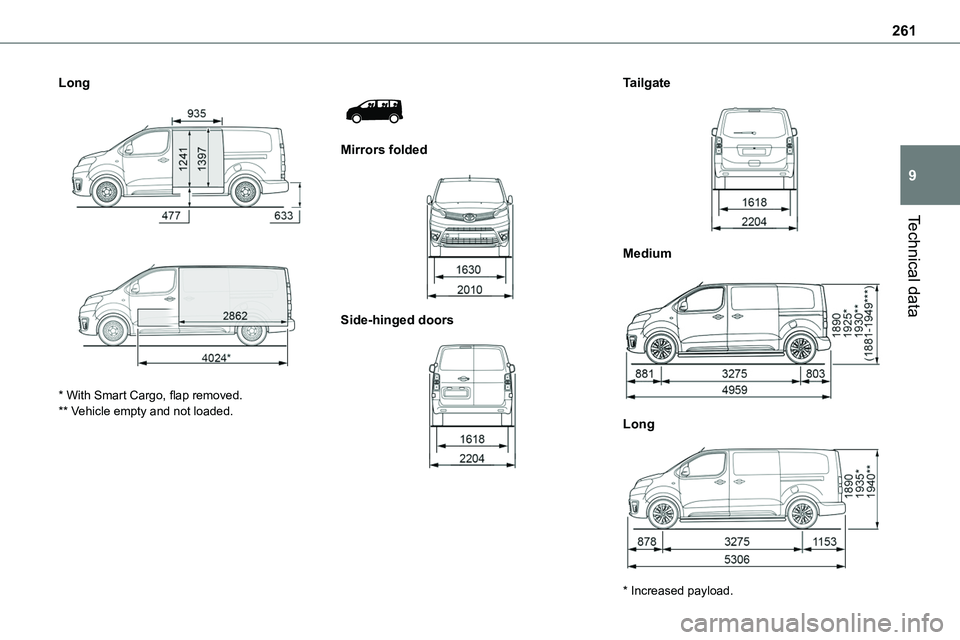
Dimensions (mm)
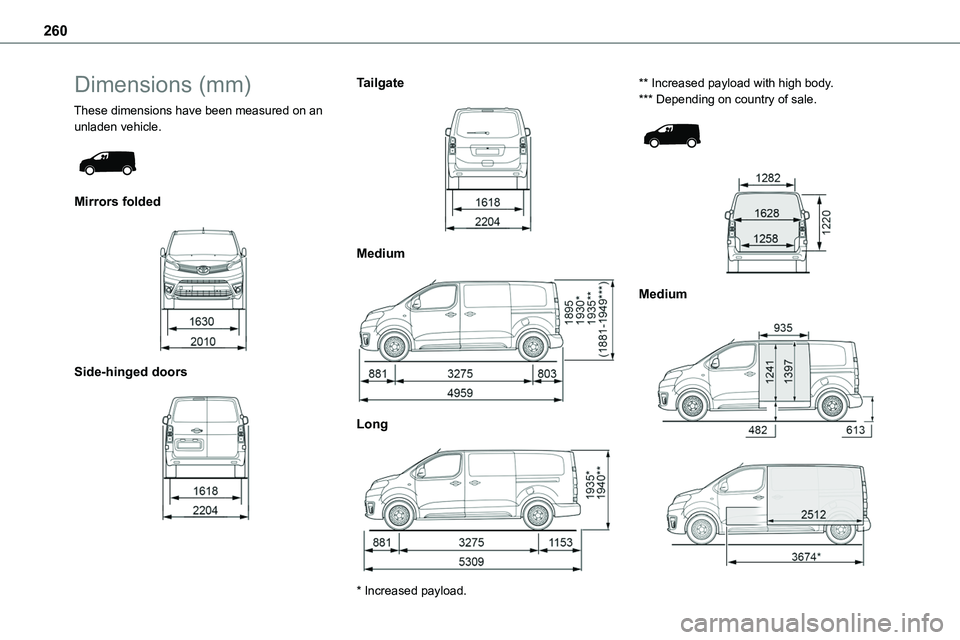
These dimensions have been measured on an unladen vehicle.
Mirrors folded
Side-hinged doors
Tailgate
Medium
Long
* Increased payload.
** Increased payload with high body.*** Depending on country of sale.
Medium
Page 261 of 360
261
Technical data
9
Long
* With Smart Cargo, flap removed.** Vehicle empty and not loaded.
Mirrors folded
Side-hinged doors
Tailgate
Medium
Long
* Increased payload.
Page 325 of 360
325
Alphabetical index
Messages, quick 312Minimum traction battery charge level (Electric) 22Mirror, rear view 57Mirrors, door 56–57, 91, 189–190Misfuel prevention 198Mobile application 28, 96, 208Motor, electric 153, 215, 258
Mountings, ISOFIX 131, 142, 142–143MP3 CD 269
N
Navigation 298–300Navigation, connected 301–303Net, cargo 58–60Net, high load retaining 80–81Number plate lamps 242
O
Obstacle detection 190Oil change 215Oil consumption 215OIl, engine 215On-board tools 228–229Opening the bonnet 213–214Opening the boot 30–31, 47Opening the doors 30–31, 40–41Opening to 180° 46–47
P
Pads, brake 219Paint 225, 262Paint colour code 262Paint, matt 225Panoramic glass sunroof 82Parcel shelf, rear 76
Parking brake 155, 219Parking brake, electric 155–158, 219Parking sensors, audible and visual 190Parking sensors, front 191Parking sensors, rear 190Passenger compartment temperature pre-conditioning (Electric) 28, 96Pedestrian horn (Electric) 11 2, 149Plates, identification 262Player, Apple® 270, 283, 309Player, MP3 CD 269Player, USB 268, 282, 308Port, USB 77, 268, 282, 284, 303, 308Power 22Power indicator (Electric) 9, 22Power mode 165Pressures, tyres 219, 230, 232, 262Pre-tensioning seat belts 11 9Priming the fuel system 227Profiles 287, 313Protecting children 120, 123–125, 127, 133–134, 142, 142–143, 142–143Public fast charging station 201, 207Puncture 229–230, 232–233
R
Radar (warnings) 170Radio 265–266, 280, 282, 306–307Radio, digital (Digital Audio Broadcasting - DAB) 267, 282, 308Range, AdBlue 20, 217RDS 280, 307
Rear screen, demisting 91Recharging the battery 248–249Recharging the traction battery 202Recharging the traction battery (Electric) 198, 206–207, 209Recirculation, air 88–90Recovery 250Recovery of the vehicle 250Reduction of electrical load 210Regeneration of the particle filter 218Regenerative braking (deceleration by engine braking) 164Reinitialisation of the under-inflation detection system 169Reinitialising the remote control 38Reminder, key in ignition 153Reminder, lighting on 100Remote control 30–34, 36, 150Remote functions 208Remotely operable functions (Electric) 28, 96Removing a wheel 235–237Removing the mat 74Replacing bulbs 238–239, 241, 243Replacing fuses 243–245