park TOYOTA PROACE 2023 Repair Manual
[x] Cancel search | Manufacturer: TOYOTA, Model Year: 2023, Model line: PROACE, Model: TOYOTA PROACE 2023Pages: 360, PDF Size: 70.22 MB
Page 311 of 360
3 11
TOYOTA Pro Touch with navigation system
12
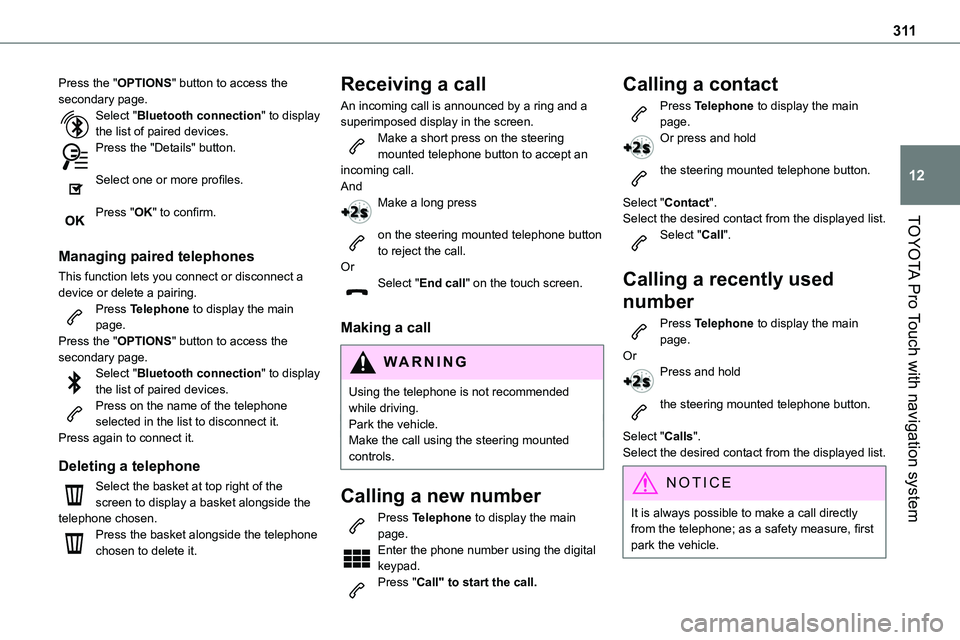
Press the "OPTIONS" button to access the secondary page.Select "Bluetooth connection" to display the list of paired devices.Press the "Details" button.
Select one or more profiles.
Press "OK" to confirm.
Managing paired telephones
This function lets you connect or disconnect a device or delete a pairing.Press Telephone to display the main page.Press the "OPTIONS" button to access the secondary page.Select "Bluetooth connection" to display the list of paired devices.Press on the name of the telephone selected in the list to disconnect it.Press again to connect it.
Deleting a telephone
Select the basket at top right of the screen to display a basket alongside the telephone chosen.Press the basket alongside the telephone chosen to delete it.
Receiving a call
An incoming call is announced by a ring and a superimposed display in the screen.Make a short press on the steering mounted telephone button to accept an incoming call.AndMake a long press
on the steering mounted telephone button to reject the call.OrSelect "End call" on the touch screen.
Making a call
WARNI NG
Using the telephone is not recommended while driving.Park the vehicle.Make the call using the steering mounted controls.
Calling a new number
Press Telephone to display the main
page. Enter the phone number using the digital keypad.Press "Call" to start the call.
Calling a contact
Press Telephone to display the main page.Or press and hold
the steering mounted telephone button.
Select "Contact".Select the desired contact from the displayed list.
Select "Call".
Calling a recently used
number
Press Telephone to display the main page.OrPress and hold
the steering mounted telephone button.
Select "Calls".Select the desired contact from the displayed list.
NOTIC E
It is always possible to make a call directly from the telephone; as a safety measure, first
park the vehicle.
Page 316 of 360
316
In certain countries, only major routes (motorways, etc.) are listed for the traffic information.This is perfectly normal. The system is dependent on the traffic information available.The altitude is not displayed.On starting, GPS initialisation may take up to 3 minutes to receive more than 4 satellites correctly.
► Wait until the system has started up completely so that there is GPS coverage by at least 4 satellites.Depending on the geographical environment (tunnel, etc.) or the weather, the conditions of reception of the GPS signal may vary.This behaviour is normal. The system is dependent on the GPS signal reception conditions.My navigation is no longer connected.During start-up and in certain geographical areas, the connection may be unavailable.► Check that the online services are activated (settings, contract).
Radio
The reception quality of the tuned radio station gradually deteriorates or the station presets are not working (no sound, 87.5 MHz is displayed, etc.).The vehicle is too far from the selected station’s transmitter, or no transmitter is present in the geographical area.
► Activate the "RDS" function by means of the short-cut menu to enable the system to check whether there is a more powerful transmitter in the geographical area.The aerial is missing or has been damaged (for example while entering a car wash or underground car park).► Have the aerial checked by a dealer.The environment (hills, buildings, tunnels,
basement car parks, etc.) is blocking reception, including in RDS mode.This is a perfectly normal phenomenon, and is not indicative of an audio system malfunction.I cannot find some radio stations in the list of stations received.The name of the radio station changes.The station is no longer received or its name has changed in the list.Some radio stations send other information in place of their name (the title of the song for example).The system interprets these details as the station name.► Press the "Update list" button in the "Radio stations” secondary menu.
Media
Playback of my USB memory stick starts only after a very long wait (around 2 to 3 minutes).Some files supplied with the memory stick may greatly slow down access to reading the memory stick (multiplication by 10 of the cataloguing time).
► Delete the files supplied with the memory stick and limit the number of sub-folders in the file structure on the memory stick.There may be an extended pause after inserting a USB stick.The system reads a variety of data (folder, title, artist, etc.). This can take from a few seconds to a few minutes.This is perfectly normal.
Some characters in information about the currently playing media may not be displayed correctly.The audio system is unable to process certain types of character.► Use standard characters to name tracks and folders.Playback of streaming files does not start.The connected device does not automatically launch playback.► Start playback from the device.Track names and playing times are not displayed on the audio streaming screen.The Bluetooth profile does not allow the transfer of this information.
Telephone
I cannot connect my Bluetooth telephone.The telephone's Bluetooth function may be switched off or the device may not be visible.► Check that the telephone has Bluetooth switched on.► Check in the telephone settings that it is "visible to all".
Page 325 of 360
325
Alphabetical index
Messages, quick 312Minimum traction battery charge level (Electric) 22Mirror, rear view 57Mirrors, door 56–57, 91, 189–190Misfuel prevention 198Mobile application 28, 96, 208Motor, electric 153, 215, 258
Mountings, ISOFIX 131, 142, 142–143MP3 CD 269
N
Navigation 298–300Navigation, connected 301–303Net, cargo 58–60Net, high load retaining 80–81Number plate lamps 242
O
Obstacle detection 190Oil change 215Oil consumption 215OIl, engine 215On-board tools 228–229Opening the bonnet 213–214Opening the boot 30–31, 47Opening the doors 30–31, 40–41Opening to 180° 46–47
P
Pads, brake 219Paint 225, 262Paint colour code 262Paint, matt 225Panoramic glass sunroof 82Parcel shelf, rear 76
Parking brake 155, 219Parking brake, electric 155–158, 219Parking sensors, audible and visual 190Parking sensors, front 191Parking sensors, rear 190Passenger compartment temperature pre-conditioning (Electric) 28, 96Pedestrian horn (Electric) 11 2, 149Plates, identification 262Player, Apple® 270, 283, 309Player, MP3 CD 269Player, USB 268, 282, 308Port, USB 77, 268, 282, 284, 303, 308Power 22Power indicator (Electric) 9, 22Power mode 165Pressures, tyres 219, 230, 232, 262Pre-tensioning seat belts 11 9Priming the fuel system 227Profiles 287, 313Protecting children 120, 123–125, 127, 133–134, 142, 142–143, 142–143Public fast charging station 201, 207Puncture 229–230, 232–233
R
Radar (warnings) 170Radio 265–266, 280, 282, 306–307Radio, digital (Digital Audio Broadcasting - DAB) 267, 282, 308Range, AdBlue 20, 217RDS 280, 307
Rear screen, demisting 91Recharging the battery 248–249Recharging the traction battery 202Recharging the traction battery (Electric) 198, 206–207, 209Recirculation, air 88–90Recovery 250Recovery of the vehicle 250Reduction of electrical load 210Regeneration of the particle filter 218Regenerative braking (deceleration by engine braking) 164Reinitialisation of the under-inflation detection system 169Reinitialising the remote control 38Reminder, key in ignition 153Reminder, lighting on 100Remote control 30–34, 36, 150Remote functions 208Remotely operable functions (Electric) 28, 96Removing a wheel 235–237Removing the mat 74Replacing bulbs 238–239, 241, 243Replacing fuses 243–245
Page 327 of 360
327
Alphabetical index
Tailgate rear screen 48Tank, fuel 196–198Technical data 254, 258Telephone 271, 273, 285–287, 310–312Telephone, Bluetooth with voice recognition 273Temperature, coolant 18–19Textured Paint 225Thermal comfort consumption indicator (Electric) 23Thermal comfort equipment 23Third brake lamp 241Three flashes (direction indicators) 100Time (setting) 29, 288, 314TMC (Traffic info) 300Tool box 228–229Tools 229, 233Topping-up AdBlue® 221Top Rear Vision 192, 195Total distance recorder 23Touch screen 26–27, 96Towbar 11 4, 2 11Towed loads 253–254, 258Towing another vehicle 250–252Towing eye 251Toyota Traction Select 11 5Traction battery charge 202Traction battery (Electric) 22, 27, 198, 200, 258Traction control (ASR) 11 3, 11 5–11 6Traffic information (TA) 266Traffic information (TMC) 300
Trailer 11 4, 2 11
Trailer stability assist (TSA) 11 4Trajectory control systems 11 2–11 3Triangle, warning 227Trip computer 24–26Trip distance recorder 23Tyres 219, 262Tyre under-inflation detection 168, 232, 237
U
Under-inflation (detection) 168Unlocking 30–34Unlocking from the inside 39Unlocking, selective 33–34Unlocking the doors 39–40Unlocking, total 33–34Updating the date 29, 288, 314Updating the time 29, 288, 314USB 268, 282, 284, 303, 308
V
Vehicle data recording and privacy 318Vehicle Stability Control (VSC) 11 2, 11 5Ventilation 86–88, 92, 94Video 309VisioPark Light 192Voice commands 294–297
W
Wallbox (Electric) 201Warning and indicator lamps 12Warning lamp, driver''s seat belt not fastened 11 8Warning lamps 12Warning lamp, seat belts 11 8Warnings and indicators 12Washing 171Washing (advice) 199, 224–226Weights 253–254, 258Wheel, spare 168, 219, 233–234, 237Windows, rear 81Windscreen, athermic 58Windscreen wipers 105–106Windscreen zones for toll/car park cards 58Wiper blades (changing) 107–108Wiper, rear 107Wipers 105–106Wipers, automatic rain sensitive 106