Electric TOYOTA PROACE EV 2021 Repair Manual
[x] Cancel search | Manufacturer: TOYOTA, Model Year: 2021, Model line: PROACE EV, Model: TOYOTA PROACE EV 2021Pages: 360, PDF Size: 68.91 MB
Page 164 of 360
164
WARNI NG
In all circumstances, ensure that the selector is in position P before leaving your vehicle.
Malfunction
When the ignition is on, a message appears on the instrument panel to indicate a fault with the gearbox.In this case, the gearbox goes into back-up mode and is locked in 3rd gear. You may feel a significant jolt (without risk to the gearbox) when changing from P to R and from N to R.Do not exceed 62 mph (100 km/h), local speed restrictions permitting.Have it checked by any authorized Toyota retailer or Toyota authorized repairer, or any reliable repairer.
WARNI NG
There is a risk of damaging the gearbox:– If the accelerator and brake pedals are depressed simultaneously.– In the event of a battery failure, forcing the selector from position P to another position.
WARNI NG
If your vehicle has an automatic gearbox, do not try to start the engine by pushing the vehicle.
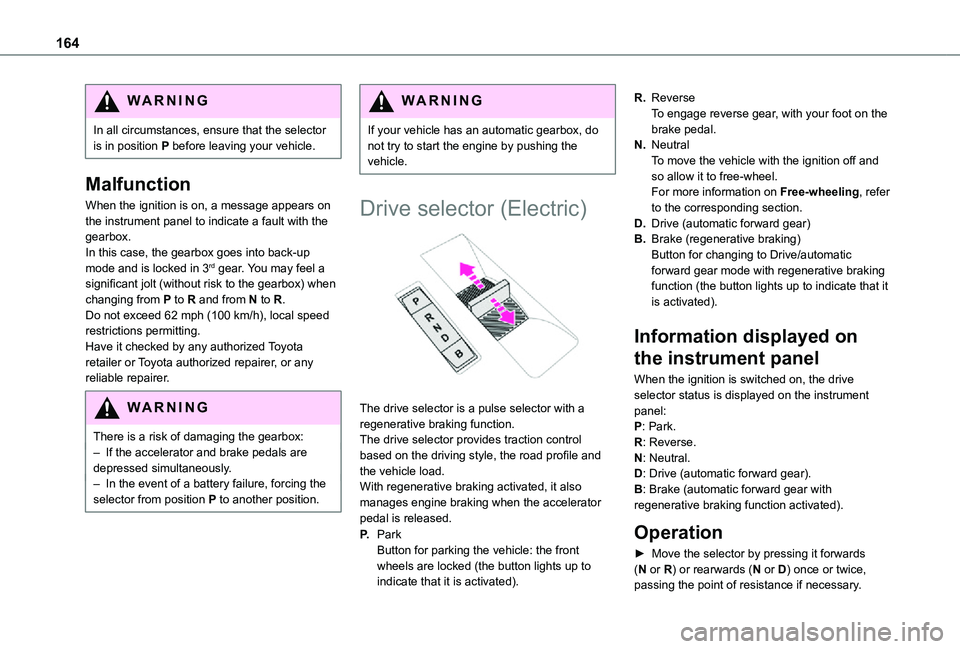
Drive selector (Electric)
The drive selector is a pulse selector with a regenerative braking function.The drive selector provides traction control based on the driving style, the road profile and the vehicle load.With regenerative braking activated, it also manages engine braking when the accelerator pedal is released.
P.ParkButton for parking the vehicle: the front wheels are locked (the button lights up to indicate that it is activated).
R.ReverseTo engage reverse gear, with your foot on the brake pedal.
N.NeutralTo move the vehicle with the ignition off and so allow it to free-wheel.For more information on Free-wheeling, refer to the corresponding section.
D.Drive (automatic forward gear)
B.Brake (regenerative braking)Button for changing to Drive/automatic forward gear mode with regenerative braking function (the button lights up to indicate that it is activated).
Information displayed on
the instrument panel
When the ignition is switched on, the drive selector status is displayed on the instrument panel:P: Park.R: Reverse.
N: Neutral.D: Drive (automatic forward gear).B: Brake (automatic forward gear with regenerative braking function activated).
Operation
► Move the selector by pressing it forwards (N or R) or rearwards (N or D) once or twice, passing the point of resistance if necessary.
Page 165 of 360
165
Driving
6
For example, to change from P to R (with your foot on the brake pedal), either push forwards twice without passing the point of resistance or push just once, passing the point of resistance.
Regenerative braking
With the Brake function and when decelerating
The Brake function emulates engine braking, slowing the vehicle with no need to depress the brake pedal. The vehicle slows more quickly when the driver releases the accelerator pedal.The energy recovered when the accelerator pedal is released is then used to partially recharge the traction battery, thereby increasing the vehicle's driving range.
WARNI NG
The resulting deceleration of the vehicle does not cause the brake lamps to come on.
► From mode D, press button B to activate/deactivate the function (the button lights up when the function is activated).D on the instrument panel is replaced with B.The system status is saved when the ignition is switched off.
WARNI NG
In some situations (e.g. battery full, extreme temperatures), the amount of regenerative braking may be temporarily limited, resulting in less deceleration.The driver must remain alert to traffic conditions and must always be ready to use the brake pedal.
With the brake pedal
When the brake pedal is depressed, the intelligent braking system automatically recovers some of the energy and uses it to recharge the traction battery.This energy recovery also reduces use of the brake pads, thereby limiting their wear.
NOTIC E
The driver may experience a different sensation when depressing the brake pedal compared to a vehicle without regenerative braking.
Driving modes (Electric)
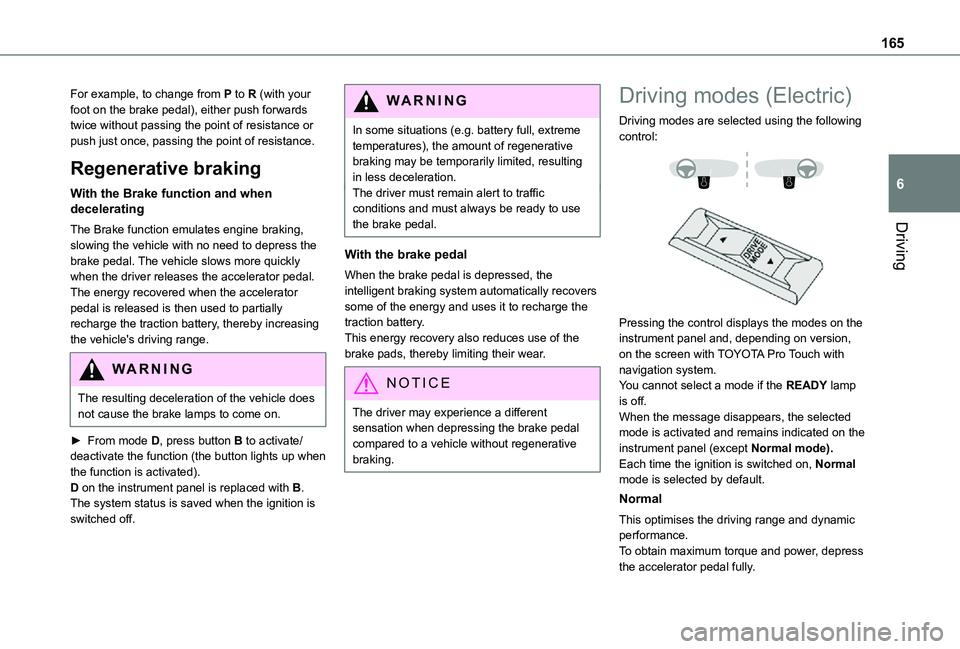
Driving modes are selected using the following control:
Pressing the control displays the modes on the instrument panel and, depending on version, on the screen with TOYOTA Pro Touch with navigation system.You cannot select a mode if the READY lamp is off.When the message disappears, the selected mode is activated and remains indicated on the
instrument panel (except Normal mode).Each time the ignition is switched on, Normal mode is selected by default.
Normal
This optimises the driving range and dynamic performance.To obtain maximum torque and power, depress the accelerator pedal fully.
Page 182 of 360
182
NOTIC E
If the driver operates a direction indicator to overtake a slower vehicle, the cruise control allows the vehicle to temporarily approach the vehicle in front to assist the overtaking manoeuvre, without ever exceeding the speed setting.
WARNI NG
Some vehicles present on the road may not be properly seen or may be misinterpreted by the radar (e.g. a lorry), which may lead to a poor assessment of distance and lead to the vehicle accelerating or braking inappropriately.
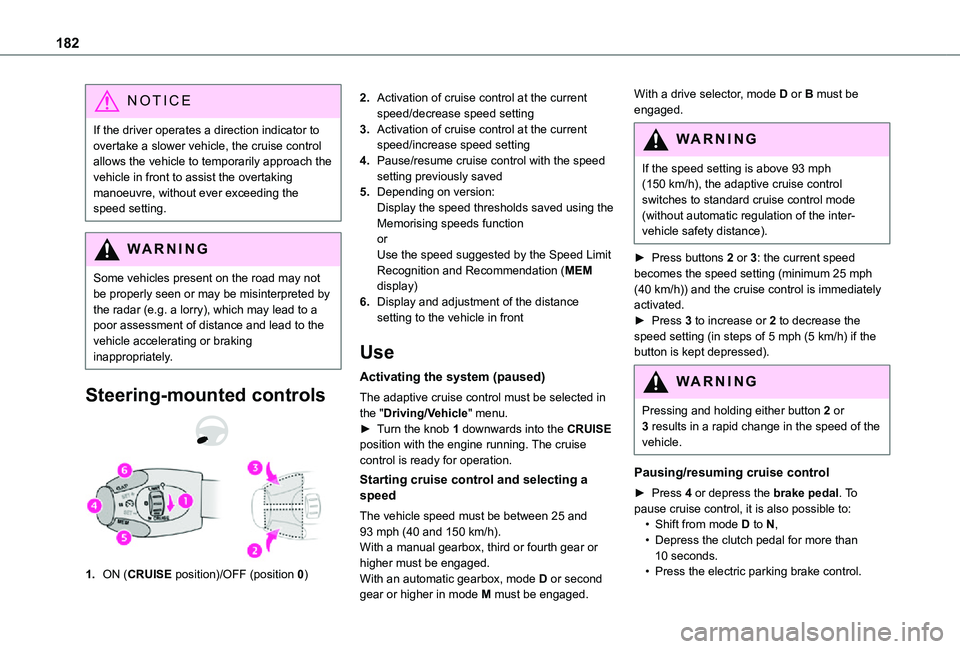
Steering-mounted controls
1.ON (CRUISE position)/OFF (position 0)
2.Activation of cruise control at the current speed/decrease speed setting
3.Activation of cruise control at the current speed/increase speed setting
4.Pause/resume cruise control with the speed setting previously saved
5.Depending on version:Display the speed thresholds saved using the Memorising speeds functionorUse the speed suggested by the Speed Limit Recognition and Recommendation (MEM display)
6.Display and adjustment of the distance setting to the vehicle in front
Use
Activating the system (paused)
The adaptive cruise control must be selected in the "Driving/Vehicle" menu.► Turn the knob 1 downwards into the CRUISE position with the engine running. The cruise control is ready for operation.
Starting cruise control and selecting a speed
The vehicle speed must be between 25 and 93 mph (40 and 150 km/h).
With a manual gearbox, third or fourth gear or higher must be engaged.With an automatic gearbox, mode D or second gear or higher in mode M must be engaged.
With a drive selector, mode D or B must be engaged.
WARNI NG
If the speed setting is above 93 mph (150 km/h), the adaptive cruise control switches to standard cruise control mode (without automatic regulation of the inter-vehicle safety distance).
► Press buttons 2 or 3: the current speed becomes the speed setting (minimum 25 mph (40 km/h)) and the cruise control is immediately activated.► Press 3 to increase or 2 to decrease the speed setting (in steps of 5 mph (5 km/h) if the button is kept depressed).
WARNI NG
Pressing and holding either button 2 or 3 results in a rapid change in the speed of the vehicle.
Pausing/resuming cruise control
► Press 4 or depress the brake pedal. To pause cruise control, it is also possible to:• Shift from mode D to N,• Depress the clutch pedal for more than
10 seconds.• Press the electric parking brake control.
Page 198 of 360
198
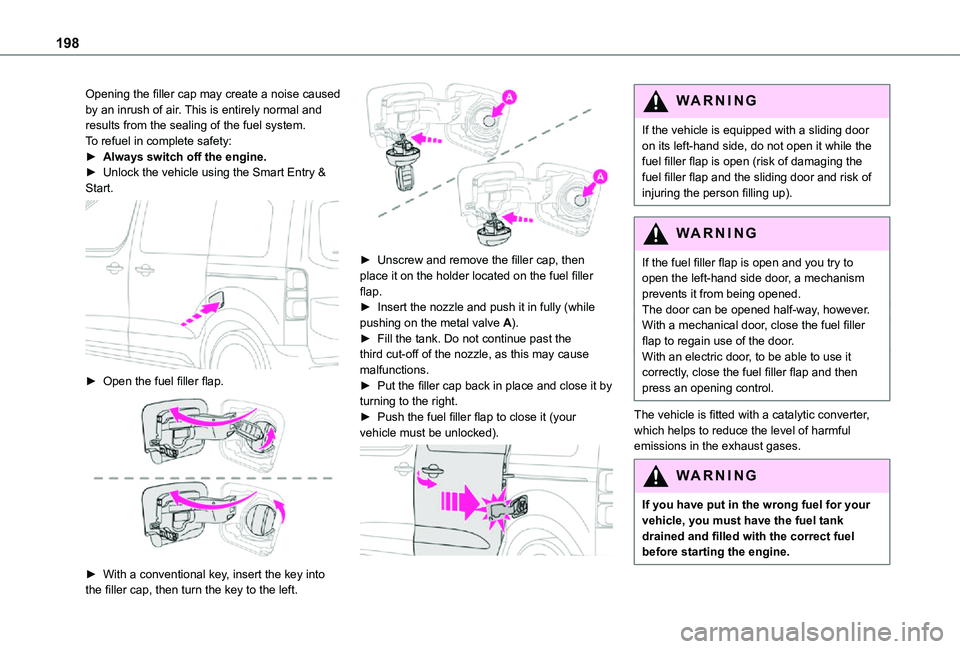
Opening the filler cap may create a noise caused by an inrush of air. This is entirely normal and results from the sealing of the fuel system.To refuel in complete safety:► Always switch off the engine.► Unlock the vehicle using the Smart Entry & Start.
► Open the fuel filler flap.
► With a conventional key, insert the key into the filler cap, then turn the key to the left.
► Unscrew and remove the filler cap, then place it on the holder located on the fuel filler flap.► Insert the nozzle and push it in fully (while pushing on the metal valve A).► Fill the tank. Do not continue past the third cut-off of the nozzle, as this may cause malfunctions.► Put the filler cap back in place and close it by turning to the right.► Push the fuel filler flap to close it (your vehicle must be unlocked).
WARNI NG
If the vehicle is equipped with a sliding door on its left-hand side, do not open it while the fuel filler flap is open (risk of damaging the fuel filler flap and the sliding door and risk of injuring the person filling up).
WARNI NG
If the fuel filler flap is open and you try to open the left-hand side door, a mechanism prevents it from being opened.The door can be opened half-way, however.With a mechanical door, close the fuel filler flap to regain use of the door.With an electric door, to be able to use it correctly, close the fuel filler flap and then press an opening control.
The vehicle is fitted with a catalytic converter, which helps to reduce the level of harmful emissions in the exhaust gases.
WARNI NG
If you have put in the wrong fuel for your vehicle, you must have the fuel tank drained and filled with the correct fuel
before starting the engine.
Page 199 of 360
199
Practical information
7
Fuel cut-off
Your vehicle is fitted with a safety system that cuts off the supply of fuel in the event of an impact.
Misfuel prevention (Diesel)
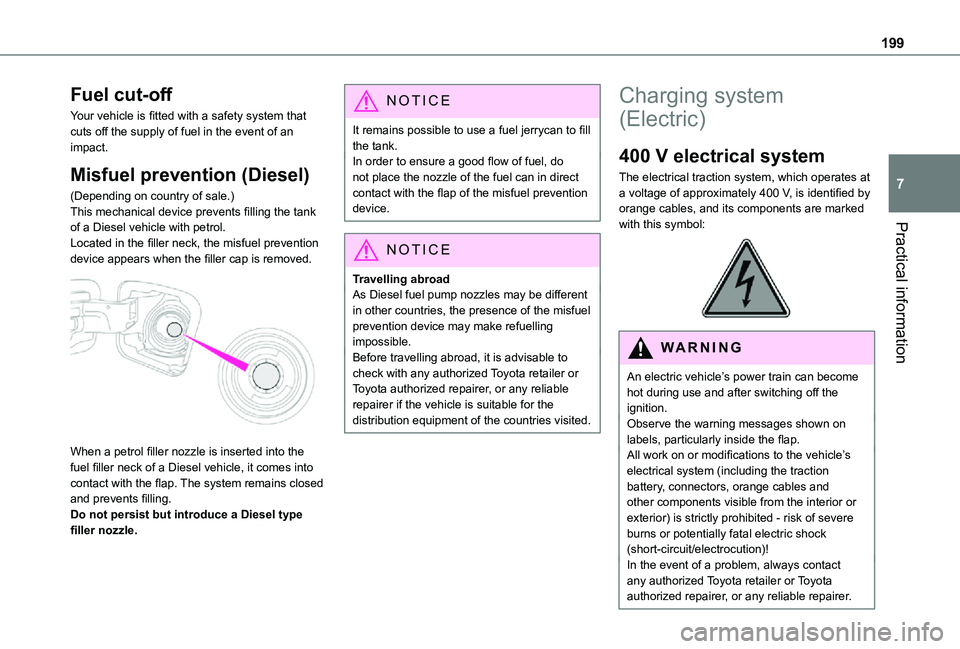
(Depending on country of sale.)This mechanical device prevents filling the tank of a Diesel vehicle with petrol.Located in the filler neck, the misfuel prevention device appears when the filler cap is removed.
When a petrol filler nozzle is inserted into the fuel filler neck of a Diesel vehicle, it comes into contact with the flap. The system remains closed and prevents filling.Do not persist but introduce a Diesel type filler nozzle.
NOTIC E
It remains possible to use a fuel jerrycan to fill the tank.In order to ensure a good flow of fuel, do not place the nozzle of the fuel can in direct contact with the flap of the misfuel prevention device.
NOTIC E
Travelling abroadAs Diesel fuel pump nozzles may be different in other countries, the presence of the misfuel prevention device may make refuelling impossible.Before travelling abroad, it is advisable to check with any authorized Toyota retailer or Toyota authorized repairer, or any reliable repairer if the vehicle is suitable for the distribution equipment of the countries visited.
Charging system
(Electric)
400 V electrical system
The electrical traction system, which operates at a voltage of approximately 400 V, is identified by orange cables, and its components are marked with this symbol:
WARNI NG
An electric vehicle’s power train can become hot during use and after switching off the ignition.Observe the warning messages shown on labels, particularly inside the flap.All work on or modifications to the vehicle’s electrical system (including the traction battery, connectors, orange cables and other components visible from the interior or exterior) is strictly prohibited - risk of severe burns or potentially fatal electric shock
(short-circuit/electrocution)!In the event of a problem, always contact any authorized Toyota retailer or Toyota authorized repairer, or any reliable repairer.
Page 200 of 360
200
WARNI NG
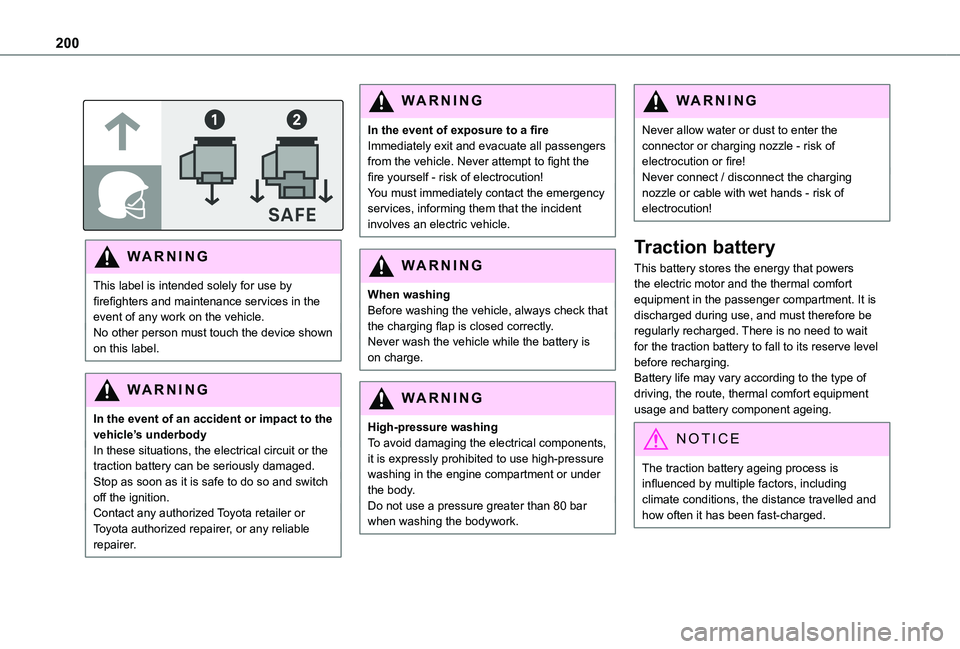
This label is intended solely for use by firefighters and maintenance services in the event of any work on the vehicle.No other person must touch the device shown on this label.
WARNI NG
In the event of an accident or impact to the vehicle’s underbodyIn these situations, the electrical circuit or the traction battery can be seriously damaged.Stop as soon as it is safe to do so and switch off the ignition.Contact any authorized Toyota retailer or Toyota authorized repairer, or any reliable repairer.
WARNI NG
In the event of exposure to a fireImmediately exit and evacuate all passengers from the vehicle. Never attempt to fight the fire yourself - risk of electrocution!You must immediately contact the emergency services, informing them that the incident involves an electric vehicle.
WARNI NG
When washingBefore washing the vehicle, always check that the charging flap is closed correctly.Never wash the vehicle while the battery is on charge.
WARNI NG
High-pressure washingTo avoid damaging the electrical components, it is expressly prohibited to use high-pressure washing in the engine compartment or under the body.Do not use a pressure greater than 80 bar when washing the bodywork.
WARNI NG
Never allow water or dust to enter the connector or charging nozzle - risk of electrocution or fire!Never connect / disconnect the charging nozzle or cable with wet hands - risk of electrocution!
Traction battery
This battery stores the energy that powers the electric motor and the thermal comfort equipment in the passenger compartment. It is discharged during use, and must therefore be regularly recharged. There is no need to wait for the traction battery to fall to its reserve level before recharging.Battery life may vary according to the type of driving, the route, thermal comfort equipment usage and battery component ageing.
NOTIC E
The traction battery ageing process is influenced by multiple factors, including climate conditions, the distance travelled and how often it has been fast-charged.
Page 202 of 360
202
Charging cables, sockets
and chargers
The charging cable supplied with the vehicle (depending on version) is compatible with the electrical systems in the country of sale. When travelling abroad, check the compatibility of local electrical systems with the charging cable.A full range of charging cables is available from your dealer.
Contact any authorized Toyota retailer or Toyota authorized repairer, or any reliable repairer for more information and to obtain suitable charging cables.
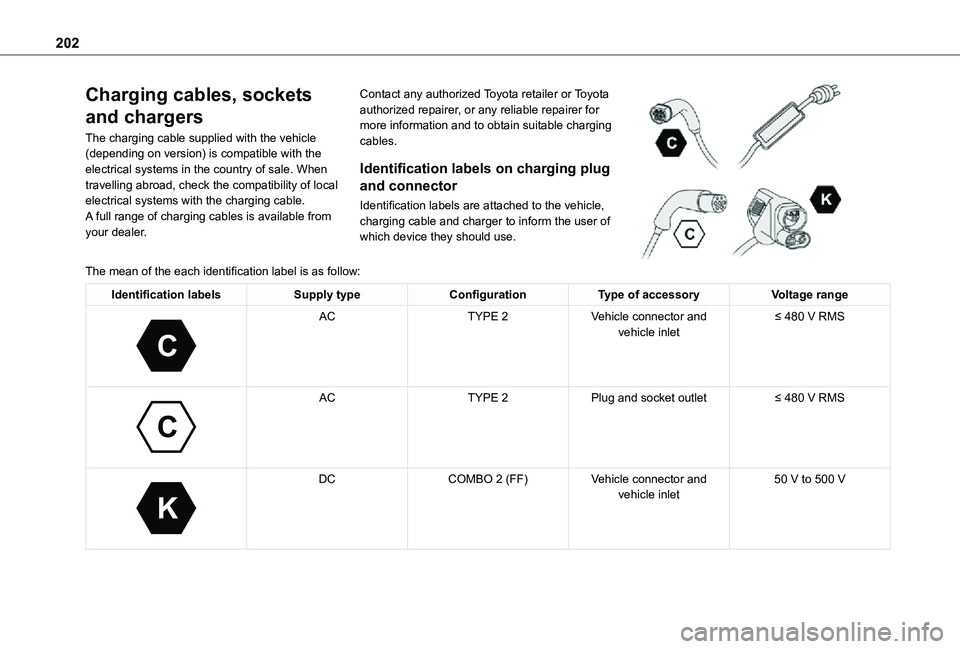
Identification labels on charging plug
and connector
Identification labels are attached to the vehicle, charging cable and charger to inform the user of which device they should use.
The mean of the each identification label is as follow:
Identification labelsSupply typeConfigurationType of accessoryVoltage range
C
ACTYPE 2Vehicle connector and vehicle inlet≤ 480 V RMS
C
ACTYPE 2Plug and socket outlet≤ 480 V RMS
K
DCCOMBO 2 (FF)Vehicle connector and vehicle inlet50 V to 500 V
Page 203 of 360
203
Practical information
7
Standard charging, mode 2
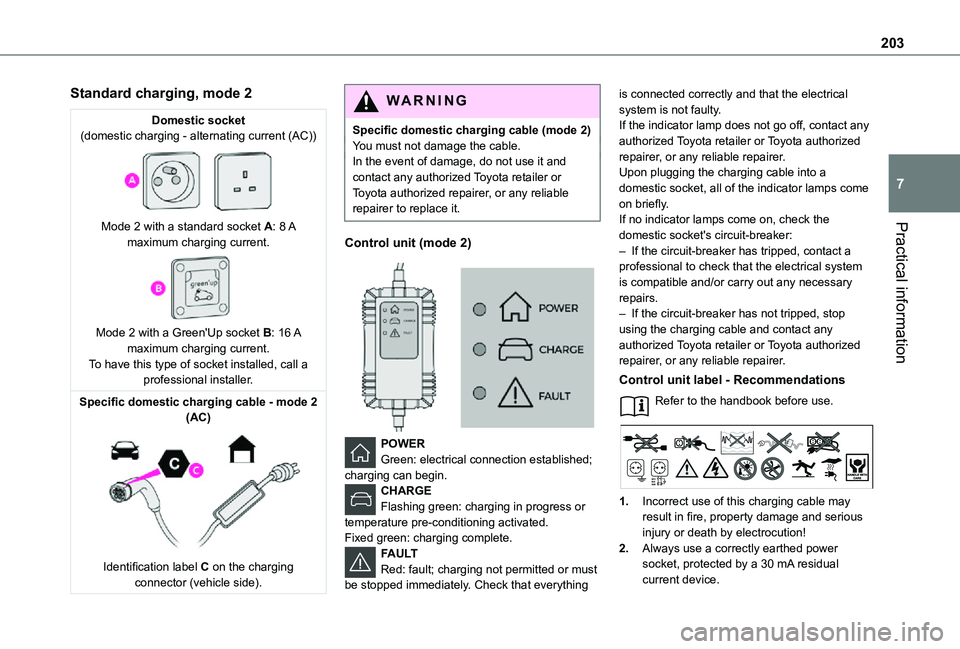
Domestic socket(domestic charging - alternating current (AC))
Mode 2 with a standard socket A: 8 A maximum charging current.
Mode 2 with a Green'Up socket B: 16 A maximum charging current.To have this type of socket installed, call a professional installer.
Specific domestic charging cable - mode 2 (AC)
Identification label C on the charging connector (vehicle side).
WARNI NG
Specific domestic charging cable (mode 2)You must not damage the cable.In the event of damage, do not use it and contact any authorized Toyota retailer or Toyota authorized repairer, or any reliable repairer to replace it.
Control unit (mode 2)
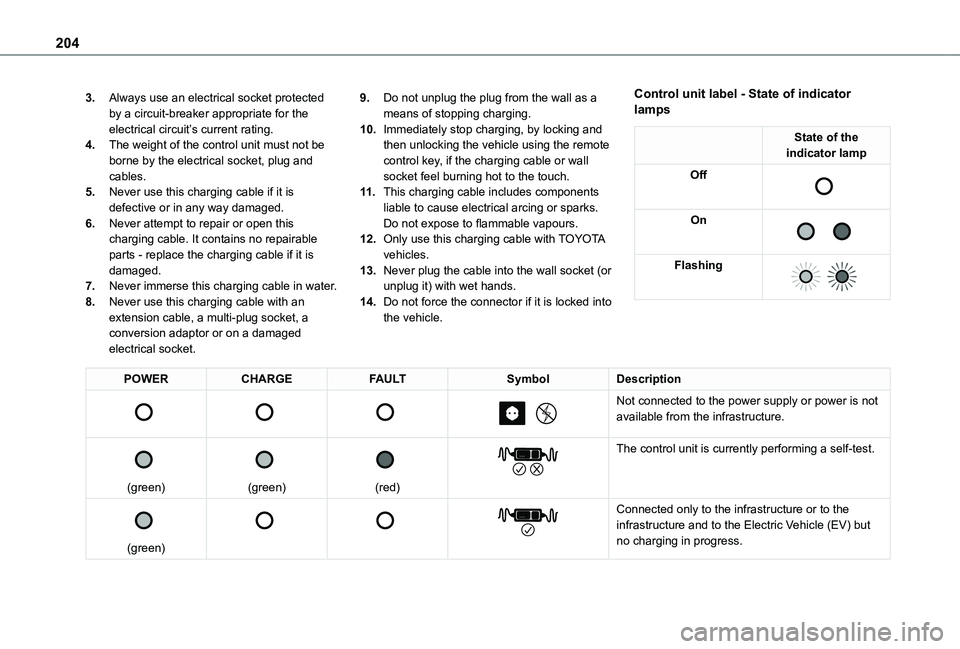
POWER
Green: electrical connection established; charging can begin.CHARGEFlashing green: charging in progress or temperature pre-conditioning activated.Fixed green: charging complete.FAULTRed: fault; charging not permitted or must be stopped immediately. Check that everything
is connected correctly and that the electrical system is not faulty.If the indicator lamp does not go off, contact any authorized Toyota retailer or Toyota authorized repairer, or any reliable repairer.Upon plugging the charging cable into a domestic socket, all of the indicator lamps come on briefly.If no indicator lamps come on, check the domestic socket's circuit-breaker:– If the circuit-breaker has tripped, contact a professional to check that the electrical system is compatible and/or carry out any necessary repairs.– If the circuit-breaker has not tripped, stop using the charging cable and contact any authorized Toyota retailer or Toyota authorized repairer, or any reliable repairer.
Control unit label - Recommendations
Refer to the handbook before use.
1.Incorrect use of this charging cable may result in fire, property damage and serious injury or death by electrocution!
2.Always use a correctly earthed power socket, protected by a 30 mA residual current device.
Page 204 of 360
204
3.Always use an electrical socket protected by a circuit-breaker appropriate for the electrical circuit’s current rating.
4.The weight of the control unit must not be borne by the electrical socket, plug and cables.
5.Never use this charging cable if it is defective or in any way damaged.
6.Never attempt to repair or open this charging cable. It contains no repairable parts - replace the charging cable if it is damaged.
7.Never immerse this charging cable in water.
8.Never use this charging cable with an extension cable, a multi-plug socket, a conversion adaptor or on a damaged electrical socket.
9.Do not unplug the plug from the wall as a means of stopping charging.
10.Immediately stop charging, by locking and then unlocking the vehicle using the remote control key, if the charging cable or wall socket feel burning hot to the touch.
11 .This charging cable includes components liable to cause electrical arcing or sparks. Do not expose to flammable vapours.
12.Only use this charging cable with TOYOTA vehicles.
13.Never plug the cable into the wall socket (or unplug it) with wet hands.
14.Do not force the connector if it is locked into the vehicle.
Control unit label - State of indicator lamps
State of the indicator lamp
Off
On
Flashing
POWERCHARGEFAULTSymbolDescription
Not connected to the power supply or power is not available from the infrastructure.
(green)
(green)
(red)
The control unit is currently performing a self-test.
(green)
Connected only to the infrastructure or to the infrastructure and to the Electric Vehicle (EV) but no charging in progress.
Page 205 of 360
205
Practical information
7
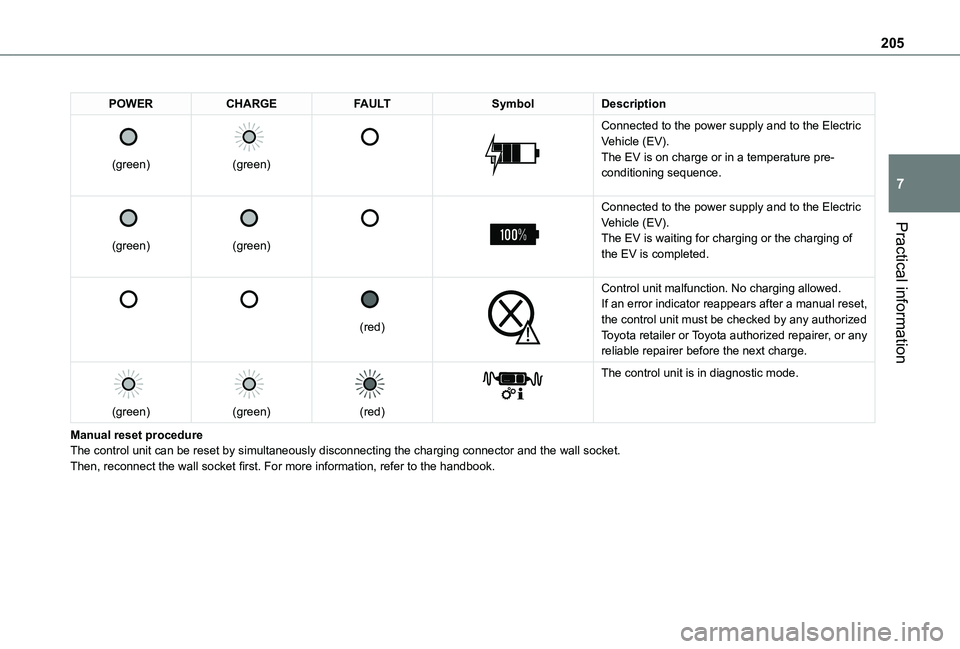
POWERCHARGEFAULTSymbolDescription
(green)
(green)
Connected to the power supply and to the Electric Vehicle (EV).The EV is on charge or in a temperature pre-conditioning sequence.
(green)
(green)
Connected to the power supply and to the Electric Vehicle (EV).The EV is waiting for charging or the charging of the EV is completed.
(red)
Control unit malfunction. No charging allowed.If an error indicator reappears after a manual reset, the control unit must be checked by any authorized Toyota retailer or Toyota authorized repairer, or any reliable repairer before the next charge.
(green)
(green)
(red)
The control unit is in diagnostic mode.
Manual reset procedureThe control unit can be reset by simultaneously disconnecting the chargi\
ng connector and the wall socket.Then, reconnect the wall socket first. For more information, refer to the handbook.